A Practical Guide to LMS Integration with SIS Systems

Connecting your Learning Management System (LMS) with your Student Information System (SIS) is all about making them talk to each other automatically. This simple-sounding process is a total game-changer. It puts an end to manual data entry, cuts down on errors, and makes sure student info is always in sync.
Why Connecting Your Lms And Sis Is A Game Changer
If you’re running any kind of educational program, you know the daily grind of managing two separate platforms. You’ve got the LMS, where all the learning and teaching happens, and the SIS, the official system of record for student data.
Without a bridge between them, you’re stuck in a painful loop of administrative busywork. I’ve been there. Exporting spreadsheets from one system, painstakingly formatting them, and uploading them into another. All while hoping a single misplaced comma doesn’t mess up an entire class roster right before a new term.
It’s tedious, stressful, and a recipe for human error. This is exactly why a solid LMS integration with SIS systems is so critical. It’s a strategic move to build a reliable, automated foundation for your entire operation.
The Problem With Disconnected Systems
When your LMS and SIS operate in their own little worlds, you create a ton of unnecessary work and risk. Every new student who enrolls requires an admin to manually create an account in the LMS. Every final grade means an instructor has to transfer that data back to the SIS.
This constant back-and-forth is a major source of user frustration. A staggering 52% of LMS users report being dissatisfied with platforms that don’t integrate well with other essential tools. It’s the number one pain point for a reason.
A lack of integration forces staff to spend valuable time on repetitive data entry instead of focusing on what really matters: supporting students and instructors. It’s a bottleneck that actively slows down your ability to grow.
This challenge isn’t unique to education. The benefits of connecting separate systems are seen across industries. For example, successful payment integration in fintech has driven massive efficiency gains by creating similar automated data flows.
The Real-World Wins Of Integration
So, what does a successful integration actually look like in practice? It creates a smooth, automated flow of information that makes life easier for everyone.
- Automated Enrollment: When a student registers in the SIS, an account is instantly created for them in the LMS and they’re enrolled in the correct courses. No waiting, no manual steps.
- One Source of Truth: The SIS becomes the definitive record. Any change made there, like a name update or a change in status, automatically syncs to the LMS.
- Seamless Grade Syncing: Final grades entered in the LMS gradebook can be pushed back to the student’s official record in the SIS with a single click, saving instructors hours of work.
- Improved Student Experience: Students get immediate access to course materials and have a single, reliable source for their academic information. It just works.
Let’s look at the practical shift in workload this creates.
Lms Vs Sis Data Before And After Integration
This table breaks down the shift from frustrating, manual tasks to a smooth, automated workflow. It highlights how an integration transforms daily operations for your administrative and teaching staff.
| Data Task | Before Integration (Manual) | After Integration (Automated) |
|---|---|---|
| New Student Enrollment | Admin manually creates LMS account and enrolls student in each course. | Student account and enrollments are created in the LMS automatically upon SIS registration. |
| Course Roster Updates | Admin manually adds or removes students from LMS courses based on SIS changes. | Roster changes in the SIS are instantly reflected in the LMS. |
| Grade Entry | Instructor manually transfers final grades from LMS gradebook to SIS. | Final grades are synced from the LMS to the SIS with a button click. |
| User Data Changes | Admin must update student/staff info (e.g., name, email) in both systems. | Changes in the SIS automatically update user profiles in the LMS. |
| Course Creation | Admin manually creates course shells in the LMS for each new term. | Course shells are automatically provisioned in the LMS based on SIS data. |
Ultimately, the goal is to get your technology out of the way so your team can focus on what they do best.
Connecting these systems removes the administrative burden, freeing up your team to focus on creating amazing learning experiences. When you explore the broader benefits of an LMS, you can see how a well-integrated system improves the entire educational ecosystem. It’s the key to scaling your programs without getting buried in administrative tasks.
Getting Into the Weeds: The Technical Building Blocks for Integration

Alright, let’s pop the hood and look at what actually makes an LMS integration with SIS systems work. When you get right down to it, getting these two platforms to play nice is all about understanding the specific languages and rules they use to talk to each other.
It might sound a bit intimidating, but I promise it’s not as complex as it seems. We’re going to break down the key technical standards you’ll run into so you can walk into conversations with vendors or your IT team feeling completely confident.
Think of it like this: your LMS and SIS are two brilliant specialists who speak different languages. To get them to collaborate on a project, you need a translator and a set of ground rules. That’s exactly what these standards do for your software.
The Role of APIs and Industry Standards
At the core of any modern software connection is an API, which stands for Application Programming Interface. An API is just a set of rules and protocols that lets one piece of software make requests of another. It’s the secure messenger that carries a request from your LMS over to your SIS, gets the right information, and brings it back in a format the LMS can understand.
Following solid API design best practices is the bedrock of building a stable connection between your systems. This ensures the integration is secure, scalable, and efficient. Without these shared standards, every single integration would be a custom-built, one-off project. This is incredibly expensive to build and a nightmare to maintain.
Thankfully, the education technology world has rallied around a few key standards to make this whole process much smoother. Let’s look at the big ones.
Key Standards That Power Your Integration
When you start talking to vendors, you’re going to hear a lot of acronyms thrown around. Here’s a plain-English guide to the main players and what they actually do.
- OneRoster: This is a huge one, especially in K-12 and higher education. OneRoster is a specific standard built to handle the secure exchange of class rosters, course details, and grades. It’s the magic that makes a student automatically appear in the correct online class with the right teacher the moment they’re enrolled in the SIS.
- LTI (Learning Tools Interoperability): Ever wanted to plug a third-party tool, like a cool video quiz app or a virtual science lab, directly into an LMS course? That’s what LTI does. It lets your LMS securely launch these external tools so students have a seamless experience, without ever having to log into another platform.
- SCIM (System for Cross-domain Identity Management): SCIM is all about managing user accounts. When a new student or teacher is added to your SIS, SCIM is the protocol that can automatically create (or “provision”) their account in the LMS. It also handles updates and, just as importantly, de-provisions accounts when someone leaves, which is critical for security.
- SSO (Single Sign-On): This one is a massive quality-of-life win for absolutely everyone. SSO lets a user log in just once to get access to multiple applications. For a student, this means no more juggling different passwords for the SIS, the LMS, their email, and the library portal. It’s a simple concept that drastically cuts down on frustration and helpdesk tickets.
Think of these standards as the universal adapters for the edtech world. They create a “plug-and-play” environment that takes a lot of the custom coding and guesswork out of connecting different software systems. For anyone curious about other e-learning standards, our guide comparing SCORM vs. xAPI offers a deeper dive into how course content itself talks to an LMS.
Getting a handle on these building blocks helps you ask much better questions. Instead of just asking, “Do your systems connect?” you can get specific: “Do you support the OneRoster 1.1 standard for grade passback?”
Knowing this terminology demystifies the technical side of the project. It puts you in the driver’s seat, allowing you to clearly define your requirements and accurately assess whether a vendor’s solution is truly the right fit for your school or organization.
Choosing the Right Integration Architecture
Alright, we’ve covered the technical languages these systems speak. Now, let’s talk about how you actually build the bridge between your SIS and LMS. When it comes to connecting these two powerhouses, you’ve really got two main paths to choose from. The best one for you boils down to your specific needs, your budget, and maybe most importantly, how critical “right now” access is for your users.
There’s no single “correct” answer here, just the right fit for your school or business. Let’s dig into the two main approaches so you can make a smart choice.
The Real-Time API Sync Approach
First up is the real-time API sync. Think of this as a constant, live conversation between your LMS and SIS. The second a piece of data changes in one system, say, a student’s enrollment status, an API call is made to update the other system almost instantly.
Imagine an online school launching a new course. As soon as a student clicks “enroll” and their payment goes through in the SIS, a real-time integration immediately creates their LMS account and enrolls them in the right classes. They get that welcome email with login details within minutes, not hours.
This approach is a dream for the user experience. It delivers that instant gratification and silky-smooth onboarding that modern learners have come to expect.
A real-time sync completely eliminates those frustrating waiting periods and the dreaded “When will I get my course access?” emails. It makes your entire operation feel polished and professional from the very first touchpoint.
This method is the gold standard for programs where immediate access is a key selling point or just an operational necessity. The trade-off? It’s typically more complex and costly to set up and maintain. You need a more robust infrastructure to handle that constant flow of API calls without breaking a sweat.
The Batch Processing Approach
The other common method is batch processing. Instead of that constant chatter, this is more like a scheduled daily check-in. The systems agree to sync up at a set time, maybe once overnight or every few hours, to exchange all the new and updated information from the day.
Let’s go back to our online school scenario. With batch processing, the admin team would see all of Monday’s new student registrations populate in the LMS overnight. When those students wake up Tuesday morning, their accounts and course access are all set and ready to go.
This approach has some major perks. For one, it’s often simpler and less expensive to implement. Because it only runs at specific times, it puts far less strain on your servers and is generally much easier to troubleshoot if something goes wrong.
The obvious downside, of course, is the delay. For many traditional schools, a 24-hour wait for access is perfectly fine. But for others, especially those in hyper-competitive markets or running short, intensive bootcamps, that delay can be a real point of friction for new students.
Making the Right Choice for You
So, how do you decide which path to take? It really comes down to weighing the key factors against your operational reality.
| Factor | Real-Time API Sync | Batch Processing |
|---|---|---|
| Speed | Instantaneous data transfer. | Scheduled delays (e.g., hourly, daily). |
| Complexity | Higher complexity to build and maintain. | Simpler and more straightforward to set up. |
| User Experience | Excellent, provides immediate access and updates. | Good, but involves a waiting period for users. |
| Best For | Programs needing instant enrollment, self-service models. | Traditional academic terms, situations where a short delay is fine. |
| Cost | Generally more expensive due to development and server load. | More cost-effective to implement and run. |
The growth of the global LMS market is truly staggering. Projections show it rocketing from $22 billion in 2023 to $52 billion by 2032. A huge chunk of that growth is fueled by exactly these kinds of powerful integrations that seamlessly connect the different parts of an educational ecosystem.
Ultimately, your choice is a balancing act between budget and user expectations. Both methods get you to the same goal of automating data flow. If you’re managing a large-scale operation, exploring a robust enterprise learning management system can also help clarify which architectural style best supports your goals for automation and scale. The key is to pick the path that aligns with your operational model and sets both your team and your students up for success.
A Practical Plan for a Smooth Integration Project
This is where all that careful planning starts to pay off. A successful LMS integration with SIS systems comes from following a solid, step-by-step process. I’m going to walk you through the key phases of a real-world project, giving you a playbook for a low-stress launch.
The first major task on your list is data mapping. It sounds technical, but the concept is simple. You’re deciding exactly how a piece of information from your SIS, like a field called ‘Student_First_Name’, connects to the corresponding field in your LMS, which might be called ‘FirstName’.
You’re essentially creating a clear, logical map that tells the systems how to translate information. Getting this right from the start prevents a world of headaches later, like names appearing in the wrong fields or enrollment data getting completely mismatched.
Your Pre-Launch Safety Nets
Before you even think about going live, you need a safe place to test everything. This is where a staging environment becomes non-negotiable. A staging site is basically a private, carbon copy of your live LMS and SIS setup.
It’s your playground. It’s where you can connect the systems, run test data through, and try to break things without affecting a single real student. I can’t stress this enough: never, ever test a new integration on your live, production platform. It’s a risk you just don’t need to take.
This visual shows the basic flow we’re trying to perfect, moving data from the SIS, through the sync process, and into the LMS.
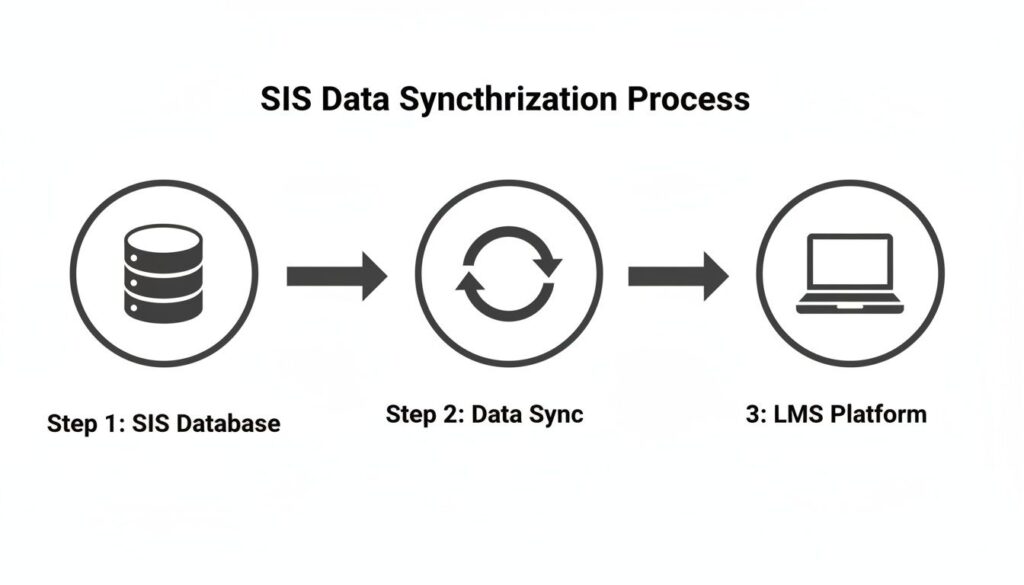
This clean, three-step flow is exactly what you’re aiming to achieve in your staging environment before you push anything live.
Once your staging site is up and running, it’s time for some serious testing. You want to simulate every possible scenario your users might encounter. You need to confirm the right data moves correctly.
Here’s a practical checklist to guide your testing phase:
- Create Test Users: Build a handful of fictional student and instructor accounts in your staging SIS. Make sure to give them different roles and permissions.
- Run Enrollment Scenarios: Enroll your test students in various courses. Do they appear correctly in the LMS?
- Test Withdrawals: Unenroll a test student from a course in the SIS. Is their access revoked properly in the LMS?
- Check Data Updates: Change a test user’s name or email in the SIS. Does it update correctly in their LMS profile?
- Grade Passback Test: If it’s part of your scope, enter a final grade for a test student in the LMS and confirm it syncs back to the SIS accurately.
Preparing for Go-Live and Beyond
Another critical piece of your plan is the rollback strategy. Think of this as your “uh-oh” button. A rollback plan is simply a documented process for quickly undoing the integration and returning your systems to their previous state if something goes seriously wrong at launch.
Hopefully, you’ll never need it. But having a clear, tested plan in place provides immense peace of mind. It means you can move forward with confidence, knowing you have a safety net.
Your rollback plan is a mark of a professional, well-managed project. It turns a potential crisis into a manageable hiccup.
Once you’ve launched, the job isn’t quite done. The final phase is all about monitoring. For the first few weeks after going live, you should keep a close eye on the integration. Check system logs for any errors or warnings.
This proactive monitoring helps you catch small issues before they snowball into big problems. Things like an API call failing occasionally or a data field not syncing as expected are much easier to fix when you spot them early. This ongoing vigilance is what makes an integration truly successful in the long run.
The future of education tech is pointing squarely toward this kind of seamless fusion. Emerging trends for K-12 education show a clear move toward cloud-based systems and tightly integrated platforms that support modern hybrid learning and reduce manual errors. For a closer look, you can explore more LMS statistics and the future of educational technology. By following a practical project plan, you’re not just solving today’s problems. You’re setting your organization up for a more efficient and connected future.
Common Pitfalls to Avoid During Integration
I’ve spent years navigating the tricky waters of system integrations, and I’ve seen firsthand how a promising plan can hit the rocks. A successful LMS integration with SIS systems is about dodging project management landmines as much as getting the technology right. Think of this as a field guide to the most common traps I’ve seen teams fall into, so you don’t have to learn these lessons the hard way.
One of the biggest project killers is scope creep. It never announces itself, it just quietly shows up. You start with a clear, simple goal, like syncing daily enrollments. Then, during a planning meeting, a well-meaning stakeholder says, “While we’re at it, can we also sync attendance records?” A week later, another asks for custom grade passback calculations.
Suddenly, your straightforward integration has morphed into a complex, costly beast with no end in sight.
To prevent this, you have to nail down the boundaries from day one. Create a rock-solid project scope document that explicitly lists what’s included in this phase and, even more importantly, what’s not. Get every key stakeholder to sign off on it. This document is your shield, allowing you to politely but firmly say, “That’s a great idea for phase two,” when requests start pouring in.
Overlooking Data Privacy and Compliance
Another huge misstep is treating data security like a checkbox you tick off at the end. When you’re connecting systems that house sensitive student data, compliance is the law. Regulations like FERPA (Family Educational Rights and Privacy Act) and GDPR (General Data Protection Regulation) have serious consequences. A breach can do irreparable damage to your reputation and your budget.
Your integration plan needs a data governance strategy baked in from the very beginning. This means asking some tough questions before you write a single line of code:
- What specific data fields are we actually syncing?
- Do we absolutely need every single one of those fields for this to work?
- Who gets to see this data once the systems are connected?
- How will we encrypt the data, both in transit and at rest?
Bring your security and compliance teams into the conversation early. I can’t stress this enough. They are there to help you build a secure data pipeline that protects students and keeps your institution out of legal trouble.
The goal is to practice data minimization. Only sync the absolute minimum amount of data required to meet your objectives. The less sensitive information you move around, the smaller your risk profile.
Choosing the Wrong Partner and Poor Documentation
The people you bring in to build this integration are just as critical as the technology itself. Whether you’re hiring an in-house developer, a freelancer, or a specialized vendor, you absolutely have to do your homework. Don’t just look at their technical chops. Ask for references from other schools or districts they’ve worked with.
Drill down into their process. How do they handle testing and QA? What does their project documentation look like? A huge red flag is a vendor who gets vague about their process or dismisses the need for thorough documentation. That documentation is your insurance policy. It ensures that someone else can understand and maintain the integration long after the original developer is gone.
And what about life after launch? A good partner will have a clear plan for ongoing support and maintenance. APIs get updated, systems change, and things inevitably break. You need to know who to call when that happens, because a broken integration can grind your entire operation to a halt. Insist on a clear Service-Level Agreement (SLA) that defines support response times.
With 83% of organizations now using an LMS, keeping these critical connections running is non-negotiable. You can learn more about how LMS usage dominates learning tech and see why long-term support is so essential.
Clearing Up the Most Common LMS and SIS Integration Questions
After walking through a project this big, I know there are probably still a few questions bouncing around in your head. I get asked about the practical side of connecting an LMS with an SIS all the time, so I’ve pulled together the most common ones to give you clear, straightforward answers.
How Long Does This Kind of Integration Usually Take?
This is the classic “it depends” question, but I can give you some real-world context. A simple, out-of-the-box connection using pre-built connectors might only take a few weeks from planning to launch. It’s relatively quick because the data mapping is mostly done for you.
However, if you’re looking at a fully custom solution that needs extensive data cleanup, a lot of specific mapping, and rigorous testing, you should probably budget for several months. The timeline is directly affected by the complexity of your systems, how clean your existing data is, and which integration architecture you choose.
What Are the Main Costs I Should Budget For?
It’s easy to focus only on the developer’s invoice, but the true cost is much broader. Thinking about the total investment will help you budget more accurately and avoid surprises down the road.
Here are the main cost centers to consider:
- Development and Implementation: This is the most obvious cost, whether you’re using an in-house team or bringing in a third-party vendor.
- Middleware or Platform Fees: If you use an iPaaS (Integration Platform as a Service) to connect your systems, there will likely be an ongoing subscription fee.
- Internal Team Time: Don’t forget to account for the hours your own staff will spend on planning, meetings, testing, and training. This is a significant, though often hidden, cost.
- Ongoing Maintenance: It’s smart to budget for an annual support contract or retainer to handle updates, bug fixes, and inevitable system changes.
Looking at the total cost of ownership gives you a much more realistic picture. It shifts the focus from a one-time project expense to a long-term strategic investment in your operational efficiency.
Thinking about the full scope of costs from the start helps you build a solid business case and secure the right budget for a successful project.
Will My Students Actually Notice a Difference?
Yes, absolutely, and it’s all for the better. While connecting your LMS with an SIS is a backend project, its impact on the front-end user experience is huge. Students will notice a much smoother, more professional process from the moment they sign up.
For them, this means instant access to their courses as soon as they enroll. No more waiting days for manual updates. It also means they only have to remember a single login for everything, and their personal information is always accurate across all platforms.
This seamless experience is becoming more critical every year. In higher education, for example, nearly 5 million U.S. college students took classes fully online in 2024. That’s a massive 136.4% jump from 2015, and these students rely on solid integrations to make their digital campus experience work.
You can discover more insights about how edtech supports modern learning on Classter.com. A backend project like this creates a much better front-end user experience for a rapidly growing audience.