How to Build an Internal Knowledge Base From Courses

Building an internal knowledge base from your courses is about turning the expertise you already have into an evergreen, searchable resource for your entire team.
You’ve already done the heavy lifting by creating the content. Now, it’s time to give that knowledge a second life.
Why Your Courses Are a Goldmine for Your Knowledge Base
I’ve seen it countless times. Companies spend hundreds of hours developing incredible courses, workshops, and webinars. But what happens after the live session ends? That valuable expertise often ends up on a hard drive, collecting digital dust.
This is a massive missed opportunity. Let’s dig into why turning that existing content into a searchable internal knowledge base can fundamentally change how your team operates.
Slash Repetitive Questions and Boost Efficiency
Think about the day-to-day impact. A well-organized knowledge base means your support team, new hires, and even veteran employees spend less time digging through old emails or Slack threads for answers. They get instant, standardized information, freeing them up for more strategic work.
When you convert your courses into an internal knowledge base, you are building a central library of your company’s best practices, processes, and institutional wisdom. It’s a dynamic tool that supports your business as it scales.
The flow is pretty straightforward, but the impact is huge.
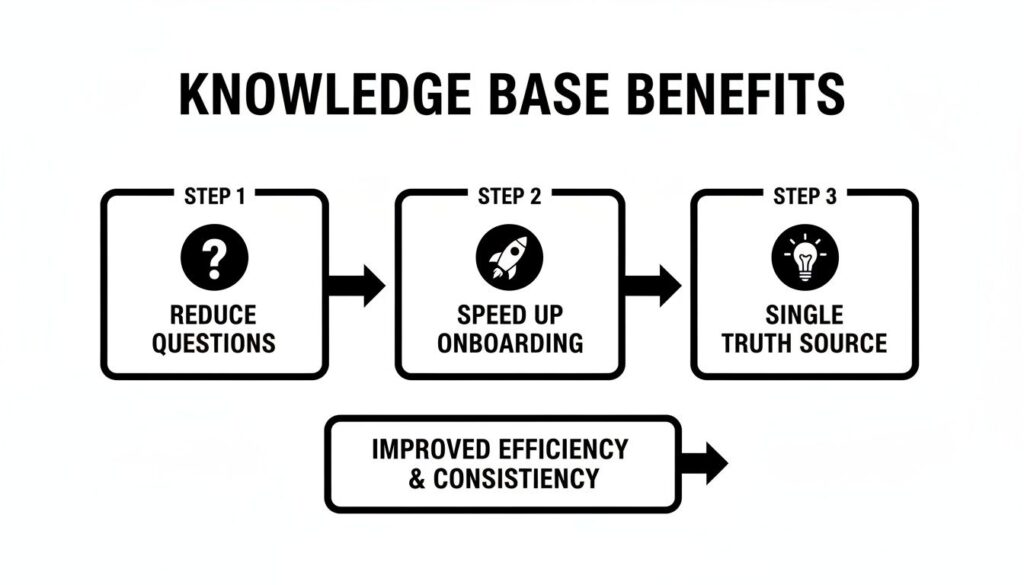
As you can see, it all starts with reducing the constant barrage of internal questions. That directly leads to faster, more self-sufficient onboarding and culminates in a reliable single source of truth for everyone.
Accelerate Onboarding and Preserve Knowledge
Every time a seasoned employee leaves, a piece of your company’s “tribal knowledge” walks right out the door with them. Your courses have already captured a huge chunk of this expertise. By organizing it into a knowledge base, you create an incredibly powerful onboarding asset.
New hires can self-serve, learning processes and finding answers on their own instead of constantly tapping others on the shoulder. This autonomy doesn’t just speed up their ramp-up time, it builds their confidence from day one.
A well-managed knowledge base is more than a document repository. It’s an active system that captures institutional knowledge, empowers your team, and prevents valuable expertise from being lost over time.
Research backs this up. In companies that prioritize knowledge transfer, a stunning 80% of workers find repository information easy to access, compared to just 51% in other organizations. This directly contributes to 71% of them seeing the information’s value as above average, which is key to cutting down on redundant work.
Of course, the upside goes beyond just repurposing courses. Digging into the core benefits of a knowledge management system shows just how much it can drive overall business efficiency and team empowerment.
Auditing and Mapping Your Existing Course Content
Before you can build anything useful, you need to know exactly what you’re working with. This is where a content audit comes in, and honestly, it’s the most crucial part of the entire process.
Skipping this step is like trying to build a house without a blueprint. You might end up with something, but I guarantee it won’t be the organized, functional resource your team actually needs.
So, let’s roll up our sleeves and create a full inventory of all your existing course materials. I’m talking about everything: video lessons, webinar recordings, downloadable PDFs, slide decks, and even the Q&A transcripts from your live sessions. The goal is to get a complete picture of the knowledge you’ve already captured.
Don’t just make a list, though. The real value comes from understanding what each piece of content does. Is it a high-level strategic overview? A step-by-step technical tutorial? A simple checklist? Knowing the purpose and format of each asset is what will help you build a knowledge base that actually serves your team.

Creating Your Content Inventory
I’ve found that a simple spreadsheet is the best tool for this job. You don’t need anything fancy. Just create a few columns to track the essentials for each piece of content you dig up.
Here’s a basic structure I use that you can copy right now:
- Content Title: The name of the lesson, video, or document (e.g., “Module 3 Lesson 2 Keyword Research”).
- Format: What type of content is it? (e.g., Video, PDF, Slide Deck).
- Source Course: Which course or webinar did it come from? (e.g., “Advanced SEO Mastery”).
- Core Topic: What’s the main subject? (e.g., “Keyword Gap Analysis”).
- Relevance Score: On a scale of 1-5, how up-to-date and relevant is this information today?
This inventory gives you a bird’s-eye view of all your assets. You’ll quickly spot outdated content that needs a refresh, identify duplicate materials, and see which topics you’ve already covered in depth.
Mapping Content to Real-World Questions
Once your inventory is ready, the next move is to connect your content to the actual questions your team asks every single day. This is how you transform a simple content library into a problem-solving machine.
Think about the repetitive questions you see in Slack or in emails. “How do we set up the new project management tool?” or “Where is the latest brand style guide?” Your job is to map a specific piece of your course content to each of those questions.
The magic happens when you stop thinking about your content in terms of ‘course modules’ and start thinking about it in terms of ‘answers to problems’. This simple shift in perspective is the key to building a knowledge base people will actually use.
To do this, I just add another column to my spreadsheet: “Internal Question it Answers.” For a video on keyword gap analysis, the question might be, “How do I find keywords my competitors rank for but we don’t?” This direct mapping is what makes the knowledge base so incredibly powerful.
Identifying User Needs and Content Gaps
As you map everything out, you can let current user activity guide you. Looking at how your team already interacts with your Learning Management System (LMS) can reveal which content is most popular or where people are getting stuck. If you want to go deeper on this, our guide on how to audit LMS user activity provides some great frameworks.
This process will also naturally reveal gaps in your knowledge. You might realize you have five videos on setting goals but absolutely nothing on how to track them weekly. These gaps become your roadmap for future content creation.
To make this more tangible, here’s a practical example of how you can map course content directly to internal questions and organize it for your new knowledge base.
Course Content to Knowledge Base Mapping Example
| Course Module | Key Lesson/Topic | Internal Question it Answers | Knowledge Base Category |
|---|---|---|---|
| Onboarding 101 | Setting Up Your Email Signature | How do I create my official company email signature? | HR & Onboarding |
| Advanced SEO Mastery | Competitor Backlink Analysis | How do I see which sites are linking to our competitors? | Marketing |
| Sales Playbook | Handling Common Objections | What should I say when a prospect says we’re too expensive? | Sales |
| Project Management | Creating a Project Timeline | What is the process for mapping out a new client project? | Operations |
See how that works? By the end of this audit and mapping phase, you won’t just have a pile of content. You’ll have a strategic plan for an internal knowledge base that’s organized, relevant, and incredibly useful from day one.
Making Your Content Findable Starts with Breaking It Apart
Let’s be real. A two-hour webinar recording is fantastic for a deep dive, but it’s a total nightmare when someone on your team needs a quick answer right now. This is where the real work of building a knowledge base begins, and it’s all about breaking things down.
The process is called content chunking, and it’s how you turn massive course files into easily digestible, problem-solving pieces. Instead of one giant video, you might end up with five smaller assets that solve specific issues. This single shift is what separates a dusty content archive from a functional, searchable knowledge hub that people actually use.
Deconstructing Your Long-Form Content
The goal here is to get surgical with your courses. Think about how you can slice up a single one-hour lesson into five or six focused micro-lessons. That webinar could become a series of short video clips, a downloadable checklist, and maybe a couple of quick, text-based guides.
This approach respects your team’s time. Nobody wants to scrub through a 90-minute recording to find a two-minute answer. By chunking the content, you’re delivering the exact solution they need, precisely when they need it. This is a core principle of microlearning, which is the perfect format for an internal knowledge base. If you’re looking for more ideas on this, we’ve put together a great guide on how to structure microlearning content that you’ll find helpful.
You can break content down into a ton of different formats:
- Short Video Clips: Isolate key moments from a webinar or video lesson, each answering a single, specific question.
- Step-by-Step Guides: Turn a process demonstration into a written article with screenshots. It’s often faster to scan than re-watching a video.
- Quick Reference Checklists: Pull out the actionable steps from a lesson into a simple, downloadable PDF.
The need to repurpose structured materials like this is a huge reason the internal knowledge base software market is growing so fast. What was valued at $1.5 billion in 2025 is projected to skyrocket to $3.5 billion by 2033, driven by this exact need for searchable, chunked-down content. You can learn more about these knowledge management market trends and see how this shift is impacting businesses.
Building a Smart Tagging System (The Secret Sauce)
Once you’ve broken your content into smaller chunks, the next step is making it all discoverable. A great title helps, but a smart tagging system is the real secret sauce for building an internal knowledge base that people love using. Tagging goes way beyond the basics to connect related ideas and improve search results dramatically.
A good tagging system, or taxonomy, acts like a web, linking different pieces of content together. It allows team members to find not only the exact answer they were looking for but also other relevant resources they didn’t even know they needed.
Think of tags as the invisible threads connecting every piece of knowledge in your hub. The more thoughtful your tagging system is, the smarter and more intuitive your knowledge base becomes for everyone on your team.
So, how do you actually build one? The best way is to start thinking in categories. For each piece of chunked content, apply tags that cover a few key areas.
Key Tagging Categories to Start With
- Topical Keywords: These are the most obvious ones. A video about keyword research gets tagged with things like “keyword research,” “SEO,” and “content strategy.”
- Role or Department: Who is this content for? Tag it for the people who will use it most, like “sales,” “marketing,” “customer support,” or “new hires.”
- Content Format: This helps people filter by the type of content they prefer. Think “video,” “checklist,” “template,” or “guide.”
- Problem or Use Case: Tag the content based on the problem it solves. A pricing guide could be tagged with “objection handling” or “closing deals.”
Let’s walk through a real-world example. Imagine you have a 5-minute video clip you’ve pulled from a sales course about handling pricing objections. Instead of just titling it “Pricing Clip,” you would tag it with: sales, objection handling, pricing, negotiation, video.
Now, when a sales rep searches for any of those terms, this exact clip will pop right up. That’s the power of combining chunking with smart tagging. You’re not just storing information. You’re building an intelligent system that delivers precise answers on demand.
Picking the Right Platform for Your Knowledge Base
You’ve done the hard work of auditing, mapping, and tagging all your course content. Now comes the moment of truth: choosing the technology. The platform you pick can either become the central brain of your organization or a frustrating bottleneck that nobody wants to use.
The market is flooded with options, from jack-of-all-trades workspace tools to hyper-focused knowledge management software. It’s easy to get distracted by flashy feature lists, but the best approach is to start with your team’s real-world needs and work backward.
My goal here is to give you a practical framework for making this decision. The idea is to find the right tool for your team, your budget, and your goals. This will help you avoid buying a system that’s overkill for your needs or, even worse, one you’ll outgrow in six months.

What to Look For in a Knowledge Base Platform
Before we get into specific brands, let’s nail down the core criteria. Every company is a bit different, but I’ve seen these four factors consistently make or break a platform’s success.
Think of these as your non-negotiables:
- Powerful Search: This is everything. If your team can’t find what they need in seconds, they’ll simply stop trying. Look for smart, AI-powered search that understands natural language, not just exact keyword matches. The difference is night and day.
- Ease of Use: The platform must be intuitive for both the people adding content and the people consuming it. A clunky editor or a confusing interface will kill adoption faster than anything.
- Smart Integrations: Your knowledge base can’t be an island. It needs to seamlessly connect with the tools your team already lives in, think Slack, Microsoft Teams, Jira, or your CRM.
- Permissions and Access Control: You absolutely need granular control over who can see, create, and edit content. This is critical for protecting sensitive information while making general knowledge widely available.
Choosing a platform is like buying a car. A two-seater sports car is fun, but it’s useless for a family of five. Be ruthlessly honest about who is using this thing and what they actually need to do their jobs better.
The best way to figure this out is to ask your team. Research shows that 85% of L&D leaders expect a major increase in skills development needs over the next three years, driven by new tech in the workplace. This means understanding what your users need is more important than ever.
Comparing Popular Platform Types
Let’s break down the main categories of tools you’ll run into. They generally fall into three buckets, each with its own strengths and weaknesses.
All-in-One Workspace Tools
Think Notion or Confluence. These platforms are incredibly flexible, combining docs, databases, and project management. They’re often a fantastic starting point for smaller teams or anyone on a tight budget.
The flip side of all that flexibility? You have to build your knowledge base structure from scratch. And while their search is decent, it often lacks the power of a dedicated tool.
Dedicated Knowledge Base Software
Tools like Document360 or Helpjuice are purpose-built for one thing: creating and managing a world-class knowledge base. They come loaded with features like advanced search, version control, detailed analytics, and robust permission settings right out of the box.
The main drawback is that it’s another specialized tool and another subscription to manage. The price tag can be higher, but you’re paying for a solution that solves this one problem exceptionally well.
LMS Platforms with Knowledge Base Features
Some Learning Management Systems (LMS) are now building knowledge base features directly into their platforms. This can be a smart move if you want to keep your formal courses and your on-demand knowledge in the same ecosystem. We have a whole guide on how to choose an LMS that explores this further.
The key is to investigate whether the knowledge base functionality is a core, well-supported feature or just a marketing bullet point they tacked on.
To give you a clearer picture, here’s a quick comparison of the different platform types.
Knowledge Base Platform Comparison
Choosing the right platform is about matching the tool’s core strengths to your team’s specific needs. This table breaks down the key differences to help guide your decision.
| Platform | Best For | Key Feature | Price Point |
|---|---|---|---|
| All-in-One Workspace | Small teams, startups, and those needing high flexibility. | Highly customizable, combines multiple tools into one platform. | Low to Mid |
| Dedicated Software | Growing teams that need powerful search and analytics. | Purpose-built with advanced knowledge management tools. | Mid to High |
| LMS with KB Features | Businesses wanting to keep formal training and resources unified. | Seamless integration between structured courses and searchable articles. | Varies |
Ultimately, the best platform is the one your team will actually use every single day. Start with a clear idea of your goals, get direct feedback from your team, and always run a pilot with a small group before you commit to any tool. This small step can save you from a very expensive mistake.
Getting Your New Knowledge Hub Off the Ground (and Keeping It Alive)
You’ve put in the hard work. The content is audited, chunked, tagged, and sitting in your shiny new platform. But let’s be honest, building the thing is only half the battle.
The real challenge, the part that actually determines if this whole project was worth it, is getting your team to use it.

A great launch is about building excitement and proving the value of the knowledge base from the moment it goes live. If your team sees it as just another tool they have to learn, adoption will stall before it ever really begins.
You need a simple, effective plan that makes the knowledge base feel like a lifeline from day one, not a chore.
Crafting a Simple Launch Plan
The whole point of the launch is to build momentum. You want to make it crystal clear that this new hub is the single source of truth and the fastest way to get answers. I’ve found that a phased approach works best to build this habit without overwhelming people.
A great starting point is to seed the knowledge base with answers to the top 10 most frequently asked questions in your company. Work with department heads to nail these down. When you launch, you can immediately point people to these high-value articles, showing its utility right away.
Here’s a quick plan I’ve used before that works wonders:
- The Teaser Campaign: A week before launch, start dropping hints in your main communication channels like Slack or Teams. Post messages like, “Tired of searching for that brand logo? The answer is coming next week.” It builds a little mystery and anticipation.
- A Live Demo Session: Host a quick, 30-minute training session. The key here is to solve real problems. Walk through how to find the answer to a common, frustrating question in under 30 seconds. That’s what gets people’s attention.
- Appoint Your Champions: Find a few enthusiastic people in each department to be your “knowledge base champions.” They become the go-to folks who can help answer questions and, more importantly, gently nudge their peers to use the tool first.
Preventing the Digital Graveyard with Good Governance
We’ve all seen it happen. A new wiki or internal drive starts off strong, full of promise. But within a year, it’s a messy, outdated digital graveyard that nobody trusts. This is where governance comes in.
It sounds formal and boring, but it’s really just about setting a few simple rules to keep your knowledge base alive, accurate, and trustworthy. Without them, your hub will quickly become cluttered and unreliable, killing any long-term adoption.
Governance isn’t about creating bureaucracy. It’s about establishing simple, clear rules that protect the value of your knowledge base and ensure it remains a trusted resource for everyone on your team.
This plan doesn’t need to be some 20-page document. Just define a few key things:
- Content Owners: Who is responsible for what? The marketing lead owns the marketing section, the HR manager owns the HR section, and so on. This creates clear accountability.
- Review Cadence: Set a simple schedule for content reviews. Critical process documents might need a quarterly check-in, while general company info could be checked annually.
- Archiving Process: Create a clear, simple way to remove outdated content. Don’t just delete it. Move it to an archive section in case it’s ever needed for historical context.
Using Analytics to Guide Your Content Strategy
Your knowledge base isn’t a “set it and forget it” project. It’s a living asset that should grow and evolve right alongside your business. The best way to guide this evolution is by paying close attention to your analytics.
Most dedicated knowledge base platforms like Helpjuice or Zendesk provide data on what your team is searching for. This is pure gold. If you see dozens of searches for a topic that has no results, that’s a direct signal telling you exactly what content to create next.
This data-driven approach turns content creation from a guessing game into a strategic response to your team’s real-time needs. The impact is significant. In practice, some users locate knowledge up to five times faster and slash open ticket rates by 30% with a well-organized system. You can explore more insights on the effectiveness of AI knowledge bases here.
By combining a strong launch, clear governance, and a feedback loop driven by analytics, you can transform your old course content into an internal knowledge base that becomes an indispensable tool for your entire organization.
Answering the Tough Questions About Building a Knowledge Base

Whenever I talk to teams about turning their course libraries into a living knowledge base, the same handful of questions always surface. It’s a big project, and it’s completely natural to have concerns about the time commitment, getting people on board, and proving it was all worth it in the end.
So, let’s tackle those big questions head-on. I’ve pulled together the most common ones I hear to give you the clarity and confidence you need to move forward.
How Much Time Does This Actually Take?
This is always the first one out of the gate, and the honest answer is: it depends. The initial setup is definitely the most intensive part. If you’re starting with a well-organized library of courses, you could realistically have a functional version of your knowledge base up and running in a couple of weeks.
But let’s be real. Most content isn’t perfectly organized. If your material is scattered across different platforms and in various formats, your content audit and chunking phase will naturally take longer. A good rule of thumb is to dedicate a small, focused project team to it for about a month to get everything structured, migrated, and launched.
The goal isn’t perfection on day one. Aim to launch a “Minimum Viable Knowledge Base” that solves your team’s top 5 to 10 most urgent problems. You can, and should, build and expand from there.
The key is to see this as an ongoing initiative, not a one-and-done project. The initial time investment pays off by saving your team countless hours down the road, but it requires continuous effort to stay relevant and valuable.
How Do I Get My Team to Actually Use It?
This is the million-dollar question, isn’t it? You can build the most beautiful, perfectly organized knowledge base in the world, but it’s completely useless if it just gathers digital dust. Driving adoption is about fundamentally changing daily habits.
The most effective way to do this is to make the knowledge base the path of least resistance. Integrate it directly into the tools your team already lives in, like Slack or Microsoft Teams. If they can find an answer with a quick slash command without ever leaving their chat window, they’re infinitely more likely to do it.
Here are a few other tactics that have worked wonders for teams I’ve worked with:
- Lead by Example: When someone asks a question in a public channel that you know is answered in the knowledge base, respond with a direct link to the article. This gently trains everyone to check there first.
- Appoint Champions: Find those enthusiastic supporters in different departments who just get it. These champions can help their peers find info and drum up support at the ground level.
- Make It Collaborative: Give people the power to suggest edits or flag outdated content. When your team feels a sense of ownership, they become far more invested in the knowledge base’s success.
Ultimately, consistent, gentle promotion and proven usefulness are what will win people over for the long haul.
What if My Course Content Is Outdated?
It’s a super common concern, and a valid one. What if some of that course material is past its prime? The content audit we talked about earlier is your best friend here. That process is specifically designed to help you separate what’s still golden, what needs a quick refresh, and what can be gracefully retired.
Don’t look at outdated content as a roadblock. Think of it as a head start.
A process video from two years ago might be slightly out of date, but it’s the perfect starting point for a new, updated text-based guide. You’re not starting from a blank page, you’re starting with a solid foundation. This is also why that ongoing maintenance plan is so critical. For a deeper look at the entire process, this how to build a knowledge base: a comprehensive guide is a fantastic resource.
How Do I Know if My Knowledge Base Is Working?
The great thing is, you won’t have to guess. Most modern knowledge base platforms come with built-in analytics that offer powerful insights into how your team is engaging with the content.
You can track a few key metrics to measure your success and prove the ROI:
- Search Queries: What are people actually looking for? This is a goldmine for identifying content gaps.
- Most Viewed Articles: Which topics are the most valuable to your team? This tells you what kind of content to double down on.
- Failed Searches: When someone searches for something and gets zero results, that’s your content creation to-do list, handed to you on a silver platter.
- Article Ratings: Simple thumbs-up/thumbs-down ratings give you instant, direct feedback on the quality and helpfulness of specific articles.
By checking these metrics regularly, you can make sure your knowledge base evolves with your team, becoming a truly living resource. This is how you prove the value of that initial time investment and show how much time everyone is saving.