Creating Effective Microlearning Modules for Staff
Microlearning modules are short, focused training lessons designed to teach a single, specific skill in just a few minutes. They’re the perfect fix for those long, mind-numbing training sessions because they deliver exactly what an employee needs to know, right when they need it.
This bite-sized approach respects your team’s time and, more importantly, it actually helps them remember what they’ve learned.
Why Microlearning Is a Game Changer for Staff Training
Let’s be honest. We’ve all sat through those hour-long webinars, trying to pay attention while our inboxes spiral out of control. That old model of corporate training is completely broken. It just doesn’t fit the reality of our busy workdays, and most of the information is forgotten almost immediately anyway.
This is where building microlearning modules for staff completely changes the game. It’s an approach that works with our limited attention spans and packed schedules, not against them. Instead of forcing employees into long, disruptive sessions, you deliver powerful, concentrated bursts of learning they can knock out in five minutes during a coffee break.
Here’s a quick comparison showing the key differences between old-school training methods and a modern microlearning approach.
Traditional Training vs Microlearning Modules
| Attribute | Traditional E-Learning | Microlearning Modules |
|---|---|---|
| Duration | 30-60+ minutes | 3-7 minutes |
| Focus | Broad topics (e.g., “Sales Fundamentals”) | Single, specific objective (e.g., “Handling Price Objections”) |
| Access | Scheduled, desktop-focused | On-demand, mobile-first |
| Retention | Low (subject to the “forgetting curve”) | High (facilitates long-term memory) |
| Engagement | Often passive, leading to low completion | Active and interactive, boosting completion |
The contrast is pretty stark. Microlearning is built for how people actually work and learn today.
Better Engagement and Higher Completion
One of the biggest wins I’ve seen with microlearning is the immediate jump in engagement. When a training module feels quick and easy to complete, people are far more likely to actually start it. Even better, they’re far more likely to finish it.
The numbers don’t lie. Microlearning modules often see completion rates of around 80%, while traditional, long-form courses frequently struggle to even hit 20%. That’s a massive difference that directly impacts whether your training investment pays off. One survey showed 58% of employees said they would be more likely to use online training tools if the content was broken into shorter pieces. You can explore more data on microlearning’s impact and see how it boosts engagement by as much as four times.
By focusing on one key idea per module, you eliminate the mental fatigue that causes people to tune out. This keeps them focused, engaged, and ready to apply what they’ve just learned.
Knowledge That Actually Sticks
Have you ever heard of the “forgetting curve”? It’s a well-documented psychological principle showing how quickly we forget new information if we don’t actively reinforce it. Those one-off, hour-long training sessions are the perfect victims of this curve.
Microlearning is designed to fight this. The short, repetitive lessons are much easier for our brains to process and move into long-term memory. Instead of a one-time info dump, you’re building a library of quick resources that staff can go back to anytime they need a refresher.
This leads to some powerful benefits:
- On-Demand Support: Employees can find an answer to a specific problem in seconds without having to dig through a massive manual or a 45-minute video.
- Improved Confidence: Staff feel more prepared because they can quickly review a process right before they have to perform a task.
- Lasting Behavioral Change: Small, reinforced lessons are far more effective at building new habits than a single, overwhelming training event.
Where to Start: Mapping Out Your Microlearning Strategy
Before a single video is recorded or a single quiz is written, we need a plan. A solid strategy is what separates a library of random, short videos from a powerful training program that actually improves performance and hits business goals. This is where we lay that crucial foundation.
The first move is always figuring out what to teach. Let’s be honest, not every company policy or dense procedure is a good candidate for microlearning modules for staff. I’ve found the best topics are almost always specific, high-frequency tasks or common points of confusion that trip people up.
Think about the questions your managers get asked over and over again. Those are your starting points.
Finding the Perfect Microlearning Topics
To unearth your first few topics, go talk to department heads and team leads. Don’t just ask them what training they need. Instead, ask this question: “What’s one skill that, if everyone on your team improved it by just 10%, would make a massive difference?”
Their answers will be a goldmine for high-impact module ideas.
Here are a few areas that are almost always ripe for a microlearning approach:
- Software Walkthroughs: How to use that one tricky feature in your CRM or project management tool that everyone forgets.
- Process Refreshers: The exact way to submit an expense report so it doesn’t get rejected, or how to properly request time off.
- Sales Enablement: Quick, focused tips on handling a specific customer objection that keeps derailing deals.
- Compliance Updates: A short, to-the-point video explaining a recent change in safety protocol or data privacy.
The key here is to think in terms of performance support. You are creating resources that help employees solve a problem or perform a task right in their moment of need, not building a university.
Setting Crystal-Clear Learning Objectives
Once you’ve landed on a topic, you have to define precisely what you want your staff to be able to do after they’re done. Vague goals like “Understand our brand voice” are useless. A strong learning objective is specific, actionable, and measurable.
Let’s stick with that “brand voice” example. We can sharpen it into something much more effective: “After completing this module, you will be able to write an email to a customer using the three core elements of our brand voice.”
See the difference? Now we have a clear target to aim for. We know exactly what the content needs to teach and what the final check-in or quiz needs to measure.
A great learning objective always completes this sentence: “After this module, the learner will be able to…” If you can’t finish that sentence with a specific action verb, your objective isn’t tight enough.
Skipping this step is a classic mistake. Without a clear objective for each module, you’re just making content for the sake of making content, and your team won’t see any real value. For a deeper dive on this, check out our guide to microlearning best practices.
The Art of Chunking Your Content
“Chunking” is just a fancy L&D term for breaking down big, complicated subjects into smaller, digestible pieces. This is the absolute heart of creating effective microlearning modules for staff. Our brains can only handle so much new information at once, and chunking works with that limitation, not against it.
Imagine you need to train your team on a complex new software platform. The old-school approach would be a 90-minute webinar covering everything from logging in to running advanced reports. We all know how that ends: people zone out halfway through and forget nearly everything by the next day.
A microlearning approach, on the other hand, would chunk that content into a focused learning path made of several short modules:
- Module 1: How to Log In and Navigate the Dashboard (2 minutes)
- Module 2: Creating Your First Project (3 minutes)
- Module 3: Adding Team Members to a Project (2 minutes)
- Module 4: How to Generate a Basic Report (4 minutes)
Each module nails one single, distinct task. This structure makes the information far less intimidating and much easier to remember. Even better, it allows staff to find the exact answer they need, right when they need it, without scrubbing through a marathon video. This strategic breakdown is the final, crucial step in mapping out a program that actually works.
Designing and Building Your First Microlearning Module

Alright, let’s get into the fun part: actually building something. This is where your strategy becomes a real, tangible microlearning module you can get into your team’s hands. And honestly, it’s way more doable than you might think, especially once you have a clear process and the right tools.
The first big decision you need to make is the format. Trust me, not everything needs to be a video. The best format is the one that fits the content and helps your employees do something new or better after they’ve finished.
Choosing the Perfect Format
Your goal here is to pick a format that makes the information dead simple to understand and apply. A quick video walkthrough is perfect for showing a new software process, but you’d probably want a scenario-based challenge to help someone practice their soft skills.
Here are a few popular and effective formats for microlearning modules for staff:
- Short Explainer Videos: These are fantastic for demonstrating a process, breaking down a complex concept, or even sharing a quick message from leadership. If you already have longer training videos, you can learn how to create YouTube Shorts from existing video to repurpose them into bite-sized clips.
- Interactive Quizzes or Polls: Use these to quickly check for understanding, reinforce key facts, or just make the whole experience more engaging.
- Infographics and Job Aids: Perfect for summarizing a process or providing a quick-reference guide that employees can save and look back on later.
- Scenario-Based Challenges: These are my favorite for decision-making skills. You present a realistic work situation and ask the learner, “What would you do next?”
The shift to these quick, punchy formats is massive. We’ve seen a staggering 700% increase in the use of microlearning platforms since 2019 as companies ditch those marathon training sessions. With Gen Z expected to make up 25% of the workforce by 2025, their preference for quick, TikTok-style learning makes this a no-brainer. This trend is a big reason the market is projected to rocket from $1.8 billion in 2025 to $6.2 billion by 2035.
Simple Scripting for Engaging Content
You don’t need to be a Hollywood screenwriter. The most important thing is to sound human and conversational. Write like you talk, not like you’re drafting a formal business document.
My best tip? Read your script out loud. If it sounds clunky or robotic when you say it, it’s going to sound ten times worse in a recording. Keep your sentences short and get straight to the point. You only have a few minutes, so make them count.
For a deeper dive, our guide on how to structure microlearning content has some great frameworks.
Your script should feel like a helpful colleague is explaining something over your shoulder, not like a corporate memo being read aloud. Keep it simple, friendly, and focused on the key takeaway.
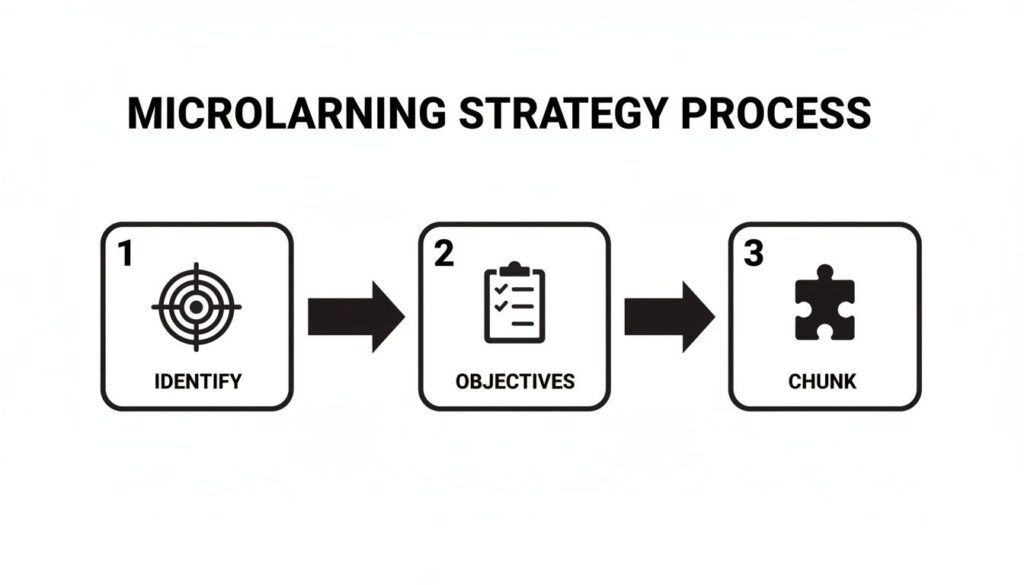
Before you even start scripting, though, your strategy needs to be solid. This simple visual breaks down the core process of mapping everything out.
As you can see, it all starts with identifying the need, setting clear objectives, and then chunking the content. Nail these first, and the building part becomes so much easier.
User-Friendly Tools That Get the Job Done
Gone are the days when you needed a complex and expensive software suite to create training. Today, there are some amazing, user-friendly tools that let you create professional-looking content without a degree in instructional design.
My absolute favorite for getting started is Gamma.app. It’s almost like having a designer do the work for you, letting you create beautiful, interactive presentations and documents with incredible ease.
Here’s a quick look at the Gamma.app interface. It’s all about simplicity and modern design.
The clean, intuitive platform makes it easy for anyone to jump in and start creating polished content right away.
A few other great options include:
- Canva: Amazing for creating infographics, job aids, and even short video clips.
- Loom: The simplest way to record your screen and yourself for quick software tutorials.
- CapCut: A free and surprisingly powerful mobile video editor for creating engaging shorts on the fly.
With these tools and a clear plan, you have everything you need. The key is to start small, focus on providing real value, and just get that first piece of content out there. You can always refine your process as you go.
You’ve created some fantastic, focused content. That’s a huge win, but your job isn’t done. Making great microlearning is only half the battle. The other half is getting that content to your staff in a way that feels easy, accessible, and maybe even a little fun.
This is all about the delivery. You need a system that gets the right module to the right person at the right time, without adding friction to their already busy day. More than that, you need to create a little buzz and get people genuinely interested in participating.
Choosing Your Delivery Platform
The first big decision is where your modules will live. There are a few solid options, and the best one really depends on your company’s size, budget, and existing tech stack.
A full-blown Learning Management System (LMS) is the most traditional route. It’s fantastic for tracking completion, creating learning paths, and handling compliance. If you already have one, this is probably your easiest path.
But you don’t always need a heavy-duty LMS. For many teams, simpler methods work even better. I’ve seen some incredibly creative and effective approaches to delivering microlearning modules for staff.
Here are a few other ideas:
- Email Drip Campaigns: Use a simple email marketing tool to send out one module per week. This is a great way to “drip” content over time and keep learning top-of-mind without overwhelming anyone.
- Community Platforms: A tool like Circle.so or even a dedicated Slack channel can be an amazing home for your modules. This turns learning into a social activity where people can discuss the content and ask questions.
- Company Intranet or Wiki: If you have a central knowledge base people already use, just create a dedicated section for your microlearning library. This makes your modules feel like part of the existing workflow.
The key is to meet your employees where they already are. Don’t force them to learn yet another new platform if you don’t have to.
When you’re weighing your options, it helps to see the pros and cons side-by-side.
Comparing Microlearning Delivery Methods
| Delivery Method | Best For | Pros | Cons |
|---|---|---|---|
| LMS | Structured learning paths, compliance, large organizations | Robust tracking, SCORM compliant, centralized management | Can be expensive, may feel formal and clunky for users |
| Email Drip | Spaced learning, consistent reinforcement | Easy to set up, delivered directly to users, keeps learning top-of-mind | Can get lost in inboxes, limited interactivity, harder to track |
| Community Platform | Collaborative learning, peer support, engagement | Fosters discussion, builds community, feels informal and accessible | Can be distracting, requires active moderation, content can get buried |
| Company Intranet | “Just-in-time” performance support, easy access | Integrates into existing workflows, serves as a central knowledge hub | Lower visibility, may lack tracking features, can feel static |
Ultimately, the best delivery method is the one your staff will actually use. Don’t be afraid to pilot a couple of different approaches with a small group to see what sticks.
Launching Your Modules for Maximum Buy-In
How you introduce your microlearning program is just as important as the content itself. A sloppy launch can kill engagement before it even starts. You need to build a little excitement and clearly explain the “what’s in it for me” for your staff.
Don’t just send out a mass email with a link. Treat it like a mini internal marketing campaign.
Get managers on board first and have them champion the initiative with their teams. Their endorsement is pure gold. You could host a quick, 15-minute launch call to show people how it works and what to expect. Frame it as a new resource designed to make their jobs easier and help them grow, not as another mandatory task.
Make the first batch of modules about topics you know will solve an immediate pain point for a lot of people. An early win builds incredible momentum and proves the value of the program right away.
The global appeal for accessible training is clear. In the U.S. alone, 62% of microlearning users access content on their phones, which makes sense with smartphone usage over 85%. This mobile-first trend isn’t just local. 60% of corporate employees worldwide now train on the go. To keep them hooked, over 36% of modules use AI-powered adaptive paths to personalize the experience. You can discover more insights about the microlearning market and see how these trends are shaping effective training.
Simple Gamification That Actually Works
The word “gamification” can sometimes sound a bit cheesy, but when done right, it can seriously boost motivation. People are naturally wired to enjoy a bit of competition and recognition. The good news? You don’t need a complex system.
Simple tricks can make a huge difference.
- Achievement Badges: Award digital badges for completing a module or a learning path. It’s a small thing, but it gives people a tangible sense of accomplishment.
- Leaderboards: For topics like sales training, a public leaderboard showing who has completed the most modules can spark friendly competition. Just make sure it fits your company culture.
- Progress Bars: Simply showing people how far they are through a series of modules is a powerful motivator. We all love filling up those progress bars and reaching 100%.
The goal is to use basic human psychology to make the learning process more satisfying, not to turn training into a video game. Start with one or two simple elements and see how your team responds. You might be surprised at how effective a simple digital badge can be.
Measuring Success and Refining Your Program

You’ve built some great modules and have a solid delivery plan. Now for the most important question of all: how do you know if any of this is actually working?
The answer is in the data.
Creating effective microlearning modules for staff isn’t a one-and-done project. It’s a continuous loop of creating, measuring, and refining. This final step is where you prove the value of your training program and get the insights you need to make it even better.
Key Metrics You Need to Track
When you’re first starting, it’s easy to get overwhelmed by all the possible things you could measure. My advice? Keep it simple. Focus on the numbers that tell a clear story about engagement and comprehension. These are your foundational metrics.
You’ll want to keep a close eye on these four key areas:
- Completion Rates: The most basic metric, but a crucial one. A high completion rate, which I consider 80% or higher, tells you the content is short, engaging, and relevant enough for people to see it through to the end.
- Quiz and Assessment Scores: If your modules include a short quiz, the scores are your direct line of sight into knowledge transfer. Are people really absorbing the key learning objective? Low average scores are a red flag that the content might not be as clear as you thought.
- Time to Completion: How long are people actually taking to finish each module? If a three-minute video is taking most people ten minutes to get through, they might be re-watching sections, which could signal a point of confusion.
- Learner Feedback: This is the qualitative gold. A simple one-question survey at the end of a module asking “How helpful was this?” on a scale of 1-5 can give you incredible insights.
These numbers give you a solid baseline to understand what’s working and what isn’t at the module level.
Moving Beyond the Basics to Measure Real Impact

Completion rates are great, but they don’t tell the whole story. The ultimate goal of any training program is to improve performance and drive better business outcomes. This is where you connect your microlearning efforts to what really matters to the company.
Measuring this kind of impact requires you to be a bit more of a detective, but it’s where you’ll find the most compelling success stories.
The most powerful data you can have is proof that your training directly improved a business KPI. This is what turns your training program from a ‘cost center’ into a clear investment with a measurable return.
Look for connections between your module topics and real-world performance data. For example:
- Launched modules on handling sales objections? Look for an increase in the conversion rate for the sales team members who completed the training.
- Created modules on a new software feature? Check with the IT help desk to see if there’s been a decrease in support tickets related to that feature.
- Trained staff on a new safety procedure? Monitor the number of reported safety incidents to see if there’s a decline.
Connecting your training to these kinds of tangible results is how you demonstrate real ROI. For more ideas on this, our article about how to measure training effectiveness goes into even more detail.
A Simple Framework for Continuous Improvement
Once you have your data, it’s time to act on it. Don’t just let it sit in a report. Use it to make your next batch of microlearning modules for staff even more effective.
I use a simple “Review, Revise, Relaunch” cycle.
- Review the Data Monthly: Set aside time each month to look at your key metrics. What are the top-performing modules? Which ones have low completion rates or poor feedback? Look for patterns.
- Gather Direct Feedback: Don’t be afraid to talk to your learners. Reach out to a few people who recently completed a module and ask them for their honest thoughts. You’ll often learn more from a five-minute conversation than you will from a spreadsheet.
- Revise and Relaunch: Use what you’ve learned to make small tweaks. Maybe a video needs a clearer introduction, or a quiz question is poorly worded. Make the change, relaunch the module, and see if your metrics improve.
This cycle of continuous improvement is what separates a good training program from a great one. It ensures your content library stays relevant, effective, and valuable for your team over the long haul.
Got Questions About Microlearning? You’re Not Alone.
When you start building out your training, questions are going to pop up. Trust me, I had a ton of them when I first started creating microlearning modules for staff. Over the years, I’ve heard the same challenges come up again and again from other L&D pros.
So, let’s just get them out in the open and tackle them head-on. My goal is to give you some quick, practical answers to sidestep these common hurdles.
What’s the Perfect Length for a Module?
This is the number one question I get, and the answer is about focus, not a magic number. While the sweet spot is generally between 3 to 7 minutes, the real goal is to stick to one, single learning objective. That’s it.
If you’re making a quick “how-to” video, aim for under five minutes. An interactive quiz or a short job aid? The same rule applies.
The core principle is simple: A module should be short enough for an employee to finish on a coffee break or right before starting a task. If it feels too long, you’re trying to cover too much ground.
And if a topic truly needs more time? Your best bet is to break it into a series of connected modules. This creates a manageable learning path instead of one overwhelming info-dump.
How Do You Handle Really Complex Topics?
Trying to cram a huge, complex subject into a five-minute lesson is a recipe for disaster. This is where the art of “chunking” becomes your best friend. You don’t simplify the topic, you deconstruct it.
Take that big, complicated subject and break it down into its core components. Then, create a dedicated microlearning module for each of those small, digestible pieces.
For example, let’s say you need to train your team on “Advanced Project Management.” That’s a massive topic. Instead of a single, hour-long webinar, you could create a learning path with modules like:
- Spotting Scope Creep (4 minutes)
- How to Build a Risk Register (5 minutes)
- Mastering Stakeholder Communication (3 minutes)
- Closing Out a Project Like a Pro (4 minutes)
This approach turns an intimidating subject into a series of achievable learning steps, making the information far easier to digest and, more importantly, to actually remember and use.
What If My Staff Isn’t Engaging?
Low engagement is frustrating, but it’s usually a clear signal that something is off in one of three areas. Before you get discouraged, do a quick audit of these common culprits.
First, check for relevance. Is the content directly and obviously useful for your team’s daily work? If they can’t immediately see how a module will help them solve a real problem, they simply won’t make time for it. The “what’s in it for me” has to be crystal clear.
Second, look at accessibility. How easy is it for them to find and take the training? If they have to click through six different screens or if the modules look terrible on their phones, you’re creating friction that kills motivation. It has to be seamless.
Finally, consider your launch. Did you just email out a link and hope for the best, or did you build some excitement? Getting managers to champion the training or adding a simple gamification element like a leaderboard can make a world of difference. When in doubt, just ask for feedback. A quick survey can give you the exact roadmap you need to get things back on track.