A Practical Guide to Choosing an LMS for K-12 Schools
Think of a Learning Management System (LMS) as the new digital nervous system for a school. It’s the central hub that connects students, teachers, and parents, handling everything from homework submissions to grade reports and school-wide announcements. In a world where education is constantly evolving, a solid LMS isn’t just a nice-to-have. It’s the foundation of a modern K-12 school.
Why an LMS Is No Longer Optional for K-12 Schools
If your first thought about an LMS is that it’s just for remote learning, it’s time to expand that view. I like to think of it as the school’s digital heart, pumping information and resources exactly where they need to go, whether students are in the classroom or at home.
It’s the single, reliable place where teachers post lesson plans, students turn in assignments, and parents can check on grades and attendance.
This centralized approach does more than just keep things tidy. It creates one source of truth that simplifies life for everyone. No more digging through emails for a missed announcement or wondering about a due date.
Moving Beyond the Traditional Classroom
Technology’s role in the classroom is about building more dynamic and supportive learning environments. A well-chosen LMS for K-12 schools is a huge part of that shift.
Here’s how these platforms make a real, tangible difference day-to-day:
- Consistency Across Classrooms: An LMS gives every student a consistent way to access materials and submit work, no matter which teacher they have. This predictability helps them focus on learning, not logistics.
- Better Communication: Teachers can fire off announcements to entire classes or groups of parents in seconds, keeping everyone on the same page about everything from field trips to project deadlines.
- Personalized Learning: Many modern platforms let teachers tailor the experience. They can create unique learning paths, assigning extra resources to students who need more support or offering advanced challenges to those ready to fly.
This push toward integrated digital tools is accelerating. The global K-12 LMS market, currently valued at $5.5 billion, is on track to explode to $33.5 billion by 2034. That kind of growth isn’t just a trend. It’s a signal of how fundamental these systems have become.
The Bigger Picture
The rising demand for an LMS is a clear sign of the broader digital transformation in education. It’s about using technology to make schools smarter and more responsive.
Adopting an LMS is about building an educational ecosystem that is more resilient, efficient, and equitable. It’s an investment in a school’s ability to adapt and provide quality instruction, no matter what challenges arise.
When you get right down to it, these platforms give teachers back their most valuable resource: time. By automating repetitive administrative tasks, they free up educators to focus on what they do best, which is teaching. This ultimately creates a more organized and engaging learning environment, which is a win for everyone, especially the students.
The Essential Features Every K-12 LMS Must Have
When you’re shopping for an LMS for K-12 schools, it’s incredibly easy to get lost in a sea of features. Every platform promises the world with shiny bells and whistles.
But from years of experience, I can tell you that only a handful of these features are true deal-breakers. These are the ones that can make or break the experience for your teachers, students, and parents.
Let’s cut through the marketing noise. I want to talk about the core functions that actually matter. These are the tools that give teachers their planning time back, keep parents looped in, and ensure every single student can access their learning materials without a headache.
Think of this as your non-negotiable checklist.
The Power of Seamless Integration
One of the first questions you should ask is how well the LMS plays with your other essential systems, especially your Student Information System (SIS). The SIS is the official source of truth for all your student data like enrollment records and class schedules.
Without proper integration, someone on your staff is stuck manually updating class rosters every time a student enrolls or changes classes. It’s a tedious, error-prone nightmare.
A good LMS automates this whole process. When a student’s information changes in the SIS, their LMS account updates automatically. This isn’t just a nice-to-have. It’s the background magic that saves hundreds of hours and ensures every student is in the right digital classroom on day one.
Seamless SIS integration isn’t a luxury. It’s the foundation of an efficient digital learning environment. It ensures data accuracy and frees up educators to focus on teaching instead of administrative tasks.
Beyond the SIS, look at how the platform connects with the tools your teachers already use and love. It’s a common scenario: nearly 20% of districts using Google Classroom also rely on a second major LMS like Canvas or Schoology to fill in the gaps. An LMS that embraces these other tools, rather than trying to replace them, will see much faster and happier adoption.
Robust Tools for Assessment and Grading
At its heart, an LMS has to make the core job of teaching easier. A huge piece of that puzzle is streamlining how educators create, share, and grade assignments. The platform must offer a flexible suite of assessment tools that can adapt to different subjects and learning objectives.
A great way to evaluate this is by looking at the specific features that support the daily workflow of a teacher.
Essential K-12 LMS Feature Checklist
Here’s a breakdown of the core features to look for when you’re evaluating an LMS, explaining why each one is so critical for K-12 environments.
| Feature | Why It’s Critical for K-12 | What to Look For |
|---|---|---|
| SIS Integration | Automates roster management, saving administrative time and preventing errors. | Compatibility with your specific SIS (e.g., PowerSchool, Skyward) and automated, real-time syncing. |
| Standards Alignment | Allows teachers to connect assignments to state or national standards, making it easier to track mastery. | Ability to import and tag with Common Core, NGSS, or custom state standards. |
| Diverse Assessment Types | Supports varied teaching methods and student needs beyond simple multiple-choice tests. | Options for essays, file uploads, matching, fill-in-the-blank, and multimedia submissions. |
| Built-in Rubrics | Provides clear, consistent, and transparent grading criteria for subjective assignments. | Customizable rubric templates that can be easily attached to assignments and are visible to students. |
| Parent/Guardian Portal | Creates a strong home-school connection by giving parents a window into their child’s progress. | A separate, easy-to-use login for parents to view grades, upcoming assignments, and class announcements. |
| Accessibility Compliance | Ensures equitable access for all learners, including those with disabilities. | Adherence to Web Content Accessibility Guidelines (WCAG) standards, screen reader compatibility, and captioning tools. |
These features are about creating a supportive and efficient ecosystem where teachers can teach, students can learn, and parents can stay involved.
For those looking for more digital teaching tools, our article on free virtual classroom platforms for educators offers some great starting points.
Keeping Everyone Connected
A K-12 LMS isn’t just a student-teacher tool. It has to be a communication hub that connects the entire school community, and that absolutely includes parents and guardians. A dedicated, easy-to-navigate parent portal is non-negotiable.
This portal gives families a real-time window into their child’s school life. They should be able to log in to see due dates, check grades on recent assignments, and read class announcements without having to hunt down an email or make a phone call. This kind of proactive communication is fundamental to building strong school-home partnerships.
Finally, let’s talk about accessibility. An LMS is only effective if it’s usable by every student, including those with disabilities. This means the platform must be compliant with the Web Content Accessibility Guidelines (WCAG). Look for features like robust screen reader compatibility, full keyboard navigation, and built-in options for closed captions on video content.
An accessible LMS ensures that technology is opening doors for all learners, not creating new barriers.
Comparing the Top LMS Platforms for Schools

Trying to navigate the world of K-12 learning management systems can feel like a massive undertaking. There are so many options out there, and every single one claims to be the best. I want to help you cut through that noise and focus on the major platforms you’ll almost certainly run into: Canvas, Google Classroom, and Schoology.
These aren’t the only players, of course, but they are the undisputed heavyweights in the K-12 space. Getting a handle on their core strengths and who they’re really built for is the first step in finding the right fit for your school or district. The goal here is to help you see which one truly aligns with your specific needs.
The Big Three in the K-12 LMS Market
When you step back and look at the market, a clear picture emerges. The race for the top spot in K-12 schools is tight, and it’s mostly between a few key platforms.
Recent data shows that among schools using an LMS, Canvas holds about 28% of the market, followed closely by Google Classroom at 24%, and Schoology (now part of PowerSchool) at 22%. This trio really cemented its lead after 2020, when the demand for digital learning tools absolutely exploded. You can discover more insights about this K-12 market data and see how it’s shifted over time.
This tells us that most schools are finding what they need within this group. Let’s break down what makes each one stand out.
Canvas: A Robust and Scalable Powerhouse
I often think of Canvas as the all-in-one, enterprise-level solution. It’s incredibly powerful and packed with features, which is why it’s a favorite in both higher education and large K-12 districts that need serious muscle.
- Best for: Large districts with the resources to support a feature-rich platform. It’s ideal if you need deep analytics, tons of third-party integrations, and consistent functionality from kindergarten all the way through graduation.
- Strengths: Canvas is fantastic for creating complex, module-based courses. It offers some of the best assessment and grading tools you can find, including advanced rubrics and standards tracking. Its ability to integrate with other tools is top-notch.
- Weaknesses: With all that power comes a steeper learning curve. It can feel a bit overwhelming for teachers who aren’t as tech-savvy, and its price tag is typically higher than the other options.
Google Classroom: The Simple and Familiar Choice
Google Classroom is the definition of accessible. It’s built on the Google Workspace tools that millions of teachers and students already use every single day, which makes the barrier to entry practically non-existent.
You can get a class up and running in just a few minutes, which is a massive plus for busy educators. It’s often praised for its simplicity and pure ease of use.
Google Classroom’s biggest advantage is its familiarity. It leverages tools teachers already know, making adoption smooth and drastically reducing the need for extensive training.
- Best for: Schools and smaller districts already invested in the Google ecosystem. It’s perfect for those who prioritize ease of use and quick implementation over deep, complex features.
- Strengths: It’s free for schools, incredibly intuitive, and seamlessly integrates with Google Drive, Docs, and Meet. The clean, uncluttered interface is a big win for both teachers and younger students.
- Weaknesses: That simplicity comes at a cost. It lacks some of the more advanced features you’ll find in Canvas or Schoology, like sophisticated grading options, detailed analytics, or a native parent portal. We explore these differences in our detailed comparison of Canvas vs Google Classroom.
Schoology: The Collaborative Community Builder
Schoology, now part of the PowerSchool family, strikes a nice balance between robust features and everyday usability. Its interface often has the feel of a social media platform, which can make it more engaging and natural for students.
It was designed from the ground up for the K-12 environment, and you can really feel that focus in its feature set.
- Best for: Districts of all sizes that want a platform with strong communication and collaboration tools baked right in. It’s a great middle-ground option for those who find Google Classroom too basic but Canvas a bit too complex.
- Strengths: Schoology’s group features and communication tools are excellent for building classroom community and fostering collaboration. It also has a strong content marketplace where educators can discover and share resources.
- Weaknesses: While powerful, some users find the interface can feel a little dated or cluttered compared to more modern designs. The depth of its integrations with other tools can also vary.
Your Step-by-Step Implementation Roadmap

Choosing your new LMS is a huge step, but let’s be honest, it’s just the beginning. The real work and the real challenge is rolling it out so it becomes a tool that teachers actually love to use, not just another login they have to remember.
A successful launch doesn’t happen by accident. I’ve seen schools rush this part and end up with a powerful system nobody uses to its full potential. It takes a thoughtful plan, clear communication, and a focus on supporting your people every step of the way. We can avoid that by breaking the process down into manageable, common-sense steps.
Assemble Your Implementation Team
Before you do anything else, you need to build your crew. This is absolutely not just a job for the IT department. A great implementation team represents everyone who will be using the system day in and day out.
Think about pulling together a mix of perspectives:
- Administrators to provide the vision and keep the project on track.
- Tech-savvy teachers who can be your champions and peer coaches.
- Skeptical teachers, yes, really. They’ll ask the tough questions and help you spot problems early.
- Instructional coaches who live and breathe curriculum and pedagogy.
- IT staff to handle the heavy lifting on the technical setup and integration.
This diverse group ensures your rollout plan works for real people in real classrooms, not just on paper.
Start Small With a Pilot Program
I can’t stress this enough: don’t try to launch your new LMS to the entire district all at once. That’s a recipe for chaos. The smartest approach is to run a small, controlled pilot program first. Think of it as a dress rehearsal.
Pick a handful of enthusiastic teachers from different grade levels and subject areas to test-drive the platform for a semester or even just a single grading period. This gives you a safe space to work out the kinks, gather honest feedback, and figure out what kind of training will actually be effective.
A pilot program is your single best tool for a successful rollout. It lets you identify challenges on a small scale, build momentum with early wins, and create a group of expert users who can help lead the full launch.
During the pilot, your team needs to be actively collecting data and talking to the participants. What’s working well? What’s frustrating? This feedback is pure gold, and it will help you refine your plan before you go live for everyone.
This infographic provides a quick visual comparison of some of the heavy hitters in the K-12 space.
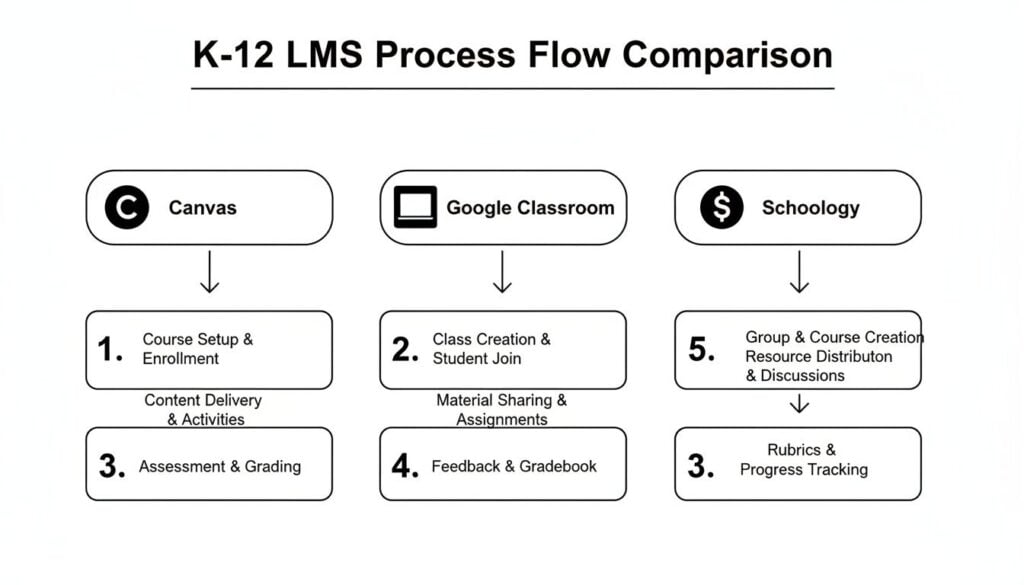
It helps visualize how each major platform fits into the educational ecosystem, underscoring why it’s so important to pick a system that aligns with your school’s specific DNA.
Plan Your Technical Rollout and Training
With the lessons from your pilot in hand, it’s time to map out the technical side of the launch. This is where you’ll tackle the big-ticket items like data migration and system integrations.
Work closely with your LMS provider and your IT team to make sure everything is ready to go. This absolutely includes setting up your Student Information System (SIS) sync to automate class rosters. Getting the LMS integration with SIS systems right from the start is non-negotiable. It prevents countless administrative headaches for teachers and staff.
At the same time, you need to design a professional development plan that goes way beyond a single, boring “sit-and-get” training day. Effective training needs to be:
- Ongoing: Offer support throughout the entire first year, not just on day one.
- Hands-On: Get teachers actively using the platform to build real classroom materials they can use tomorrow.
- Differentiated: Create different training paths for beginners and more advanced users. Not everyone starts at the same place.
By pairing a solid technical plan with supportive, continuous training, you set your school community up for success. You build confidence and show your staff that this new LMS for K-12 schools is here to make their jobs easier, not harder.
Navigating Student Data Privacy and Security

When we bring an LMS for K-12 schools into our buildings, we’re not just managing assignments and grades anymore. We become custodians of sensitive student data, a responsibility with absolutely zero room for error. Security can’t be an afterthought. It has to be the first thing on the list.
Let’s break down the legal guardrails that protect students and what you need to look for to ensure your school stays compliant and your kids stay safe. This is about building and maintaining trust with your entire community.
Understanding the Legal Landscape
In the United States, two major federal laws set the rules of the road for student data privacy. You’ve probably heard of them, but it’s worth a quick, plain-English refresher on what they actually mean for your LMS choice.
FERPA (Family Educational Rights and Privacy Act): Think of this as the foundational privacy law for schools. It gives parents rights over their children’s education records, including the right to inspect them and control who gets to see them. Your LMS must have features that honor these rights, like secure parent portals and airtight access controls.
COPPA (Children’s Online Privacy Protection Act): This law zooms in on protecting the online privacy of children under 13. It demands that online services get verifiable parental consent before collecting any personal information from young students. Any LMS vendor you consider must be fully COPPA compliant. Period.
These laws aren’t suggestions. They are mandates. The right LMS provider won’t just say they are compliant. They’ll be able to show you exactly how their platform helps you meet these critical legal duties.
Key Security Features to Demand
Beyond the legal minimums, a truly secure LMS needs to have strong technical defenses built right into its DNA. When you’re vetting vendors, treat it like an interview and ask pointed questions about their security measures.
A great place to start is their data handling practices. You need to know that student information is protected at all times, not just when someone is logged in.
Your district is ultimately responsible for protecting student data, even when it’s stored on a third-party platform. Choosing a vendor with ironclad security isn’t just a technical decision. It’s an ethical one.
Here are the specific security elements you should be asking about:
- Data Encryption: Is all data encrypted both “in transit” (as it moves across the internet) and “at rest” (when it’s stored on servers)? The answer to both must be an immediate “yes.”
- User Access Controls: The platform has to allow for granular control over who can see what. A teacher should only see their students’ data, and an administrator’s access should be clearly defined and limited to their specific role.
- Clear Privacy Policy: Don’t just skim the vendor’s privacy policy, read it carefully. Look for clear, simple language about what data they collect, why they collect it, and who they share it with. If they sell student data or use it for advertising, walk away.
To ensure comprehensive protection, proactive measures like pentesting for schools are crucial for managing student data. This process helps identify vulnerabilities before they can be exploited by bad actors. Asking a potential vendor about their security testing practices will tell you a lot about how seriously they take their responsibilities. It shows a commitment to actively defending against threats, not just reacting to them.
Making Sense of LMS Pricing and Total Costs
Let’s talk money. Diving into the world of LMS pricing can feel like trying to solve a puzzle where the pieces keep changing shape. You’ll be hit with different models, a laundry list of extra fees, and a range of quotes that can make your head spin.
My goal here is to cut through the noise so you can find an LMS for K-12 schools that fits your budget without any nasty surprises down the road.
Right off the bat, I’ll tell you that hunting for the cheapest option upfront is a losing game. Instead, we need to shift our focus to the Total Cost of Ownership (TCO). Think of it like buying a car. The sticker price is just the beginning. You also have to factor in insurance, gas, and maintenance to understand what you’ll actually spend. An LMS is exactly the same.
Unpacking Common Pricing Models
As you start collecting quotes, you’ll notice a few common ways vendors structure their pricing. Each has its pros and cons, and the best one for you really hinges on your district’s size and how you see it growing in the years to come.
Here are the most common models you’ll run into:
- Per-Student, Per-Year: This is probably the most popular model in the K-12 space, and for good reason. You pay a set fee for each enrolled student, once a year. It’s wonderfully predictable and scales directly with your student population, which makes budgeting a whole lot easier.
- One-Time License Fee: With this model, you pay a large, single fee upfront for the right to use the software indefinitely. While the initial sticker shock can be intense, it might actually be cheaper in the long run. Just be sure to ask about the mandatory annual maintenance or support fees that almost always come with it.
- Subscription or Tiered Pricing: Some platforms offer different packages or tiers based on the features you need or the number of active users you anticipate. This can be a great way to go if you want to start small and then add more functionality as your needs evolve.
Looking Beyond the Sticker Price
That initial license fee? It’s just the tip of the iceberg. The real, all-in cost of an LMS includes several other critical expenses that are easy to overlook if you’re not looking for them.
The true value of an LMS isn’t found in its initial price tag. It’s in its ability to support your school’s educational goals over the long term without breaking the budget. This means planning for the full picture of costs from day one.
To get an accurate handle on your TCO, make sure your budget accounts for these often-hidden costs:
- Implementation and Setup Fees: Most vendors will charge a one-time fee to get your system installed and configured. This can cover everything from migrating data from your old system to integrating with your SIS.
- Professional Development and Training: Your teachers and staff will need quality training to use the new system effectively. Trust me, this is not the place to cut corners. A well-trained faculty is the single most important factor for successful adoption.
- Ongoing Support and Maintenance: Many plans include a basic level of customer support, but you might need to pay extra for premium, 24/7 help. Don’t forget to ask about annual maintenance contracts, which are often required to receive software updates and security patches.
- Add-Ons and Integrations: Need that slick new assessment tool or a plagiarism checker? Many of the most valuable features come as paid add-ons. Make a list of your must-haves and get a price for each one.
By adding up all these potential costs, you can move from just looking at the price to understanding the true investment. This approach will help you make a smart, sustainable financial decision that supports your school’s vision for years to come.
Common Questions About Choosing a K-12 LMS
Even with the best game plan, questions are going to pop up. That’s perfectly normal. To wrap things up, let’s tackle a few of the most common ones I hear from school leaders right in the middle of picking or rolling out a new LMS for K-12 schools.
These are the practical, “what-if” scenarios that can keep you up at night. Let’s get you some direct, no-fluff answers.
How Long Does Implementation Really Take?
This is the big one, isn’t it? The timeline. For a small to mid-sized school district, a realistic implementation usually lands somewhere in the 3 to 6 month range. That window covers everything from planning and picking a vendor to the technical setup and that first crucial round of training.
If you’re running a larger district with more buildings, a bigger student body, and more complex tech needs, it’s much safer to budget for a 9 to 12 month process. The most important thing here is to resist the urge to rush. A thoughtful, phased rollout always beats a chaotic, district-wide launch that leaves everyone scrambling.
A well-planned timeline is more about building a solid foundation than it is about speed. Rushing the implementation process almost always leads to poor adoption and frustrated teachers down the road.
What’s the Best Way to Train Teachers?
A single, one-off training day just doesn’t cut it. Effective professional development for a new LMS has to be ongoing, hands-on, and directly tied to what teachers actually do in their classrooms. You need a multi-layered approach, not a one-and-done event.
Here’s a simple framework that I’ve seen work wonders:
- Start with the basics: Hold foundational training sessions before the official launch. The goal is just to get everyone comfortable and logged in.
- Offer continuous support: Plan for regular workshops, one-on-one coaching sessions, and a library of short, on-demand video tutorials that teachers can pull up anytime they get stuck.
- Build a team of champions: Find those enthusiastic teachers in each building who can act as the go-to experts for their peers. This kind of peer support is pure gold.
The goal isn’t just to show teachers which buttons to click. It’s to show them how this new tool can genuinely save them time and help them create more engaging lessons.
How Do We Know If the LMS Is a Success?
Figuring out if your new platform is working means looking at both the hard numbers and the human experience. You need both to get the full picture.
On the quantitative side, you can track key metrics. Look at adoption rates, which means how many teachers and students are logging in regularly. Check feature usage to see if they are actually using the assessment tools or just the messaging feature. Over time, you can also start to see if there’s any correlation with student performance data.
But the story doesn’t end with the data. The qualitative feedback is just as critical. Use simple surveys and focus groups to ask your community:
- Are teachers finding it easier to manage their daily workflow?
- Do students feel more connected and on top of their learning?
- Are parents feeling more informed about their child’s progress?
When the answer to these questions is a resounding “yes,” you know you’ve done more than just buy a new piece of software. You’ve found a tool that truly supports your school’s mission.