How to Do Webinars Like a Pro and Grow Your Business
Let’s be real for a second. The thought of hosting a webinar can feel like a massive undertaking. I get it. But I’ve personally seen them completely change the game for businesses, especially for coaches, consultants, and anyone creating online courses.
This is about more than just collecting a few more email addresses. Webinars are one of the most powerful ways to build genuine, unshakeable authority in your niche.
When you’re teaching live, you’re doing more than just sharing slides and talking points. You’re demonstrating your expertise in real time, handling questions on the fly, and proving you know your stuff. This builds a level of trust that a simple blog post or a quick social media update just can’t touch.
Forging a Real Connection
Webinars have this unique ability to break down the digital wall that usually separates you from your audience. People get to see your personality, hear the passion in your voice, and actually interact with you through the chat box and live Q&A sessions.
That interaction is pure gold. It creates a memorable experience and makes people feel genuinely connected to you and what you’re building. That very connection is what turns a passive follower on social media into a loyal customer or a dedicated student.
Webinars give you a unique opportunity to have a two-way conversation at scale. You’re not just broadcasting a message, you’re creating a shared experience with dozens or even hundreds of people at once.
To really nail this, it helps to understand the full scope of what modern webinars can do. Once you see all the moving parts, you can start putting them together to create something truly powerful.
Finding the Right Webinar Format for You
Not all webinars are created equal, and you definitely don’t have to start with a huge, 90-minute live production. The best format really depends on your goals and, just as importantly, what feels most natural to you.
Here are a few of the most common types I see working incredibly well right now:
- The Live Workshop or Training: This is the classic format where you teach a very specific skill or dive deep into a topic. It’s absolutely perfect for showing off what you know and delivering a ton of value in a short amount of time.
- The Q&A or “Ask Me Anything” Session: This format is much more casual and conversational. It’s a fantastic way to engage directly with your audience, answer their most pressing questions, and build a real sense of community.
- The Product Demo or Case Study: If you have a product or service, this format lets you pull back the curtain and show it in action. You can walk people through exactly how it works and, even better, highlight real-world success stories.
- The Automated Webinar: Think of this as your 24/7 sales machine. It’s a pre-recorded presentation that runs on a set schedule, and it’s an amazing tool for scaling your efforts once you’ve polished your live delivery.
Think of this part as our initial strategy session. Before we get into the nitty-gritty of slide decks and promotion, getting clear on the possibilities and picking the right approach is the most important first step.
Laying the Groundwork: Your Webinar Blueprint
A killer webinar doesn’t just magically happen the day you go live. The real work, the stuff that makes people genuinely glad they showed up, starts long before with a solid plan. Before you even think about slide decks or picking a webinar platform, we need to build your blueprint.
It all boils down to one simple question: what is the single most important thing you want your audience to walk away with?
Seriously, just one thing. This is about defining a crystal-clear goal that will anchor every decision you make from this point forward, not about cramming a dozen different ideas into a sixty-minute slot. A focused goal not only makes your content easier to create, but it also makes it a hell of a lot more impactful for your attendees.
This is about creating a specific outcome, not just delivering information. As you plan, you’ll see how a single goal helps you build authority, create a real connection with your audience, and teach something that actually sticks.
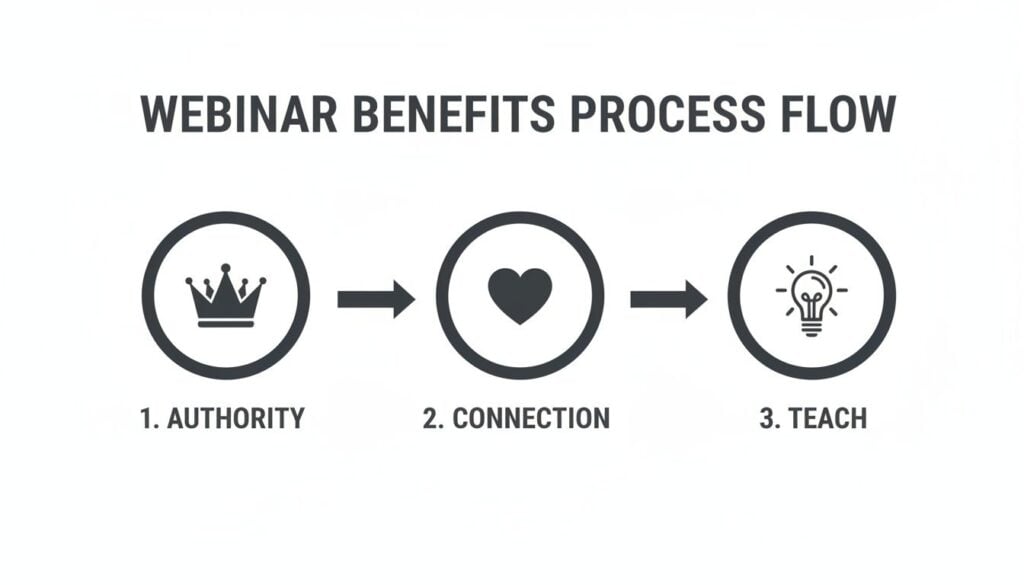
Each of these elements builds on the last, turning a simple online event into a powerful tool for your business.
Get Inside Your Audience’s Head
Once you have your core goal, it’s time to get laser-focused on who you’re actually talking to. Who is your ideal attendee? What are they struggling with right now? What keeps them up at night? The more specific you can get here, the better your content will resonate.
I find it helps to map out their biggest pain points.
- Are they frustrated with a clunky piece of software?
- Do they need a clear path to landing their first client?
- Are they stuck on a specific technical problem they can’t seem to solve?
Your webinar needs to offer a clear solution or a path forward for one of these challenges. When your audience feels like you truly understand their problem, they’ll lean in and actually listen to your solution.
Your webinar topic should feel like an answer to a question your audience is already asking. Don’t invent a problem, solve a real one.
This deep understanding is the key to crafting a title and description that stops the scroll. Your title has to make a strong promise, and the description needs to confirm they’re in the right place.
Nail the Title and Description
Let’s be honest, people are busy and their inboxes are overflowing. Your title has about three seconds to convince someone to care. It needs to be compelling, specific, and clear.
Avoid vague, boring titles like “Marketing Tips.” Instead, go for something that makes a concrete promise, like “My 3-Step Framework for Writing Social Media Posts That Actually Convert.”
See the difference? One is generic background noise, while the other promises a tangible outcome.
Your description should then expand on that promise. I like to use a few bullet points to outline exactly what attendees will learn. This manages their expectations and gets them genuinely excited about the value they’re going to get. For a deeper dive, check out our guide on how to structure a webinar for beginners.
Pick the Perfect Time and Day
Now for the logistics. Choosing the right day and time can have a massive impact on your attendance rates. I’ve experimented with this a lot over the years, and while there’s no single magic formula, there are some pretty reliable starting points.
Generally, mid-week days like Tuesday, Wednesday, and Thursday perform best. People are settled into their work week but haven’t mentally checked out for the weekend yet.
As for the time, you have to think about your audience’s time zone. If you have a global audience, this gets tricky, but you should aim for a time that covers the majority of your target demographic. I’ve found that 11 AM or 2 PM ET often hits a sweet spot, catching people on both coasts of North America during their workday.
The length of your webinar also matters. Interestingly, research consistently shows that 60-minute webinars attract significantly more attendees than shorter ones. This tells me people are willing to block out an hour if they believe the content is valuable enough to be worth their time. It’s a commitment, so make it count.
Choosing Your Tech and Promoting Like a Pro
Alright, let’s get into the part that trips a lot of people up: the technology and promotion. Picking the right webinar platform can feel like a huge commitment, but it doesn’t have to be a headache. The key is to find a tool that fits what you need right now, without drowning you in features you won’t even touch.
I’ve used quite a few over the years, from Zoom to Demio to WebinarJam. Each has its own personality and strengths. It’s more about finding the one that’s best for you than about finding the single “best” one.
Finding Your Perfect Webinar Platform
When I’m comparing platforms, I zero in on a few specific things that make a real difference for creators, educators, and membership owners. I try not to get distracted by all the bells and whistles.
Instead, I ask myself these questions:
- How easy is the setup? Seriously, can I schedule a new event and spin up a decent registration page in under 15 minutes? Simplicity is a massive win, especially when you’re just starting out.
- What are the engagement tools like? I’m looking for easy-to-use polls, a chat interface that isn’t clunky, and a simple way to spotlight audience questions.
- Is the branding customizable? I want my registration page and the pre-webinar waiting room to look and feel like my brand, not like a generic software template.
- What’s the replay experience like? How simple is it to get a replay link out to everyone who registered? A smooth, no-fuss replay process is absolutely non-negotiable for me.
The goal is to find the one that makes it easiest for you to connect with your audience and deliver a killer experience, not to find the platform with the most features.
If you’re on a budget, Zoom Webinar is a solid and reliable choice that most people are already comfortable with. As you grow, platforms like Demio and WebinarJam can be worth the investment, as they often provide a more polished, branded experience right out of the box.
If you’d like a deeper comparison, our review of popular webinar software breaks it all down.
To give you a quick snapshot, here’s a look at how some of the top platforms stack up on features that are essential for creators and educators.
Key Feature Comparison of Popular Webinar Platforms
| Feature | Zoom Webinar | Demio | WebinarJam |
|---|---|---|---|
| Ease of Use | Very familiar interface, quick setup. | Modern, intuitive, and user-friendly. | Feature-rich, but a slightly steeper learning curve. |
| Branding | Basic customization options. | Highly customizable registration pages and rooms. | Good branding options, especially for replays. |
| Engagement Tools | Standard polls, Q&A, and chat. | Advanced polls, handouts, and featured actions. | Offers polls, surveys, and product offers. |
| Automated Events | Live events only. | Excellent for both live and automated events. | Strong focus on automated, evergreen webinars. |
This isn’t an exhaustive list, of course, but it highlights the different philosophies behind each platform. Your choice really comes down to your priorities which could be simplicity, brand control, or automation.
Setting Up a Killer Registration Page
Your registration page has one job: get people to sign up. That’s it. It needs to be simple, clear, and compelling. Don’t overcomplicate it with walls of text or confusing navigation.
Focus on these core elements:
- A Powerful Headline: This should mirror the big promise you made in your webinar title.
- Key Learning Outcomes: Use bullet points to clearly list 3-5 things attendees will walk away knowing.
- Presenter Information: A brief bio and a friendly headshot build immediate trust and authority.
- Date and Time: Make this impossible to miss. Including an “add to calendar” button is a fantastic touch that boosts attendance rates.
Since capturing registrations is crucial, you’ll need to know how to create a high-converting landing page to maximize your sign-ups. The principles are exactly the same: communicate clear value and have a simple, obvious call to action.
Crafting a Simple and Effective Promo Plan
Okay, you’ve got your platform and your registration page is live. Now it’s time to get people signed up. I see so many creators pour their heart into an amazing webinar but then fall flat on promotion because they make it way too complicated. You don’t need a massive, month-long launch campaign.
Here’s my simple checklist for promotional assets:
- Email Sequence (3-5 emails): Start with an announcement to your list. Follow up a few days later by highlighting a key pain point your webinar solves. Then, send final reminders the day before and the day of the event.
- Social Media Graphics (4-6 variations): Create a few different visuals to keep things fresh. I like to use a mix: a branded graphic with the title, a picture of myself, and maybe a “quote” graphic that hints at one of the webinar’s big takeaways.
- Short Social Media Copy: Write a few different captions you can adapt for platforms like Instagram, LinkedIn, or Facebook. A great trick is to ask a question related to your topic to spark some engagement in the comments.
You don’t need to be everywhere at once. Just focus on the one or two channels where your audience already hangs out. If you have an engaged email list, that’s often all you need to fill your event.
If you have a budget, running a small ad campaign on a platform like Facebook can be a great way to reach new people, but it’s definitely not a requirement for a successful webinar. The main goal is simply to get the right people into that virtual room.
Designing Content That Captivates and Converts
This is where the magic happens. Your content is the absolute heart of your webinar. So many people just dump a ton of information into a slide deck, call it a day, and then wonder why their audience is multitasking with their email inbox ten minutes in.
Let’s not do that. Let’s talk about how to design a presentation that keeps people genuinely hooked from start to finish.
The structure of your content is everything. I like to think of a great webinar as telling a compelling story. It has a beginning (the problem), a middle (the solution), and an end (the next step). Framing your content this way doesn’t just make it more engaging, it makes it far easier for people to follow along and, more importantly, remember what you taught them.
A Simple Structure for Maximum Engagement
To make this super practical, I map out my content using a simple, repeatable flow. It works by first connecting with the audience over a shared challenge, then walking them through a new way of thinking, and finally showing them exactly how to put it into action.
Here’s the basic outline I swear by:
- The Hook (The Problem): Kick things off by clearly articulating the problem your audience is wrestling with. Use their words, not jargon. This instantly shows you get them and grabs their attention.
- The “Big Idea” (The Shift): Introduce a single, powerful idea that completely reframes their problem. This is your core teaching point, the one thing you want them to walk away remembering.
- The “How-To” (The Steps): Now, break down your big idea into three to five actionable steps or pillars. This is the real meat of your presentation where you deliver tangible, practical value.
- The Offer (The Next Step): Transition smoothly into what you want them to do next. Whether it’s downloading a resource, booking a call, or checking out your course, this should feel like the obvious and logical next step on their journey.
This structure works so well because it builds momentum and creates a natural narrative that pulls the audience along.
Designing Slides That Support, Not Distract
Let me be clear: your slides are there to support what you’re saying, not to be your teleprompter. When it comes to slide design, less is almost always more.
My guiding principle is one idea per slide. That’s it. If you have a slide with five bullet points, that’s actually five different slides. Breaking up your content this way keeps the pace of your presentation moving and holds your audience’s visual attention. Nobody wants to read a wall of text while trying to listen to you speak.
Use high-quality images, simple icons, and a clean, consistent font. Your goal is to create visual aids that reinforce your message, not a document that people have to squint to read.
Planning for Interaction from the Start
Engagement isn’t something you sprinkle in at the end with a Q&A. You have to weave it into the very fabric of your presentation from the beginning. I plan for interaction points every 7-10 minutes to keep my audience actively involved and paying attention.
A passive audience is a bored audience. The best way I’ve found to keep people engaged is to constantly give them small, easy ways to participate. It makes them feel like part of the event, not just observers.
Here are a few of my favorite ways to make this happen:
- Launch a Simple Poll: Ask a multiple-choice question directly related to your topic. Something like, “What’s your single biggest challenge with X?” works perfectly for gathering instant feedback.
- Use Chat Prompts: Ask the audience to type a one-word answer or an emoji into the chat. A quick “Type ‘YES’ in the chat if this makes sense!” is a low-effort way to get a pulse check and keep energy high.
- Strategic Q&A Breaks: Don’t save all the questions for the very end. I like to plan one or two short Q&A breaks in the middle of the content. This breaks up the presentation and lets you address questions while they’re still fresh and relevant.
These small moments of interaction make a massive difference in keeping people locked in throughout the entire webinar.
My Non-Negotiable Rehearsal Checklist
Finally, let’s talk about rehearsing. A full, out-loud run-through is non-negotiable. This is where you work out the kinks, find your rhythm, and build the confidence you need to show up and deliver.
I have a personal checklist I go through the day before every single webinar, without fail.
- Full Tech Check: Test your microphone, camera, and internet connection on the actual webinar platform you’re using. Check your lighting. Don’t assume anything will just work.
- Presentation Flow: Go through your entire slide deck out loud. This is crucial for catching awkward phrasing and checking your timing. You’ll almost always find you need to cut something to fit your time slot.
- Interaction Points: Practice launching your polls and using the Q&A feature. It might sound silly, but you don’t want to be fumbling around looking for the right button when you’re live.
- Backup Plan: What will you do if your internet dies? Have a backup plan ready to go, like a mobile hotspot. Hope for the best, prepare for the worst.
This level of preparation is what separates an amateur from a pro. It’s what will give you the confidence to show up and deliver an amazing, high-value experience for your audience.
Mastering Your Live Delivery and Audience Engagement

Alright, the moment of truth. It’s showtime. Going live can feel a little nerve-wracking, but I promise you, it can also be a ton of fun. The trick is to shift your mindset. You’re the host of an experience, not just a presenter reading slides.
Your first five minutes are everything. This is your window to set the tone and grab everyone’s attention before they even think about opening another browser tab. I always kick things off with a high-energy welcome, a quick sound check, and an engaging question in the chat to get people fired up and participating right away.
Starting Strong and Keeping the Energy High
A strong start builds momentum that will carry you through the entire event. I like to begin by immediately telling attendees what they’re going to learn and what the big “aha” moment will be. This reassures them they’re in the right place and that their time is about to be well spent.
From there, your main job is to maintain that energy. Modulate your voice. Smile. People can absolutely hear a smile, even if you’re not on camera. Nothing kills the vibe faster than a monotone delivery, so think of yourself less like a lecturer and more like a guide leading your audience on an interesting journey.
The best webinar hosts act more like friendly facilitators than formal presenters. Your enthusiasm is contagious. If you’re having a good time, your audience is much more likely to have one, too.
Remember those interaction points we planned? Now’s the time to deploy them. I make it a rule to include some kind of audience involvement every 7-10 minutes, whether it’s a simple poll, a “raise hand” prompt, or asking people to drop an idea in the chat. This simple rhythm keeps people leaning in and paying attention.
Managing Chat and Questions Like a Pro
The chat box can be your best friend or your biggest distraction. The secret is to manage it, not let it manage you. Don’t feel the pressure to respond to every single comment the second it appears, as this can easily derail your presentation and train of thought.
Here’s my proven method for handling it:
- Set Expectations Upfront: I let everyone know at the beginning that I’ll be checking the chat periodically and that we’ll have dedicated time for Q&A. This simple step prevents people from feeling ignored.
- Bring in a Moderator (If Possible): If you have a team member who can help, have them answer simple logistical questions and flag the most important ones for you to address during your Q&A breaks. This is a game-changer.
- Time-Block for Questions: I schedule one or two short Q&A breaks in the middle of my content and save a longer session for the very end. This keeps the flow smooth and ensures questions get answered without interrupting your core teaching points.
Handling questions this way makes you look organized and in control, and it respects both your time and the audience’s.
Handling the Unexpected
Let’s be real. No matter how much you prepare, things can sometimes go sideways. Your internet might get choppy, a slide could refuse to load, or you might draw a complete blank on what you were about to say. The key is: don’t panic. How you handle these moments is what truly matters.
If a tech glitch happens, just calmly acknowledge it. A simple, “Looks like my screen share is acting up for a moment, let me get that sorted,” works wonders. People are incredibly understanding. In fact, handling a small hiccup with grace can actually make you seem more human and relatable.
And if you find yourself staring at an awkward silence? Just take a breath. It’s perfectly fine to pause, take a sip of water, and gather your thoughts. Your audience won’t even notice a few seconds of quiet, I promise. Having a simple plan for these “what if” scenarios is what will give you the confidence to handle absolutely anything that comes your way.
What to Do After Your Webinar Ends
The moment you click “End Webinar,” you can finally take a breath. But the work isn’t quite over. In fact, what you do in the next 48 hours can make a massive difference in your event’s overall success and ROI.
This is your window to continue the conversation and squeeze every last drop of value out of the effort you just invested. Honestly, the follow-up is where a lot of the magic really happens.
Smart Post-Webinar Follow-Up
Your first move should be sending a thank you email to everyone who attended live. I usually get this out the door within a few hours. Keep it simple: thank them for their time, include a direct link to the replay, attach any resources you promised, and reiterate your call to action.
But don’t lump everyone together. The people who registered but didn’t show up need a different touch. I like to frame this email with a friendly “Sorry we missed you!” tone. They still get the replay link, but I might add a little urgency by mentioning the replay will only be available for a limited time.
A smart follow-up sequence recognizes that attendees and no-shows have different needs. Tailoring your message to each group shows you’re paying attention and makes your communication feel much more personal and effective.
This simple act of segmenting your list shows you respect their time and dramatically increases the odds they’ll actually watch the replay and engage with your content.
The Goldmine of Repurposing Content
That one-hour webinar you just hosted is a content goldmine waiting to be excavated. You can slice and dice that single recording into a dozen different assets, extending its reach for weeks or even months. It’s no surprise that nearly 90% of marketers repurpose their webinar content for this very reason.
Here are a few of my favorite ways to get more mileage out of a single event:
- Bite-Sized Video Clips: Find the juiciest 1-2 minute moments, like a key insight, a surprising stat, or a powerful quote, and turn them into short clips for social media. These are absolute gold on platforms like LinkedIn and Instagram.
- A “Key Takeaways” Blog Post: Use the webinar transcript as a starting point for a blog post that summarizes the main points. You can then embed the full webinar replay right inside the post for anyone who wants to dive deeper.
- An Engaging Infographic: Was your webinar heavy on data or a step-by-step process? Pull out the most compelling numbers and create a simple, shareable infographic. This is a fantastic visual asset for Pinterest or Twitter.
Thinking about repurposing isn’t an afterthought, it’s a core part of the webinar strategy. It allows you to reach a much wider audience without having to constantly create brand-new content from scratch.
Measuring What Truly Matters
Finally, it’s time to look at the numbers and figure out what actually worked. It’s tempting to fixate on the live attendance number, but that really only tells a tiny part of the story.
To get a real sense of your webinar’s success, you need to dig a little deeper. I focus on a few key metrics:
- Audience Retention: Most webinar platforms give you a chart showing when people dropped off. Did a huge chunk of your audience leave at a specific point? That’s priceless feedback for refining your next presentation.
- Engagement Rate: How many people actually participated in your polls, asked questions in the Q&A, or clicked on your call-to-action link? This tells you how interactive and compelling your content really was.
- Replay Views: Keep an eye on how many people watch the recording in the days and weeks that follow. A high number of replay views is a strong signal that your topic has lasting interest and evergreen value.
By analyzing these metrics, you get a much clearer picture of what resonated with your audience. This data is what helps you iterate, improve, and make sure every webinar you host is even better than the last.
Your Top Webinar Questions Answered
Over the years, I’ve gotten hundreds of questions about running successful webinars. Let’s tackle some of the most common ones I hear so you can move forward with total confidence.
How Far in Advance Should I Promote My Webinar?
This is a classic question, and for good reason. My sweet spot, honed over dozens of events, is promoting about two weeks out.
Any longer, and people tend to forget. Any shorter, and you don’t have enough runway to build real momentum. I usually start with a “save the date” announcement, then ramp up emails and social posts in the final week. On the day of the event, a few well-timed reminders are non-negotiable for getting as many people there live as possible.
What Is the Best Way to Handle Nerves Before Going Live?
First off, know that everyone gets nervous. If you don’t feel a little bit of adrenaline, you’re probably not human! The best cure I’ve found is rock-solid preparation.
Always, always do a full tech rehearsal the day before. Test your mic, your camera, your slides, and your internet connection. On the day of, I like to block out 10 minutes to just breathe and silently review my opening lines. It helps center me. And remember, you’re the expert they signed up to see. They are on your side! Having a glass of water nearby is a simple but surprisingly effective trick, too.
The most important thing to remember is that your audience is rooting for you. They signed up to learn from you, not to judge you. A little confidence goes a long way.
Should I Offer a Replay of My Webinar?
Yes, almost always. Life happens, and offering a replay is a fantastic way to provide value to people who genuinely wanted to attend live but couldn’t make it. It also doubles as a powerful marketing tool.
The key is to add a little bit of urgency. I usually make my replays available for a limited time, like 48 or 72 hours. This encourages people to actually watch it instead of letting it gather dust in their inbox, especially if you’ve tied a special offer to the webinar.