Adobe Captivate vs iSpring Suite for Course Creators
You’ve outlined your course, collected your slides, maybe even recorded a few rough lessons. Then you open a dozen tabs comparing authoring tools and end up less certain than when you started.
That happens a lot with Adobe Captivate vs iSpring Suite for course creators because both tools can produce solid e-learning. The difference is not just features. It is the way each tool shapes your build process, your revision cycle, and your long-term costs.
I’ve seen new creators get stuck on the wrong question. They ask which tool is “better” in the abstract. A more useful question is which tool fits the kind of course business they are trying to run.
Below is the comparison I’d want in front of me if I were choosing today.
| Decision area | Adobe Captivate | iSpring Suite |
|---|---|---|
| Best fit | Advanced instructional design and technical simulations | Fast course creation from familiar slide workflows |
| Learning curve | Steeper | Easier for most new creators |
| Core strength | Fine control, branching, simulations, responsive projects | Speed, PowerPoint-based development, straightforward publishing |
| Workflow feel | More like a production tool | More like upgrading the presentation process you already know |
| Stability on larger multimedia work | Reviews often mention challenges on larger projects | Generally seen as steadier for frequent updates |
| Cost posture | Higher-priced and often part of a broader Adobe stack | More accessible for cost-conscious creators |
| Good choice for | SaaS training, ERP training, complex compliance simulations | Membership libraries, academic content, SME-led training |
Picking Your Authoring Tool Can Feel Overwhelming
A lot of course creators hit the same wall at the same moment.
The content is ready. The outline makes sense. You finally have the energy to build. Then the tool decision shows up and slows everything down.
One option looks powerful. One looks simpler. One seems built for pros. One seems built for speed. Before long, you’re comparing quiz types, export options, and interface screenshots instead of publishing lesson one.

I think this choice feels so heavy because it affects more than authoring. It affects how fast you launch, how painful updates become, and how much technical friction you absorb every month after launch.
If you run a membership, this matters even more. You are not building one perfect course and walking away. You are updating lessons, adding modules, fixing typos, publishing revised versions, and trying not to break the learner experience in the process.
That is why I would not evaluate these tools by feature checklist alone.
The key question behind the tool question
Most new creators are choosing between two very different ways of working.
- One path favors speed: You use a familiar environment, move quickly, and publish often.
- One path favors depth: You gain more control, but you pay for it with setup time and more learning overhead.
- Your business model decides a lot: A solo educator and a corporate training team should not make the same choice by default.
If you want a broader look at the current tool options before narrowing it down, this guide to authoring tools for e-learning in 2026 is a good companion resource.
If your course plan depends on frequent updates, the editing workflow matters almost as much as the finished course output.
The Two Philosophies of Course Authoring
Adobe Captivate and iSpring Suite solve the same broad problem, but they come from very different design philosophies.
iSpring Suite starts with familiarity
iSpring Suite makes the most sense when the creator already thinks in slides.
It lives inside PowerPoint, which means many instructors, trainers, and subject-matter experts can start building without feeling like they need to retrain as software developers. That familiarity is one of the biggest reasons it gets such a warm reception from users.
According to independent comparison platforms that aggregate verified user reviews, Adobe Captivate holds a user sentiment rating of approximately 84 out of 100 based on more than 1,200 reviews, while iSpring Suite scores 93 out of 100 based on over 1,400 reviews. The higher satisfaction for iSpring is often linked to its PowerPoint integration, as noted by SelectHub’s Adobe Captivate vs iSpring Suite comparison.
That tracks with what many new creators need. They do not need to reinvent course production. They need to turn existing decks, talking points, and simple interactions into sellable learning products without fighting the software.
Adobe Captivate starts with control
Captivate comes from the opposite direction.
It is a dedicated authoring environment. You open it because you want more control over the learning experience itself, not because you want the fastest route from slideshow to course.
That difference changes the working experience right away. Captivate asks more from the author, but it also lets the author define more. If your course needs complex branching, technical simulations, and tightly controlled interactions, that extra complexity can be justified.
Think of them as two different vehicles
I explain it like this.
iSpring Suite is like upgrading a car you already drive every day. You already know where the controls are. You can get moving quickly. The upgrade gives you better performance without forcing you to relearn the basics.
Adobe Captivate is more like stepping into a specialized machine built for a demanding track. It can do more in skilled hands, but it asks for more attention, more setup, and more patience.
Neither philosophy is wrong.
They just suit different people.
Why this matters for course creators
If you are building a growing library of lessons for a paid membership, the faster and more familiar path often wins.
If you are producing software training where learners must practice a process, make decisions, and receive guided feedback, the specialized tool often earns its place.
That is why so many “which is better” comparisons feel unsatisfying. They flatten two very different products into one generic category.
Feature Deep Dive for Modern Course Creators
A feature list by itself rarely helps. What helps is tying features to the work you do.
Quizzes and learner interactions
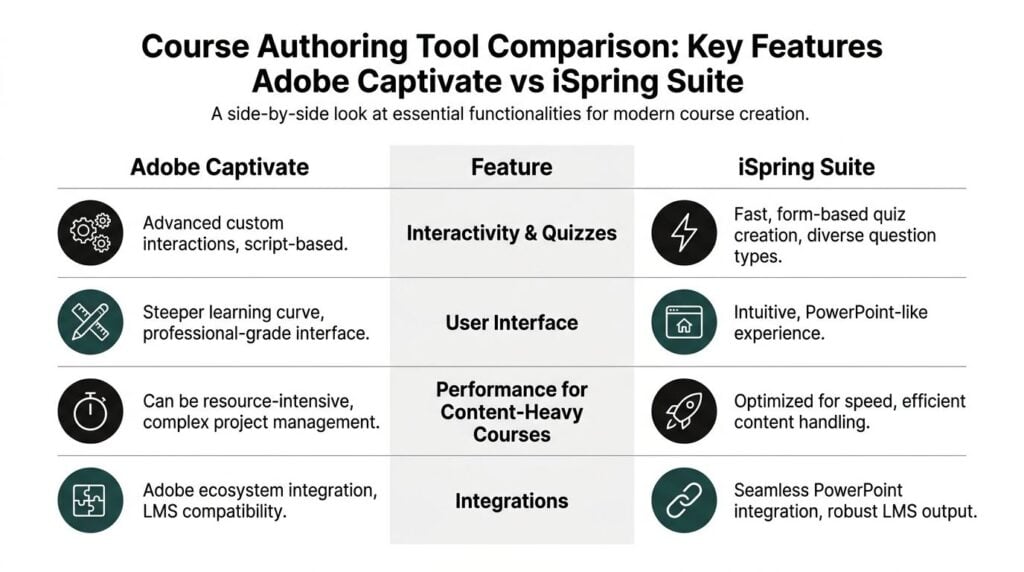
For standard course interactions, iSpring Suite is often the faster tool.
If your typical course includes knowledge checks, graded quizzes, surveys, and click-through interactions, iSpring keeps the process approachable. You are selecting from structured options rather than building interaction logic from scratch.
That matters for creators who publish often. When the tool stays out of the way, you spend more time shaping the lesson and less time managing the mechanics behind it.
Captivate can do more here, but the extra flexibility is only valuable if you need it. If you want custom behavior, more intricate branching, and logic tied to learner actions, Captivate gives you room to build that.
Software simulations and technical training
This is the clearest dividing line between the two tools.
Adobe Captivate provides a granular, timeline-based editing environment built for advanced software simulation authoring, including demo, training, and assessment modes. It also supports variable-driven quizzes and the kind of precise control teams need for detailed technical training, according to this comparison of Adobe Captivate and iSpring.
If you train users on a CRM, ERP platform, cybersecurity workflow, internal dashboard, or SaaS onboarding process, that matters a lot. You can capture workflows in a much more structured way and build failure paths, practice steps, and assessment logic around them.
iSpring can support screen-based learning, but it does not compete with Captivate as a simulation-first tool. For guided walkthroughs or presentation-style software explainers, it can be enough. For deep hands-on simulation work, Captivate is stronger.
If software practice is central to the learner outcome, Captivate earns serious consideration fast.
Mobile output and responsive behavior
Mobile is one of those areas where people often assume every tool works the same way. They do not.
Captivate’s responsive design is built more into the project structure. That gives experienced authors more control over how learning experiences adapt across screens. For teams building polished training across desktop, tablet, and phone, that can be a major advantage.
iSpring takes a simpler route. It produces mobile-friendly output through a universal player experience. For many creators, that is enough. The trade-off is less fine-grained control over layout behavior.
This is a classic creator decision.
- If you want quicker publishing with less device-specific tweaking, iSpring is easier to live with.
- If you need tighter control over how interactions behave across devices, Captivate gives you more room.
- If your learners mainly consume straightforward content, the simpler route often wins.
Design freedom versus development speed
Captivate is the stronger tool for authors who care about detailed behavior and pixel-level control.
That strength can become a weakness if the course itself does not need that level of control. I’ve watched creators spend hours adjusting things that learners seldom notice, while the launch date keeps sliding.
iSpring tends to protect you from that trap. Its structure encourages momentum. For newer teams, that is not a small advantage. It often means the course ships.
What works best for typical creator use cases
Here is the practical version.
| Task | Better fit | Why |
|---|---|---|
| Turning existing slide content into a course | iSpring Suite | Familiar PowerPoint workflow speeds authoring |
| Building technical software simulations | Adobe Captivate | Specialized simulation modes and detailed control |
| Launching a microlearning library fast | iSpring Suite | Lower friction for repeatable production |
| Creating custom branching interactions | Adobe Captivate | More flexibility in interaction logic |
| Updating content frequently | iSpring Suite | Easier for many teams to revise and republish |
If your work leans heavily toward learner engagement features that are practical rather than highly custom, this overview of interactive content creation tools is useful alongside the authoring decision.
Real-World Workflows and Scaling Your Courses
Features matter. Workflow decides whether your publishing process stays sane.

What iSpring feels like under deadline
For many creators, iSpring feels close to an accelerated version of work they already know.
If you can organize ideas in PowerPoint, you can get that material into a presentable e-learning course without a long adjustment period. That is a big deal when your content calendar is tight and your offers depend on shipping lessons consistently.
This is why iSpring works well for:
- Membership owners: You can keep adding short modules without rebuilding your whole process.
- Small training teams: Subject-matter experts can contribute without needing advanced authoring skills.
- Academic instructors: Existing lecture decks can become interactive lessons with less friction.
What Captivate feels like in production
Captivate is more deliberate.
You do more setup. You make more design decisions. You manage a more specialized environment. That can feel slow at first, and for some projects, it is slow. But on more complex builds, that structure helps.
If the course has intricate scenario logic or simulation-heavy training, the extra setup is not wasted effort. It is part of the production value.
Still, many new creators underestimate the operational cost of using a tool that asks more from them every time they publish an update.
Stability matters more than most reviews admit
This issue gets skipped too often in glossy comparison posts.
User reviews and performance analyses often note “stability issues” or “frequent crashes” with Adobe Captivate on large multimedia projects, while iSpring Suite’s PowerPoint foundation is generally described as more stable for high-volume course updates, according to this performance-focused comparison.
That matters if you are scaling.
A solo creator updating one flagship course can absorb some friction. A business managing a growing course library, multiple cohorts, or recurring member content feels every delay more sharply.
A tool problem is never just a tool problem. It turns into a missed update, a delayed launch, or a support email from a paying learner.
Scaling changes the decision
The right choice for your first course is not always the right choice for your fifth.
Once your library grows, you start caring about things like version control, republishing speed, edit confidence, and whether another team member can jump in without weeks of ramp-up.
That is where iSpring becomes attractive for entrepreneurial course businesses. It supports an efficient repeatable workflow.
Captivate still makes sense when your catalog revolves around complex interactive training. But if your growth plan looks more like “publish often, revise often, keep the pipeline moving,” then simpler systems tend to age better.
Platform decisions also connect to this. If you are still deciding where your courses will live, a solid online course platform comparison can help you think through hosting, learner management, and delivery alongside the authoring choice.
Calculating the True Cost of Your Authoring Tool
A lot of buyers stop at the license price.
That is a mistake.
The true cost of an authoring tool includes the software itself, the time it takes to learn, the effort required to maintain courses, and the system you use to deliver those courses to learners.
The visible price versus the actual bill
iSpring Suite’s pricing, including its academic and Max tiers, is generally more accessible than Captivate’s. Comparison data also gives iSpring a Value for Money score of around 4.5 out of 5, compared with 3.9 out of 5 for Adobe Captivate, according to Software Finder’s Adobe Captivate vs iSpring Suite analysis.
That tells you something useful about buyer sentiment. Many users see iSpring as the better return for common course creation needs.
But even that still does not tell the whole story.
Captivate is often positioned at a higher price point, and neither product is a complete LMS on its own. You still need somewhere to host, assign, track, and manage the learning experience.
The hidden expense most creators miss
The hidden expense most creators miss. Total cost of ownership begins to matter here.
For a course business, hidden costs often show up in places like these:
- LMS fees: The authoring tool is only one part of the stack.
- Integration effort: Publishing content and fitting it into your delivery platform takes time.
- Revision labor: More friction in the editing cycle means more staff time or founder time.
- Training overhead: A steeper tool can require more onboarding before anyone is productive.
Why creators should care about TCO early
I tell people to think in business years, not buying moments.
A tool that feels exciting in a trial can become expensive if every update takes longer, every new contributor needs more support, and every project depends on one advanced specialist to keep things moving.
This is one reason iSpring lands well with smaller businesses. The workflow is easier to distribute across a team, or even across a founder plus contractor arrangement.
If you are mapping your budget beyond the software itself, this guide on how much it costs to create an an online course helps frame the wider stack, not just the authoring line item.
My practical way to price these tools
I would compare them using four buckets:
| Cost bucket | Adobe Captivate | iSpring Suite |
|---|---|---|
| License posture | Higher-priced | More accessible for many creators |
| Onboarding effort | Higher | Lower for PowerPoint users |
| Revision cost | Can rise with complexity | Often easier to manage |
| Stack fit | Better if you need advanced custom work | Better if you need efficient production |
If you only compare subscription prices, you risk choosing the tool with the lower sticker shock and the higher operating drag.
Who Should Choose Captivate and Who Should Choose iSpring
This gets easier when you stop thinking like a reviewer and start thinking like an operator.
The solo course creator
If you are building and selling courses yourself, iSpring Suite is often the safer choice.
You probably need to move from idea to publishable lesson quickly. You also need updates to be manageable when customers ask for changes or when your content evolves. A PowerPoint-based workflow is easier to sustain when you are doing everything from outlining to sales pages.
The membership owner
For a membership library, I would lean iSpring in most cases.
Memberships reward consistency. You need a process that makes monthly or weekly publishing realistic. Fast republishing also matters because members expect active maintenance, not frozen content.
The academic instructor or subject-matter expert
This is another strong iSpring use case.
If your raw material already exists in slide decks, lecture notes, or workshop presentations, iSpring lets you build on what you have instead of forcing a full workflow reset.
The technical training designer
Captivate fits best when the course itself depends on practice inside a simulated environment.
If learners need to perform steps, react to prompts, and work through a precise workflow, Captivate’s strengths line up well with the job. This is common in software onboarding, internal systems training, and high-stakes process learning.
The agency or advanced instructional design team
For custom client builds, Adobe Captivate can make more sense.
Agencies need more control over branding, behavior, and interaction design. They also tend to have specialists who can justify the steeper learning curve because the project margins depend on that level of customization.
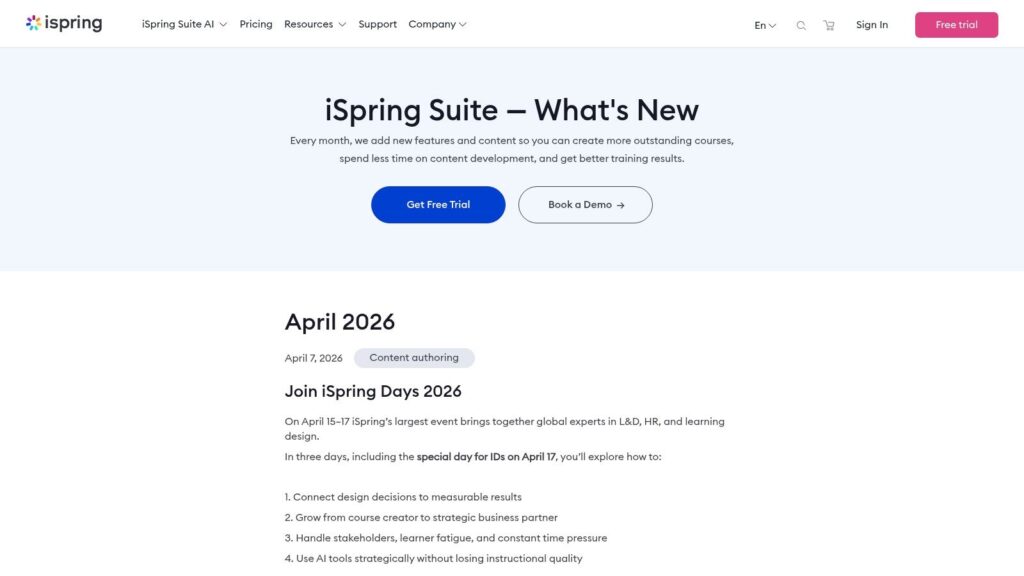
This screenshot reflects the kind of product evolution and update cadence many creators pay attention to when evaluating authoring software.
My short version
- Choose iSpring Suite if speed, familiarity, and repeatable publishing matter most.
- Choose Adobe Captivate if complex simulations and deep control are central to the learning product.
- Pick based on your workflow, not just the demo features that look impressive in a sales video.
The best tool is the one your team will still be using confidently after the fifth revision cycle, not the one that looks most powerful on day one.
Your Final Decision Checklist
If you are still undecided, this is the filter I would use.
How much learning time can you afford
Be blunt with yourself.
If you have very little time to learn a new environment, iSpring has the advantage. If you have the room to invest in a more demanding tool because your projects justify it, Captivate stays in the running.
Do your courses depend on advanced simulations
This one clears up a lot.
If software simulation is a core part of your offer, Captivate deserves serious weight. If your courses are more content-driven, assessment-driven, or presentation-driven, iSpring will often get you to market faster.
How often will you revise and republish
Creators underestimate this regularly.
A one-time build can tolerate a clunky workflow. A living course business cannot. If your content changes often, the easier revision path is often more valuable than the initial build environment with extensive features.
What does your full stack cost over time
Total Cost of Ownership analysis often finds that Adobe Captivate plus a separate LMS can be 40 to 60 percent higher over three years than an iSpring Suite and integrated LMS combination, according to Calibr’s comparison of iSpring Suite and Adobe Captivate.
That is the sort of number that changes a business decision.
Especially if you are building for long-term profitability, you need to count the whole setup, not just the authoring subscription.
Which trade-off bothers you less
Every tool decision has a trade-off.
Some creators hate complexity more than they value customization. Others are willing to absorb complexity because the learning design demands it.
Ask yourself which annoyance you can live with:
- Slower setup and a steeper curve
- Less design freedom but faster output
- More control but more maintenance
- More simplicity but fewer advanced build options
If you answer those questions, the decision often gets clear.
A simple final test
Use this quick matrix:
| If this sounds like you | Better fit |
|---|---|
| I need to publish fast and update often | iSpring Suite |
| I need advanced software simulations | Adobe Captivate |
| My team already works heavily in PowerPoint | iSpring Suite |
| I need more granular interaction control | Adobe Captivate |
| I care a lot about long-term stack efficiency | Usually iSpring Suite |
| I run specialized technical training projects | Usually Adobe Captivate |
For most independent course creators, I would steer toward iSpring Suite.
For specialized instructional design work, especially simulation-heavy training, Adobe Captivate still has a real edge.
The important part is choosing the tool that fits the business you are building, not the one that sounds most advanced on paper.