Can LMS Track Employee Certification? Your Ultimate Guide

Let’s get right to it. The short answer is a resounding yes. A modern Learning Management System (LMS) is far more than just a digital library for your courses. I like to think of it as the central command center for managing every single employee certification, from the moment it’s issued to the day it expires.
Answering The Big Question: Can An Lms Track Employee Certifications?
If you’re still juggling confusing spreadsheets and setting manual email reminders, I’m here to show you a much better way. An LMS is designed to pull you out of that chaotic, reactive world and place you in a fully automated, organized system. It becomes your single source of truth for everything related to certification and compliance.
This shift gives you instant visibility into your team’s qualifications, helping you spot compliance risks before they snowball into real problems. Ultimately, it’s all about making your job easier while ensuring your organization stays compliant, skilled, and ready for anything.
Moving Beyond Manual Tracking
Relying on an LMS for certification is quickly becoming standard practice. In fact, a staggering 83% of organizations now use their LMS platforms to keep an eye on training completion and certification status. It’s a clear signal that manual tracking is on its way out.
For a long time, managing certifications meant drowning in paperwork, endless email chains, and the constant fear that something important would slip through the cracks. An LMS flips that script entirely. Instead of chasing down information, you get a powerful tool that offers:
- Centralized Control: All your certification data, from issuance dates to expiration notices, lives in one tidy, accessible place. No more hunting through disconnected files.
- Less Administrative Headache: Automation takes over the tedious, repetitive tasks. Think automatic renewal reminders and report generation. This frees you up for more strategic work.
- Improved Compliance: Need to pull a report for an audit? It’s a matter of a few clicks. You can easily prove your organization meets all necessary requirements, on demand.
An LMS fundamentally changes how you approach compliance. It transforms certification management from a reactive, often stressful chore into a proactive, automated process that runs quietly in the background.
This is invaluable for managing all sorts of credentials, whether it’s broad safety training for the whole company or highly specialized credentials like hospitality industry certifications. A good system doesn’t just store data. It actively manages the entire lifecycle of each and every certification.
To give you a clearer picture, let’s compare the old way with the new.
Manual vs. LMS Certification Tracking
Here’s a quick look at how using an LMS for certification tracking stacks up against traditional manual methods. The difference is pretty stark.
| Feature | Manual Tracking (Spreadsheets) | LMS Tracking (Automated) |
|---|---|---|
| Data Entry | 100% manual, prone to human error. | Automated data capture from course completions. |
| Renewal Alerts | Manual calendar reminders or email follow-ups. | Automated notifications sent to employees and managers. |
| Reporting | Time-consuming process of manually compiling data. | Instant, real-time reports generated with a few clicks. |
| Accessibility | Limited to whoever has the latest version of the file. | Centralized access for all authorized users, anytime. |
| Scalability | Becomes unmanageable as the team grows. | Easily scales from 10 employees to 10,000+. |
| Audit Trail | Difficult to prove and relies on email chains and notes. | Automatic, tamper-proof record of all activities. |
As you can see, the LMS is a completely different and more powerful way of working.
If you’re curious about the other ways an LMS can support your business, you might be interested in the core benefits of using a Learning Management System. This is all about building a more competent, compliant, and prepared workforce from the ground up.
So, we’ve agreed that an LMS is your best bet for managing employee certifications. But how does it actually do it? It’s not just a single magic button. It’s a suite of powerful, interconnected features all working together to make your life a whole lot easier.
Let’s pull back the curtain and look at the essential tools built into modern learning platforms. These are the features designed to take the soul-crushing manual labor out of tracking so you can focus on the bigger picture.
Automated Certificate Issuance
This is one of the most immediate and deeply satisfying benefits. The second an employee nails a required course or passes a quiz, the LMS can instantly generate and issue a personalized certificate.
Just think about the time that frees up. No more manually creating PDFs. No more sending individual emails. And definitely no more employees pinging you to ask where their certificate is. The system just handles it. These aren’t just generic documents, either. You can customize them with your company branding, the employee’s name, the certification title, and the completion date.
The real beauty of automated issuance is that it creates an immediate, tamper-proof record. That certificate is instantly logged in the employee’s profile and becomes part of the official audit trail, all without you lifting a finger.
If you’re curious to see how this works behind the scenes, we’ve got a guide on tools to automate course completion certificates that dives into the nuts and bolts.
Expiration and Renewal Management
Here’s where an LMS shifts from being helpful to being an absolute lifesaver for compliance. Many critical certifications, think safety, regulatory, or technical skills, aren’t a one-and-done deal. They expire. And trying to track hundreds of different expiration dates on a spreadsheet is a genuine recipe for disaster.
A solid LMS with certification tracking will take care of everything:
- Log Expiration Dates: When a certificate is issued, the system automatically logs its validity period.
- Send Automated Reminders: The platform then automatically sends out notifications to both the employee and their manager well before a certificate is about to expire. You can usually set the timing yourself, like sending alerts at 90, 60, and 30 days out.
- Manage Recertification: It can point employees directly to the right renewal course or assessment, making the entire process smooth and crystal clear.
This automated workflow ensures nothing falls through the cracks. You can finally rest easy knowing your team will stay compliant and that you have a system in place to prevent costly, embarrassing lapses. It transforms a high-risk manual headache into a reliable, automated process.
Automating Your Compliance and Reporting

This is where an LMS truly shows its value, especially if you work in a heavily regulated industry. We all know that manual reporting is a nightmare, and that feeling only gets worse when an auditor comes knocking. An LMS can transform this dreaded, high-anxiety chore into a simple, click-of-a-button process.
It’s about turning a high-stakes, manual task into a routine, manageable one. Think about it. Instead of frantically digging through old emails and spreadsheets for proof of training, you just pull up a clean, organized report.
From Manual Nightmare to Automated Dream
I can’t tell you how many training managers I’ve talked to who live in fear of audits. It’s a massive source of stress. With an LMS, you can generate audit-ready reports that show exactly who is certified, when they earned it, and when it’s time for renewal.
These automated reports are your best defense against costly fines and legal headaches. For instance, reports like certification expiration trackers automatically send out renewal reminders and create ready-made documentation. This lets compliance officers find answers to critical questions in seconds. In fact, research shows that 63% of organizations report their LMS-powered compliance programs help slash legal costs and fines. You can dig into more of these findings from the latest LMS statistics on Programs.com.
The ability to instantly generate a detailed compliance report doesn’t just save you time during an audit. It gives you peace of mind year-round, knowing that your records are always accurate, organized, and ready.
This is especially critical in fields with stringent professional development requirements. In healthcare and allied professions, for example, professionals have to meticulously log their activities. An LMS can dramatically streamline this, simplifying AHPRA compliance and CPD tracking and ensuring every development activity is logged correctly and ready for review.
Real-World Reporting in Action
Let’s look at a concrete example. Imagine you manage a team of field technicians who all need an annual safety certification to be on-site. Without an LMS, you might have one person whose certification lapsed last week without anyone noticing. That’s a huge liability just waiting to happen.
With an LMS, you can run a quick report to see:
- Who is currently compliant: A list of all technicians with a valid safety certification.
- Who is at risk: A list of technicians whose certifications expire in the next 30 days.
- Who is non-compliant: A list of anyone whose certification has already expired.
You can even schedule this report to run automatically every Monday morning and land right in your inbox. This proactive approach helps businesses maintain their operational licenses and turns a potential crisis into a simple administrative check-in. It’s all about using automation to stay ahead of the game.
Integrating Your LMS with Other Business Systems
Your LMS is a powerful tool on its own, but its real magic is unlocked when it starts talking to your other core business systems. It shouldn’t be an island. To get the most out of your investment, it needs to communicate with the tools you already use every day, especially your HR Information System (HRIS).
Now, I know the technical side of things can sound a little intimidating. Don’t worry. Think of it like this: your business systems are a team, and they work best when they’re all on the same page, sharing information freely. I’ll break down exactly how that happens.
Connecting Your Tech Stack
At the heart of this connection are technical standards like SCORM and xAPI. You don’t need to be a developer to get this. Just think of them as universal languages that let your training courses and your LMS communicate perfectly, no matter who created them. This is what makes it possible for the LMS to know, without a doubt, when a course is completed.
But the real game-changer is connecting your LMS directly to your HRIS. This integration is what creates a seamless, automated flow of employee data. When these two systems are synced up, you can say goodbye to countless hours of manual data entry and dramatically cut down the risk of human error. It’s a huge win for efficiency.
Integrating your LMS and HRIS moves you from managing data to using it. Information flows automatically, which means less busywork for you and more accurate, real-time insights for the entire organization.
This simple flowchart shows how data from your systems can flow automatically to create reports for audits, taking the manual work, and the potential for mistakes, out of the equation.
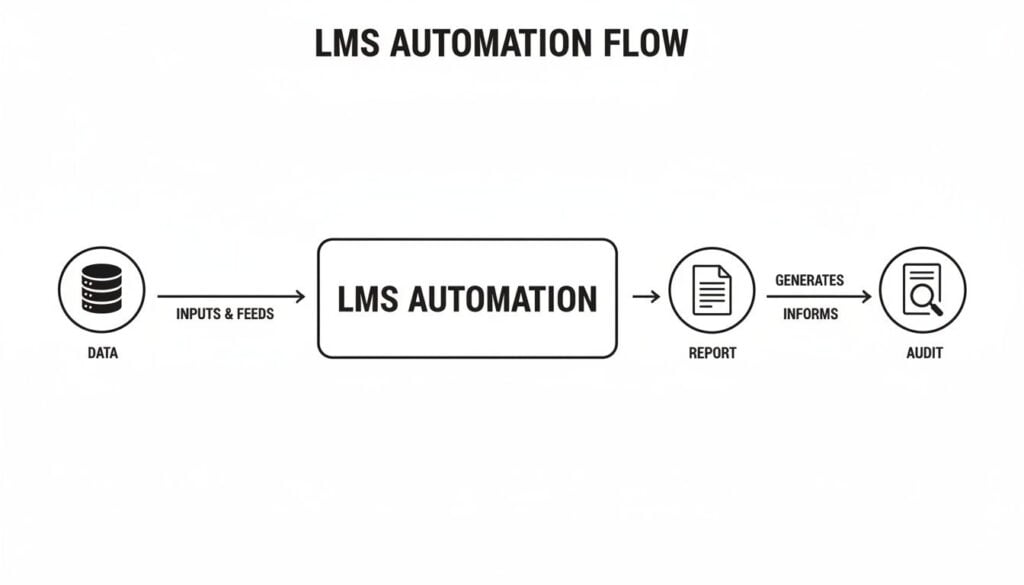
The key insight here is how automation bridges the gap between your raw data and the audit process, removing the manual steps where errors often creep in.
The Power of HRIS Integration
So, what does this actually look like day-to-day? When your HR team adds a new hire to the HRIS, the integration can kick off a series of events in the LMS, all without anyone lifting a finger.
- Automatic Enrollment: The new employee is instantly enrolled in all required onboarding and certification courses for their specific role. No more checklists or manual assignments.
- Profile Syncing: When an employee earns a certification, that achievement is automatically written back to their master profile in the HRIS. Everyone has the same, correct information.
- Role Changes: If an employee gets a promotion or moves to a new department, the system can automatically update their required training plan to match their new responsibilities.
This seamless data exchange ensures that employee records are always up-to-date across all platforms. You can explore this idea further in our guide on LMS integration with Student Information Systems, which works on similar principles.
Ultimately, this connected ecosystem doesn’t just save time. It builds a more agile, responsive, and data-driven training program that scales right alongside your business. It makes it easy to answer the question, “Can an LMS track employee certification?” with a confident “Yes, and it can do so much more.”
A Practical Checklist for Setting Up Certification Tracking
Alright, feeling ready to get started? Let’s move from theory to action. I’ve put together a straightforward checklist to guide you through setting up your certification tracking in an LMS. Think of this as your step-by-step plan to make sure you cover all the important bases.
We’ll start with the foundational work before diving into the more technical parts of the setup. It’s a simple, three-phase process that will take you from planning to a fully operational system.
Phase 1: Foundational Planning
This initial phase is all about getting organized. Before you touch a single setting in your LMS, you need a crystal-clear picture of what you’re tracking and why. Honestly, getting this part right makes the technical setup a breeze.
- Identify All Required Certifications: First things first, make a complete list of every single certification your employees need. Don’t just dump them into a spreadsheet. Group them by role, department, or location to keep things tidy.
- Define Renewal Timelines: For each certification on your list, document its validity period. Is it good for one year? Three years? Does it require an annual refresher? Get these dates down.
- Assign Ownership: Decide who is responsible for overseeing compliance for each certification or department. This creates clear accountability from the start and prevents the “I thought you were watching that” problem later.
Phase 2: Technical Setup and Configuration
Now it’s time to jump into the LMS and bring your plan to life. This is where you’ll configure the system to do all the heavy lifting for you, so you can focus on more important things.
- Build Your Courses: Create or upload the training materials and assessments that lead to the actual certification. Make sure they align perfectly with the requirements you outlined in Phase 1.
- Design Your Certificates: Use the LMS template builder to create branded, professional certificates. Be sure to include key information like the employee’s name, the certification title, completion date, and most importantly, the expiration date.
- Set Up Automation Rules: This is the magic step. Configure the system to automatically issue certificates the moment a course is completed. Then, create rules to send out renewal reminders at specific intervals, like 90, 60, and 30 days before expiration.
Your goal during the technical setup is to automate as much as humanly possible. A well-configured system should handle issuance, tracking, and reminders without you needing to manually intervene for every single employee.
Phase 3: Rollout and Training
With the system configured, the final step is to introduce it to your team. A smooth rollout ensures everyone understands how to use the new system and, just as crucially, why it’s important.
- Communicate with Employees: Announce the new process clearly. Explain how they can access their training, view their certifications, and what those automated reminders actually mean. No surprises.
- Train Your Managers: This is key. Show managers how to use their dashboards to monitor their team’s compliance status at a glance. They are your first line of defense in keeping everyone up-to-date and certified.
To make this even easier, I’ve organized these steps into a table you can print out or save. It breaks down each phase into actionable tasks and highlights the key things to think about.
Your LMS Certification Tracking Checklist
This table is your roadmap for a successful implementation. Follow it step-by-step to ensure you don’t miss any critical details.
| Phase | Task | Key Consideration |
|---|---|---|
| 1. Planning | Identify Required Certifications | Group by role or department for clarity. Are they internal or external? |
| Define Renewal Timelines | Note the validity period (e.g., 1 year, 3 years) and any grace periods. | |
| Assign Ownership | Who is the final point of contact for compliance in each area? | |
| 2. Setup | Build/Upload Courses & Assessments | Ensure content directly maps to certification requirements. |
| Design Certificate Templates | Include employee name, cert title, completion date, and expiration date. | |
| Configure Automation Rules | Set up auto-issuance on completion and timed renewal reminders (90/60/30 days). | |
| Set Up Dashboards & Reports | Create views for managers to see team status and for admins to see overall compliance. | |
| 3. Rollout | Communicate with Employees | Announce the new system, explaining the benefits and how to access it. |
| Train Managers & Admins | Show them how to use reports and dashboards to track their team’s progress. | |
| Monitor & Gather Feedback | After launch, check in with users to identify any friction points or areas for improvement. |
By following this checklist, you’re not just implementing a feature. You’re building a reliable, automated system that protects your organization and empowers your employees. It’s a proactive approach that turns compliance from a recurring headache into a smooth, background process.
Best Practices for a Successful Rollout
Just having the LMS is the starting line, not the finish. To actually get value out of it, you need a smart plan for how you’ll use it. I’m going to share some practical, field-tested advice for implementing your certification tracking so it runs smoothly from day one. These are the small details that make a massive difference.
It all begins with creating certification paths that are clear and logical. When an employee logs in, they should see a simple roadmap telling them exactly what they need to do and when. Throwing a jumbled mess of courses at them without any context is a surefire way to create confusion and kill motivation.
Structure Your Certification Paths
Think of a certification path like a GPS route for someone’s career development. It needs to guide them from point A to point B without any confusing detours.
- Group by Role: Build specific learning paths for different jobs. A salesperson needs a completely different set of certifications than a warehouse operator.
- Use Prerequisites: If one certification is a building block for another, make sure the LMS enforces that sequence. This is critical for preventing people from jumping ahead and skipping foundational knowledge they’ll need later.
- Keep It Visual: Use the LMS features to create a visual timeline or progress bar. Seeing how far they’ve come and what’s next is a powerful motivator for employees.
When you get this structure right, employees feel empowered, not overwhelmed. They understand the “why” behind the training, which dramatically boosts their drive to get it done.
Configure Smart Notifications
Automated reminders are a huge time-saver, but there’s a fine line between a helpful nudge and annoying spam. The goal is to set up alerts that are genuinely helpful, not just another piece of inbox clutter.
Don’t just flip the switch on default notifications. Take a few minutes to customize the message and timing to fit your company culture. A friendly, encouraging tone goes a long way.
For instance, a simple reminder 60 days out, another at 30 days, and a final heads-up a week before expiration is a great starting point. This gives everyone plenty of time to get their recertification done without feeling nagged or rushed.
The real-world impact of getting this right is huge. One case study showed that a well-implemented LMS led to a 50% drop in volunteer attrition and a 60% reduction in operating costs. You can discover more insights from this Skill Lake case study.
Finally, be crystal clear about who is responsible for what. Train your managers on how to use their dashboards to keep an eye on team compliance. And make sure every employee knows exactly who to contact if they have questions. These are the practices that separate a clunky, frustrating system from one your team actually wants to use.
Answering Your Top Questions About LMS Certification Tracking
Over the years, I’ve had hundreds of conversations with training managers about the nuts and bolts of using an LMS for certifications. A few key questions always come up. Let’s tackle them head-on so you can get a clear picture of how this really works in practice.
Can It Track Certifications From Other Providers?
Yes, and this is a bigger deal than it sounds. While your LMS is perfect for issuing certificates for your own training, a modern system knows that’s only half the story. Your team gets certified by all sorts of external bodies, and you need one place to see it all.
Most systems handle this beautifully. You can create a “certification” placeholder in the LMS and then have employees upload proof of completion, like a PDF certificate from an industry conference or a professional board. From there, a manager can approve it, set an expiration date, and just like that, the external credential is part of your automated tracking and reporting.
The real power of an LMS isn’t just issuing certificates. It’s centralizing your entire compliance picture. Bringing external credentials into the fold gives you a complete, 360-degree view of your team’s skills and qualifications without juggling multiple systems.
What About Complex Recertification Paths?
This is a fantastic question because recertification often isn’t as simple as retaking the same course. Industry standards evolve, and so should your training.
A good LMS is built for this. Instead of just a simple renewal, you can create unique recertification paths. Here’s a typical workflow:
- Initial Certification: An employee completes the foundational “Safety 101” course and gets their certificate.
- Renewal Period: As the expiration date gets closer, the LMS doesn’t re-enroll them in “Safety 101.” Instead, it automatically assigns them the new “Advanced Safety Protocols 2.0” course.
- New Certificate Issued: Once they finish the updated course, they get a new certificate with a fresh validity period.
This keeps your team current with the latest information, not just checking a box by repeating old content. It makes the question “Can an LMS track employee certification?” a lot more interesting, with the answer being “Yes, and it can do it intelligently.”
How Much Manual Work Is Still Required?
Let’s be real. It’s not a “set it and forget it” magic button, but it gets you pretty close. The goal is to automate the grind, not your entire job.
The heavy lifting happens upfront. You have to define your certification rules, design certificate templates, and build the courses. That takes time and thought.
But once it’s running? Your role shifts from administrator to strategist. Instead of chasing people down for paperwork and manually updating spreadsheets, you’ll spend your time monitoring dashboards, analyzing compliance reports, and tweaking your training programs for better results. The LMS handles the nagging and the number-crunching, freeing you up to do the work that actually moves the needle.