Create Online Course Platform from Scratch: A Practical Guide

So, you’re ready to move beyond just creating a single course. You have a bigger vision: building an entire online course platform, a dedicated home for your teaching and your community. This is where a bit of upfront strategic thinking can save you from massive headaches and wasted cash down the line.
Planning Your Course Empire: The First Moves
Building a course platform can feel like a monumental task, but it doesn’t have to be. The entire project hinges on getting two things right at the very beginning: knowing exactly who you’re building for, and defining the absolute simplest version of your platform that still solves their core problem.
Nail this foundation, and everything else falls into place so much more easily. Think of it as your blueprint. You wouldn’t pour the concrete for a house without one, and you shouldn’t start building a platform without this initial plan. It’s what keeps you from burning time and money on features nobody actually wants or needs right now.
Get Laser-Focused on Your Audience
Before you even think about tech stacks or pricing, you have to know your ideal student inside and out. Who are they? What’s the one problem that keeps them up at night? The more specific you can get, the better.
And I’m not just talking about basic demographics like age or location. You need to dig into the why behind their behavior.
- What’s their biggest struggle? Pinpoint the exact pain point your platform will solve. Are they trying to master a new piece of software for their job? Pick up a creative hobby they’ve always dreamed of? Make a scary but exciting career change?
- What have they already tried? Chances are, this isn’t their first attempt. They’ve probably watched a bunch of random YouTube tutorials, bought a book, or even tried another course that didn’t stick. Understanding where those other solutions failed is your golden ticket to positioning your platform as the real answer.
- What does “success” actually look like to them? What’s the real win? It’s probably not “finishing your course.” The real win is getting that promotion, landing their first freelance client, or just feeling the pure joy of mastering a new skill.
Let’s say you’re building a platform for aspiring freelance graphic designers. Their main challenge isn’t just “learning design software.” Their real challenge is “finding and keeping high-paying clients.” That single insight changes everything, from the courses you create to the way you market the entire platform.
Define Your Minimum Viable Product (MVP)
Once you have that crystal-clear picture of your student, it’s time to define your Minimum Viable Product, or MVP. It’s a term borrowed from the startup world, and it just means building the simplest, most essential version of your idea that you can launch quickly.
The point is to focus only on the core features that solve your student’s #1 problem, not to launch something cheap or half-baked.
The whole goal of an MVP is to get a real, working product into the hands of actual users as fast as you can. It lets you gather feedback, prove your idea has legs, and maybe even start making money without getting stuck in development hell for a year.
Before you go all-in, learning how to build MVP is the smartest way to test the waters and see if people will actually pay for what you’re creating.
So, what does an MVP for a course platform really need? Just the bare essentials.
- User Sign-Ups & Profiles: A simple way for students to create an account and log in.
- Basic Course Uploads: The ability for you to upload your videos, PDFs, and text-based lessons.
- A Secure Payment Gateway: A connection to something like Stripe or PayPal so you can actually get paid for your courses or memberships.
That’s it. Seriously.
Notice what’s missing? Fancy community forums, complicated quizzes with leaderboards, gamification badges, or automated drip content. Those features are all great, but they are not essential for day one. You can and should add them later, based on what your real students tell you they want. This approach gets you to market faster, helps you avoid building features nobody uses, and lets you start learning from your users from the moment you launch.
Choosing Your Platform’s Technical Foundation
Alright, let’s get into the tech side of things. I promise to keep it practical and skip the jargon. When you decide to create an online course platform, your first major technical decision comes down to one big choice: use an all-in-one hosted service or build your own self-hosted platform.
Each path has its own set of trade-offs, and what’s right for you really hinges on your budget, how comfortable you are with technology, and where you see your business going in the long run. Let’s break down what each option actually means for you.
This decision tree can help you visualize how defining your audience and MVP can steer you toward the right technical foundation from the get-go.
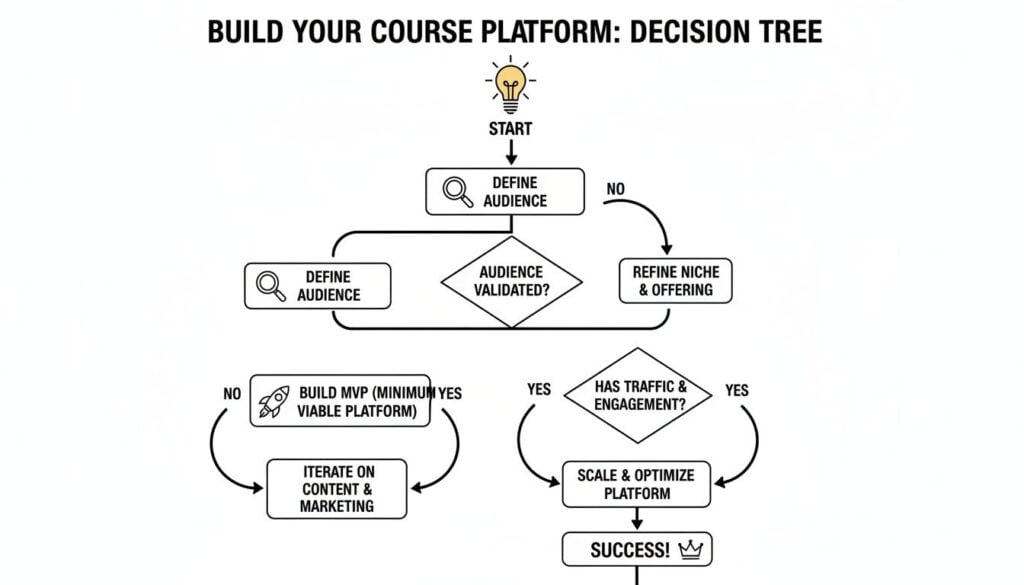
As you can see, getting crystal clear on your core offering first makes it so much easier to know whether you need the quick setup of a hosted solution or the long-term flexibility of building it yourself.
The All-In-One Hosted Platform Route
Hosted platforms are services like Kajabi, Teachable, or Thinkific. They are designed to be the absolute fastest way to get your online course business off the ground and start making sales.
Think of it like renting a fully furnished storefront in a busy mall. The landlord (in this case, the platform) handles all the maintenance, security, and infrastructure. Your job is just to stock your shelves and open the doors.
These platforms bundle everything you need into a single monthly subscription:
- Website Hosting: No need to shop for a web host, it’s included.
- Course Player: They provide the video player and lesson structure out of the box.
- Payment Processing: Secure payment gateways are built right in and ready to go.
- Technical Support: If something breaks, it’s their job to fix it, not yours.
The biggest win here is speed and simplicity. You can literally have a professional-looking platform ready to sell courses in a weekend without touching a single line of code.
Of course, this convenience comes at a price. You’ll have less control over the look, feel, and functionality. While there are customization options, you’re ultimately operating within their system. The monthly fees can also add up, and many platforms take a small percentage of your sales on their entry-level plans.
The Self-Hosted Platform Route
Going the self-hosted route means you’re building your platform on your own digital turf. This is like buying a plot of land and building your store from the ground up. You have total control over every single detail, from the branding and layout to the specific features you want to offer.
The most common way to do this is by using WordPress, which famously powers over 43% of all websites, and pairing it with a powerful Learning Management System (LMS) plugin like LearnDash or LifterLMS.
Here’s what that looks like in practice:
- You choose your hosting: You’ll sign up for a web hosting plan from a provider you choose.
- You install WordPress: Most hosts make this a simple one-click process.
- You add an LMS plugin: This plugin is what transforms your standard WordPress site into a full-featured course platform.
- You control everything: You can integrate any tool you want, customize any page, and design the exact learning experience you envision for your students.
This path offers unmatched flexibility and true ownership. In the long run, it’s often more cost-effective because you’re paying for hosting and specific plugins instead of a hefty monthly subscription. The catch? It demands more technical setup and ongoing maintenance from you. When something goes wrong, you’re the one who has to fix it.
Choosing your technical foundation is a strategic business decision, not just a tech one. The best choice aligns with your current resources (time, money, skills) and your future growth plans.
To go deeper on this, you might find it helpful to check out our guide on how to choose an LMS that fits your specific needs.
Hosted vs. Self-Hosted Platform Comparison
To make this decision a little easier, here’s a quick look at the major differences between all-in-one hosted solutions and building your own self-hosted online course platform.
| Feature | Hosted Platforms (e.g., Kajabi, Teachable) | Self-Hosted Platforms (e.g., WordPress + LearnDash) |
|---|---|---|
| Speed to Launch | Very Fast (hours to days) | Slower (days to weeks) |
| Technical Skill Required | Low / None | Moderate (requires some learning) |
| Customization & Flexibility | Limited to platform templates and features | Nearly unlimited; full control over design and functionality |
| Ownership | You’re renting space on their platform | You own the platform and all data outright |
| Maintenance & Security | Handled by the platform provider | Your responsibility |
| Cost Structure | Monthly subscription fee + transaction fees | Hosting fee + one-time/annual plugin costs |
| Long-Term Cost | Can become expensive as you scale | Generally more cost-effective over time |
| Support | Platform-provided customer support | Community forums, plugin developers, or hired help |
Ultimately, neither option is universally “better.” It’s about what’s better for you right now.
Making the Right Choice for You
So, which path should you take? There’s no single correct answer, but here’s a simple way to frame the decision.
Go with a hosted platform if:
- You want to get to market as quickly as possible.
- You are not comfortable handling technical setup and maintenance.
- You prefer a predictable monthly cost and having everything managed in one place.
Go with a self-hosted platform if:
- You want complete control over your branding, design, and features.
- You’re okay with a bit of a technical learning curve (or can hire help).
- You want to minimize ongoing fees and build a more scalable, long-term asset.
For example, a yoga instructor who just wants to sell a few video courses and isn’t tech-savvy would probably thrive on a platform like Teachable. On the other hand, a software developer building a large-scale coding academy with unique, interactive features would be much better served by a self-hosted WordPress and LearnDash setup.
Designing an Engaging Student Learning Experience
Once you’ve sorted out the technical foundation, the real fun begins. A solid platform is crucial, but the learning experience you design is what will keep students engaged and make them feel like they got their money’s worth. This is where you shift from being a builder to an architect of education.
When you create an online course platform, you’re selling a transformation, a result, not just videos and PDFs. To deliver on that promise, the way you structure and present your content has to be thoughtful, engaging, and designed for how people actually learn today.

It’s about making the learning journey feel intuitive and rewarding, not like a chore. The goal is to design an experience that pulls students forward, making them excited to log in and see what’s next.
Embrace Microlearning for Modern Learners
Let’s be honest, attention spans aren’t what they used to be. Nobody wants to sit through a 90-minute lecture video anymore. That’s where the concept of microlearning comes into play, and it’s a total game-changer for online courses.
Microlearning is all about breaking down complex topics into small, easily digestible chunks. Instead of one massive module on a single topic, you create a series of short, focused lessons that deliver quick wins.
Here’s what that could look like in practice:
- Short Videos: Aim for videos between 5 and 10 minutes long. Each one should cover a single, specific concept or skill.
- Quick Quizzes: After a few videos, a simple 3-5 question quiz can help reinforce the key takeaways without feeling like a stressful exam.
- Downloadable Checklists: A one-page PDF or a simple checklist can provide a quick, actionable tool students can use immediately.
This approach respects your students’ time and makes it way easier for them to fit learning into their busy lives. They can squeeze in a lesson during a lunch break or while waiting for the kids. This makes progress feel constant and achievable, which is a massive motivator.
Use Drip Content to Guide the Journey
Have you ever bought a course, logged in, and seen a massive list of 150 lessons staring back at you? It’s completely overwhelming. Most people just give up before they even start.
The solution is drip content.
This just means you release the course content to students on a set schedule instead of giving them everything at once. For example, you could release a new module every Monday for eight weeks.
Using a drip schedule does more than just prevent overwhelm. It creates a shared learning experience, keeps students on a similar pace, and builds anticipation for what’s coming next. It turns a self-paced course into a guided journey.
This is especially powerful if you have a community component. When everyone is working on Module 3 at the same time, the discussion in your community forum is more focused and relevant for everyone involved.
Make Learning a Team Sport
Learning online can feel incredibly lonely. One of the biggest reasons students drop out of online courses is a feeling of isolation. You can solve this by building community elements directly into your platform.
This doesn’t have to be complicated. A simple community forum or a dedicated chat space can make a world of difference. It gives students a place to:
- Ask questions and get help from both you and their peers.
- Share their wins and get encouragement when they’re stuck.
- Network and build relationships with other people in their field.
When students feel connected to a community, their investment in the platform goes way up. They’re no longer just a customer, they’re part of a group. This sense of belonging is one of the most powerful retention tools you have. These principles are central to effective online teaching, and if you’re interested, you can explore more about instructional design for online courses in another one of our articles.
Setting Up Your Platform’s Monetization Strategy

Alright, let’s get to the part that turns your passion project into a real business: making money. You’ve poured your heart into creating an incredible learning experience. Now you need a pricing strategy that actually reflects its value and builds a sustainable income stream.
This is so much more than just picking a number out of thin air. It’s about matching your business model to the transformation you’re promising your students. Get this right, and you’ll create predictable revenue, increase the lifetime value of every student, and have the cash flow to keep growing your platform. It’s a make-or-break piece of the puzzle.
One-Time Purchases: The Classic Approach
The most straightforward way to sell your course is with a simple, one-time payment. A student pays once and gets lifetime access to all the material. It’s a clean, easy-to-understand transaction that’s been the backbone of the online course world for years.
I’m a fan of this model for a couple of reasons. It’s a low barrier to entry for customers who are a bit hesitant to commit to a recurring subscription. Plus, the upfront revenue can be a massive boost, especially when you’re just getting started. Selling a signature course for a single payment of $497 is a very common and very effective strategy.
But there’s a catch. The major downside is that your income can be a rollercoaster. You’re constantly on the hunt for new sales to keep the lights on, which can easily lead to a “feast or famine” cycle that’s stressful to manage.
Memberships and Subscriptions for Predictable Revenue
This is where things start to get really powerful. Instead of selling one-off access, you charge a recurring fee, maybe monthly or annually, for access to your content. This one shift fundamentally changes your business from chasing individual transactions to building long-term relationships.
So, why is this so effective?
- Predictable Income: You have a pretty good idea of how much money is coming in each month. That makes it so much easier to plan, budget, and reinvest in your business with confidence.
- Higher Customer Value: Think about it. A student who happily pays $49/month for two years is far more valuable than one who pays a single $497 fee.
- Stronger Community: The membership model naturally encourages ongoing engagement. It helps you build a dedicated, thriving community around your platform, which in itself becomes a massive value-add.
You could offer a membership that includes access to all your courses (both current and future), a private community forum, and maybe even monthly live Q&A calls. This creates an ongoing value proposition that gives people a compelling reason to stick around.
A recurring revenue model shifts your focus from simply acquiring new customers to retaining the ones you already have. This long-term perspective is the foundation of a truly resilient online education business.
Of course, to make any of this work, you need to turn visitors into buyers. It’s essential to understand how to improve ecommerce conversion rates and boost sales.
Smart Pricing Tactics to Boost Your Sales
Beyond these two core models, there are other smart tactics you can layer on top to increase your revenue and offer more flexibility. I’ve found these to be especially effective in my own projects.
Payment Plans
For any high-ticket course, offering a payment plan is a no-brainer. Breaking a $997 course into four monthly payments of $297 suddenly makes it accessible to a much wider audience who might not have the cash upfront. You might charge a little more in total for the payment plan to cover the risk and processing fees, but the jump in sales almost always makes it worthwhile.
Course Bundles
If you have more than one course, bundling them together at a discount is a fantastic way to increase your average order value. A customer who was planning to buy one course for $197 could easily be tempted by a bundle of three related courses for $397. It’s a win for them and a bigger win for you.
Corporate Licensing
Seriously, don’t sleep on the B2B market. You can offer a corporate license where a company pays a flat annual fee to give a certain number of their employees access to your training. This can become a highly profitable and scalable revenue stream that many course creators completely overlook.
Launching and Marketing Your New Course Platform
You’ve built an incredible platform, but now comes the part that really matters: getting students through the virtual door. This is your playbook for a killer launch and, just as crucially, for keeping that momentum going long after the initial buzz dies down.
Let’s be real, the “if you build it, they will come” strategy is a fantasy. A great launch isn’t an accident. It’s the result of a deliberate, well-executed plan that starts weeks, or even months, before you ever think about opening for enrollment.

Building Momentum Before You Launch
The secret to a packed-out launch day is making sure you aren’t launching to an empty room. This pre-launch phase is all about building anticipation and warming up a ready-to-buy audience. You want people waiting with their credit cards out on day one.
So, how do you make that happen? It all starts with the most valuable asset in your marketing toolkit: an email list.
- Create a High-Value Lead Magnet: Don’t just ask for emails. Offer a free PDF guide, a mini-course, or a checklist that solves a small, specific problem for your ideal student. This gives them a taste of your teaching style and earns you a spot in their inbox.
- Generate Buzz on Social Media: Stop just announcing things. Share behind-the-scenes content of your platform build, ask your audience for input on course topics, and run polls. Make them feel like they’re a part of the creation process.
- Start a Countdown: Use your email list and social channels to build excitement. A simple “7 days until launch!” campaign can work wonders to keep your platform top of mind.
This isn’t just busy work. It’s about making your audience feel invested, so when you finally ask for the sale, it feels like the natural next step for them.
Mapping Out Your Launch Week Plan
Launch week is showtime. This is where all that pre-launch effort pays off. From my experience, a structured, high-energy event can be the single most effective way to drive those crucial first sales.
A live webinar or a multi-day workshop is perfect for this. It gives you a chance to connect with your audience in real-time, deliver massive value, and then perfectly position your new platform as the ultimate solution.
Your launch event should be an incredibly valuable training session that just happens to end with an offer, not a long sales pitch. Teach them something amazing for free, and they’ll be far more likely to pay for the full experience.
Think of it as the ultimate preview of the quality they can expect inside your platform. To really get into the nuts and bolts of this, check out our complete guide on how to market an online course.
Sustaining Growth After the Launch Dust Settles
A big launch is great, but a truly successful online course platform has a system for consistent, long-term growth. That initial spike in sales is just the beginning. The real work is turning that launch into a predictable revenue engine.
This is where you shift from a sprint into a sustainable marketing rhythm.
Content Marketing and SEO
Get a blog going on your platform’s website. Write articles that answer the exact questions your ideal students are typing into Google. It’s a long game, for sure, but ranking for keywords related to your course topics can bring in a steady stream of highly motivated students for years to come.
Targeted Ad Campaigns
Once you have some initial sales data, you can start experimenting with paid ads on platforms like Facebook or Instagram. Use the data from your first customers to build lookalike audiences and target people who are a perfect fit for what you teach.
The Power of Social Proof
This one is absolutely critical. Reach out to your first batch of students and ask for testimonials. A short video clip or even a few sentences from a happy student is pure marketing gold. Sprinkle these testimonials across your sales pages, emails, and social media. Nothing sells your platform better than the success stories of the people who’ve already been through it.
The e-learning market is growing at a mind-blowing pace, creating a massive opportunity. The massive open online courses (MOOCs) segment alone was valued at USD 26 billion in 2024 and is projected to grow at an astonishing 39.3% compound annual growth rate through 2034. This just proves there’s a huge appetite for specialized online learning, making a solid marketing plan more important than ever.
Got Questions About Building Your Platform?
When you decide to build an online course platform, the questions start piling up fast. I get asked these all the time, so I’ve pulled together the most common ones to give you some quick, straight-to-the-point answers.
These are the things that often trip people up. But with a bit of clarity, you can move forward with a lot more confidence. Let’s dive in.
How Much Does It Really Cost to Create an Online Course Platform?
This is the big one, isn’t it? The honest answer is: it completely depends on the path you choose. The costs can swing from a simple monthly subscription to a serious one-time investment.
Here’s a realistic breakdown of what you can expect:
- Hosted Platforms: Using a service like Kajabi or Teachable will run you anywhere from $30 to $400 per month. This is usually the most predictable and straightforward way to get started.
- Self-Hosted (WordPress + LMS): If you go this route, you’re looking at initial software costs of around $300 to $500 for a premium plugin like LearnDash. On top of that, you’ll have your monthly web hosting fees.
- Fully Custom Build: Hiring developers to build a platform from scratch is, by far, the most expensive option. You should budget for a starting price of at least $10,000, and that number can climb much, much higher depending on the features you need.
My advice? Start with a hosted platform or a self-hosted LMS setup. It’s the smartest way to test your idea and start bringing in revenue before you even think about a pricey custom build.
What Are the Absolute Must-Have Features for a New Platform?
It’s incredibly easy to get swept up in feature-fever, wanting all the bells and whistles from day one. Resist that urge. For your first version, you need to be ruthless about sticking to only the essentials.
For your Minimum Viable Product (MVP), just focus on this core list:
- User registration and profiles so students can actually sign up and log in.
- A simple content uploader for your videos, text lessons, and downloadable PDFs.
- Secure payment processing that connects to something reliable like Stripe or PayPal.
- A basic video and content player so students can view the lessons.
- Student progress tracking to help them see how far they’ve come and where they left off.
I can’t stress this enough: features like advanced community forums, gamification badges, and complex certificates can always be added later. Launch with what’s necessary, then build out based on what your paying customers actually ask for.
How Can I Protect My Course Content From Piracy?
This is a totally valid concern, but don’t let the fear of piracy paralyze you. While you can’t stop a truly determined thief, you can absolutely make it much more difficult for them.
Most of the good hosted platforms and LMS plugins have built-in protections that make it tough for people to just right-click and download your videos. Beyond that, make sure you have clear copyright notices and terms of service visible on your site.
A simple but surprisingly effective tactic is to watermark your videos with your logo. It’s a visual deterrent that makes your content less appealing to share illegally.
Ultimately, the best defense is to build an experience that’s more valuable than just the video files. When you offer live Q&A calls, a supportive community, and direct access to you, your platform becomes something that simply can’t be pirated. That’s where the real value lies.