Define asynchronous learning: A Quick Guide to Flexible Online Education

Let’s cut through the jargon. If you’ve ever wanted to create an online course that doesn’t chain you to a live-webinar schedule, you’re already thinking about asynchronous learning.
I like to think of it as ‘learning on demand.’ It’s the engine that powers a truly scalable online education business, letting your students dive into lessons, tackle assignments, and connect with your material whenever and wherever it works for them.
What Does Asynchronous Learning Really Mean?
Here’s the simplest analogy I can think of: it’s the difference between a live TV show and a Netflix series.
The live show is synchronous. Everyone has to tune in at 8 PM sharp, or they miss it. A Netflix series is asynchronous. You can binge-watch it at 3 AM, pause for a snack, or watch one episode a week. The content is there, waiting for you.
This flexibility is a game-changer for course creators. It means you can build one amazing product that serves students across every time zone, fitting into the messy reality of their lives, whether they’re parents, full-time employees, or night owls.
The Core Idea: Flexibility and Freedom
At its heart, asynchronous learning separates the act of teaching from the act of learning. It completely removes the requirement for you and your students to be in the same “place” at the same “time.”
This model is built on a library of high-quality, pre-created materials that students navigate on their own terms. The typical ingredients include:
- Pre-recorded video lessons they can watch, pause, and re-watch as many times as needed.
- Downloadable workbooks or PDFs to apply what they’ve learned.
- Online quizzes and assignments, often with instant, automated feedback.
- Community discussion boards or forums where they can post questions and connect with other students 24/7.
This approach puts your student in the driver’s seat, empowering them to take control of their own educational journey.
For you, the creator, this is where the magic of scalability happens. You record a lesson once, and it can be consumed by 10 students or 10,000 students without a single extra minute of your time spent on live instruction. It’s the secret sauce in any profitable, sustainable digital product.
Why This Definition Matters for Creators
Getting your head around this concept really shapes your business model. When you design an asynchronous course, you’re building an asset that works for you around the clock.
This is the foundation for scalable offers like evergreen courses, automated challenges, and drip-fed membership content. As you’ll discover in our guide on how asynchronous learning can spur student success, it’s about building a business that generates revenue and impact even while you’re sleeping.
Ultimately, this model frees you from the ‘time-for-money’ trap, giving you the space to focus on what you do best: creating more incredible content and growing your business.
The Building Blocks of a Great Asynchronous Course

So, you’re sold on the flexibility of asynchronous learning. Awesome. But what actually goes into making a great asynchronous course? It takes more than uploading a few videos and calling it a day.
I think of it like building with LEGOs. You have different types of blocks, and each one plays a specific role. A solid course combines these elements into a clear, guided learning path that doesn’t leave your students feeling lost or alone.
Core Content Components
This is the foundation of your course, the actual educational material. It’s where you deliver your expertise and guide students from where they are to where they want to be. This is the “what” of your teaching.
Your primary content will likely include:
- Pre-recorded video lessons: These are the heart and soul of most asynchronous courses. The trick is to keep them focused and digestible. I suggest aiming to cover just one key concept per video to avoid overwhelming your students.
- Downloadable workbooks and guides: Think PDFs, checklists, and templates. These give students a tangible way to apply what they’re learning, turning passive watching into active doing.
- Audio files or podcasts: These are perfect for on-the-go learners. Someone might listen during their commute or workout, giving them another way to absorb your content when they can’t be in front of a screen.
Here’s a great example from Coursera showing how different learning materials can be organized within a single business program.
You can see how the platform organizes videos, readings, and practice exercises into a clear, step-by-step weekly structure. That kind of organization is absolutely critical for self-paced learning.
Interaction and Assessment Elements
Content alone isn’t enough to create a powerful learning experience. You need elements that check for understanding and build a sense of connection, which is vital when you’re not physically there to guide them. These are the pieces that make your course feel supportive and engaging.
A well-designed asynchronous course anticipates student questions and provides pathways for them to find answers and connect with others, preventing them from feeling isolated on their learning journey.
Here are the interactive pieces you can’t skip:
- Automated Quizzes and Assessments: Low-stakes quizzes are perfect for reinforcing key concepts right after a video. They provide that instant feedback loop that helps students track their own progress and build confidence.
- Community Discussion Boards: A dedicated space, like a forum, a private Slack channel, or a Facebook group, is crucial. This is where students can ask questions, share wins, and connect with their peers, creating a community that learns together.
- A Capstone Project or Final Assignment: This gives students a chance to pull everything they’ve learned together into a single, meaningful project. It’s the ultimate test of application and provides a massive sense of accomplishment.
Putting all these pieces together requires a solid framework. Our guide on instructional design for online courses dives much deeper into how to structure these elements effectively. Think of a good Learning Management System (LMS) as the container that holds all these blocks, organizing them into a seamless, intuitive experience for your students.
Asynchronous vs. Synchronous: Which Model Is Right for You?
This is one of the biggest forks in the road you’ll face as a course creator. Do you pre-record everything and let students learn on their own time, or do you host live, interactive classes? Let’s break down the two models, asynchronous and synchronous, to figure out which path makes the most sense for you.
Choosing a model is a decision that ripples through your entire business, shaping everything from your students’ experience to how you spend your own time. There’s no single right answer for everyone, but there’s definitely a right answer for you.
Understanding the Trade-Offs
Synchronous learning is the live, real-time model. Think of it like a traditional classroom, but online, with live webinars, group coaching calls, and virtual workshops. The magic here is the immediacy. Students get instant feedback, can ask questions on the spot, and build a strong sense of community right away.
Asynchronous learning, our main focus here, is the on-demand model. It’s built on a foundation of flexibility and scalability. You create the materials upfront, things like pre-recorded videos, downloadable workbooks, and discussion prompts, so students can access them whenever and wherever they want. This is the model that lets you sell your course to someone in Australia while you’re fast asleep in New York.
This on-demand style has absolutely exploded in popularity, and for good reason. In the fall of 2021, a staggering 9.4 million undergraduates in the U.S. were enrolled in at least one distance education course. A huge chunk of those programs rely on asynchronous formats to serve students juggling jobs, families, and different time zones. You can dig into the numbers and discover more insights on educational statistics from the National Center for Education Statistics.
Making the Right Choice for Your Course
So, how do you decide? It really boils down to three things: your topic, your audience, and your business goals. A high-touch, premium coaching program probably needs those live synchronous calls to deliver that personalized, white-glove support.
On the other hand, a foundational skills course like “Introduction to Graphic Design” is a perfect candidate for an asynchronous format. The core content doesn’t change much, and students genuinely benefit from being able to pause, rewind, and re-watch technical tutorials at their own pace.
This flowchart can help you visualize how to pick the right components for your course based on what you want your students to achieve.
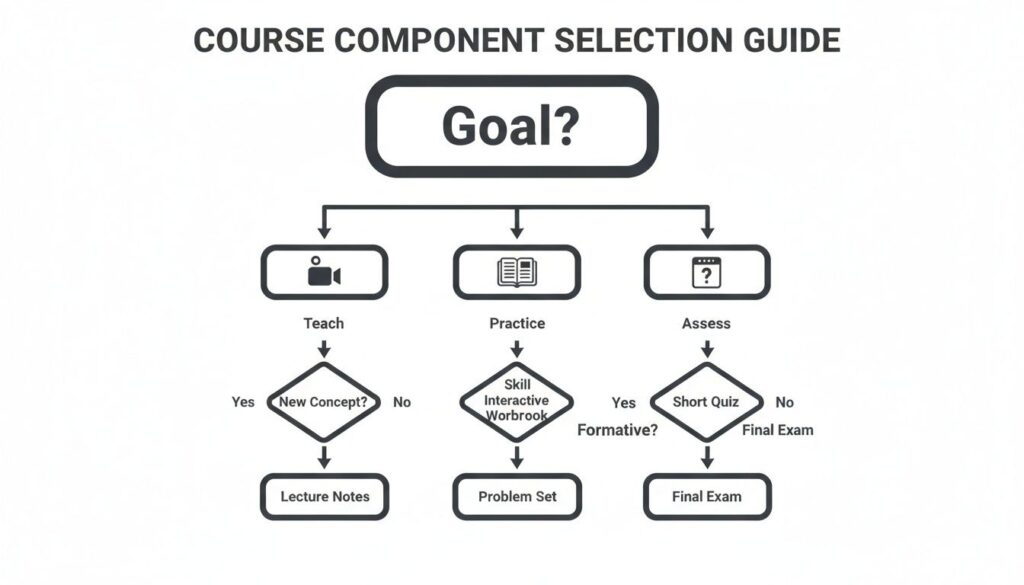
The key takeaway is simple: your goal should drive your format. Whether you want to teach a concept, let students practice a skill, or assess their knowledge, there’s a specific type of content that works best.
Choosing Your Learning Model: Asynchronous vs. Synchronous
To make the decision clearer, it helps to see the two models side-by-side. Think of this table as a cheat sheet for weighing the pros and cons based on what matters most to you and your students.
| Feature | Asynchronous Learning | Synchronous Learning |
|---|---|---|
| Flexibility | High. Students learn on their own schedule, anytime. | Low. Everyone must attend at a specific, scheduled time. |
| Scalability | High. You can serve thousands of students with no extra time. | Low. Limited by the number of people in a live session. |
| Community | Builds over time in forums and discussion boards. | Builds instantly through live interaction and Q&A. |
| Creator Time | High upfront investment to create all materials. | Ongoing time commitment for each live session you run. |
Looking at this, you might realize you don’t have to pick just one.
Often, the best approach is a hybrid one. You can create a core asynchronous course and then add optional synchronous elements, like monthly live Q&A sessions or weekly “office hours” calls. This gives you the best of both worlds: the scalability of on-demand content with the community-building power of live interaction.
Ultimately, picking your model is about aligning your course with your students’ needs and, just as importantly, your own lifestyle. Choose the path that lets you deliver an incredible transformation for your students without burning yourself out in the process.
How to Keep Students Engaged Without Live Interaction

Let’s be honest, this is the number one fear I see creators have about asynchronous learning. You pour your heart and soul into creating amazing content, only to worry, “Will anyone actually finish it?” It’s a completely valid concern. Without the built-in accountability of a live class, it’s dangerously easy for students to lose momentum and just fade away.
The good news? Keeping students engaged is absolutely possible. The secret is to be incredibly intentional about building connection and interaction directly into the course design itself. You have to craft an experience that pulls them forward, making them feel supported and motivated every step of the way.
Make Learning an Active Sport
The fastest way to lose a student’s attention is to make them a passive consumer of information. Just watching video after video is a recipe for boredom and drop-offs. The key is to get them doing things.
You need to build in activities that require them to immediately apply what they’ve just learned. This creates a series of small wins that builds their confidence and keeps them hooked.
Here are a few ideas to get you started:
- Interactive Quizzes: I think of these as low-stakes check-ins after each module. They are meant to reinforce the key takeaways and help students check their own understanding, not to get a perfect score.
- Action-Oriented Worksheets: Instead of just summarizing a lesson, create a worksheet that prompts a specific action. For a social media course, it might be, “Draft your next three posts using the framework from this lesson.”
- Peer-Feedback Assignments: Have students submit a small project and then provide constructive feedback on two of their peers’ submissions. This not only builds community but also exposes them to different perspectives and ideas.
Build a Thriving Community Hub
Asynchronous does not mean alone. In fact, building a strong community is arguably more important in a self-paced environment because it becomes the student’s primary support system. This is where they go to ask questions, celebrate progress, and get unstuck when they hit a wall.
A dedicated community space transforms your course from a simple digital product into a vibrant, supportive ecosystem. It’s the glue that holds the learning experience together, making students feel like they are part of something bigger than themselves.
This space could be a private forum, a Slack channel, or a dedicated platform. The specific tool doesn’t matter nearly as much as the culture you create within it. Post regular discussion prompts, share student wins, and make sure you’re present to answer questions. This shows you’re invested in their success. For a deeper dive, you’ll find a wealth of actionable student engagement strategies that can help you foster this kind of active community.
Use Automation to Cheer Them On
Finally, you can use simple automation to create a personalized and encouraging experience that scales. Automated email sequences can be your secret weapon for keeping students on track without you having to manually check in on everyone.
You can set up emails that trigger based on a student’s progress. Imagine an email that goes out 24 hours after a student completes a particularly tough module, saying, “Great job pushing through that lesson! You’re making awesome progress.” These small, automated touches make a huge difference, making students feel seen and supported on their journey.
Essential Tools to Build Your Asynchronous Course

You’ve mapped out your content and you’re ready to go. But now you’re facing the tech. What tools do you actually need to bring your course to life?
Don’t worry, you don’t need a computer science degree to get this done. Let’s walk through a simple, effective tech stack that will get you started without the overwhelm. The goal is to find tools that do the heavy lifting for you, so you can stay focused on what you do best: creating amazing content.
All-In-One Course Platforms
The most straightforward way to get started is with an all-in-one platform. Think of this as the command center for your entire course. These systems are specifically designed to handle everything from hosting your videos and processing payments to tracking student progress.
A couple of the most popular options include:
- Kajabi: A really robust platform that goes beyond just courses, bundling in tools for email marketing and building your website.
- Teachable: Known for its incredibly user-friendly interface, making it super simple to upload your lessons and get your course online fast.
Using one of these platforms just simplifies the entire technical side of things, letting you launch much faster than if you tried to piece everything together yourself.
Choosing the right platform is your first big step. It provides the structure for your students’ learning journey and makes managing your business much easier in the long run. A good system just works, letting your content shine.
Content Creation Tools
Next up, you need the tools to actually create your lessons. This is where your expertise starts taking shape as videos, workbooks, slide decks, and other resources that your students will engage with.
For creating your course content, I recommend a few key tools:
- Loom: This is perfect for recording your screen and your face at the same time. It’s fantastic for creating tutorials, software walkthroughs, or just adding a personal, human touch to your lessons.
- Canva: An amazing design tool for creating beautiful workbooks, slide decks, and promotional graphics, even if you have zero design experience.
If you’re looking to assemble a really effective learning environment, exploring these 6 fantastic tools for any distance learning system can give you a solid foundation for your tech stack.
Community and Connection
Finally, don’t forget about creating a dedicated space for your community to gather. This is what separates a static course from a living, breathing learning experience.
Platforms like Circle allow you to create a private forum that can integrate directly with your course, giving students a place to ask questions, share wins, and connect with each other. For a deeper dive into this part of the process, you can learn more about the best authoring tools for elearning in our detailed guide.
Still Have Questions? Let’s Clear Things Up
Let’s wrap up by tackling some of the most common questions I hear from creators when they first start digging into this model. My goal here is to give you clear, straightforward answers so you can move forward feeling confident.
Can Asynchronous Learning Actually Be Interactive?
Absolutely. This is probably the biggest misconception out there. While it doesn’t have real-time interaction, a great asynchronous course is absolutely packed with ways for students to engage.
Think automated quizzes that give instant feedback, hands-on assignments where students have to apply what they just learned, and lively discussion boards where they can connect with each other. True interaction is about creating opportunities for students to engage with the material and the community on their own schedule.
Is This Model a Good Fit for Every Topic?
It’s fantastic for a huge range of topics, especially skill-based or informational subjects where people really benefit from going at their own pace. Things like software tutorials, marketing fundamentals, or creative writing courses are a perfect fit. Students can pause, rewind, and re-watch the tricky parts as many times as they need.
However, for topics that are all about live feedback or group role-playing, like advanced public speaking coaching or couples therapy, a purely asynchronous model can fall short. In those cases, a hybrid approach that blends recorded content with live sessions usually works best.
The key is to match the delivery model to the learning objective. Asynchronous learning excels at transferring knowledge and building foundational skills at scale.
How on Earth Do I Price an Asynchronous Course?
Pricing an asynchronous course is all about the transformation you provide. Because you can sell it to one person or a thousand people without much extra work, you can often price it lower than a high-touch synchronous program, making it way more accessible.
When you’re thinking about price, consider a few things:
- The depth and quality of your content. Is this a quick-start guide or a comprehensive masterclass?
- The market value of the skill you’re teaching. What is this new skill worth to someone in their career or life?
- Any community or support you include. Access to you or a community adds a ton of value.
Remember, you aren’t selling your time on a live call. You’re pricing the value of the outcome your student gets at the end.