Learning Management Systems Reviews: The Category Leaders
Hi, I’m Jason, and I’ve spent over a decade neck-deep in the e-learning world. If you’re here digging through learning management systems reviews, you’re probably feeling like you’re drowning in options. It’s a familiar feeling.
A good LMS needs solid course creation tools, straightforward user management, and clear reporting. But the best one for you has almost nothing to do with a generic feature list. It really comes down to your specific goals.
How to Find the Right LMS in a Crowded Market
I get it. Choosing a Learning Management System (LMS) feels like a huge, high-stakes decision. The sheer number of choices is completely overwhelming. The market is absolutely exploding.
That’s the exact reason I put this guide together. I want to cut through all the marketing noise and give you some real clarity.
This isn’t just another feature comparison. We’re going to get into what makes each platform tick, who it’s actually built for, and how it can help you build the kind of learning experiences you’ve envisioned.
Why Is Everyone Talking About LMS Platforms?
The demand for online learning has gone from a steady stream to a tidal wave. The numbers are just staggering. The global LMS market was valued at around $29 billion in 2025. Projections show it rocketing towards $188.1 billion by 2035, growing at a compound annual growth rate of up to 20.6%.
That massive growth is exactly why you have so many platforms to sift through.
This isn’t just some passing trend. It’s a fundamental shift in how we teach and learn. For you, this means more competition, but it also means having access to more powerful and refined tools than ever before. My only goal here is to help you find the one platform that perfectly aligns with your vision.
Choosing an LMS is a strategic decision. The right platform becomes the foundation for your entire educational ecosystem, affecting everything from student engagement to your bottom line.
Whether you’re launching your first online course from scratch or trying to scale a corporate training program for thousands, the information here will help you make a better choice.
As you go through these reviews, remember that most modern systems are cloud-based. Because of that, it’s also smart to understand how to choose a cloud provider to ensure your entire tech stack is solid.
My aim is simple: to give you the confidence to choose wisely. If you’re just starting your search, you might also want to check out our broader guide on how to choose an LMS, which covers more of the foundational questions you should be asking.
How I Review Each LMS Platform

You can’t just look at a feature list to understand an LMS. I learned that the hard way. A great platform is so much more than a collection of what it can do. The experience matters, like how the features feel when you’re deep into building a course at 11 PM. It’s also about how intuitive it is for a student who just wants to learn without fighting the software.
To make these learning management systems reviews genuinely useful, I knew a simple marketing-page comparison wouldn’t cut it. I needed to roll up my sleeves.
So, I built a consistent, hands-on methodology to test every platform. This ensures I’m comparing apples to apples and giving you insights from real-world use, not just a sales pitch.
My Core Evaluation Criteria
I focused my entire review process on the five areas that I’ve found matter most to course creators, business owners, and corporate trainers. Each platform was scored on how it performed in these make-or-break categories.
User Experience (for Admins and Learners): Is the backend a confusing mess or a streamlined workspace for creators? On the other side, is the student dashboard clean, easy to navigate, and motivating? I spent hours on both sides of the platform to find the friction points.
Core Features and Course Building: How powerful is the actual course builder? I dug into the tools for creating quizzes, handling assignments, dripping content, and embedding different types of media. I built a real test course on every single platform to see what the process felt like and where I hit roadblocks.
Integrations and Scalability: No LMS is an island. A good one has to play nice with the other tools you already rely on. I tested connections to essentials like payment gateways and email marketing software. I also looked at whether a platform could truly scale with a business from a solo operation to a full-fledged enterprise.
Pricing and Overall Value: I looked way beyond the advertised sticker price. My goal was to sniff out any hidden transaction fees, user caps, or surprise costs that jack up the price. The real question is whether the price tag is justified by the performance and features you actually get.
Customer Support: When a technical glitch hits right before a launch, how fast can you get a real human to help you? I evaluated the quality and availability of support channels like live chat, email, and the knowledge base. In my book, responsive and competent support is a non-negotiable.
By digging deep into each of these areas, my reviews give you a practical, well-rounded picture of what it’s really like to choose and use each tool.
Head-to-Head LMS Platform Comparisons
Alright, this is where the rubber meets the road. Looking at individual learning management system reviews is a good start. But the real clarity comes when you put them side-by-side.
I’m going to pit some of the biggest names against each other so you can see the subtle but critical differences that make all the difference.
We’re moving beyond simple feature checklists and into how these platforms actually feel and function in the real world. We need to understand the philosophy behind each tool and match it to what you’re trying to build. This applies whether you’re a course creator, a corporate trainer, or a solopreneur. This is how you find the platform that doesn’t just work, but feels right.
The Rise of Cloud-Based Platforms
Before we dive into specific brands, we need to talk about deployment. Today, the overwhelming majority of LMS options are cloud-based. This is also known as SaaS (Software as a Service). This just means the company hosts everything for you, and you access it through a web browser for a subscription fee. This model has completely taken over, and for good reason.
The alternative is a self-hosted LMS, where you install the software on your own server. While this gives you absolute control, it also makes you responsible for every single update, security patch, and bit of maintenance. For most people, the plug-and-play convenience of a cloud solution is a no-brainer.
The market data hammers this point home. As of 2025, cloud platforms had already captured a staggering 88.24% of the total LMS market share. This isn’t a passing fad. The trend is set to accelerate through 2031, driven by the scalability and efficiency that modern businesses need.
Thinkific vs Kajabi: The Creator’s Dilemma
I see people get stuck here all the time. Thinkific and Kajabi are both titans in the course creation space, but they’re built on fundamentally different ideas. Your choice really comes down to your business model.
Thinkific is a pure-play course platform. Its main job is to help you build, market, and sell incredible online courses. The course builder itself is a dream to use, with a drag-and-drop interface that makes putting lessons together feel intuitive.
- Strengths: A fantastic course creation experience and powerful student engagement tools like communities and assignments. It also gives you total flexibility with integrations, so you can plug in your favorite email marketing tool or payment processor.
- Best For: Creators who put the student learning experience above all else and want to build their business with a “best-of-breed” tech stack, picking and choosing their favorite tools.
Kajabi, on the other hand, is an all-in-one business platform. It handles your courses, but it is also your website, email marketing engine, sales funnel builder, and checkout system. The goal is for Kajabi to be the single engine running your entire online business.
- Strengths: The convenience is off the charts. Having everything under one roof massively simplifies your tech life. Its built-in marketing and automation tools are robust and seamlessly integrated.
- Best For: Solopreneurs and small teams who want a single, unified solution to run their entire knowledge business without juggling a dozen different subscriptions and integrations.
While Kajabi is a powerhouse for entrepreneurs who want everything in one box, Thinkific offers more freedom for those who want to mix and match their favorite marketing and sales tools.
LearnDash vs TalentLMS: The WordPress Powerhouse vs. The Corporate Trainer
Next up, we have two platforms designed for completely different worlds. LearnDash is the undisputed king of WordPress LMS plugins, while TalentLMS is a dominant force in corporate training.
LearnDash is a plugin, which means it lives inside your existing WordPress website. This gives you unparalleled control over branding, design, and functionality. If you’re already a WordPress pro, LearnDash will feel like a natural, powerful extension of what you already know.
Community ratings are a great way to gauge user satisfaction and see where a platform stands in the market. This kind of grid helps you spot the leaders at a glance.
This visual shows how platforms like LearnDash are rated against competitors based on real user feedback.
TalentLMS, by contrast, is a cloud-based LMS built from the ground up for corporate training. Its entire focus is on things like employee onboarding, compliance modules, and professional development. The feature set is rich with tools for managing users, creating learner groups, and pulling detailed reports on employee progress.
LMS Feature And Use Case Scorecard
To make these distinctions crystal clear, I’ve put together a scorecard based on my hands-on experience with each platform. A score of 5 is a top performer in that category, while a 1 means it’s not a focus area for the tool.
| Platform | Ease of Use (1-5) | Built-in Marketing Tools (1-5) | Customization & Branding (1-5) | Best For |
|---|---|---|---|---|
| Thinkific | 5 | 3 | 4 | Course Creators Focused on Teaching |
| Kajabi | 4 | 5 | 3 | All-in-One Entrepreneurs |
| LearnDash | 3 | 2 | 5 | WordPress Users |
| TalentLMS | 4 | 1 | 3 | Corporate Employee Training |
This scorecard really highlights the trade-offs. Kajabi gives up some course creation depth for its all-in-one marketing muscle. LearnDash offers ultimate control but comes with a steeper learning curve. Thinkific and TalentLMS are both remarkably easy to use, but they’re pointed at completely different targets.
As you weigh these options, it’s also smart to look at how related tools are reviewed. For example, checking out a guide on the Best Online Teaching Platforms can offer a fresh perspective on what makes an educational tool truly great.
Ultimately, the best choice boils down to what you value most. Is it the polished student experience of Thinkific? The business-in-a-box power of Kajabi? The infinite customizability of LearnDash? Or the corporate efficiency of TalentLMS? Pinpointing which one aligns with your vision is the key to making the right call.
Finding the Best LMS for Your Specific Needs
The search for a single, perfect, one-size-fits-all LMS is a wild goose chase. It just doesn’t exist. But the perfect LMS for you? That absolutely does.
The whole game is about cutting through the marketing hype and matching a platform’s real-world strengths to what you’re actually trying to build.
I’ve seen so many entrepreneurs either overspend on a mountain of features they never touch or, worse, pick a system they outgrow in six months. This part of our learning management systems reviews is designed to stop that from happening. We’re going to break down the common paths people take so you can see which type of platform truly aligns with your goals.
This decision tree gives you a simple starting point. It visualizes the paths different users might take based on their primary role.
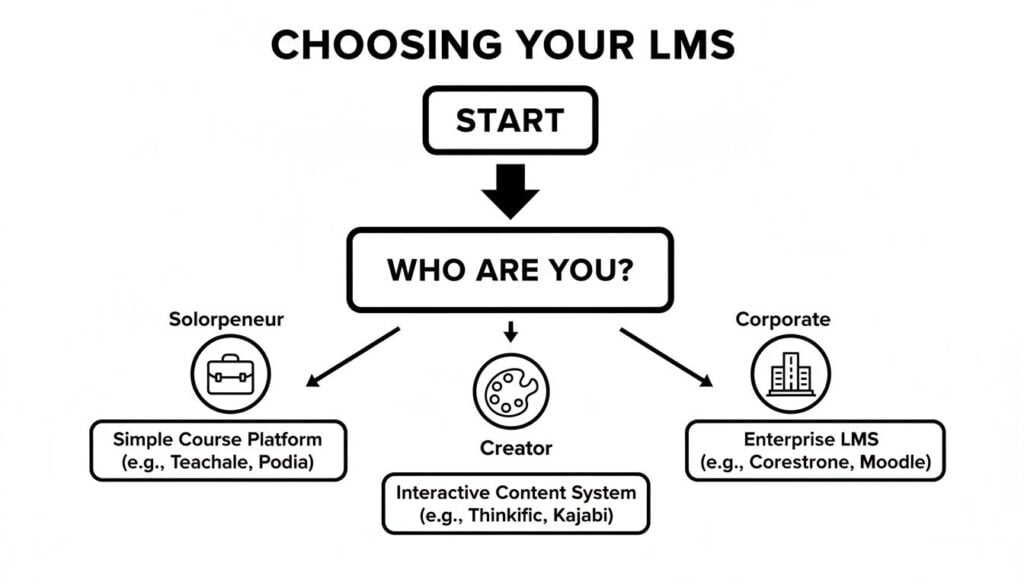
As the chart shows, figuring out your core identity is the first, most critical step in filtering your options. Your role could be a solo business owner, a dedicated course creator, or part of a corporate team.
The Solopreneur and Course Creator Path
If you’re a solopreneur or a course creator who’s just starting out, your needs are radically different from anyone else’s. You’re likely wearing all the hats: marketer, content creator, accountant, and the entire customer support department.
Your top priorities are almost always affordability, dead-simple usability, and the fastest possible path to getting your course live and making sales.
You’re probably not losing sleep over complex user permissions or integrating with an HR system. What you really need is an LMS with:
- A user-friendly course builder: You need to be able to upload videos, create quizzes, and structure your lessons without needing a degree in instructional design.
- Built-in payment processing: A platform that seamlessly connects to Stripe or PayPal is non-negotiable. You need to get paid.
- Simple marketing tools: Features like coupons, basic email capabilities, and simple landing page builders can be a lifesaver in the early days.
For this group, all-in-one platforms like Kajabi can be a godsend. It handles everything from your website to your email marketing. On the other hand, a user-friendly platform like Thinkific gives you a top-tier course creation experience while letting you plug in your favorite marketing tools as you grow.
If you’re running a small operation, you might find our guide on the best LMS for small business has some great, targeted advice.
The Membership Site Owner
Running a membership site is a different ballgame entirely. Sure, courses are a big part of the value, but the real magic happens in the community. That’s the stuff that keeps people paying month after month.
You need an LMS that not only delivers content but actively fosters connection and engagement among your members.
Your focus shifts from just content delivery to features that build a thriving online space.
For a membership, the LMS is more than just a content library. It’s the digital town square. If members can’t easily connect with each other and the content, they won’t stick around.
When I review platforms for this specific use case, I’m laser-focused on robust community features. This means built-in discussion forums, live event capabilities, and the ability for members to create profiles and message each other directly. Any platform that can successfully blend course delivery with strong community tools is a clear winner here.
The Corporate Trainer and Instructional Designer
Now we’re entering the big leagues. If you’re an instructional designer or corporate trainer, you have an entirely different set of requirements. Your job is to deliver training that is effective, measurable, and, often, mandatory.
You’re looking for a system built for power and control. Your non-negotiable list includes:
- Advanced Reporting: You have to track completions, quiz scores, and learner progress across different departments and job roles. This data is critical for proving training ROI and ensuring compliance.
- SCORM and xAPI Compliance: The ability to import courses created in authoring tools like Articulate Storyline or Adobe Captivate is a must-have for most corporate teams.
- User and Group Management: You need the power to create distinct learner groups, assign specific training paths, and manage permissions for hundreds or even thousands of employees.
- Automation: Automating enrollments, sending reminders for overdue training, and managing recertification dates saves an enormous amount of administrative time.
The corporate LMS market is a massive industry for a reason. Its growth is fueled by the constant need for companies to upskill their workforce, stay on top of regulations, and manage training for huge, often global teams. In fact, the corporate segment alone hit USD 15.02 billion in 2025 and is projected to reach USD 42.09 billion by 2030. That tells you just how critical these specialized tools are for large organizations. You can dig into more data on this trend in this corporate LMS market report.
Platforms like TalentLMS, Docebo, and Absorb LMS are built specifically for this world. They excel at managing large-scale training programs and providing the detailed analytics that businesses demand. Their focus is less on public-facing sales pages and more on internal efficiency and training effectiveness. Identifying which of these personas you fit into is the first, and most important, filter in finding your perfect LMS.
Practical Tips for LMS Implementation and Migration

You’ve done the hard work of reviewing learning management systems and finally picked a winner. That’s a huge milestone. But let’s be honest, the real project starts now.
Getting your new platform running and moving your entire library of content over can feel like an absolute beast of a task.
I’m here to give you some real-world advice to make this transition as painless as possible. Whether you’re migrating from another LMS or trying to wrangle a chaotic mess of video files and Word docs, a solid plan is your best defense against disaster. The goal is to get you launched without wanting to pull your hair out.
Plan Your Content Migration First
The single biggest mistake I see organizations make is drastically underestimating the time and effort required to move content. It’s almost never a simple copy-and-paste job. Every platform has its own unique structure for courses, lessons, and quizzes. What works in one system often breaks in another.
Your first move should be to take a full inventory of everything you need to bring over. Start by identifying your most critical course materials. You need to decide what’s absolutely essential for launch day and what can be moved in a later phase.
Don’t even think about a “big bang” migration where everything moves at once. That’s a recipe for failure. Your goal should be a phased rollout. Get your flagship course live, start generating value, and then methodically migrate the rest of your library over time.
This approach transforms a massive, overwhelming project into a series of smaller, manageable wins. And if you’re dealing with complex academic data, understanding how an LMS integrates with a Student Information System (SIS) is a critical piece of the data management puzzle.
Your Pre-Launch Checklist
Before you flip that switch and open the doors, running through a final pre-launch checklist is non-negotiable. This isn’t about being nit-picky. It’s about making a solid first impression. A buggy or incomplete launch can instantly kill learner confidence and create a support nightmare.
Here are the absolute essentials I recommend testing and double-checking before anyone lays eyes on your new platform:
- Payment Processor: Don’t just assume it works. Run a real transaction. Use a coupon code to buy your own course for $1 to ensure the entire payment-to-enrollment workflow is seamless.
- Branding and Customization: Upload your logo, set your brand colors, and edit the default system emails. You want the platform to feel like your brand, not a generic, off-the-shelf template.
- The Student Experience: This is crucial. Create a test student account and go through an entire course from their perspective. Watch a video, complete a quiz, and download a resource. Does everything work as expected?
- Welcome and Onboarding: Is your welcome email configured and ready to send? Do you have a “Start Here” lesson or module that shows new users how to navigate the platform? A little bit of upfront guidance goes a long way.
Getting these small details right is what separates a frustrating launch from a successful one. Trust me, spending one extra day running through this checklist will save you weeks of support tickets and headaches down the road.
My Final Recommendations for Choosing an LMS
We’ve been through a lot of head-to-head comparisons and deep dives. After all that analysis, let’s get down to the final decision.
I know the search for the right platform can feel overwhelming. But by now you should have a much clearer picture of which learning management system is the right fit for you.
Here’s a quick rundown of my top picks based on the most common situations I see.
My Top Picks for Specific Scenarios
For Budget-Conscious Beginners: I’d point you straight to Thinkific. It has a genuinely useful free plan to get you off the ground, and its course builder is so intuitive you can focus on making great content instead of fighting with the software.
For All-in-One Marketers: Kajabi is the undisputed leader here. It’s a complete business-in-a-box for anyone who wants their website, email marketing, and courses all under one roof without needing a dozen different tools.
For WordPress Fans: It has to be LearnDash. If you already love the control and endless customization of WordPress, this plugin gives you unmatched power to build a learning experience that’s deeply woven into your existing site.
For Corporate Training: TalentLMS really shines in a corporate setting. It was built from the ground up to handle employee onboarding, compliance training, and skill development at scale, with the robust reporting features that managers need.
My most important piece of parting advice is this: future-proof your choice. Pick an LMS that not only solves the problems you have today but can also grow with your vision for tomorrow. The best system is the one you won’t outgrow in a year.
Frequently Asked Questions About LMS Platforms
As people start digging through learning management systems, a few questions pop up time and time again. These aren’t just minor details. The answers often shape the entire direction of your online course business. Let’s tackle them head-on to clear up any confusion.
What Is the Difference Between Self-Hosted and Cloud?
This is one of the first major forks in the road you’ll encounter. The decision really boils down to one thing: control versus convenience.
Think of a self-hosted LMS, like LearnDash for WordPress, as building your own house. You own the land and the structure. You can paint the walls any color, knock down a wall, or add a new wing whenever you want. This gives you total control over customization, and all your data stays on your own server. The flip side? You’re also the one who has to fix the plumbing, patch the roof, and make sure the foundation is secure. You’re on the hook for all the technical maintenance, security, and updates.
A cloud LMS, like Thinkific or Kajabi, is more like renting a high-end apartment. The building management handles all the maintenance, security, and infrastructure. It’s incredibly easy to move in and get started, but you can’t exactly start knocking down walls. You pay a monthly fee for that peace of mind and convenience, accepting that you have less control over deep, code-level customization.
Can I Switch My LMS Later If I’m Not Happy?
The short answer is yes, you can. But I want to be upfront with you, it’s a serious undertaking. It’s not like swapping out your email provider.
Migrating from one LMS to another involves exporting all of your course content and student data. Then you have to carefully import and reformat everything to fit the new system’s architecture.
Migrating an LMS is completely doable, but it’s a significant task. That’s why choosing carefully upfront is so important. A thoughtful decision now can save you a major headache later.
It’s a project that demands careful planning to ensure no student progress gets lost and no content breaks in the transfer. This is the single biggest reason I tell people to invest a little extra time in their initial research. Getting it right the first time is a massive win.
Do I Really Need an LMS for Just One Small Course?
I get this question a lot, especially from first-time creators. For a single, ultra-simple digital product, you might get away with a simpler tool like Gumroad. A standalone PDF or a video series you sell as a zip file can work that way.
However, the moment you want to provide a true learning experience, an LMS becomes almost essential. It’s the difference between handing someone a book and enrolling them in a class. An LMS gives you progress tracking, quizzes to reinforce learning, and the ability to award completion certificates.
If you have any ambition to grow beyond that one course or simply want to present a polished, professional brand from day one, starting with a user-friendly LMS is one of the smartest moves you can make. It builds a foundation you can actually scale.