LMS for Manufacturing Workforce: Boost Safety, Skills, and Compliance
Trying to shoehorn a generic, corporate Learning Management System (LMS) onto the factory floor is like trying to fit a square peg in a round hole. I’ve seen it lead to wasted time and frustrated employees more times than I can count, because these systems fundamentally misunderstand the daily reality of manufacturing work.
Why Generic LMS Platforms Fail in Manufacturing
It’s a classic story. A company invests in a popular LMS, the same one the sales and marketing teams love, and rolls it out to their machine operators. It never quite sticks. That’s because the manufacturing environment has its own unique set of rules, pressures, and challenges.
Think about it. Training on a factory floor needs to be immediate, hands-on, and accessible in less-than-ideal conditions. Your team is dealing with loud machinery, spotty Wi-Fi in the far corners of the plant, and the need to pull up information on a shared tablet, often while wearing gloves. A system designed for quiet cubicles just can’t keep up.
The Disconnect Between Corporate and Factory Training
Generic platforms are built around course catalogs and long-form video lectures. They assume the learner is sitting comfortably at a desk with a reliable internet connection and an hour to spare. This model completely falls apart when an employee needs a quick, two-minute video on troubleshooting a specific machine to prevent a costly line stoppage.
The core issues usually boil down to a few key problems:
- Accessibility: Content isn’t designed for mobile or tablets, and it definitely doesn’t work offline when a worker is in a dead zone of the plant.
- Content Type: They lack support for the hands-on, practical formats that actually work in manufacturing, like augmented reality (AR) walkthroughs or virtual reality (VR) simulations for dangerous tasks.
- Compliance Tracking: Managing the complex, recurring certifications required for safety and equipment operation becomes a manual, spreadsheet-fueled nightmare.
The biggest failure of generic systems is that they treat every employee like an office worker. A manufacturing LMS needs to be a tool for the floor, not another piece of corporate software that feels out of place.
High Stakes and Unique Demands
In manufacturing, training is critical for safety, quality, and operational uptime. This is where generic platforms really miss the mark, especially when it comes to mitigating the critical health and safety risks prevalent in manufacturing.
When an operator needs the correct lockout/tagout procedure, they need it now. Not buried inside a 45-minute module. When a new quality standard is rolled out, you need to push that update to every relevant employee and track their acknowledgment immediately.
This urgency has fueled a massive industry shift. The market for learning systems built specifically for manufacturing was valued at US $20.33 billion in 2023 and is projected to skyrocket to US $98.69 billion by 2030. This incredible growth shows just how vital specialized training has become for modern factories looking to stay competitive and safe.
Ultimately, choosing the right LMS for your manufacturing workforce is an investment in your core operations. It ensures your team is safe, compliant, and productive every single shift.
Your Essential Manufacturing LMS Feature Checklist
Okay, so you’re sold on getting an LMS built for the realities of manufacturing. Smart move. But the moment you start looking at vendors, the sheer number of features can make your head spin. It’s way too easy to get distracted by flashy dashboards or “AI-powered” promises that don’t actually solve a single problem on your factory floor.
Let’s cut through that noise. I want to help you build a practical checklist of non-negotiable features. This guide focuses on the core functions your LMS absolutely must have to make a real difference for your workforce.
Think of this as your vendor evaluation scorecard. Use it to ask the tough questions during demos and separate the serious platforms from the pretenders.
Access Anytime, Anywhere
This is the big one. If your team can’t get to the training when and where they need it, the entire system is a bust. Forget any platform that assumes your employees are sitting at a desk all day.
Your checklist has to include:
- Rock-Solid Mobile & Tablet Experience: Training has to work flawlessly on a shared tablet in a production cell or a supervisor’s phone. That means a clean interface with big buttons you can tap even with gloves on. No excuses.
- True Offline Access: Wi-Fi dead zones are a fact of life in large plants and remote sites. Your LMS must let workers download training modules, like an SOP video, and access them without an internet connection. Critically, the system needs to sync their progress automatically once they’re back online.
Training That Mirrors the Real World
Manufacturing is a hands-on job. Your training has to reflect that. Making someone read a PDF about a complex machine is a recipe for failure. Modern systems offer ways to make learning practical and, most importantly, safe.
Look for platforms that support these immersive formats:
- Augmented Reality (AR) and Virtual Reality (VR): This might sound like science fiction, but it’s incredibly practical today. AR can overlay step-by-step repair instructions on a technician’s tablet. VR lets a new hire practice on dangerous equipment in a completely safe simulation, building muscle memory before they ever touch the real thing.
A great manufacturing LMS doesn’t just deliver information. It provides a safe space for your team to practice, make mistakes, and build confidence before they perform a task on the production line.
Seamless System Integrations
Your LMS can’t live on an island. To be truly effective, it has to talk to the other software you rely on every single day. Manually entering data between systems is just asking for errors and wasted time.
Make sure any vendor you consider can integrate with your:
- HR Information System (HRIS): This is for automating the basics. When a new person is hired, the HRIS syncs their data, and the LMS automatically assigns the right onboarding plan based on their role.
- Manufacturing Execution System (MES) or SCADA: This is a game-changer. Imagine an operator scans a QR code on a machine, and the LMS instantly pulls up the correct SOPs or safety checklists for that specific piece of equipment. That’s the kind of integration that saves real time and prevents mistakes.
Ironclad Compliance and Certification Tracking
Keeping up with certifications is a massive headache in manufacturing. A good LMS turns this into an automated, stress-free process. It’s essential for delivering up-to-date training on critical regulations, like a practical guide to GHS and SDS compliance, ensuring everyone knows how to handle chemical hazards safely.
Your system should manage this automatically:
- Automated Reminders: It needs to ping employees and their managers when a certification is about to expire. No more surprises.
- Audit-Ready Reporting: When an auditor walks in, you should be able to pull a complete training history for any employee or department in just a few clicks. No more digging through filing cabinets.
This kind of automated tracking is a must-have. If you’re interested in structuring this type of training, our guide on building a competency-based training framework is a great place to start.
The Bottom-Line Feature Checklist
To make this even easier, I’ve put the must-have features into a simple table. Use this as a scorecard when you’re sitting in on vendor demos. If a platform is missing capabilities in these key areas, it’s probably not the right fit for a demanding manufacturing environment.
Essential LMS Features for Manufacturing Environments
| Feature Category | Must-Have Capability | Why It’s Critical on the Shop Floor |
|---|---|---|
| Accessibility | Mobile-first design and true offline functionality. | Workers need access on shared tablets or phones, often in areas with unreliable Wi-Fi. Progress must sync automatically. |
| Content Delivery | Support for AR/VR, video, and interactive simulations. | Hands-on jobs require hands-on training. These formats allow for safe practice and better skill retention than text-based learning. |
| System Integration | APIs for HRIS, MES, and SCADA systems. | Automates user management, links training directly to equipment, and eliminates manual data entry, reducing errors. |
| Compliance | Automated certification tracking and audit-ready reporting. | Manages expiring certifications, sends reminders, and allows for instant report generation, ensuring you’re always audit-ready. |
| Assessments | Skills-based evaluations and observational checklists. | Moves beyond simple quizzes to verify that employees can actually perform a task safely and correctly on the job. |
This checklist isn’t exhaustive, but it covers the core functionality that will deliver the biggest impact. Focusing on these essentials will help you choose a system that truly supports your team’s performance and safety, rather than just becoming another piece of software no one uses.
How to Choose the Right LMS Vendor Partner
Picking a vendor for your manufacturing LMS is a huge decision. Let’s be honest, after a few demos, all the sales pitches start to blur together. They all promise the moon, but how do you spot the difference between a genuine partner and just another software seller?
It all comes down to creating a smart evaluation process that cuts through the marketing fluff and hones in on what really matters for the long haul.
I’ve sat through more demos than I can count, and I’ve learned that the secret is to control the conversation. Don’t let them just click through their standard, polished presentation. You need to show up with your own list of questions and real-world scenarios pulled directly from your factory floor. This is how you find someone who actually gets your world.
Do They Speak Your Language?
This is my number one litmus test for any potential vendor. You have to figure out, and fast, if they actually understand manufacturing or if they’re just a generic software company trying to muscle into a new market. Their team should know what “line down,” “SOP,” and “lockout/tagout” mean without you having to define them.
During your first call, press them about their other manufacturing clients.
- Can they share case studies or examples from companies that look like yours?
- Do their support and implementation teams have any real experience with factory environments?
- Have they ever helped a client navigate an OSHA or FDA audit?
A vendor who gets it will talk about these things with confidence. If they seem confused or give you vague, canned answers, that’s a massive red flag. They need to understand the high stakes of your operations from day one.
A great vendor partner knows that a ‘line down’ situation is a crisis, not just another support ticket. Their customer service model has to reflect that urgency.
Scrutinize the Support Model
When your LMS is the backbone of safety training and daily operations, you can’t afford to wait 24 hours for an email response. You have to dig deep into their customer support structure, moving beyond the sales pitch to get the specific details.
I always demand to see their Service Level Agreement (SLA). This is the document where they put their promises in writing, like response times, resolution guarantees, and other key details. Look for a vendor that offers tiered support, including an emergency hotline for critical issues. You need to know that if something breaks during a night shift, you can get a real human on the phone immediately.
Make the Demo Work for You
A canned demo is designed to show off the prettiest features, not necessarily the ones you’ll be using every single day. To make a demo truly effective, send the vendor a couple of your own use cases ahead of time.
For example, ask them to show you, step-by-step:
- New Hire Onboarding: “Show us how you would build an onboarding plan for a new machine operator. It needs a safety video, a PDF of the machine manual, and an in-person skills checklist that a supervisor has to sign off on.”
- Certification Management: “Walk us through how your system handles an expiring forklift certification. We need to see exactly how the employee and their manager get notified, and how we can pull a report of all certified operators in under a minute.”
Giving them specific tasks forces them to demonstrate how the system solves your real problems, not just theoretical ones. It’s also a great way to stress-test the platform’s flexibility and see how intuitive it really is.
This sharp focus on industry-specific needs is why manufacturing has become such a huge slice of the learning software market. The sector actually accounts for 9% of all LMS users worldwide, a figure that speaks volumes about its unique and critical training demands. It’s clear that specialized tools are no longer a luxury in these high-stakes environments. You can learn more about these sector-specific LMS findings on Programs.com.
Ultimately, choosing the right LMS for your manufacturing workforce is about the vendor’s expertise and commitment. You’re not just buying software. You’re looking for a partner who will be in the trenches with you, helping solve problems and adapt as your needs evolve. A team that truly understands the relentless pressure of a production environment is worth its weight in gold.
Designing a Successful Implementation and Pilot Program
You’ve done the hard work and picked your LMS. That’s a huge win, but now comes the part where the rubber really meets the road: the implementation. A brilliant tool with a clumsy rollout is just an expensive mistake waiting to happen. To avoid that, we need to map out a clear, phased plan that builds momentum and gets your team on board from the very beginning.
Rushing into a plant-wide launch is a common, and often disastrous, error. I’ve seen it happen. The smarter approach? Start small with a pilot program.
This lets you test the system in a controlled environment, work out all the inevitable kinks, and most importantly, build a group of champions who can help you roll it out to everyone else. A pilot is your first and best chance to prove the value of this new tool.
Setting Up Your Pilot Program for Success
The first step is choosing the right group. It’s tempting to pick the easiest department or the one with the fewest challenges, but that won’t give you a true picture.
Instead, look for a team that represents a good cross-section of your workforce, maybe a production line with a mix of new hires and veteran operators. This will give you the most realistic, valuable feedback.
Once you have your team, you need to define what success looks like. Get really specific with your goals. Don’t just aim for “better training.” Set clear, measurable targets.
- Goal 1: Reduce the time it takes for a new operator to complete required safety certifications by 25%.
- Goal 2: Achieve an 85% user adoption rate within the pilot group during the first 30 days.
- Goal 3: Decrease errors related to a specific task by 15% after the relevant training modules are completed.
These kinds of concrete goals give your pilot a clear purpose and make it easy to demonstrate its value to leadership later on.
Choosing the Right Content and Metrics
For the pilot, don’t try to migrate your entire training library. That’s a recipe for burnout. Focus on one or two high-impact areas that are currently a pain point. Maybe it’s the lockout/tagout procedure that’s always a compliance headache, or the onboarding for a new machine that has a high rate of operator error.
As the pilot runs, you need to track the right data. This data will be your evidence that the system works, not just a gut feeling.
The goal of a pilot is to gather data, not just opinions. Hard numbers showing a reduction in errors or faster certification times are what will convince skeptics and secure the resources for a full rollout.
Look beyond simple completion rates. Focus on Key Performance Indicators (KPIs) that connect directly to your shop floor operations.
This visual shows the simple, effective flow from initial setup to a full launch, with the pilot phase being the critical link.
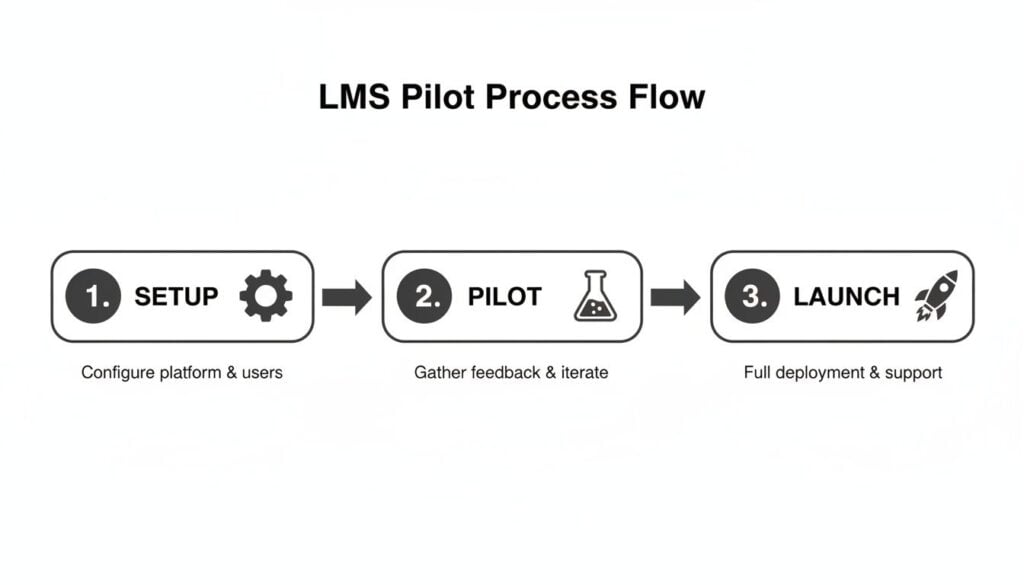
This process emphasizes that the pilot isn’t just a test, but a crucial stage for gathering feedback and proving value before scaling up.
Key Pilot Program Metrics to Monitor
| Metric Category | Specific KPI to Track | Why It Matters |
|---|---|---|
| Efficiency | Time-to-Competency | Measures how quickly a new employee can master a skill. A shorter time means your training is effective and getting people productive faster. |
| Engagement | User Adoption Rate | Tracks how many employees in the pilot group are actively using the LMS. High adoption is a strong sign that the system is easy to use and valuable. |
| Quality | Reduction in Scrap/Rework | Directly links training to production quality. If training on a specific process leads to fewer defects, that’s a powerful ROI metric. |
| Compliance | Audit Pass Rate Improvement | For any compliance-focused training, this measures the direct impact on your ability to pass internal or external audits successfully. |
By tracking these KPIs, you’re building a solid business case for the LMS based on real results.
It’s also crucial to gather qualitative feedback. Talk to the operators and supervisors in the pilot. What did they like? What was frustrating? This feedback is gold for refining your full implementation plan. By performing a skills gap analysis, you can also identify exactly which competencies to focus on first. Check out our guide on using a skills gap analysis template to get started.
A successful pilot program does more than just test software. It builds momentum, creates advocates, and provides a clear, data-backed roadmap for a successful, full-scale launch of your new manufacturing LMS.
Driving Adoption and Scaling Your Training Program

So, your pilot program was a hit. The data looks good, the feedback is positive, and now you’re ready for the main event: rolling this out across the entire operation. This is where a lot of great initiatives lose steam. A successful pilot is one thing, but a successful full-scale launch is another beast entirely.
Getting everyone on board, from the newest hire on third shift to the most skeptical, tenured supervisor, takes a smart change management strategy. This part is less about the technology and more about the people. You have to build genuine excitement and make the “why” behind this new system crystal clear.
Just sending a mass email announcing the new LMS is a surefire way to get ignored. People are naturally wary of change, especially when it means learning a new tool on top of their already busy jobs. Your communication needs to be consistent, clear, and laser-focused on what’s in it for them.
Building Excitement and Explaining the Why
To get real buy-in, you have to answer the one question on every employee’s mind: “How does this make my job easier, better, or safer?” Your entire communication plan should revolve around answering this question from different angles.
Think about hitting them from multiple channels.
- Town Hall Meetings: Hold short, direct meetings for different shifts (in person or virtual). Don’t just talk, show. Do a live demo of how fast someone can pull up an SOP on a tablet right on the floor.
- Supervisor Champions: Your frontline leaders are your secret weapon. Get them trained and comfortable first, then empower them to be advocates. When they believe in it, their teams are far more likely to follow.
- Posters and Flyers: Simple visual reminders in break rooms and other high-traffic spots can work wonders. Highlight a single, powerful benefit, like “Stop Hunting for Binders! Find any SOP in 30 seconds.”
The goal is to position the LMS as an indispensable tool designed for them, not just another top-down mandate. You’re selling the benefits, not the features.
People don’t adopt software; they adopt solutions to their problems. Frame the LMS as the fix for frustrating, time-wasting tasks like digging through file cabinets for paper documents or sitting through boring, irrelevant training sessions.
Designing Effective Training Workflows
A smooth rollout also hinges on creating learning pathways that actually make sense in a manufacturing environment. You can’t just put old PowerPoint slides online. You should blend digital tools with the essential hands-on practice that builds real skill.
Let’s walk through a practical example.
Workflow Example: New Machine Operator Onboarding
A new operator needs to learn a complex CNC machine. Instead of just handing them a dense manual and wishing them luck, their learning path in the LMS could look like this:
- E-Learning Modules: They start with a few short, interactive lessons on their tablet. These cover the machine’s basic theory, critical safety protocols, and the control panel layout. They can do this at their own pace before ever touching the machine.
- VR Simulation: Next, they might use a VR headset to practice operating the machine in a completely safe, virtual environment. Here, they can make mistakes and learn from them without any risk to themselves, the equipment, or production.
- Mentor-Led Practice: Now they’re on the floor with an experienced mentor. The mentor uses a digital checklist on a tablet, pulled right from the LMS, to guide the new operator through real-world tasks on the actual machine.
- Final Assessment: The supervisor conducts a final on-the-floor skills validation, which is also tracked in the LMS. Once passed, the operator is officially certified.
This blended approach is miles more effective than any single method alone. It builds foundational knowledge first, making hands-on time safer and more productive. Building out these kinds of practical, multi-step workflows is how you truly embed the LMS into your daily operations. You can get more great ideas by learning about creating effective microlearning modules for staff development that can be slotted into these larger workflows.
A Quick Case Study in Success
Let’s look at a mid-sized automotive parts supplier that nailed their LMS rollout. They were dealing with inconsistent training across three plants and lived in constant fear of their next ISO audit.
They started their pilot on a single production line known for high turnover. They focused on two things: standardizing the onboarding process and digitizing all machine-specific SOPs. The results were immediate and impressive. They reduced onboarding time by 30% and cut initial quality errors by 20%.
When it was time to scale, they took the data and their pilot “champions” to the other plants. Showing off the pilot’s success metrics in every meeting got other supervisors leaning in, genuinely curious. They made the LMS the single source of truth for all compliance and safety documents, which drove adoption almost overnight because everyone knew exactly where to find the most current information.
The biggest lesson they learned? Start small and prove the value. By creating a clear, undeniable win in one area, they built the momentum they needed to make the LMS an essential, plant-wide tool that’s now core to how they operate.
Got Questions About Manufacturing LMS Platforms?
I’ve been helping manufacturing companies roll out learning systems for years, and I’ve noticed the same questions and concerns pop up time and time again. It’s a huge step, so it’s only natural to have a few things you’re trying to figure out.
These aren’t hypothetical questions from a sales deck. They’re the real-world concerns I hear from plant managers and supervisors on the floor. Let’s tackle them head-on.
How Do We Train Workers Who Aren’t Tech-Savvy?
This is probably the most important question you can ask. The reality is, not everyone on your team grew up with a smartphone in their hand, and that’s perfectly fine. The trick is to choose a system that was built for simplicity, not for office workers.
Your best bet is a tablet-based system with big, obvious icons. Think minimal clicks. The goal is to get someone from logging in to watching a training video in seconds. Speaking of which, lean heavily on video. A short clip demonstrating how to perform a task is universal. It cuts through language barriers and varying comfort levels with technology.
Your pilot program is the perfect testing ground for this. You’ll quickly see certain employees who just get it. Turn them into your “super users.” They can become peer mentors, offering on-the-spot help to colleagues who are a bit hesitant. You could also set up a training kiosk in the break room where someone is always available to help. The best platforms for this industry are designed with this exact user in mind, prioritizing an intuitive, visual experience above everything else.
What’s the Best Way to Actually Measure the ROI?
This is where the rubber meets the road. Measuring the return on your investment means connecting training directly to business outcomes. Forget about simple completion rates. We need to look at the KPIs that actually impact the bottom line.
A strong business case for an LMS is built on tangible results.
- Safety Incidents: Are you seeing a measurable drop in safety incidents or near-misses after rolling out new safety modules?
- Scrap & Rework: Have quality control issues decreased for processes where you’ve introduced digital training?
- Onboarding Speed: How long does it take to get a new hire fully up to speed? If you can get them competent 20% faster, that’s a massive, quantifiable win.
- Compliance Audits: Are your audit scores improving? Better, more consistent training is directly reflected in higher compliance scores.
When you link the data from your LMS to your production data, you can draw a straight line from learning to real financial gains.
An LMS isn’t just another training expense. It’s a strategic investment in operational excellence. Proving its ROI is about showing how smarter training creates a safer, more efficient, and more profitable plant.
Will an LMS Replace Our Hands-On Training?
Not a chance. And it shouldn’t. This is a common misconception, but a good LMS is designed to amplify your hands-on training, not get rid of it. The whole idea is to create a blended learning approach that leverages the best of both worlds.
Here’s how to think about it: Use the LMS to deliver all the foundational knowledge. This includes the theory, the safety procedures, and the “why” behind the process. This can all be done through self-paced digital modules.
This frees up your most experienced trainers and supervisors to do what they do best: provide hands-on coaching and skill validation right there on the production line. With tools like AR and VR, you can even give employees a chance to practice dangerous or complex tasks in a completely safe virtual environment before they ever touch the actual equipment. The LMS simply becomes the central hub that organizes and tracks it all, both digital and physical.
How Much Content Do We Need Before We Can Go Live?
Don’t fall into the trap of thinking you need to build your entire training library before you can launch. I’ve seen this single mistake paralyze projects for months. The smartest approach is to start small and targeted.
Pick one or two high-impact areas for your pilot program. Maybe it’s a critical safety certification that’s always a logistical nightmare to manage. Or perhaps it’s the onboarding for your most common entry-level role.
When you launch with a focused, high-quality set of content, you prove the system’s value almost immediately and get crucial feedback from your team. From there, you can build out your library over time, letting your most urgent operational needs guide your priorities.