A Guide to Personalized Learning Software

At its core, personalized learning software is any digital tool that customizes educational content for the individual using it. Instead of forcing everyone down the same path, it adapts the material, pace, and style to fit a person’s unique needs and progress. The result is a much more efficient and engaging way to learn.
What Is Personalized Learning Software
Have you ever sat through a class feeling either completely lost or incredibly bored? That’s the exact problem personalized learning software sets out to solve.
Think of it like a personal fitness trainer, but for your brain. A good trainer would not give a beginner the same workout as a professional athlete, right? They adjust the exercises based on your goals, current strength, and how you’re performing that day. This software does the same for education.
This approach moves away from the old one-size-fits-all model where everyone gets the same lecture and the same homework. Instead, it creates a unique learning path for every single user, whether they’re a student in a classroom or an employee tackling a corporate training program.
The market for these tools is exploding for a reason. Valued at around $5.96 billion in 2025, the global personalized learning software market is projected to more than double to $14.15 billion by 2029. This boom is fueled by smarter data analytics and a massive demand for educational experiences that actually connect with people on an individual level. You can explore more data on this market’s impressive growth and see what’s driving the change.
To get a clearer picture, let’s look at how this approach stacks up against the traditional way we’ve always taught and learned.
Personalized Learning vs Traditional Learning
This quick comparison shows the key differences between personalized and traditional, one-size-fits-all educational approaches.
| Aspect | Traditional Learning | Personalized Learning |
|---|---|---|
| Pacing | Instructor-led; everyone moves at the same speed. | Self-paced; learners advance when they’re ready. |
| Content | Standardized for the whole group. | Customized based on individual needs and interests. |
| Learner Role | Passive recipient of information. | Active participant in their own learning journey. |
| Assessment | Typically standardized tests at the end of a unit. | Ongoing, integrated assessments to guide the path. |
| Focus | Content delivery and memorization. | Skill mastery and deeper understanding. |
As you can see, the shift is fundamental. It moves the focus from the curriculum to the learner, creating a more dynamic and responsive educational environment.
The Shift From Uniform To Unique
The whole idea is to make learning feel relevant again. When content is shaped around someone’s interests and existing knowledge, they are far more likely to stay engaged and motivated. This is a huge reason why so many schools and businesses are flocking to this technology.
It’s all about creating educational experiences that empower each person to succeed on their own terms. This approach helps learners build confidence by letting them master concepts at their own speed without feeling rushed or held back.
“Personalized learning is a system that allows for collaboration between educators and children. It’s a method for creating essential and engaging lessons based on a child’s needs, skills, and interests, that makes learning more relevant for each child.”
How It Works In Practice
So, what does this actually look like on the screen? Personalized learning software uses a few core strategies to build these custom experiences.
- Learner Profiles: The software builds a detailed profile for each user, tracking their strengths, weaknesses, progress, and even their preferred way of learning (like watching videos vs. reading articles).
- Personal Learning Paths: Based on that profile, the system carves out a custom journey. If a student nails a concept quickly, they can move on to more advanced topics. If they’re struggling, the software offers up extra resources and support until they get it right.
- Competency-Based Progression: Users only advance after they’ve shown they actually understand a topic, not just because they spent a certain amount of time on a lesson. It’s about mastery, not just seat time.
This approach puts the individual at the heart of the learning process, with all the surrounding technology and content working to support them.
As the image shows, everything revolves around the learner’s needs. The curriculum adapts to the learner, which is a fundamental flip from the old model where the learner had to adapt to a rigid curriculum.
How These Platforms Adapt to Each Learner
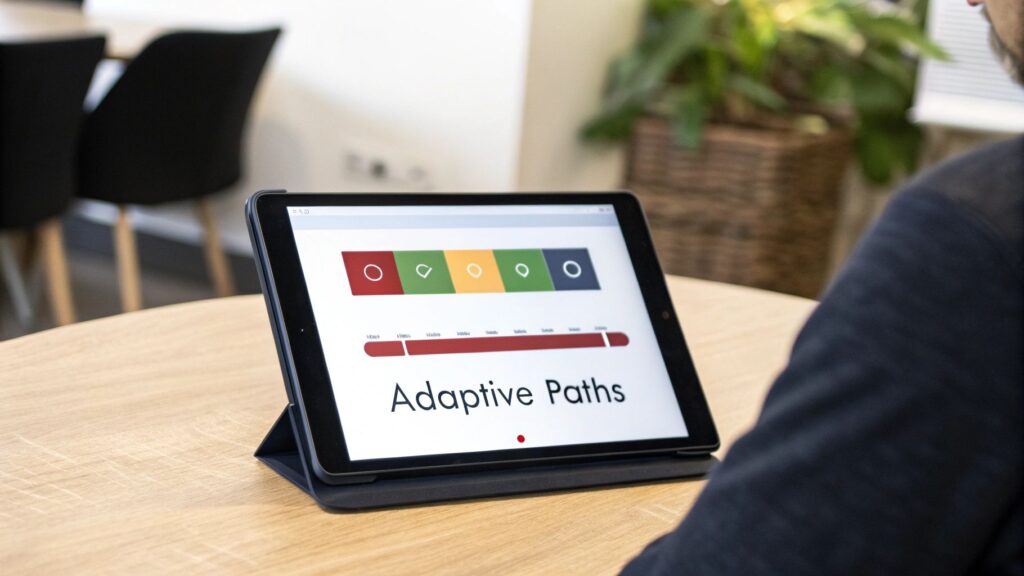
So, how does this software actually pull off a custom-tailored experience for every single person? It’s not magic, but it’s close. Behind the scenes, it’s a clever combination of smart technology and proven educational strategies working together.
Let’s lift the hood and see what makes these platforms tick.
The core engine is a set of intelligent algorithms making real-time adjustments. Think of it like a video game that gets tougher right as you master a new skill. That’s the secret sauce that makes the learning feel perfectly dialed in for each individual.
The Power of Adaptive Algorithms
The most common technology driving this personalization is the adaptive algorithm. This is the code that’s constantly watching and analyzing a learner’s performance. Get a question right, and the software might serve up a slightly harder one. Struggle with a concept, and it might switch gears, presenting the information in a new way or offering a simpler problem to build your confidence back up.
This constant feedback loop keeps learners in their “zone of proximal development.” That is the sweet spot where the material is challenging enough to be engaging but not so hard it becomes discouraging. It’s a dynamic system that sidesteps the boredom of content that’s too easy and the frustration of tasks that are too difficult.
The growth in this space is absolutely staggering. The adaptive learning software market is projected to explode from $3.2 billion in 2023 to a massive $20.7 billion by 2033. That’s an incredible 20.5% compound annual growth rate, fueled by organizations hunting for more effective learning outcomes. You can read more about the projections for the adaptive learning market to grasp just how significant this trend is.
Building on Proven Learning Models
But it’s not all about algorithms. These platforms are built on solid educational theories. They aren’t just guessing what works. They apply structured pedagogical models to guide the entire learning process.
Here are a few of the most popular approaches you’ll run into:
- Mastery-Based Paths: This model is simple but powerful. You must fully grasp a concept before you can move on to the next one. Think of it like building a house, you can’t put up the walls until you have a rock-solid foundation. The software keeps providing resources and practice until the user demonstrates true mastery.
- Microlearning: This strategy carves up huge, complex topics into small, digestible lessons. Instead of a marathon one-hour video, a learner might get a series of three-minute clips, a quick quiz, and an interactive graphic. This makes learning feel less intimidating and much easier to squeeze into a packed schedule.
- Gamification: Many platforms borrow elements from video games, like points, badges, and leaderboards. These features tap into our natural drive for competition and achievement, making the whole learning process more fun and motivating.
The core idea is simple: by combining data-driven algorithms with effective teaching strategies, the software can create a learning journey that is truly individualized, responding to a person’s needs from one moment to the next.
Creating a Truly Personal Journey
Ultimately, these different technologies and models work together to build a complete, dynamic picture of the learner. The software tracks every click and answer to understand not just what a person knows, but how they learn best. Our guide on the benefits of adaptive learning software digs deeper into how these systems create such effective educational experiences.
This blend of real-time adjustments and structured learning paths is what gives personalized learning software its power. It respects each individual’s pace and style, creating an environment where everyone gets the best possible shot at success.
Key Features of Effective Learning Software
When you start digging into different personalized learning software, the sheer number of features can feel like you’re trying to read a menu in a foreign language. It’s easy to get lost in a sea of buzzwords and flashy promises. Let’s cut through the noise and focus on what actually makes a platform powerful and effective.
Think of this as your field guide for finding a tool that not only looks good on paper but works great in the real world.
Real-Time Analytics and Reporting
Let’s be blunt. Without good data, “personalization” is just a guess. The single most critical component of any personalized learning software is its ability to provide clear, immediate feedback. Real-time analytics give both learners and instructors a window into what’s working and what isn’t, right as it happens.
For learners, this often looks like a personal dashboard showing their progress toward a goal. It highlights areas where they’re excelling and gently flags concepts that need more review. This is incredibly empowering because it gives them a real sense of ownership over their journey.
For instructors or managers, it means they can spot struggling users early and offer targeted help instead of waiting for a formal assessment to tell them something is wrong. They can see which pieces of content are genuine hits and which ones might need a refresh.
Great analytics don’t just track completion rates. They reveal the story behind the learning, showing engagement patterns, time spent on specific tasks, and the exact points where learners get stuck.
This data-driven approach allows for constant, meaningful improvement for everyone involved.
Flexible Content Authoring Tools
While some platforms come with a pre-built library of courses, the best ones give you the power to create and customize your own content. Content authoring tools are what let you build lessons from scratch or tweak existing materials to better fit your audience’s specific needs.
This is non-negotiable because no two organizations are exactly alike. You might need to incorporate company-specific procedures, use industry-relevant examples, or adjust the tone to match your unique culture. Good authoring tools make this possible without needing a team of developers.
Look for features that support a rich variety of content types. A solid system should let you easily combine:
- Video and audio clips for engaging explanations and storytelling.
- Interactive quizzes and simulations to test knowledge in a hands-on way.
- Text-based articles and downloadable PDFs for in-depth reading and reference.
- Surveys and polls to gather direct feedback and spark discussion.
The ability to mix and match these formats is absolutely key. This is especially true if you are building out bite-sized lessons that need to pack a punch. For more on this, you can check out our guide on the best micro-learning platforms to see how different tools approach content creation.
Seamless and Smart Integrations
Your learning software shouldn’t live on an island. To be truly effective, it needs to connect with the other tools you and your team already use every day. This is where integrations come in, and they are an absolute must-have.
Think about how much smoother the experience is when your learning platform can automatically sync user data with your HR system. Or when it can post completion updates to a communication channel like Slack or Microsoft Teams. These connections eliminate manual work and weave learning into the daily workflow.
A crucial integration to look for is with your existing Learning Management System (LMS), if you have one. You’ll want your new personalized learning software to work with it, not against it. This allows you to handle the heavy administrative lifting in your LMS while delivering the actual learning experience through the more dynamic, personalized tool.
Core Features Checklist for Personalized Learning Software
When you’re evaluating different platforms, it helps to have a checklist. Use this table to compare your options and make sure you’re not missing any foundational features.
| Feature Category | Key Functionality | Why It’s Important |
|---|---|---|
| Adaptive Learning Engine | Uses algorithms to adjust content difficulty and paths based on user performance. | This is the core of true personalization, ensuring learners are always challenged but not overwhelmed. |
| Real-Time Analytics | Provides instant data on progress, engagement, and trouble spots. | Enables timely interventions and continuous improvement for both learners and instructors. |
| Content Authoring | Allows creation and customization of courses with various media types (video, quizzes, text). | Gives you the freedom to create relevant, brand-aligned content tailored to your specific audience. |
| LMS Integration | Connects with systems like Moodle, Canvas, or Blackboard. | Avoids data silos and creates a unified learning environment for administrators and users. |
| Communication Tools | Links to Slack, Microsoft Teams, or other chat apps. | Sends automatic notifications and encourages social learning, keeping learners engaged. |
| Single Sign-On (SSO) | Allows users to log in with existing company credentials. | Reduces password fatigue and makes it much easier for users to actually access the platform. |
| Third-Party Content | Integrates with external content libraries or providers. | Expands your course offerings without you having to create every single piece of content from scratch. |
| Mobile Accessibility | Offers a fully functional and intuitive experience on smartphones and tablets. | Meets learners where they are, allowing for flexible, on-the-go access to materials. |
Ultimately, choosing a platform with the right features is about finding the perfect balance between power and usability. The goal is a tool that not only has strong capabilities under the hood but is also intuitive and genuinely helpful for the people using it every single day.
A Roadmap for Successful Implementation

Picking the right personalized learning software is a great first step, but how you roll it out is what really separates success from failure. A brilliant tool with a clumsy launch often ends up collecting digital dust. Let’s walk through a real-world roadmap to get your new platform humming.
This involves a deliberate, thoughtful process that gets everyone on board and sets you up for a massive win. It is not just about flipping a switch on a new piece of tech.
Start with a Clear Plan
Before you touch a single setting, you need to define what victory looks like. Why are you even bringing this software in? Setting clear, measurable goals is the single most important part of this entire process. Don’t just aim to “improve learning,” because that’s too vague. Get specific.
Are you trying to hit targets like these?
- Boost course completion rates by 20% within six months.
- Slash onboarding time for new hires from four weeks down to two.
- Increase learner engagement scores on post-training surveys by 15%.
These kinds of concrete goals give your project a clear direction and make it much, much easier to prove your ROI down the line. It also gives your team something to rally around. When people understand the why behind a big change, they’re far more likely to get on board.
Get a Handle on Your Data
Personalized learning software runs on data. It’s the fuel that powers the entire adaptive engine. This means you need a rock-solid plan for managing it all, from collection and cleaning to privacy and security. The first step is figuring out what data is actually useful.
Think about what you need to collect to build meaningful learner profiles. This could be anything from past quiz scores and self-assessed skill levels to stated career ambitions. The goal is to gather what’s necessary to create a better experience without getting intrusive.
Data privacy and security aren’t just a feature, they’re a promise. You have to be completely transparent with your users about what data you’re collecting and how it’s being used to help them. Make sure any software you choose complies with regulations like GDPR or CCPA.
Getting this foundation right is what makes personalization feel helpful, not creepy.
This diagram breaks down how that data flows through the system, from the initial analytics all the way to content creation and integration.
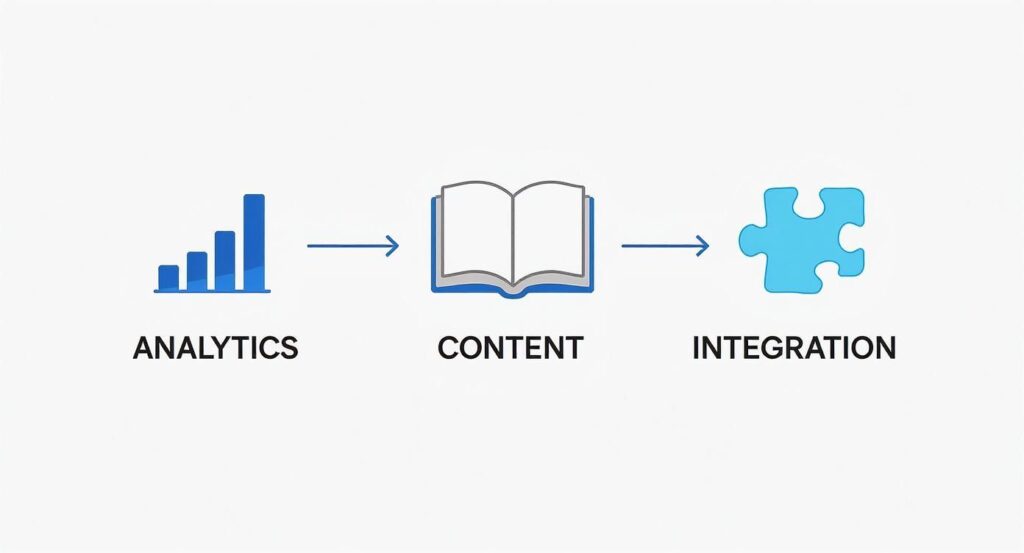
As you can see, strong analytics are the starting point. They inform both the content you create and the other systems you need to connect with.
Focus on the User Experience
Here’s a simple, unavoidable truth. If the software is a pain to use, people won’t use it. A clunky, confusing user experience (UX) will sabotage even the most powerful platform. Your job is to make the whole process feel effortless for everyone, from the admins setting things up to the learners logging in for the first time.
Before you go all-in, run a small pilot program with a mix of different users. Ask for their brutally honest feedback.
- Where did they get stuck?
- What felt confusing or awkward?
- Could they easily find what they were looking for?
Use what you learn to create simple quick-start guides, short tutorial videos, or an FAQ that tackles the most common sticking points. A little proactive support goes a long way in driving adoption. Remember, the best technology fades into the background, letting the learner focus completely on the content.
Design Assessments That Actually Help
Finally, let’s talk about assessment. In a personalized learning world, tests and quizzes should be more than just a way to slap a grade on someone. They’re learning tools. Good assessments are what feed the system the data it needs to adjust an individual’s learning path on the fly.
Instead of a single, high-stakes final exam, try weaving in a variety of low-stress checks for understanding throughout the journey.
- Quick pulse checks after a short video to lock in a key idea.
- Interactive simulations that let learners apply new skills in a safe, consequence-free space.
- Short self-assessments that encourage learners to reflect on their own confidence with a topic.
This approach transforms assessment from a stressful event into an ongoing, helpful conversation between the learner and the software. It provides the constant feedback loop that guides each person forward, and that’s what true personalization is all about.
How to Choose the Right Software Vendor

With so many options out there, picking the right software vendor can feel like a monumental task. The real goal is to find a true partner who’s as invested in your success as you are, not just to find another subscription to manage.
This choice goes way beyond comparing feature lists. You’re looking for a company whose vision and support model line up with your long-term goals.
Look Beyond the Feature List
It’s easy to get wowed by a slick demo and a laundry list of capabilities. But while features are important, the company behind the software matters so much more. I think of your relationship with the vendor as being just as critical as the technology itself.
You’re not just buying a tool. You’re entering a partnership that should last for years. A great platform from a vendor that offers terrible support or stops releasing updates can quickly become a very expensive headache.
Key Questions to Ask During a Demo
A product demo is your chance to interview a potential partner. Don’t just sit back and watch the presentation. You need to come prepared with questions that dig deeper than the surface-level bells and whistles.
Here are a few essential questions to get the conversation started:
- What does your customer support actually look like? Ask about their average response times, what channels they offer (phone, email, chat), and whether you’ll get a dedicated account manager.
- What is your product roadmap for the next 12-18 months? This tells you if they’re actively improving the product and, more importantly, if their future plans align with where you’re headed.
- Can you show me how your software will scale? You need to know if the platform can handle your growth, whether that means adding more users, more courses, or more complex integrations down the road.
These kinds of questions shift the conversation from what the software does today to how the vendor will support you tomorrow.
Understanding the True Cost
Pricing models for personalized learning software can be all over the map. You’ll see everything from per-user licenses to tiered subscriptions and usage-based fees. It’s vital to get a crystal-clear picture of the total cost of ownership, not just the attractive sticker price.
When you’re evaluating options, look beyond the initial price and understand the true cost of ‘free’ software, which often includes hidden fees and long-term implications. Ask pointed questions about implementation fees, charges for premium support, or extra costs for integrations. This helps you avoid any unpleasant financial surprises. For a more detailed breakdown, you can check out our guide on how to choose an LMS, which covers many similar financial considerations.
Finding a vendor is about more than just a transaction. You’re looking for a partner who is invested in your success, understands your goals, and is ready to grow with you.
The personalized learning market is expanding at an incredible rate, largely fueled by the power of AI-driven systems. In fact, the global hyper-personalized learning market is projected to grow from an estimated $3.8 billion in 2025 to a massive $27.4 billion by 2035. This explosive growth means more vendors and more innovation are just around the corner.
Ultimately, don’t rush this decision. The best move you can make is to run a pilot program with your top two or three choices to see how they perform in a real-world setting. Getting feedback from the people who will actually use the software every day is the surest way to choose a vendor that’s the right fit for everyone.
Common Questions About Personalized Learning
As you start looking into personalized learning software, a few questions always seem to pop up. It’s a big decision, and you want to feel confident you’re making the right move. Let’s walk through some of the most common concerns I hear from people who are exactly where you are right now.
My goal is to give you clear, straight-up answers so you can move forward knowing what to expect.
How Does This Software Handle Data Privacy?
This is usually the first question people ask, and for good reason. When a platform’s whole purpose is to collect learner data to create custom experiences, you have to know that information is locked down tight. Security is the foundation everything else is built on.
Any vendor worth your time takes data privacy incredibly seriously. They use standard security measures like end-to-end encryption, which scrambles data while it’s being sent and while it’s stored on their servers. This basically makes the information unreadable to anyone without the right keys.
You’ll also want to look for vendors who comply with the big data protection regulations.
- GDPR (General Data Protection Regulation): This is the gold standard for data privacy, and it’s non-negotiable if you have any users in Europe.
- CCPA (California Consumer Privacy Act): This law provides similar protections for residents of California.
- SOC 2 Certification: Think of this as a rigorous third-party audit that proves a vendor has strong, verified security controls in place to protect customer data.
Don’t be shy about asking a potential vendor for their security documentation. A trustworthy partner will be more than happy to show you exactly how they keep your learners’ information safe.
Can It Integrate with Our Existing Systems?
Nobody wants to buy a shiny new piece of software only to find out it creates more work. A common fear is that a new platform will become a “data island,” totally cut off from the other tools you depend on every day. That’s why smooth integration is an absolute deal-breaker.
The best personalized learning software is built to play nicely with others. The key here is looking for a platform with a robust API (Application Programming Interface). You can think of an API as a universal translator that lets different software programs talk to each other and share data automatically.
A strong API means you can hook the platform into your essential systems, like your Learning Management System (LMS) or Human Resources Information System (HRIS). This allows for a seamless flow of information, so you can automatically enroll new hires or sync course completion records without someone having to do it all by hand. Many platforms also offer pre-built, one-click integrations with popular tools, which makes getting set up even easier.
Is Personalized Learning Effective for All Subjects?
That’s a great question. While the core ideas of personalized learning can apply almost anywhere, the software really delivers its biggest punch in certain areas. It’s especially powerful for subjects that are skill-based and where knowledge builds on itself, one block at a time.
For instance, it absolutely excels in topics like:
- Mathematics and Coding: Where you can’t move on to step two until you’ve truly mastered step one.
- Language Learning: Where everyone’s pace and practice needs are completely different.
- Technical or Compliance Training: Where you have to prove you’ve mastered specific procedures and there’s no room for error.
The software shines wherever there’s a clear, logical progression of skills. For more subjective or discussion-heavy topics like literature or philosophy, the software is still really useful for delivering the core content and checking comprehension. However, it works best when it’s blended with things like instructor-led discussions or group projects that add the human element.
The core strength of personalized learning software is its ability to ensure every learner builds a solid foundation of knowledge, which is a game-changer for skill-based subjects.
It’s not that it can’t work for other areas, but its biggest wins come from adapting to a learner’s pace as they build skills step-by-step.
What Is the Typical Learning Curve?
Bringing any new technology into the mix comes with a learning curve, both for your team managing it and for the people using it. The good news is that modern software companies put a huge emphasis on user experience, so getting up and running is usually much smoother than you might think.
For your learners, the experience is often incredibly intuitive. The platform is designed to guide them, so they typically just need a quick tour to get the lay of the land. A well-designed system should feel natural within just a few minutes.
For instructors or admins, the curve is a little steeper but still very manageable. Most vendors provide comprehensive onboarding support, from live training sessions to video tutorials and detailed help guides. The initial setup might take some focused effort, but once you’re familiar with the dashboard and reporting tools, the day-to-day management is usually pretty straightforward. The key is to pick a vendor that’s known for having your back with excellent customer support.