A Course Creator’s Guide to Spaced Repetition Strategy in Online Courses
If you’ve ever felt that frustrating sense that your students are forgetting information almost as fast as you can teach it, you’re not alone. I hit this wall myself, which sent me digging into the research on how we actually learn. That’s when I rediscovered the ‘Forgetting Curve,’ a concept that proves how quickly we lose new information if we don’t actively try to retain it.
A spaced repetition strategy in online courses is the most powerful tool I’ve found to completely flip that script. It’s a science-backed method for moving knowledge from a student’s short-term to long-term memory. It works by prompting students to review information at specific, ever-increasing intervals, right at the moment they’re about to forget it.
This approach is so much more effective than the “cram and forget” cycle of traditional study. It’s a total game-changer for lasting learning.
Why Spaced Repetition Is a Game Changer for Online Learning

Tapping Into How the Brain Actually Learns
This isn’t just another teaching theory. It’s a method grounded in the way our brains are wired. Think about it. Cramming for an exam might get someone a passing grade, but how much of that information do they remember a week later? Almost nothing.
Spaced repetition works differently by taking advantage of a few key psychological principles:
- Active Recall: Instead of passively rereading notes or re-watching a video, the strategy forces the brain to retrieve information. Each time a student successfully pulls an answer from their memory, the neural pathway to that knowledge gets a little stronger.
- The Spacing Effect: By reviewing material at increasing intervals (e.g., one day, then three days, then a week), you interrupt the forgetting process at the perfect moment. This tells your brain, “Hey, this is important, don’t delete it!”
The goal is to make learning stick. In a world full of digital distractions, course creators who want to deliver real, lasting results need a method that works with our natural memory processes, not against them.
To see just how different the outcomes are, here’s a quick comparison of what typically happens when students cram versus when they use a spaced learning approach.
Traditional vs. Spaced Repetition Learning Outcomes
| Metric | Traditional Learning (Cramming) | Spaced Repetition Learning |
|---|---|---|
| Short-Term Recall (1-3 Days) | High | High |
| Long-Term Retention (30+ Days) | Very Low (often <10%) | High (often >80%) |
| Cognitive Load | Extremely High | Low and Distributed |
| Confidence & Mastery | Low, often anxiety-driven | High, builds incrementally |
| Application to New Problems | Poor | Strong |
The data is clear. Spaced repetition improves memory and builds genuine, applicable knowledge that students can carry with them long after the course ends.
Why This Matters More Than Ever
The demand for effective online education is exploding. The industry is projected to grow by about 9.1% annually between 2018 and 2026. And the latest data shows that in Fall 2023, a staggering 53.4% of higher education students took at least one online course.
For course creators, this growing market means more opportunity, but it also means way more competition.
To really stand out, you have to deliver real results. Understanding how to apply the principles of mastering spaced repetition studying is paramount, offering a proven path to enhanced learning outcomes and deeper comprehension. You can dig into more online learning statistics on DevlinPeck.com to see just how big this shift is.
Implementing a spaced repetition strategy boosts student outcomes and gives you a serious competitive advantage. When students succeed and retain what they’ve learned, they become your best advocates. That leads to better reviews, more referrals, and a stronger brand. It’s about delivering on the true promise of education, ensuring the knowledge you share actually lasts.
Designing Course Content for Spaced Repetition
Alright, let’s get practical. A successful spaced repetition strategy is something you bake into your course from the beginning. It starts right when you’re first sketching out your course content.
The whole game is about breaking down your big, complex topics into tiny, digestible pieces. I call them ‘learning atoms.’ Think of them as individual Lego bricks. On their own, they’re simple, but when you combine them strategically, they build a complete picture of understanding for your learners.
From Big Topics to Learning Atoms
You can’t just drop an hour-long video lesson into a spaced repetition system and call it a day. It just doesn’t work. The review has to be quick, focused, and targeted.
For a digital marketing course I built, I tackled the giant topic of ‘SEO Fundamentals’ by deconstructing it. Instead of one monster module, it became a whole series of smaller, reviewable chunks.
- Key Term Flashcards: What’s the definition of ‘domain authority’?
- Quick Video Recaps: A 60-second clip explaining the difference between on-page and off-page SEO.
- Short Quizzes: A five-question quiz on the core parts of a technical SEO audit.
This micro-approach makes reviewing feel effortless. A student can knock out a review session in just a few minutes, which is absolutely critical for keeping them engaged over the long haul. For more on this, check out our guide on how to structure microlearning content.
The core principle here is to shift from “re-watching” to “recalling.” Your review materials should prompt students to pull information from their memory, not just passively consume it again.
That very act of retrieval is what strengthens neural pathways and cements knowledge into long-term memory. It’s the difference between merely recognizing a correct answer and truly knowing it.
Creating Review Materials That Actually Work
Once you’ve identified your learning atoms, the next job is designing the actual review materials. The goal is to make them interactive to force students to apply what they’ve learned. Passive review is the enemy of retention.
Here are a few formats that have worked exceptionally well in my own courses.
- Interactive Flashcards: A classic for a reason. One side has a question or term, the other has the answer. The key is making them digital and easily accessible on any device.
- Fill-in-the-Blank Questions: Simple but surprisingly powerful. Something like, “The three main types of search intent are informational, navigational, and ___________.” This forces active recall of the specific term.
- Scenario-Based Problems: Instead of asking for a dry definition, present a mini-case study. For a project management course, you could ask, “Your client just added three major features mid-sprint. Which project management principle should you apply first?”
These kinds of questions push learners toward deeper processing. Research consistently shows that when we have to struggle a bit to recall something, the memory trace becomes much stronger once we finally get it.
Building Your Content Map
To keep all this straight, I strongly recommend creating a content map. This doesn’t need to be fancy, a simple spreadsheet is perfect for the job.
Here’s a basic structure you can steal:
| Main Lesson | Learning Atom (Core Concept) | Review Material Type | Review Question/Prompt |
|---|---|---|---|
| SEO Fundamentals | What is a backlink? | Flashcard | Define ‘backlink’ and its importance for SEO. |
| Email Marketing | A/B Testing Subject Lines | Mini-Quiz | Which subject line is likely to perform better and why? A vs. B |
| Social Media Ads | Calculating ROI | Fill-in-the-Blank | To calculate ad ROI, you subtract your ad spend from your _______ and then divide by ad spend. |
This map becomes your blueprint. It ensures that for every core concept you teach, you have a corresponding piece of review material ready to go.
When you design your course this way from the start, you’re not just creating content. You’re building an entire system engineered for lasting knowledge, making your spaced repetition strategy both effective and dead simple to manage.
Choosing Your Spaced Repetition Schedule and Tools
Alright, so you’ve broken down your course into those perfect, bite-sized “learning atoms.” Now for the million-dollar question: How often should your students actually review them? This is where you get to design the rhythm of your course, and it’s way less complicated than it sounds.
You don’t need a degree in data science to get this right. The whole game is about reviewing information at ever-increasing intervals. A fantastic, no-fuss starting point is a fixed schedule you can easily set and forget.
- 1 Day: The first review hits fast, right when the memory is most vulnerable to that initial steep drop on the forgetting curve.
- 3 Days: The next one comes a few days later, just as the memory starts to get a little fuzzy again.
- 7 Days: A week out, this review session really starts to solidify those neural pathways.
- 14 Days: Two weeks later, you’re helping push that information into true long-term memory.
This simple schedule is a killer way to get started with spaced repetition in your online course without needing fancy, complex software. Honestly, you could even pull this off with a simple automated email sequence.
Going Beyond Basic Schedules
For those who want to get a bit more dialed in, there are some classic systems designed to optimize this whole process. One of the old-school favorites is the Leitner system. Picture a series of digital “boxes.” When a learner gets a flashcard right, it graduates to the next box, which gets reviewed less often. Get it wrong? It goes all the way back to box number one for more frequent practice.
Another heavy hitter is the algorithm used by apps like Anki, which dynamically adjusts the schedule based on how difficult a student finds each concept. It’s a much more personalized approach that adapts to individual learning speeds. The big idea is the same, though. The system should surface harder concepts more often and ease up on the stuff students already know.
The perfect schedule is the one your students will actually stick with. Whether you choose simple, fixed intervals or a more dynamic algorithm, consistency is what drives the real results.
The real magic happens when you pair a smart schedule with the right technology. You want this entire process humming along in the background, making it feel like a natural, helpful part of the learning experience, not a chore.
Finding the Right Tools for the Job
So, how do you make all this happen on autopilot? You’ve got a few great options, from using what you already have to bringing in specialized tools.
Platforms that offer advanced features like AI Powered Revision tools can personalize these experiences for some seriously impressive retention. Let’s look at the main ways you can pull this off.
- Native LMS Features: A lot of course platforms like Teachable or Kajabi have features you can repurpose. Think drip content that releases review modules on a schedule or automated quizzes that get sent out a certain number of days after a lesson is completed. It’s a great place to start.
- Specialized Spaced Repetition Apps: This is where tools like Anki and Quizlet absolutely shine. They were built from the ground up for spaced repetition and handle all the scheduling for you. Your students can use them right alongside your main course content.
Here’s a quick look at Anki, a favorite among serious learners for its powerful, customizable algorithm.
This screenshot shows the simple, focused interface of the Anki app, where students can build and review their own flashcard decks. The platform’s real power is in its algorithm, which automatically calculates the perfect time to show each card again.
This kind of dedicated tool takes all the guesswork out of scheduling. For many learners, that automation is a total game-changer. One study focusing on medical students found a direct link between using Anki and better exam performance. The ones who logged over 178 hours in the app did significantly better on their board exams, which just goes to show how consistent engagement with these tools directly boosts what you can remember under pressure.
Ultimately, the best tool really depends on your course and your audience. Are your students tech-savvy and willing to fire up a separate app? Or would they rather have everything baked right into the learning platform? Thinking through these questions will point you in the right direction. For an even deeper dive into student-centric tech, you might find our article on adaptive learning software interesting.
Integrating Spaced Repetition Into Your Learning Platform
Alright, you’ve chunked your content and designed your review materials. Now for the fun part: plugging it all into your learning platform so it runs on its own. I know this step can feel a bit technical, but there are a few surprisingly straightforward ways to get this done, even if you’re not a coder.
Let’s start with a simple, low-tech method that works incredibly well. You can actually build a basic spaced repetition system using the email service you’re probably already using.
Use Your Email Service for Simple Automation
If you use a tool like ConvertKit, Mailchimp, or any other email marketing platform with automation features, you have everything you need. The core idea is to create a simple, automated email sequence that kicks off the moment a student completes a key lesson or module.
Here’s a workflow I’ve used that you can basically copy and paste:
- Set the Trigger: The automation begins when a student gets a tag like “Completed Module 1.”
- Wait 3 Days: Add a delay step. Easy enough.
- Send Review Email #1: This email links out to a quick 5-question quiz or a digital flashcard deck covering the most important takeaways from Module 1.
- Wait 7 Days: Add another, longer delay.
- Send Review Email #2: Time for a different, slightly more challenging quiz on the same concepts. This is where you really start to see if the knowledge is sticking for the long term.
This “set it and forget it” method is a fantastic first step. It keeps your students engaged and thinking about your material long after they’ve clicked “complete” and moved on.
The whole process boils down to three simple steps: take your content, put it on a smart schedule, and use a tool to make the delivery happen automatically.
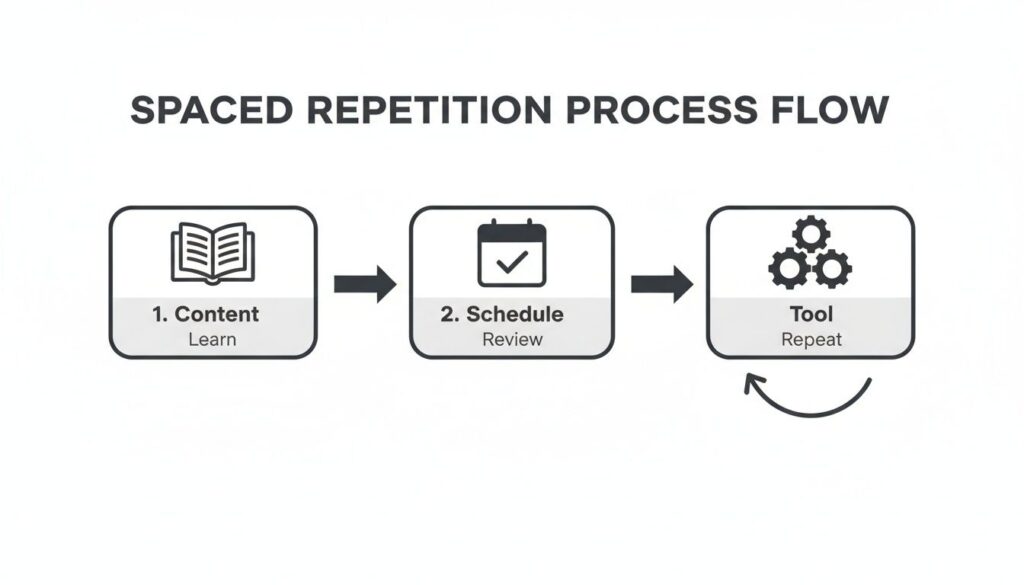
As you can see, it’s really about turning your great content into a repeatable system that cements learning.
Leverage Your LMS’s Built-In Features
Your Learning Management System (LMS) might have some powerful tools hiding in plain sight. Platforms like Kajabi, Thinkific, or Teachable often have features you can repurpose for spaced repetition.
Look for things like:
- Content Dripping: This is the most obvious one. You can set up your review content, like a short video recap or a quiz, to unlock on a spaced schedule. Think 3, 7, and 14 days after the main lesson is finished.
- Automated Reminders: Some platforms let you send automated emails or in-app notifications based on a student’s progress. You can use this to nudge them to complete a review quiz.
The key is to get creative with the tools you already pay for. Before you rush out to add another piece of software to your tech stack, spend an hour digging through your LMS settings. You might be surprised at what you can already do.
This approach also keeps the entire learning experience inside one platform, which is a huge win for your students. It feels seamless and integrated right into the natural flow of the course.
Connect Your Platform to Dedicated Tools
For the most flexible and powerful setup, you can connect your course platform to other apps using an automation tool like Zapier. This opens up a world of possibilities for creating custom workflows that are a perfect fit for your course.
The options here are practically endless, but I’ll share a real-world example to get your gears turning.
My Favorite “Zap” Workflow:
- Trigger: A student completes a specific lesson in Thinkific.
- Action: Zapier automatically creates a new review task for that student in a project management app they might already use, like Todoist or Asana.
- Details: The task is named “Review: Lesson 3 Key Concepts” and the due date is set for 3 days from now.
This is so effective because it puts the review prompt right inside the workflow tools your students are already looking at every day. It’s a gentle nudge that doesn’t get lost in a crowded email inbox.
This hands-on approach is not only effective but also more engaging. In fact, a recent study with medical students found that 64.44% found a similar digital flashcard system enjoyable, which was a key factor in helping them stick with it. You can learn more about how this strategy boosted their test scores in the full research on spaced repetition in medical education.
No matter which path you take, the goal is the same: automate the process. This lets you focus on creating amazing content while your system works tirelessly in the background to make sure that content actually sticks.
Measuring Success and Refining Your Strategy

Getting an automated spaced repetition system up and running is a huge step, but the job isn’t quite done. You’ve built the engine, but now you have to make sure it’s actually getting your students to their destination. How do you know if it’s really working?
You have to look at the data. But not just any data.
We need to move way beyond vanity metrics like course completion rates. Someone can marathon through a course in a weekend and forget everything by the next month. The real measure of success, the entire point of this effort, is long-term retention. That’s what we need to track.
Focusing on the Metrics That Matter
The most direct way to see if your spaced repetition strategy is doing its job is to track quiz scores over time. This is where you can literally see memory in action.
Don’t just glance at the final grade on a single test. The magic is in the comparison. How do students perform on an initial assessment right after a lesson versus how they do on the review materials a week or two later?
Imagine a student scores a 90% on the main quiz for a module but then tanks the 14-day review quiz with a 60%. That’s a massive red flag. It’s a clear signal that the information isn’t sticking the way you thought it would. This kind of data is gold for refining your course.
Another critical metric is engagement with the review materials themselves. Are your students even opening the reminder emails and clicking through to the flashcards?
Tracking engagement with your review materials is just as important as tracking quiz scores. If students aren’t using the system, it doesn’t matter how perfectly you designed it.
Most email automation tools will give you the open and click-through rates for your sequences. If you notice your 7-day review email has a dismal open rate, the subject line probably needs some work. If the click-through rate is low, the email copy itself might not be creating enough urgency or curiosity.
Gathering Direct Student Feedback
While hard numbers like quiz scores and open rates are essential, they don’t paint the full picture. You also need to hear directly from your students. They’re the ones in the trenches, after all.
You don’t need to bombard them with a 50-question survey. A simple, two-question poll after the first couple of review cycles can provide incredible insights.
Try asking something like this:
- On a scale of 1-5, how helpful are the short review quizzes for remembering the material?
- What’s one thing that would make these reviews more useful for you?
This direct feedback helps you understand the “why” behind the numbers you’re seeing. A student might tell you the review content is great, but they wish it was more mobile-friendly. That’s an easy fix that could have a huge impact on their experience and your results. You can find more ideas for gathering feedback in our guide on how to measure training effectiveness.
Analyzing and Acting on Your Findings
Once you have this data, both the numbers and the feedback, it’s time to connect the dots and make adjustments. Think of yourself as a learning detective, piecing together clues to improve the experience.
Here’s a simple way to think about it:
| Data Point | What It Might Mean | Actionable Next Step |
|---|---|---|
| Big drop-off in 14-day quiz scores | The time gap might be too long for your content, or the initial lesson wasn’t clear enough. | Test a shorter interval, like 10 days. Or, go back and add a quick summary video to the original lesson. |
| Low open rates on review emails | Your subject lines are boring or the emails are landing in spam folders. | A/B test different subject lines. Try something more engaging like, “Quick 5-Min Quiz for Module 2.” |
| Feedback says reviews are “too long” | Your ‘learning atoms’ are still too big. Students feel overwhelmed by the review. | Break the review content down even further. The goal should be a review that takes 5 minutes or less. |
This continuous loop of measuring, analyzing, and refining is what elevates a good course to a great one. By listening to what the data and your students are telling you, you can constantly fine-tune your spaced repetition strategy and build a course that creates real, lasting knowledge.
Common Questions About Spaced Repetition in Courses
As a course creator, you’re always looking for ways to deliver better, more lasting results for your students. When I start talking about spaced repetition, a few of the same great questions always come up.
Let’s get into them and clear up any lingering doubts.
How Much Extra Work Is This, Really?
I won’t sugarcoat it. There’s definitely some upfront work involved. But the payoff in student success and course value is massive.
The heaviest lift is in the initial design phase. This is where you’ll break down your big, beautiful course into those small, reviewable chunks of core information we talked about earlier.
Once you’ve pinpointed those key terms, core concepts, or critical steps, you have to create the actual review materials. This could be a set of simple digital flashcards, a quick 5-question quiz, or a fill-in-the-blank exercise.
The good news? After you automate the delivery schedule with your LMS or email tool, the system pretty much runs on autopilot.
My best advice is to start small. You don’t have to rebuild your entire course in a weekend. Pick one critical module, build out the spaced repetition components for it, and just watch how your students respond. The positive feedback and improved results will give you all the motivation you need to expand it.
Will I Overwhelm My Students with Constant Reviews?
This is a totally valid concern, and it’s one I had myself. The last thing any of us want is for our course to feel like a chore.
When it’s done right, a good spaced repetition strategy actually reduces overwhelm, it doesn’t create it. Instead of facing a monster, all-night study session before a final exam, students are doing quick, 5 to 10-minute reviews every few days. These short bursts are so much easier to fit into a busy schedule and feel far less intimidating.
The key is to keep the review content laser-focused. Don’t ask students to re-watch an entire 30-minute lesson. A quick quiz on the main takeaways is way more effective and respects their time.
It also helps to explain the “why” behind the strategy. When students understand that these quick check-ins are designed to make learning easier and more permanent, they see them as a valuable tool, not as extra homework.
What if My LMS Doesn’t Support Spaced Repetition?
Don’t worry, you are definitely not out of luck. A lot of fantastic learning platforms weren’t built with this specific strategy in mind, but there are some excellent, battle-tested workarounds.
The most common and accessible solution is to simply use your email marketing tool.
- Tools like Mailchimp or ConvertKit are perfect for this. You can set up an automated email sequence that gets triggered when a student finishes a lesson. From there, you just add delays of 3, 7, and 14 days before sending out links to your review materials. Simple and effective.
Another fantastic option is an automation platform like Zapier. This lets you connect your LMS to just about any other app your students might already use. For example, you could create a “Zap” that automatically adds a review reminder to a student’s Google Calendar or Todoist list after they complete a module.
Is This a Good Fit for My Course Topic?
This strategy is an absolute powerhouse for any course that involves retaining factual or procedural information. It’s a perfect fit for subjects where knowledge can be broken down into clear question-and-answer formats.
Think about it:
- Learning a new language (vocabulary)
- Mastering coding syntax (commands and functions)
- Memorizing financial formulas (equations)
- Understanding a business framework (key steps and definitions)
But what about topics that are more abstract or creative, like leadership philosophy or artistic interpretation? Its application is less direct, but it’s still incredibly useful.
Even in a creative writing course, you can use spaced repetition to help students master key literary terms or story structures. This gives them a stronger, more stable foundation for their actual creative work. It’s about reinforcing the building blocks, no matter what you’re teaching.