Vimeo vs Wistia for Hosting Course Videos
You’ve done the expensive part.
Not expensive in money, but in time. You outlined the curriculum, recorded the lessons, fixed the audio, re-exported the videos after spotting one typo on slide 14, and now you’re staring at the last technical choice before launch.
Then Vimeo vs Wistia shows up.
On paper, it looks like a simple hosting decision. In practice, it changes how your course feels to students, what data you can act on, how readily your business can scale, and whether your monthly software bill stays sensible or starts drifting upward.
I’ve seen course creators choose too fast here. They pick the lower visible price, then realize they need better engagement data, webinar tools, or cleaner CRM handoffs. Others go for the premium option and pay for features they never use. Both mistakes are common.
That’s why I think the best way to compare Vimeo vs Wistia for hosting course videos is through the lens of total cost of ownership. Not plan price. Not player design. The full business picture.
Choosing Your Video Host is a Huge First Step
Uploading your first finished course video feels great for five minutes.
Then the practical questions start. Where will this live? Will students get a smooth viewing experience? Can I protect paid content? If learners drop off halfway through a lesson, will I know where that happened? If I run a workshop or onboarding webinar, can this same platform support it?

This marks a significant crossroads.
A video host is not just a storage locker. It shapes the student experience every day. It also affects what you can measure and improve. If your course business is small today, that may sound secondary. Once you start optimizing lessons, running launches, or managing a membership, it becomes central.
I’ve found that creators care about one of three things first:
- Keeping costs controlled: You want reliable hosting without stacking another premium tool onto a lean budget.
- Improving conversions: You want video to help sell courses, capture leads, and support launch campaigns.
- Running a cleaner operation: You need the hosting platform to fit into a bigger system without constant manual work.
Those priorities point toward different answers.
A lot of comparison posts flatten this into a feature checklist. That misses the part that matters most. The right platform is the one that fits how you make money, how your students consume lessons, and how much complexity your business can absorb right now.
A course creator with a flagship program, a webinar funnel, and CRM automations is solving a different problem than someone uploading a self-paced mini course to a WordPress site.
That’s why the better question is not “Which platform is better?” It’s “Which platform earns its keep in my business?”
The Core Difference Vimeo vs Wistia in a Nutshell
If you want the short version, Vimeo and Wistia come from different instincts.
Vimeo feels like a strong fit when presentation matters most. It has long appealed to creative professionals and teams that want polished playback, a professional feel, and a more straightforward route to hosting.
Wistia is built more like a business tool. It puts more weight on tracking, lead capture, engagement analysis, and workflow connections around the video itself.
That difference sounds subtle until you’re deep into a course launch.
Vimeo suits creators who want elegant delivery
If your main job is to host lessons cleanly, keep the player professional, and avoid overcomplicating your stack, Vimeo makes sense for a lot of creators.
I recommend it to people in a few situations:
- You’re launching your first paid course
- Your sales process happens outside the video player
- You care more about playback and design than viewer-level analytics
- You want a lower entry price than a premium marketing-oriented platform
There’s a practical calm to that setup. You upload, embed, organize, and move on.
Wistia suits creators who treat video like a growth channel
Wistia is the better fit when video is doing more than delivering lessons.
If you’re collecting leads, comparing engagement across assets, tracking individual viewer behavior, or using webinars as part of your membership or course sales process, Wistia starts to look less like a hosting bill and more like infrastructure.
That’s why many course businesses graduate into it. They do not always start there. They move there when they need more than clean playback.
For a broader look at the category, this guide to video hosting platforms for online courses is useful alongside this comparison.
The simplest way to think about it
Here’s the mental model I use.
| Area | Vimeo | Wistia |
|---|---|---|
| Best fit | Solo creators, design-focused courses, simpler setups | Growth-focused course businesses, memberships, webinar-led programs |
| Core strength | Professional hosting and polished playback | Deeper analytics, lead capture, and business workflow value |
| Budget posture | Easier starting point | Higher upfront commitment, stronger upside if used fully |
| Main risk | You may outgrow the data and workflow depth | You may overpay if you only need basic hosting |
Neither platform is wrong.
But they reward different business models. Vimeo is easier to justify when you need dependable hosting and a cleaner monthly bill. Wistia makes more sense when better data and conversion tooling can change what you earn, what you learn about viewer behavior, or how much manual admin your team handles.
Feature Deep Dive for Course Creators
A course creator notices platform differences at an expensive moment. A launch replay underperforms. Students stall in the same lesson. A webinar fills up faster than the tool can handle. At that point, this stops being a player comparison and starts being an operations decision.
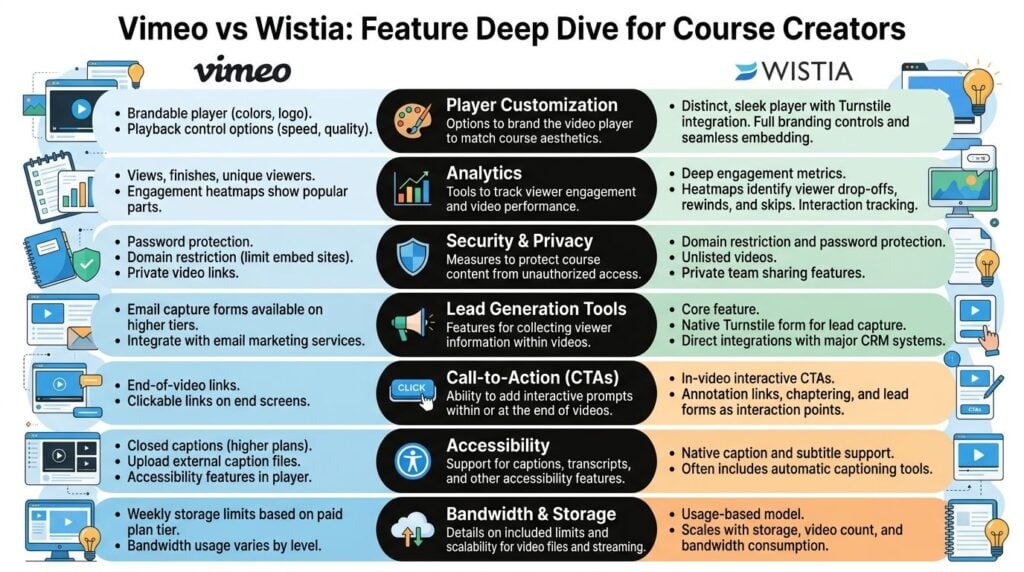
Player branding and on-site experience
Both platforms give paid courses a cleaner presentation than public video platforms. That baseline matters because students should stay inside your brand, not feel like they stepped into someone else’s product.
A key difference is how far you want video to carry your brand and sales process. Vimeo gives you a polished player and a straightforward viewing experience. Wistia puts more weight on the surrounding experience, especially if your videos sit on registration pages, replay pages, or webinar assets that support sales as much as delivery.
That distinction affects total cost of ownership more than creators expect. If you need extra tools, custom pages, or manual fixes to make the experience feel consistent, the cheaper platform can stop being cheaper.
Analytics that help you improve a course
This can be the financial break point.
Vimeo gives you useful top-level reporting. For many course businesses, that is enough to confirm that lessons are being watched and that the library is working as intended. Wistia goes deeper into viewer behavior, which matters if you regularly revise lessons, test sales content, or track how prospects engage before buying.
I have found that broad reporting answers management questions. Granular reporting answers revenue questions.
If 40 students watched lesson three, Vimeo can help confirm the lesson got views. If students repeatedly drop at the same timestamp, rewatch one confusing explanation, or abandon a sales video before the offer appears, Wistia is better suited to catching that pattern. For a creator with one flagship course and light revision cycles, that extra detail may be nice to have. For a business that updates lessons every quarter or uses video heavily in its funnel, it can pay for itself by showing exactly what to fix.
Lead capture and business intent
This feature matters if video plays a role in acquisition.
If every video lives behind a login and your sales happen elsewhere, Vimeo’s simpler approach can be fine. If you use preview lessons, evergreen webinars, mini-trainings, or workshop replays to collect leads, Wistia starts acting less like storage and more like a conversion tool.
That is a different cost equation. A platform with built-in email capture and viewer-level follow-up can replace part of the stack around the video. If Wistia helps you avoid a separate tool, a patchwork embed setup, or manual segmentation work, the monthly premium can be easier to justify. If none of that applies to your course business, you are paying for features that sit idle.
Webinar hosting for cohorts and memberships
Live delivery changes the comparison fast.
For self-paced courses with occasional Q&A sessions, Vimeo can cover the basics without pushing your costs up too early. For cohort programs, memberships, onboarding calls, or workshop-led sales, Wistia is the stronger operational fit because the webinar feature set is built to do more of the job inside one system.
That matters because webinar complexity has a habit of creating hidden costs. Attendance caps force awkward workarounds. Weak engagement tools reduce participation. A disconnected replay workflow creates extra admin after every event. If live sessions are central to your offer, Wistia’s higher price can be easier to defend because it reduces friction in a part of the business that already consumes team time.
Storage, entry cost, and early-stage friction
Early-stage creators prioritize one thing first. How much does it cost to get the course online without creating a mess later?
Wistia lowers the starting friction with a free entry point, while Vimeo starts as a paid product. That can make Wistia attractive for testing. But free access is not the same as low ownership cost. If your library grows and you never use Wistia’s stronger analytics, lead capture, or webinar tools, Vimeo can still end up being the cleaner long-term choice for a straightforward teaching business.
I would judge this part by business model, not by the first month’s bill. A creator validating one starter course has different needs from a membership business that ships new video every week.
Support and day-to-day reliability
Support seldom feels important until something breaks during a launch or a live session.
Wistia has a stronger reputation for support quality in the comparisons cited earlier, and that matters most for businesses where video problems touch revenue directly. If your videos are primarily for lesson delivery inside a stable course area, support quality still matters, but the gap may not be large enough to change the buying decision. If you run webinars, live onboarding, or high-ticket programs, quicker and better help can save a launch, a client relationship, or a renewal cycle.
That is part of total cost of ownership too. Time spent troubleshooting is still a cost.
A practical feature summary
Here is the simpler way to judge the feature trade-off.
| Feature area | Vimeo | Wistia |
|---|---|---|
| Player experience | Clean, professional, low-friction for standard course delivery | Clean, more useful if video also supports branded marketing and event flows |
| Lesson analytics | Good for broad visibility | Better for revision, segmentation, and spotting drop-off patterns |
| Lead capture | Limited if video is part of your funnel | Stronger if video needs to collect emails or trigger follow-up |
| Webinar use | Fine for lighter live needs | Better fit for cohort, membership, and webinar-led models |
| Cost logic | Lower friction if you mainly need hosting | Higher price, but better value if it replaces other tools or manual work |
The short version is this. Vimeo often wins on simplicity. Wistia wins when video is tied closely to sales, retention, and iteration.
If your course business earns money primarily from a stable library of lessons, Vimeo can have the better TCO. If one better-performing webinar, one stronger replay funnel, or one round of smarter lesson fixes can produce measurable revenue, Wistia reaches its break-even point much sooner.
For creators who want stronger lessons before they worry about software, this guide on how to create engaging online course videos is a useful companion to the analytics discussion above.
Integrations and Scaling Your Course Business
Many creators make the hosting choice while thinking only about the player.
That works for a while. Then the business grows and the hidden question appears. How well does this thing connect to everything else I use?

The answer matters more if you run a membership, sell cohort programs, work with a corporate client, or have a team handling marketing and student operations.
Basic embedding is not the hard part
At the simpler end, both platforms work with common website setups and basic WordPress video workflows.
That is enough for many solo creators. If your stack is a course platform, an email tool, and a checkout page, you may never hit serious friction. You upload the video, drop it into the lesson page, and keep moving.
The problem shows up when your process stops being linear.
You may want to track who watched a required onboarding video, trigger follow-up based on attendance, or connect course engagement to a CRM record. That is where platform differences start to matter.
Enterprise LMS needs are a separate category
One useful distinction in the verified data is not a flashy feature. It’s operational fit.
The verified data notes that while both platforms work with basic WordPress plugins, a key differentiator is their ability to integrate with enterprise LMS platforms like Canvas or Blackboard, and that Wistia’s API is often favored for supporting automated enrollment workflows and grade synchronization, which is less of a focus for Vimeo’s core product according to the CMinds comparison at top video hosting platforms compared.
That matters if you’re in corporate training or institutional learning.
A solo course creator selling from a landing page does not need grade synchronization. A training manager might.
This is one of those areas where the wrong platform doesn’t fail immediately. It creates manual work later.
The gap nobody explains well enough
There is a content gap in most comparisons.
The verified data points out that many reviews still do not offer detailed guidance on enterprise LMS compatibility, SCORM compliance, automated enrollment workflows, or student data flow management. That gap is important because those are actual operational pain points for training teams and instructional designers, not edge cases.
So the practical read is this:
- For simple course publishing: either platform can work
- For data-sensitive training operations: Wistia appears better aligned
- For LMS-heavy environments: you need to verify workflow details before committing
- For compliance-driven programs: don’t assume either platform covers every enterprise learning requirement out of the box
That last point is worth underlining. If your business sells to organizations, ask workflow questions before you buy. Don’t start with the player demo. Start with the handoff requirements.
Unpacking Cost and Return on Investment
Comparisons of Vimeo vs Wistia for hosting course videos stop early.
They compare monthly prices, maybe mention storage, then declare one platform “cheaper” and the other “better for marketers.” That is too shallow to help an actual course business decide.

Monthly price is only one layer
A hosting bill is visible. The harder costs are indirect.
They show up when:
- You spend extra time exporting reports manually
- Your team cannot connect video engagement to follow-up
- You need a separate webinar tool because the built-in option is too limited
- You outgrow entry-level bandwidth or storage assumptions
- You collect leads outside the player and lose useful context
The verified data highlights this point. Comparisons mention Wistia’s higher price but do not analyze the revenue threshold where its tools justify that cost, especially once hidden costs like bandwidth overages are part of the picture in this comparison on hosting options.
That missing threshold is the whole game.
When Vimeo tends to win on cost
Vimeo tends to win the cost argument when your course business is structurally simple.
This means:
| Business setup | Why Vimeo is the better value |
|---|---|
| Self-paced course with few updates | You need dependable hosting more than granular insight |
| Small library of lessons | Fewer assets means less pressure on advanced content analysis |
| Sales happen through email and sales pages | Video does not need to carry lead capture duties |
| No webinar-led sales model | You are not paying for event capacity you do not need |
In those cases, Wistia’s upside may stay theoretical. You can admire the analytics and not get paid back for them.
When Wistia earns its keep
Wistia gets easier to justify when one or more of its premium features directly affects revenue or operational efficiency.
I look for signs like these:
- Your launch relies on webinar attendance and replay engagement
- Your funnel includes video lead capture
- You regularly revise lessons based on drop-off behavior
- Your team needs attendee-level or viewer-level follow-up
- You care to prove which videos support conversion
That’s when a higher software cost can be cheaper in total.
Not because the invoice shrinks. It doesn’t. But because the platform replaces guesswork, reduces manual admin, or improves how well your videos perform as part of your sales and learning system.
If a premium feature changes a decision you make every month, it has business value. If it looks impressive in the dashboard, it is overhead.
A practical break-even mindset
Since the verified data does not provide a precise revenue threshold, the honest answer has to stay qualitative.
I would frame the break-even question like this:
- Does better video insight help you improve paid content fast enough to matter?
- Will in-video lead capture replace another tool or improve your funnel enough to justify the spend?
- Would better webinar capacity or attendee tracking prevent you from buying another platform?
- Does your team waste enough time on manual reporting that workflow depth has actual value?
If the answer is “no” across the board, Vimeo is the better financial decision.
If the answer is “yes” to several of them, Wistia starts to look less expensive than it first appears.
For teams that need to connect tool spend to business outcomes, this guide on ROI on training is a useful companion read.
The Decision Matrix Which Platform Is Right For You
Much of this decision comes down to one question. Are you buying a video host, or are you buying a video system that replaces other tools and manual work?
That framing matters because the cheaper monthly plan is not always the lower-cost choice over a year. Total cost of ownership changes once your course business depends on webinars, lead capture, reporting, or team workflows.
Vimeo vs Wistia decision matrix for course creators
| Creator Scenario | Primary Goal | Recommended Platform | Why |
|---|---|---|---|
| First-time solo course creator | Launch cleanly without overspending | Vimeo | Lower ongoing cost, simpler setup, and enough control for a standard course delivery stack |
| Bootstrapped educator testing demand | Keep risk low while validating a course | Vimeo | You can protect cash while proving the offer before paying for features tied to a more advanced funnel |
| Membership owner using video to sell and retain | Improve renewals and identify what content works | Wistia | The higher price starts to make sense if video data directly shapes retention, promos, or content decisions |
| Cohort course operator running live sessions | Run smoother live sessions without adding more software | Wistia | It makes more sense if webinars are a regular part of delivery and you want fewer workarounds in the stack |
| Corporate training manager | Fit video into a larger operational setup | Wistia | Better choice when reporting, workflow depth, and cross-team visibility affect delivery costs |
| Design-focused creative educator | Deliver polished lessons with minimal complexity | Vimeo | Strong fit if presentation matters more than viewer-level business insight |
Choose Vimeo if your cost break-even point is still far away
Vimeo fits the course creator who needs reliable hosting, a professional player, and predictable spending.
That often means self-paced courses, a standard checkout, email handled elsewhere, and no strong need to connect video behavior to sales or learner operations. In that model, Wistia can become an extra line item without producing enough return to justify it.
I have seen this play out frequently. If your course sells because the offer is good, the teaching is clear, and the delivery is smooth, Vimeo covers the job without asking you to build a more complex system around it.
Choose Wistia if video replaces other costs
Wistia earns its price when it does more than host lessons.
It needs to save time, remove another tool, or help your team make better commercial decisions often enough that the extra spend stops being theoretical. That tends to happen in businesses where video sits close to acquisition, conversion, onboarding, or recurring engagement.
A few examples make the break point clearer:
- You run webinars as part of your sales process and want that inside the same video platform
- You review engagement patterns to decide which lessons, promos, or free videos to improve first
- You have a team, and manual reporting time already has an actual payroll cost
- You want fewer disconnected tools in the stack, even if the platform fee is higher
In those cases, Wistia can cost more per month and still reduce total operating cost.
If you work with organizations, price alone is the wrong filter
Client work and training contracts change the math.
A platform that saves your team two hours a week, makes reporting easier for stakeholders, or creates fewer implementation issues can be the cheaper option in practice. The subscription price matters, but labor cost, tool sprawl, and rollout friction matter too.
Still, this is the part to verify carefully. If a client needs strict LMS behavior, compliance tracking, or procurement-specific requirements, confirm those details before you commit.
The shortest recommendation I can give
Pick Vimeo if you want efficient hosting at a cleaner cost.
Pick Wistia if video is close enough to revenue or operations that better visibility and workflow depth can pay for themselves.
My Final Verdict and Your First Step
If I were choosing between Vimeo vs Wistia for hosting course videos today, I’d make the call based on business model, not feature envy.
Vimeo is the smarter pick for creators who want professional delivery, cleaner costs, and a simpler stack. It works well when your course sells through ordinary pages and email, and your video host only needs to do its core job well.
Wistia is the better pick when video is tied directly to growth. If you care for detailed engagement signals, better webinar operations, lead capture, and deeper business visibility, Wistia has a stronger case. The extra cost only makes sense when you will use that depth.
That’s the part many people skip. Premium software is only a good deal when it removes friction or creates value enough to matter.
Your first step is simple.
Upload one course lesson. Then embed it on a test lesson page or sales page. Watch it on desktop and mobile. Check what information you get back after playback. If webinars matter, test that next. You’ll quickly feel whether the platform fits your course business or whether you’re forcing it.
If you want more practical breakdowns like this, LearnStream publishes hands-on guidance for course creators, membership owners, and training teams building digital learning products.