What Are Virtual Classrooms And How Do They Work
So, what exactly is a virtual classroom? Let’s cut through the jargon.
Think of it as a live, interactive workshop you host from your desk. It’s an online space where you and your students show up at the same time to connect, collaborate, and learn together, instead of a pre-recorded lecture someone watches alone.
Understanding The New Digital Classroom

When I first started exploring online teaching, the concept felt a little cold and distant. But a simple analogy made it all click.
Imagine a traditional brick-and-mortar classroom. You have a whiteboard, desks, and students who can raise their hands to ask questions or break into small groups. A virtual classroom is all about recreating that dynamic, human experience online. It’s a dedicated digital room where you are facilitating a live learning event, not just broadcasting information.
What Really Sets It Apart?
This live, collaborative element is what truly defines it. Unlike a static, pre-recorded video that students consume passively, a virtual classroom brings everyone together simultaneously. The magic happens in that real-time interaction.
You’re not just hitting “play.” You’re leading a session with essential tools that mimic a real classroom:
- Live video and audio so you and your students can see and hear each other.
- Interactive tools like digital whiteboards, screen sharing, and live polling.
- Real-time communication through chat boxes and virtual “hand-raising.”
The core idea is simple: create a space for shared learning and collaboration, not just one-way content delivery. This is the key difference that elevates the experience for everyone involved.
The COVID-19 pandemic threw this model into the spotlight, causing the global remote learning market to explode by 250% in 2020 alone. In the U.S., online student enrollment leaped from 2.4 million to 7 million in just one year, proving just how quickly this approach was adopted.
For a deeper dive, check out this a complete guide to virtual classrooms. Understanding this foundation is crucial for any course creator or membership owner looking to build a strong community and offer a premium experience that pre-recorded videos simply can’t match.
Virtual Classrooms vs Other Online Learning
It’s easy to get virtual classrooms confused with other online learning formats like webinars or pre-recorded courses. They all live online, but they serve very different purposes. Here’s a quick breakdown to clear things up.
| Feature | Virtual Classroom | Pre-Recorded Course | Webinar |
|---|---|---|---|
| Pacing | Instructor-led, real-time | Self-paced, on-demand | Instructor-led, real-time |
| Interaction | High (2-way video, chat, polls, breakouts) | Low (comments, forums) | Medium (Q&A, polls) |
| Focus | Deep learning, skill practice, collaboration | Information transfer, self-study | Presentation, lead generation |
| Best For | Cohort-based courses, workshops, tutoring | Evergreen content, foundational knowledge | Marketing, product demos, large audiences |
As you can see, the biggest difference lies in the level of live interaction and collaboration. While webinars are often one-to-many presentations and pre-recorded courses are self-guided, a virtual classroom is built for genuine, two-way engagement.
The Core Tools That Power a Virtual Classroom
So, we know a virtual classroom is built for live, two-way interaction. But what actually makes that happen? It’s the specific set of tools baked right into the software. These features are the building blocks that transform a generic video call into a dynamic learning environment.
Think of it this way: a basic video call is an empty room. A virtual classroom, on the other hand, comes fully furnished with everything an educator needs. You get a whiteboard, a way to share your screen, and tools to get instant feedback from everyone in the room.
Let’s pull back the curtain on the most important tools you’ll find in almost any platform built for online teaching. Understanding what they do is the first step toward creating a class that truly clicks with your students.
Tools for Live Instruction and Presentation
At its core, your virtual classroom has to let you present your material clearly and professionally. This is where a few foundational features come into play, forming the backbone of your live session. These are the absolute non-negotiables for delivering your content.
You’ll rely on these to share slides, demo software, or walk through examples just as you would in a physical classroom.
- High-Quality Video Streaming: This is table stakes. You and your students need to see and hear each other without glitches. Modern platforms are great at this, but a stable internet connection is the key to a smooth experience for everyone involved.
- Screen Sharing: This is your digital projector. It lets you share your entire desktop, a single application window, or even just one browser tab. It’s essential for showing presentations, walking through a software demo, or reviewing a document together in real-time.
- File Sharing and Annotation: Good platforms let you upload files like PDFs or images directly into the classroom. The best ones let you and your students draw, highlight, or add text right on top of that content, turning a static file into a collaborative canvas.
Fostering Collaboration and Engagement
This is where a virtual classroom truly separates itself from a one-way webinar. These tools are designed specifically to get your students doing things, not just passively watching. They are the secret to keeping energy levels high and making the learning stick.
These features encourage students to work together, share their ideas, and apply what they’re learning on the spot. They’re what turn a lecture into a workshop.
The point of these tools isn’t just to add bells and whistles. It’s to create moments for active learning, where students are thinking, doing, and discussing.
Let’s look at the most powerful ones.
Interactive Whiteboard
An interactive whiteboard is a shared digital canvas. You can draw diagrams, jot down notes, and brainstorm ideas, and your students can jump in and contribute right alongside you. It’s the online equivalent of gathering everyone around a whiteboard with markers in hand, and it’s fantastic for visual explanations and group problem-solving.
Breakout Rooms
Breakout rooms are an absolute game-changer for collaboration. This feature lets you temporarily split your main class into smaller, private groups. Each group gets its own mini-virtual room to discuss a topic, work on an activity, or prep a presentation. As the instructor, you can pop into each room to check on their progress before bringing everyone back together.
Live Chat and Polling
These tools are your lifeline for instant feedback and keeping a pulse on the room.
- Live Chat: A dedicated chat box allows students to ask questions or share comments without interrupting the flow of the lesson. It’s a perfect way to manage a Q&A session.
- Polls and Quizzes: Want to quickly check for understanding or get a read on the room’s opinion? You can launch a multiple-choice poll or a short quiz and see the results instantly. This keeps everyone engaged and gives you valuable insight into whether your message is landing.
Choosing the right platform with a solid mix of these features is crucial. If you’re comparing your options, our webinar software comparison guide offers some helpful insights into different toolsets, many of which overlap with virtual classroom needs.
Choosing Your Teaching Style: Live vs. On-Demand
When you’re mapping out your virtual classroom, one of the first forks in the road you’ll hit is your teaching style. You’ve basically got two main paths: synchronous or asynchronous learning.
Don’t let the jargon scare you off. It’s a simple idea. Synchronous is just a fancy way of saying “live.” Everyone shows up at the same scheduled time for a session together. On the flip side, asynchronous means “on-demand.” You create the materials, and your students dive in whenever it works for them.
The truth is, most of the really successful course creators I know use a smart blend of both. Let’s break down what each style feels like, who it’s for, and how to decide what makes the most sense for your course, your students, and frankly, your own sanity.
The Power of Live Synchronous Learning
Synchronous learning is all about that live, real-time energy. Think of it as the closest you can get to that in-person workshop buzz without anyone having to leave their house. When you and your students are all in the same virtual room at the same time, it creates an incredible sense of community and shared momentum.
This live approach is an absolute game-changer for:
- Getting Instant Feedback: Students can pop a question into the chat and get an answer right away. This stops small points of confusion from turning into major roadblocks later on.
- Building a Real Community: There’s something powerful about seeing other people’s faces and hearing their voices. It turns a list of names into a genuine cohort of people learning and growing together.
- Keeping People Accountable: When there’s a specific time on the calendar, it creates a real commitment. Students are far more likely to show up and stay engaged when they know a live session is happening.
Of course, the big elephant in the room is scheduling. Trying to nail down a time that works for people across different time zones can feel like a game of Sudoku. Live sessions also mean you have to be “on” and ready to perform at a specific time, which doesn’t fit every creator’s lifestyle.
The real magic of synchronous learning is its ability to create momentum. The shared energy from a live session can keep students excited and motivated to continue their journey with you.
The Flexibility of Asynchronous Learning
Asynchronous learning puts flexibility front and center. This style is built around things like pre-recorded videos, downloadable worksheets, project assignments, and discussion forums that students can access 24/7. It’s the perfect model for a global audience or for students juggling jobs, kids, and chaotic schedules.
With an asynchronous setup, you put in the work upfront to create incredible, high-value content. Then, your students can learn at a pace that actually works for them. This is a huge advantage for complex topics where someone might need to re-watch a lesson a few times before a concept really clicks.
This hands-off approach also frees you from being chained to a calendar, letting you scale your business without having to show up to teach live every week. You create the materials once, and they can serve hundreds or even thousands of students over time.
The trade-off? It can sometimes feel a bit isolating for students. Without that live interaction, it’s much harder to organically build a sense of community. You have to be more intentional about creating engagement and keeping students motivated to cross the finish line.
The demand for both styles is absolutely exploding. The global virtual classroom market was valued at USD 13.55 billion in 2024 and is projected to skyrocket to USD 56.27 billion by 2033. This shows a massive shift in how people want to learn, not just a small trend. You can read more about the virtual classroom market trends to see just how fast this space is growing.
Synchronous vs Asynchronous: Which Is Right for You?
So, how do you choose? It really comes down to what you’re teaching, who you’re teaching, and the kind of experience you want to create. This table breaks down the key differences to help you think through the decision.
| Aspect | Synchronous (Live) | Asynchronous (On-Demand) |
|---|---|---|
| Best For | Building community, Q&A sessions, skill practice, accountability | Complex topics, self-paced learning, global audiences, evergreen content |
| Student Experience | High-energy, collaborative, immediate support | Flexible, convenient, self-directed |
| Creator’s Effort | Requires being “on” for scheduled sessions, less prep per session | High upfront effort to create all content, less ongoing time commitment |
| Community Building | Natural and organic during live calls and breakout rooms | Requires intentional effort through forums, projects, and events |
| Biggest Pro | Real-time interaction and a strong sense of belonging | Ultimate flexibility for students and scalability for the creator |
| Biggest Con | Scheduling nightmares across time zones | Higher risk of student isolation and lower completion rates |
Ultimately, there’s no single “right” answer. Many creators find a hybrid model offers the best of both worlds. For example, pre-recorded core lessons (asynchronous) paired with weekly live Q&A sessions (synchronous). This gives students flexibility while still providing that crucial human connection and accountability.
Building Your Virtual Classroom Tech Stack

Alright, let’s talk tech. Setting up your virtual classroom might feel like a huge technical hurdle, but I promise it’s more about making smart choices than complex coding. You don’t need a massive budget or an IT degree to build a professional learning environment. It all comes down to picking the right tools for the job.
This collection of software is what we call your tech stack. Some people go for an all-in-one platform that handles everything. Others prefer to mix and match individual tools to create a totally custom setup. There’s no single “right” way, it’s all about what works for you, your content, and your students.
The Foundational Platforms
First things first, you need a core platform to host your live sessions. This is the digital “room” where your teaching actually happens. You’re generally looking at two main categories of tools to fill this role.
- Dedicated Virtual Classroom Software: These are platforms built specifically for teaching. They come with all the goodies we talked about earlier, like interactive whiteboards, breakout rooms, and polling, all integrated into one clean interface. They’re designed for learning from the ground up.
- Video Conferencing Tools: Think of tools like Zoom or Google Meet. While not built just for education, they’ve become incredibly popular for their reliability and ease of use. They have features like screen sharing and chat, but you might need to bolt on other tools to get that complete classroom feel.
Your choice here really sets the stage for everything else. A dedicated platform can simplify your life, but a standard video tool gives you flexibility if you want to use other specific apps for things like quizzes or community building.
Organizing Your Content with an LMS
Beyond your live sessions, you need a home base to organize all your course materials. This is where a Learning Management System (LMS) becomes your best friend. An LMS is like a digital binder for your entire course. It’s where you can upload pre-recorded videos, post assignments, share downloadable resources, and keep track of student progress.
Even if your teaching is mostly live, an LMS provides that central hub for your students. It gives them a single place to go for everything related to your course. This makes the whole experience feel much more professional and streamlined for them. Some virtual classroom platforms even have a lightweight LMS built right in.
The goal of a good tech stack is to make the technology fade into the background. Your tools should support your teaching, not get in the way of it.
Essential Tools for Engagement and Community
Finally, let’s talk about the tools that add that extra layer of interaction and connection. These are the apps that can really elevate your virtual classroom from a simple broadcast to a vibrant learning community.
You might want to consider adding a few of these to your stack:
- Interactive Quizzing Tools: Apps like Kahoot! or Mentimeter let you create fun, game-like quizzes and polls that you can run during your live sessions to keep energy high.
- Community Platforms: If you want to keep the conversation going between classes, a dedicated community platform like Circle or Heartbeat is perfect for building those relationships.
- Collaboration Tools: For project-based learning, you can integrate tools like Miro for collaborative whiteboarding or Google Docs for shared document editing.
Putting together your tech stack is a key step. For those just starting out, exploring some free virtual classroom platforms for educators is a great way to experiment without a big financial commitment.
The following visual breaks down the core difference between the live and on-demand teaching styles your tech stack will need to support.
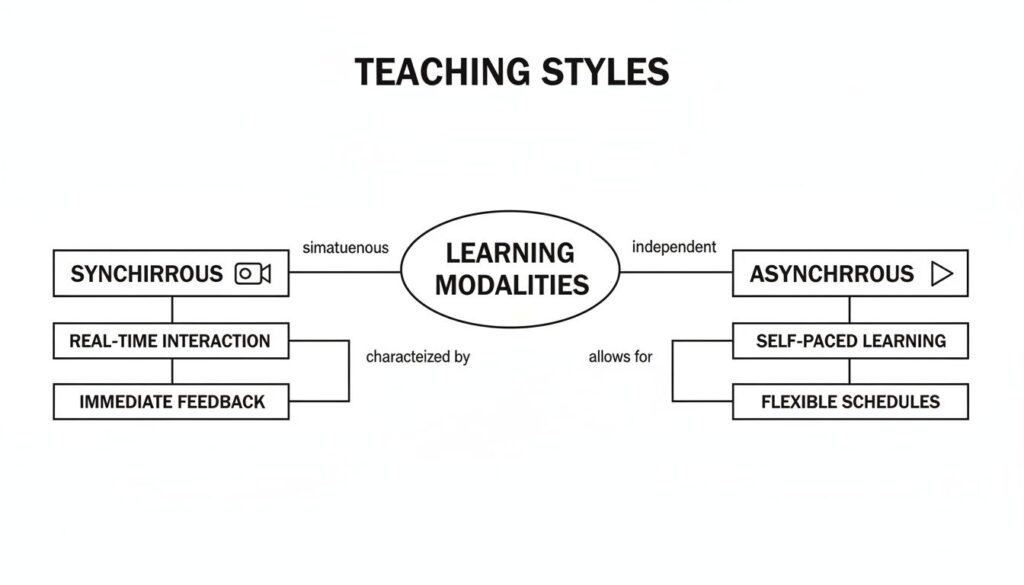
This map highlights a key idea. Your tech choices should directly align with whether you prioritize real-time interaction or flexible, on-demand content. Your stack for a live, synchronous workshop will look very different from one designed for a self-paced asynchronous course.
Keeping Your Students Engaged Online
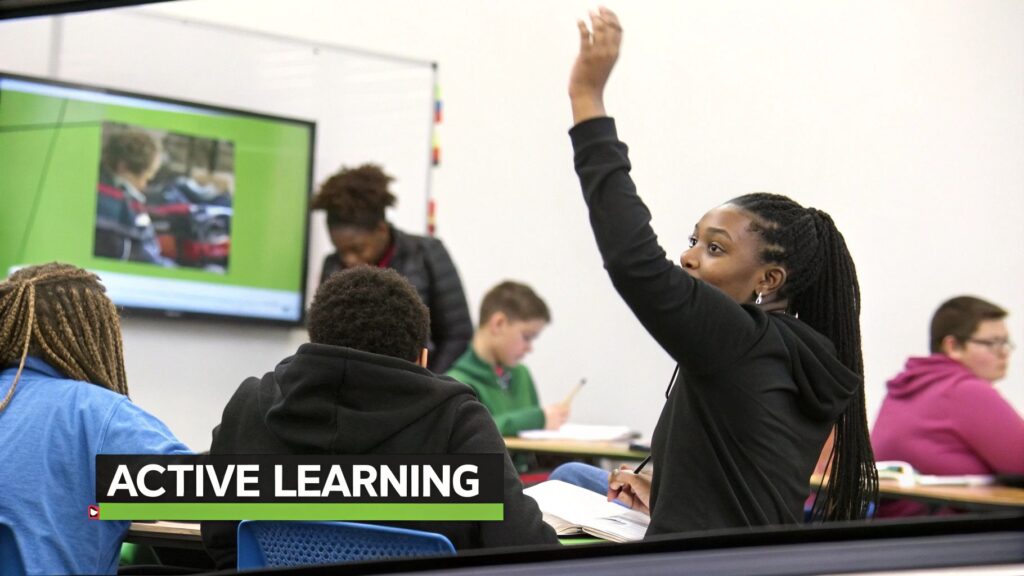
Having the right tech stack is a fantastic start, but it’s only half the battle. The single biggest challenge I see creators face in a virtual classroom setting is keeping students genuinely engaged. When someone is just one click away from their email inbox or social media feed, holding their attention becomes your most important job.
This is where we move beyond the tools and into the art of online facilitation. This means creating an experience so interactive and compelling that your students forget they’re staring at a screen. Let’s get into some practical, proven strategies that turn passive viewers into active participants who are excited to show up.
Break Down Your Content
The human brain isn’t wired to absorb an hour-long monologue, especially not online. One of the most effective techniques is breaking your content into small, digestible chunks. As a rule, I try never to talk for more than 10-15 minutes without introducing some kind of interactive element.
This “chunking” method keeps the energy fresh and gives everyone a moment to process what you’ve just taught them. Think of your lesson as a series of short sprints with interactive breaks in between, not as one long lecture.
After a short teaching segment, you could introduce:
- A quick poll to check for understanding.
- A question for students to answer in the chat.
- A brief moment for a personal story or a relevant example.
This simple rhythm of teach-interact-teach keeps the session moving forward and makes it much easier for your students to stay focused. It shows you respect their attention span and makes the whole experience feel more dynamic.
Foster Collaboration with Breakout Rooms
If there’s one feature that can completely transform your virtual classroom, it’s breakout rooms. Simply listening to an instructor is a passive activity. Discussing a concept with peers is an active one. Breakout rooms are your best tool for making that happen.
I use them in almost every single live session I run. You can split your class into small groups of three to five people and give them a specific task to dig into.
Using breakout rooms shifts the dynamic from a one-to-many broadcast to a many-to-many collaboration. It empowers students to take ownership of their learning and build real connections with each other.
For example, you could ask them to brainstorm solutions to a problem, discuss a case study, or prepare a short summary of a key topic. As the instructor, you can “float” between the rooms to listen in and offer guidance. This strategy consistently gets the highest praise from my students because it makes them feel seen and connected.
Make Participation Easy and Frequent
Not everyone is comfortable speaking up in a large group, even when they’re online. That’s why it’s so important to create multiple, low-stakes ways for students to participate. The goal here is to make interaction a constant, natural part of the class, not a special event.
Frequent, small interactions are way more effective than one big Q&A session at the end. Research even shows that 70% of students feel more engaged when instructors use interactive polling and quizzes.
Here are a few of my favorite ways to encourage participation:
- Use frequent polls: Ask multiple-choice questions throughout your lesson to gauge opinions or check for understanding.
- Leverage the chat: Prompt students with specific questions and ask them to type their answers in the chat. This gets everyone involved.
- Implement “hand-raising”: Use the virtual hand-raise feature to call on students, which helps create a more organized and flowing discussion.
By offering a mix of ways to contribute, you include everyone from the quiet thinkers to the vocal participants. You can discover more by exploring these powerful student engagement strategies that work wonders in an online environment. It’s all about making every student feel like an essential part of the experience.
Turning Your Virtual Classroom into a Business
Alright, let’s get to the good stuff. Let’s talk about turning your passion for teaching into a real, sustainable business. A virtual classroom is a powerful engine for building a business around what you know, not just a cool piece of tech for delivering lessons. This is a massive opportunity for coaches, experts, and creators who are ready to move beyond just sharing knowledge and start generating serious income from it.
In this section, I’ll walk you through some proven business models that are working right now. We’re going to look at how you can leverage the interactive, high-touch nature of a virtual classroom to build premium online courses, exclusive masterminds, high-ticket corporate training packages, and recurring revenue memberships. I’ll share some concrete examples for each to get your own ideas flowing.
Monetizing Through Premium Online Courses
One of the most direct paths to revenue is selling a premium online course that has a live virtual classroom component. This is often called a cohort-based course, where a group of students moves through the material together over a set timeframe, like six or eight weeks.
The live sessions are the star of the show here. They create a level of accountability and community that you simply can’t get from a library of pre-recorded videos. Because of that direct access to you and the shared experience, you can charge a much higher price. This can often be anywhere from $500 to $2,000 or even more.
For example, think of a freelance writer offering a six-week “Kickstart Your Freelance Career” course. The course might have video modules that students watch on their own, but the real magic happens in the weekly virtual classroom sessions where they workshop their pitches and get direct, personal feedback from the instructor. That live interaction is what justifies the premium price tag.
Building Exclusive Mastermind Groups
A mastermind is a small, curated group of peers who meet regularly to challenge, support, and push each other forward. A virtual classroom is the perfect venue to host these high-ticket groups. Because the groups are kept small, usually just 6-10 people, the experience is incredibly personal and high-touch.
This model is all about exclusivity and deep connection. You are facilitating a powerful peer network, not just selling information. For that reason, mastermind memberships command premium prices, often billed monthly or quarterly.
The core value of a mastermind isn’t just access to you as the leader. It’s the structured collaboration among the members themselves. Your virtual classroom becomes the private boardroom where that magic happens.
Imagine a marketing consultant who runs a mastermind for agency owners. They meet bi-weekly in a virtual classroom to tackle their biggest business challenges, share what’s working, and hold each other accountable. The consultant guides the discussion, but the members themselves drive a huge part of the value.
Corporate Training and Workshops
Another huge opportunity lies in corporate training. Companies are constantly looking for outside experts to upskill their teams, and they have budgets to pay for it. You can package your expertise into half-day workshops, full-day bootcamps, or ongoing coaching programs, all delivered through your virtual classroom.
This model allows you to sell your time and expertise in high-value blocks. Instead of selling a single course for $500, you could sell one corporate workshop for $5,000. The key is to tailor your content to solve a specific, painful business problem, like helping a sales team improve its closing rate or teaching new managers how to lead effectively. To really turn this into a profitable venture, it’s worth exploring different business models and specific strategies for online course creators.
Creating High-Value Membership Sites
Finally, a membership site offers recurring revenue, which is the holy grail for most online businesses. In this model, members pay a recurring fee, monthly or annually, for ongoing access to a library of content, a community, and you.
Your virtual classroom becomes the beating heart of the membership. You can host monthly live Q&A calls, bring in guest experts for interviews, or run members-only workshops. These live events are what keep your community buzzing with energy and give people a powerful reason to stick around month after month.
A great example is a fitness coach who runs a membership. It might include a library of workout videos, but the real draw is the live group coaching call each week where members can ask questions and get personalized advice. That’s a benefit you just can’t pre-record.
Got Questions About Virtual Classrooms?
I’ve helped a ton of creators, coaches, and community builders make the leap to virtual classrooms. Over time, I’ve noticed the same questions tend to pop up. It makes sense, this stuff can feel a little fuzzy at first. So, let’s clear the air and tackle the most common questions I hear.
How Is a Virtual Classroom Different from a Webinar?
This is, without a doubt, the number one question people ask. It’s a great one, because while they both involve live video, their entire purpose is worlds apart.
A webinar is basically a one-to-many broadcast. Think of a single speaker presenting to a large, mostly quiet audience. Interaction is usually limited to a text-based Q&A session tacked on at the end. It’s all about presenting information to people.
A virtual classroom, on the other hand, is built for genuine, two-way interaction. It’s a many-to-many space designed to pull everyone into the action, turning passive listeners into active participants.
A webinar is like a lecture in a huge auditorium. A virtual classroom is more like a hands-on workshop in a small, collaborative studio.
With features like shared digital whiteboards, screen annotation, and breakout rooms, the whole point is doing, discussing, and learning together. The experience is about collaboration, not just consumption.
Do I Need to Be a Tech Whiz to Run One?
Absolutely not. I know the technology can sound intimidating, but modern platforms are built to be incredibly straightforward. If you can handle a video call on a tool like Zoom, you already have all the core skills you need.
The real key is finding a platform that feels intuitive to you. Before your first live class, just spend a little time playing around with the main features. Most providers have fantastic tutorials and support teams ready to help. Honestly, running a great virtual class is much more about being a skilled facilitator than a tech genius.
What’s the Ideal Number of Students for a Class?
There’s no single magic number here. It really boils down to what you want to achieve with the session. The right size is all about the level of interaction you’re aiming for.
Here’s a simple way I think about it:
- For high-touch workshops: If you’re running a session heavy on personal feedback and deep conversation, keeping it small is the way to go. I’d aim for around 10-15 people. This gives everyone a chance to speak and you a chance to connect with each person.
- For lecture-style teaching: When your session is more of a presentation with polls and a managed Q&A, you can easily go bigger. You could handle 50, 100, or even more students without a problem. Pro tip: having a co-host or moderator to help manage the chat can be a total lifesaver in these larger sessions.
Always think about the experience you want to create for your students first, and let that decision guide your class size.