
Canvas LMS Cost: What You Really Pay in 2026

Instructure publishes no fixed price for Canvas, and one real public benchmark to plan around is $24.13 per FTE for a one-year subscription. That number changed how I look at Canvas LMS cost, because it gives you something solid to test against a sales quote instead of guessing from a pricing page that doesn't exist.
I like starting there. Public contracts won't tell you your exact price. They will show you the shape of the bill, including the minimums and add-ons that catch smaller teams off guard.
What Canvas LMS Really Costs in Public Contracts
A public Canvas contract can put the annual subscription at $24.13 per FTE, while separate fees for setup, support, and implementation change the total. Instructure does not publish a single list price, so procurement records are useful benchmarks, not guaranteed rates.
A Texas A&M University System purchasing document lists a one-year subscription for 1,716 full-time-equivalent users at $41,407.08, or $24.13 per FTE. Treat that as a reference for this agreement, not a rate every institution can expect.
At a larger enrollment, the per-user average can look much lower. A North Carolina public-school purchasing document records $110,976 for a subscription with round-the-clock support for about 21,550 users. Dividing the total by the user count gives roughly $5.15 per user, but that figure includes support and is not a like-for-like license rate.
Fixed charges hide under the per-user rate
Fixed fees and minimums affect the budget even when the per-learner subscription looks manageable. A Texas A&M System contract lists a $5,000 minimum product commitment, a $500 setup fee, and premium help desk support at $3.50 per FTE annually, subject to a $3,000 minimum. Its implementation packages range from $11,680 to $77,630 for institutions with 5,000 to 9,999 FTE.
A North Carolina State Board contract sets a $12,466,496.72 ceiling over five years. That is the maximum authorized spend for the contract, not a per-college or per-learner price. At the smallest scale, a Railway Canvas deployment estimate puts an 8 GB RAM, 4 vCPU server at about $576 per year. That is an infrastructure floor, before staffing or other operating costs.
Canvas LMS benchmark costs from public contracts
| Benchmark | Scale | Figure |
|---|---|---|
| Texas A&M University System, one-year subscription | 1,716 FTE users | $41,407.08 |
| North Carolina public schools, subscription plus 24/7 support | about 21,550 users | $110,976 |
| Texas A&M minimum product commitment and setup fee | any size | $5,000 minimum plus $500 setup |
| Texas A&M premium help desk support | per FTE, $3,000 minimum | $3.50 per FTE annually |
| Texas A&M implementation packages | 5,000 to 9,999 FTE | $11,680 to $77,630 |
| North Carolina community colleges contract ceiling | five years | not to exceed $12,466,496.72 |
| Self-hosted example cloud server, floor only | 8 GB RAM, 4 vCPUs | about $576 per year |
Use the subscription figure as a starting point, then budget separately for fixed charges, support minimums, implementation, and infrastructure. If your quote differs sharply from these benchmarks, ask which users, services, and add-ons account for the gap.
How Canvas Licensing Works for Schools and Creators
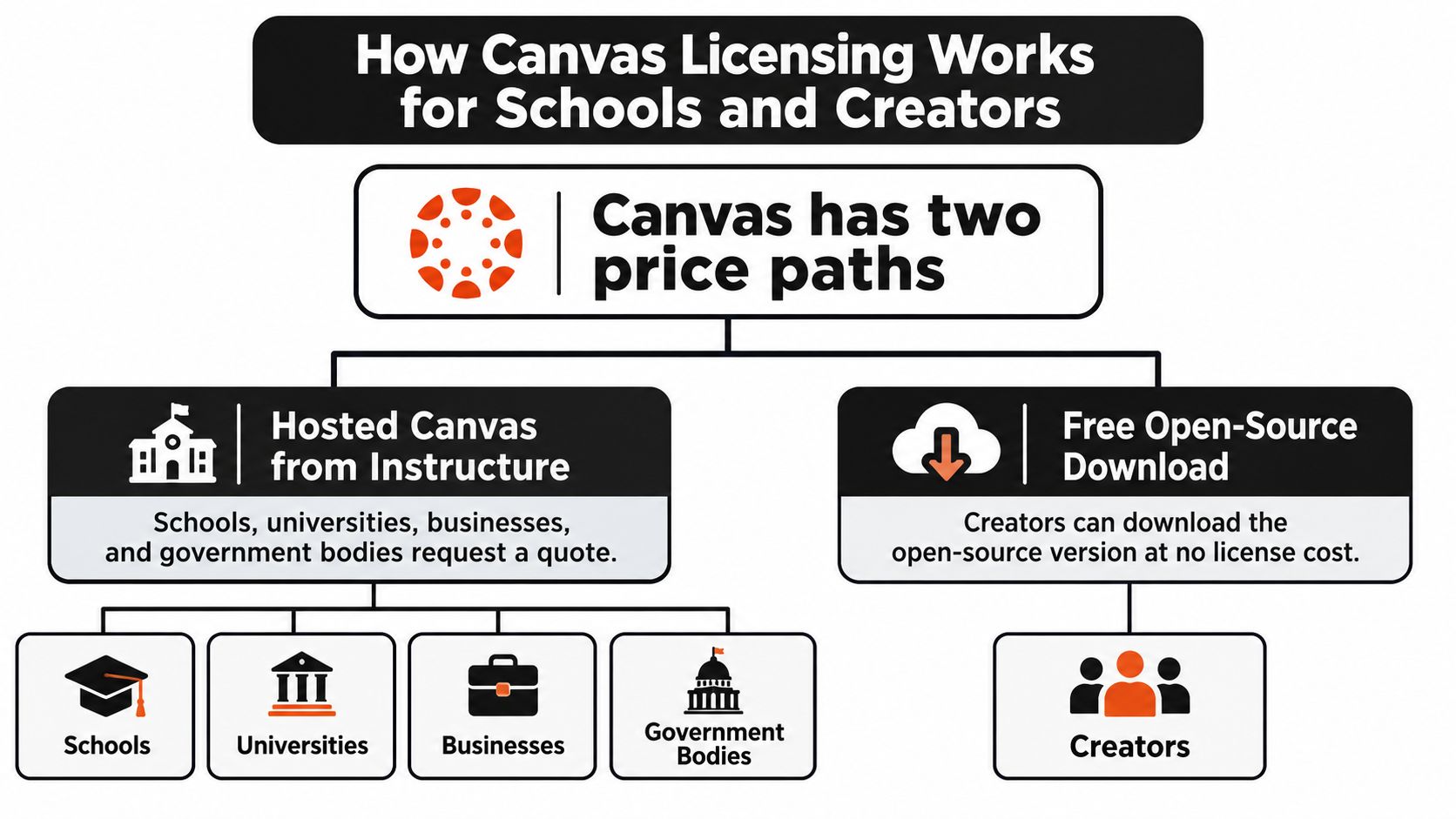
Canvas has two licensing paths: an institution can buy hosted service from Instructure, or it can use the open-source software and operate it itself. The hosted route puts the service under a negotiated contract. Self-hosting removes the software license fee but shifts operational responsibility to the organization.
The hosted quote path
An Edwiser pricing overview explains that Instructure quotes schools, universities, businesses, and government organizations individually. User count, contract term, support, implementation, and optional add-ons can all affect the final price. Similar enrollment does not guarantee similar quotes: contract scope and service levels matter too.
- User count: More covered learners generally increase the total, though the per-learner rate may fall at higher enrollment.
- Contract term: A longer commitment can change the annual rate and extends the period covered by renewal terms.
- Support level: More coverage raises the contract cost; compare it with the internal capacity needed to handle support requests.
- Implementation work: Migration, setup, and training may be priced separately from the subscription.
- Optional add-ons: Each product adds cost. Include one only when its function supports a defined requirement.
Students generally do not pay a separate access fee when their institution licenses Canvas. The institution holds the contract, and learners use the courses through it.
Where individual creators fit
A teacher or course creator can use a free classroom account at no cost. That can suit a small class or a trial, but it is not a price benchmark for an institution-wide deployment.
A free personal account does not include the administrative controls, integrations, support, or rollout work a school or company may need. Treating it as evidence that a full deployment should be cheap is a common budgeting mistake.
Self-hosting is a separate option. The open-source code is available under the AGPL-3.0 license, with no per-student software license fee. The organization takes responsibility for operating the service. For a small team, requesting a hosted quote first provides a useful comparison point, even if self-hosting remains under consideration.
Total Cost of Ownership Beyond the License
A subscription quote is only the first line of the budget. I always push people toward total cost of ownership, or TCO, because finance teams and boards care about the full bill. They won't accept a license number that leaves out migration, support, and staff time.
Instructure's own Canvas tiers page describes an "all-inclusive cost structure" for hosted Canvas and directs institutions to request a personalized quote rather than publishing a universal per-user rate. The same framing points buyers toward estimating annual hosting, implementation, support, identity management, data migration, accessibility compliance, backup, and staff time separately.
If you're new to that way of budgeting, it helps to look beyond technology sticker prices and list what ownership really involves. Our own LMS pricing comparison guide can also help you line Canvas up against other platforms using the same categories.
Cost categories in hosted and self-hosted Canvas
| Cost category | Hosted Canvas | Self-hosted Canvas | Usually paid by |
|---|---|---|---|
| Annual subscription or license | Quoted by Instructure | No per-student license fee under AGPL-3.0 | Institution |
| Hosting and infrastructure | Included in the vendor quote | Cloud compute, database, storage and backups | Institution |
| Implementation and data migration | Often quoted separately | Internal IT time or outside contractor | Institution |
| Premium support | Optional add-on, often a minimum charge | Your own on-call rota | Institution |
| Integrations and single sign-on | Varies by quote | Built and maintained internally | Institution |
| Upgrades, patching and security | Vendor-managed | Internal testing and rollout | Internal staff |
| Accessibility checks and training | Quoted or handled internally | Handled internally | Institution |
Who carries the work on each row
Hosted Canvas is usually easier to budget because the vendor absorbs much of the platform operations work. Hosting, upgrades, patching, and security sit inside the vendor relationship. You still own your courses, your users, and your internal training, but you don't wake up as the server team.
Self-hosting flips that. The license line drops away, while infrastructure, monitoring, upgrades, and system administration move onto your staff. That trade can work well if you already have DevOps skills in house. It gets expensive in a hidden way when a teacher or general IT helper becomes the unofficial LMS engineer.
A zero license fee does not mean zero operating cost. It means you pay with infrastructure and people's hours instead.
The forgotten items are the ones I'd write down first. Accessibility checks take real time when courses include documents, videos, and third-party tools. Patch testing matters because an update that breaks a quiz integration during exam week becomes everyone's problem. Identity management and single sign-on also need setup and ongoing care, especially when staff and learners join or leave through the year.
Backups deserve their own honest line too. Storing a copy is one task. Testing a restore, checking database recovery, and knowing who acts when something fails are separate tasks. If nobody owns them, they don't become free. They become risk.
Here's a step you can do today. Open a spreadsheet and list every category in the table. Put a rough figure next to each one, then mark it as one-time or annual. Use staff hours where you don't have a vendor price yet, because hours are still a cost even when no invoice arrives.
That total is the number I'd take to a finance meeting. It won't be perfect on day one. It will be much closer to reality than a headline subscription price.
Budget Scenarios for 500, 2,000 and 10,000 Learners
Let me turn that Texas A&M benchmark into budgets you can picture. I am using $24.13 per FTE as a planning rate for the subscription only. These are indicative figures from one contract, so please don't treat them as quotes for your school.
Multiply the rate by each learner count and you get three very different starting points. At 500 learners, the annual subscription estimate is about $12,065. At 2,000 learners, it is about $48,260. At 10,000 learners, it reaches about $241,300 a year.
Those numbers look tidy. Then the fixed charges arrive and mess up the tidiness, especially for the smallest group.
Indicative annual Canvas budget by learner count
| Learners (FTE) | Premium help desk at $3.50 per FTE | Notes |
|---|---|---|
| 500 | $3,000 (minimum applies) | $5,000 product minimum and $500 setup may still apply |
| 2,000 | $7,000 | Help desk sits well above the minimum |
| 10,000 | $35,000 | Implementation is quoted as a separate line |
Why 500 learners feels different
Premium help desk support at $3.50 per FTE would be only $1,750 for 500 learners before the minimum kicks in. The $3,000 minimum applies instead, which is roughly a quarter of the estimated subscription at that size. Add the $500 setup fee, and remember the $5,000 product minimum when you test whether a small configuration even clears the contract floor.
The break-even is easy to remember. The per-FTE help desk charge only moves past the $3,000 minimum above about 857 learners. Below that point, you pay the minimum. Above it, the per-learner math takes over.
At 2,000 learners, premium help desk comes to $7,000 a year. The minimum no longer distorts the budget, though implementation and migration still need their own lines. Fixed setup costs also spread across more learners, so each learner carries a smaller share.
At 10,000 learners, premium help desk reaches $35,000 a year. That's a serious support budget, so I'd ask what response times and coverage you get for it. Implementation can also be substantial at this scale, and it should never be folded into a vague first-year total.
Planning rule: At small scale, minimums drive the budget. At large scale, the per-learner rate and support choices drive it.
The North Carolina school example near $5.15 per user shows the other direction scale can pull. A much larger user base can produce a far lower average, even with support included in the arrangement. Your quote may land nowhere near either benchmark, and that gap is exactly what you should ask the vendor to explain.
The self-hosted scenario
Self-hosting starts from a much smaller infrastructure floor. A Railway Canvas LMS deployment estimate places one example cloud configuration with 8 GB RAM and 4 virtual CPUs at approximately $48 per month, or $576 annually, before backups, domains, plugins, support, and administration.
I'd treat $576 as a floor, not a budget. A production setup still needs backups, email delivery, file storage, monitoring, security work, and capacity for deadline and exam spikes. Staff time will usually decide whether self-hosting saves money or just moves the bill.
Year one and renewal years also look different. Setup, implementation, and migration land up front. Subscription and support recur. If you build one blended annual number, you'll either overstate renewal costs or understate the pain of year one, so keep two columns from the start.
Support, Implementation and Contract Terms to Check
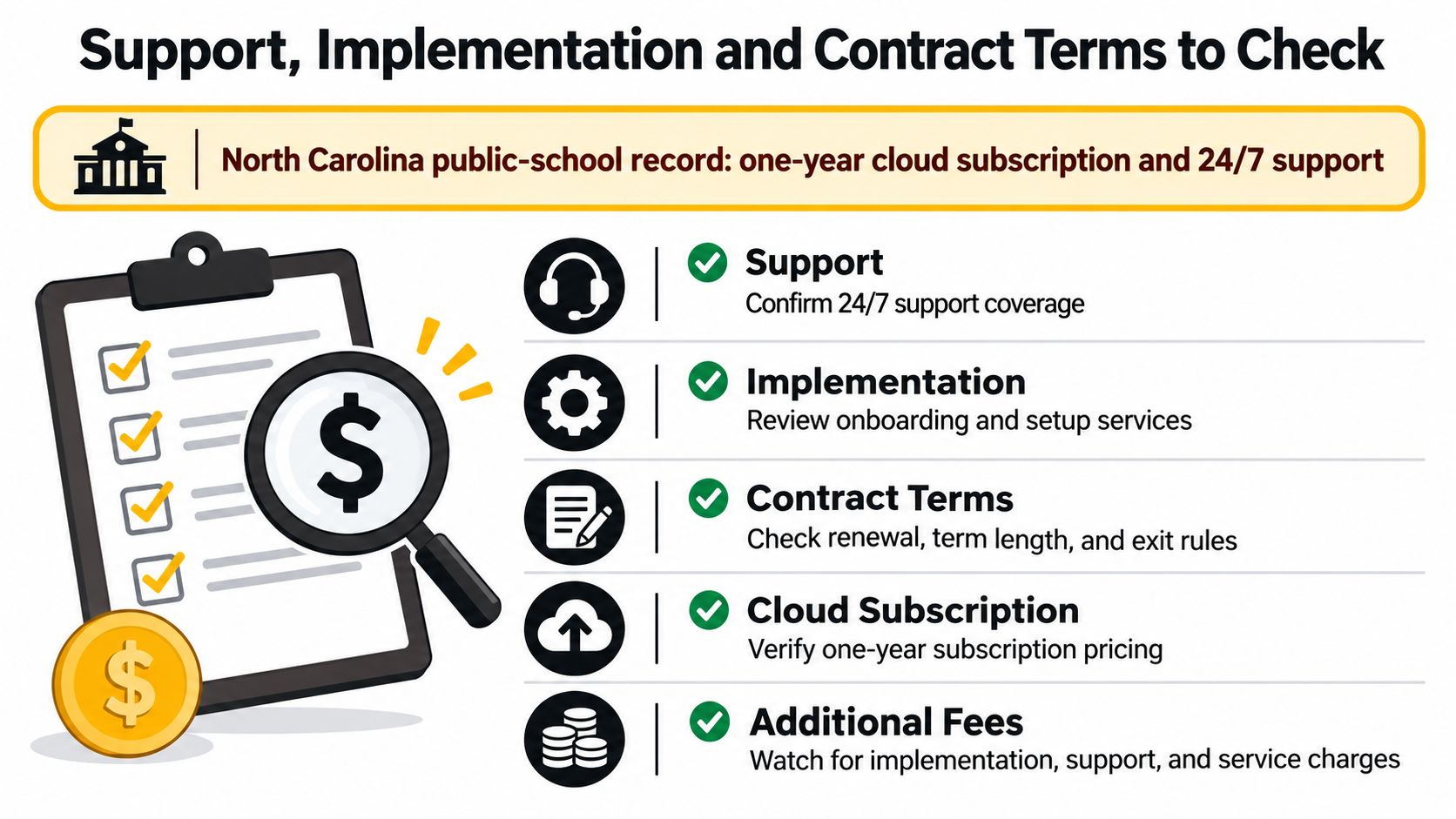
One public-school contract pairs a one-year Canvas cloud subscription with 24/7 support for $110,976 across approximately 21,550 users, according to the North Carolina public-school purchasing document. The document separates subscription and support costs. Ask for the same breakdown in your quote so you can see what support covers and whether it recurs.
Implementation can rival the license
Implementation and migration are often quoted separately from the subscription. Moving courses may involve old quizzes, embedded files, gradebook history, and integrations that need rebuilding. Training takes staff time too, and rushed training can lead to more support requests later.
Before paying a vendor or contractor, list the setup tasks your staff can handle and the ones that require outside help. A small-team LMS implementation checklist can help organize that review.
Read ceilings and renewals carefully
A multi-year contract ceiling is not a forecast of actual spending. The North Carolina State Board of Community Colleges approved a Canvas contract running from July 2026 through June 2031, with a total amount not to exceed $12,466,496.72, according to its contract document.
That ceiling is an authorization limit, not proof that the buyer will spend every dollar. Without enrollment, product scope, renewal, and service details, it cannot establish a per-user rate.
Ask these questions before signing:
- Core LMS only: Does the contract cover Canvas itself, or are optional products included?
- Enrollment changes: How does the bill change if learner numbers fall during the term?
- Optional add-ons: Which extras can you decline now and add later without penalty?
- Renewal increases: How large can a renewal increase be, and when will the vendor give notice?
- Leaving Canvas: How can you export courses, files, grades, and user data if you switch?
The answers shape both the initial budget and the cost of staying or leaving. A bundle may be poor value if it includes products your team will not use, while difficult data exports can add work to a future migration.
Request a written quote with support, implementation, and add-ons on separate lines. Itemized costs make it easier to compare offers and identify which services you can handle internally.
Request a Quote and Compare Before You Sign
You don't need a perfect forecast to make a good decision. You need an itemized quote, your real learner count, and a three-year view that separates launch costs from renewals. I'd work through it in this order.
Five steps I would follow
-
Count your real learners. Use FTE if you're an institution, active users if you run a smaller program, and peak concurrency if exams or launch days create spikes. Averages hide the busy weeks that stress support and infrastructure.
-
Build a three-year TCO sheet. Give year one its own column for setup, implementation, and migration. Give renewal years their own columns for subscription and support. Use the public benchmarks as a sanity check, not as a promise.
-
Ask for an itemized quote. I want license, implementation, support, training, and optional products on separate lines. That format lets you cut an add-on without reopening the whole negotiation.
-
Price self-hosting realistically. Start with the roughly $576 a year server floor, then add staff hours, backups, monitoring, email delivery, and security work. If nobody on your team wants the on-call role, hosted Canvas deserves a harder look.
-
Use the contract checklist before signing. Check term length, renewal rules, enrollment changes, export rights, and optional extensions. Compare at least two quotes side by side using the same learner count and the same cost categories.
If Canvas is on your shortlist with a simpler classroom tool, our Canvas vs Google Classroom comparison can help you judge fit before price takes over the conversation. For workplace training, LearnStream also has a guide comparing learning management systems for employee training by team size, pricing, SCORM and xAPI support, and use case, plus a pilot plan.
The number you can trust is the one you build yourself from an itemized quote and your own learner count.
No public price list is coming to rescue the budgeting process. That's frustrating, I know. It also means a careful buyer has an advantage, because you can walk into the sales call with benchmarks, categories, and questions already prepared.
Do one small thing this week. Open a spreadsheet, enter your learner count, and fill in the cost categories you can already estimate. Even a rough first pass will make the vendor conversation sharper.
Ready to budget with fewer surprises? Start your spreadsheet today with your learner count, a year-one column, and separate lines for subscription, implementation, and support, then request an itemized Canvas quote and compare it against the public benchmarks before you sign anything.