8-Step LMS Implementation Checklist for Small Teams
Ready to launch your LMS? Good call. But if you’re a small team, the to-do list can get messy fast.
One person is comparing vendors. Someone else is digging through old slide decks. IT is asking about SSO. Leadership wants a launch date. And in the middle of all that, you’re trying to avoid buying a platform that looks great in a demo and then sits unused a month later.
That situation is common. Small teams usually don’t fail because they lack ambition. They fail because the rollout gets too big, too vague, or too technical for the resources they have.
A practical LMS implementation checklist for small teams needs to reflect real constraints. Limited budget. Limited admin time. Limited patience for clunky setup. You probably can’t spend months building the perfect academy before anyone logs in. You need something that works, is maintainable, and gives you proof early that the system is worth keeping.
The teams that do this well usually make a few smart moves early. They narrow scope. They agree on what success looks like. They lock key integrations before content work gets too far. They pilot before they announce a big launch. None of that sounds flashy, but it saves a lot of cleanup later.
There’s also a retention angle worth paying attention to. In 2022, SHRM reported that 76% of employees were more likely to stay with an organization offering continuous training. For a small team, that matters because training isn’t just an HR checkbox. It affects onboarding, consistency, confidence, and whether people feel like they’re growing.
Let’s keep this simple and useful. These eight steps are built for lean teams that need a cost-conscious rollout, not a giant enterprise project.
1. Define Your Learning Objectives and Organizational Goals
If you skip this step, the LMS becomes an expensive storage closet.
Small teams are especially vulnerable here because it’s easy to buy a platform based on feature lists instead of actual needs. You see quizzes, certificates, automation, communities, AI tools, and reporting dashboards, and suddenly you’re shopping for a future version of your team instead of the one you have right now.
Start with the problem you’re trying to solve.
A small SaaS team might need faster onboarding for new hires. A consulting firm might need more consistent delivery standards. A membership business might need one clean place to deliver training instead of juggling email, PDFs, and recorded calls.
Keep the goal list short
You do not need a giant competency map on day one.
The leaner approach is to define a small set of core learning objectives and tie each one to a visible outcome. For example:
- Onboarding speed: New hires can find and complete required training without chasing managers for links.
- Quality control: Subject matter experts teach one approved process instead of five slightly different ones.
- Compliance or certification: Learners complete required content and managers can verify status without manual follow-up.
- Engagement: People return to the platform after their first login.
I’ve seen small teams make progress faster when they choose a few high-value objectives instead of trying to model the whole company at once. 360Learning’s implementation approach, summarized in the verified data, frames the work in phases and recommends focusing first on 3 to 5 high-value modules and 2 to 3 learning paths tied to job roles before expanding scope.
Practical rule: If your first rollout needs a training manual to explain the rollout, your scope is too wide.
Decide what success looks like before launch
Many projects often drift here.
The KPI conversation has to happen early, not after users are already inside the system. For small teams, simple is better. Track a mix of outcome and adoption measures so you don’t end up with a platform that looks active but doesn’t solve anything.
Useful examples include completion rates, onboarding completion by role, compliance by cohort, repeat logins, and weekly active learners. If your leadership only wants one number, push back a bit. One metric rarely tells the full story.
The strongest setups also document goals somewhere visible. A one-page shared brief is enough. Put in the objective, owner, target audience, and how you’ll know the rollout is working.
That shared document prevents a common small-team problem. Midway through implementation, someone says, “Can we also use this for partner training, customer education, and certification?” Maybe eventually. Not yet.

2. Assess Your Current Technology Stack and Integration Needs
Most LMS headaches aren’t really content problems. They’re workflow problems.
The platform might be fine, but your user data lives in one system, your reporting lives somewhere else, and nobody agrees who should manually update enrollments. That’s how small teams end up doing admin work the LMS was supposed to remove.
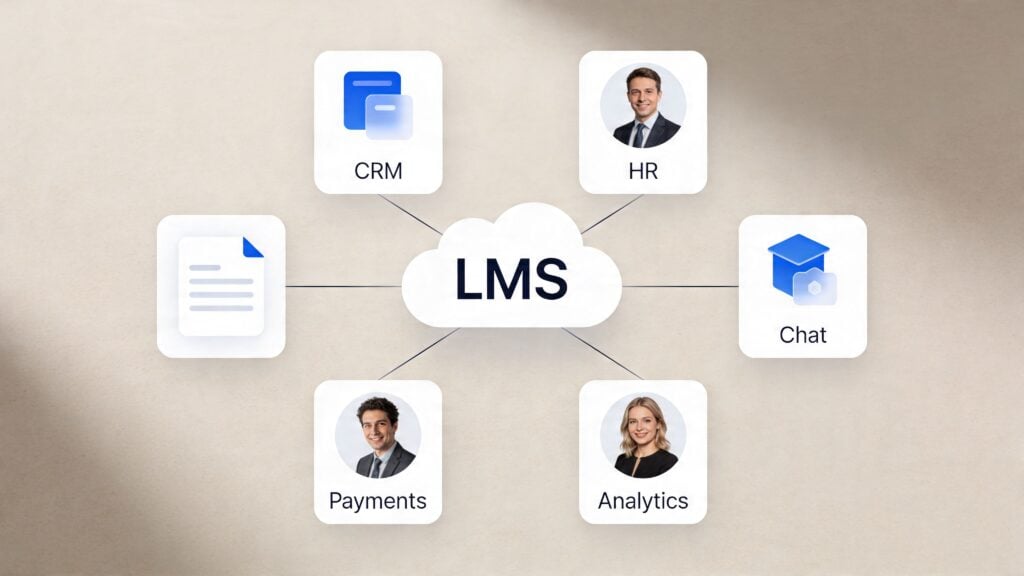
Before you configure anything, list every tool that touches learners, staff, or training data. That usually includes your HR system, CRM, email tool, community platform, support desk, identity provider, and any spreadsheet someone swears is “temporary” but has run the process for years.
Lock the critical integrations first
For small teams, not every integration matters equally.
The ones worth prioritizing first are the ones tied to access and identity. If people can’t log in smoothly, usage drops. If employee or customer data doesn’t sync cleanly, your reporting turns into cleanup work.
TopClassLMS emphasizes locking in key integrations like SSO and systems such as HR platforms, CRM, or AMS early because integration complexity stretches timelines and puts extra pressure on small technical teams. That’s one of those boring truths that saves real pain later.
A quick whiteboard sketch helps here. Put the LMS in the middle, then draw arrows to systems that send data in or pull data out. You don’t need a fancy architecture diagram. You just need clarity.
Separate “must-have” from “nice-to-have”
Here, restraint pays off.
Maybe you’d like Slack notifications, e-commerce syncing, marketing automation, advanced analytics, and webinar attendance data all feeding into one place. Fair enough. But your first pass should answer simpler questions.
- Who needs accounts created automatically
- How will they sign in
- Where will role or group data come from
- Which system is the source of truth for reporting
If you’re a training business, maybe Stripe or your checkout tool matters right away. If you’re internal-only, HRIS and SSO probably matter more. If you’re running customer training, your CRM may be the key dependency because enrollment and account mapping affect everything else.
Bad integration choices don’t usually break on launch day. They break three weeks later when manual work piles up and nobody wants to own it.
Also check the vendor’s support reality, not just the sales promise. Ask who handles setup, what documentation exists, and what happens if the integration behaves differently in your environment than in the demo. Small teams can’t afford vague answers here.
3. Select an Appropriate LMS Platform
This choice gets overcomplicated all the time.
If you’re a small team, the best platform is usually the one your people can run without a dedicated admin, custom developer, or ongoing rescue mission. That’s why cloud-based LMS platforms are often the safer fit. Self-hosted tools can give you more control, but they also hand you more maintenance, more security responsibility, and more ways for a simple update to become next week’s emergency.
Pick for workload, not just features
Many teams choose the system with the most impressive capabilities and only later consider who will manage them.
Moodle can make sense if you need deep customization and you have technical support to match. Teachable, Thinkific, Kajabi, and Circle can work well for creators or membership businesses that care about delivery simplicity and built-in business features. TalentLMS and iSpring Learn are often shortlisted by corporate training teams because they balance structure with usability.
If you’re still comparing options, LearnStream has a helpful guide to best LMS tools for small business, and this external roundup offers a complete comparison of LMS platforms.
The point is not to chase the “best” LMS in abstract terms. It’s to choose the one that fits your current team shape.
Test the ugly workflows
Demos are polished. Your real workflow won’t be.
When you’re trialing platforms, don’t just click through the homepage and sample course. Test the stuff that usually gets annoying:
- Admin setup: Create users, assign groups, and change permissions.
- Course building: Upload a file, build a lesson, add an assessment, and update it later.
- Reporting: Find completion status fast without exporting three CSV files.
- Learner experience: Log in as a new user and see whether the next step is obvious.
iSpring’s implementation plan, referenced in the verified data, notes a fast goal-setting phase of 2 days and gives an example target like a 20% sales uplift from training. What matters for small teams is the mindset behind that example. Get specific early, then choose a platform that supports that outcome without extra ceremony.
One more filter helps. Ask what happens after launch when someone on your team quits, goes on leave, or stops owning the LMS. If the platform becomes hard to run after one handoff, it isn’t low-maintenance enough.
4. Plan Content Migration and Course Structure
Content migration is where teams either get disciplined or get buried.
Most small teams already have training content. It’s just scattered. Some of it is in Google Drive. Some lives in an old LMS. Some is trapped in slide decks, Zoom recordings, long emails, or notes from the one employee who knows the process by heart.
You do not need to move all of it.
Audit before you upload
A proper audit sounds tedious, but it saves you from dragging years of clutter into a brand-new platform.
According to the verified data from Selleo’s roadmap, a strong content audit can reduce a messy legacy library from 300 mixed items to 120 owned, purposeful modules with clear ownership and usage notes. That’s a useful benchmark because it reflects what small teams often discover. A surprising amount of training content is duplicated, outdated, orphaned, or impossible to maintain.
When you review material, ask four plain questions:
- Is it still accurate
- Does anyone own it
- Does it belong in the LMS
- Will learners use it
If the answer is fuzzy, archive it until proven useful.
The LMS should contain training people need, not every document your company has ever created.
Build a structure people can navigate
Uploading content is not course design.
A scattered pile of PDFs inside folders isn’t a learning experience. For a small team, the cleanest structure usually follows learner jobs or moments of need. New hire onboarding. Manager essentials. Product certification. Compliance refreshers. Member welcome path. Keep it obvious.
That doesn’t mean every course has to be complex. In fact, simpler tends to work better. Short modules, clear progression, and a consistent naming pattern go a long way.
If you’re rebuilding materials instead of just uploading them, this guide to instructional design for online courses is worth keeping open while you map modules.
A good practical move is assigning one content lead, even if they’re not the only author. That person doesn’t have to write everything. They just need to keep format, tone, naming, and quality from drifting across the library.

5. Configure User Roles, Permissions, and Access Levels
Permissions feel boring until the wrong person edits a live course or sees reports they shouldn’t have.
Small teams often treat access setup as a quick admin task. It isn’t. It’s an operations decision. The way you assign roles affects speed, security, and how much cleanup you create for yourself later.
Keep the role model lean
You probably don’t need a dozen custom roles.
For most small-team LMS rollouts, a lean structure works best. The verified guidance points to a cross-functional setup with 4–6 dedicated personnel covering roles like team lead, project manager, department representatives, and executive sponsor. That same lean mindset applies inside the platform. A few clear access levels beat a maze of exceptions.
Typical role groups might include admin, course creator, reviewer, manager, and learner. In a membership setting, you might also add moderator or community support. That’s usually enough.
Write down what each role can do before you click through settings. Can they publish content or only draft it? Can they enroll users? Can they view all reports or only direct reports? Can they edit certificates, automations, or branding?
If you rely on memory, you’ll end up with accidental privileges.
Use least privilege and test real scenarios
Least privilege sounds technical, but it’s just common sense. Give each person enough access to do their job and no more.
That protects the platform and also reduces confusion. Someone with too much access often clicks into areas they don’t understand, changes something, and then nobody knows why a course disappeared from a catalog or a report started filtering differently.
A simple pilot test helps. Create sample accounts for each role and run through common actions:
- Creator workflow: Build and submit a course for review
- Manager workflow: Check completion for a direct report
- Learner workflow: Log in, find assigned training, and resume progress
- Admin workflow: Update enrollment without breaking permissions
I like to treat permissions like office keys. Not everyone needs the master key, and giving everyone one doesn’t make the office run smoother. It just makes mistakes harder to trace.
Also review permissions after launch. Small teams change shape quickly. Contractors leave. Managers switch teams. Subject matter experts become accidental admins if nobody tidies access.
6. Set Up Technical Infrastructure and Security Protocols
If your LMS feels convenient but fragile, users will notice.
Security work isn’t glamorous, and for small teams it’s tempting to assume the vendor handles all of it. Cloud platforms do remove a lot of infrastructure burden, which is one reason they tend to suit smaller teams better. But “hosted by the vendor” does not mean “fully configured for your risk level.”
Cover the basics early
Admin accounts deserve special attention first. They’re the keys to your content, user data, and reporting. Protect them accordingly.
At minimum, establish password rules, account recovery steps, user deactivation procedures, and how your team will respond if a learner gets locked out right before a deadline. None of that requires enterprise bureaucracy. It just requires someone owning the process.
The verified data also points to practical technical prep like device audits, vendor trials, and early decisions around SSO and key systems. That’s a reminder that security and access aren’t separate tracks. They’re connected.
For teams documenting governance, this resource on Building a System Security Plan is a useful framework.
Prepare for the moment something goes wrong
Systems fail in ordinary ways. A sync breaks. A browser setting blocks login. A certificate doesn’t issue. A course displays oddly on mobile. These are not catastrophic events unless your team has no response plan.
AnyforSoft, referenced in the verified data, adds another overlooked step that matters a lot before launch: load testing and bug resolution. Small teams don’t always expect traffic spikes, but they still need to know the platform behaves under real use.
A calm launch usually comes from boring preparation. Device checks, test accounts, browser testing, and outage messaging do more than flashy launch banners ever will.
If you’re collecting learner data across regions, make sure privacy settings and deletion workflows match your real obligations. If you’re selling training, check payment flow security and account provisioning. If you’re training staff, confirm offboarding removes access when people leave.
This part of the LMS implementation checklist for small teams is really about trust. Learners trust the platform when login is smooth, data is handled responsibly, and issues are resolved without chaos.
7. Develop a Training and Onboarding Plan for Your Team
Monday morning after launch, three people are already stuck. One admin cannot find the setting they changed last week. A course owner uploads the wrong file type. A learner clicks the login link, lands in the LMS, and has no idea what to do next. That is how adoption slips on small teams. Not because the platform is bad, but because nobody was given a clear first path.
A good onboarding plan keeps the first week small and specific.
Train by role so people learn only what they need
Small teams do not have time for one long session that tries to cover everything. It usually creates confusion, not confidence.
Split training by role. Admins need setup basics, common fixes, and a short checklist for recurring tasks. Course creators need a repeatable workflow for building, reviewing, and publishing content. Managers need to know how to check completion and spot who is falling behind. Learners need the fastest possible route to four actions: log in, find assigned training, resume progress, and complete a course.
That role-based split also saves support time later. If managers only learn reporting and assignments, they are less likely to poke around in settings they should not touch. If creators get a standard publishing process, you get fewer last-minute formatting problems.
Analysts and implementation teams cited in the verified research recommend training admins and content owners before learner rollout, and that matches what works in practice. Short walkthroughs beat a giant PDF almost every time. If your LMS supports it, build a short orientation course inside the platform. People learn the tool by using the tool.
If you want a practical model for structuring that enablement content, LearnStream has a useful guide on creating a training programme.
Give people help where they will actually use it
Training alone will not carry the first few weeks. People forget steps. They get interrupted. They click the wrong thing.
Set up visible, low-effort support. For a small team, that can be a shared inbox, one designated internal owner, a Slack channel, or two short office-hour sessions each week. The point is not building a formal support operation. The point is making it obvious where questions go.
This video is a useful companion if your team wants a visual walkthrough mindset during setup:
Keep the support materials just as focused as the training. A one-page “start here” guide, a short creator checklist, and a simple FAQ will do more for adoption than a polished 30-page manual that nobody opens.
TopClassLMS’s checklist also describes planning content in quarterly themes and keeping a regular release rhythm with promotion and extra support around peak usage. For small teams, that approach is practical. It spreads the workload, keeps training visible, and avoids the common mistake of treating onboarding as a one-time event.
I use a simple rule here. Train people on the three tasks they need this week. Save the advanced features for later, when they have a reason to care.
8. Launch Pilot Program, Gather Feedback, and Iterate Before Full Rollout
Do not launch to everyone just because the platform is technically live.
For small teams, a pilot is one of the cheapest forms of risk management. It gives you real behavior, real questions, and real friction points before the whole company or customer base sees them.
Choose a pilot group that tells the truth
A weak pilot is made up entirely of enthusiasts.
You want a mix. Include someone tech-comfortable, someone busy, someone skeptical, and someone who represents the most common user journey. If you’re doing internal training, choose people from different functions. If you’re running customer education, include members at different experience levels.
The verified data strongly favors phased rollout over a big-bang launch for smaller teams, and I agree with that completely. Phased rollout gives support capacity room to breathe. It also helps you find process gaps without damaging confidence.
Selleo’s roadmap, reflected in the verified data, also recommends starting with 3–4 pass/fail KPIs and validating reporting before full release. That’s exactly the right mindset for a pilot. Keep the decision criteria simple enough that you can act on them.
Track feedback in a way you can use
Don’t just ask, “How’s it going?”
Ask what blocked progress, what felt unclear, what took too many clicks, and what users expected to happen next. Then compare that feedback with actual usage patterns inside the LMS.
Good pilot feedback usually falls into a few buckets:
- Usability issues: Navigation, labeling, login friction
- Content issues: Outdated modules, unclear instructions, poor sequencing
- Workflow issues: Enrollment delays, manager visibility, reporting gaps
- Support issues: People don’t know where to ask for help
TopClassLMS’s verified data cites association results reported for 2025 of 47% increased virtual attendance and 49% certification growth. I wouldn’t use those as a promise for your rollout, but they do support a broader point. When the platform, content, and delivery flow are aligned, engagement and credentialing can improve in visible ways.
Finish the pilot with a real go or no-go conversation. Not a vague “we’re mostly there.” Decide what must be fixed now, what can wait, and what success looked like in practice versus in the original plan.
8-Step LMS Implementation Comparison for Small Teams
| Item | Implementation complexity | Ideal use cases | Key advantages |
|---|---|---|---|
| Define Your Learning Objectives and Organizational Goals | Low–Medium, strategic alignment required | Teams starting LMS selection or reworking strategy | Prevents feature bloat; enables ROI measurement and buy‑in |
| Assess Your Current Technology Stack and Integration Needs | Medium, technical audit and mapping | Teams using multiple tools (CRM, HR, payments, chat) | Smoother UX, fewer manual processes, single sign‑on readiness |
| Select an Appropriate LMS Platform (Cloud vs Self‑Hosted) | Medium, evaluation, trials, negotiation | Small teams balancing cost, ease of use, and growth | Lower maintenance (cloud), rapid deployment, trialability |
| Plan Content Migration and Course Structure | High, content audit and redesign | Teams with scattered legacy content or many assets | Consolidation, reusability, consistent learner experience |
| Configure User Roles, Permissions, and Access Levels | Medium, role mapping and testing | Multi‑role organizations or membership sites | Security, accountability, streamlined workflows |
| Set Up Technical Infrastructure and Security Protocols | High, compliance and security configuration | Regulated industries or data‑sensitive organizations | Data protection, regulatory compliance, reliability |
| Develop a Comprehensive Training and Onboarding Plan for Your Team | Medium, content creation and scheduling | Teams adopting a new LMS or onboarding new creators | Higher adoption, self‑service support, internal expertise |
| Launch Pilot Program, Gather Feedback, and Iterate Before Full Rollout | Low–Medium, planning and feedback loops | Risk‑averse rollouts and phased deployments | Low launch risk, data‑driven improvements, early advocates |
Your Launchpad for Continuous Learning
A small team usually feels LMS mistakes fast.
If setup drags on, the same person who owns onboarding is also answering access questions, cleaning up courses, and chasing managers for feedback. If the platform is harder to run than the training it supports, the system becomes extra admin work instead of a useful part of the job.
That is why the best small-team rollout is usually the one with the fewest moving parts.
The goal is not to launch with every feature turned on. The goal is to get a system live that your team can keep up to date without needing a dedicated LMS manager or constant IT help. That often means choosing the boring option over the impressive one, delaying advanced automations, and keeping the first content set tight.
Good implementations are usually easy to describe afterward. The team picked a platform that fit their actual capacity. They migrated the content people still needed. They set clear permissions, tested the core workflows, and let a pilot group find the rough spots before a wider launch. None of that is flashy. It works.
That matters because an LMS only earns its keep when people return to it without being pushed. New hires need a clear first path. Managers need reports they can trust. Internal experts need an easy way to update repeatable training without opening a ticket every time. Customers or members need answers they can find on their own.
Small teams do not have much margin for a messy rollout. A confusing course catalog, weak role setup, or delayed integration work can create support issues your team then has to live with for months. I have seen teams spend more time fixing a rushed launch than they would have spent narrowing the scope from the start.
So treat this checklist like a priority order, not a box-ticking exercise. Start with the decisions that reduce maintenance and risk. Leave nice-to-have features for later, once people are using the system and you know what is worth adding.
Keep these points in view:
- Start smaller than your wishlist. A focused launch is easier to improve and cheaper to support.
- Pick the platform your team can maintain. An LMS with fewer features but clearer admin controls often wins for small teams.
- Be strict about content. If a course is outdated, duplicated, or rarely used, leave it out until it earns a place.
- Protect the basics. Login, course navigation, reporting, and role-based access affect adoption more than extras.
- Use the pilot as a stress test. A small group will expose the friction points before they become company-wide problems.
It also helps to treat launch as version one. Once the foundation is stable, you can add deeper reporting, cleaner automations, stronger learning paths, or a broader course library with a lot less risk.
That approach lowers pressure and leads to better decisions. Your team does not need a perfect learning environment on day one. It needs a working system that is easy to run, easy to trust, and worth returning to.
For a small team, that is a strong result.