Free Online Behavior Tracking for Teachers

Let’s be honest, managing a classroom can sometimes feel like trying to solve a puzzle with half the pieces missing.
I remember my early teaching years, buried under stacks of paper trying to connect the dots. Who was struggling during math? Who thrived during group work? My notes were helpful, but they were scattered, and seeing the bigger picture was a constant struggle.
Making the switch to a simple, free online system was a turning point. Suddenly, I could see patterns I’d completely missed before. A few clicks could show me that a student’s off-task behavior consistently spiked on Tuesday mornings, or that another student’s participation soared during project-based learning.
This approach gives you the insights you need to help every single student succeed.
Finding Clarity Without the Cost
The world of educational technology has exploded, especially after the massive shift to remote and hybrid learning. When over 220 million students had to adapt during 2020, teachers needed new ways to stay connected and understand student needs from a distance. Research has since confirmed that using behavior data for early intervention can boost student completion rates by an incredible 25-30%. You can dig into the research on educational technology’s growth for more details.
What this means for you is that free tools are more powerful and accessible than ever. You don’t need a fancy, expensive subscription to start making a real difference.
The real power of tracking behavior is shifting your focus from reacting to disruptions to proactively understanding student needs. It turns you into a classroom detective, uncovering clues that lead to better support.
The Real-World Benefits
Moving from paper to a digital tool might feel like one more thing to learn, but the benefits are immediate and tangible. When I started, I worried it would just add to my workload, but the opposite was true. It actually streamlined my observations and freed up valuable mental energy.
Adopting a free, straightforward system can provide some quick wins for you and your students.
| Benefit | Impact on Teaching | Impact on Students |
|---|---|---|
| Early Identification | Spot struggling students before it shows up on a report card. | Get help sooner, reducing frustration and building confidence. |
| Personalized Support | Tailor interventions based on specific, observed data. | Receive support that actually matches their individual needs. |
| Positive Reinforcement | Easily notice and reward positive behaviors and growth. | Feel seen and encouraged, fostering a more positive mindset. |
| Better Communication | Have concrete, data-backed examples for parent conferences. | Benefit from a stronger, more collaborative home-school connection. |
This process helps you understand student behavior. The right system helps you see the “why” behind student actions, which is the first step toward creating a more supportive and engaging classroom for everyone.
This guide is designed to walk you through the entire process, from figuring out what to track to choosing the right tool. My goal is to show you how a few simple changes can give you powerful insights to support every learner in your classroom.
Figuring Out What’s Actually Worth Tracking
Alright, so you’re ready to build a free behavior tracking system. That’s fantastic. But before we get lost in the world of apps and spreadsheets, we need to hit the pause button and ask a critical question: what are we actually going to track?
If you skip this step, you’ll end up with a messy pile of data that feels important but doesn’t actually tell you anything useful. The whole point is to spot patterns that help you help your students, not just to collect notes.
The golden rule here is to focus on observable actions, not your interpretation of a student’s feelings or intentions. For example, instead of writing down “disrespectful,” which is subjective, you’d track a concrete action like “spoke while another student was sharing.” This tiny shift is everything. It moves your data from guesswork to objective evidence, which is far more powerful.
Start with the Good Stuff
I’ve learned over the years that the best place to start is with the positives. It completely changes the energy of the whole process, framing it around growth and encouragement instead of just hunting for problems. First, just think about the behaviors you want to see more of in your classroom.
Here are a few positive behaviors I always keep an eye on:
- Asking clarifying questions: This is a huge tell. It shows a student is genuinely engaged and trying to connect the dots.
- Peer collaboration: I love noting when a student jumps in to help a classmate during group work without being prompted.
- Finishing an assignment early: This can be a sign that a student is ready for a deeper challenge.
- Jumping into discussions: When a student shares an idea, even a half-baked one, it’s a win for classroom culture.
Zeroing in on these actions helps you see and celebrate the great things your students are already doing. It’s also a backdoor to building stronger relationships. One of the most effective techniques I’ve ever used is the “2×10 strategy,” which is just spending two minutes a day for ten straight days talking with a specific student about whatever they want. It’s not an academic check-in. The research on this is stunning, showing an 85% improvement in that student’s behavior. Why? Because it builds a real, human connection.
The most powerful data isn’t always about problems. Tracking small, positive moments helps you build on student strengths and creates a classroom where everyone feels seen.
Nailing Down Challenging (but Actionable) Behaviors
Of course, the other side of the coin is tracking behaviors that signal a student might need some extra support. The key, again, is to be specific and objective. A vague note like “disruptive” is a dead end. It gives you nothing to work with.
You have to pinpoint the exact action. Here’s a screenshot showing a basic student information system, which is great for tracking the big stuff like attendance and grades.
These systems are essential for the big picture, but for day-to-day insights, you need to get more granular.
Let’s break down a few common challenges into things you can actually track:
- Off-task during independent work: Instead of that generic label, track the specific action. Is it “browsing non-academic websites” or “chatting with a neighbor off-topic”? Those are two very different problems.
- Difficulty starting tasks: This is a classic. Try noting when a student hasn’t started an assignment within the first five minutes after you’ve given the instructions.
- Missed assignments: This is a straightforward data point, but it’s a critical one. It can signal anything from organizational challenges to a lack of understanding or even issues at home.
Consistency Is Your Superpower
Once you’ve picked a handful of positive and challenging behaviors, the name of the game is consistency. If you track “peer collaboration” on Monday but forget about it for the rest of the week, your data is useless for spotting patterns. Commit to tracking the same defined behaviors for at least a few weeks. That’s how you start to see the real story.
The EdTech market is projected to hit USD 441.67 billion by 2033, and even the free tools out there are incredibly sophisticated. Take a platform like the free version of Quizizz, which has logged billions of student responses and has shown a 25% lift in student engagement in some studies. These tools work because they consistently capture specific data points. That’s exactly the mindset you need for your own behavior tracking. You can read more about EdTech’s explosive growth and see what’s driving it.
Taking the time to build this clear framework first makes everything that comes next, from picking your tool to analyzing the data, so much easier and a thousand times more effective.
Picking the Right Free Tools for Behavior Tracking
Alright, now that you have a good handle on what you want to track, let’s get into the fun part: the tools. Finding the right free online behavior tracking system doesn’t mean you need a huge budget or complicated software. In fact, you probably already have some fantastic options right at your fingertips.
I’ve spent a lot of time testing out different free platforms, and I’m going to walk you through my top picks. The goal here is to find a tool that clicks with your teaching style and classroom needs, all without costing you a single penny.
Look at the Tools You Already Use
Before you go hunting for a brand-new app, let’s start with the resources you likely already have. Many teachers I know overlook the simple, built-in features of their existing classroom platforms.
- Google Classroom: The “Private Comments” feature on assignments is perfect for leaving quick, specific notes for students about their effort or participation. Another brilliant trick is to create a simple Google Form that you bookmark on your computer or phone. You can set it up to quickly log a behavior, select a student’s name from a dropdown, and hit submit, with all the data feeding neatly into a Google Sheet.
- Microsoft Teams for Education: The “Praise” feature is a fantastic way to publicly acknowledge positive behaviors so the whole class can see. For more detailed, private tracking, you can create a channel with just yourself and use the posts to log time-stamped notes on individual students.
These methods are great because they don’t add another platform to your plate. They just build on the foundation you already have. If you’re looking for more ways to manage your digital classroom, you might be interested in our guide on free virtual classroom platforms for educators.
Dedicated Free Behavior Tracking Tools
When you’re ready for something more specialized, there are some incredible free tools designed specifically for classroom behavior management. These often come with more robust features like parent communication and detailed reporting.
One of the biggest names in this space is ClassDojo. It’s built around a system of awarding points for positive behaviors and, if you choose, deducting them for challenging ones. The platform’s use of cute avatars and positive sound effects makes it especially engaging for younger students, turning behavior management into something more like a game.
Another powerful, open-source option is Moodle, especially if your school already uses it as its Learning Management System (LMS). While it’s more academic-focused, its plugins and activity logs are fantastic for tracking things like assignment submissions, forum participation, and login frequency. This can give you objective data on student engagement without any extra work.
The growth of these tools reflects a huge shift in education. The EdTech market’s massive USD 163.49 billion valuation is driven by the demand for smarter teaching solutions. In North America, platforms like ClassDojo and various Moodle plugins are used to track everything from quiz attempts to simple participation. Globally, software like this makes up over half the market, showing just how important these digital tools have become.
Choosing the right tool is less about finding the one with the most features and more about finding the one that feels the most natural to use during a busy school day. If it’s clunky, you won’t stick with it.
To help you decide what to focus on when you set up your tool, this decision tree can help visualize the process.
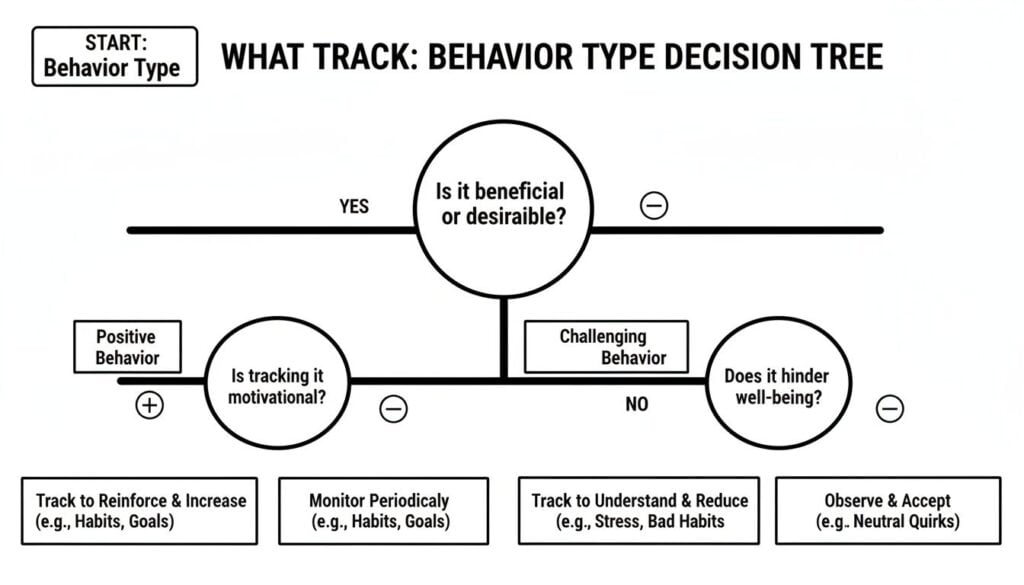
This visual helps break down how to categorize different actions, ensuring you’re tracking behaviors that provide meaningful insights into student well-being and academic progress.
Comparison of Top Free Behavior Tracking Tools
To make the decision a little easier, I’ve put together a quick comparison of the most popular free tools out there. This side-by-side look should help you see which one might be the best fit for your classroom.
| Tool Name | Best For | Key Features | Potential Drawbacks |
|---|---|---|---|
| Google Suite | Teachers already comfortable with Google Classroom and Forms. | Highly customizable with Forms/Sheets, integrates with existing workflow, private comments for direct feedback. | Requires manual setup, lacks built-in reporting dashboards, not designed specifically for behavior tracking. |
| ClassDojo | Elementary and middle school teachers looking for a gamified system. | Point-based rewards, parent communication portal, student portfolios, customizable monster avatars, class stories. | Can feel too game-like for older students, the point system might not fit every teaching philosophy. |
| Moodle | Schools with an existing Moodle LMS, tracking academic engagement. | Tracks login activity, assignment submission, forum posts, and quiz attempts automatically, highly extensible. | Can be complex to configure without admin support, more focused on academic data than specific classroom behaviors. |
| Microsoft Teams | Educators using the Microsoft 365 ecosystem. | “Praise” badges for public recognition, private channels for detailed notes, integrates with other Microsoft tools. | Lacks dedicated behavior reporting, requires a disciplined approach to note-taking to be effective. |
Ultimately, the best free online behavior tracking for teachers is the one you will use consistently. Start simple with the tools you already know, or try a dedicated app like ClassDojo if you want more bells and whistles. The key is to pick one, commit to it for a few weeks, and see what kind of patterns begin to emerge.
Navigating Student Privacy and Parent Communication

Let’s tackle the big one. As soon as you start using any kind of free online behavior tracking system, you’re handling student data. That comes with some serious responsibility. This involves more than just spreadsheets and cool apps. It’s about trust.
Getting this part right is everything. If parents or students feel like they’re being watched or judged, the whole system will backfire. But when you approach it with transparency and a genuine focus on support, it can become an incredible tool for building stronger home-school partnerships.
Building Trust Through Transparency
I’ve learned this lesson the hard way. Be upfront from day one. Don’t let parents discover you’re using a tracking tool by accident. Introduce it proactively, framing it as a positive way you plan to support their child’s learning and growth.
The key is to position it as a partnership. This isn’t some secret report card you’re keeping on their kid. It’s a tool you’re using to better understand how to help them thrive in your classroom.
The goal is to make parents feel like they’re looking with you at the data, not like you’re reporting to them about their child. This simple shift in perspective makes all the difference.
To make this conversation easier, I always create a simple one-page info sheet at the beginning of the year. It’s nothing fancy, just a friendly, easy-to-read document that clearly explains what I’m doing and why.
Here’s what I make sure to include on my info sheet:
- What I’m Tracking: I get specific. I list the observable behaviors, both positive and challenging, like “Peer collaboration,” “Asking clarifying questions,” or “Needing reminders to start a task.”
- Why I’m Tracking It: I explain that the goal is to spot patterns, understand individual student needs, and celebrate all the small wins along the way.
- How the Data Helps Their Child: I connect the dots for them. This data helps me provide extra support where it’s needed or find new ways to challenge a student who’s ready for more.
- How Their Privacy Is Protected: I briefly explain how the data is stored securely and who has access, making sure my process aligns with our school’s privacy policies.
This little document demystifies the whole process and answers most questions before they even pop up. More importantly, it shows you’ve thought through the ethical side of things.
Keeping Parents in the Loop
Once your system is up and running, consistent communication becomes your best friend. Don’t just reach out when there’s a problem. Share the good news, too! A quick email saying, “I wanted to let you know that Sam was an amazing collaborator during our group project today!” can be incredibly powerful.
Many tools, like ClassDojo, have built-in parent communication features that make this super easy. But even if you’re just using a simple spreadsheet, you can still send a quick, positive note home. It makes a huge difference.
As you track behavior to inform student support, it’s also crucial to know the legal frameworks. For instance, understanding the distinctions between 504 Plans and IEPs is really helpful when you’re discussing specific student needs with parents and support staff.
This consistent, positive communication builds a bank of goodwill. So when you do need to discuss a more challenging behavior, parents already know that you see their whole child, not just the issues. For more on managing a modern classroom, check out our guide on finding the right LMS for K-12 schools.
By being open, transparent, and communicative, you turn your behavior tracking system from a simple data collection tool into a powerful bridge connecting your classroom to your students’ homes.
Turning Your Data Into Actionable Classroom Strategies
Okay, so you’ve started collecting information with your chosen free online behavior tracking system. That’s a huge step. But the real magic isn’t in the collecting. It’s in what you do with it.
This is where all your hard work starts to pay off. The data you’ve gathered is a collection of stories waiting to be read, full of clues you might have missed in the day-to-day hustle of the classroom.
Now, let’s get into how to turn those raw data points into meaningful changes that can make a real difference for your students.
Spotting Trends and Patterns
The first thing I always do is look for patterns. I’m not talking about complex statistical analysis, just simple, gut-level observations. I’ll scan through my notes or the dashboard of the tool I’m using, looking for things that repeat themselves.
Does a particular student consistently struggle to get started during the first 10 minutes of math? Is there a group of students that absolutely thrives during collaborative projects but becomes disengaged during independent reading?
These trends are the clues. They move you from reacting to individual incidents to proactively addressing the root cause of a behavior. You finally start seeing the bigger picture.
Your data is like a map of your classroom’s ecosystem. Look for the well-worn paths, the unexpected detours, and the places where students get stuck. These are your opportunities for intervention.
For instance, I once noticed a student was consistently marked as “off-task” during the last period of the day. A quick, quiet chat revealed she was just hungry. A simple snack made all the difference, and it was a solution I never would have found without seeing that pattern in the data first.
Planning Targeted Support and Enrichment
Once you’ve identified a pattern, you can start planning your response. This is where your system for free online behavior tracking for teachers becomes an indispensable planning tool. The data helps you create personalized support that actually works.
Here’s how you can use what you find:
- For struggling students: If you notice a student often has trouble starting tasks, you can create a simple checklist for them or plan a quick, two-minute check-in at the start of the activity.
- For high-achieving students: If the data shows a student consistently finishes work early, you can prepare extension activities or offer them a leadership role in the next group project.
- For the whole class: If you see engagement drops during a specific type of lesson, it might be a sign to switch up your teaching approach for that topic.
This data-driven approach allows you to be much more strategic. For more in-depth information, you can explore how to audit LMS user activity to get an even clearer picture of engagement.
One year, I used login data to see that a student with spotty internet at home always submitted assignments late at night, often right before the deadline. I reached out to her and her parents, and we worked out a more flexible schedule that eased her stress and dramatically improved the quality of her work.
Creating Simple Reports to Share Progress
Sharing the insights you’ve gathered is a powerful way to build motivation and reinforce partnerships with students and parents. You don’t need to create complicated, formal reports. A simple summary can be incredibly effective.
Most dedicated tools have a reporting feature, but even a screenshot from your spreadsheet can work. When sharing, I always focus on growth and positive momentum.
Here are a few ways I like to share the data:
- Student Check-Ins: I love having quick, informal check-ins. I might say, “Hey, I noticed you’ve been amazing at helping your tablemates this week. Look at how many times I marked down ‘peer collaboration’!”
- Parent Communication: In an email or at a conference, you can show a simple chart and say, “I wanted to celebrate this with you. Look at the progress we’re seeing in assignment completion since we started our new organizational plan.”
Once you’ve collected your data, explore how to translate these insights into truly effective classroom behavior management strategies. The information you’ve gathered is the foundation for making smart, supportive changes.
By turning your observations into action, you close the loop. You’re not just tracking behavior for the sake of it. You’re using it to create a more responsive, supportive, and successful learning environment for every single student in your classroom.
A Few Lingering Questions
As we wrap up, I know a few questions might still be bubbling up. Diving into any new classroom system can feel like a big lift, but I promise, this is far more manageable than it seems. I’ve pulled together some of the most common questions I hear from fellow teachers to give you some quick, straight-from-the-shoulder answers.
How Much Time Does This Really Take to Manage?
This is probably the number one question, and it’s a fair one. Your time is gold. Upfront, expect to spend an hour or two getting your system dialed in, whether that’s customizing a Google Form or picking your target behaviors in an app. Think of it as a small initial investment.
Once you’re rolling, the daily tracking can take as little as 5 to 10 minutes. The real trick is building it into your routine, just like taking attendance. Most of these free tools are built for lightning-fast input on a phone or tablet. That small bit of time upfront will pay you back tenfold by saving you hours of guesswork and stress down the road.
Here’s how I think about it: You can spend 10 minutes a day proactively gathering clear data, or you can spend that same time reactively putting out fires without ever understanding the spark. The choice becomes pretty clear.
What If My Students Feel Like They’re Being Watched?
This is a huge, and totally valid, concern. Nobody wants to feel like they’re under a microscope, especially not a kid. The success of this whole thing boils down to one simple element, how you frame it. It is absolutely essential to introduce this as a supportive tool for the entire class.
You have to emphasize that you’re looking for ways to help everyone have a better day and learn more effectively. I like to tell my students something like, “My job is to help you succeed, and to do that, I need to notice all the amazing things you’re doing and figure out how I can help when things get tricky.”
You can even get them involved in the process. Ask them what positive behaviors they think make for an awesome classroom. When students see that the data is used to celebrate their wins and get them the right kind of help, they’re far more likely to see it as a positive thing, not a “gotcha” system.
Can I Just Use a Spreadsheet Instead of an App?
Absolutely! For many teachers, a well-organized Google Sheet or Excel file is the perfect starting point. You have total control and can customize it to your exact needs with columns for names, dates, and the specific behaviors you’ve decided to track.
The main draw of a dedicated app like ClassDojo is often the slick interface and the built-in parent communication features. But if you value simplicity and want complete command over your data, a spreadsheet is a fantastic and powerful option. Don’t ever feel pressured to use a fancy app if a simple spreadsheet gets the job done for you.
How Do I Handle Student Data if They Leave My Class?
This is a critical privacy question, and it’s one every teacher needs to think about. The best practice is to have a clear policy for handling student data from day one. When a student leaves your class, you should securely archive or delete their individual records after a set period, making sure you’re following your school’s official guidelines.
If you’re using a school-approved platform, it likely has built-in procedures for managing student transfers. If you’re using your own spreadsheet, just make it a part of your end-of-term or end-of-year checklist to clean up your records. It’s a simple step that shows professionalism, respects student privacy, and helps maintain the trust you’ve worked so hard to build.