Guide to Instructional Design Technology
You might be in this spot right now. You built a course you care about, uploaded the lessons, added a few quizzes, and hit publish. Then the quiet part starts. Learners enroll, a few click around, and far fewer finish than you expected.
I’ve seen that happen to smart creators over and over. The problem usually isn’t effort. It’s that most of us start by asking, “What content should I put in the course?” when the better question is, “What does the learner need to do differently after this course?”
That shift is where instructional design technology becomes useful. Not as jargon. Not as a university-only field. As a practical way to build online learning that helps people understand, apply, and remember.
What Is Instructional Design Technology Anyway
Instructional design technology is the mix of learning design and digital tools used to create better learning experiences.
I think of it as two parts working together:
- Instructional design is the thinking. What should learners be able to do? What problems are they trying to solve? What order should the material follow?
- Technology is the delivery system. Your LMS, quiz builder, video platform, authoring tool, AI assistant, and analytics all live here.
If you only use the technology side, you can publish fast but still end up with a weak course. If you only use the design side, you might have solid ideas that never become a polished learning product.
It’s more than uploading lessons
A lot of new course creators treat a course like a folder of content. Record videos. Add worksheets. Upload slides. Done.
But learners don’t experience your course as a folder. They experience it as a journey. They hit confusion points, lose momentum, skip practice, and forget what they watched if the course doesn’t guide them well.
That’s why I like to describe instructional design technology as a toolkit for shaping that journey.
Practical rule: Don’t ask whether your course contains enough information. Ask whether it gives people enough structure to make progress.
A simple example helps.
Say you teach customer onboarding for SaaS teams. A content-first course might include a long video about your onboarding philosophy, a PDF checklist, and a final quiz. A course built with instructional design technology would break that same topic into short steps, show a real onboarding scenario, ask learners to make decisions, give feedback, and track whether they can apply the process on the job.
That second version feels different because it was designed, not just uploaded.
Why this matters for small teams
If you’re a solo creator or small business owner, this matters even more. You probably don’t have a full production team, a dedicated LMS admin, and a learning strategist on standby.
You need a simple system that helps you make smart choices with limited time. That’s one reason the broader benefit of technology in education matters so much. Good tools can reduce repetitive work, but only if they support a clear learning goal.
When people hear the phrase instructional design technology, they often imagine something technical or abstract. In practice, it’s much simpler than that. It’s the discipline of using the right design decisions and the right tools so your course effectively helps someone learn.
From Chalkboards to Algorithms A Brief History
Instructional design didn’t begin with course platforms or AI prompts. It began with a very basic need. Someone knows something useful, and they need a reliable way to help other people learn it.
For a long time, that meant oral teaching, handwritten notes, physical classrooms, and eventually printed books. Those formats worked, but they had limits. Access was slower. Feedback was slower too.
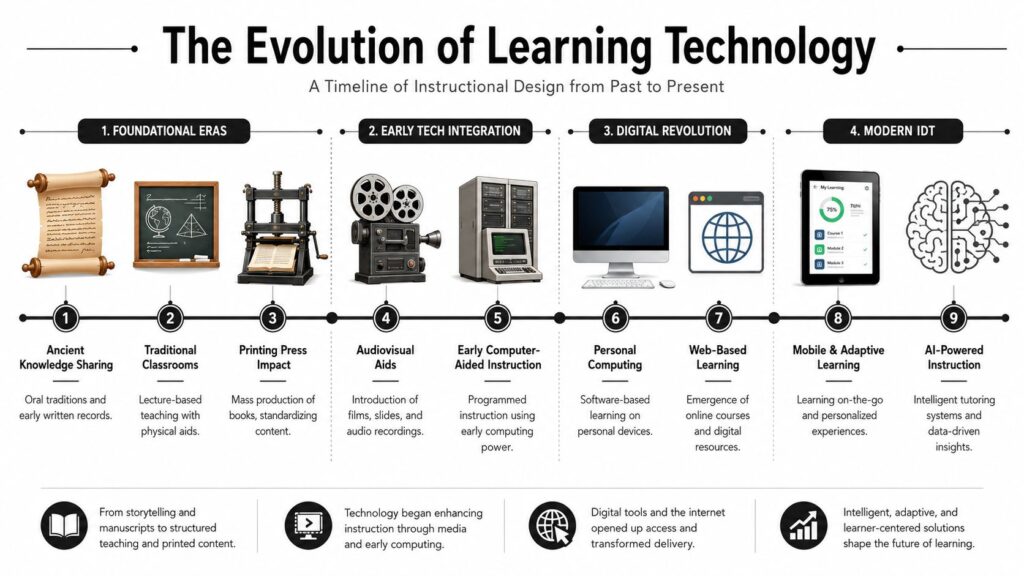
Here’s a visual timeline that makes the shift easier to see.
Early learning tools solved scale problems
Once printing made content easier to reproduce, teaching became more consistent. A book let many people receive the same lesson instead of relying on memory or live explanation every time.
Then audiovisual tools showed up. Film strips, recordings, projectors, and later training videos gave instructors a way to demonstrate ideas instead of only describing them. That mattered for procedural learning. It’s easier to show a process than to lecture about it.
By the time workplace training expanded in the late twentieth century, many organizations used physical manuals, in-person sessions, and video-based instruction. VCR-era training might feel outdated now, but it solved a real problem at the time. Teams needed repeatable instruction across locations.
Computers changed the shape of the lesson
Personal computers pushed learning from passive watching into interactive practice. Instead of only reading or viewing, learners could click, respond, retry, and receive feedback.
CD-ROM courses and early computer-based training were clunky by today’s standards, but they introduced an important idea. Learning could respond to the learner.
The web changed things again. Once courses moved online, distribution became easier, updates became faster, and tracking became possible. That’s when learning platforms started becoming central to instructional design technology.
If you want a useful snapshot of how those changes connect to current platforms, this overview of trends in technology for education is a good companion read.
Every major shift in learning technology happened because older methods stopped fitting the scale, speed, or complexity of the learning problem.
Why today’s tools look the way they do
A modern course stack can include mobile delivery, analytics, adaptive pathways, AI support, and video-based interaction. That can feel like a huge leap from a chalkboard.
But the core need hasn’t changed. We still need to help people learn clearly, practice safely, and improve performance.
What has changed is the precision of the tools. Today, creators can build more customized experiences, update content faster, and support learners across devices.
That’s why current instructional design technology can feel so powerful. It stands on top of a long line of teaching tools, each one trying to solve the same question a little better than the last.
Your Blueprint for Building Effective Learning
A lot of online courses fail for a simple reason. The creator starts by building lessons before defining the job the course needs to do.
That is why instructional designers use frameworks. For solo creators and small businesses, the point is not to sound academic. The point is to avoid spending two weeks recording polished videos for a problem that was never clearly defined.
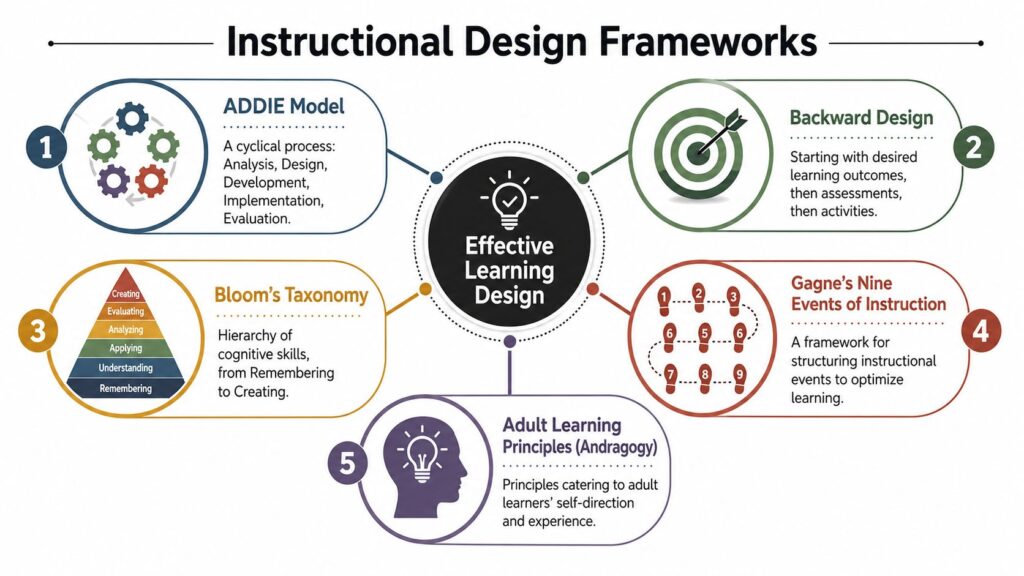
A strong starting framework is ADDIE. It stands for Analysis, Design, Development, Implementation, and Evaluation. If that sounds formal, strip it down to its practical use. ADDIE gives you an order for decisions, so you solve the right learning problem before you open your tools.
ADDIE keeps you from building the wrong thing
Each phase answers a different question. That is what makes the framework useful.
| Framework step | The question it answers | Practical example |
|---|---|---|
| Analysis | What problem are we solving? | Are learners missing knowledge, confidence, or a repeatable process? |
| Design | How should learning work? | Decide objectives, lesson flow, activities, and assessments. |
| Development | What do we build? | Record videos, write scripts, create slides, build quizzes. |
| Implementation | How will people use it? | Upload to the LMS, enroll learners, test access and flow. |
| Evaluation | Did it work? | Review learner results, feedback, and performance changes. |
The sequence matters. If Analysis is weak, Design gets shaky. If Design is fuzzy, Development turns into guesswork. By the time you launch, you may have a finished course that looks professional but teaches the wrong thing.
The University of Arizona Global Campus overview of instructional design technology notes that skipping the Analysis phase can raise course revision rates by approximately 40% because objectives get misaligned: https://www.uagc.edu/blog/what-instructional-design-technology. That lines up with what many course creators learn the hard way. Poor diagnosis leads to expensive rewrites.
Analysis is the least flashy step and the most important
New course creators usually want to jump into production. Open Storyline. Draft slides. Ask ChatGPT for quiz questions. Start recording.
That feels productive because you can see the work.
Analysis feels slower because you are still defining the problem. But this is the phase that protects your time, budget, and credibility. It works like measuring before cutting wood. The measuring part is not exciting. It is still the step that keeps the final product from coming out crooked.
Start with a few practical questions:
Who is this for
A beginner, a new employee, a manager, a paying customer?What should they be able to do after the course
Explain a concept, complete a task, avoid an error, make a better decision?What is getting in the way now
Missing knowledge, unclear process, weak onboarding, no practice, bad documentation?
One more question helps a lot. Does this problem need a course? Sometimes the answer is no. A checklist, job aid, template, or product walkthrough may solve the issue faster than a full training program.
Working advice: If the learner problem is fuzzy, the course will be fuzzy too.
SAM is useful when you need faster cycles
ADDIE gives you structure. Some projects also need speed.
That is where SAM, the Successive Approximation Model, helps. Instead of planning everything up front and reviewing late, you build a small version, test it early, revise it, and keep going. For a solo creator, that can mean drafting one lesson, getting feedback from five learners, and fixing the confusing parts before building the rest.
This approach works well when the subject matter is still changing or when you need to launch quickly and improve in rounds. Startups, membership businesses, and small teams often work this way because they cannot afford long production cycles followed by a major rebuild.
You do not have to choose one model forever. Many creators use ADDIE to frame the project, then use a faster build-review rhythm inside it. If you want a practical breakdown, this guide to the ADDIE model for training shows how the framework works in real course projects.
Frameworks matter because they connect the why with the how. They help you choose technology based on the learning job, not based on whichever tool looks impressive first.
The Modern Instructional Designer’s Toolkit
A lot of course creators hit the same point in the build process. The learning goal is finally clear, but now they are staring at a long list of platforms, plugins, authoring apps, AI assistants, video tools, and quiz builders, wondering about their specific technology requirements.
The simplest way to sort the confusion is to treat your toolkit like a workshop. You would not use a screwdriver to cut wood, and you would not use a saw to tighten a hinge. Course technology works the same way. Each tool supports a different part of the job.
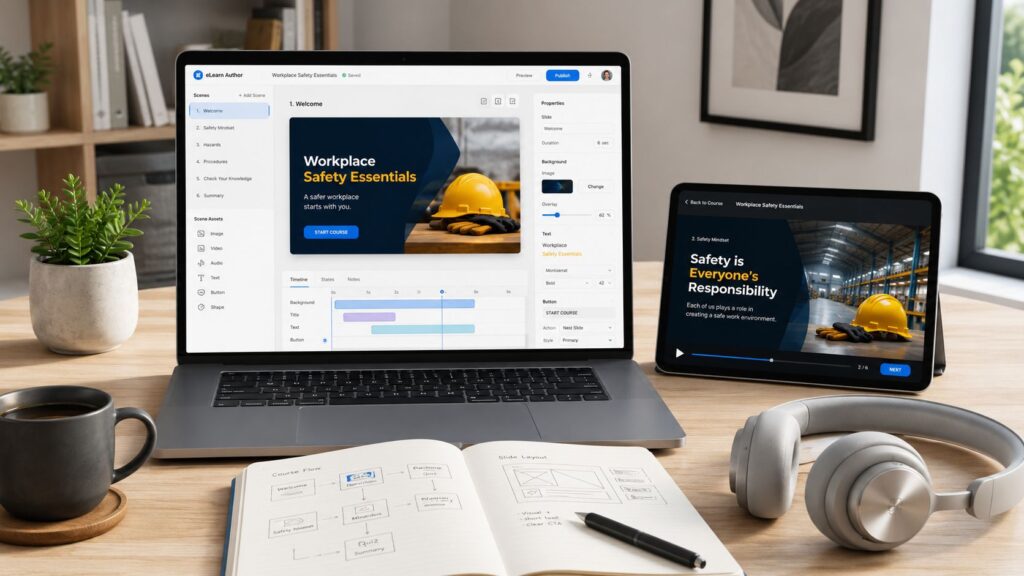
LMS platforms are the home base
Your Learning Management System, or LMS, is the place where learners enter, move through the course, and leave a record of what they completed.
If the authoring tool is your build bench, the LMS is the classroom, front desk, and attendance sheet combined.
A good LMS helps you answer practical questions such as:
- Who enrolled?
- Which modules did they finish?
- Where do they stop?
- Which assessments did they pass?
For a solo creator, the LMS may be a course platform with basic progress tracking. For a training team, it may be a system built for reporting, compliance, user groups, and manager visibility.
Authoring tools build the learning experience
Authoring tools are where the lesson takes shape. Within them, you create branching scenarios, software simulations, clickable walkthroughs, interactions, and scored checks for understanding.
Tools like Articulate Storyline, Adobe Captivate, and iSpring Suite give you more control than a standard video hosting platform. That control matters when learners need to practice decisions, not just watch explanations.
According to eLearning Industry’s coverage of 2024 eLearning trends, instructional designers spend about 60% of their time on development, project management, and implementation. The same article notes that 37% name Storyline as their top authoring tool. That lines up with real course work. A large share of the job is not brainstorming. It is building, revising, organizing assets, testing interactions, and getting the course into learners’ hands.
Here is a practical way to sort the main categories:
| Tool category | What it’s best for | Common examples |
|---|---|---|
| LMS | Hosting, enrollment, tracking, reporting | LMS platforms and course systems |
| Authoring tools | Building interactive lessons | Articulate Storyline, Adobe Captivate, iSpring Suite |
| Media tools | Creating course assets | Video, audio, screen recording, graphics tools |
| Assessment tools | Checking understanding and performance | Quizzes, scenario builders, surveys |
That table can save you money.
New creators often buy overlapping tools because every platform promises to do everything. In practice, one tool usually leads, and the others support it. If your course depends on scenario practice, put more attention on the authoring tool. If reporting matters most, choose the LMS more carefully.
AI tools speed up production, but they do not replace design
AI is now part of many instructional designers’ day-to-day workflow. According to Shift eLearning’s article on the future of instructional design in the AI era, nearly 80% of instructional designers use AI tools weekly.
That number makes sense. AI is useful for the parts of course production that are repetitive, time-consuming, or messy at the start.
I use AI most often to help with:
- Drafting outlines from rough source material
- Creating first-pass quiz questions that I can edit
- Rewriting explanations for learners who need a simpler version
- Turning one asset into several formats, such as a lesson summary, script, or short refresher piece
The key is using AI after the learning goal is clear.
If you ask AI to build before you know what learners need to do, you get polished confusion. If you give it a clear target, it can save hours on formatting, first drafts, and content adaptation.
For solo creators and small businesses, that is the practical win. You do not need a giant production team to build useful training. You need a small set of tools, a clear job for each one, and the judgment to connect the framework to the technology instead of letting the technology make the decisions for you.
Putting Theory and Tech into Practice
You open your course builder on Monday morning with a good goal and too many options. There is an AI video tool, a branching scenario template, a badge system, and a theme that makes everything look polished in ten minutes. By Friday, you have something that looks finished, but learners still cannot do the task that mattered in the first place.
I see that pattern all the time.
Good instructional design technology starts with the work learners need to perform, then chooses the simplest tool that supports that performance. The framework gives you the blueprint. The technology is the set of power tools. If you pick up the drill before you know what you are building, you still end up with a crooked shelf.
Start with the real task, not the feature list
Begin with one question: what should someone be able to do after this training that they could not do before?
That answer should be concrete.
If the goal is to follow a process, build guided practice with prompts, examples, and a job aid. If the goal is to make decisions, build scenarios with tradeoffs and consequences. If the goal is to use software, show the task clearly, then give learners a safe place to try it themselves.
The point is alignment. A video can introduce an idea. It usually cannot carry the full weight of skill building on its own. People learn judgment by making choices, not by watching someone else make them.
Build one working piece before you build the whole machine
Solo creators and small teams often try to produce the full course catalog version first. That usually leads to bloated lessons, long recording sessions, and fixes that take weeks instead of hours.
Start smaller.
Create one lesson around one outcome. Then add one practice activity that mirrors real work. Then add one feedback method so learners can tell whether they are doing it correctly. That could be quiz feedback, a manager check, a peer review prompt, or a simple rubric.
A practical sequence looks like this:
Define one visible outcome
Example: “The learner can lead a kickoff call using our standard agenda.”Build one realistic practice task
Use a scenario, checklist, decision path, role-play prompt, or software simulation.Add one feedback layer
Tell learners what good performance looks like and where they went off track.Watch for friction
Notice where learners pause, guess, skip directions, or misunderstand the task.
That last step matters more than people expect. Learner confusion is not just a content problem. It often points to a design problem, a tool problem, or a mismatch between the lesson and the actual job.
Accessibility needs to be part of the build
Small businesses often treat accessibility like final cleanup. That choice usually creates rework later and leaves learners out in the meantime.
Build for access from the start instead.
Clear headings help screen reader users and fast skimmers. Captions help deaf learners, multilingual learners, and anyone watching with the sound off. Keyboard-friendly navigation helps learners who cannot use a mouse. Transcripts make review easier for everyone. The U.S. General Services Administration guidance on Section 508 explains that federal agencies must make electronic and information technology accessible, and that requirement shapes common expectations for captions, keyboard access, structure, and readable design.
Even if Section 508 does not legally apply to your course, it is still a strong baseline for building training people can use.
Use technology to strengthen practice, feedback, and revision
Course creators sometimes spend the most time polishing surfaces because polish is visible. Learning quality is less visible at first, but it shows up where it counts: in practice, feedback, and performance on the job.
So use your tools where they make the biggest difference. Use your LMS to release content in the right order and track who needs support. Use your authoring tool to create interactions that mirror real decisions. Use AI to speed up drafts or adaptations after the outcome is clear. Use screen recording, simulations, and discussion prompts to help learners apply knowledge instead of just seeing it.
Pretty courses can still fail.
Courses work better when the technology supports a clear outcome, realistic practice, useful feedback, and access for all learners. That is the practical connection between theory and tech. One tells you why the lesson should work. The other helps you build it in a way learners can use.
How to Know If Your Course Is Actually Working
A learner finishes every lesson, passes the final quiz, and leaves a five-star review. A week later, they still cannot do the task your course promised to teach.
That is the measurement problem in one snapshot.
Completion data matters, but it is only the front door. If you want to know whether your course is doing its job, you need evidence that learners understood the material, practiced it well enough, and used it after the course ended. For solo creators and small businesses, that means tracking a few measures that connect learning design to real performance.
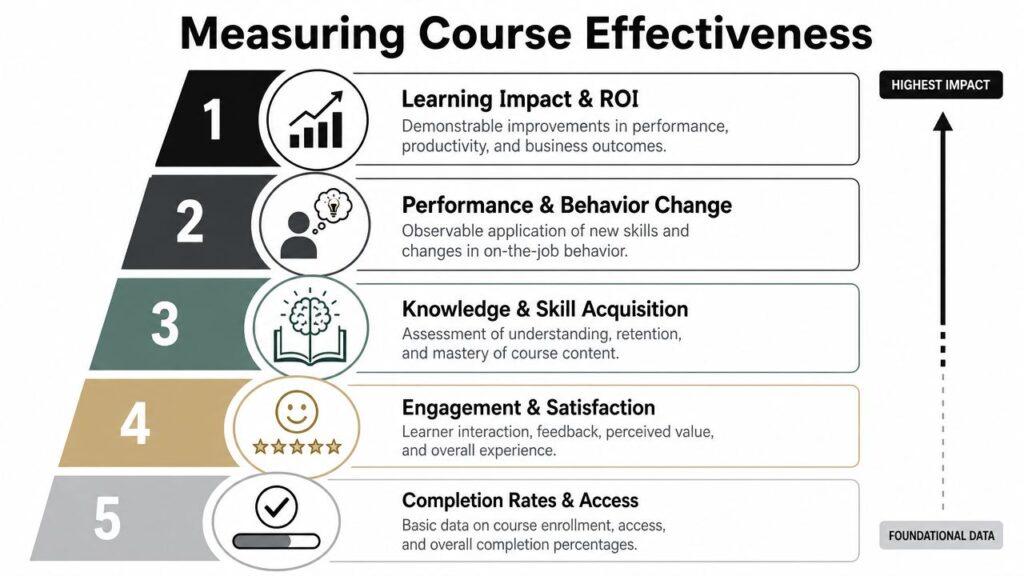
A helpful way to organize this is a simplified version of the Kirkpatrick Model. It gives you four levels to check: reaction, learning, behavior, and results.
Here’s a simple visual hierarchy.
Move past vanity metrics
The bottom layer is operational data like enrollments, logins, and completion rates. Those numbers help you spot access problems or drop-off points. They do not show whether learning happened.
Stronger indicators sit higher up:
Engagement and satisfaction
Did learners find the course clear, relevant, and usable?Knowledge and skill acquisition
Can they explain the idea, identify the right option, or perform the target skill?Behavior change
Are they using the skill in real work or real projects?Impact and ROI
Did the course improve a result the business or learner values?
A course platform usually tracks the easiest numbers by default. Good evaluation asks a harder question. Did the learner get better at something that matters?
Use metrics tied to performance
The National Academies report How People Learn II explains that effective assessment should measure whether learners can organize knowledge, apply it, and transfer it to new situations, not just recall facts (National Academies Press). That is a useful filter for course metrics. If a measure does not connect to application, it probably should not be your main proof of success.
Research from the U.S. Department of Education also found that learning experiences with interactive and adaptive elements can improve outcomes when they are aligned to clear instructional goals, feedback, and learner needs (Office of Educational Technology). In practice, that means AI features are only helpful if they support the design. Adaptive paths, feedback prompts, and recommendations should help learners reach competence faster or with fewer errors.
For a practical scorecard, use measures like these:
| What to measure | What it tells you |
|---|---|
| Quiz and assessment results | Whether learners understood the material |
| Practice performance | Whether they can apply the skill in context |
| Time-to-proficiency | How quickly they reach expected competence |
| Post-training performance improvement | Whether job performance changed after training |
| Manager or peer observations | Whether behavior shifted during real work |
A course works like a flight simulator. Finishing the simulation is not the goal. Landing safely is the goal.
The best course metrics answer one simple question. What can learners do now that they could not do before?
If you run a small course business, you do not need an enterprise analytics stack to answer that question. You can collect useful evidence through project submissions, before-and-after samples, reflection prompts tied to a real task, client outcomes, manager feedback, or short follow-up surveys sent two to four weeks later.
Start small. Pick one learning measure, one behavior measure, and one result that matters to your learner or customer. That simple system will tell you far more than completion rate alone.
Your Top Instructional Design Questions Answered
Do I need a formal degree to use instructional design technology well
No. A degree can help, but it isn’t the only path.
What matters most is that you learn to diagnose learner needs, write clear outcomes, choose the right activities, and use the tools carefully. Many strong course creators came from teaching, training, operations, customer education, or subject matter expertise.
What’s the difference between instructional design and UX design
They overlap, but they aren’t the same.
Instructional design focuses on learning outcomes. It asks how people will understand, practice, and apply knowledge or skills.
UX design focuses on the experience of using a product or interface. In courses, UX matters because confusing navigation can block learning. But a course can have clean UX and still teach poorly if the learning design is weak.
How much should I budget for software
The honest answer is that budgets vary a lot.
A solo creator can start lean with a course platform, a basic recording setup, simple design tools, and an AI assistant. A business building interactive modules may need dedicated authoring software, media tools, and an LMS.
I’d make decisions in this order:
- Start with your delivery method and learner needs
- Choose tools that solve a current problem
- Avoid buying advanced software before you’ve validated the course format
- Leave room for revision, because updating courses is part of the overall cost
What’s the fastest way to get better
Build one small course with a clear outcome. Watch real learners use it. Revise based on where they struggle.
That loop teaches more than reading theory alone ever will.