How to Create an Online Course to Sell That People Actually Buy

So, you have an idea for an online course and you’re ready to share your expertise with the world. That’s fantastic. But turning that idea into a profitable, sellable product requires a shift in thinking. You need to move from being just an expert to being an entrepreneur who builds something that genuinely transforms your students.
Before you even think about cameras or curriculum, let’s get the foundation right. I’ve seen countless experts build courses full of amazing information that ultimately flop because they missed this crucial first step. They built what they wanted to teach, not what people were desperate to learn.
This guide is your pre-flight checklist. We’re going to make sure your course is built on solid ground, designed to solve a specific problem for a specific audience. Your expertise is the tool, but the solution you deliver is the product.
This process chart breaks down the three core phases we’ll walk through together: building a solid foundation, designing a transformative experience, and launching for maximum impact.
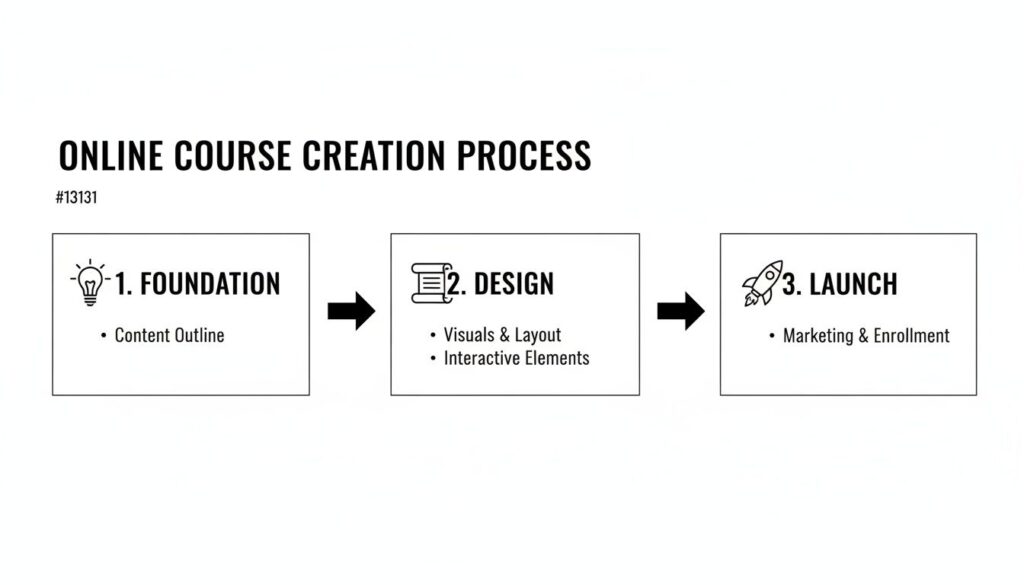
Seeing it laid out this simply shows that creating a course is about mastering a few critical stages in the right order.
So, Why Online Courses?
If you’re wondering if you’ve missed the boat, you haven’t. The e-learning market is not just a trend. It’s a fundamental shift in how people acquire new skills. The industry has exploded by over 900% since 2000, making it the fastest-growing corner of the education market. People are actively and enthusiastically paying for knowledge online.
Learning how to create an online course to sell is one of the smartest moves you can make as an expert in this new landscape. To give you a high-level roadmap, here’s a quick framework of the core stages we’ll be diving into.
Quick-Start Framework for Your Online Course
| Stage | Key Objective |
|---|---|
| 1. Validation | Confirm your course idea solves a real, painful problem for a paying audience. |
| 2. Curriculum | Design an outcome-focused learning path, not just a content dump. |
| 3. Tech & Hosting | Choose the right tools to deliver a smooth and professional student experience. |
| 4. Pricing & Offers | Structure your pricing to reflect the value and transformation you provide. |
| 5. Launch & Market | Build a simple, repeatable system to attract your ideal students. |
Think of this table as the 30,000-foot view. We’ll be digging into the nitty-gritty of each stage, but this shows you the clear path from idea to paying students.
If you’re looking for a deep dive, this ultimate guide on how to create online courses is a great resource to have open in another tab as you go through this journey.
A successful online course is about the value of the transformation. Your primary goal is to solve a real, specific problem for your students. Get that right, and everything else falls into place.
So, you have a killer course idea. That’s fantastic. The energy and excitement around a new concept are intoxicating. But before you get lost in designing slides and recording videos, we need to pump the brakes and ask one brutally honest question: Will anyone actually pay for this?
I’ve seen it happen more times than I can count. A creator pours months of their life into a beautiful, comprehensive course, hits the launch button, and… crickets. It’s a gut-wrenching experience.
This part of the guide is your insurance policy against that exact scenario. We’re going to sidestep that painful mistake by using some practical, low-effort ways to see if your idea has legs. By the time we’re done here, you won’t just think you have a good idea. You’ll have cold, hard evidence that a market is hungry for what you’re planning to build.
Become a Digital Eavesdropper
The most profitable course ideas come from listening. Your future students are already online, right now, talking about their problems, frustrations, and goals. Your job is to find those conversations and tune in.
Pay close attention to the exact words they use. Don’t just look for what they’re asking. Listen for the emotion behind it. What have they already tried that failed? Where are they getting stuck? These expressions of pain are pure gold. They’re the building blocks of a course that sells.
Here’s my go-to “listening tour” checklist:
- Niche Facebook Groups: Find groups where your ideal student hangs out. Once you’re in, use the group’s search bar for keywords like “help,” “stuck,” “frustrated,” “how do I,” or “can anyone recommend.” The results are a direct line into your audience’s brain.
- Reddit Subreddits: Reddit is a goldmine of unfiltered, honest conversation. Find the subreddits for your niche and look for the posts where people are asking for advice or just flat-out venting. It doesn’t get more real than that.
- Quora and AnswerThePublic: These platforms are literally designed around questions. Search your topic and dive into the “People also ask” sections. You’ll quickly see the most common questions and the related queries that orbit your main idea.
This kind of digital eavesdropping gives you a crystal-clear picture of the problems people are actively trying to solve. You can learn more about finding these opportunities by conducting a training needs assessment for your audience.
Run Simple Polls to Gauge Interest
Once you’ve zeroed in on a common problem, it’s time for a quick temperature check. You don’t need fancy survey software. A simple poll on social media can give you incredibly valuable feedback in less than 24 hours.
Let’s say you’re kicking around an idea for a “Meal Prepping for Busy Professionals” course. You could pop into a relevant Facebook group or post an Instagram Story with a poll like this:
“What’s your single biggest challenge with eating healthy during the work week?”
Give them a few distinct options:
- No time to cook.
- Bored with the same meals.
- Hard to stick to a plan.
- Don’t even know where to start.
The results will instantly show you which pain point is the most acute. This helps you sharpen your course angle to focus on what really matters to people.
A critical point here: this is not about asking, “Would you buy this course?” That’s a trap. People are nice. They’ll say “yes” to be supportive, but that doesn’t mean they’ll pull out their credit card. Instead, your goal is to validate their current struggles.
Create a Smoke Test Landing Page
This is my absolute favorite validation technique, the “smoke test.” A smoke test is when you create a simple landing page that describes your potential course and asks people to sign up for a waitlist or even pre-order it at a discount.
This is the ultimate test of an idea. It asks for a small but meaningful commitment, an email address or a small pre-sale payment. This is what separates the casually interested from the truly motivated buyers. If you can get 50-100 people on a waitlist, you’ve got a very strong signal that you’re onto something real.
Your smoke test page only needs a few key things:
- A Killer Headline: Don’t describe the course. Describe the transformation. (e.g., “The Busy Professional’s Guide to Healthy Meal Prepping in Under 2 Hours a Week”).
- Key Outcomes: Use 3-5 bullet points to list what they’ll be able to do after taking your course.
- A Clear Call to Action: Something direct like “Join the Waitlist” or “Pre-Order Now & Save 50%.”
Building a waitlist does more than just validate your idea. It builds you an audience before you even have a product. It’s the single most effective way I know to ensure you have a line of customers ready and waiting on launch day.
Designing a Course That Delivers Real Transformation
This is my favorite part of the process. It’s where your validated idea starts to become a real, tangible thing that can change someone’s life.
But before we get into the nuts and bolts, let’s get one thing straight. A great course is so much more than a folder full of videos. It’s an engine for transformation. Your goal isn’t just to teach something. It’s to get your student from Point A to Point B.
Point A is their current struggle, the pain point that brought them to you. Point B is the successful outcome, the result they’re paying you for.
To make that happen, I swear by a method called outcome-based design. This simply means that every single lesson, quiz, and resource you create must have a clear purpose. It has to directly contribute to getting your student closer to that promised result. If it doesn’t, it gets cut. No fluff.
Start with the End in Mind
To build your course using this outcome-first approach, you actually start at the finish line. Begin by defining the final, concrete transformation. What is the one major promise of your course?
Let’s say you’re building a course on starting a podcast. The final outcome might be: “Launch a professionally produced podcast with three live episodes and a content plan for the next month.”
Once you have that big, juicy goal, you work backward. What are the major milestones someone needs to hit to achieve that? These milestones become your course modules.
For our podcasting example, the modules might look something like this:
- Module 1: Defining Your Podcast Concept and Audience
- Module 2: Choosing Your Gear and Recording Setup
- Module 3: Recording and Editing Your First Episodes
- Module 4: Creating Your Launch and Marketing Plan
See how each module is a significant, logical step toward the final goal? This structure creates a clear path for your students, which is essential for keeping them engaged and preventing them from feeling lost. From there, you just break each module down into smaller, bite-sized lessons.
Embrace Microlearning for Better Results
Let’s be real: people are busy. We’re all fighting for attention. That’s why microlearning is so incredibly powerful.
It’s the practice of breaking down complex topics into short, focused, and easily digestible chunks. This is absolutely key for creating an online course that sells because it respects your student’s time and makes the learning process feel manageable, not overwhelming.
The ideal video lesson length is around 6-12 minutes. Anything longer and you start to see a significant drop-off in student engagement. Keep it short, focused, and actionable.
Instead of creating one massive 45-minute video on “podcast editing,” you should break it into several smaller, skill-based lessons.
- Lesson 1: How to Remove Background Noise
- Lesson 2: Adding Your Intro and Outro Music
- Lesson 3: Cutting Out Mistakes and Pauses
- Lesson 4: Exporting Your Final Audio File
Each lesson teaches one specific skill that the student can immediately practice. This approach builds confidence and momentum. A student who completes five short lessons feels way more accomplished than someone who is only halfway through a single long one. It’s a huge psychological win.
Mix Up Your Lesson Formats
While video is the star of most online courses, it shouldn’t be the only tool in your toolkit. The best learning experiences use a mix of formats to keep things interesting and cater to different learning styles. The goal is to make your course interactive and provide tangible assets, not just a series of lectures.
Must-Have Lesson Components
| Format | Why It’s Important | Example |
|---|---|---|
| Video Lessons | The core of your instruction. Great for showing “how-to” processes and building a personal connection with your students. | A screen-share tutorial showing how to set up podcast hosting. |
| Actionable Worksheets | Helps students apply what they’ve learned, turning passive knowledge into active practice. This is where real learning happens. | A “Podcast Branding Worksheet” for defining their show’s name, tagline, and cover art. |
| Checklists | Provides a clear, step-by-step guide for complex tasks. This reduces overwhelm and ensures nothing gets missed. | A “Podcast Launch Checklist” with every step from recording to submitting to Apple Podcasts. |
| Templates | Gives students a massive head start by providing a fill-in-the-blank resource. These are often the most valued parts of a course. | An email template for reaching out to potential podcast guests. |
Don’t just add these for the sake of it. Every single resource should have a clear purpose tied to an outcome. A good worksheet doesn’t just ask random questions. It guides the student toward making a decision or completing a task that is essential for their progress.
This is what creates an experience that delivers real, lasting transformation for your students and turns them into your biggest fans.
Choosing Your Tech Stack and Recording Your Content
Alright, let’s talk about the part that often feels the most intimidating: the technology. I’ve seen countless brilliant experts get stuck here, but the good news is that the tools for creating and selling an online course are more accessible and user-friendly than ever. You absolutely do not need to be a tech wizard to get this done.
Your “tech stack” is just the collection of tools you’ll use to host your videos, process payments, and give your students a place to learn. The most important choice you’ll make is your course platform. This is the online home for your course.
There are two main paths you can take, and the right one really depends on your budget, technical comfort, and long-term goals.
All-in-One Platforms vs. a Self-Hosted Setup
The first, and most popular, option is an all-in-one platform. Think of services like Teachable, Kajabi, or Thinkific. These platforms are built specifically for course creators and handle just about everything for you. They host your videos, manage student logins, process payments, and provide a pre-built, professional-looking structure for your course.
The huge benefit here is simplicity. You can get a great-looking course up and running in a single day without touching a line of code. They are designed to make your life easier so you can focus on what you do best: making amazing content.
The second option is a self-hosted solution, which usually means using WordPress with a special piece of software called a Learning Management System (LMS) plugin. Popular choices here include LearnDash or LifterLMS.
This route gives you complete control and flexibility. You can customize every pixel of the student experience, and you generally have lower transaction fees. However, it requires more technical setup, and you’re responsible for maintenance, security, and piecing together different tools for payments and video hosting.
My honest advice for 90% of first-time creators is to start with an all-in-one platform. The time and mental energy you save on technical headaches is incredibly valuable. You can always migrate to a self-hosted solution later as your business grows and your needs evolve.
To make the choice clearer, here’s a breakdown of the key differences you’ll want to consider.
Comparing Popular Online Course Platforms
Choosing between an all-in-one service and a self-hosted WordPress site is a critical decision. The right tech stack should support your goals, not become a roadblock. This table breaks down the core trade-offs.
| Feature | All-in-One Platforms (e.g., Teachable, Kajabi) | Self-Hosted (WordPress + LMS Plugin) |
|---|---|---|
| Ease of Use | Very beginner-friendly. Built for non-techies. | Steeper learning curve. Requires some technical skill. |
| Setup Time | Fast. You can be up and running in hours. | Slower. Requires installing and configuring plugins. |
| Customization | Limited. You work within their templates. | Nearly unlimited. You have full design control. |
| Cost | Monthly subscription fee plus transaction fees. | Upfront cost for plugins, plus hosting and other tools. |
| Maintenance | Handled for you by the platform. | Your responsibility (updates, security, backups). |
Ultimately, if your priority is speed and simplicity, go with an all-in-one. If total control and long-term cost savings are more important, and you don’t mind a bit of a project, the self-hosted route is for you.
Simple Gear for High-Quality Content
Now for the recording part. I have to be crystal clear about this: you do not need a professional studio to create a course that sells. In fact, over-the-top production can sometimes feel less authentic and more intimidating to your students. They are here for your knowledge, not for Hollywood-level special effects.
Here is my recommended “good enough” gear list that will give you professional results without breaking the bank:
- A Good USB Microphone: This is the single most important piece of gear. Bad audio is far more distracting than less-than-perfect video. A Blue Yeti or a Rode NT-USB are fantastic choices that plug directly into your computer and just work.
- Screen Recording Software: This is essential for any course that involves showing your computer screen. Loom and Screencast-O-Matic are both excellent and have very generous free plans. Camtasia is a more powerful paid option if you need advanced editing features down the line.
- A Webcam or Smartphone: The built-in webcam on most modern laptops is perfectly fine to start. If you want to step it up, a Logitech C920 is a classic choice for great 1080p video. Your smartphone can also shoot amazing video, so don’t overlook it!
That’s it. Seriously. You can create a $100,000 course with just those three things. Don’t let the gear become an excuse to procrastinate. If you’d like to explore more options, you can check out our deep dive into other elearning content creation tools that can help. The key is to choose your tools and get started.
You’ve poured your heart, soul, and expertise into creating an amazing course. Now for the exciting part, getting it into the hands of eager students. This is where we pivot from creator to marketer, and it all starts with the million-dollar question: what on earth do I charge?
Pricing a course feels more like an art than a science, and honestly, there’s no magic number. Your price needs to be a direct reflection of the transformation you deliver, not just a tally of the videos or PDFs you’ve stacked up.
How to Price Your Course
The first decision is how you’ll charge. A few standard models exist, and each has its place.
One-Time Payment: This is the simplest path. A student pays once and gets lifetime access. It’s clean, easy for everyone to understand, and gives you immediate cash flow.
Payment Plan: This breaks the full price into smaller monthly installments (think 3 payments of $197 instead of a single $497 hit). This is a game-changer for conversions, making your course accessible to people who can’t swing the full price at once.
Subscription or Membership: Instead of a single sale, students pay a recurring monthly or annual fee. This model is perfect if you plan to consistently add new content, host a vibrant community, or offer ongoing support.
I almost always tell creators to offer both a one-time payment and a payment plan. It gives students flexibility and instantly removes a huge mental hurdle to buying.
It’s All About Value, Not Hours
So, how do you land on the actual number? Don’t just peek at your competitors and pick a price in the middle. That’s a race to the bottom. Instead, anchor your price to the transformation you provide.
Is your course going to help someone land a promotion, launch a freelance business that brings in thousands, or save 10 hours of tedious work every single week? Those outcomes have a real, tangible dollar value. A $497 course that helps someone land a single client worth $2,000 is an incredible return on investment.
For a comprehensive, high-value course, a great starting point is often in the $297 to $997 range. Dipping below $100 can sometimes devalue your work, making potential students wonder if it’s any good. Don’t be afraid to charge what your expertise is worth.
The price is a signal of quality. A higher price often attracts more committed and successful students because they have more skin in the game. They are invested in getting a result, which leads to better outcomes and more powerful testimonials for you.
Crafting a Winning Launch Plan
Once your price is set, it’s time to plan the launch. A successful launch isn’t just dropping a link and crossing your fingers. It’s a choreographed event designed to build anticipation and create a focused window of opportunity.
Your email list is your single most important launch asset. Period. You absolutely must have an engaged email list before you open the cart. This is non-negotiable. Social media is great for building buzz, but email is where the sales happen.
A typical launch week involves a focused email sequence. For a 7-day launch, I usually send around 9 to 11 emails. I know, it sounds like a lot! But during a launch, your audience expects to hear from you. You can check out our detailed guide on how to market an online course for more in-depth strategies.
Here’s a quick look at a launch email flow:
- Pre-Launch Buzz (2-3 emails): A few days before enrollment opens, send emails that build excitement. Talk about the problem your course solves and hint that a solution is just around the corner.
- Cart Open (1 email): Announce that the doors are open! Clearly state the price, what’s included, and who it’s for. Make the offer crystal clear.
- Social Proof & FAQ (2-3 emails): Share testimonials from your beta testers. Answer common questions and tackle objections head-on.
- Urgency (3 emails): In the final 48 hours, the reminders begin. The “24 hours left” and “closing in a few hours” emails are often the highest-grossing emails of the entire launch.
As you gear up for your launch, it’s critical to remember that selling a course is an e-commerce transaction. Understanding how to increase your e-commerce sales by applying proven principles is essential to your success.
Marketing Beyond the Launch for Steady Sales
The adrenaline rush of a launch week is amazing, but the real goal is to build a system that brings in students consistently. You don’t want your income to be a roller coaster of big launches a few times a year.
Corporate e-learning is a massively profitable area to explore for ongoing revenue. The market is projected to hit $49.87 billion by 2026, driven by businesses that see higher revenue and profits from strong training programs. This shows that organizations see training as a crucial investment, opening a huge door for course creators targeting the B2B market, especially with subscription models.
Here are a few sustainable marketing strategies to focus on:
Content Marketing: Consistently create valuable blog posts, YouTube videos, or podcast episodes related to your course topic. This builds trust and attracts your ideal student over time. At the end of each piece, mention your course as the perfect next step.
Simple Paid Ads: Once you’ve validated your offer and know your numbers, running targeted ads on platforms like Facebook or Instagram can be incredibly profitable. You can start small, promoting a free webinar that leads into your course pitch.
Affiliate Partnerships: Team up with other creators in your niche who serve a similar audience. They promote your course to their community, and you give them a commission on each sale. It’s a powerful way to reach new, qualified audiences with zero upfront cost.
Sustaining Momentum After Your Launch

Watching those first sales roll in during launch week is an incredible feeling. There’s nothing quite like it. But once the confetti settles and the initial excitement fades, the real work of building a sustainable business truly begins.
Think of your launch as a massive milestone, not the finish line. The goal now is to channel that initial burst of energy into a steady, reliable stream of students and income. This is how you shift from having a successful product launch to building a long-term, profitable asset. It’s all about creating systems that keep your course selling, month after month.
Turn Feedback Into Your Best Marketing Asset
Immediately after your launch, you’re sitting on a goldmine of information: your first cohort of students. These early adopters are not only your most valuable source of feedback but also your future marketing champions. Your first priority should be to listen intently to what they have to say.
Make it easy for them to share their thoughts, ask questions, and celebrate their wins. This could be a dedicated channel in your community platform, a simple follow-up survey, or even just a few personal email check-ins.
As soon as students start seeing results, don’t be shy. Reach out and ask for a testimonial. A genuine story from someone who achieved the exact transformation you promised is more powerful than any sales copy you could ever write yourself.
Gathering student success stories is not just for plastering on your sales page. Weave these powerful testimonials into your emails, social media content, and ad campaigns. They provide the undeniable social proof that your course delivers on its promise.
Build Your Evergreen Sales Engine
A big launch is a fantastic way to generate a surge of sales in a short window. But you don’t want your entire income to depend on just a few high-stakes events each year. The next crucial step in learning how to create an online course to sell is building an evergreen funnel.
An evergreen sales funnel is basically an automated system that works around the clock to sell your course, without you having to be directly involved in every single sale. It’s what allows new students to discover, learn about, and enroll in your course any day of the year.
The process usually looks something like this:
- A Content Magnet: You start by creating a high-value piece of free content that solves a small, specific problem related to your course topic. This could be a detailed blog post, a YouTube tutorial, or a podcast episode.
- A Lead Magnet: Within that content, you offer a free, downloadable resource, like a checklist, a short e-book, or a mini-email course, in exchange for an email address. This is how you get interested people onto your email list.
- An Automated Email Sequence: Once someone signs up, they automatically receive a series of pre-written emails. This sequence is designed to build trust, provide more value, and eventually introduce them to your paid course.
This engine quietly works in the background, consistently attracting new leads and converting them into paying students. It’s the key to creating predictable, long-term revenue and finally breaking free from the exhausting launch-to-launch cycle.
Common Questions About Selling Online Courses

Over the years, I’ve noticed a few questions that come up again and again. They’re the common worries that nearly every new creator has when they’re thinking about building a course.
So, I wanted to tackle them head-on. Think of this as a quick, candid chat to clear up some of those nagging doubts and give you the confidence to move forward.
How Much Money Can I Really Make Selling an Online Course?
This is the big one, isn’t it? The honest answer is that the income potential is all over the map, but it’s not a complete mystery. Your earning potential really hinges on three things.
Those key factors are your audience size, your course price, and your niche. It’s not just about raw follower counts, either. A creator with an engaged email list of 2,000 people can easily blow past someone with 25,000 Instagram followers because an email list is a direct line to your most committed fans.
Let’s run some quick, realistic numbers. Say you have a list of 1,000 people. If you convert just 2% of them on a $497 course, that’s 20 students. That single launch just brought in $9,940. When you see the math laid out like that, it’s clear how learning to create and sell an online course can become a serious business.
Don’t get discouraged by the huge numbers you see some gurus throwing around online. Focus on building a small, engaged audience that genuinely trusts you. A handful of true fans who buy your course are far more valuable than thousands of passive followers who never will.
Your income grows as you build that audience and refine your offer over time. It’s not a get-rich-quick scheme, but it is a very real path to building a substantial income stream.
How Long Should My Online Course Be?
There’s this stubborn myth that a longer course is somehow a more valuable course. I’m here to tell you that this couldn’t be more wrong. Nobody is buying your course because they want to spend more hours staring at videos.
They are buying a result.
The perfect length for your course is however long it takes to deliver the promised transformation, and not a single minute more. Your job is to create the most direct, efficient path to their goal. If you can deliver a life-changing result in three hours, your course is infinitely more valuable than a bloated 20-hour course that’s packed with fluff.
Here are a few pointers to guide you:
- Focus on Actionable Steps: Every lesson should teach a specific skill or lead to a clear, tangible action.
- Embrace Microlearning: Keep your videos short and punchy, ideally in the 6-12 minute range. This keeps engagement high and gives students a constant sense of progress.
- Cut Ruthlessly: As you outline your curriculum, ask yourself if each lesson is absolutely essential for achieving the final outcome. If the answer is no, cut it. Your students will thank you.
Remember, completion rates are a massive factor in student success and, by extension, your long-term reputation. Shorter, more focused courses have much higher completion rates, which leads to more success stories and glowing testimonials for you.
What if Someone Copies My Course Content?
This fear is completely understandable, and it’s one I hear all the time. You pour your heart, soul, and unique expertise into your course, so the thought of someone just stealing it is incredibly frustrating.
But I want to offer a little perspective here. The chances of this actually happening are relatively low, and even if it does, the impact is often far less than you’d imagine. Your course is not just a pile of information. It’s your unique point of view, your specific teaching style, the community you build, and the personal support you offer.
No one can copy you. That’s your single biggest competitive advantage. Someone might be able to rip off a few video scripts, but they can’t replicate the trust you’ve built with your audience or the specific experience you provide inside your program.
While you shouldn’t let this fear paralyze you, there are a few simple things you can do for peace of mind. Watermarking your videos and PDFs with your logo and including clear terms of service on your site are great first steps. These small hurdles are often enough to deter any casual theft. Ultimately, your energy is best spent serving your real, paying students, not worrying about the tiny percentage of people who might try to cheat the system.