Define Onboarding Process

A strong onboarding process improves retention by 82% and productivity by over 70%. In practice, if you define onboarding process well for a course or membership, you’re building a guided path that helps people get value fast instead of joining, feeling lost, and drifting away.
If you run an online course, membership, or community, you’ve probably seen this happen. Someone signs up, seems excited, maybe opens one email, then disappears. No complaint. No refund request. They just stop showing up.
That’s why I think a digital onboarding process matters so much. For online education, it isn’t an HR checklist or a corporate orientation packet. It’s a series of guided experiences designed to help a new member or student quickly find value, feel welcome, and build lasting habits with your course or community.
A lot of onboarding advice online still comes from the employee HR world. Some of that is useful, but much of it misses what course creators and membership owners encounter. You’re not seating someone at a desk or handing them a company handbook. You’re helping a person understand a login, a curriculum, a community, a schedule, and their own motivation.
Your Guide to Defining the Onboarding Process
Most creators don’t have a traffic problem first. They have a follow-through problem.
You can get signups from a webinar, free trial, podcast mention, or paid ad. But if people land inside your course and don’t know what to do next, the sale doesn’t turn into a learning habit. That gap is where onboarding lives.
When I define onboarding process for digital learning, I keep it simple. Onboarding is the intentional experience that moves a new student from “I signed up” to “I know where to start, I got a quick win, and I want to come back tomorrow.”
That definition matters because digital products create a different kind of friction. In a classroom or coaching room, people can ask questions in real time. In a membership site, they often face a dashboard, a content library, and too many choices.
The problem isn’t small. Existing onboarding content leans heavily toward traditional employee integration, while digital sectors report 25% higher new user dropout rates in the first 30 days due to poor virtual acclimation, and 40% of e-learning platforms lose subscribers before completion without a customized digital onboarding process, according to SHRM onboarding guidance for digital sectors.
Practical rule: If a new member has to guess what “getting started” means, your onboarding process isn’t finished.
Here’s where readers often get confused. They think onboarding starts after lesson one. I don’t. I think it starts the moment a person says yes.
A checkout confirmation, a welcome email, a first-login screen, a short orientation video, a progress checklist, a community prompt. Those are all onboarding touchpoints. Together, they answer the same quiet questions every new member has:
- Where do I begin: Show one clear next step, not six menu options.
- What matters first: Point them to the first win, not the full library.
- Am I in the right place: Reassure them that their choice makes sense.
- Can I do this: Reduce technical friction and mental friction early.
If you keep that frame in mind, the term “onboarding process” gets a lot less fuzzy.
What Onboarding Really Means for Course Creators
Good onboarding feels a lot like the tutorial level in a smart video game. You’re not dumping every control, map, and rule on the player at once. You’re guiding them to one simple action, then another, until they feel capable.
That’s the actual job.
For course creators, onboarding isn’t just a welcome email with a password link. It’s the sequence that helps someone cross the awkward gap between paying and participating. In my experience, that gap is where most momentum gets lost.

It moves people from buyer to active learner
The moment after purchase is emotionally strange. A student is excited, but also unsure. They may wonder whether they chose the right course, whether they’ll have time, or whether the platform will feel overwhelming.
A strong onboarding process handles that uncertainty before it grows.
Research by the Brandon Hall Group shows that a strong onboarding process improves new hire retention by 82% and productivity by over 70%, as summarized in this onboarding statistics roundup. In a digital education business, I read that as a clear sign that guided beginnings lead to better follow-through and faster engagement.
It creates a first win
A lot of creators think onboarding means “show them everything we included.”
I think that’s backwards.
Your new member does not need a grand tour of every course tab, bonus resource, and discussion category on day one. They need one meaningful win. That could be:
- A completed starter lesson: A short lesson that solves a small but real problem
- A finished setup task: Connecting their account, profile, or learning dashboard
- A community introduction: Posting a short hello in Circle.so or another community tool
- A planning action: Choosing a learning path that fits their schedule
A welcome email says, “You’re in.”
Onboarding says, “Start here, do this next, and you’ll feel progress quickly.”
That distinction is huge.
It reduces cognitive overload
Digital learning businesses often hurt onboarding by being too generous too soon. We give members a giant library because we want them to feel abundance. But abundance without direction often feels like homework.
A cleaner onboarding process narrows focus.
Here’s a quick comparison:
| Experience | What the member feels |
|---|---|
| Huge content library with no path | “I don’t know where to begin.” |
| One guided starting point | “I can do this.” |
| Feature-heavy dashboard | “This looks complicated.” |
| Clear first action and deadline | “I know what to do next.” |
The best onboarding helps someone feel competent before they feel ambitious. Once they trust themselves inside your platform, they’ll explore more.
The Four Stages of a Digital Onboarding Process
I like to think of digital onboarding as a sequence, not an event. If you only focus on the welcome email, you’re treating a full journey like a single moment.
These four stages work across self-paced courses, communities, coaching programs, and membership sites.
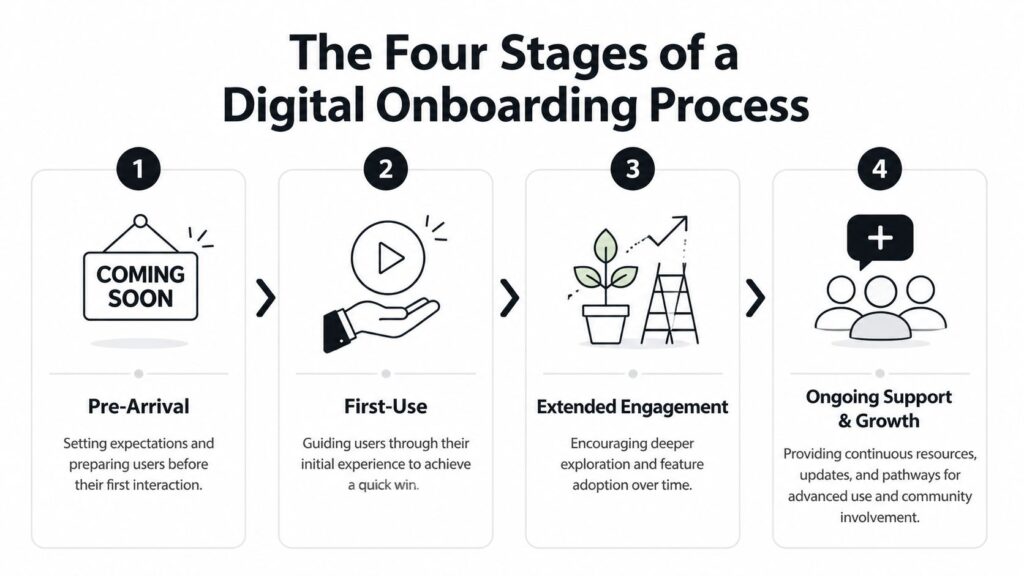
Pre-arrival
This starts right after signup and before the member fully enters the experience.
The purpose here is simple. Reduce uncertainty.
Your new member should know what they bought, what happens next, where to log in, and what to expect in the first few days. If they’re joining a drip course, tell them how content becomes available. If they’re entering a community, explain what to post first. If they’re joining a membership with live sessions, point them to the calendar right away.
Useful pre-arrival actions include:
- A short welcome email: Include login details, one next step, and a realistic expectation of what happens first
- A one-minute orientation video: Show the dashboard and only the most important areas
- A “start here” page: Keep it uncluttered and focused on the first action
- A simple expectation-setting note: Tell members how long the first step takes so they can commit
The emotional outcome you want is calm. Not hype. Calm.
First use
This is the first login, first click, first lesson, first post, or first reply.
People decide very quickly whether a platform feels clear or tiring. Your job here is to create a quick win without asking for too much effort. I usually recommend one action that takes only a few minutes and clearly proves the membership is useful.
That might be a short lesson called “Do this first,” a checklist that enables progress, or a discussion prompt that gets an easy response.
Common mistake: Asking new members to consume too much before they feel any momentum.
If your first-use experience includes a 20-step checklist, five tabs to review, and a giant resource vault, many members will postpone starting. Postponed starts often become abandoned starts.
A short welcome walkthrough can help here:

Early engagement
Once the member has that first win, you want a second and third action that build confidence.
This stage often covers the first week or two of the relationship. In a self-paced product, that may mean finishing the first module and downloading one template. In a community, it may mean posting an intro, replying to one thread, and attending a live call. In a coaching program, it may mean booking the first session and completing a prep form.
I like to design this stage around momentum markers:
- Complete one useful task
- Interact with one human or community space
- See a visible sign of progress
That visible sign matters more than many creators realize. A checked box, a completed lesson badge, a welcome comment from a host, or a saved plan can all reinforce the feeling of “I’m already doing this.”
Habit formation
Onboarding comes of age.
A lot of people think onboarding ends after day one. For digital learning, I don’t think that’s realistic. The deeper purpose is to help members return often enough that your platform becomes part of their routine.
Habit formation can include:
- Weekly reminder emails: Focus on the next best action, not a generic newsletter
- Milestone prompts: Encourage members to finish a module, attend a live event, or share progress
- Community nudges: Tag members into a relevant thread or challenge
- Pathways for different user types: New beginner, returning learner, or advanced member
Here’s a simple way to view the four stages:
| Stage | Main question the member has | What you should provide |
|---|---|---|
| Pre-arrival | “What happens now?” | Clear expectations |
| First use | “Where do I start?” | One quick win |
| Early engagement | “Can I keep going?” | Momentum and support |
| Habit formation | “Should I make this part of my week?” | Routine and relevance |
You don’t need a complex system to start. You need a deliberate one.
Setting Goals and Measuring Onboarding Success
If you can’t tell whether onboarding is working, you’ll end up judging it by vibes. That’s risky. A polished welcome flow can look nice and still fail to help members stick.
I prefer simple measures tied to behavior.
A 2025 SHRM study found that 68% of digital membership sites see a 20-30% revenue lift from extended onboarding up to 90 days, while 45% of creators underinvest due to a lack of benchmarks, leading to 3x higher churn, according to this summary of onboarding process outcomes. That matters because it shifts onboarding from “nice touch” to “business system.”
The metrics that actually help
For online courses and memberships, I’d watch a small set of onboarding indicators first.
- Time to first value: How quickly a new member reaches a moment that feels useful
- Starter lesson completion: Whether they finish the first recommended lesson or module
- Community activation: Whether they post, comment, or reply early
- Return behavior: Whether they come back after the first session
- Support friction: Which questions show up repeatedly in email or chat
These are better than vanity metrics like total page views. A member can click around ten pages and still feel lost.
Keep the scorecard short
If you’re a solo creator or small team, don’t build a giant analytics project before improving your onboarding. Start with a compact review you can maintain.
| Signal | What it tells you |
|---|---|
| Members skip the first lesson | Your starting point may be unclear |
| Members log in once and vanish | Your first-use experience may be too broad |
| Members ask the same setup question | Your instructions likely need simplification |
| Members join the community but stay silent | They may need a lower-pressure first prompt |
Track the first proof of value, not just the first login.
That one rule clears up a lot of confusion.
Review onboarding like a teacher, not just a marketer
I’d also look at onboarding with an educator’s eye. Where do students hesitate? Which instructions do they misread? Which tool setup steps cause drop-off? Those details usually reveal more than a dashboard snapshot.
If you want help choosing practical measurement methods, this guide on how to measure training effectiveness is a useful next read.
A good onboarding process should make progress easier to spot for both you and your members.
Sample Onboarding Flows for Different Platforms
The same core idea shows up differently depending on what you sell. A drip course needs a different opening than a community membership. A coaching program needs more human touch than a self-serve library.
Here’s how I’d shape a few common flows.
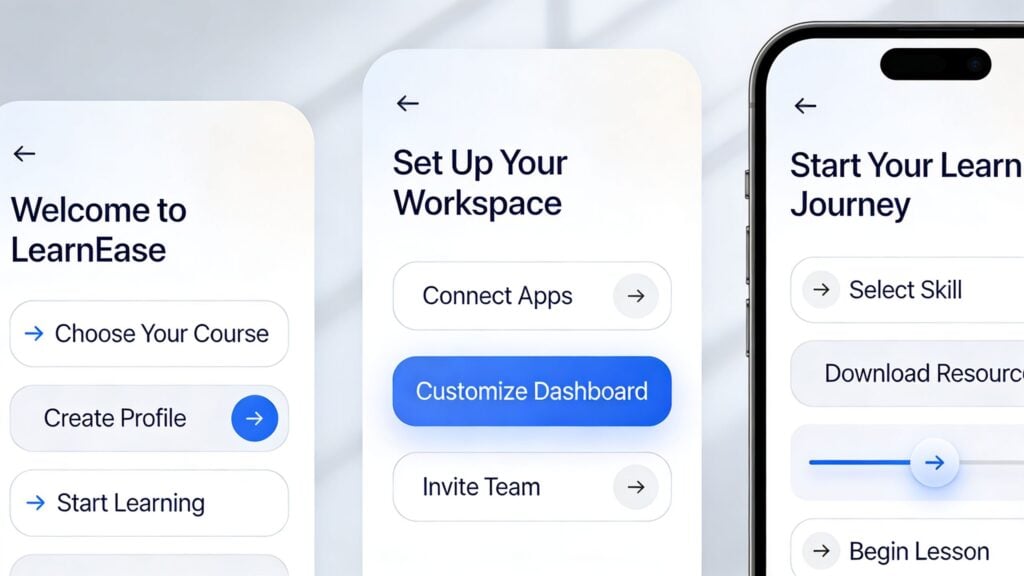
Self-paced drip course
A drip course works best when anticipation and clarity work together.
Right after signup, the student gets a welcome email with one login link and a note explaining when new lessons become available. On the start page, they see a short orientation video, a lesson called “Begin here,” and one downloadable worksheet.
During the first week, I’d avoid pushing the full curriculum. I’d focus on one small transformation they can feel early. If the course is about email marketing, maybe the first win is drafting a welcome email. If it’s a design course, maybe it’s publishing one polished mini-project.
A good drip flow often looks like this:
- Day one: Welcome, orientation, first lesson
- Early follow-up: Prompt to complete the first action
- Next step: Short reminder tied to the next lesson
- Progress nudge: Encourage them to keep their streak alive
Community membership on Circle.so or Heartbeat
Community onboarding is less about content order and more about social confidence.
When someone joins a Circle.so space or a Heartbeat group, the first screen shouldn’t feel like walking into a crowded room with no introduction. I like a pinned “start here” post, a clear community guide, and a simple intro prompt with low pressure.
Instead of asking “Tell us your whole story,” ask something easy. Something like, “What are you hoping to learn first?” gets better responses.
Here’s the flow I’d use:
| Stage | Example community action |
|---|---|
| Pre-arrival | Email with login link and what to post first |
| First use | Intro thread with one easy prompt |
| Early engagement | Tag the member into one relevant discussion |
| Habit formation | Weekly roundup and invitation to a live event |
The key is making the room feel navigable.
High-ticket group coaching program
Coaching clients usually expect stronger guidance. They paid for closeness, so a passive setup can feel disappointing fast.
I’d start with a personal welcome message, a scheduling link, and a short prep form. Then I’d point them to one place where all essentials live. Session calendar, recordings, worksheets, group norms, and contact instructions.
If your premium client has to hunt for links, your onboarding is quietly lowering trust.
For group coaching, I also like assigning a first milestone before the first call. That could be completing a reflection form, sharing a priority goal, or watching a brief orientation video. It gives the client a role in the process instead of making them wait for you to lead everything live.
Different platform, same principle. The onboarding process should remove hesitation and create motion.
Essential Onboarding Tools and Best Practices
Tools can support onboarding, but they don’t fix a weak journey. I’ve seen creators buy better software when what they really needed was a clearer first step.
Still, the right stack helps a lot when it matches the experience you want to create.
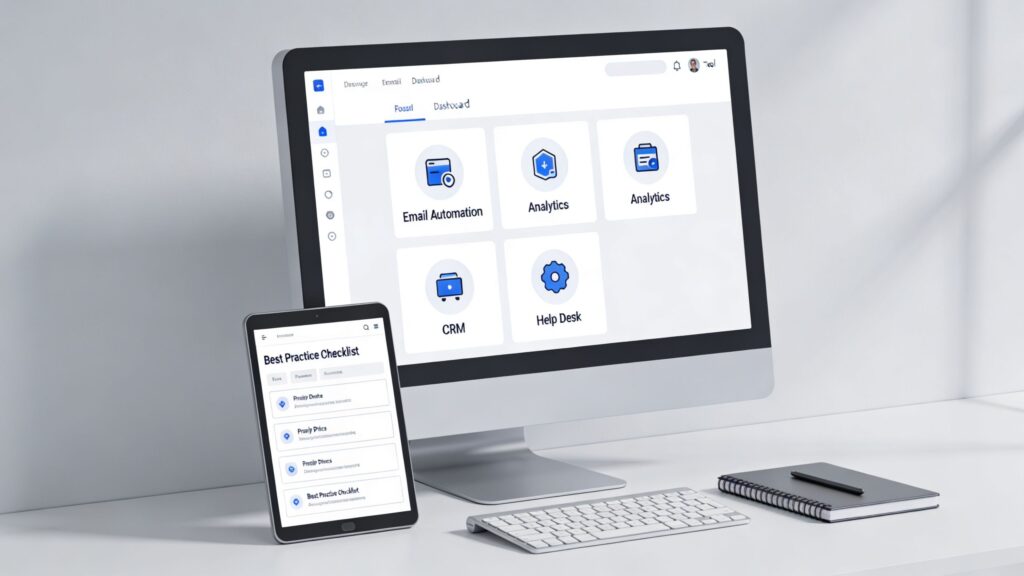
The tool categories that matter most
You don’t need dozens of apps. You need coverage in a few key areas.
- Email automation: ConvertKit or similar tools can send timed welcome sequences, reminders, and progress nudges
- Course delivery: Your LMS should make the first lesson obvious and reduce navigation clutter
- Community platform: Circle.so or Heartbeat can give members a social place to ask, post, and return
- Video messaging: Loom works well for short personal welcomes or quick setup walkthroughs
- Forms and intake: Tally or Typeform can collect goals, preferences, or onboarding responses
- Documentation hub: Notion can hold your start page, FAQ, and quick links
If you’re still comparing platform options, this guide to choosing the best employee onboarding LMS solutions for 2026 can help you think through the software side more clearly.
Best practices I keep coming back to
The strongest onboarding systems I’ve built usually follow a few repeatable rules.
- Create one clear starting line: Use “Start here” language and make it impossible to miss
- Design a fast win: Give the member something useful they can finish quickly
- Write short instructions: Replace long paragraphs with direct steps and screenshots where needed
- Use personality sparingly: Warmth helps, but clarity should still lead
- Prompt action, not browsing: Ask members to do one thing, not explore everything
- Follow up based on behavior: If someone hasn’t started, send a different message than you’d send to someone who already finished lesson one
If you’re revising your welcome sequence, browsing a few examples of email templates for growth can help you tighten subject lines, structure, and calls to action without sounding stiff.
A simple tool-to-task view
| Need | Helpful tool type |
|---|---|
| Welcome sequence | Email automation |
| Guided start page | LMS or Notion |
| Personal intro | Loom |
| Group connection | Circle.so or Heartbeat |
| Goal collection | Tally or Typeform |
Software should support the onboarding process you defined. It shouldn’t define it for you.
Key Onboarding Questions Answered
A few questions come up every time I talk with creators about onboarding. They’re good questions, because they usually show where people get stuck.
How long should an onboarding process last
Longer than a welcome email, shorter than an endless orientation.
For digital learning, I think onboarding lasts until the member can use your product with confidence and has a repeatable next step. For some offers, that’s a few days. For others, especially memberships and coaching programs, it can stretch across the first several weeks or even the first few months.
The mistake is treating onboarding like a single login event. If habit-building is part of success, onboarding should continue until that habit has real support.
What’s the biggest mistake to avoid
Giving too many options too early.
Creators love their content, so they often present the whole library at once. New members then feel pressure instead of progress. A better approach is to narrow the path at the start, then widen it after the member gets their first result.
New members rarely need more choices. They need better sequencing.
This is also why app-style walkthroughs can be useful outside mobile products. If you want inspiration from product teams that think carefully about first-use friction, these mobile app onboarding best practices offer a few transferable ideas.
Should free trial users and paid members get the same onboarding
Usually, no.
They may enter the same platform, but they don’t enter with the same mindset. Trial users often need quicker proof, fewer steps, and a more obvious reason to continue. Paid members may be ready for a deeper setup and more detailed guidance.
I’d keep the early experience aligned, but not identical. Both groups need clarity. Trial users need faster conviction. Paid members need stronger integration into the full experience.
A good rule is to ask what each group must believe by the end of week one. Build the onboarding around that belief.
Your First Step to Better Member Retention
If you want to define onboarding process in a useful way, think beyond access and orientation. Think about guided momentum. Your onboarding process should help a new member feel capable, welcomed, and ready to return.
Start small. Review your current welcome email and ask one question. Does it clearly lead to a first win?
If the answer is no, that’s your first fix. And if you want more practical ways to keep people engaged after signup, LearnStream’s guide to membership retention strategies is a solid next step.