How to Create a Learning Record Store for xAPI

You’re probably here because your LMS reports feel neat, tidy, and a little useless.
You can see completions. You can see quiz scores. You might even see time in course. But when a learner rewatches a lesson, drops off during a simulation, returns from their phone later, or reads a help doc before retrying an assessment, that story usually disappears.
That gap is why people start looking at xAPI and eventually ask the practical question nobody answers clearly: how to create a learning record store for xAPI without turning it into a giant engineering project.
A lot of guides jump straight into spec language. Others stay so high level that you still don’t know what to buy, what to configure, or what “good enough” looks like for a first deployment.
This guide takes the middle path. It’s written from the practitioner side. Less theory, more decisions. Less architecture for architecture’s sake, more “what should I do if I’m running courses, memberships, training programs, or a small learning team?”
Why Your LMS Is Only Telling You Half the Story
A common pattern goes like this.
A course creator launches a program in an LMS. The first dashboard looks fine. Completion rates are there. Final quiz scores are there. Maybe a few progress bars too. Then the deeper questions start.
Which lesson did people replay?
Where did they get stuck?
Did they use the job aid before passing?
Did they continue on mobile after leaving the desktop course?
Most LMS reporting can’t answer that cleanly because it was built around course packages and completion events. That’s useful, but narrow.

The technical reason is historical. xAPI was first released by ADL in April 2013, and it opened the door to tracking learning beyond the LMS. Before that, SCORM had been the dominant standard since 2000, but it was limited in informal learning scenarios to 10 to 20% effectiveness according to the ADL material summarized in this xAPI history overview.
That shift matters because modern learning rarely happens in one place.
A learner might start in Storyline, continue in a web app, join a webinar, read a knowledge base article, then return to the course. If all you capture is “completed course,” you miss the behavior that explains success or failure.
What an LRS changes
A Learning Record Store, or LRS, gives you a place to collect those learning events in xAPI format across tools and touchpoints.
Instead of one platform owning the record, the LRS becomes the central store for statements like:
- Learner completed module
- Learner watched video
- Learner answered question
- Learner launched simulation
- Learner resumed lesson
That’s a much richer picture than a pass or fail field.
Most teams don’t need more dashboards first. They need better raw learning data.
If you’ve ever tried to make sense of weak LMS reporting, it helps to first look at what your current platform is and isn’t capturing. This guide to auditing LMS user activity is a good companion step before you start wiring in xAPI.
The practical takeaway
If your learning experience happens in more than one tool, an LMS alone usually won’t be enough.
An LRS becomes worth the effort when you need to answer behavior questions, not just administrative ones. That’s the point where xAPI stops sounding like a standards discussion and starts feeling like a reporting fix.
The Blueprint for Your LRS Architecture
Before you deploy anything, get the mental model right.
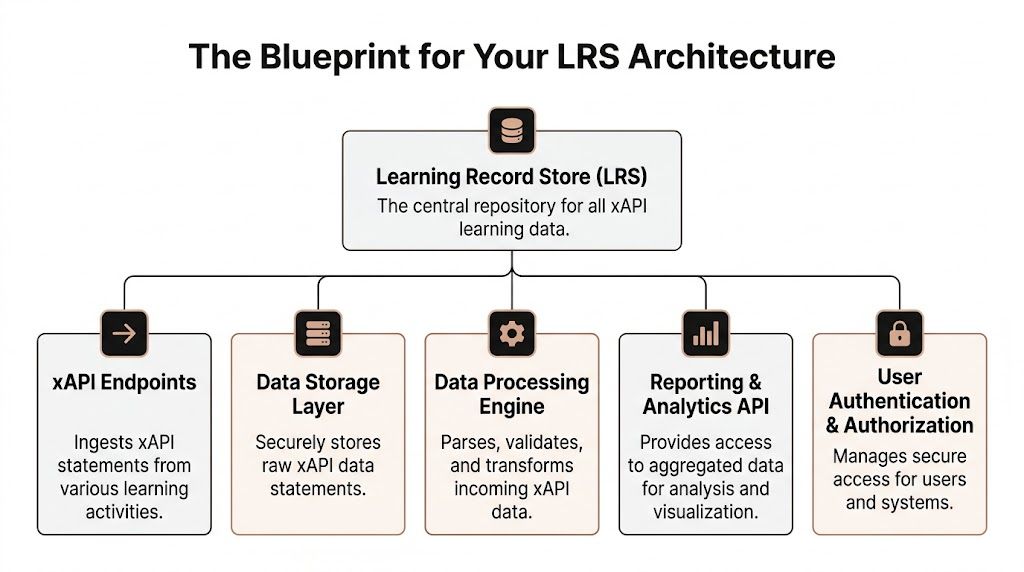
An LRS is basically a database with strict rules about how it receives, stores, and returns learning data. The easiest way to think about it is as a digital filing cabinet built for xAPI records.
Each record follows a familiar pattern: actor, verb, object.
For example:
- A learner completed onboarding
- A manager reviewed a checklist
- A member watched a lesson
That simple pattern is why xAPI data is flexible. It can describe a lot of learning behavior without locking you into one platform.
The four APIs you actually need
If you build or evaluate an LRS, there’s one essential requirement. A conformant LRS needs all four RESTful xAPI APIs: Statements, State, Activity, and Agent, as explained in this guide to building a learning record store.
Here’s what those mean in plain English.
| API | What it does | Why you care |
|---|---|---|
| Statements API | Receives and returns xAPI statements | This is the main pipe for learning events |
| State API | Stores progress or temporary learning state | Useful for resume behavior and in-progress tracking |
| Activity API | Stores or resolves activity details | Helps describe what the learner interacted with |
| Agent API | Stores person-related documents | Useful when systems need learner-specific records |
A lot of first-time buyers only ask whether a tool “supports xAPI.” That’s too vague.
Ask whether it supports all four APIs properly. Partial support creates hidden pain later, especially when you start integrating more than one source.
Where custom builds usually go wrong
The least glamorous part of an LRS architecture is often the one that breaks reporting.
The Activity API needs careful handling because the LRS has to resolve and store full activity descriptions without slowing request handling. According to the xAPI.com resource above, a common pitfall affects 70% of custom LRS builds when teams mishandle dynamic activity metadata fetching.
That sounds technical, but the result is very human. Reports become messy. Activities don’t line up. Dashboards show duplicates or vague labels. Your analytics end up looking untrustworthy even when statements are technically arriving.
Practical rule: If the activity IDs and metadata aren’t clean, your reporting won’t be clean either.
The architecture decisions that matter early
For a first deployment, these are the pieces worth deciding up front:
Storage model
You need a database that can comfortably handle JSON-based xAPI statements and querying patterns you’ll use.Authentication approach
Basic Auth can be enough for simple internal setups. OAuth 2.0 is usually the better long-term choice when multiple systems are involved.Tenant model
If you serve different clients, business units, or brands, plan for separation early. Retrofitting this later gets painful fast.Taxonomy
Decide how you’ll name courses, modules, lessons, and interactions before content goes live.
That last point gets skipped all the time. It shouldn’t.
If your Storyline package reports one lesson as “Intro,” another tool reports the same thing as “module-1,” and your webinar platform sends a different naming scheme, the LRS won’t magically fix that. It will faithfully store the inconsistency.
For teams planning storage carefully, general database design best practices are worth reviewing because xAPI statements still live inside a database system that needs sane structure, indexing, and naming discipline.
What non-developers should ask vendors or developers
You don’t need to write the backend yourself to ask good questions.
Use a short checklist:
- Do we support all four xAPI APIs?
- How are activity IDs and metadata handled?
- What authentication methods are available?
- How do we query data back out for reporting?
- What happens when multiple systems send statements for the same learner?
If you’re still deciding whether xAPI is worth the extra complexity compared with older package tracking, this breakdown of SCORM vs xAPI for course creators is helpful before you commit to the architecture.
Choosing Your Build Path Hosted vs Open Source
At this stage, most projects either stay sensible or become expensive hobbies.
You have three realistic ways to get an LRS in place:
- Use a hosted LRS
- Deploy an open-source LRS
- Build your own from scratch
All three can work. They just solve different problems.
The short version
If you’re a course creator, membership owner, or small L&D team, hosted or open source is usually the right starting point.
If you’re imagining a scratch build because it sounds cleaner, pause for a second. A custom LRS is not a light project. It means implementing the spec, handling auth, ingestion, querying, storage, debugging, and ongoing maintenance without dropping data or producing weird reports.
That’s not impossible. It’s just bigger than most first-time teams expect.
What the market looks like now
The good news is you’re not choosing from one or two niche tools anymore.
Since 2013, over 50 commercial and open-source LRS solutions have emerged. Hosted platforms like Watershed process billions of statements, while open-source options like Learning Locker, with over 20,000 downloads, can offer up to 80% cost savings versus proprietary builds, according to this Watershed overview of learning record stores.
That variety is helpful, but it also makes people overthink the decision.
You do not need the perfect LRS. You need the one that matches your current complexity.
Option one: hosted LRS
Hosted LRS platforms are the fastest route.
You get a working environment, admin controls, ingestion endpoints, and usually some reporting tools without touching infrastructure. For a team that wants to start collecting xAPI statements next week, this path is hard to beat.
Hosted works well when:
- You need speed and don’t want to manage servers
- Your team is small and doesn’t have backend engineering capacity
- You care more about using data than about designing infrastructure
- You need vendor support when integrations fail
The downside is control.
You’re working within someone else’s product model. If you need unusual workflows, custom query behavior, or deep data pipeline ownership, hosted platforms can start to feel restrictive.
You also need to watch pricing and volume limits carefully, especially if you’re sending lots of fine-grained interaction data.
Option two: open-source LRS
Open-source is the middle path, and for many budget-conscious teams it’s the best one.
Tools like Learning Locker give you a real LRS foundation without the cost of a proprietary license. You still have to host it, secure it, monitor it, and update it, but you’re not starting from a blank editor.
This path fits when:
- You want lower software cost
- You can handle deployment work
- You want more control over data and integrations
- You’re comfortable troubleshooting with documentation and community help
Open-source is often where “good enough” lives for a first serious xAPI deployment.
You can get a standards-based system online, connect Storyline or web-based learning, inspect statements, and prove value before committing to something bigger.
For first deployments, boring is good. Pick the path your team can maintain six months from now, not the one that sounds impressive in a kickoff meeting.
The trade-off is operational ownership. Someone still has to look after uptime, backups, access control, and upgrades.
Option three: full custom build
A scratch-built LRS makes sense when your requirements are unusual, your volume is substantial, or your organization already has engineering capacity and strict integration rules.
It can be the right move. It’s just rarely the right first move.
Custom builds usually appeal for reasons like:
- “We want complete control”
- “We already have a platform team”
- “We need to embed this in an existing product”
- “We have reporting requirements no vendor fits”
Those can all be valid.
What trips teams up is that they underestimate the boring parts. Not statement ingestion. Everything around it.
You need to support all required APIs. You need to validate statements. You need to store them efficiently. You need to expose them for reporting. You need to secure learner data properly. And when the authoring tool sends malformed activity metadata on a Friday afternoon, your team owns that too.
A practical comparison
| Path | Best for | Main advantage | Main downside |
|---|---|---|---|
| Hosted | Small teams, fast launch | Quick setup and support | Less control, ongoing vendor dependency |
| Open source | Budget-conscious teams with technical help | Lower software cost and more control | You manage hosting, security, and maintenance |
| Custom | Mature teams with specific requirements | Full flexibility | Heavy engineering and long-term ownership |
What I’d recommend for most first-time teams
If you’re new to xAPI and want usable data fast, choose one of these:
- Hosted LRS if your team has more urgency than technical capacity
- Open-source LRS if you have technical help and want budget control
I would only greenlight a full custom build early if the team already understands the xAPI spec, owns backend operations, and has a real need that existing products can’t meet.
A lot of teams think custom equals future-proof. In practice, maintainable usually beats custom.
The LRS that keeps receiving clean statements and lets you answer real questions is better than the one with the prettiest architecture diagram.
Deploying Your First LRS with Practical Code Examples
Let’s make this concrete.
A first deployment does not need to be fancy. It needs to do four things well:
- accept xAPI statements
- store them correctly
- let you inspect them
- stay manageable
That’s enough to prove value.
For a budget-conscious team, an open-source route is often the easiest place to learn. Learning Locker is a common starting point because it gives you a real xAPI-capable environment without forcing a custom build from day one.

Start with a minimum viable setup
Before you send anything, define a narrow first use case.
Good first use cases include:
- A single Storyline course reporting completions and quiz interactions
- A web lesson reporting page views and completion
- A membership onboarding flow with a few tracked milestones
Bad first use cases include “track everything across every platform” or “build a full analytics warehouse from day one.”
That’s where teams drown.
Your first deployment should give you one clean reporting loop. Something goes in, something useful comes out.
What you need configured first
At the tool level, the basics are straightforward. To send xAPI data, you define the LRS endpoint, add credentials, construct the JSON statement, and POST it to the Statements API, as outlined in this Valamis overview of learning record stores.
So before touching code, make sure you have:
- An endpoint URL for your LRS
- A key and secret or the auth method your LRS expects
- A test learner identity such as an email-based actor
- A statement viewer or admin screen where you can confirm receipt
Don’t skip that last one. If you can’t inspect incoming statements easily, debugging gets annoying fast.
Your first xAPI statement
At its simplest, an xAPI statement is just JSON.
Here’s a basic example:
const endpoint = "https://your-lrs.example.com/xAPI/statements";
const username = "YOUR_KEY";
const password = "YOUR_SECRET";

const statement = {
  actor: {
    objectType: "Agent",
    mbox: "mailto:learner@example.com",
    name: "Test Learner"
  },
  verb: {
    id: "http://adlnet.gov/expapi/verbs/completed",
    display: { "en-US": "completed" }
  },
  object: {
    id: "https://example.com/courses/onboarding/module-1",
    definition: {
      name: { "en-US": "Onboarding Module 1" },
      description: { "en-US": "First onboarding module" }
    },
    objectType: "Activity"
  }
};

fetch(endpoint, {
  method: "POST",
  headers: {
    "Content-Type": "application/json",
    "Authorization": "Basic " + btoa(username + ":" + password),
    "X-Experience-API-Version": "1.0.3"
  },
  body: JSON.stringify(statement)
})
  .then(res => res.text())
  .then(data => console.log(data))
  .catch(err => console.error(err));
This is enough to prove your LRS is reachable and accepting statements.
If it fails, the usual causes are simple:
- wrong endpoint
- bad credentials
- missing xAPI version header
- malformed JSON
- CORS restrictions if you’re testing from a browser context
Add a little more useful data
A statement gets more useful when you include result details and context.
const statementWithResult = {
  actor: {
    objectType: "Agent",
    mbox: "mailto:learner@example.com",
    name: "Test Learner"
  },
  verb: {
    id: "http://adlnet.gov/expapi/verbs/answered",
    display: { "en-US": "answered" }
  },
  object: {
    id: "https://example.com/courses/onboarding/question-1",
    definition: {
      name: { "en-US": "Question 1" },
      description: { "en-US": "A sample assessment interaction" }
    },
    objectType: "Activity"
  },
  result: {
    success: true,
    response: "B"
  },
  context: {
    contextActivities: {
      parent: [
        {
          id: "https://example.com/courses/onboarding/module-1"
        }
      ]
    }
  }
};
Taxonomy starts to matter. If your object IDs and parent relationships are sloppy, reports become hard to trust.
Storyline 360 setup
If you’re using Articulate Storyline 360, you don’t need to hand-code every statement.
Storyline can report to an external LRS using its built-in trigger. In practice, that means you configure the project to send xAPI data to your endpoint and supply the credentials from your LRS.
Keep the first Storyline test simple:
- publish one course
- turn on reporting to the external LRS
- launch the content
- complete one obvious action
- check the statement viewer
If nothing arrives, check the basics before assuming the LRS is broken.
The Valamis resource above also notes an easy-to-miss issue with free LRS plans. Data limits in free tiers can cause 25% data loss if they aren’t managed. That’s a painful problem because it looks like random analytics inconsistency when it’s really just a capacity limit.
Use a repeatable test workflow
A practical test cycle looks like this:
- Send one manual statement from code
- Confirm receipt in the LRS viewer
- Send one authoring-tool statement from Storyline or similar
- Compare the payloads
- Check labels and IDs for readability
- Run the same test twice to catch duplicate or overwrite behavior
That sounds basic because it is. Basic wins here.
If you can’t explain what a statement should look like before you send it, you’re not ready to scale the implementation.
A useful demo to watch while testing
If you want a visual walk-through while you’re wiring this up, this demo is helpful for seeing xAPI flow in a more concrete way.

What good enough looks like for a first launch
For a first-time deployment, I’d call it successful if you can do these things consistently:
- Receive statements from at least one source
- Inspect them clearly in an admin or viewer screen
- Identify one learner, one activity, and one verb without confusion
- Query or export the data for a simple report
- Avoid silent data loss from limits or auth issues
You do not need a giant dashboard yet.
You need confidence that when a learner does something important, your LRS records it properly.
That’s a key milestone. Once that’s stable, adding more verbs, more content sources, and richer reporting becomes much easier.
Essential Security and Testing for Your LRS
A working LRS that isn’t secured properly is a liability.
This part gets treated like cleanup work, but it’s not optional. An LRS stores learner activity records, and those records can become sensitive quickly once they’re tied to names, emails, progress, and behavior patterns.
Authentication is not a small detail
At minimum, your LRS needs controlled access for systems writing statements and people reading data back out.
Common setups use Basic Auth or OAuth 2.0. Basic Auth is easier to get running. OAuth 2.0 is usually the better fit once multiple tools and teams are involved.
What matters in practice is consistency.
If one authoring tool uses old credentials, another is pointed at the wrong endpoint, and a dashboard tool has broad read access for convenience, you’ve created the kind of setup that leaks data and breaks trust.
What to lock down early
Don’t overcomplicate your first security pass. Just be disciplined.
Use a short checklist:
- Separate write access from read access so content tools can send statements without gaining broad reporting permissions
- Create environment-specific credentials for testing and production
- Limit admin accounts to the smallest possible group
- Review logs regularly so failed auth attempts and ingestion errors don’t sit unnoticed
- Back up the data store on a schedule you can maintain
For teams that need a practical foundation beyond the xAPI-specific side, these database security best practices are worth reading because the LRS is still a database system first, even if the payloads are learning records.
Bad security doesn’t just expose learner data. It also poisons your analytics because unauthorized changes and broken integrations create records you can’t trust.
Testing for conformance and sanity
A secure LRS still isn’t enough. It also needs to behave correctly.
Two kinds of testing matter here.
The first is spec conformance. If your LRS claims xAPI support, it needs to handle the required APIs and response behavior properly.
The second is real-world sanity testing. That means confirming your actual tools send the statements you think they send.
Those are different problems.
A system can be conformant and still be useless in your environment because your content taxonomy is inconsistent or your endpoint settings are wrong.
What to test before launch
Use a practical checklist, not a vague “we tested it.”
Statement ingestion
Send known-good statements and confirm they’re stored.Authentication failure handling
Intentionally try bad credentials and make sure requests are rejected.Query behavior
Retrieve statements by learner or activity and confirm the results make sense.Activity metadata
Check whether activity names and descriptions resolve correctly.Cross-tool consistency
Compare statements from Storyline, web apps, and any other source you plan to use.Privacy controls
Confirm only the right people can access learner data.
Don’t trust the dashboard first
This is the mistake I see constantly.
Teams launch, open the dashboard, and assume the dashboard is the truth. It isn’t. The raw statements are the truth. The dashboard is an interpretation layer.
When testing, inspect the statements directly before you start celebrating charts.
If the actor identity is inconsistent, the object IDs are messy, or parent relationships are missing, the dashboard can still look polished while the data underneath is a headache.
What “done” means here
Security and testing are done enough when:
- writing systems authenticate reliably
- unauthorized requests fail cleanly
- learner records are only visible to the right people
- your content sends readable, consistent statements
- your query results match known user actions
That standard is higher than “it works on my machine,” and it should be.
An LRS becomes useful when people trust the data. Without that trust, it’s just another box collecting records nobody wants to defend.
Integrating and Scaling for Real-World Analytics
An LRS on its own is interesting. An LRS connected to the rest of your stack is useful.
The project starts paying off. Once statements are flowing, the next job is making the data available where decisions happen.
That usually means integrating with your LMS, membership platform, internal reporting, or CRM workflows.

Connect the LRS to the tools you already use
A practical LRS setup often sits in the middle of a small ecosystem.
For example:
- Authoring tools send xAPI statements into the LRS
- Your LMS launches content and may provide learner identity context
- A membership or community platform contributes participation events
- A reporting layer queries the LRS for dashboards or exports
That’s where the value shows up. You can start connecting learning behavior with platform behavior instead of leaving each tool in its own reporting silo.
If your environment also involves academic or enterprise system syncing, this guide to LMS integration with SIS systems is useful background because identity alignment becomes critical once records move across systems.
Keep your integration model boring
The best integrations are usually the least dramatic.
Don’t start by piping every event from every app into the LRS. Start with a few event types that answer useful questions.
Good examples:
- Course started
- Course completed
- Assessment answered
- Video watched
- Resource viewed
Once those are stable and named consistently, add more.
The LRS gets powerful when event naming stays disciplined. Most reporting pain starts with messy verbs and inconsistent activity IDs, not lack of data.
Scaling without turning it into an infrastructure hobby
A lot of tutorials stop after “the API works.” That’s the easy part.
The harder question is what happens when the course library grows, usage expands, and your statement volume stops being tiny.
One useful perspective is that many tutorials overlook cost-effective scaling, and a more contrarian view suggests custom builds can suit 75% of startups if they use serverless stacks like AWS Lambda, reducing costs by 60 to 80% versus hosted platforms. The same source also notes that recent xAPI 2.0 specs can cut storage costs by 30% via compressed statements, according to this discussion on LRS scaling and build choices.
I wouldn’t treat that as a reason for every small team to jump into custom infrastructure immediately.
I would treat it as a reminder that scaling choices should come later, once you know your traffic patterns, statement mix, and reporting needs.
What to watch as volume grows
Even without hard metrics, the warning signs are easy to spot:
- ingestion starts slowing down
- reports feel delayed
- admins avoid querying because it’s sluggish
- exports become annoying
- statement cleanup becomes manual work
When those show up, look at the whole path:
- How statements arrive
- How they’re validated
- How they’re stored
- How reporting tools query them
- How often you move or archive older data
Scaling is rarely solved by one clever tweak. It usually comes from making each stage simpler and more predictable.
Turning records into analytics people will use
Raw statement volume doesn’t matter if nobody can answer business questions with it.
The strongest first dashboards usually stay narrow. They answer things like:
- where learners stop
- which resources they revisit
- which modules take multiple attempts
- which interactions happen before completion
- which content gets ignored
Those are useful because they lead to action. Rewrite a lesson. Add support content. Fix a confusing assessment. Change sequence. Improve onboarding.
That’s the point of the LRS.
Not bigger piles of data. Better decisions based on behavior you couldn’t see before.
A sensible long-term view
Typically, the winning sequence looks like this:
- start with a small deployment
- send clean statements from a few sources
- validate the taxonomy early
- connect reporting to real operational questions
- scale only after the data proves useful
That path isn’t flashy, but it works.
If you’ve been trying to understand how to create a learning record store for xAPI in a way that’s realistic for a budget, that’s the version I’d recommend. Start narrow. Make the records trustworthy. Expand once the answers are worth the extra plumbing.
If you want more practical guidance on learning platforms, analytics, course operations, and the software choices behind scalable training businesses, explore more articles on LearnStream.