Riverside.fm vs Zoom for Recording Course Interviews
You’ve probably lived some version of this already.
You line up a strong guest for your course. The conversation is excellent. They explain the hard part of your framework better than you do. You finish the call thinking, great, that’s a full lesson and three promo clips done.
Then you open the recording.
Their face freezes in key moments. Your audio sounds fine, theirs sounds thin. A couple of answers have that mushy, internet-scraped quality that makes a smart person sound less credible than they are. Now you’re deciding whether to re-record, edit around it, or just accept that this module won’t feel as polished as the rest of the course.
That’s where the Riverside.fm vs Zoom for recording course interviews question stops being a feature debate and starts becoming a business decision.
For course creators, an interview isn’t just a meeting recording. It’s course content, sales content, clips for social, bonus content for members, and sometimes the thing that lifts the perceived value of the whole product. If the recording falls apart, the damage isn’t just technical. It affects trust, retention, and how premium your course feels.
I’ve used enough recording tools to know this part matters more than people think. A lower monthly price can turn expensive fast if it creates cleanup work, weak footage, or content you can’t confidently reuse.
So let’s get practical. I’ll break down where Riverside beats Zoom, where Zoom still makes sense, and how to think about total cost if you’re building courses on a real budget.
The Agony of a Bad Recording
You can survive a mediocre live call.
You usually can’t hide a mediocre course interview.

I’ve seen creators put real effort into curriculum design, scripting, slides, and launch emails, then treat the interview recording tool like an afterthought. That’s usually fine until the guest says something brilliant right as their connection dips.
Once that happens, you learn the hard lesson fast. The best content in the room only helps if the recording holds up.
When the interview is good but the asset is bad
This is the painful part. The conversation can be excellent and still produce a weak final lesson.
That usually shows up in a few ways:
- Distracting audio shifts: one speaker sounds close and warm, the other sounds far away or metallic
- Visible internet artifacts: pixelation, stutter, and motion blur on useful teaching moments
- Messy editing options: one combined file gives you less control when you need to clean up mistakes
- Limited reuse: a recording that’s passable for a replay often isn’t strong enough for course clips or paid content
If you’ve ever gone hunting for software to remove noise from audio after a rough interview, you already know the pattern. Cleanup tools can help, but they can’t fully rescue a recording that started compromised.
A bad interview recording creates extra work twice. First in editing, then again when you hesitate to reuse it.
Why this choice matters more for course creators
A consultant recording a client call has one standard. A course creator has another.
Your recording may end up in a paid module, a private member library, a lead magnet, and a social teaser. That means quality has to survive more than one use case.
Zoom can absolutely record a conversation. That’s not the issue. The issue is whether the recording feels strong enough to become productized content.
If your interviews are central to the course experience, the tool choice affects your bottom line more than it first appears.
The One Big Difference Local vs Cloud Recording
Here’s the decision that affects your editing time, usable footage, and budget.
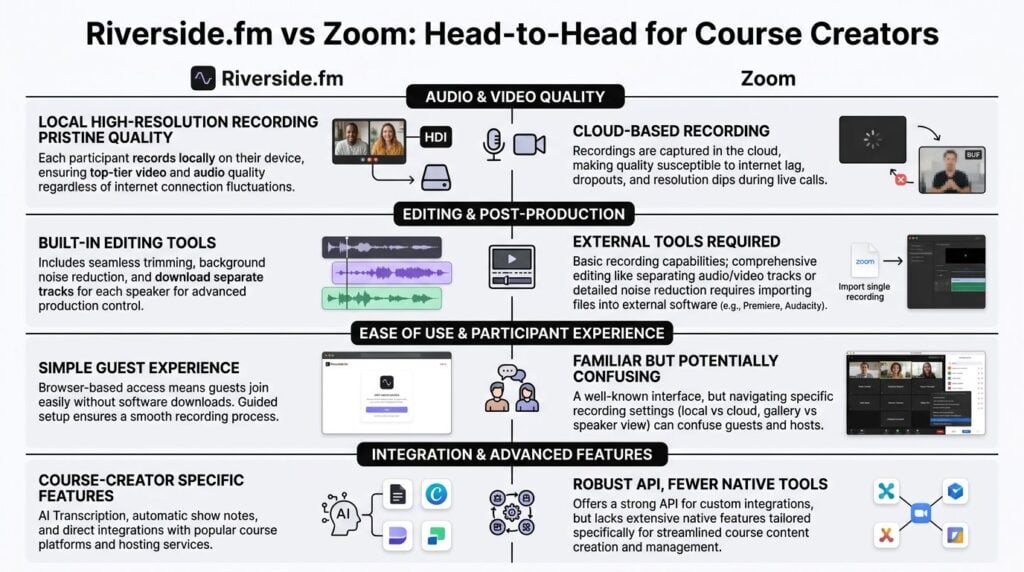
Riverside records each participant locally on their own device. Zoom records the meeting as it happens over the internet.
That sounds technical, but the business impact is pretty simple. One approach gives you a stronger source file for repurposing. The other gives you a cheaper, familiar way to capture a conversation.
| Area | Riverside.fm | Zoom |
|---|---|---|
| Recording method | Local recording on each participant’s device | Cloud-style meeting recording workflow |
| Best fit | Course interviews, podcast-style content, reusable lessons | Meetings, quick calls, live sessions |
| Editing flexibility | Separate tracks for each speaker | More limited if you need deep cleanup |
| Internet impact on final file | Less exposed to internet-dependent compression artifacts | More exposed to connection issues in the final recording |
| Budget implication | Higher value if you reuse and edit content heavily | Lower starting cost if you just need simple recordings |
Why local recording changes the economics
For a course creator, the file you get after the interview matters more than the call itself.
Riverside saves a higher-quality recording from each person’s computer, which usually gives you cleaner audio, better-looking video, and separate files you can work with in post. Zoom is optimized for the live meeting experience first. That is a real advantage when guests need something familiar and easy to join.
The trade-off shows up later.
If a guest has a weak connection, Zoom can bake those internet problems into the final recording. That often means more cleanup, more retakes, or a lesson you decide not to use in your paid course. Riverside can still have a rough live call, but the recorded file is often much better than what you saw during the session because each side was captured locally.
That difference affects ROI fast for a solo creator. A lower monthly price looks good until one shaky interview costs you an extra hour in editing, or forces you to scrap clips you planned to reuse in your sales funnel, member library, and course modules.
For a larger course business, the math gets even clearer. If your team edits every interview, separate local tracks reduce avoidable post-production work. Better source files also stretch further across promos, bonus lessons, and social cutdowns. That lowers your cost per usable asset.
What this means in practice
I use a simple rule.
- Choose Zoom when convenience for the guest matters most
- Choose Riverside when the recording is part of the product
- Judge the tool by the value of the final asset, not just by the monthly subscription price
That last point gets missed in a lot of comparisons. Solopreneurs often focus on sticker price because cash flow is tight. Fair enough. But total cost of ownership includes editing time, failed takes, content reuse, and whether one interview can earn its keep across multiple formats.
If you also teach live and need more control over overlays, scenes, and production quality, this guide on how to effectively host webinars using OBS Studio helps draw the line between recording tools and full live production setups.
Practical rule: if the interview needs to hold up as paid course content six months from now, start with the tool that gives you the better source file.
Round-by-Round Breakdown Riverside vs Zoom
A lot of course creators get stuck here because both tools can seem “good enough” on paper. In practice, the better choice usually comes down to one question. Which platform gives you the best finished asset for the least total effort and cost?
Audio and video quality
Riverside wins this round for paid course interviews.
If an interview will live inside a flagship program, certification, or paid member library, weak source quality creates costs later. You spend longer cleaning up audio, you cut around visual glitches, and sometimes you decide a strong conversation is not polished enough to publish. That is expensive for a solo creator and even more expensive for a team with editors on payroll.
Zoom is often perfectly serviceable for internal calls, coaching check-ins, and low-stakes recordings. Riverside is the better fit when the interview itself is part of what the customer paid for.
Better source files usually lower your editing bill, even if the monthly subscription is higher.
Reliability and stability
This round depends on what kind of failure worries you most.
Zoom is dependable for getting people into the room. Guests know it. Corporate experts are used to it. If you book busy professionals who join between meetings, that familiarity reduces friction and lowers the odds of a delayed start.
Riverside is more reassuring if your concern is protecting the final asset. A guest can have a shaky connection and still give you a recording worth publishing. For course production, that difference matters because rescheduling a subject-matter expert is rarely free. It costs calendar time, admin time, and momentum.
Ease of use for you and your guests
Zoom still has the easiest guest story. Send link. Join call. Start talking.
That convenience has real value, especially for solopreneurs who do not have an assistant sending prep notes or troubleshooting mic settings. If your interview process depends on guest compliance, the simplest workflow often wins.
Riverside asks for a bit more setup discipline, but it pays you back if you record regularly. For recurring interviews, guest lectures, or testimonial-style modules, a recording-first workflow gives you more consistency across sessions. That consistency shows up later in editing time.
A few patterns I see often:
- Zoom works well for one-off guest conversations
- Riverside works better for repeatable production
- Established course businesses benefit more from standardization than from guest familiarity alone
If you are also comparing platforms for live classes and audience-facing sessions, this webinar software comparison for course businesses gives better context on where Zoom fits beyond interview recording.
Post-production and editing workflow
Riverside has the advantage here, and for many course creators this is the round that decides the purchase.
Separate audio and video tracks give you more control when a guest has room echo, keyboard noise, bad framing, or uneven volume. You can repair one side of the conversation without degrading the other. That is not a nice bonus. It directly affects how many editor hours you need to budget per interview.
Zoom can still work if you plan to publish recordings with minimal cleanup. But if your workflow includes transcripts, clips, lessons, trailers, or social cutdowns, the limitations show up fast.
Cheap recording software gets expensive when every fix has to happen in post.
Pricing and what you actually get
Sticker price is only part of the story.
Zoom often looks cheaper because many creators already use it for meetings, coaching calls, or team check-ins. If you are adding interviews occasionally and publishing them with light editing, using one tool for everything can be the more economical decision.
Riverside often wins on total cost of ownership once interviews become a repeatable content engine. Better files, fewer retakes, and less cleanup can easily justify the extra spend. That is especially true if one interview gets reused in a course module, a sales page clip, an email promo, and a member update.
For a solopreneur, the question is usually, “Will this save me enough time to matter?”
For an established online school, the question becomes, “Does this reduce production labor across the whole team?”
Those are different ROI calculations.
Live audience features
Zoom wins if live participation is part of the format.
It is better suited to workshops, cohort sessions, guest trainings with audience Q&A, and webinar-style teaching where attendance matters as much as the recording. If your business runs on live delivery first and replay second, Zoom has the stronger case.
Riverside is better treated as a recording studio for remote conversations. It can support hosted sessions well, but live audience management is not its main strength.
Best use by format
Here’s the practical version.
| If you’re recording… | Better fit | Why |
|---|---|---|
| Expert interviews for a flagship course | Riverside.fm | Better source files and lower post-production effort |
| Internal training calls | Zoom | Familiar, simple, and usually enough quality |
| Live cohort workshops with audience interaction | Zoom | Better fit for audience participation |
| Interview-based membership content | Riverside.fm | Stronger ROI when you plan to repurpose content |
| Quick guest conversations you won’t heavily edit | Zoom | Lower friction and lower setup overhead |
If budget is tight, start by looking at volume. One interview a month is a different decision from building an interview-driven course library. The more often you record, edit, and repurpose, the more Riverside’s workflow tends to pay for itself.
Beyond Recording Advanced Features and Workflows
A course interview is not finished when the guest leaves the call. The work that follows often decides whether a cheaper tool stays cheap.
For budget-conscious creators, advanced features matter when they remove paid labor, your own editing hours, or extra software subscriptions. That is the ultimate business test.
Where Riverside pulls ahead
Riverside puts more of the post-production workflow in one place. That matters if you regularly turn one interview into a lesson, a transcript, a few promo clips, and maybe a members-only bonus.
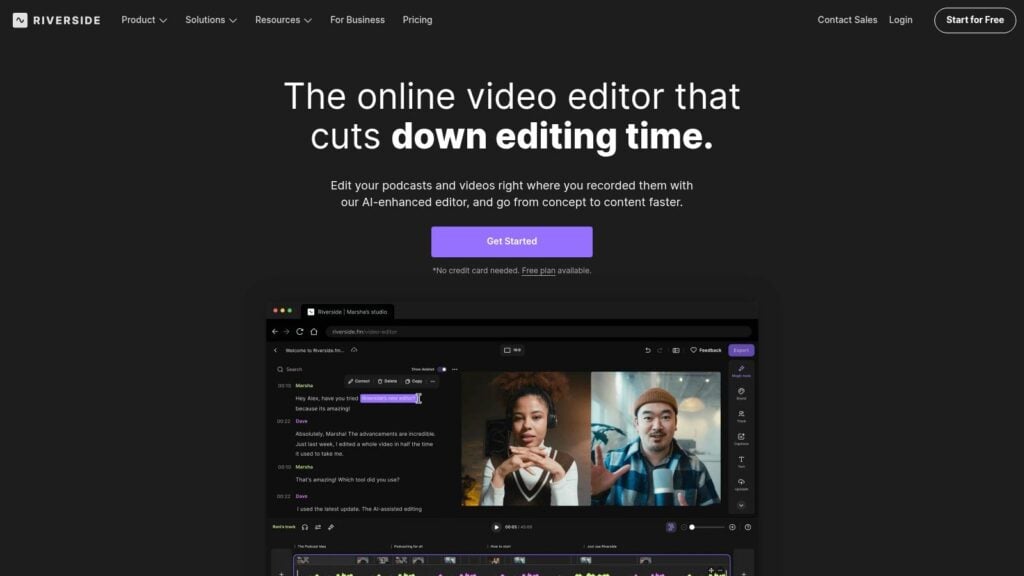
Its built-in editor, AI cleanup tools, and clip generation can shorten the path from raw recording to publishable assets. For a solopreneur, that can mean fewer hours stuck trimming pauses and exporting files between apps. For a larger course business, it can mean less handoff friction for an editor or content manager.
The practical upside looks like this:
- Fewer tool switches after the interview
- Faster cleanup of rough spots
- Easier clip creation for launch emails and social posts
- More consistency across a series of expert interviews
That convenience has a dollar value.
If you record two interviews a year, it probably does not justify much. If you record every week and reuse each conversation in four or five places, it often does. I have seen creators focus on the subscription price, then ignore the six extra steps their team repeats after every call. That is where the margin disappears.
Why workflow affects ROI
Feature comparisons get shallow fast. The better question is which platform reduces the total cost of producing one finished interview.
Riverside usually makes a stronger case when your workflow includes editing, clipping, transcription, and content repurposing. In that setup, the platform is doing part of the producer’s job. Even if the monthly plan costs more, the total cost per published interview can come out lower.
That trade-off is different for different businesses.
A solo course creator may value saved evenings and fewer paid apps. An established online school may care more about standardizing the workflow so contractors and in-house staff can move faster with fewer mistakes.
Where Zoom still earns its place
Zoom is still the more practical choice for teams that treat the interview as one part of a live teaching operation.
If your workflow includes audience Q&A, panel sessions, office hours, or guest expert events that need registration and attendance management, Zoom’s event-oriented tools can matter more than built-in editing. In that case, the recording is only one output. The live session itself is the product.
That is an important distinction because it changes the ROI math.
- Riverside fits recording-first businesses
- Zoom fits live-delivery businesses
- The cheaper option depends on where the work happens after the call
If your bottleneck is post-production, Riverside usually saves more time. If your bottleneck is hosting, moderating, and delivering live sessions reliably, Zoom can be the better operational buy even if you still need separate editing tools later.
The Real Cost of Creating Your Course Interviews
A lot of course creators make this decision by comparing monthly plans, then feel the extra cost later in editing hours, cleanup work, and missed content they never get to publish.
That is the gap that matters. Software price and operating cost are different things.

Sticker price versus total cost
Zoom’s Pro plan starts lower than many creators expect. According to this comparison focused on course creator ROI, Zoom Pro starts at $15.99 per month, while Riverside’s higher tiers include AI editing and transcription that can reduce other production costs.
For a budget-conscious creator, that distinction matters more than the headline price. The monthly fee is only one part of the bill.
Your total cost also includes:
- Editing time
- Transcription needs
- Clip creation
- Quality recovery work
- Missed reuse opportunities when the recording is not good enough
A cheap recording tool gets expensive fast if every interview creates two extra hours of cleanup. A pricier tool can pay for itself if it replaces another app or saves a night of editing every week.
When Zoom is actually cheaper
Zoom is the lower-cost option in a very specific setup. You record the interview, do light trimming at most, and publish it without asking that recording to carry a lot of production value.
That usually describes creators who:
- use interviews as supporting material, not the core product
- do little or no clip repurposing
- already pay for Zoom for meetings, coaching, or team calls
- can live with functional quality instead of polished source files
In that case, Zoom keeps the stack simple and the recurring spend low. For a solopreneur trying to launch without piling on subscriptions, that can be the right call.
When Riverside becomes the better value
Riverside starts to make more financial sense when each interview needs to do more work.
One session might need to become a course lesson, a replay for members, a transcript for accessibility, a few social clips, and an archive you can reuse next year. If your workflow looks like that, the higher subscription can reduce the need for separate tools and cut down the time between recording and publishing.
That changes the ROI math. You are not only paying for nicer video or cleaner audio. You are paying for fewer handoffs, fewer fixes, and less friction in post-production.
The same source notes that course creators using Zoom should factor in external editing and transcription costs, while Riverside’s bundled AI tools can offer better ROI for creators who care about production speed and output quality.
Solopreneur math versus team math
The business model changes the answer.
For the solo creator
Time is usually the tightest constraint. Money matters, but hours matter just as much.
If you record on Tuesday and still have to transcribe, cut clips, fix levels, and assemble the lesson on Thursday night, the cheaper tool may be costing you more than it looks. I have seen this trade-off frustrate creators who were trying to save $20 or $30 a month while losing entire evenings to manual work.
For the established online school
The equation gets more operational.
A larger team may already have editors, a transcription process, and documented post-production steps. In that setup, Zoom can be cost-effective if it fits the existing system and the team is already optimized around it.
But schools producing lots of interview-driven lessons should still look at labor cost, not only software cost. If Riverside cuts handoffs or shortens editor time across dozens of recordings, the higher plan can still be the better buy.
Budget-conscious creators should compare workflow cost, not just subscription cost.
A practical buying question
Ask one question before you choose.
Will this platform save enough time, tool spend, and rework to justify the monthly fee?
If the answer is yes, Riverside often gives better return. If the answer is no, and your interviews only need to be clear and usable, Zoom may be the smarter budget decision.
That is the total cost of ownership lens.
Which Tool Is Right for Your Course Scenario
Most creators don’t need a universal winner. They need the right fit for the kind of course business they’re running.
Here’s how I’d choose based on scenario.
The bootstrapped solo creator
You’re building your course on a tight budget. You need interviews to work, but you’re watching every recurring expense.
My advice is simple. Start with Zoom if your standards are “clear enough to publish” and your interviews are a smaller piece of the offer.
That choice makes sense when the course relies more on slides, screen recordings, worksheets, or talking-head lessons than guest interviews. Zoom is also fine when you already know you won’t do much repurposing.
The catch is that you should go in with your eyes open. If you later decide to cut clips, clean up rough audio, or build a premium member library from those calls, Zoom’s lower upfront price may feel less cheap.
The high-value course producer
If you sell a premium course and expert interviews are part of the product’s perceived value, I’d choose Riverside.
This is the creator who brings in respected guests, builds authority through conversation, and wants each session to produce multiple assets. In that setup, better source quality and a smoother editing path are worth paying for.
I wouldn’t risk premium course content on a meeting-first workflow unless there was a very strong reason to do so.
The live cohort instructor
This creator runs workshops, office hours, live Q&A sessions, and maybe a webinar-based launch.
For that business model, Zoom still has a strong argument because live interaction is central to the experience. Polls, Q&A, and webinar-style features support the teaching format better.
That said, if you also record formal interview modules outside those live sessions, a split setup can make sense. Use Zoom for live teaching and Riverside for your polished evergreen interviews.
The membership content publisher
There’s another group worth calling out.
If you run a membership and publish interview-based lessons or expert sessions regularly, Riverside usually fits better. Not because every single recording must be cinematic, but because repeat content production rewards efficient post-production.
That kind of business wins when one conversation becomes several useful assets.
Best Practices for Flawless Interview Recordings
Whichever platform you choose, a few habits will improve your recordings more than another round of tool shopping.
I’ve seen great tools produce weak interviews because the setup was sloppy. I’ve also seen decent tools deliver solid results because the host prepared well.
Prep the guest like a producer
Don’t assume your guest knows how to sound good online.
Send a short prep note before the session with the basics:
- Use headphones: this prevents speaker bleed and echo
- Choose a quiet room: soft furnishings help more than people realize
- Face a window or soft light: simple lighting beats fancy gear used badly
- Join early: a quick tech check is cheaper than a ruined interview
Protect the mic quality
Most guest problems come down to mic habits, not mic price.
A few reminders go a long way:
- Keep the microphone close enough. Distance makes people sound thin fast.
- Don’t let the guest rely on a noisy laptop setup if there’s a better option nearby.
- Turn off notifications, fans, and any machine noise in the room.
Run a short test before the real interview
This sounds obvious, but people skip it all the time.
Do a brief recording check. Listen back. Confirm the right mic is selected. Confirm the camera looks decent. Confirm no weird echo or clipping is happening.
That one-minute habit saves a lot of pain.
A test recording is boring right up until the day it saves your lesson.
Think beyond the call
Good course interviews are part teaching, part production.
That means planning for the final format:
- Frame the guest cleanly: leave space for captions if you use them
- Ask for concise restatements: this gives you better clip options later
- Mark standout moments while recording: it speeds up editing after the session
If you want a broader production checklist beyond interviews, A Creator’s Guide to Online Course Video Production is a useful companion resource. For software that helps with screen-led lessons, this guide to the best screen recording software for course creators is also worth a read.
My Final Verdict as a Course Creator
If I’m recording course interviews that I care about, I pick Riverside.
That’s my honest answer.
Zoom is still useful. I’d use it for internal training, quick conversations, live cohort calls, and projects where speed and familiarity matter more than polished output. It does that job well.
But for Riverside.fm vs Zoom for recording course interviews, Riverside is the better tool for most serious course creators. The recording quality is stronger, the workflow is more creator-friendly, and the total cost can make more sense once you factor in editing and repurposing.
Zoom is a meeting platform that can record.
Riverside is a recording platform built for creator workflows.
That distinction matters a lot when your interview is part of a paid product.
If you’re building a course business and trying to make smarter software decisions, LearnStream publishes practical guides on tools, memberships, and digital learning workflows at https://learnstream.io.