Synthesia vs HeyGen for AI Course Videos: Expert Comparison

You sit down to record one short lesson and suddenly the whole day disappears.
The mic picks up room echo. You rerecord the intro five times. A slide has a typo. The lighting changes halfway through. Then the edit drags on longer than the lesson itself. Most course creators don’t get stuck on expertise. They get stuck on production.
That’s why tools like Synthesia and HeyGen have become part of the conversation for online educators, membership owners, and training teams. They promise a much cleaner workflow. Write the script, choose an avatar, render the lesson, move on.
That promise is real, but the trade-offs are real too. For Synthesia vs HeyGen for AI course videos, the biggest differences aren’t just avatar quality or language count. They show up in your weekly workflow, your revision speed, your student experience, and the way costs stack up once you move beyond a couple of test videos.
The End of Endless Video Shoots for Your Course
I’ve seen this pattern over and over. A creator plans a solid course outline, gets excited, then hits the filming wall. Lesson one turns into retakes, reshoots, and editing cleanup. By lesson four, the project starts to feel heavier than the business case behind it.

AI video tools help because they remove the most fragile parts of the old process. You don’t need to be camera-ready every time you update a module. You can revise a policy lesson, swap a CTA, or localize a welcome video without rebuilding the whole production setup.
That doesn’t mean you should throw out every other production tool. A lot of the strongest courses still mix AI presenter videos with screen demos, walkthroughs, and annotated slides. If your course includes software teaching, pair these avatar tools with solid screen recording software for course creators instead of forcing one tool to do everything.
For creators tightening up their process, I also like keeping a short checklist nearby. These actionable tips for AI training videos are useful because they focus on scripting and clarity, which matter more than fancy visuals in most learning products.
The fastest course workflow usually comes from reducing retakes, not from adding more effects.
Synthesia and HeyGen at a Glance
Course creators usually feel the difference between these tools before they notice the feature list. One platform fits a controlled training operation. The other fits a faster publishing rhythm with more experimentation built into the process.
Synthesia is usually the cleaner fit for course businesses that need repeatable production. In practice, that means a stronger handoff process when instructional designers, subject matter experts, and reviewers all touch the same lesson. The platform is positioned around structured training use cases, with enterprise security, LMS support, and SCORM export noted in earlier comparisons. That matters less for a one-off promo video and much more for a 40-lesson certification that will need revisions, approvals, and localization over time.
HeyGen comes at the job from a different angle. It tends to appeal to creators who publish often, test formats quickly, and want more room to personalize delivery. The product feels closer to a creator studio than a training system, which can be a real advantage if your course catalog changes often or your sales funnel depends on fresh video assets around the course itself.
That difference affects total ownership cost more than many buyers expect.
A lower entry price does not always mean a lower operating cost. For course teams, the actual expense shows up later in versioning, localization, stakeholder review, and how easily a lesson moves into the rest of your stack. If you are comparing broader e-learning content creation tools for course production workflows, this is the point to pay attention to. A tool that saves two minutes per video but creates friction every time you update 30 lessons is usually the more expensive choice.
How I’d separate them for course work
| Category | Synthesia | HeyGen |
|---|---|---|
| Best fit | Training teams with repeatable course production | Creators and small teams publishing quickly |
| Workflow style | Structured, approval-friendly, easier to standardize | Fast, flexible, better for testing variations |
| Strength in course ops | Governance, LMS-oriented delivery, predictable process | Speed, personalization, broader creative experimentation |
| Cost risk | Lower workflow friction for large libraries | More chance of credit and usage creep as output scales |
| Better for | Compliance, onboarding, certification, internal training | Cohort courses, marketing-led education, multilingual experiments |
My quick read
Synthesia usually makes more sense when the course business needs consistency across many lessons and many stakeholders. It is easier to justify when operations matter as much as video quality.
HeyGen often feels faster in day-to-day creation, especially for creators still shaping the offer or testing different lesson styles. That speed is useful, but it can come with more moving parts, and those moving parts tend to show up on the bill and in the workflow once the course library starts growing.
Comparing Core Features for Course Video Production
A course creator usually feels the difference between these tools on lesson 12, not lesson 1.
The first few videos can look fine in either platform. The pressure shows up later, when you need to update a pricing slide across a full module, localize a lesson into three languages, rerender feedback from beta students, and keep the course looking consistent without adding hours of cleanup.
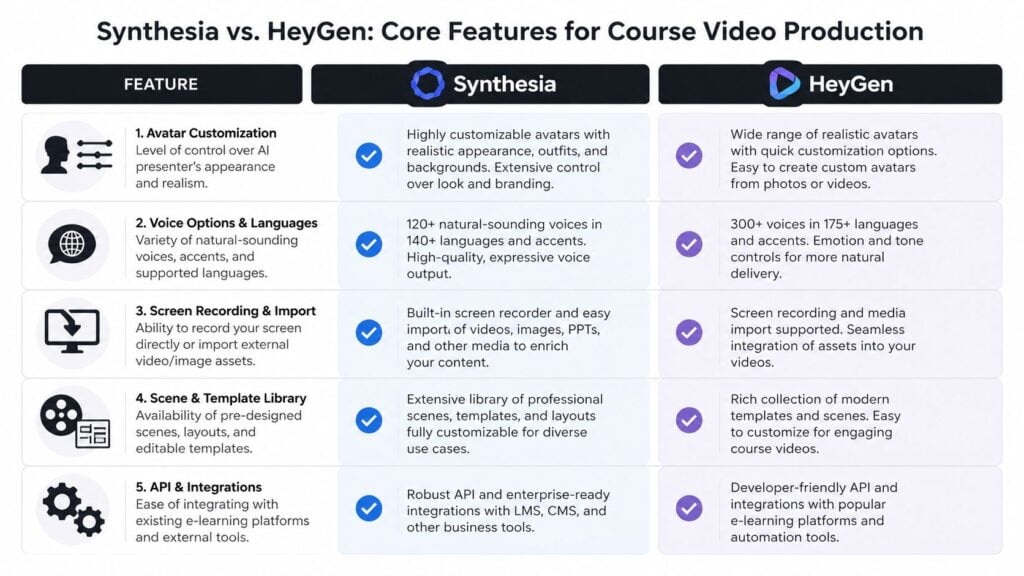
Avatar quality and on-screen trust
For course video, avatar quality affects more than aesthetics. It affects attention span and trust.
Students will tolerate a slightly artificial presenter in a short promo. They are less forgiving in a 20-minute lesson, especially in onboarding, compliance, coaching, or anything that asks them to stay focused on a talking head for multiple modules. Small issues in lip sync, eye contact, or pacing become more noticeable over time.
As noted earlier, Synthesia tends to feel more stable for presenter-led lessons, while HeyGen often feels more expressive and creator-friendly. In practice, I use Synthesia more often for modules that need a calm, controlled delivery. I use HeyGen more often when the course style is faster, more personality-driven, or closer to audience-building content.
Templates and lesson production
Templates matter because course work is repetitive by nature.
You are not making one polished video. You are building intros, recap slides, policy updates, scenario lessons, assessment explainers, and revised versions of all of them. Synthesia usually gives training teams a more standardized starting point, which reduces decision fatigue and makes it easier to hand work between subject matter experts, instructional designers, and reviewers.
HeyGen gives creators more room to shape the final video manually. That flexibility is useful, but it also adds more style decisions per lesson. For a solo creator, that can feel freeing. For a team producing a larger library, it can turn into inconsistency unless someone owns the visual system and review process.
If you are comparing this with the rest of your production stack, it also helps to review other eLearning content creation tools because the video generator is only one part of course production.
Languages, voice options, and revision load
HeyGen offers broader language coverage. That matters if multilingual delivery is part of your business model.
Still, course creators should look past the headline number. A key question is how often translated lessons need updates and how expensive those updates become. A platform with more language options can still cost more to run if each revision eats credits, adds manual QA, or forces your team to rebuild scenes that should have been simple edits.
This is one of the clearest workflow differences I see in real projects. Language support helps you expand. Revision handling determines whether that expansion stays profitable.
Render speed and iteration cycles
Render speed affects production cost in a very ordinary way. It changes how often your team is willing to revise.
HeyGen generally feels faster during active course development, especially when scripts are still changing and you are testing lesson structure. That speed is useful for cohort-based courses, webinar repurposing, and early-stage offers where the content is still being shaped by student feedback.
Synthesia can feel slower in that drafting phase, but speed is only part of the equation. If a platform gives you a more controlled process and fewer style corrections later, the slower render is not always the more expensive option. Course creators should measure total turnaround, not just generation time.
Customization, branding, and consistency
Both tools let you adjust scenes, scripts, and branding. The practical difference is what happens after 30 or 50 lessons.
Synthesia usually keeps teams closer to a fixed presentation system. That is helpful for academies, employee training, certification programs, and any course business that needs a consistent visual identity across a growing library. Less variation also means fewer approval issues.
HeyGen supports a wider range of presentation styles, which is great for creators who want lessons to feel less templated. The trade-off is governance. More creative freedom can improve engagement, but it can also increase review time, credit usage, and rework if the style changes halfway through production.
The same issue shows up outside the video itself. Course teams still need supporting visuals, lesson thumbnails, and downloadable assets. If you are cleaning up accessibility around those materials, an alt text generator ai can help speed up production without leaving that task for the end.
What works best for different lesson types
The fit is usually clear once you map the tool to the course format.
- Compliance, onboarding, and policy training: Synthesia is usually the safer choice because consistency and presenter stability matter more than creative range.
- Cohort courses and fast content testing: HeyGen often works better because quicker iteration helps you respond to learner questions and improve lessons between launches.
- Multilingual course libraries: HeyGen has the broader language reach, but the better choice depends on how often modules need revision after launch.
- Large structured academies: Synthesia is easier to keep uniform across dozens of lessons, instructors, and approval rounds.
A balanced takeaway
For course creators, this is less about which platform has more features and more about which one creates less friction across the full production cycle.
Synthesia usually fits better when stable delivery, repeatability, and team consistency drive the project. HeyGen usually fits better when speed, experimentation, and audience-specific variations drive the project. The expensive choice is the one that looks cheaper per video but creates extra revisions, scattered branding, and credit creep once the course starts to scale.
Beyond the Basics Accessibility and Integrations
The video itself is only half the job. The rest is delivery.
A course has to reach real learners on real devices, often in different languages, and usually inside a broader system that includes an LMS, subtitle workflow, downloadable resources, and progress tracking. For this reason, a lot of quick software comparisons fall apart.

Accessibility for real learners
Language coverage matters, but accessibility is broader than translation. Learners need readable captions, usable visuals, and media that works in your platform without extra cleanup.
HeyGen supports over 175 languages, while Synthesia supports over 140, and HeyGen also offers native interactive avatars for branching quizzes and SCORM exports according to this comparison focused on course use cases. For creators building multilingual education or branching experiences, that gives HeyGen a more ambitious learner-facing toolkit.
Still, accessibility work rarely ends inside the video generator. If you’re publishing diagrams, lesson thumbnails, or visual downloads, good alt text matters too. A simple tool like this alt text generator ai can help speed up that part of the process without turning accessibility into an afterthought.
If subtitles are a big part of your workflow, it also helps to compare dedicated AI subtitle generators for course videos instead of relying on whatever defaults happen to ship with your video platform.
Interactivity and retention workflow
This is one of the clearest differences between the two tools.
HeyGen’s native interactive avatars are useful when you want a lesson to behave more like a guided experience. Think branching quiz paths, conversational checkpoints, or embedded choice-based modules. That matters for creators selling premium courses, cohort programs, or onboarding flows where you want learners to do something, not just watch.
Synthesia is more limited natively on interactivity. You can still build engaging course experiences with it, but you’ll usually need external tools or LMS-side workarounds to create branching or responsive lesson behavior.
If your course strategy depends on learner decisions inside the lesson flow, HeyGen gives you more to work with out of the box.
LMS depth and operational fit
Synthesia still has a meaningful advantage in environments where integration discipline matters.
The verified data highlights its LMS integration and SCORM export focus, and positions it strongly for enterprise training teams that need secure, repeatable delivery. In a corporate setup, that depth matters because content often has to pass through administrators, learning teams, and internal systems before a learner ever sees it.
Here’s the practical split:
| Need | Better fit |
|---|---|
| Branching and interactive learner paths | HeyGen |
| Structured enterprise LMS delivery | Synthesia |
| Broad multilingual reach | HeyGen |
| Standardized global training operations | Synthesia |
For solo creators, these differences may feel abstract at first. They stop feeling abstract once you’re managing revisions across many lessons, many audiences, or many regions.
Analyzing the Total Cost of Course Video Creation
A course creator usually notices the pricing problem on lesson 12, not lesson 1.
The first few modules look affordable. Then the project grows. You add a second language, update a product walkthrough, swap an avatar for a higher-trust sales lesson, and build alternate versions for different audiences. At that point, the monthly subscription matters less than the cost per finished lesson and the time it takes to maintain the library.

Why pricing pages miss the point for course teams
For course production, the useful question is not “What does the plan cost per month?”
It is a workflow question:
- How many publishable lessons does this plan cover?
- How expensive are revision cycles once the course is live?
- What happens to the budget when localization starts?
- Which costs move into other tools, your LMS, or your team’s production time?
In a HeyGen vs Synthesia cost comparison from HeyGen, the hands-on test notes that premium features such as Avatar IV and interactivity can burn through credits 2 to 3 times faster than standard production, and that a 50-video test project reached $673 across the two platforms. That number will not match every course build, but it does reflect a pattern I see often. AI video stays cheap only while the workflow stays simple.
Predictability matters more than low entry pricing
Synthesia is usually easier to budget for once a course business has a repeatable format. If you publish structured modules every month, predictable limits help more than an attractive starting price. Finance teams like that. So do course operators who need to forecast updates, translations, and client revisions without checking credit balances every week.
HeyGen often wins the first-round test because it feels faster and more flexible. For pilots, launch sprints, and early curriculum experiments, that can be the right call. The catch is that the features that make HeyGen interesting for modern course design can also make budgeting harder once the library grows.
That is the trade-off.
Here is the ownership view I use with clients:
- Synthesia lowers budget volatility. Better fit for standardized lesson libraries, recurring training work, and programs with frequent updates.
- HeyGen lowers upfront friction. Better fit for testing new lesson styles, fast launches, and creative iteration.
- Advanced usage changes platform economics quickly. Avatar upgrades, multilingual delivery, and interactive formats can shift the cost per lesson much faster than the base plan suggests.
- Integration gaps create hidden spend. If the video platform does not fit your delivery stack, you pay in manual publishing, extra software, or staff time. This LMS features comparison for creators is a useful reminder that course delivery costs rarely stop at video generation.

Where course budgets usually break
I see three patterns repeatedly.
First, teams budget for production and forget maintenance. AI video makes updates easier, so course teams usually revise more often, not less.
Second, they price a single course format and end up supporting five. Core lessons turn into onboarding tracks, sales enablement clips, bonus modules, webinar follow-ups, and translated versions for new markets.
Third, they treat the video tool as the whole system. It is not. If one platform needs extra tools for interaction, publishing, or LMS handoff, the missing cost shows up somewhere else.
Cheap per month can still mean expensive per course.
For a polished training catalog, Synthesia is usually easier to control over time. For a creator still testing the offer, HeyGen can be a smart choice, but only with close attention to credit-heavy features and the extra workflow they create once the course expands.
My Final Verdict for Your E-Learning Project
A course creator usually feels this decision in month three, not day one. The first ten videos look fine in either tool. The significant difference shows up when lessons need updates, translations multiply, reviewers want changes, and someone has to get every file into the LMS without turning the workflow into a manual production line.
That is why my verdict comes down to operating model.
Synthesia is the better fit for course businesses that need repeatable production, cleaner handoff, and fewer workflow surprises as the library grows. HeyGen is the better fit for creators who are still testing format, audience, and teaching style, and who can tolerate a bit more hands-on cost control.
Choose Synthesia if your course business runs on consistency
Synthesia is the safer default for structured education products.
I recommend it for teams building onboarding, compliance, product training, certification prep, or any curriculum with a standard lesson format. In those environments, consistency matters more than novelty. You need templates that stay stable, review cycles that do not sprawl, and a publishing process that still works when the course catalog grows from 20 videos to 200.
It also tends to be the better choice when multiple people touch production. Instructional designers, SMEs, reviewers, and LMS admins usually work faster in systems that favor control over experimentation.
Choose HeyGen if speed is your main advantage
HeyGen makes more sense for creators validating an offer, building short-form lesson experiments, or testing more interactive teaching formats.
I use it when the goal is to get a concept in front of learners quickly and refine from feedback. That can be a smart move for solo educators, cohort-based course builders, and teams prototyping guided learning experiences. If interactivity is part of the teaching strategy, HeyGen can give you more room to experiment before you lock the course into a formal production workflow.
The trade-off is management overhead. Teams need someone paying attention to feature usage, revision habits, and how quickly “just one more version” turns into extra spend.
My recommendation by project type
Here is the short version.
| Project type | Best choice |
|---|---|
| Enterprise onboarding and compliance | Synthesia |
| Fast course MVPs and lesson testing | HeyGen |
| Standardized multilingual training | Synthesia |
| Interactive learning prototypes | HeyGen |
| Scalable professional training programs | Synthesia |
If you are undecided, ask a more practical question.
Will this video system still work when the course needs monthly updates, multiple versions, and LMS publishing support?
That usually gets to the right answer faster than comparing avatar demos.
The delivery environment matters too. This LMS features comparison for creators is worth reviewing before you commit, because a good video generator does not fix weak quiz options, poor progress tracking, or clunky course administration.
My candid recommendation is simple. Pick Synthesia if your business depends on predictable production and long-term catalog management. Pick HeyGen if your edge is speed, testing, and creative flexibility.
Some teams should use both. I have seen that work well when one side of the business needs polished internal training and another side needs faster customer education experiments. For a single primary platform, though, Synthesia usually wins for mature course operations, while HeyGen wins for early-stage course iteration.