What Do Instructional Designers Do?

You probably know this feeling.
You record a great course. The videos are clean. The worksheets look polished. You know your topic cold. Then the launch goes live, and people stall out halfway through module one, skip the exercises, or post questions that reveal they’re lost in places you thought were obvious.
That disconnect is where a lot of course creators first ask, what do instructional designers do?
I’ve seen it happen with smart creators, strong teachers, and experienced operators. They assume good information will naturally turn into good learning. Usually it doesn’t. Knowing something and teaching it well are two different jobs.
That’s why instructional designers matter so much right now. The e-learning industry is projected to reach $315 billion by 2025, and a 2024 Purdue report says 40% of universities now employ dedicated instructional design teams, up from 25% in 2019 according to Purdue’s overview of what instructional designers do. As more education moves online, more creators are realizing they need someone who can shape a learning journey, not just package expertise.
For solo educators building courses from home, that shift connects with a bigger reality. More teaching, consulting, and learning design work now happens online, and YayRemote’s guide to remote work gives a practical view of how people are building careers in that environment.
Your Amazing Course Idea Is Not Enough
A course idea can be excellent and still land flat.
I’ve worked with creators who had everything you’d want at launch. They had an audience, a useful topic, and enough content to fill a bookshelf. But the actual learner experience felt like opening a kitchen cabinet where every ingredient is high quality and nothing is labeled. The flour is there. The salt is there. The recipe is somewhere. Dinner still isn’t happening.
That’s usually the first sign you don’t have a content problem. You have a design problem.
An instructional designer helps turn raw expertise into a path people can follow. I think of the role as a learning experience architect. They don’t just ask, “What should we include?” They ask, “What should happen first? Where will people get stuck? What does success look like? Which activity gives a learner confidence fast?”
Where creators usually get tripped up
Most course creators start with the material they want to teach.
That makes sense, but learners start somewhere else. They start with confusion, hesitation, limited time, and a bunch of competing priorities. If your course doesn’t account for that, even strong content can feel heavy.
Common symptoms look like this:
- Overloaded early lessons: The first module tries to teach everything at once.
- Weak progression: One lesson doesn’t clearly prepare people for the next.
- Passive learning: Students watch but don’t do much.
- Mismatched assumptions: You think the learner is a beginner, but the language assumes prior knowledge.
A good course doesn’t just transfer information. It helps a learner move from one clear state to another.
That’s the heart of instructional design. It’s less about making content prettier and more about making learning doable.
More Than a Course Builder Core ID Responsibilities
The title “instructional designer” often conjures images of someone building slides in PowerPoint or arranging lessons inside an LMS.
For online course creators, that definition is far too small. In the creator economy, an ID helps you shape learning into something people can finish, apply, and keep paying to stay close to. That matters a lot more than making a course portal look tidy.
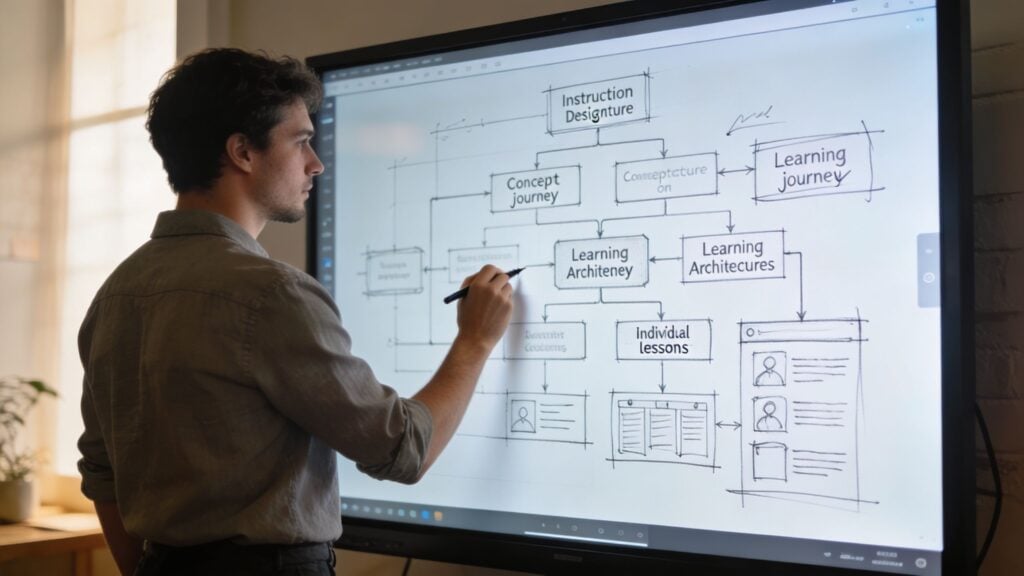
They study the learner before they build
A strong ID starts by getting specific about the person on the other side of the screen.
Not just demographics. Behavior. Friction. Motivation. Time.
If you run a membership site, those details change the whole build. A freelance designer who wants faster client wins needs a different experience than a team manager joining your leadership program between meetings. Same topic. Different pace, examples, practice, and support.
That is why IDs ask questions course creators sometimes skip. What does this learner already know? What problem made them buy? Where do they usually stall? What would make them feel early progress in week one?
Good design begins there.
They define what success actually looks like
This is one of the least flashy parts of the job, and one of the most useful.
An instructional designer writes learning objectives that describe what learners should be able to do, not just what content you plan to cover. That sounds simple, but it changes everything. It forces a creator to stop saying, “I need a module on email marketing,” and start saying, “By the end of this lesson, members can write a welcome sequence for their own offer.”
Cooking is a helpful comparison here. Listing ingredients is not the same as serving dinner. In the same way, listing topics is not the same as designing learning. Objectives turn a pile of ideas into a result.
Without that filter, courses bloat fast. You keep adding bonus lessons, extra templates, optional workshops, and “one more thing” videos until the product feels generous but hard to finish.
They decide the order, pace, and practice
Creators often underestimate this part because expertise can hide the missing steps.
You know the material so well that the path feels obvious. The learner does not.
An ID breaks the journey into manageable moves. They decide what should come first, what needs practice right away, and what can wait until the learner has enough context to use it. They also protect momentum. A quick win early in the course can do more for completion than another polished lecture.
That same logic shows up in structured workflows like the ADDIE model for training design, but in creator businesses the goal is usually faster application, not semester-style instruction. You are helping someone get a result in real life, often between client work, family time, and twenty open browser tabs.
They choose the right teaching format for the job
Not every lesson should be a video.
Some ideas need a screen share. Some need a checklist. Some need a worksheet, a short quiz, a swipe file, a live feedback session, or a discussion prompt that gets members to apply what they learned. A good ID matches the format to the learning task.
That saves your learners energy.
It also saves you from overproducing. Course creators sometimes record a 20-minute lesson for something that would work better as a one-page template. An ID helps trim that excess so the course feels easier to use and easier to finish.
They reduce friction that quietly kills progress
A lot of instructional design work is invisible.
It shows up in clear directions, consistent lesson flow, better naming, useful examples, and assignments that do not make learners stop and guess what to do next. It also shows up in what gets removed. If a quiz does not reinforce anything meaningful, it goes. If a lesson repeats what the last one already covered, it gets combined or cut.
That matters even more for paid communities and memberships. In a university course, learners may stick with a clunky experience because they need the credit. In a creator business, they can cancel.
Here’s a practical way to separate the roles:
| Role focus | Typical question |
|---|---|
| Subject matter expert | “What do I know that learners need?” |
| Instructional designer | “How will learners best understand and use this?” |
| Course builder | “How do I upload and organize this?” |
You may wear all three hats in a small creator business. The instructional design hat is the one that keeps the course useful, focused, and worth coming back to.
The ADDIE Method An IDs Foundational Workflow
You sketch a course outline on a Saturday, record three lessons on Sunday, and by Wednesday you are wondering why the whole thing suddenly feels fuzzy.
That moment is exactly why ADDIE still holds up.
ADDIE is the classic workflow many instructional designers use to turn a promising topic into a course people can finish and use. The letters stand for Analysis, Design, Development, Implementation, and Evaluation. For online course creators and membership owners, it works like a build order. You do not start by decorating the kitchen before the foundation is poured. You decide what the house is for, who will live in it, and how each room needs to function.
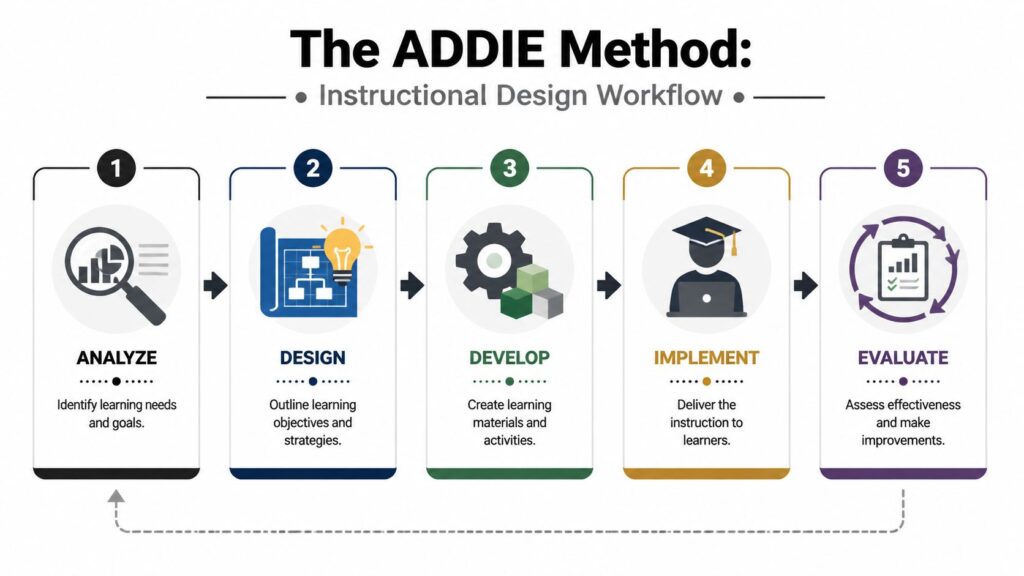
Let’s put it in creator terms.
Say you want to build a beginner course on podcasting for people who have never published an episode. ADDIE gives you a way to shape that idea before you spend weeks recording content no one needed in the first place.
Analysis
Analysis is where an ID asks uncomfortable but money-saving questions.
Who is this course for, exactly? What are they trying to do? What have they already tried? What is stopping them right now? In a creator business, those answers affect more than learning. They affect refunds, completion, retention, and whether members feel your offer was worth paying for.
For a podcasting course, you might assume the big need is audio editing. After talking to learners, reading survey responses, or reviewing community questions, you may find the actual blockers are choosing a show angle, picking a format, and getting past the fear of publishing.
That changes the course.
Analysis finds the gap between where learners are now and where they want to be. In practical terms, it keeps you from cooking a five-course meal when your audience needed a fast, useful dinner.
Design
Design turns that insight into a plan.
This is the blueprint stage. The ID maps learning goals, decides what each lesson should accomplish, and puts the material in an order that matches how real progress happens. For creators, this matters because a course is not just a library of what you know. It is a guided path toward a result.
For a beginner podcasting course, the sequence might be:
- Choose your show concept
- Define your audience
- Plan your episode structure
- Set up your recording process
- Record and edit a simple first episode
- Publish and promote
That order is doing a lot of work. It prevents the common creator mistake of dumping every tip, tool, and opinion into one giant content vault.
If you want a practical creator-friendly breakdown, LearnStream has a helpful guide on the ADDIE model for training.
A useful rule here is simple. If a lesson does not move the learner toward the promised outcome, it probably belongs in a bonus resource, not in the main path.
Development
Development is where the course gets built.
Scripts, slide decks, worksheets, examples, quizzes, templates, screen recordings, and lesson text all start taking shape here. In the podcasting example, that could mean a one-page show planning worksheet, a short video on basic mic setup, and a launch checklist learners can follow without overthinking each step.
Format choices matter a lot in this phase. A screen recording may work best for showing podcast hosting software. A worksheet may work better for shaping a show concept. A quick self-check may help learners test whether they understand episode structure before they move on.
That is one reason IDs are valuable for creators. They do not just help you make more content. They help you choose the right container for the job, the same way a good recipe tells you when to bake, sauté, or serve something cold.
If your business also produces training content for businesses and families, this phase often reveals where one asset can do double duty across offers.
Here’s a short explainer before we keep going.
Implementation
Implementation is the launch and delivery stage.
Your course goes live in your platform, membership, cohort, or LMS. Emails go out. Lessons become available. Community prompts get posted. Live sessions happen if that is part of the offer.
For creator businesses, implementation includes all the little details that affect whether people keep going after lesson one. Are the login steps clear? Does the first action feel manageable? Do learners know what to do after each lesson? Does the release schedule build momentum, or does it leave people waiting too long and drifting away?
A university program can sometimes survive clunky delivery because learners need the credit. A membership or creator course has to earn attention every week.
Evaluation
Evaluation is where instructional design becomes an ongoing business habit instead of a one-time build process.
After launch, the ID looks at what occurred. Which lessons got completed? Where did learners stall? Which questions kept showing up in comments or office hours? Did the assignment produce real progress, or did it confuse people?
There are two checkpoints here. You improve while building, and you review after delivery. Both matter.
That loop is what makes ADDIE useful for the creator economy. It gives you a repeatable way to improve your course based on learner behavior, not creator guesswork. Over time, that usually leads to stronger completion, happier members, and offers that are easier to sell because they produce clearer results.
From Storyboards to Software Common ID Deliverables
At this point, a fair question is, “Okay, but what do they make?”
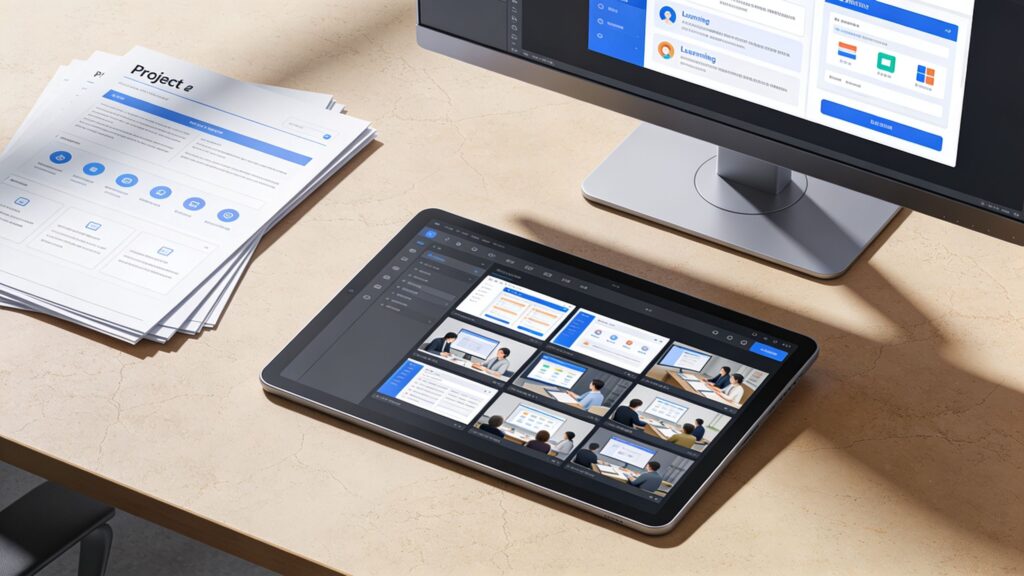
The answer depends on the project, but instructional designers usually produce a mix of planning documents, learning assets, and support materials. Some are visible to the learner. Some live behind the scenes and save you from expensive rework.
Storyboards
A storyboard is one of the most useful deliverables in the whole process.
It resembles a comic book version of your course, created before filming or building begins. It shows what appears on screen, what the narrator says, what the learner clicks, and where interactions happen. If a lesson includes a scenario, the storyboard maps the branches before development starts.
For creators, this matters because it catches problems early. You can spot a confusing explanation, a weak example, or a missing transition before you spend hours recording and editing.
Interactive modules
An interactive e-learning module is a packaged lesson that asks the learner to do something.
That could mean making choices in a scenario, answering practice questions, exploring a labeled diagram, or working through a simulation. In a membership context, it might be a short decision-based lesson where a new manager chooses how to respond to a team issue and sees the consequence of each choice.
From the learner side, this feels less like watching content and more like participating in a guided exercise.
Job aids and support tools
Some of the best instructional design work isn’t flashy at all.
A job aid might be a one-page checklist, a decision tree, a swipe file, or a quick-reference guide. In a course on webinar hosting, that could be a pre-event checklist. In a writing membership, it could be an editing rubric. These tools help learners apply what they learned after the lesson ends.
If you want examples of how training assets get assembled for different audiences, this walkthrough on training content for businesses and families is a handy reference.
Here’s how a few common deliverables compare:
| Deliverable | What it does | Best use |
|---|---|---|
| Storyboard | Plans the learning flow before build | Preventing rework |
| Worksheet | Guides reflection or practice | Deepening understanding |
| Quiz | Checks recall or application | Reinforcing learning |
| Job aid | Supports on-the-job use | Improving real-world transfer |
| Facilitator guide | Helps someone lead a session | Cohorts, workshops, live training |
You’ll also see deliverables like course maps, assessment banks, facilitator notes, rubrics, scripts, and design specs. LearnStream’s collection of instructional design templates can help if you want to see the bones of these assets before hiring someone or building them yourself.
The best deliverables don’t just look organized. They reduce learner hesitation.
That’s a useful test. If a deliverable makes the next action clearer, it’s doing its job.
The Modern IDs Toolkit Key Skills and Essential Software
A lot of people think instructional design is mainly a software stack.
It isn’t. Tools matter, but the best IDs I know are strong because of how they think, ask questions, and make judgment calls. Software helps them execute. It doesn’t replace the judgment.
The human skills that make the work good
These are the skills that hold the whole role together.
- Empathy: A good ID can step into the learner’s shoes and notice where directions are fuzzy, where motivation drops, and where cognitive overload kicks in.
- Curiosity: They ask subject matter experts the annoying but necessary questions. What does success look like in practice? What mistakes do beginners make? Which detail is essential and which one is just interesting?
- Communication: IDs spend a lot of time translating. They translate expert knowledge into learner-friendly language. They also translate learner needs back to stakeholders.
- Facilitation: Even when they aren’t leading live teaching, they often guide reviews, gather feedback, and keep a project moving.
- Prioritization: This is huge in the creator economy. An ID has to know what belongs in version one, what should be optional, and what can wait.
If you’re hiring, these are often better predictors than a flashy portfolio alone.
The technical side of the toolkit
Once the thinking is clear, the software comes in.
Different IDs use different stacks, but these are common categories:
- Authoring tools: Articulate Storyline and Rise are popular for interactive lessons. Some IDs also use Adobe Captivate.
- Video tools: Camtasia is a staple for screen recordings and light editing. Creators might also use Descript or ScreenFlow depending on the workflow.
- Design tools: Figma, Canva, and Adobe Express help with visual layout, mockups, and graphics.
- Learning platforms: IDs often need working knowledge of LMS platforms and course platforms. That includes understanding navigation, progress tracking, assessments, and drip delivery.
- Documentation tools: Google Docs, Notion, Airtable, and Miro often handle scripts, reviews, maps, and collaboration.
- Survey and assessment tools: Google Forms, Typeform, and built-in quiz tools help gather learner feedback and check understanding.
What matters more than the tool list
A beginner can learn where the buttons are in Storyline.
The harder skill is deciding whether an interaction should exist in the first place. Some creators overbuild because the tool makes it possible. They add tabs, click-to-reveals, timelines, and drag-and-drops that don’t improve learning. An experienced ID knows when a plain checklist beats a fancy interaction.
Here’s a simple way I evaluate the stack.
| Skill area | Why it matters |
|---|---|
| Learner empathy | Prevents confusing or overloaded lessons |
| Learning strategy | Connects activities to actual outcomes |
| Platform knowledge | Helps the course function smoothly |
| Media production | Improves clarity and presentation |
| Data literacy | Supports course improvement after launch |
If you’re becoming an ID, build both sides together. Learn the tools, yes. But don’t hide in the tools. Value comes from sound judgment about people and learning.
Designing with Data How IDs Measure and Improve Learning
A course launch isn’t the finish line for a good instructional designer. It’s the start of the next round of questions.
Once learners enter the course, they generate signals. They pause videos, skip lessons, retake quizzes, drop off after a certain module, revisit a worksheet, or ignore a discussion prompt entirely. A smart ID pays attention to those signals because they reveal where the course is helping and where it’s getting in the way.

According to EdTech Books on learning analytics, instructional designers use learning analytics to turn raw learner data into actionable metrics such as progress indicators and peer benchmarks, which can then support interventions like personalized recommendations or redesigning a confusing module.
What that looks like in plain English
Let’s say you run a course on client onboarding for freelancers.
Your quiz after lesson two has one question that a large share of learners miss. That doesn’t automatically mean the learners weren’t paying attention. It may mean your example was weak, your wording was muddy, or the lesson skipped a prerequisite concept.
That’s the mindset shift. IDs use data to grade the course design, not just the learner.
A simple before and after example
Here’s a realistic scenario.
Before the revision, your module teaches proposal writing through a long video and then drops learners into a quiz. Many learners miss the question about scope boundaries. In your community, people also ask versions of the same thing. “How detailed should I be?” “What do I include?” “What if the client adds more later?”
An ID looks at those clues and changes the lesson.
They might:
- Add a worked example: Show one proposal section with annotations
- Insert a short practice activity: Ask learners to identify vague scope language before the quiz
- Rewrite the quiz prompt: Make sure the question tests the concept clearly
- Create a job aid: Offer a scope checklist learners can use in real client work
That’s data-informed design in action.
If you want a practical companion for this side of the work, LearnStream has a helpful guide on how to measure training effectiveness.
When learners repeatedly struggle in the same spot, the course is telling you something.
Useful signals an ID watches
Not every creator has a giant analytics dashboard. That’s okay. You can still look for patterns.
Some of the most useful signals are:
- Quiz misses: Where learners answer incorrectly again and again
- Video drop-offs: Places where attention falls off
- Lesson completion patterns: Modules people finish versus abandon
- Support questions: Repeated confusion in comments, email, or community posts
- Assignment quality: Whether learner submissions show real understanding
Why this matters for memberships and creator businesses
In a corporate setting, an ID may be asked whether training improved performance on the job.
In a creator business, the same habit supports retention, trust, and product quality. If members join your program and can’t find momentum, they leave. If they get fast wins and see a clear path, they stay, participate, and recommend the experience to others.
That’s why data belongs in the design conversation. It helps you move from “I think this lesson works” to “I can see where learners are thriving and where I need to improve the path.”
Hiring and Becoming an ID A Practical FAQ
You’ve built a course you believe in. The lessons are packed with good ideas, the sales page is converting, and new members are joining. Then the support emails start. People ask where to begin. They skip key lessons. They stall halfway through and never come back.
That’s usually the moment a creator realizes content and learning are not the same thing.
For online course creators and membership owners, this part matters because the stakes are different from corporate training. You are not building for an internal compliance goal. You are building for retention, referrals, renewals, and learner results people will pay for. That changes how you hire. It also changes how you prepare if you want to become an instructional designer yourself.
How do I know if I need an instructional designer
A good rule is simple. If your expertise is strong but the path through your material feels uneven, an instructional designer can help.
In creator businesses, that problem often looks like low completion rates, repeated confusion, overloaded modules, weak onboarding, or lessons that sound helpful but do not lead to action. An ID helps you fix the structure around the content, not just add more content to the pile.
It works a lot like renovating a house with solid materials but a bad floor plan. The walls may be beautiful. The kitchen may have great appliances. But if every room leads to the wrong place, people feel lost inside it.
You may need an ID if:
- Your offer is expanding: A small course is becoming a fuller program or membership
- Your curriculum has grown messy: Bonuses, workshops, templates, and replays exist, but the path is unclear
- Your audience is widening: Beginners and advanced learners are entering the same product and need better guidance
- Your experience feels inconsistent: Multiple instructors or content types need one coherent learner journey
What should I look for when hiring for a membership site or online course
Many hiring guides miss the specific needs of membership sites and online courses.
A strong corporate ID may still be a poor fit for a creator-led business. Memberships, cohort programs, and paid communities run on a different rhythm. You might have drip releases, onboarding emails, live calls, office hours, community prompts, and a free-trial period that needs to lead naturally into paid engagement.
That means your hire needs to understand both learning design and the business model around it. In a creator business, the course is rarely a standalone product. It is often part classroom, part onboarding system, and part retention engine.
So look past, “Can they build a course?” Ask whether they can shape a learner journey that fits how your offer makes money and keeps members engaged.
Good hiring signals
- They ask about the learner and the offer: Strong IDs ask about audience, promise, churn points, onboarding, and what success looks like
- They reduce clutter: They can trim sprawl and build a clearer core path
- They understand creator formats: Drip lessons, workshops, communities, and templates are familiar territory
- They work lean: They can improve a product without requiring a large corporate process
- They show design reasoning: Their samples reveal sequencing, practice, and clarity, not just polished visuals
What’s the difference between an instructional designer and a course creator
A course creator owns the message, the expertise, and usually the brand voice.
An instructional designer shapes how that expertise becomes teachable. If the creator is the chef developing the signature recipe, the ID is the person organizing the kitchen so every step happens in the right order and the final dish comes out right for the learner.
Sometimes one person wears both hats. That is common in the creator economy. Still, the roles are different enough that mixing them together causes confusion.
This is the cleanest way to explain it:
| Role | Primary focus |
|---|---|
| Course creator | Content, perspective, audience promise |
| Instructional designer | Learning flow, practice, outcomes, clarity |
| Video editor or producer | Media polish and delivery assets |
| Community manager | Engagement and support after enrollment |
You do not always need separate people for every role. You do need clarity on which job is being done at any given moment.
What should I ask in an interview
Process questions usually tell you more than software questions.
A tool can be learned. Design judgment takes longer. You want to hear how someone handles messy material, competing priorities, and unclear learner needs.
Try questions like these:
- Walk me through how you’d redesign an underperforming module
- How do you decide what belongs in the main course versus bonus material
- How do you handle a subject matter expert who wants to include too much
- What do you review after launch to decide what to improve
- How have you designed for asynchronous communities or memberships
Strong answers usually include audience needs, sequencing, practice, feedback, and iteration. Weak answers stay focused on software features or visual polish.
Hire the person who can diagnose learning friction and fix it inside your business model.
Can I use a freelancer instead of hiring full time
Yes. For many creator businesses, that is the smarter first move.
A freelancer makes sense when you need help structuring a flagship course, cleaning up onboarding, redesigning one pathway, or creating templates your team can keep using. Full-time hiring fits better when learning products sit at the center of the business and design work is constant month after month.
Start small if you are unsure. Ask for a course audit, a redesign of one module, or a membership onboarding map. That gives you a practical test before making a bigger commitment.
I want to become an instructional designer. Where do I start
Start with real learning problems, not a giant software checklist.
New IDs often spend too much time collecting tools and too little time practicing judgment. Learn the basics of objectives, sequencing, assessment, feedback, and platform limits. Then use those ideas on small projects a creator business would need.
A strong early path looks like this:
- Study core models: Learn the frameworks and how they guide choices
- Practice on real topics: Redesign a mini-course, a workshop, or an onboarding sequence
- Build artifacts: Create course maps, storyboards, worksheets, and simple modules
- Learn common tools: Get comfortable with authoring tools, video tools, and collaboration software
- Explain your choices: Show why you made each decision, not just what you built
For creator-economy work, this matters a lot. Clients want someone who can improve a paid learning product quickly, without overcomplicating the process.
Do I need a formal degree
Not always.
A degree can help in higher education or some enterprise roles, but many instructional designers build strong careers through portfolios, contract work, and clear project examples. In creator businesses, practical skill, communication, and the ability to improve learner progress often carry more weight than credentials alone.
If you are applying for jobs, your resume still needs to pass screening systems. Resumatic’s tips for ATS success are useful if you want your experience and project language to be easier for applicant tracking systems to parse.
What should go in an ID portfolio
Show your thinking, not just the finished screen.
This is the portfolio mistake I see most often. Someone uploads a polished lesson and stops there. But hiring managers and clients want to see the blueprint behind the build. They want the why, not only the what.
Useful portfolio pieces include:
- A course map: Shows structure and progression
- A storyboard: Shows planning before development
- An assessment sample: Shows how you check understanding
- A redesign example: Shows what was broken and how you improved it
- A short case writeup: Shows the learner, the constraint, the decision, and the result
A good portfolio works like an architect’s set of drawings. The finished building matters. The plan behind it matters just as much.
Is instructional design a good fit for creators who want to improve their own programs
Yes.
Even if you never hire an ID or become one professionally, learning this mindset will improve your products. You start noticing where a lesson asks too much too early. You cut material that looks impressive but slows progress. You build around results instead of coverage.
That shift changes the quality of a course and the health of a membership business.
Instructional designers are not there to make content feel more formal. They help people learn in a way that keeps them moving, getting wins, and wanting to stay.