Definition of Cooperative Learning: Unlock Engagement

Cooperative learning is a structured teaching method where small groups work toward a shared goal, with built-in individual accountability so every learner contributes and learns. In research reviewed by David and Roger Johnson, students in cooperative learning settings showed 37% higher academic gains, 28% better reasoning skills, and 25% higher self-esteem than students in individualistic or competitive settings.
If you build online courses, you’ve probably seen the opposite of that.
A learner logs in, watches a lesson, downloads the worksheet, and clicks the next button. They finish content, but they don’t always process it. In a membership site, the pattern looks similar. People consume posts, maybe leave a comment, then drift into the background.
I run into this problem all the time in digital learning design. The issue usually isn’t the quality of the content. It’s the structure around the content.
A lot of online courses treat learning like a private playlist. Watch this. Read that. Submit something. Move on. That can work for simple knowledge transfer, but it often falls apart when you want discussion, reflection, practice, and retention.
Some creators try to fix that by adding “community” or putting people into groups. That’s where things get messy. A random discussion thread isn’t cooperative learning. A group project where one person carries the load isn’t either.
The definition of cooperative learning matters because it gives us a better design standard. It helps us build activities where learners need each other in a useful way, while still making each person responsible for their own learning.
That difference becomes even more important online, especially in asynchronous and semi-synchronous courses where learners rarely show up in the same place at the same time.
More Than Just Group Work
A common online course problem looks harmless at first.
A student joins with good intentions. They watch the welcome video, complete the first module, and maybe even post an introduction. By week two, they’re mostly consuming in silence. By week three, they’re still enrolled but mentally checked out.
I’ve seen this in self-paced courses, cohort programs, and paid communities. The content can be solid. The experience still feels lonely.
Why passive learning stalls out
When learners work alone the whole time, a few things happen fast:
- Attention drops: videos become background noise
- Thinking stays shallow: learners recognize ideas without applying them
- Momentum fades: there’s no social reason to keep showing up
- Misunderstandings linger: nobody challenges weak interpretations
That’s why “just add a forum” rarely fixes the problem.
If the activity has no structure, the most confident people talk, the hesitant people lurk, and the task becomes optional in practice even if it looks interactive on paper. Traditional group work often creates the same issue. One person organizes, one person contributes a little, and one person disappears.
Group activity only improves learning when the task forces meaningful participation.
The better question for course creators
The useful question isn’t “How do I get learners into groups?”
It’s “How do I design an activity where they help each other learn, and where each person still has to think for themselves?”
That’s where cooperative learning earns its place. It isn’t a buzzword for teamwork. It’s a research-backed way to turn passive course consumption into active learning by giving people a shared goal, clear roles, and personal responsibility.
For digital educators, that matters because online learning strips away many of the natural interactions that happen in a classroom. If we want discussion, explanation, peer support, and accountability, we have to design them on purpose.
The True Definition of Cooperative Learning
A learner logs into your course on Tuesday night. They post a thoughtful reply in the forum, skim two other comments, and move on. Another learner never returns. A third writes a great summary after reading everyone else’s work. All three were in the same activity, but only one of them had to depend on the group.
That distinction gets to the heart of the definition.
David W. Johnson and Roger T. Johnson describe cooperative learning as the instructional use of small groups so that students work together to maximize their own and each other’s learning. For online course creators, the important part is not “small groups.” It is the designed relationship between shared progress and individual thinking.
A practical comparison helps here. A shared discussion board works like people waiting at the same bus stop. They are near each other, but their success is separate. Cooperative learning works more like a relay team. Each person has a leg to run, the handoff matters, and the final result depends on everyone doing their part well.
In an online course, that usually means the activity is built so learners contribute different pieces, respond to one another in a sequence, and produce something none of them would complete in the same way alone. That structure matters even more in asynchronous and semi-synchronous teaching, where learners are not all present at once and cannot rely on live conversation to create momentum.
What the definition looks like in practice
I explain it to course creators this way. Cooperative learning is group work with instructional architecture.
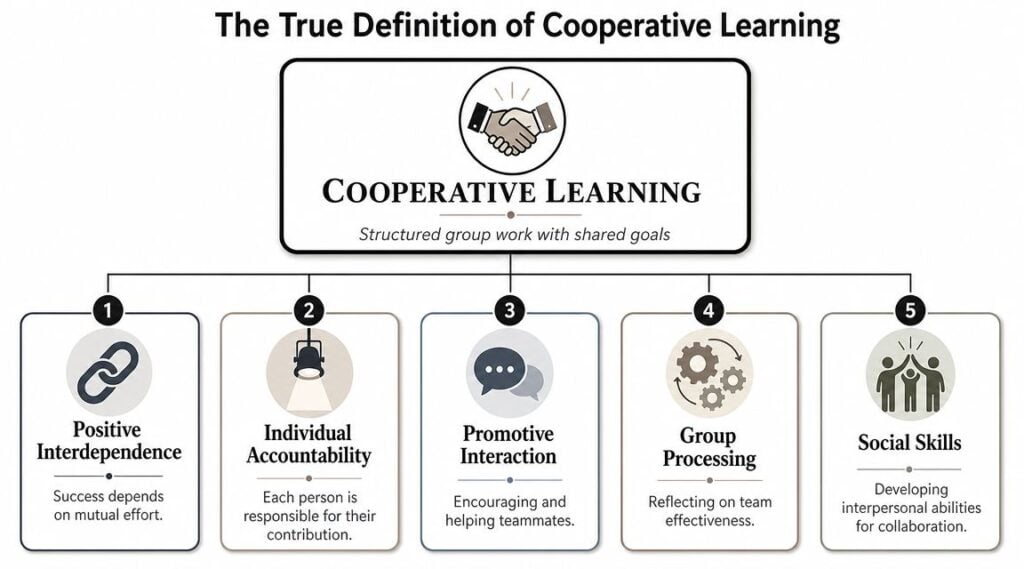
The architecture usually includes five connected conditions:
- Positive interdependence: learners need each other’s input to complete the task well
- Individual accountability: each learner must show their own understanding
- Promotive interaction: learners help, question, explain, and build on each other’s thinking
- Interpersonal skills: learners practice communication, listening, and conflict handling
- Group processing: the group reflects on how they worked and how to improve
Those elements are what separate a real learning structure from a loose community activity.
For example, a membership site might assign each learner one customer case, one framework, or one source to analyze by Wednesday. By Friday, each small group posts a combined recommendation. By Sunday, each learner submits a short reflection explaining how the group discussion changed their original view. That workflow is cooperative because the shared outcome depends on distinct contributions, and each person still has to think independently.
Why course creators should care about the definition
This definition gives you a design test.
If everyone can complete the task alone, post a version late, and still get the same value, you probably built participation around proximity, not interdependence. If the sequence, roles, and outputs require learners to build on each other’s work across time, you are much closer to true cooperative learning.
That idea fits well with constructivist teaching. Kubrio explains learning theory in a way that connects directly to course design. It also pairs naturally with Vygotsky’s sociocultural theory in online learning, especially if you design peer support into discussion prompts, project checkpoints, and reflection tasks.
Practical rule: If a learner can finish the activity without relying on peers and without showing their own understanding, it probably isn’t cooperative learning.
The Five Pillars That Make It Work
The power of cooperative learning doesn’t come from putting people in a shared space. It comes from the design logic underneath the activity.
That logic is easiest to understand through the five pillars identified by David and Roger Johnson.

Positive interdependence
This is the pillar many miss.
The critical distinction of cooperative learning is positive interdependence, where learners understand that each member’s effort is required for group success. That structure is designed to reduce social loafing, the classic free-rider problem in ordinary group work, as explained in this overview of cooperative learning characteristics.
In an online course, this might look like a lesson where each learner is assigned a different source, example, or customer scenario. The group can’t complete the final shared response unless every person brings their piece.
If everybody can do the same task alone and paste their answer into a thread, interdependence is weak.
Individual accountability
A shared goal only works when each learner still has to think independently.
This is why I usually add a personal checkpoint after any group activity. It can be a short quiz, a private reflection, a voice note, or a quick application prompt inside the LMS. The point is simple. Every learner should have to demonstrate understanding in their own words.
A practical digital setup looks like this:
- Group task: learners discuss a case in a Circle.so space or private channel
- Individual proof: each person submits a short takeaway or mini-quiz
- Instructor review: you check both the group output and the individual responses
That one extra step changes the whole feel of the activity.
Promotive interaction
This is the active helping part.
Learners explain, clarify, question, and encourage each other while working. In a live Zoom room, that can happen naturally. In an async course, you have to script it more carefully.
Try prompts that require response moves, not just opinions. For example:
- Clarify: restate your teammate’s point in simpler language
- Extend: add one example that strengthens their answer
- Question: ask one question that exposes an assumption
- Apply: connect the group idea to a real student or client scenario
That creates interaction with purpose.
Learners don’t need endless discussion. They need useful exchanges tied to a clear task.
Interpersonal skills
Students don’t automatically know how to collaborate well online.
They may not know how to disagree politely, divide work fairly, or give useful feedback. If you skip this part, weaker group habits creep in fast. Silence, vague praise, takeover behavior, and resentment all show up.
So teach the behaviors explicitly. Give people sentence starters, role descriptions, and norms for response quality. If your learners have to reach a shared conclusion, a resource like this collaborative decision-making guide can help you think through how groups move from many opinions to one outcome.
Group processing
This final pillar is where improvement happens.
After the task, the group reflects on how it worked together. Not in a fluffy way. In a practical way.
Ask prompts like:
- What helped your group make progress
- Where did communication break down
- Which role was unclear
- What should change next time
For online programs, I like to keep this short and consistent. A two-minute written check-in after each team task is enough. Over time, groups get better because they start noticing patterns instead of repeating them.
Popular Cooperative Learning Models You Can Use
Once you understand the structure, the next question is usually practical. What does this look like in a course?
The good news is that cooperative learning isn’t one single activity. It’s a family of models you can adapt. Some work well in a live cohort. Others fit self-paced or semi-synchronous programs surprisingly well.

Jigsaw
Jigsaw is one of the clearest examples of cooperative design.
In this method, learners become experts on one part of a topic, then teach that part to their peers. Structured methods like the Jigsaw technique, where students become experts on subtopics and then teach their peers, create role-based accountability and interdependence, as described in this overview of cooperative learning methods.
Here’s how I’d run it in an online course:
Split the lesson into parts
Example: four ways to improve onboarding in a membership businessAssign one part to each learner or mini-group
One person studies retention triggers, another studies welcome emails, another studies community rituals, another studies progress trackingCreate expert spaces
Use private discussion threads, shared docs, or small breakout rooms so each expert group can prepareReturn to mixed groups
Each learner teaches their section to peersRequire a shared output
The group creates one onboarding plan using all four parts
Jigsaw works well when the material is broad enough to divide into meaningful chunks.
Think Pair Share
This one is much simpler, which is why I use it all the time.
A standard live version is straightforward. Learners think individually, discuss with a partner, then share with the whole group. Online, you can stretch that same pattern across time.
An async version might look like this:
- Think: post a prompt on Monday and ask learners to submit a private first response
- Pair: on Tuesday, assign each learner one peer to respond to inside a thread or shared doc
- Share: by Wednesday, each pair posts a combined insight in the main community space
This works especially well for opinion-based topics, interpretation tasks, and scenario analysis.
I’ve seen language teachers use a similar rhythm effectively when learners practice together outside class. If you want a good example of peer-based practice in another domain, this guide on how to master conversational Chinese shows how structured partner exchange can support real learning.
A quick visual walkthrough can help if you’re planning to adapt one of these models:

Numbered Heads Together
This model is great when you want shared preparation and random accountability.
Each learner in a group gets a number. The group works together to solve a question or problem. Then one number is called, and the matching learner gives the answer on behalf of the group.
That changes behavior immediately. People stop dividing the task into isolated pieces because anyone may need to explain the final answer.
For a digital course, try this version:
| Step | What learners do | Digital setup |
|---|---|---|
| Group solve | Work through a case or prompt together | Small group channel or breakout room |
| Prep all members | Make sure everyone can explain the answer | Shared notes doc |
| Random call | Instructor tags one learner or reveals one number | Live session or scheduled async check |
| Individual response | Selected learner posts or presents the answer | Video reply, thread, or voice note |
Choosing the right model
I usually match the model to the learning job.
- Use Jigsaw when the topic has clear subtopics and you want peer teaching
- Use Think Pair Share when you want low-friction reflection and discussion
- Use Numbered Heads Together when you need every learner prepared to explain a shared answer
That’s the practical value of the definition of cooperative learning. It gives you a way to choose designs that create interdependence on purpose rather than hoping interaction appears on its own.
Cooperative vs Collaborative vs Group Work
A learner joins your course forum on Tuesday night, sees the prompt “work together on this case study,” and posts, “I’ll take section 3.” Another learner replies the next morning, “I’ll do the intro.” By Friday, you have a stitched-together document, light interaction, and no clear sign that anyone learned from anyone else.
That is the confusion in one snapshot. Shared output does not automatically mean cooperative learning.
These three terms overlap, but they are not interchangeable. For course creators, the difference shows up in the workflow you build. Cooperative learning is the most deliberately structured. Collaborative learning gives learners more freedom to shape the process. Group work is the broad container, and it often describes any assignment completed by more than one person.
Research summarized in this review of cooperative learning studies found stronger academic results when group activity included clear participation structures and individual accountability. That point matters online because asynchronous spaces make it easy for learners to split tasks without engaging with each other’s thinking.
The simple comparison
| Attribute | Cooperative Learning | Collaborative Learning | Traditional Group Work |
|---|---|---|---|
| Structure | Highly structured by the instructor | More open and student-directed | Often loosely structured |
| Shared goal | Yes, explicitly designed | Yes, usually broad | Sometimes, but often vague |
| Individual accountability | Required and visible | May be present, may be light | Often inconsistent |
| Roles | Usually assigned or clearly defined | Often negotiated by students | Frequently unclear |
| Teacher role | Designer and facilitator | Guide or co-participant | Task setter, sometimes hands-off |
| Best use | Skill building, concept mastery, peer teaching | Discussion, exploration, co-creation | Simple projects or task division |
A practical way to separate them is to look at what happens if one learner disappears for three days.
In cooperative learning, the system notices. Roles, checkpoints, or individual responses reveal the gap quickly. In collaborative learning, the group may adapt and redistribute the work. In ordinary group work, the missing learner often creates frustration at the end, usually after the strongest participant has already carried too much.
Cooperative learning works like a relay with marked exchange zones. Each learner has a defined job, but the handoff is planned. Collaborative learning is closer to a jazz group. There is still a shared direction, but learners have more say in how they contribute and respond. Traditional group work often turns into task splitting, which is closer to parallel play than shared learning.
That distinction becomes even more useful in digital courses.
In a live classroom, learners can read body language, interrupt, clarify, and recover from vague instructions. In an asynchronous course or membership site, those signals are weak or missing. If you tell learners to “collaborate,” many will divide the assignment into separate chunks and never build shared understanding. If you want interaction that actually teaches, structured peer activity usually performs better than a vague group prompt. The broader design principle is similar to what I cover in this article on social learning in online courses.
Here is the test I use when designing online activities. If the task can be completed by dividing the work and recombining it later, you probably have group work. If learners must respond to one another’s ideas but can choose their own path, you likely have collaborative learning. If the task includes assigned roles, visible accountability, and a reason each learner needs the others to succeed, you are in cooperative learning territory.
For asynchronous and semi-synchronous courses, that last model is usually the safest starting point. It gives busy learners a clearer path, and it gives you better evidence of participation and learning.
Bringing Cooperative Learning into Your Online Course
Many good ideas break down at this stage.
A lot of definitions of cooperative learning assume learners are together in the same room, talking in real time. Online creators don’t always have that luxury. We’re building for self-paced students, global cohorts, rolling enrollment, and communities where members log in at completely different times.
That doesn’t make cooperative learning impossible. It just means we have to translate the structure, not copy the classroom.
The core adaptation for digital learning
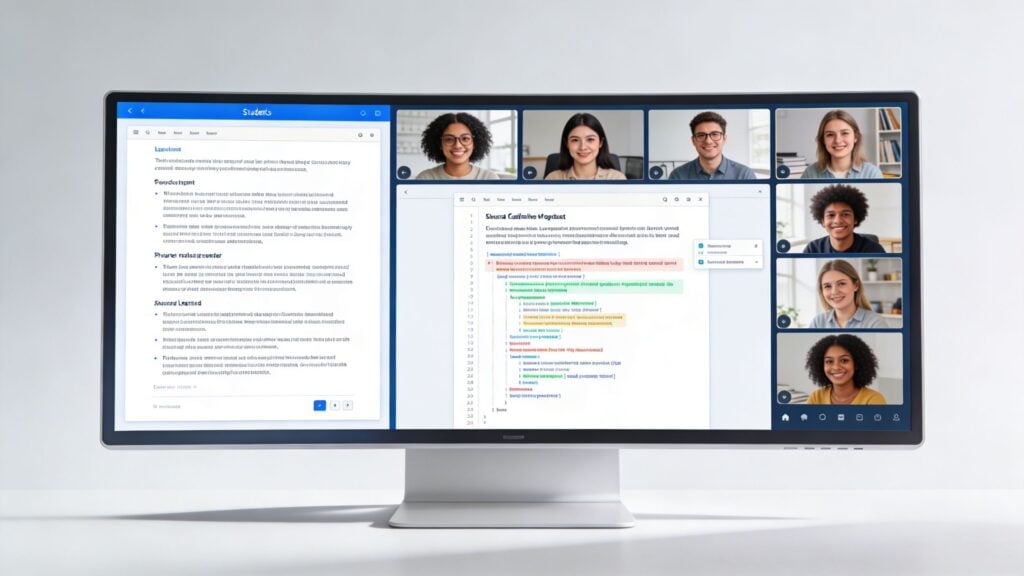
A major challenge for online course creators is adapting the face-to-face promotive interaction principle. One practical answer is to use digital tools to structure positive interdependence and accountability, such as assigning roles in an asynchronous discussion on a platform like Heartbeat Chat, as noted by the Cooperative Learning Institute overview.
That idea sounds simple, but it changes how you build lessons.
Instead of asking everyone to “join the discussion,” assign roles with different responsibilities. One learner summarizes. One challenges assumptions. One finds an example. One connects the discussion to implementation.
Now the discussion has architecture.
An asynchronous workflow that actually works
Here’s a version of Think Pair Share I’ve used for async design.
Step 1 through Step 3
Think on your own
Post a scenario inside your LMS or community. Ask learners to submit a short private response first so they don’t just mirror what others say.Pair with structure
Match learners in a thread, direct message, or small group space. Give each person a job, such as “identify the strongest idea” or “find one gap in the reasoning.”Share back to the wider group
Each pair posts one merged answer, one disagreement they resolved, and one open question.
That sequence works in Circle.so, Heartbeat Chat, Slack, or a forum-based LMS. The platform matters less than the rules.
A semi-synchronous Jigsaw stack
If you run live workshops with async prep, Jigsaw adapts nicely.
Try this setup:
- Prep phase: assign each learner one subtopic and give them source material
- Expert phase: learners build a short explainer deck or summary in Gamma.app
- Teaching phase: learners present their piece in a live Zoom breakout or scheduled small-group session
- Integration phase: the group creates one final plan, checklist, or recommendation
- Accountability phase: each learner completes a short solo application prompt
That stack works because each tool has a clear job. Gamma.app handles preparation. Zoom handles explanation. Your community space handles follow-up and reflection.
If you’re building a more connected learning environment around those activities, this guide on how to build community in an online course is worth keeping nearby while you plan.
Design check: every digital cooperative task should answer three questions. Who depends on whom, where does the interaction happen, and how will each learner prove understanding?
Tool choices by teaching function
I find it easier to choose tools by function rather than by hype.
| Teaching function | Useful tool examples | What to watch for |
|---|---|---|
| Live small-group discussion | Zoom breakout rooms | Give prompts and time limits |
| Async discussion with roles | Circle.so, Heartbeat Chat | Assign response jobs, not just topics |
| Shared artifact creation | Gamma.app, shared docs | Require named contributions |
| Individual accountability | LMS quiz, reflection form, voice note | Keep it short and tied to the group task |
| Group processing | Debrief thread, end-of-week check-in | Ask specific reflection questions |
What not to do
Some online “group work” fails for predictable reasons:
- No role clarity: everyone is told to contribute, so nobody knows how
- No deadline windows: async turns into indefinite
- No visible contribution trail: free-riding becomes easy
- No individual follow-up: learners can coast on the group answer
- No reflection loop: teams repeat bad habits
A digital course doesn’t need more interaction for its own sake. It needs better-designed interaction.
That’s the practical heart of the definition of cooperative learning for online educators. We’re not trying to recreate a classroom exactly. We’re creating a system where learners need each other, help each other, and still remain individually responsible for learning.
Assessing Learning and Avoiding Common Pitfalls
The two objections I hear most are fair.
“How do I grade this without being unfair?” and “What do I do about the learner who disappears?”
Both problems are manageable if you design assessment from the start instead of treating it as an afterthought.
A fair way to assess
I like a blended approach.
Use one part of the assessment for the group product and one part for the individual learner evidence. The group product could be a presentation, summary, checklist, debate post, or solution. The individual evidence could be a quiz, reflection, explanation video, or brief application task.
That gives you a clearer picture of both teamwork and understanding.
A simple assessment mix can include:
- Shared output: the team submits one final artifact
- Individual response: each learner explains a key idea in their own words
- Peer feedback: teammates comment on contribution quality
- Process reflection: the group identifies one strength and one fix for next time
Stopping free-riding before it starts
Social loafing is easier to prevent than to repair.
Set expectations early. Assign roles. Make contribution trails visible. Use short deadlines and small deliverables instead of one giant end-of-module project. In online spaces, this often means requiring named posts, recorded comments, version history in shared docs, or short individual check-ins after team activities.
A weak cooperative task asks, “Did the group finish?” A strong one asks, “What did each person contribute, and what did each person learn?”
The overlooked skill course creators need to teach
Many learners have never been taught how to work well in a group.
So teach it. Give examples of helpful feedback. Show what a strong peer response looks like. Offer a template for disagreement. Make “how we work together” part of the course, not an invisible expectation.
That’s usually the difference between cooperative learning feeling clunky and feeling natural.
When it’s designed well, learners don’t just complete tasks. They explain, question, support, revise, and remember more of what they’re learning. That’s why this method keeps showing up in serious teaching conversations, and why it deserves a place in modern online course design.