Online Course Compliance: A Creator’s Guide
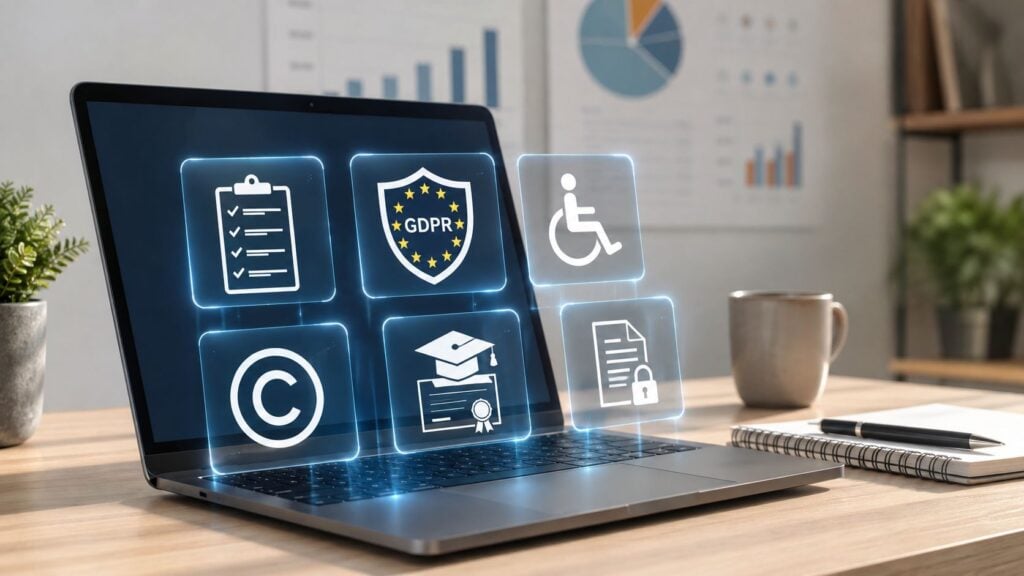
You’ve probably had this moment. A course is live, the content looks clean, the privacy policy is linked in the footer, and someone on the buyer side still asks, “Can you prove this training happened?”
That question is where online course compliance gets real. The problem usually isn’t the lesson slides. It’s the evidence trail, the accessibility of the platform, the recordkeeping behind completion, and whether the course can stand up when a regulator, procurement team, or internal auditor starts asking for proof.
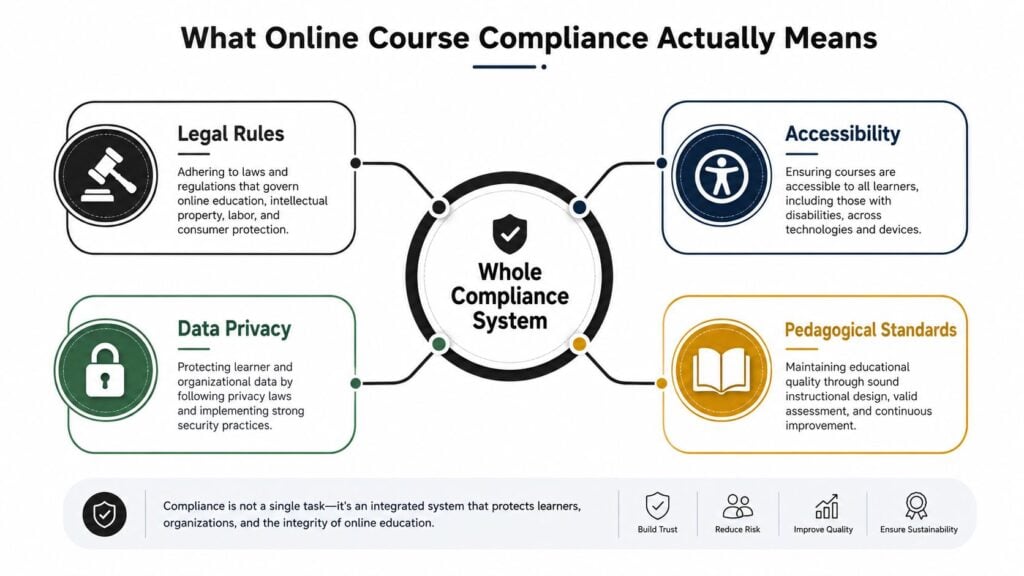
What Online Course Compliance Actually Means
A creator once told me, “The course was compliant because I added a terms page.” That’s a common starting point, but it’s not the finish line. A course can look polished on the outside and still fail the moment someone asks for records, accessibility checks, or proof that the right learners saw the right version.
At a practical level, online course compliance means your course meets the rules that apply to its audience, subject matter, and delivery system. That includes legal obligations, privacy handling, accessibility, and the way you prove completion. In regulated training, the system matters as much as the lesson content, because auditors and buyers often care more about what you can document than what you can describe.
Content compliance and platform compliance are different
I like to split the problem into two layers. Content compliance is what’s inside the course, the statements, files, assessments, and claims you publish. Platform compliance is what the LMS, video player, certificate engine, and reporting tools can prove after someone takes the course.
That split matters because a course can be educationally strong and still be weak as evidence. A learner may watch a video, but if your platform can’t log the module launch, quiz attempt, pass or fail result, and certificate issuance, the record may not satisfy audit expectations. In workplace-safety e-learning, a defensible stack is expected to support SCORM or an equivalent standard and record assessment and completion status, not just page views, as outlined in this technical overview of e-learning platform requirements for security training.
Practical rule: if your course can’t answer “who did what, when, and under which version,” you’re looking at a content package, not a compliance system.
The same logic explains why mandatory training behaves differently from optional learning. In a voluntary course, people can browse and leave. In a mandatory program, the organization needs tracking, reminders, deadlines, and managerial oversight. That’s why enrollment is a weak signal and documented completion is the one that usually matters.
The simplest way to describe your own compliance posture is this. Say whether the course is built for regulated delivery, who it applies to, what records you can export, and which accessibility and privacy controls are already in place. If you can’t say that plainly, the rest of the work starts there.
The Five Pillars of a Compliant Online Course
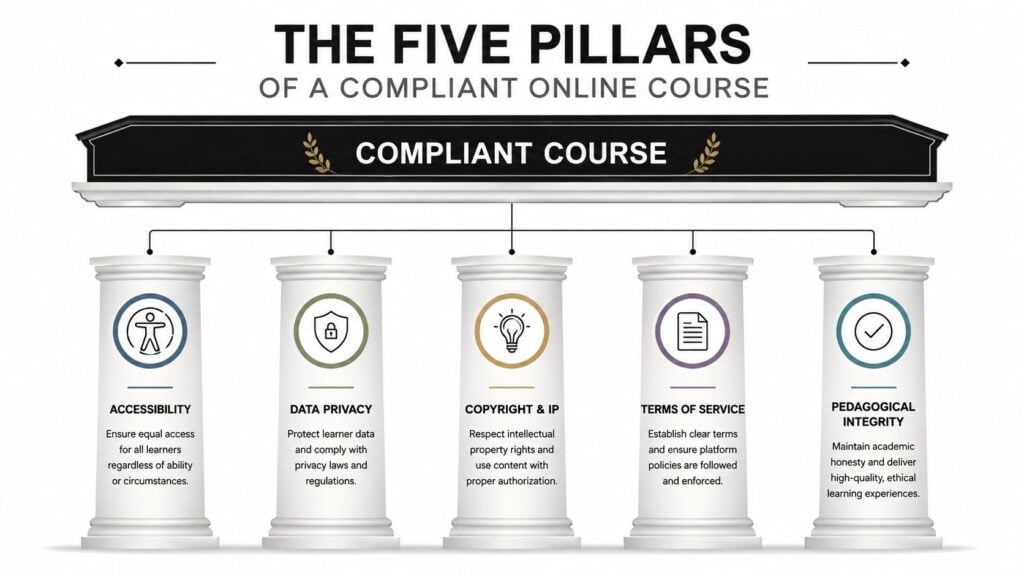
A compliant course rests on five pillars. If one pillar is missing, the whole system can wobble when someone asks for records, accessibility checks, or proof that the right learners saw the right version.
Accessibility
Accessibility is the ramp into the building. A welcome sign at the door does not help if a learner using a screen reader or keyboard cannot get inside. For online course compliance, the current technical baseline in major public-sector markets is effectively WCAG 2.1 or 2.2 Level AA, and the U.S. Department of Justice’s 2024 Title II update requires public educational institutions to meet WCAG 2.2 AA for websites, online courses, and digital content, with deadlines tied to entity size, including April 24, 2026 for larger entities and a deadline expected in 2027 for smaller ones, as summarized in this accessibility guide for education.
Creators often stop at the file itself. The course page may look fine, while the LMS menu, quiz widget, or video player blocks a learner from moving through it. Good practice includes keyboard-only navigation, captions, labeled form fields, tagged documents, and checks against screen readers like NVDA or JAWS.
Data privacy
Privacy explains what learner data you collect, why you collect it, and who can see it. The common mistake is treating a privacy policy like decoration instead of a workflow. If you track progress, issue certificates, or store identity data, the process needs to match what the policy says.
Copyright and intellectual property
This pillar is about permission. If you use a third-party image, chart, article excerpt, or clip, you need rights to use it in the course. A lot of course takedowns start here because the creator assumed “educational use” was enough. It usually isn’t.
Terms of service
Terms of service set the rules of the classroom. They cover refunds, access windows, acceptable use, and what happens if someone shares materials outside the intended audience. They work like the written boundaries around the learning room.
Pedagogical integrity
This one gets overlooked, but it matters. If the course promises a measurable outcome, the objectives, assessments, and content should line up. The National Standards for Quality Online Courses say course objectives need to be measurable and tied to what the learner can demonstrate, and the course overview should clearly state expectations and policies, as laid out by the National Standards for Quality Online Courses.
A course can be beautifully designed and still fail if the assessment says one thing and the learner experience says another.
These five pillars work together. A privacy issue can create a recordkeeping problem, and a missing accessibility feature can make a course unusable even if the content itself is strong. An audit trail stays defensible only when all five pillars support the same course history.
When people talk about regulated training, I usually frame it as an evidence problem. The course has to produce proof, not just pages. In HIPAA-related programs, that proof has to stand up inside the LMS and in the records behind it, which is why course creators should review the LMS features required for HIPAA compliance training and understand the OCR enforcement realities explained before they decide a course is “done.”
How Compliance Changes by Industry and Learner Type
A compliance course for new managers in a startup and a course for licensed clinicians are solving different problems. That sounds obvious, but creators still reach for one template and hope it fits everywhere. It usually doesn’t.
Your governing body changes the rules
In healthcare, the governing rules are often tied to privacy, safety, and workplace training. In finance, the focus shifts toward sector rules and documentation. In K-12 and higher education, accessibility, procurement, student rights, and institutional policy weigh heavily. For professional licensing, the relevant body may be the regulator or certifying organization that controls continuing education credit or renewal requirements.
UK course creators face a similar branching path. Depending on the subject, the course may need to account for Ofqual, the FCA, or GDPR, and the recommended first move is a formal audit that identifies the applicable regulations and checks content, data handling, and accessibility features, according to this UK compliance overview.
A simple two-question test helps. First, ask who can approve or reject the course. Second, ask what evidence they want at audit or renewal time. If the answer is a school, licensor, regulator, or purchasing office, you’re probably dealing with more than a generic training policy.
Different learners need different records
Corporate internal training often lives and dies on completion records, manager follow-up, and proof that the right people took the right version. Higher ed and public-sector courses can add accessibility procurement checks, location rules, and privacy scrutiny. Healthcare courses may need more rigid documentation because the training ties into job function and risk exposure.
For readers building healthcare training, the operational details matter a lot. Ollo’s piece on OCR enforcement realities explained is a useful companion when you’re trying to understand how healthcare compliance language gets enforced in practice.
That’s also where a platform-specific checklist helps. If you’re mapping HIPAA-style training workflows, this LMS features guide for HIPAA compliance training is worth keeping open while you compare reporting, certificates, and access controls.
One marketing caution helps too. Don’t claim more than you can document. If the course is designed for internal awareness, say that. If it’s built for a specific credentialing outcome, make sure the issuer, records, and required review path can support that claim.
Configuring Your LMS for Audit-Ready Recordkeeping
When a buyer asks for evidence, your LMS should be able to export it without a scramble. I’ve seen plenty of courses with solid content and weak reporting, and that mismatch creates avoidable stress at renewal time, procurement review, or audit.
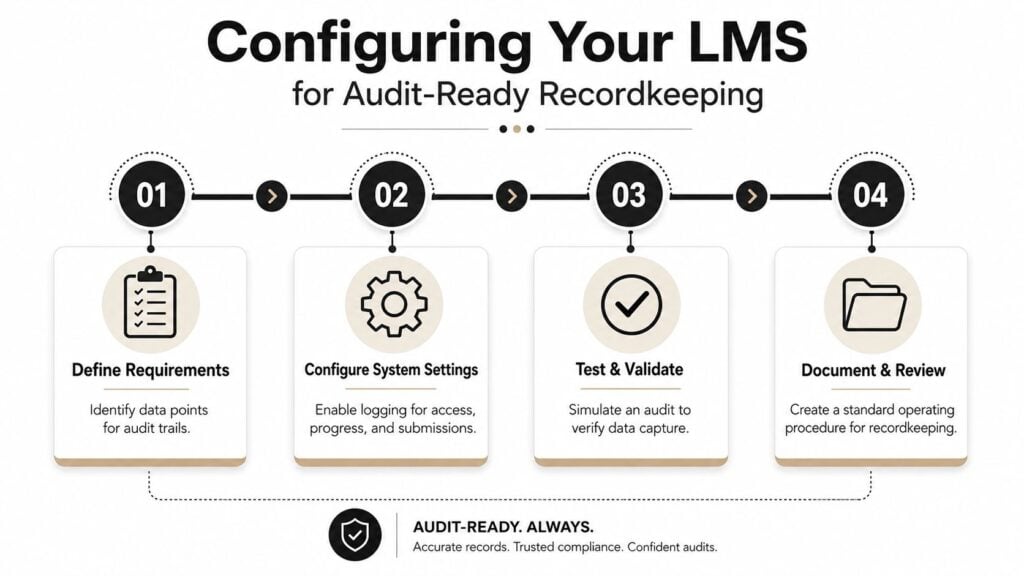
What the system needs to capture
A defensible record usually includes module launches, time-on-task, quiz or assessment attempts, pass or fail outcomes, certificate issuance, consent timestamps, and version control. If you only know that someone opened a page, you don’t really know whether they completed the training.
That distinction is why compliance teams care about activity logs. The system should record the event, not just the presence of a page. In the security-training reference above, the point is clear, compliance audits depend on evidentiary traces, including course completion status and assessment history.
A good LMS setup should also let you prove the training was available within the right access window. In some regulated environments, access is restricted to working hours or tied to acceptance of a training contract before entry. That creates a cleaner chain of consent and attendance for auditors.
SCORM, xAPI, and cmi5 in plain language
You don’t need to become a standards nerd to use these well. Think of SCORM as the classic package that tells the LMS how to launch and track a course. xAPI is more flexible and can log more kinds of learning activity. cmi5 sits in the modern tracking family and helps structure how the LMS and content exchange completion data.
The main question isn’t which acronym sounds cooler. It’s whether your platform can record the evidence you need in a way you can export later. If your course uses branching modules, simulations, or mixed media, check whether the tracking format captures the actions that matter to your audit trail.
What I’d check this week
- Module event logging: Confirm the LMS stores launch and exit data for each module.
- Assessment records: Verify that every attempt, score, and pass or fail result is saved.
- Completion status: Make sure certificates are tied to a real completion event, not a manual shortcut.
- Version history: Check that policy updates create a new content version with a date stamp.
- Export options: Test whether reports can be pulled by learner, course, date range, and version.
- Consent capture: Confirm that acknowledgments are time-stamped and retrievable.
If your export can’t survive a screenshot-free audit meeting, it’s not ready yet.
If you want a practical reference for what to inspect in activity logs, this guide to auditing LMS user activity is useful alongside your admin settings.
For teams using automated workflows, LearnStream also offers an LMS for insurance agent continuing education with automated CE credit tracking, custom certificate templates, expiration reminders, and audit-ready records. That kind of setup is relevant because the workflow, not just the content, is what makes the record defensible.
Real-World Lessons From Compliant and Non-Compliant Courses
A course creator I worked with had a strong training product, good videos, and a clean sales page. A university procurement team still blocked the purchase because the course package didn’t support the accessibility checks they needed. The content wasn’t the problem. The missing proof was.
That kind of delay hurts twice. The creator loses the sale, then spends time rebuilding captions, document tags, and navigation behavior after the fact. Retrofitting also means the team has to re-test everything, which can drag launch timelines and create frustration for the buyer who already wanted the course.
A second creator handled things differently. They built accessibility checks and audit logs from day one, then used those records as part of the sales conversation. Buyers could see that the platform tracked completion, stored version history, and supported a cleaner review process. The course didn’t just look ready, it could show its work.
Copyright issues create a similar mess. Instructors sometimes drop in third-party images because the course is educational and the image feels harmless. Then the platform receives a takedown notice, or the creator has to replace assets across multiple modules. That’s a painful way to discover that “found online” isn’t a license.
The pattern is simple. The less evidence you build in upfront, the more expensive the fix becomes later. Compliance that lives in the workflow tends to travel better than compliance that lives only in a policy page.
A Step-by-Step Remediation Plan for Existing Courses
If you already have a course live, start with the highest-risk gaps first. I’d fix the things that can create legal exposure or block access before I spend time polishing wording that only matters at the margins.
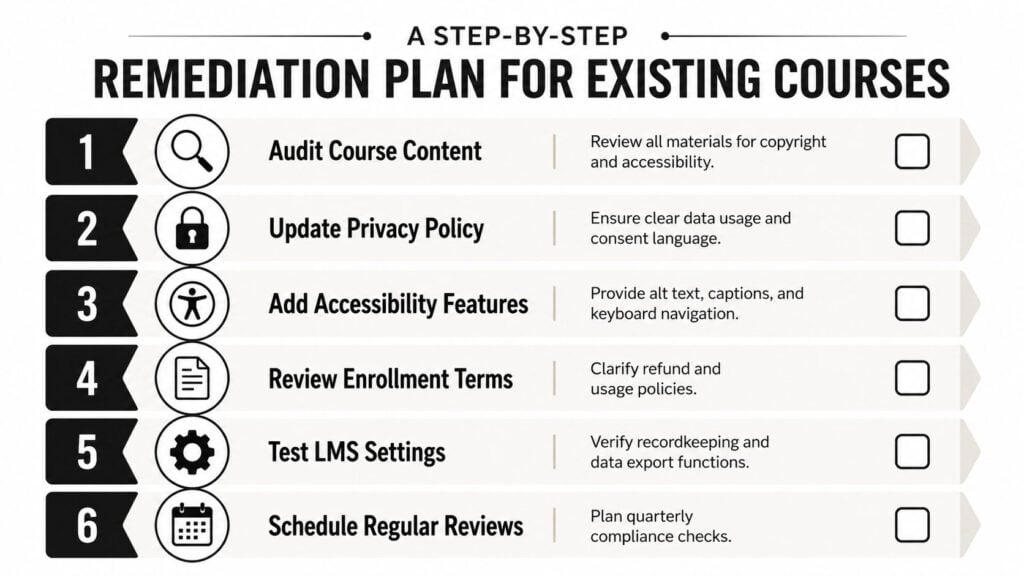
A practical order of operations
- Audit course content. Review slides, downloads, images, and quizzes for copyright use and obvious accessibility barriers.
- Update privacy policy. Make sure your data use and consent language matches what the LMS does.
- Add accessibility features. Add alt text, captions, keyboard navigation, and tagged PDFs where needed.
- Review enrollment terms. Clarify refunds, access windows, and acceptable use.
- Test LMS settings. Export sample reports and confirm your recordkeeping works.
- Schedule regular reviews. Put quarterly checks on the calendar so the course doesn’t drift.
The early steps can usually be handled in-house if the problems are straightforward. Captioning, alt text, and policy edits are often manageable. The moment you’re dealing with data retention, legal jurisdiction, or a dispute over rights to materials, I’d bring in outside legal or compliance help.
For certificate workflows, a tool that automates issue and renewal reminders can reduce manual errors. If that’s part of your setup, this overview of tools to automate course completion certificates is a useful reference point.
A simple checklist you can print
- Content rights checked
- Captions and transcripts added
- Keyboard navigation tested
- Privacy copy aligned to actual data collection
- Completion export verified
- Policy review date scheduled
If you’re only going to do two things this week, do the accessibility check and the report export test. Those two items expose more hidden problems than most creators expect.
Treating Compliance as Course Maintenance, Not a Project
Compliance doesn’t end when the course page goes live. It keeps going every time you update a module, issue a certificate, change a form, or sell into a new market. That’s why I treat it like maintenance, the same way you’d maintain a building system instead of repainting the lobby once and calling it finished.
The five pillars hold the course together in different ways. Accessibility keeps the course usable. Privacy keeps learner data handled properly. Copyright and intellectual property keep your assets lawful. Terms of service keep expectations clear. Pedagogical integrity keeps your promises aligned with the actual learning experience.
This week, test your LMS export and review your accessibility blockers. This quarter, schedule a full compliance audit and update your recordkeeping SOP. If you do those two things on repeat, you’ll spend less time defending the course and more time improving it.