LMS features required for HIPAA compliance training

You might be in this exact spot right now.
Your team has solid training content. The modules are clear. The quizzes work. People can log in and complete assignments without much friction. Then someone asks a simple question that changes the whole conversation: “Can our LMS support HIPAA compliance training in a way we can defend?”
That’s usually the moment the room gets quiet.
I’ve seen this happen with course creators, training managers, and instructional designers who are very good at building learning experiences and a lot less excited about parsing security rules, access controls, and audit logs. The problem is that HIPAA doesn’t stay in the legal department. It reaches right into your learning platform, your workflows, your reporting, and even how your team uploads files.
The good news is that this is manageable when you know what to look for. The LMS features required for HIPAA compliance training aren’t mysterious. They’re concrete. You can evaluate them, configure them, and build processes around them.
Why Your LMS is on the Front Lines of HIPAA Compliance
A lot of people treat the LMS like a content shelf. Upload the course, assign the audience, collect completions, move on.
For HIPAA training, that mindset breaks down fast. Your LMS becomes part of the evidence trail. It stores who took training, when they took it, what policy they acknowledged, whether they passed, and whether access to sensitive material was controlled. If a question comes up later, your LMS is often one of the first places people look.

That’s why I don’t think of HIPAA as just a legal checkbox. I think of it as an operational discipline. If you’re trying to understand the broader idea behind Regulatory Compliance, that framing helps. It’s about proving that your systems and your people consistently follow the rules that apply to them.
One real example makes this feel a lot less abstract. The Sault Tribe Health Division used a compliance-focused LMS and achieved a 99.98% training compliance rate, which MedTrainer ties to features like tracking and automated reminders that support HIPAA’s training mandate under 45 CFR § 164.530(b).
Why this matters in practice
If you’re assigning HIPAA training manually, chasing people in email, and exporting spreadsheets every time leadership asks for an update, you’re relying on effort instead of system design.
A stronger LMS changes the day-to-day work:
- Managers see gaps early instead of finding out after deadlines pass
- Learners get automated reminders rather than depending on a coordinator’s memory
- Compliance teams can pull proof quickly when someone asks for completion records
- Instructional teams can standardize policy acknowledgment instead of handling it ad hoc
Practical rule: If your LMS can’t show who completed training, when they completed it, and what they acknowledged, you’re already in a weak position.
HIPAA can sound intimidating because people often encounter it through penalties and fear. I think that framing gets in the way. The right LMS turns compliance into a repeatable process, and that makes the whole thing much less dramatic than it first appears.
Decoding HIPAA Rules for Online Training
Before you can judge LMS features, it helps to translate HIPAA into normal working language.
When I explain this to colleagues, I use a bank vault analogy. The vault is the sensitive information. The bank doesn’t just lock the room and call it done. It decides who gets a key, who can see records, who can change records, who gets trained on handling money, and how activity gets reviewed afterward. HIPAA asks for the same kind of discipline around health information.
What HIPAA is trying to protect
The term you’ll run into constantly is PHI, or protected health information. In plain English, that means health-related information tied to an identifiable person.
If your training environment includes learner records, uploaded documents, discussion activity, or policy attestations that connect to identifiable health information, you need to treat that environment carefully. Even if the LMS is “just for training,” the moment PHI enters the picture, your standards need to rise.
Who has responsibilities
Two terms confuse people all the time.
- Covered entities are organizations like healthcare providers, health plans, and others directly governed by HIPAA
- Business associates are vendors or service providers that handle protected information on behalf of those organizations
That second category matters a lot for LMS selection. If your LMS vendor is handling data in a way that brings them into HIPAA scope, you need the right contractual and technical setup, not just reassuring marketing copy.
What training requirements mean for your LMS
HIPAA training isn’t only about publishing a course called “HIPAA Basics.”
You need a system that supports the full training lifecycle:
- Assign the right training to the right people
- Track completion and acknowledgment
- Restrict access appropriately
- Retain records that show what happened
- Update training when policies change
That’s why weak platforms create problems. They may be fine for generic onboarding, but they fall apart when you need evidence, user-level controls, and defensible records.
Why general compliance advice still helps
I’ve found that HIPAA-specific work gets easier when teams also understand the broader habits behind compliance training. A practical example is this guide to effective HR compliance training for SMBs, which does a good job of showing how policy training, documentation, and role-based assignments fit together in real organizations.
A HIPAA course is only part of the answer. The stronger answer is a training system that assigns, tracks, documents, and restricts access in ways you can explain later.
Where people usually get tripped up
Most confusion comes from mixing up content compliance and platform compliance.
You can build an excellent HIPAA lesson in a weak LMS. The content may be accurate. The course may look polished. But if the platform can’t control access, preserve records, and support secure operations, the training program still has a problem.
Another common mistake is assuming that if a vendor says “secure,” that automatically means suitable for HIPAA-related training. It doesn’t. You need to ask what security controls exist, how activity is logged, what the reporting looks like, and whether the vendor supports the legal relationship required for handling sensitive data.
That’s where feature-level evaluation starts to matter.
The Core LMS Features for HIPAA Compliance
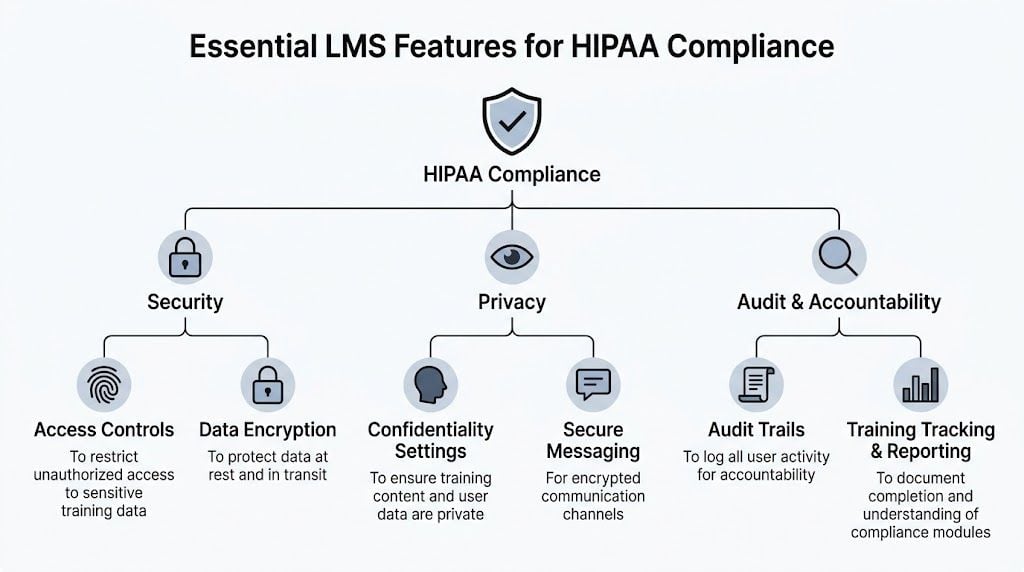
Here’s the short version. The LMS features required for HIPAA compliance training need to do two jobs at once.
First, they have to protect sensitive information. Second, they have to prove training happened in a way your organization can document.
The LMS market grew to over $23 billion by 2023, with 83% of organizations using one, and in healthcare that adoption is tied to features like zero trust architecture and detailed audit trails as organizations respond to breach risks that exposed over 540 million records in US healthcare in 2021, according to Accountable.
For a broader security baseline, I also like this walkthrough of LMS security features course creators should know. It’s useful if you’re comparing healthcare needs against general platform security.
Security controls you should treat as non-negotiable
Some features are table stakes.
- Encryption for data at rest and in transit. The verified guidance specifically calls out AES-256 recommended for PHI. If a vendor gets vague here, I get cautious quickly.
- Role-based access controls (RBAC). People should only see what they need for their role. A trainer, manager, compliance lead, and learner should not all have the same visibility.
- Automatic logoffs. This matters more than people think, especially in shared environments or busy healthcare settings.
- Zero trust security architecture. In practical terms, the platform should assume access needs to be verified, not casually trusted because someone is already “inside.”
A good vendor can explain these controls in plain English and show how they work in the admin area.
Audit trails that are actually useful
A lot of LMS platforms say they have logs. That doesn’t mean the logs will help you when pressure is on.
For HIPAA training, you want immutable, time-stamped audit trails that can be filtered by user, role, department, or facility. You also want exports that are practical during reviews or investigations, not a giant blob of unreadable system activity.
Here’s what I look for:
- User-level detail so you can isolate one person’s actions
- Timestamps that show when training, acknowledgments, or access events happened
- Change history for policy updates, course revisions, and admin actions
- Filter options that let you narrow results without custom engineering
- Export formats your compliance or security team can use
If the demo only shows a pretty dashboard and avoids the raw log details, keep asking questions.
Reporting and completion evidence
HIPAA training records should be easy to retrieve and hard to dispute.
That means your LMS should support:
- Real-time progress tracking
- Completion records
- Assessment scores
- Certificate generation
- Policy acknowledgment records
- Exception reporting for overdue learners
Many teams feel relief once they move off manual tracking. The platform should tell you what’s done, what’s overdue, and what still needs follow-up without requiring spreadsheet gymnastics.
Standards support and deeper activity data
If you build or buy interactive learning content, standards matter.
Platforms should support SCORM/xAPI standards with an embedded Learning Record Store (LRS). That gives you more granular learning evidence over time, including completion, scores, certificates, and policy acknowledgments.
This matters when a simple “completed” status isn’t enough. You may want to know whether a learner passed a required assessment, revisited a module after an update, or acknowledged a revised privacy policy.
Integrations that reduce compliance mistakes
One of the sneakiest risks in compliance training is bad user data.
If your LMS roster doesn’t match your actual workforce, you’ll assign the wrong people, miss new hires, or lose track of role changes. Verified guidance highlights integration with HR systems like ADP and UKG for person-by-person tracking and cleaner compliance workflows.
That’s not glamorous, but it’s huge. Good integration helps with:
- Automatic provisioning of new users
- Role changes that trigger new training
- Department-level reporting
- Cleaner termination handling
- Less duplication across systems
Dashboards and alerts that help before deadlines slip
Dashboards aren’t just for executives. In a HIPAA context, they should help people act.
Useful examples include risk visibility by department, alerts for expiring assignments or certifications, and one-click reports for managers who need to follow up with their teams. The difference between a decent LMS and a strong one often comes down to how quickly someone can spot a compliance gap and respond.
The contractual piece many teams forget
The platform features matter, but so does the vendor relationship.
If the vendor is going to handle data in a way that creates HIPAA obligations, you need the right contractual support, including a Business Associate Agreement (BAA) where appropriate. I bring this up because teams sometimes get dazzled by content features and forget to ask whether the vendor can support the compliance relationship legally and operationally.
That omission can sink an otherwise promising platform choice.
What a good HIPAA-ready LMS feels like day to day
When an LMS is configured well for HIPAA training, the admin experience feels calm.
Assignments trigger automatically. Managers can see exceptions. Learners know what’s due. Security and compliance teams can retrieve records without opening a scavenger hunt. The platform behaves less like a generic course website and more like a controlled training system.
That’s the standard I’d hold vendors to.
Your HIPAA LMS Evaluation Checklist and Vendor Questions
This is the part I wish more buyers brought into demos.
A lot of LMS evaluations go off track because the buyer asks broad questions and the seller gives broad answers. “Yes, we support reporting.” “Yes, security is a priority.” “Yes, healthcare clients use us.” None of that helps much.
What helps is a checklist you can score and a set of questions that force specifics.
HIPAA-compliance LMS feature checklist
| Feature / Requirement | What to Look For (Green Flag) | What to Avoid (Red Flag) |
|---|---|---|
| Access controls | Admin can set permissions by role, team, department, or facility | Everyone with admin status sees everything |
| Audit trail | Time-stamped, immutable logs with filtering and export options | Basic activity feed with no reliable filtering |
| Reporting | Completion, overdue status, assessment records, acknowledgments, certificates | Only high-level dashboards with little learner detail |
| Encryption | Clear documentation for data protection at rest and in transit | Vague language like “bank-level security” without detail |
| Session security | Automatic logoff and strong sign-in controls | Unlimited idle sessions and weak account controls |
| Standards support | SCORM or xAPI support, ideally with embedded LRS functionality | Content tracking limited to simple launch and completion |
| HR integration | Sync with systems such as ADP or UKG for cleaner assignment logic | Manual CSV uploads for every workforce change |
| Alerts and reminders | Automated reminders, expirations, and exception notifications | Admin must remember to send every reminder manually |
| Documentation exports | One-click rosters, certificates, and exception reports | Support team must build custom reports every time |
| BAA readiness | Vendor can clearly discuss HIPAA-related contractual support | Seller dodges the question or answers vaguely |
| Policy attestation | Platform can capture acknowledgments tied to users and timestamps | Policy sign-off handled outside the LMS |
| Admin workflow | Easy to review by person, role, and department | Compliance review requires too many workarounds |
Questions I’d ask in every demo
Bring these with you and write the answers down.
- Show me the audit trail. Don’t describe it. Show filtered logs for one learner and one admin.
- How are policy acknowledgments stored? I want to see timestamps and the user record.
- What happens when someone changes departments or roles? Ask whether training assignments update automatically.
- What reports can I export without support help? This question reveals a lot about day-to-day usability.
- How do automatic reminders work? Look for flexibility, not just a single default notice.
- Can you support SCORM or xAPI tracking in a way that preserves detailed completion evidence?
- How do you handle session security and automatic logoff?
- What permissions can I set for instructors, compliance leads, managers, and auditors?
- If we need documentation quickly, what can we export in one click?
- What does your BAA process look like, where applicable?
My rule of thumb: If a vendor answers a direct question with a brochure sentence, ask for the screen share.
A practical add-on for certificate workflows
If your program issues proof of completion, it helps to think through automation early. This guide on tools to automate course completion certificates is useful because certificate logic often becomes part of the evidence package in compliance-heavy training.
Red flags that should slow you down
I don’t automatically reject a platform over one weak answer. But a pattern matters.
Watch for these:
- Security claims without demonstrations
- Reporting that looks polished but lacks record depth
- No clean answer on BAA support
- Manual user management for basic workforce changes
- No meaningful distinction between learner, manager, and compliance permissions
- Export limitations that trap your records in the vendor’s interface
When you’re done with demos, you should be able to defend your choice to legal, IT, and leadership without crossing your fingers.
Setting Up for Success: Configuring Your Compliant LMS
Buying the right platform is only half the job. A secure LMS can still be used in sloppy ways.
I’ve seen organizations choose a solid system and then undermine it by giving broad admin rights, uploading the wrong files, skipping reminder rules, or failing to teach staff how to use the platform safely.
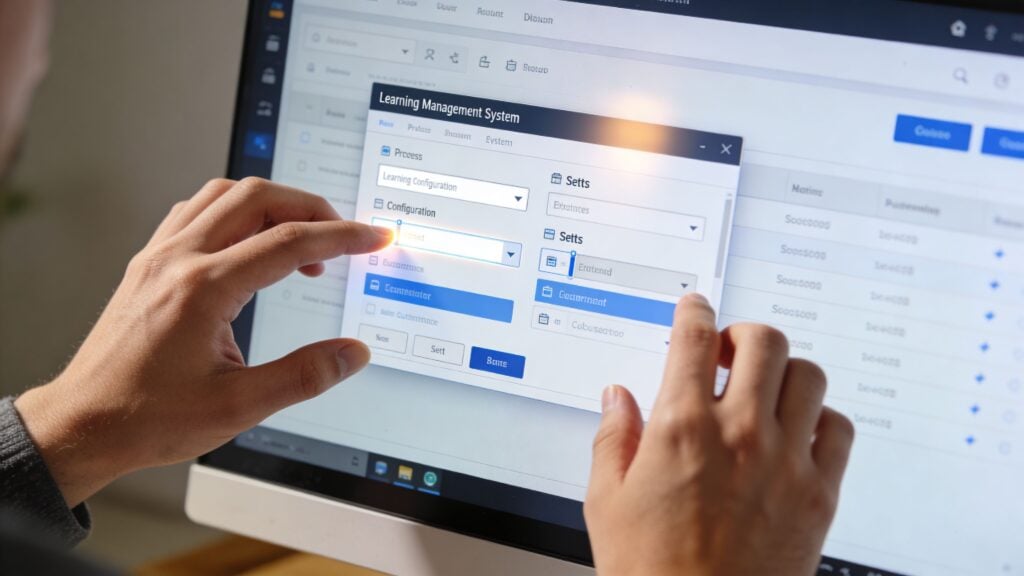
One gap comes up again and again. Teams train staff on HIPAA in general, but not on secure LMS use itself. That matters because, according to the AIHCP guide, mobile access can cut costs by 60%, yet it also creates risks if users aren’t trained on PHI protocols within the platform, and organizations with integrated training tools see 90%+ completion rates versus 70% with manual methods according to AIHCP.
Start with roles and least-privilege access
The first configuration step I recommend is boring but critical. Map your user roles before launch.
You want the principle of least privilege in practice. That means each person gets the minimum access they need to do their work.
A simple version might look like this:
- Learners can access assigned content and their own records
- Managers can view completion status for their direct team
- Instructors can manage course delivery without broad security permissions
- Compliance leads can access reports, attestations, and audit-related exports
- System admins handle platform configuration and integrations
When everyone gets “super admin” because it’s easier, problems follow.
Build assignment logic that mirrors the real organization
A HIPAA training program runs better when assignments are connected to role, location, or department instead of one-off manual enrollments.
Think about the groups you’ll need:
- New hires
- Clinical staff
- Supervisors
- Contractors or external partners
- Departments with added privacy risk
- People due for renewal or updated policy acknowledgment
If your LMS can sync this from HR data, even better. If it can’t, create a disciplined grouping structure from day one.
Strong compliance workflows usually look simple from the learner side because somebody did the hard thinking on the admin side.
Set reminders, escalations, and reporting schedules early
Don’t wait until your first overdue training cycle to decide how reminders should work.
I usually suggest teams configure:
- Pre-due reminders so people get enough notice
- Due-date notices that are direct and hard to miss
- Past-due escalations for managers or supervisors
- Recurring compliance reports sent automatically to the right stakeholders
That setup takes pressure off administrators. It also creates a documented rhythm that’s easier to defend.
If you want a practical companion for the reporting side, this guide to how to audit LMS user activity is helpful when you’re deciding what to monitor and how to review it consistently.
Train your team on secure LMS behavior
This is the blind spot I see most often.
People know not to email sensitive information casually, but they may still make mistakes inside the LMS if nobody has shown them the boundaries. For example, they may upload a file with more information than needed, use collaborative features loosely, or share accounts for convenience.
Give your team platform-specific guidance on things like:
- What kind of information can and cannot be uploaded
- How to handle password hygiene and sign-in security
- What to do if they notice suspicious access or an accidental upload
- How to use comments, messaging, or social features safely
- When to involve compliance or IT
A short internal course inside the LMS often works well here. People learn the platform securely inside the platform they’re using every day.
Here’s a useful explainer if you want a quick visual overview before configuring your workflows:

Create an incident response path inside the training process
You don’t need a dramatic breach scenario to justify this. Small mistakes are common enough.
Decide in advance:
- Who gets notified first
- How a questionable upload or access event is reviewed
- Where evidence is captured
- How temporary access is suspended if needed
- How retraining is assigned after an incident
Configuration and policy meet. A well-set-up LMS supports the response instead of becoming part of the confusion.
Future-Proofing Your Compliance with Advanced Features
Basic compliance features keep you organized. Advanced features can help you get ahead of trouble.
That shift matters. A traditional LMS tells you who is overdue after the fact. A more advanced one can help identify patterns earlier, before a deadline slips or a recurring weakness grows into a reporting issue.

Where AI starts to matter
This is one of the more interesting changes in healthcare learning tech right now.
AI-powered LMS platforms are introducing predictive compliance monitoring to identify gaps before they happen, and platforms like Absorb LMS report up to a 60% reduction in administrative costs along with improved compliance rates through automation and intelligent certification management, according to Absorb LMS.
That doesn’t mean you should hand compliance over to AI and stop thinking. It means the platform can surface risk signals earlier.
Examples include:
- Flagging learners likely to miss renewals
- Detecting engagement patterns that suggest a course isn’t landing
- Prompting recertification workflows automatically
- Allowing natural language searches for overdue or missing training
Adaptive learning can reduce training fatigue
A lot of HIPAA training suffers from a blunt-force approach. Everyone gets the same content in the same sequence, no matter what they already know.
Adaptive learning features can improve that experience by adjusting the path based on a learner’s knowledge level or performance. Someone who already understands core privacy rules may move faster through foundational sections, while another learner gets more reinforcement where they need it.
That can help with two things at once. Better learner engagement and cleaner use of staff time.
Compliance gets stronger when the platform helps people intervene early instead of react late.
What I’d prioritize next
If you’re choosing between a platform with basic tracking and one with more advanced forecasting, I’d look closely at these capabilities:
- Predictive alerts for expiring certifications or likely non-completion
- Intelligent assignment rules based on role changes
- Adaptive pathways for different learner proficiency levels
- Natural language reporting for faster admin work
- Behavioral analytics that highlight where retraining may be needed
None of these replace the core controls. They sit on top of them.
I’d rather have a platform with excellent audit logs and role controls than one with flashy AI and weak fundamentals. But once the core is solid, advanced features can make your compliance program much more proactive.
Essential FAQs for HIPAA Training on an LMS
Can I use a general-purpose course platform for HIPAA training?
Sometimes, but I’d be careful.
A mainstream course platform may work for publishing content, collecting quiz answers, and issuing certificates. That doesn’t mean it has the access controls, audit logs, reporting depth, and vendor support needed for HIPAA-related use. The biggest risk is assuming “secure enough for courses” also means suitable for regulated training. Those aren’t the same standard.
Does a vendor saying “HIPAA-compliant LMS” solve everything?
No.
An LMS can support HIPAA-aligned training workflows, but your organization’s configuration and use of the platform still matter. If you assign the wrong permissions, upload inappropriate data, fail to review logs, or skip staff training on secure platform use, a strong LMS won’t save you from weak process decisions.
Do I need a Business Associate Agreement?
If the vendor’s role brings them into HIPAA scope for the data involved, yes, that conversation needs to happen. I wouldn’t treat this as a side question for procurement. Ask early, get a clear answer, and make sure legal or compliance reviews it.
What records should the LMS preserve?
At minimum, think in terms of evidence you can explain later. That usually includes completion records, assessment results, policy acknowledgments, timestamps, user identity, and relevant admin actions tied to assignments or updates. If your current platform makes those hard to retrieve, that’s a warning sign.
Is training content alone enough to make us compliant?
No. Good content helps people understand privacy expectations. Compliance also depends on system controls, documentation, secure workflows, and how consistently your team follows them.
What’s the simplest way to sanity-check an LMS during evaluation?
Ask the vendor to demonstrate three things live: user permissions, audit logs, and exportable completion evidence. If they can’t show those clearly, I’d keep looking.
If you’re building or refining a compliance-heavy training program, LearnStream publishes practical guides for course creators, training teams, and digital education operators who need clearer answers on LMS selection, learning design, and scalable delivery.