Customer Education Platform: The Complete Guide

A new customer signs up, watches the welcome video, and starts clicking around with real enthusiasm. Then they reach the feature that makes your product valuable, but the setup is confusing. They search the help center, open a support ticket, wait for an answer, and decide the product takes too much work.
Your support team sees one ticket. The customer feels stuck, disappointed, and uncertain about the purchase. By the time the renewal conversation arrives, the issue has become a judgment about the whole product.
A well-timed lesson could have changed the sequence. A short walkthrough inside the product, followed by a role-based learning path and a clear activation milestone, might have helped the customer reach value before frustration took over.
That’s the reason the customer education platform category exists. These tools give customer-facing teams a structured way to teach users, connect learning with product behavior, and turn education into part of the customer journey. By the end of this guide, you’ll have a practical way to decide whether your business needs a dedicated platform or should connect education across the tools you already use.
The Moment a Customer Education Platform Would Have Saved the Day
I’ve seen this pattern from both sides. The product team thinks the feature is intuitive because they helped design it. The support team knows customers struggle because the same question keeps appearing in the queue. The customer sees neither perspective. They only know that something they paid for isn’t working as expected.
Suppose a new account needs to configure reporting before the product becomes useful. The customer completes registration, invites colleagues, and opens the reporting area. A required setting is buried behind an unfamiliar menu. They leave the page and ask support for help.
Support sends an article. The article is accurate, but it assumes the reader understands the product’s terminology. The customer follows part of it, misses a step, and replies. A support agent jumps on a call, explains the setup, and closes the ticket. Everyone moves on until another user from the same account asks the same question.
The problem isn’t a lack of information. It’s a lack of instruction at the moment of need.
A customer education platform can place the right lesson earlier in the journey. The customer might receive a short onboarding path based on their role, see a product walkthrough when they open reporting, or earn a certificate after demonstrating the workflow. The support team gets fewer repetitive explanations, while the customer gains confidence before the renewal conversation.
Practical rule: If customers repeatedly ask how to complete a task that drives product value, that task deserves a learning experience, not only a help article.
This category has grown because teams now connect education with adoption, retention, support efficiency, and expansion. The challenge is choosing the right level of infrastructure. A small company may need better habits and clearer content inside existing tools. A larger company may need account-level reporting, certifications, audience segmentation, and integrations that a basic knowledge base can’t provide.
What a Customer Education Platform Actually Is
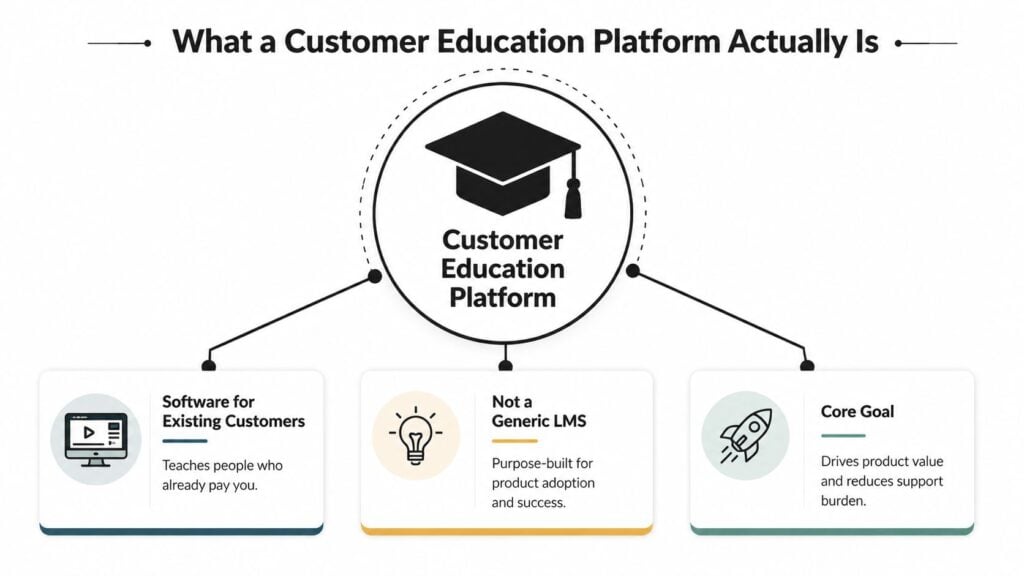
A customer education platform is software built to teach people who already pay for your product or service. Its job is to help those customers understand the product, use more of its valuable capabilities, and continue making progress after the initial purchase.
That makes it different from a corporate learning management system. An employee LMS trains people inside your organization. A customer education platform serves external audiences, often with branded portals, customer-specific learning paths, product-focused content, certificates, and connections to customer relationship systems.
It also differs from a knowledge base. A knowledge base is excellent for answering a focused question, such as “How do I reset a password?” Education creates a sequence. It can guide a new administrator from setup to first outcome, then introduce advanced workflows as the learner becomes ready.
The gym, the app, and the trainer
Think of a gym as your product. It contains the equipment and possibilities, but walking through the door doesn’t guarantee results.
A fitness app provides exercises and reminders. That’s similar to a knowledge base or a library of tutorials. It helps people find information, but the learner still has to decide what to do next.
A personal trainer creates a plan, adjusts it to the person, watches progress, and connects each exercise to a goal. A customer education platform plays a similar role at scale. It can assign learning based on role or account, deliver onboarding journeys, provide assessments, issue certificates, and show whether learning connects with product use.
The strongest platforms handle several jobs together:
- Onboarding: Help new users reach their first meaningful outcome.
- Product education: Explain workflows that require more than a single answer.
- Certifications: Validate that a user has learned a process or capability.
- In-product guidance: Put relevant instruction close to the feature being used.
- Live learning: Support workshops, cohorts, office hours, and webinars.
- Business reporting: Connect learner activity with account health, adoption, support, and renewal data.
The category became strategically important when companies stopped treating training as a support add-on and started treating it as a revenue and retention function. A 2024 Forrester study reported that 96% of organizations recouped their investment in customer education, 86% saw a positive return, and targeted products produced an average 7.6% increase in annual revenue. The same research reported an average 7% reduction in annual customer support costs for customer education programs, as summarized by Intellum’s customer education statistics.
For readers comparing broader learning technology, AI Learning Management Systems can help clarify how newer LMS products use automation and artificial intelligence. The important distinction remains audience and purpose. Customer education starts with the customer’s product journey.
Core Features That Actually Matter in 2026
A feature checklist can make every vendor look similar. I’d rank platforms by how well they connect learning activity to customer outcomes, not by how many buttons appear in a demo.
The market is large enough that vendors are adding capabilities quickly. One 2025 market report valued the global customer education platform market at $2.1 billion and projected growth to $5.8 billion by 2034 at a 15.2% compound annual growth rate. The report also said software represented 65.3% of the market, while North America held 38.2% of revenue share, according to Tami’s customer education statistics report.
Start with guided learning
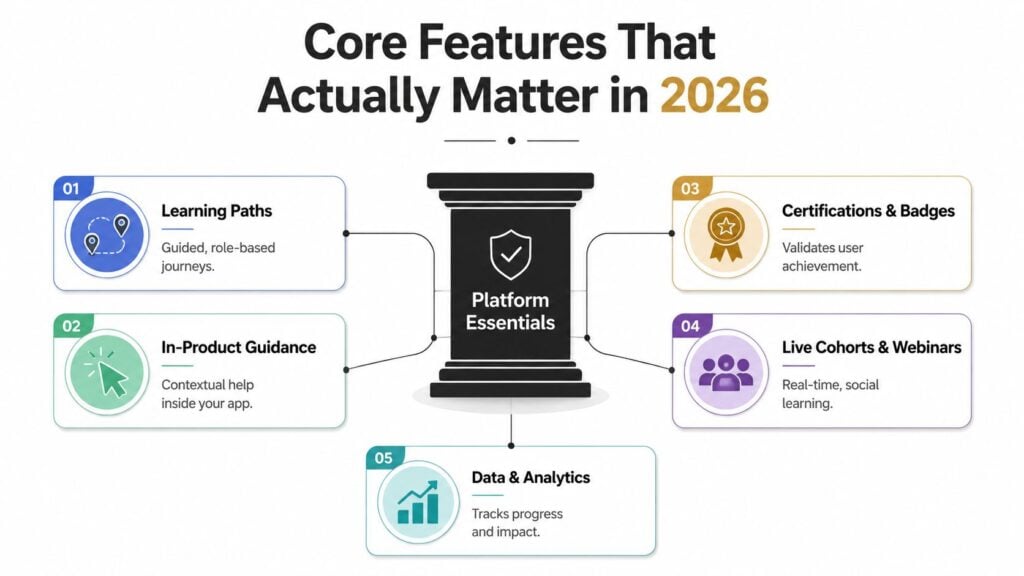
Learning paths should be flexible enough to serve different roles, plans, industries, and stages of adoption. A new end user shouldn’t receive the same path as an administrator managing permissions. Look for prerequisites, branching, automated enrollment, content releases, and a simple way to update a path when the product changes.
In-product guidance comes next. A course can explain a feature, but a contextual prompt can appear while the customer is using it. The best experiences connect the two. A user might see a short explanation in the application, then open a deeper lesson without losing their place.
You can also use LearnStream’s guide to LMS features as a checklist for foundational learning management capabilities. A customer education platform needs those basics, but it also needs to understand the customer context around them.
Treat proof and interaction as product capabilities
Certifications and badges matter when customers need to prove competence, when partners need consistent training, or when advanced education can be sold. Certificates should be branded, automatically issued, shareable, and tied to completion or assessment rules.
Live cohorts and webinars give learners interaction that self-paced content can’t always provide. The platform should handle registration, reminders, attendance, replay access, and movement from a live session into a structured learning path.
Content authoring is equally important. If every small update requires engineering support, your program will fall behind product releases. Look for support for video, text, assessments, embedded material, version updates, and reusable components.
Demand data that can travel
The most valuable feature is often less visible in a demo. Your platform should offer dependable APIs, webhooks, and analytics exports so learning records can move into your CRM, product analytics system, and customer data warehouse.
That lets you connect a completed onboarding path with an activation event, or compare certification with support activity. A platform that only reports course completion leaves your customer success team with a polished but isolated dashboard.
How It Stacks Up Against the Tools You Already Have
Most companies already own several pieces of the customer learning puzzle. The question is whether those pieces form a coherent program or just a collection of useful destinations.
A knowledge base handles searchable answers. A support platform manages conversations and tickets. A community platform creates peer interaction. A CRM stores account relationships and commercial history. An LMS delivers structured learning. A customer education platform overlaps with all of them, then adds a layer for organized customer learning and outcome tracking.
| Goal | Best Fit | Why |
|---|---|---|
| Answer focused product questions | Knowledge base | Fast, searchable self-service information |
| Resolve individual problems | Customer support software | Tracks conversations, ownership, and escalation |
| Deliver structured training and certificates | Customer education platform | Supports paths, assessments, external audiences, and learning records |
| Enable peer discussion | Community platform | Encourages conversation, sharing, and user connection |
| Manage account and renewal context | CRM | Holds customer, opportunity, and lifecycle data |
| Train employees on internal processes | Corporate LMS | Designed for workforce learning and administration |
A support platform remains essential even when education is mature. If you’re comparing support infrastructure, a guide to the Sight AI customer support platform can help separate ticket management from proactive customer instruction. Support answers the problem in front of you. Education helps prevent the same problem from returning.
The gray area is where buyers get stuck
Product teams may build in-app checklists. Marketing may publish webinars. Customer success may create onboarding documents. Support may maintain a help center. Each activity can work on its own, but the customer experiences the gaps between them.
A dedicated platform becomes more compelling when you need role-based access, structured paths, formal certification, account-level reporting, or paid education. If you only need a searchable answer center, a knowledge base is probably enough. If you need to understand how learning affects adoption and renewal, stitching tools together becomes harder.
Recent research found that 63% of organizations still operate in ad hoc or improvised modes for customer learning, while only 25% have adopted dedicated customer education platforms. That gap suggests many buyers are assembling programs from existing systems rather than running a defined education operation, as reported by Learning News.
Decision lens: Buy a dedicated platform when customer learning has owners, recurring journeys, measurable outcomes, or revenue attached to it. Stitch tools together while the program is still experimental and simple.
For a related comparison of learning administration categories, see LMS versus training management system. The same discipline applies here. Define the job before choosing the software.
Three Use Cases Worth Modeling Your Program On
The easiest way to understand a customer education platform is to follow the learner. The tools matter because they support a journey that someone on your team already needs to manage.
SaaS onboarding that leads to activation
A new customer receives access based on their role and plan. The administrator starts with setup, invites colleagues, configures a key workflow, and completes a short assessment. The platform sends reminders, records milestones, and passes learning activity to the customer success system.
The onboarding owner may sit in customer success, product education, or growth. The useful measures include time to first value, completion of the onboarding path, and whether the account reaches the product event that signals activation.
Keep the lessons short where the task is narrow. Microlearning has been reported to improve knowledge retention by 25% to 60% compared with longer traditional formats, with average completion around 80% versus roughly 20% for conventional long-form eLearning, according to Continu’s corporate eLearning research.
Complex products that need proof of competence
A CRM, analytics product, or workflow system can offer dozens of capabilities. Customers often adopt the first feature they understand and ignore the rest. A structured academy can guide users from core workflows to advanced use cases, then issue a certification that recognizes practical knowledge.
Product education or customer success usually owns this program, with support contributing the questions customers ask most often. The team can watch certification completion, adoption of target features, ticket volume associated with trained workflows, and account engagement over time.
The certificate shouldn’t be decorative. It should represent a clear learning standard and help the customer know what they can do next.
External training that creates revenue
Some companies teach a broader market, including prospects, partners, consultants, or independent practitioners. The platform becomes a storefront as well as a learning environment. A visitor buys access to a course, follows a self-paced path, attends optional live sessions, and receives a certificate after meeting the requirements.
Marketing may own acquisition, while an education team owns curriculum and operations. Useful measures include paid enrollments, course revenue, completion, repeat purchases, and whether certified learners become stronger product advocates or partners.
Webinars fit naturally into this model. A live event can introduce the topic, while the replay and follow-up path create a more durable learning experience. The platform should make that handoff easy rather than leaving the recording buried in an event tool.
How to Evaluate Vendors Without Getting Sold To
Vendor demos often begin with the prettiest part of the product. I’d begin somewhere less exciting, with the data and the work your team must perform every week.
Ask integration questions first
Bring a real account record to the demo. Ask how the platform identifies the account, what happens when a learner changes roles, and whether course activity can reach your CRM, product analytics tool, and customer data warehouse.
Check for APIs, webhooks, scheduled exports, permissions, and error handling. A native Salesforce integration may be useful, but a reliable API matters when your stack changes or your reporting team needs a different data path.
Test the learning experience with real content
Ask the vendor to build a short path from your existing materials. Test video, assessments, certificates, branching, search, mobile layouts, accessibility controls, language handling, and branding.
Give the same test to someone who didn’t attend the sales demo. If that person can’t find the next lesson or resume a course, your customers probably won’t either.
Use this checklist during evaluation:
- Data connections: Can the platform sync CRM segments, product events, and account identifiers?
- Authoring ownership: Can your education team update content without engineering help?
- Accessibility: Does the experience work with keyboard navigation, captions, readable contrast, and assistive technology?
- Commercial model: Can you sell courses or certifications if monetization becomes part of the plan?
- Operational control: Can you manage enrollment, reminders, permissions, certificates, and content changes at scale?
Pricing deserves its own investigation. Vendors may charge per learner, active learner, course, account, or platform tier. Ask what counts as an active learner, whether archived users remain billable, and which features require an upgraded plan.
The true cost can also include implementation services, content migration, SSO, certification workflows, custom integrations, support packages, and internal administration. Don’t accept a quote until the vendor has mapped those items to your actual rollout.
Know what an implementation window involves
A practical launch begins with a narrow use case. Your team defines the audience, selects a small set of learning goals, connects identity and account data, imports or creates content, tests the learner journey, and agrees on reporting.
A longer rollout may involve multiple brands, languages, products, or certification rules. The timeline matters less than ownership. Assign someone internally who can make decisions about curriculum, data, product changes, and customer communication.
A 2025 industry report identified proving business impact as the number one challenge for customer education programs, while executives cared most about time-to-value and product adoption. The same report found that 22% of programs were already monetizing training, according to SaaS Academy Advisors.
Vendor test: Ask each finalist to show the complete path from account sync to learner action to business report. A polished course screen isn’t enough.
Metrics, Reporting, and the Dashboard That Actually Gets Read
Completion rate is useful, but it’s a starting signal rather than a business result. A learner can finish every lesson and still fail to configure the product, adopt the target feature, or renew the account.
The dashboard should join learning events with customer and product data. The account is usually the useful reporting unit because retention, expansion, and renewal decisions happen at the account level. Individual learner records still matter, but they become more valuable when they help explain account behavior.
Build the reporting chain
Start with learning activity, then connect it to the customer outcome that matters.
- Time to first value: How quickly does a newly educated account reach its first meaningful product outcome?
- Onboarding completion: Which accounts finish the path, and where do learners stop?
- Product adoption milestones: Do trained users complete the product actions the curriculum supports?
- Support ticket volume: Does education correspond with fewer questions about the trained workflow?
- Certification rate: Which roles or accounts demonstrate the required knowledge?
- Expansion revenue: Do educated accounts adopt additional products or capabilities?
- Retention and renewal: How does learning engagement relate to account health and renewal behavior?
This structure supports stronger analysis than a standalone LMS report. You can compare cohorts, inspect time between learning and activation, and identify whether a lesson is associated with a meaningful behavior change. Correlation doesn’t automatically prove causation, but it gives your team a defensible place to investigate.
For broader support reporting context, Halo AI’s guide to customer support metrics offers a useful companion view. Support volume belongs beside education activity, not in a separate conversation.
Webinars need their own layer. A benchmark covering roughly 12,400 B2B webinars from Q3 2025 to Q1 2026 found a median registration-to-live-attendance rate of 41.6%. It also reported that attendees who joined live or watched at least 25% of the replay became MQLs at a 38% rate within 14 days, according to Digital Applied’s webinar benchmarks.
Use LearnStream’s beginner guide to LMS reporting dashboards when you’re designing the reporting layer. Keep the executive view focused on adoption, time-to-value, support, and account health.
Putting It All Together and Picking Your Next Move
A small team with one product and a manageable support queue probably doesn’t need a dedicated customer education platform yet. Start by creating a repeatable learning habit inside the tools you already have. Turn the most important support questions into short lessons, organize them into a simple onboarding path, and track whether customers reach the product actions that matter.
A growing company has a different decision. If you’re selling to mid-market or enterprise customers, supporting several roles, running recurring training, or charging for education, a dedicated platform may give your team the structure that stitched tools lack. Use the evaluation checklist to test data flow, authoring, accessibility, pricing, and reporting before you compare interface polish.
Enterprise programs need more planning. Multiple products, formal certifications, complex permissions, compliance requirements, and regional delivery can make integration and governance as important as course creation. Give the program an internal owner who can coordinate product, customer success, support, marketing, and data teams.
LearnStream brings learning management capabilities together with registration management for courses and programs, including online, in-person, and hybrid delivery, along with continuing education credits, transcripts, and certificates. It’s one option to consider when your education model includes structured programs and registration workflows.
The next useful step is small. Choose one customer journey, write down its desired product outcome, and audit every tool currently involved. If the journey needs structured paths, account-level measurement, certifications, or paid access, shortlist customer education platforms. Then explore related LearnStream guidance on membership pricing, drip courses, and learning management systems before you book vendor demos.
Choose one onboarding or adoption journey this week and map its learner steps, product milestones, support questions, and account outcome on a single page. If the map reveals gaps your current tools can’t handle, use it as your vendor brief and start testing platforms against the customer experience, not the sales presentation.