Learning Management System Comparison Guide for 2026
You’ve sat through three LMS demos, watched the same feature tour each time, and still can’t answer the question that matters: which platform can your team run without creating a second full-time job?
That’s the part most learning management system comparison articles miss. A platform can offer excellent authoring, assessments, mobile access, reporting, integrations, and automation, yet still be a poor purchase if your team lacks the time or technical skill to configure and govern it.
I’ve switched LMS platforms twice. Both migrations looked sensible on paper. One worked because the daily administration matched our capacity. The other created a steady stream of plugin maintenance, workarounds, and small support tasks that nobody had budgeted for.
The market has grown far beyond basic course hosting. One estimate places the global LMS market at USD 28.6 billion in 2025, with a projection of USD 123.8 billion by 2033 at a 20.2% CAGR. Another estimate puts the 2025 market at USD 30.07 billion, with a 16.6% CAGR from 2026 to 2032. You can review the underlying market figures in this LMS market analysis from MarketsandMarkets.
| LMS category | Typical buyer | Administration burden | Strongest reason to choose it | Main risk |
|---|---|---|---|---|
| All-in-one course platform | Solo creator or small education business | Low | Fast selling and delivery | Limited enterprise depth |
| Open-source self-hosted | Technical institution or organization | High | Control and customization | Hosting and maintenance |
| Enterprise SaaS suite | Large organization | Medium to high | Scale, governance, integrations | Cost and implementation effort |
| Corporate training platform | L&D or compliance team | Low to medium | Structured training workflows | Less flexibility for unusual models |
The rest of this guide treats an LMS as an operating system for learning, not a shelf of features. Start with category, then calculate total cost, then test whether your team can support the platform over time. For a broader decision checklist, use this practical guide on how to choose an LMS.
Why Picking an LMS Feels Overwhelming Right Now
The usual buying process starts innocently. You search for an LMS, create a shortlist, and book a few demos. By the third sales call, every vendor has shown you a course builder, quizzes, certificates, a mobile app, analytics, gamification, integrations, and some form of AI assistance.
The screens look different, but the sales language overlaps. AI quizzes, mobile learning, gamification, SCORM compliance, automation, and dashboards appear on nearly every shortlist. That makes feature recognition almost useless. If every platform claims the same headline capability, the decision moves somewhere else.
The comparison problem is operational
Pricing often changes with learner volume, contract length, implementation needs, support level, and optional modules. A public price may help a small buyer estimate a starting point, but larger organizations frequently need a custom quote. Two buyers can ask about the same platform and receive very different commercial proposals.
The exit risk creates another layer of anxiety. Once a team has uploaded courses, enrolled learners, connected identity systems, configured reports, and built internal processes around an LMS, leaving becomes a project. Buyers worry about losing content, learner history, certificates, integrations, or the staff knowledge required to operate the replacement.
Practical rule: Treat every LMS purchase as a staffing decision. Ask who will configure it, maintain it, troubleshoot it, and own the learner experience after launch.
I’ve found that the strongest comparison starts with five questions:
- Who creates the courses? A solo instructor needs different authoring controls from a university instructional design team.
- Who administers the platform? A part-time creator should avoid systems that need constant technical attention.
- Who pays for access? Consumer course sales, employee training, and external customer education produce different commercial needs.
- How technical is the buyer? Open-source flexibility only helps when someone can manage hosting, updates, plugins, and security.
- What carries more weight, content or compliance? A video-first membership site doesn’t need the same audit trails as regulated workforce training.
Higher education institutions had reached 85% LMS implementation worldwide in 2023, compared with 73% in 2021, while corporate training adoption was reported at 92% in 2023, up from 78% in 2019, according to the figures summarized by Fortune Business Insights. Those figures help explain why modern platforms serve such different buyers. They also explain why a generic “best LMS” list usually creates more confusion than clarity.
The Four LMS Categories Every Buyer Should Know
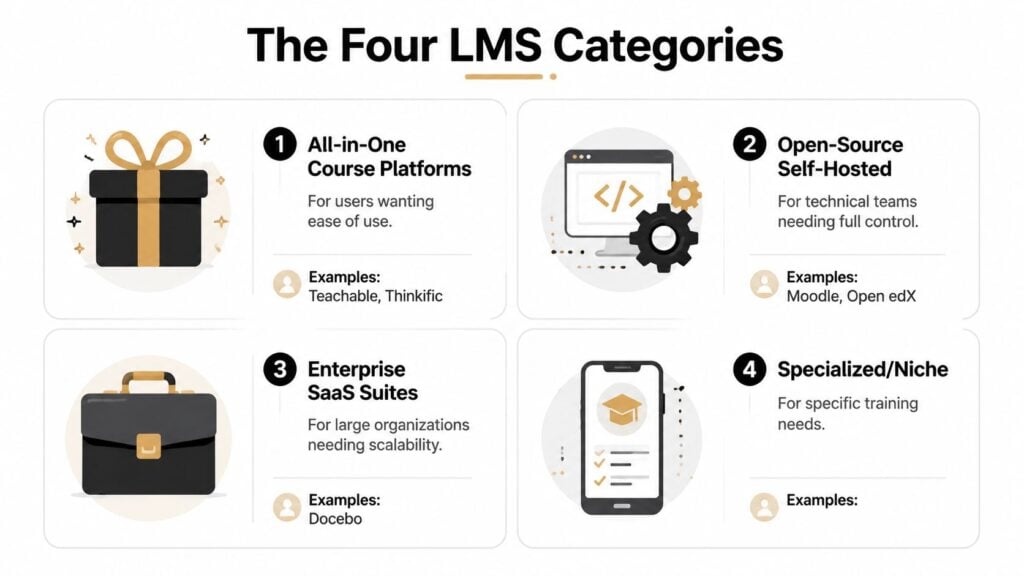
Most platforms fit into one of four useful categories. The labels aren’t perfect, but they give you a better starting point than comparing every vendor in one long spreadsheet.
All-in-one course platforms
Teachable, Thinkific, and Kajabi serve creators who want to build, sell, and deliver courses from a hosted system. Checkout, landing pages, memberships, email connections, and learner access tend to sit close together.
Choose this category when you’re selling directly to consumers and don’t want to assemble a technical stack. The trade-off is shallower administration, reporting, compliance, and enterprise integration. Some platforms also apply transaction fees or reserve advanced controls for higher plans.
Open-source self-hosted systems
Moodle and Open edX give organizations more control over hosting, configuration, extensions, and data practices. That flexibility suits universities, public institutions, and technical teams with unusual workflows.
The cost appears in the work. Someone needs to arrange hosting, apply updates, test plugins, manage backups, monitor security, and resolve conflicts between extensions. Open source can lower license dependence while increasing operational responsibility.
Enterprise SaaS suites
Docebo, Cornerstone, and large-scale LearnDash deployments target organizations with complex audiences, larger integration requirements, and formal governance. They can support advanced reporting, learning paths, permissions, branding, and connections to business systems.
These platforms make sense when training is tied to workforce development, customer education, compliance, or performance programs. Their weakness is excess capacity for smaller teams. You may pay for modules, configuration, and implementation work that your organization never fully uses.
Specialized corporate training tools
TalentLMS, LearnUpon, and SAP Litmos focus on structured employee training, onboarding, compliance, certifications, and repeatable administration. They usually offer hosted deployment and a clearer route to launch than self-hosted systems.
Use this category when an L&D team needs reliable assignments, reminders, assessments, certificates, and reporting without building the platform from scratch. For teams also comparing short-form learning tools, this guide to the best microlearning platforms for training can help separate an LMS from a more focused microlearning product.
Before you compare features, score each category against your situation:
- Authoring ownership: Decide whether instructors, subject matter experts, or a central learning team builds content.
- Administration capacity: Estimate who handles enrollments, permissions, reporting, updates, and support.
- Commercial model: Identify whether learners buy courses, employees receive assigned training, or multiple audiences share one environment.
- Technical tolerance: Be honest about your ability to manage hosting, integrations, plugins, and identity systems.
- Content and compliance needs: Decide whether the platform mainly delivers media or must maintain formal evidence of learning.
You’ll get a more useful shortlist from those answers than from a list of every available feature. LearnStream’s overview of types of learning management systems provides another way to organize the market.
How the Top LMS Platforms Actually Stack Up
The table below focuses on fit and operational trade-offs rather than pretending that every platform can serve every buyer equally well. Pricing model labels are directional because many vendors customize quotes according to audience, scale, modules, and implementation requirements.
| Platform | Category | Pricing Model | Best For | Key Limitation |
|---|---|---|---|---|
| Teachable | All-in-one course platform | Plan-based subscription, possible transaction fees | Solo creators selling courses | Limited enterprise reporting |
| Thinkific | All-in-one course platform | Plan-based subscription | Course businesses and memberships | Less suited to complex compliance |
| Kajabi | All-in-one course platform | Plan-based subscription | Creators combining courses and marketing | Higher feature breadth can raise plan cost |
| Moodle | Open-source self-hosted | Hosting, implementation, and support costs | Technical institutions needing control | Internal maintenance burden |
| Open edX | Open-source self-hosted | Hosting and implementation costs | Universities and large education programs | Requires technical ownership |
| LearnDash | WordPress-based LMS | License plus WordPress hosting and plugins | Flexible course sites | Plugin dependency |
| Docebo | Enterprise SaaS suite | Custom enterprise subscription | Large internal and external audiences | Implementation and module complexity |
| Cornerstone | Enterprise SaaS suite | Custom enterprise subscription | Learning tied to HR and performance | Heavy administration |
| TalentLMS | Corporate training platform | User or active-user subscription | Small and mid-sized training teams | Lighter enterprise customization |
| LearnUpon | Corporate training platform | Custom subscription | Multi-audience training | Less suitable for highly unusual workflows |
Hosted creator platforms
Teachable is the practical choice when checkout, course access, and basic creator operations matter more than deep reporting. Thinkific gives course businesses a similarly hosted path, with room for structured courses and memberships. Kajabi suits creators who want course delivery alongside broader marketing functions.
The limitation is predictable. These tools reduce administration by narrowing the problem. If you need extensive audit trails, complex role-based assignment, or deep HR integration, you’ll likely outgrow the category.
WordPress and open-source options
LearnDash can be powerful when you already understand WordPress and want control over site structure, content, and branding. The system becomes less attractive when the owner doesn’t maintain WordPress. Hosting, themes, payment tools, security controls, backups, and plugins can turn a simple course site into a collection of dependencies.
Moodle and Open edX offer a stronger case for institutions with technical staff and firm data or workflow requirements. They’re poor choices for a small team hoping that “open source” means “hands-off.”
Enterprise and corporate platforms
Docebo and Cornerstone are built for broader organizational needs. They can support several audiences, formal reporting, integrations, permissions, and structured governance. The price of that capability is planning. Implementation teams must define data flows, roles, content structures, and reporting expectations before launch.
TalentLMS is easier to justify for a smaller training operation. It handles standard course delivery and administration without forcing a small team into an enterprise program. LearnUpon makes sense when employees, customers, partners, or other audiences need separate learning experiences.
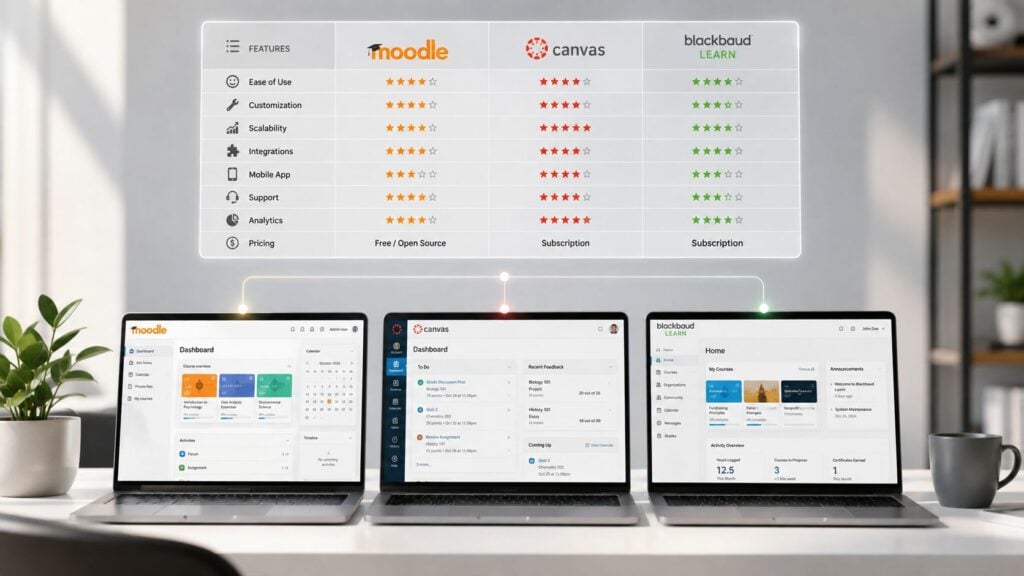
A peer-reviewed comparison found fine-grained differences among major systems. Canvas scored 0.97 for Platform and Architecture, while Moodle, Blackboard, and TalentLMS each scored 0.93. Canvas and TalentLMS received 1.00 for administration and site management, and Canvas received 1.00 for security in the study’s scoring framework. Those results are reported in the peer-reviewed LMS comparison analysis.
A useful mindset comes from evaluation work outside the LMS market. AgentStack’s guide to LLM evaluation is relevant because it treats comparison as a structured scoring problem rather than a marketing tour. Apply the same discipline here. The best LMS is the one whose category, administration model, and deployment burden fit your operation.
Pricing Models and the Hidden Costs Nobody Talks About
LMS pricing usually follows one of three structures:
- Per-user seats: You pay for the users assigned to the account, whether they log in often or rarely.
- Per-active-user: You pay according to the learners who access the system during the billing period.
- Flat-fee unlimited: You pay a fixed subscription that allows broad or unlimited learner access within the contract terms.
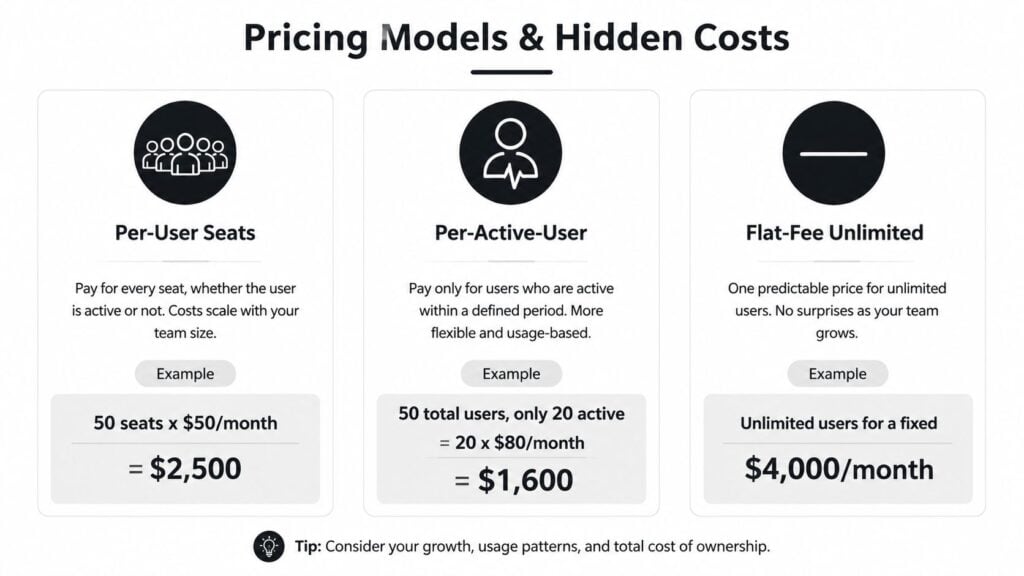
A seat model can look predictable, but dormant learners still consume capacity. An active-user model may suit seasonal training, yet a campaign or compliance deadline can push activity higher than expected. Flat-fee pricing removes some uncertainty, but the fixed amount can be wasteful if only a small audience uses the system.
Build the year-one cost, not the demo price
Your first invoice may exclude the labor required to make the platform useful. Add these items to your estimate:
- Implementation and onboarding: Vendor-led setup, configuration, workshops, and project management.
- Content migration: Course conversion, file cleanup, metadata mapping, quiz rebuilding, and testing.
- Branding and domains: Custom interfaces, branded portals, certificates, and learner communications.
- Identity and integrations: SSO, HRIS, CRM, webinar, payment, and analytics connections.
- Commercial deductions: Transaction fees when you sell courses through an all-in-one platform.
- Usage extras: Storage overages, certificate charges, premium support, or higher reporting tiers.
- Internal labor: Admin training, data cleanup, user support, quality assurance, and ongoing governance.
A platform can be inexpensive to license and expensive to operate. That’s especially true when a small team must manually perform work that a more specialized system would automate.
Budgeting test: Add the subscription, vendor services, internal hours, integrations, migration, and likely overages before comparing two quotes.
Annual billing may reduce the effective subscription cost or grant access to features, but it also commits you before the platform has proved itself in your workflow. Monthly billing offers flexibility, though the recurring price may be higher. Read the renewal terms, user thresholds, cancellation language, and pricing triggers before signing.
For a more detailed starting point, use this guide to learning management system pricing. You can also review a practical perspective on evaluating adjacent software vendors in this Vanta review from SOC2Auditors, especially when security and compliance tools become part of the wider purchase decision.
Write down your realistic learner count, expected active-user rate, required integrations, migration workload, and available admin hours. Then ask each vendor to price that exact scenario. A quote based on your actual operating pattern is more useful than a generic plan comparison.
Matching the Right LMS to Your Specific Use Case
The correct platform changes with the buyer. A solo creator, a corporate compliance manager, and a university may all need courses, assessments, reporting, and mobile access, but their administrative realities are completely different.
| Buyer Persona | Top LMS Picks | Typical Admin Hours/Week | Key Strength |
|---|---|---|---|
| Solo course creator | Teachable, Thinkific, Kajabi | Qualitative estimate, low | Hosted selling and delivery |
| Corporate training manager | LearnDash, Docebo, SAP Litmos | Qualitative estimate, medium to high | Compliance, assignments, and integrations |
| University or continuing education team | Open edX, Canvas, Moodle | Qualitative estimate, medium to high | Structured learning and interoperability |
| Nonprofit or association | Moodle Cloud, TalentLMS Lite | Qualitative estimate, low to medium | Controlled cost and manageable delivery |
The table uses qualitative workload guidance because administration depends heavily on course volume, enrollment rules, integrations, reporting, and support expectations. A small organization with complex compliance can require more attention than a larger organization with simple content delivery.
Solo creators and consumer course businesses
Choose Teachable, Thinkific, or Kajabi when you need to publish quickly and sell access without assembling checkout, payments, learner accounts, and marketing from separate tools. Hosted delivery usually beats granular customization for a one-person operation.
You’ll give up some depth in reporting and workflow control. That’s a sensible trade when your main tasks are publishing lessons, managing customers, handling refunds, and improving the course experience.
Corporate training and compliance
For employee programs, I’d shortlist LearnDash with a capable WordPress host, Docebo, or SAP Litmos. The choice depends on how much technical control you want and how formal your governance needs to be.
SCORM support matters when you rely on packaged third-party courses. SSO, role-based enrollment, completion evidence, audit trails, certifications, and HR integrations matter even more when managers need trustworthy records. SCORM launched in 2001 through the U.S. Department of Defense’s Advanced Distributed Learning initiative and became a baseline for importing, tracking, and reporting reusable course content. The history is outlined in this SCORM background from Fortune Business Insights, which is already cited above.
Universities and continuing education
Open edX, Canvas, and Moodle deserve attention when interoperability, structured assessments, instructor workflows, and accreditation support carry significant weight. Canvas scored strongly in the peer-reviewed comparison cited earlier, while Moodle offers control and extensibility for teams prepared to administer it.
Nonprofits and associations
A nonprofit with limited technical support should consider Moodle Cloud or TalentLMS Lite before choosing a self-hosted build. The simpler system may lack a desired feature, but it can preserve scarce staff time for learner support and program delivery.
For activity tracking beyond course completion, understand the difference between standards. SCORM tracks course activity such as completion, score, and time, while xAPI records learning experiences across environments, including mobile, VR, offline, and on-the-job activity. This SCORM versus xAPI comparison explains why the right tracking standard depends on where learning happens.
Why the Best LMS Is Not Always the One With the Most Features
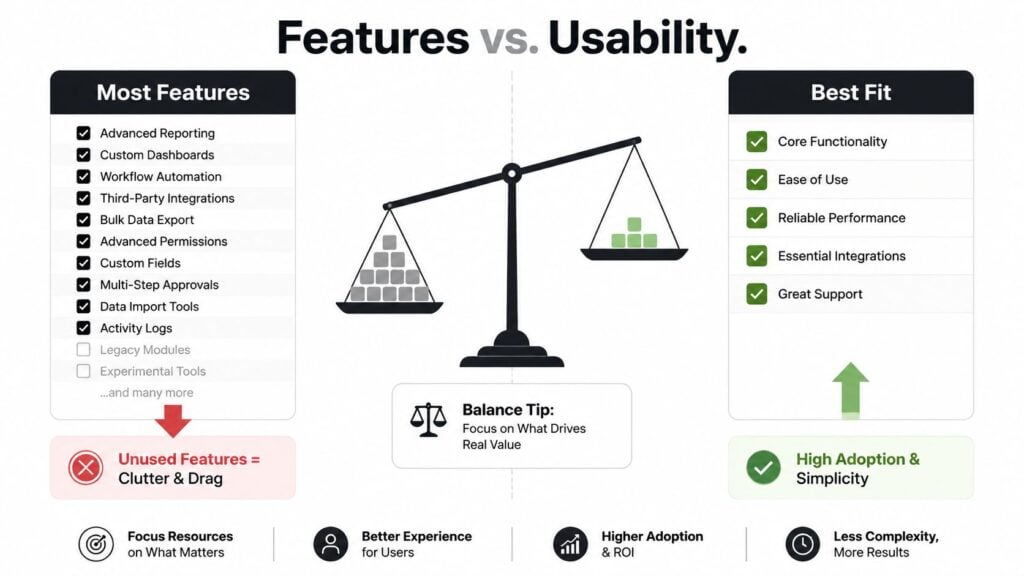
I learned this after switching platforms twice. A feature that looks valuable in a sales demo becomes a recurring task after launch. Each added workflow needs configuration, documentation, testing, permission reviews, and an owner who remembers the setup months later. The comparison is total cost of ownership, including the admin hours your team can provide.
A small coaching business may work well with a focused Teachable plan because its needs are publishing, checkout, and learner access. A creator can struggle with a feature-heavy LearnDash site when the WordPress stack, theme, payment system, and plugins demand more maintenance than the business can support.
Unused capability becomes operating cost
Larger teams face the same trade-off. A 200-person company may buy enterprise Docebo modules that few employees use. The organization still pays for licenses, onboarding, internal training, and management attention, while learners rely on basic course and completion functions.
Every extra feature can also lengthen the learning curve. Administrators need more training, instructors must make more choices, and troubleshooting becomes harder when a problem involves permissions, integrations, plugins, themes, or custom rules.
Before approving a purchase, ask:
- Configuration reality: Which features must someone set up before launch?
- Maintenance ownership: Who updates content, integrations, permissions, and policies?
- Support capacity: Who answers learner questions and fixes failed enrollments?
- Adoption evidence: Can a first-time learner finish the core path without help?
- Exit readiness: Can your team export content and learner records if the relationship ends?
The question I use now: What will this team still configure, update, and support a year from now?
The answer exposes a poor fit quickly. An enterprise system creates unnecessary overhead for a simple course business. A lightweight creator tool creates gaps for a formal compliance program.
Features earn their place when they solve a real workflow. Otherwise, they increase licensing cost and administrative drag. Choose the platform your team can run reliably, not the one with the longest feature list.
A Simple Evaluation Process to Make Your Final Decision
Use a structured pilot instead of trusting a polished demo. A vendor controls the demo environment. Your team needs to see how the platform behaves with real content, real users, and awkward questions.

- Shortlist two or three platforms. Select from the category that matches your buyer persona and administrative capacity. Don’t carry ten options into the trial stage.
- Run a 14-day test with real content. Upload a SCORM package, add video, build an assessment, configure a payment flow if you sell courses, and create the roles your administrators will use.
- Gather feedback from the full cohort. Ask admins about setup, instructors about authoring, and learners about navigation, mobile access, notifications, and completion.
- Score against weighted priorities. Give greater weight to the workflows that affect your business. A compliance team may prioritize audit trails and reporting. A creator may prioritize checkout and publishing speed.
- Plan migration before signing. Map content exports, learner records, SSO remapping, integrations, permissions, and a realistic cutover schedule.
Collect these documents before approval
- Data export documentation: Confirm what you can retrieve and in which format.
- API limits: Ask about rate limits, available endpoints, authentication, and integration costs.
- Termination clauses: Check notice periods, renewal rules, data access, and post-termination support.
- Overage triggers: Identify what happens when learner, storage, portal, or transaction limits are exceeded.
- Support commitments: Test response quality with a deliberately difficult ticket during the trial.
Your next step is simple. Write down the five workflows your LMS must handle, choose two platforms from the right category, and run the same real-content pilot in both. Reject any option that looks powerful in a demo but leaves your team guessing about daily administration, migration, or year-one cost.
Book a focused LMS comparison session with your team this week. Bring the people who will administer the system, create learning, answer learner questions, and approve the budget. Score two or three shortlisted platforms against real workflows, document the hidden work, and choose the system your organization can confidently operate after launch.