AI-Powered Learning Tools

You’re probably looking at a course, a cohort, or a training program right now and thinking the same thing I hear from educators all the time: my learners don’t need the same help, but I keep having to teach as if they do.
One learner moves too fast and gets bored. Another stalls on the basics. A third never asks for help, then bombs the assessment. Meanwhile, you’re buried in feedback, quiz edits, reminders, and support messages. That’s usually the moment when AI starts sounding interesting, not because it’s trendy, but because the workload has stopped being reasonable.
I don’t see AI-powered learning tools as magic. I see them as a new layer in the teaching stack. A useful one, if you choose carefully. The value isn’t in adding flashy features. The value is in helping you give more targeted support without multiplying your admin load.
That matters because this category is no longer experimental. The AI education tools market is projected to grow at a 40.4% CAGR, the U.S. segment is estimated at USD 2.36 billion and projected to grow at 36.7% CAGR, and 88% of students now use generative AI tools such as ChatGPT for assignments, up from 53% the prior year, according to Market.us research on the AI education tools market. If learners are already bringing AI into their study habits, educators need a better framework than “ban it” or “buy something with AI in the name.”
Your Guide to AI in Education Starts Here
Monday morning. You open the LMS and see three different problems at once. One group finished early and wants a challenge. Another is stuck on the first concept check. A third has submitted work that looks complete, but the mistakes show they never really understood the lesson.
That is the primary entry point for AI in education. It is not novelty. It is instructional triage.

A useful AI tool works like a GPS for the learning journey. You still choose the destination. You still decide which route makes sense for your learners. The system helps you spot who is off course, who is ready to move faster, and where extra support should appear before frustration turns into dropout.
That distinction matters because a lot of products are sold as if AI itself is the strategy. It is not. Good teaching strategy comes first. The tool should serve a clear learning outcome, such as improving reading comprehension, increasing practice frequency, shortening feedback cycles, or helping instructors spot misconceptions earlier.
I usually ask a simple question before recommending any platform: what teaching decision will this tool help you make better or faster? If the answer is vague, the purchase usually turns into a feature hunt instead of a learning improvement plan.
For many teams, the best starting point is not a giant platform rollout. It is one narrow use case with a measurable payoff. Maybe that means better support for learners who fall behind in week two. Maybe it means faster feedback on practice work. Maybe it means creating a comprehension solution for learners who can decode text but still struggle to understand it.
That is also why it helps to understand how adaptive learning software works in practice before comparing vendors. The important question is not whether a product says it personalizes learning. The important question is what signals it uses, what it changes, and whether those changes support the outcome you care about.
The strategic lens is straightforward.
- Start with the learning problem, not the feature list.
- Check whether the tool improves a teaching action you already know matters.
- Define success in plain terms, such as fewer repeated questions, better practice completion, or stronger assessment performance.
- Review privacy, bias, and transparency before rollout, not after complaints appear.
AI can reduce routine workload. It can also create noise, weaken trust, or steer learners toward shallow completion if you adopt it carelessly. The return on investment comes from better instructional decisions at scale, not from adding automation for its own sake.
That is the mindset that makes this category useful. You are not handing teaching over to a machine. You are choosing whether a new layer of support helps learners reach the goals your course was designed to achieve.
What AI-Powered Learning Tools Actually Do
A lot of confusion comes from the phrase itself. “AI-powered learning tools” can mean anything from a quiz generator to a full learning platform with recommendations, feedback, analytics, and chat support. That’s a wide range.
I’ve found it easier to group these tools by what they do for teaching and learning.
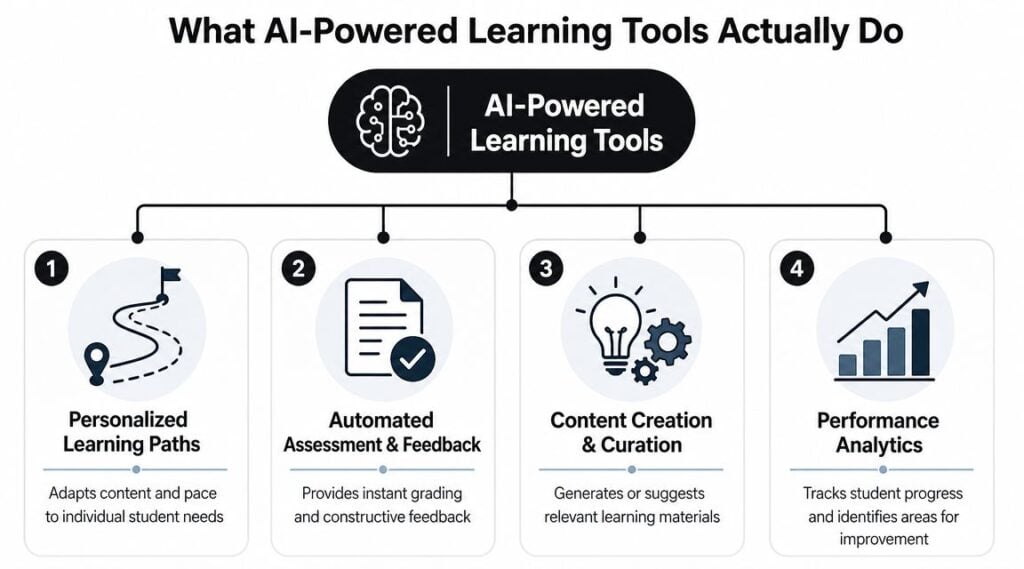
Personalized learning paths
This is typically what is meant when a tool is called “adaptive.”
Consider GPS navigation. A normal course map says, “everyone goes from lesson 1 to lesson 2 to lesson 3.” An adaptive system checks what happened on the road. If the learner is struggling, it reroutes. If they’ve already mastered a topic, it doesn’t keep them stuck in traffic.
That’s why I think it helps to understand how adaptive learning software works before comparing platforms. The useful question isn’t whether a tool claims personalization. The useful question is what data it uses, and what it changes because of that data.
A strong system can adjust pace, level, hints, and next-step recommendations based on learner responses. A weak one just rearranges content and calls it AI.
Automated assessment and feedback
This capability is easier to grasp because most educators feel the pain immediately.
You assign practice work. Learners need feedback while the topic is fresh. You can’t realistically handwrite useful responses for every low-stakes task, every time. AI can help by grading objective items, flagging patterns, and offering immediate guidance while learners still remember what they were thinking.
Used well, this works like a tutor who knows which question to ask next.
Used badly, it turns into shallow auto-scoring that sounds polished but teaches very little.
A good sanity check is to ask whether the feedback helps a learner improve the next attempt. If it only explains what was wrong after the fact, the learning value is limited.
Content creation and curation
Many educators begin with this because the time savings are obvious.
AI can help draft quiz questions, summarize source material, create practice prompts, suggest examples, or organize a messy content library into something easier to search. It can also support curation by matching learning materials to role, interest, or performance data.
That same pattern shows up in product design work too. I liked reading about ReadLab’s process of creating a comprehension solution because it reflects a useful mindset. Start with the actual learning problem, then build the support around comprehension rather than chasing novelty.
A flashy feature list doesn’t tell you whether the tool improves understanding. The design choices behind it do.
Predictive analytics and nudges
This is the least visible capability, but it often drives the biggest operational value.
The system watches behavior. Who is engaging but failing? Who stops logging in after the second module? Who keeps revisiting the same concept without improving? Those patterns can trigger nudges, support prompts, or instructor alerts before a learner disappears.
Research and industry writing from the Digital Learning Institute on AI in digital learning describes systems that curate courses from user data, predict interests, and trigger automated nudges based on learner behavior. It also explains how LMS vendors use AI to auto-tag content, recommend modules by role or performance, and streamline assignment tracking.
Here’s the simple version.
| Capability | Everyday analogy | What it helps with |
|---|---|---|
| Personalized paths | GPS rerouting | Right next step for each learner |
| Automated feedback | On-demand tutor | Faster practice and correction |
| Content curation | Smart librarian | Better matching of materials to needs |
| Predictive analytics | Attentive coach | Earlier intervention and less admin guesswork |
The reason these functions matter together is that they form a loop. Learner actions generate signals. The system uses those signals to recommend, adjust, or flag. Those actions generate new signals. That’s where AI-powered learning tools start feeling less like a widget and more like a learning system.
How AI Learning Tools Look in the Real World
A course lead is staring at three familiar problems at once. New hires need different training paths, learners keep asking the same questions, and the team has no time to manually monitor who is falling behind. That is usually where AI becomes easier to evaluate. You can see the teaching job it is being asked to do.
I tend to see three real-world patterns.
In a corporate training team
A training manager might be responsible for onboarding, compliance, and role-based upskilling at the same time. In that setting, the best AI tools often behave less like flashy add-ons and more like a capable operations assistant.
They sort content by role, suggest the next module based on progress, and flag learners who may need support. A fast-moving employee does not have to wait for the rest of the group. A struggling employee is less likely to disappear undetected because the system can surface that pattern early.
That matters pedagogically, not just administratively. If the goal is faster time to competence, then role-based recommendations and early alerts support that outcome. If the goal is better retention, the tool needs to reinforce practice and timely feedback, not just automate reminders.
A good question here is simple. Does the tool reduce admin work in a way that gives instructors more time to coach, revise weak modules, or analyze where learning breaks down? If the answer is yes, the ROI is easier to defend.
For a solo course creator
A solo creator has a different constraint. The problem is rarely enterprise reporting. It is usually limited time, limited budget, and pressure to produce useful learning support without sounding like a machine.
AI can help draft quizzes, create alternate practice items, suggest rubric language, or answer repetitive learner questions. It can also speed up video production. If you are comparing presenter-led video options, this guide to Synthesia vs HeyGen for AI course videos is a practical place to start.
But speed is not the same as good instruction.
A quiz generator that produces shallow recall questions may save 20 minutes and still weaken the course. A chatbot that answers quickly but gives vague guidance can create the feeling of support without the learning value of support. The right test is whether the tool improves feedback, practice, clarity, or learner momentum.
That is why I usually treat AI here like a teaching assistant, not the instructor. It can carry repetitive workload. The creator still has to set the learning objective, decide what good performance looks like, and review whether the generated output is accurate and on-brand.
In a language learning environment
Language learning shows AI at its best because the loop between action and feedback is short. The learner speaks, writes, or responds. The system reacts right away. Then the learner tries again.
That rhythm works like a personal trainer counting reps and correcting form in the moment. Delayed feedback is less useful because the learner has already moved on. Immediate feedback keeps practice tight and specific.
An AI tool in this setting might adjust difficulty, surface vocabulary a learner keeps missing, or prompt another speaking attempt after a pronunciation error. The point is not automation for its own sake. The point is more high-quality practice per minute.
When the tool changes the next task based on what the learner just did, the experience feels coached instead of broadcast.
As noted earlier, current usage patterns already show that learners are turning to AI for tutoring, planning, and study support, not just one-off content generation. That wider use matters because it reflects a shift in expectations. Learners increasingly want guidance that responds to them, the way a GPS recalculates after a missed turn.
Here is the practical divide I use when evaluating real implementations:
- Instructor-facing uses help with content prep, tagging, workflow, and spotting trouble patterns
- Learner-facing uses improve practice, feedback, support, and pacing
- Higher-value implementations connect both, so learner behavior informs teaching decisions instead of sitting in a dashboard no one uses
That final point is where many projects succeed or fail. If the learner gets adaptive support but the instructor gains no useful signal, the tool stays isolated. If the instructor gets analytics but the learner experience never improves, the system becomes reporting software with an AI label on it.
The strongest implementations do both. They save time, yes, but they also make the teaching strategy sharper.
How to Choose the Right AI Tool for Your Course
A course team sees a polished demo. The chatbot answers instantly, the dashboard looks tidy, and the vendor promises personalization at scale. Two months later, instructors are still grading the same bottlenecks by hand, learners barely use the new feature, and the tool has become one more system to maintain.
That pattern is common because the buying decision starts with the demo instead of the teaching problem.
I’d start with the course.
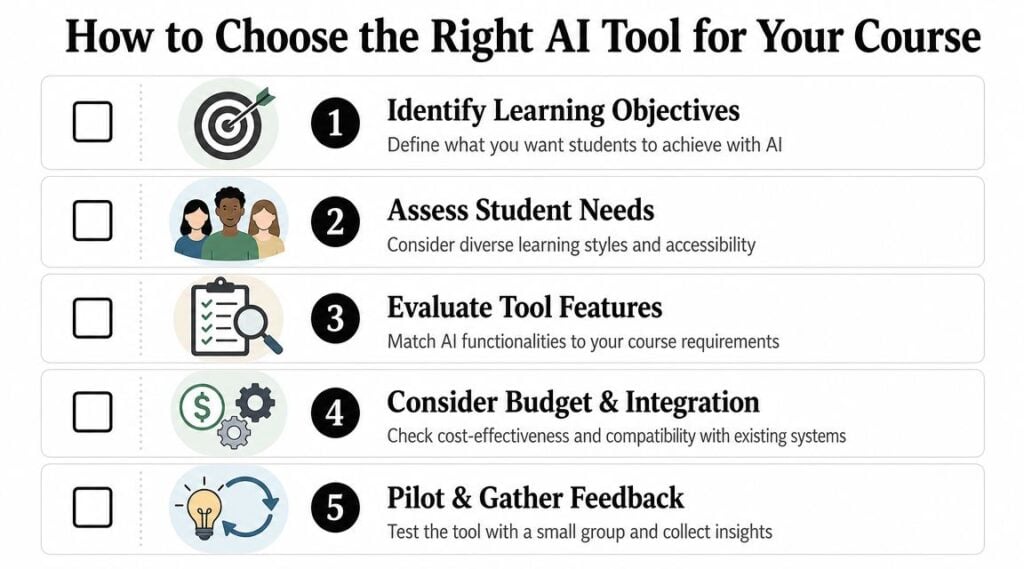
Start with one learning bottleneck
Pick the one moment where learners lose momentum.
Maybe they submit work and wait too long for useful feedback. Maybe stronger learners get bored in fixed-path modules while others need more support. Maybe the problem sits with the teaching team, where too much time goes into repetitive setup, tagging, or triage instead of actual instruction.
That bottleneck is your starting point. It works like finding the weakest link in a chain. If you strengthen the wrong link, the course still breaks in the same place.
A simple way to frame it is this: what learning outcome is underperforming, and what is causing it?
Common answers include:
- Slow feedback loops that leave learners guessing
- Uneven pacing that frustrates both advanced and struggling learners
- Content overload that makes priorities hard to see
- Instructor time drain from repetitive, low-value tasks
Once you can name the bottleneck clearly, the tool category becomes easier to judge.
Match the tool to the teaching job
AI tools often get compared as if they all belong in one bucket. They do not.
A quiz generator helps create practice items. An adaptive platform changes the next step based on performance. A chatbot handles support or guided questioning. A recommendation engine helps surface the right resource at the right time. Those are different teaching jobs, just as a GPS, a personal trainer, and a spreadsheet each solve different problems.
Use a filter like this:
| If your problem is… | Look for a tool that does… |
|---|---|
| Learners need faster practice feedback | Automated assessment and response support |
| Learners progress unevenly | Adaptive sequencing and skill-gap detection |
| Your team spends too long organizing content | Content tagging, recommendations, and search |
| You struggle to spot disengagement early | Analytics, alerts, and nudges |
This protects your budget as much as your pedagogy. The best purchase is rarely the platform with the longest feature list. It is the one that improves a costly teaching problem you can already see. If you need a practical way to frame that business case, this guide on measuring ROI on training programs is a useful companion to the selection process.
Check integration before you commit
A tool can perform well in a demo and still fail in a real course if it does not fit your existing systems.
That risk is growing as adoption expands. As noted earlier, the market for AI in education is growing quickly, student use of generative AI has become mainstream, and more learning platforms are adding AI-driven features. The practical takeaway is simple. Integration is not an IT footnote. It shapes whether instructors will use the tool, whether learner data stays usable, and whether a pilot can grow into a dependable part of the course.
Before you buy, ask:
- Where will learner data live, and how will it move between systems?
- Which actions are automated, and which still require manual cleanup?
- Who handles configuration and updates after launch?
- What happens inside the LMS, versus in a separate environment learners may ignore?
A good pilot answers those questions faster than any sales pitch because it shows the day-to-day workflow, not just the polished version.
Here’s a useful walkthrough to keep nearby while you evaluate options:

Vet privacy, access, and instructional fit
At this point, experienced course teams slow down.
A tool may save time and still be a poor choice if instructors cannot review outputs, if learners with lower digital confidence struggle to use it, or if the system gathers data in ways your organization cannot justify. Good selection means checking instructional fit and implementation risk at the same time.
I’d bring these questions directly into the vendor conversation:
- Data use. What learner data is collected, stored, and used for model improvement?
- Accessibility. Can learners use the tool across devices, bandwidth limits, and different levels of technical confidence?
- Instructor control. Can teachers review, edit, override, or turn off recommendations and generated feedback?
- Content ownership. If you leave the platform, can you export materials and learner records cleanly?
- Outcome alignment. Which specific learning outcome does the tool improve, and what evidence would show that improvement?
Decision shortcut: If you cannot explain how the tool improves one specific learning outcome, wait.
The strongest implementations usually start small. One use case. One learner group. A short pilot. Clear success measures. That approach gives you a better read on learning value, staff workload, and long-term fit than a larger rollout driven by novelty.
Answering the Big Questions of Ethics and ROI
This is the part people often rush past. I wouldn’t.
If you ignore ethics and ROI until after rollout, you usually end up with one of two outcomes. Either the tool creates avoidable trust problems, or it becomes an expensive convenience that never improves learning in a meaningful way.

Ethics belongs in the buying process
The hardest ethical questions are rarely abstract. They show up in ordinary deployment choices.
Who gets easy access to the tool, and who doesn’t?
Does it work well for learners with lower digital confidence?
Can it handle multiple languages well enough to support real understanding?
Are you reviewing outputs for bias, stereotype reinforcement, or low-quality feedback before giving the system more authority?
A World Economic Forum article drawing on UNICEF-linked commentary notes that AI may help learners with low digital literacy through speech recognition, multilingual support, and image or diagram interpretation, while also warning that the same technology can widen inequalities if access, language coverage, and bias are not addressed. That’s the tension every educator should take seriously.
If you serve mixed-access or multilingual audiences, your implementation choices matter as much as the model behind the product.
A practical ethics checklist
I’d want clear answers to these before a rollout:
- Equity of access. Can learners with older devices, lower bandwidth, or limited confidence still participate well?
- Language support. Does the tool work across the languages and dialects your learners use?
- Bias review. Who checks generated feedback, examples, or recommendations for harmful patterns?
- Transparency. Do learners know when AI is shaping feedback, support, or recommendations?
- Human backup. What happens when the system gets it wrong?
That last one matters more than many teams realize. Learners need an off-ramp. If they can’t challenge a weak recommendation or confusing answer, trust erodes fast.
Ethical use isn’t a policy document you upload once. It’s a set of choices you keep making in design, review, and support.
ROI should be broader than cost savings
I’m all for efficiency. But if you define return only as labor reduction, you’ll miss the bigger educational picture.
In learning environments, ROI usually shows up in four places:
| ROI lens | What to look for |
|---|---|
| Instructor time | Less repetitive grading, tagging, routing, and support |
| Learner experience | Faster feedback, clearer next steps, better pacing |
| Program quality | Better visibility into struggle points and content gaps |
| Operational scale | More consistency without adding equal admin overhead |
That’s why I like framing ROI as a before-and-after workflow question. What used to require manual effort, delayed intervention, or generic delivery, and what changed after the tool was introduced?
If you need a structured way to think through the business case, this guide on measuring ROI on training is a useful companion for translating educational improvements into decision-ready terms.
What good measurement looks like
You don’t need a giant dashboard on day one. You need a small set of useful signals.
For example:
- Learner signals such as completion friction, repeated struggle points, or support volume
- Instructor signals such as time spent on routine feedback or administrative follow-up
- Quality signals such as whether feedback became more timely and whether interventions happened earlier
- Trust signals such as learner complaints, confusion about AI use, or accessibility barriers
I’d also add one qualitative check that teams forget. Ask learners whether the tool helped them move forward. Not whether they thought it was impressive. Whether it was useful.
A lot of weak AI implementations look modern, yet make learning more confusing. Good ROI comes from better decisions, better timing, and better support. Not just faster output.
Your First Step into AI-Powered Learning
If all of this feels bigger than expected, that’s normal. The easiest mistake is trying to redesign your whole learning experience at once.
I’d do the opposite.
Pick one low-risk problem that keeps showing up in your workflow. Maybe it’s slow quiz creation. Maybe it’s inconsistent feedback in the first module. Maybe it’s the fact that learners who struggle early are hard to spot until it’s too late.
Then test one tool against that one problem.
The reason I like this approach is pedagogical as much as practical. Effective AI tools work best when they function as an adaptive system, using learner-response data in real time to identify skill gaps and adjust the next step, as described by the University of San Diego’s overview of AI in education. When you start small, you can see that cause-and-effect loop. A learner does something. The system responds. You review whether that response improved the experience.
That’s a much better starting point than “we should add AI somewhere.”
Try this short sequence:
- Name one friction point in your course or training flow.
- Choose one tool category that directly addresses it.
- Pilot with a small group or one module.
- Review both learning quality and workload impact.
- Keep, revise, or drop it based on what occurred.
That’s enough to build confidence without creating chaos.
You don’t need to become an AI evangelist. You just need to become a careful designer of learning experiences, as AI is already part of the environment.