
Tech Stack Audit for Membership Sites

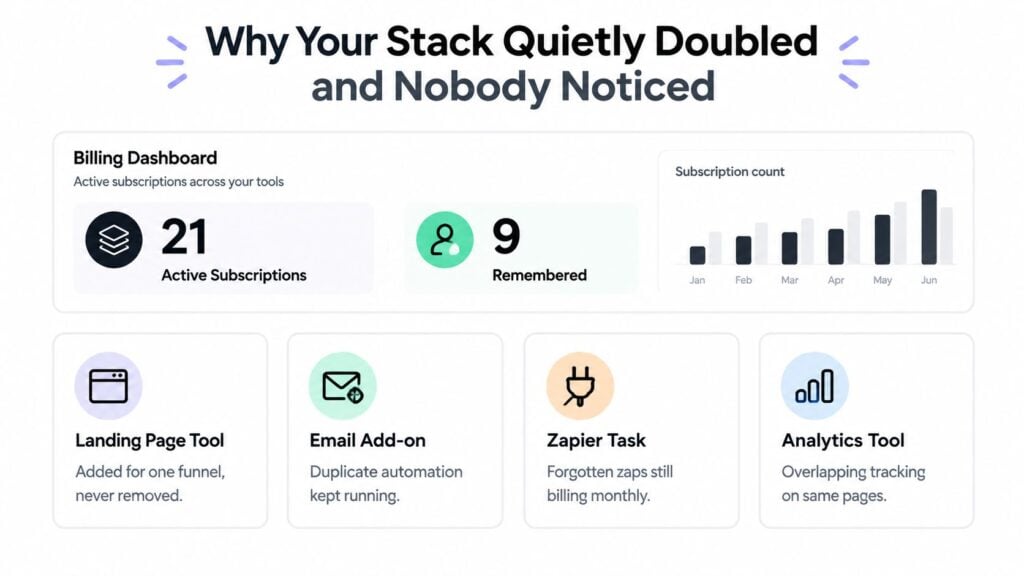
You open your billing dashboard expecting to see the handful of tools you use every day. Instead, there are twenty-one active subscriptions, even though you remember approving nine. One landing page tool supported a single funnel, a community plugin seemed useful during a launch, and a webinar platform stayed active after the event ended. A few automations still run in the background, moving member data through systems nobody checks.
That situation is common for membership owners and course creators because growth adds tools faster than it adds governance. A tech stack audit gives you a way to find the sources of cost, risk, and operational friction before a failed integration affects a paying member.
Why Your Stack Quietly Doubled and Nobody Noticed
The creator in this scenario probably didn’t make one reckless purchase. The stack grew through reasonable decisions made at different moments. A new landing page tool solved a conversion problem. A community plugin filled a gap. A webinar platform supported one launch and was never cancelled.
The problem usually appears in the handoffs between those tools. A founder may buy everything personally, keep billing in a private inbox, and share one login with a contractor. When nobody has clear ownership, renewal dates and admin access become difficult to track. The assumption that a tool is essential because it receives daily clicks makes the situation worse. Frequent clicks can mean the tool matters, but they can also reflect a small task that another platform already handles.
Practical rule: A subscription deserves review because of the workflow it supports, not because someone remembers using it recently.
The cost hides in the connections
A billing list shows license fees. It doesn’t show the cost of duplicate member records, manual exports, failed enrollment triggers, or an email tag that no longer matches the course platform. Those problems consume attention and can create access mistakes that are more expensive than the subscription itself.
Enterprise guidance from IBM’s application portfolio documentation describes portfolio views as a way to review the full application suite, assign responsibility, and analyze spend by business unit, vendor, and project impact. The same principle applies to a small membership business. You need to know what each tool does, who owns it, where its data goes, and which workflow depends on it.
CIO Dive reported that only 43% of respondents had full tech stack transparency in 2025, down four percentage points from the prior year, while only half reported clear SaaS usage visibility. The report also said nearly half of businesses spent at least $1 million on software vendor audit costs in the prior three years, and almost one-quarter faced costs of $5 million or more. Those enterprise figures don’t describe a solo creator’s budget, but they show why visibility has become a financial-control issue rather than a tidy-up exercise.
The useful response is practical. Build the inventory, map the data flows, test a member journey, and assign ownership. A solo creator can complete a credible first pass in a few focused days without buying an expensive management platform.
Building the Real Inventory of Every Tool You Touch
I start the inventory before judging anything. If I decide what to keep while collecting the list, I tend to miss the tools that feel too small to matter. A usable sheet needs enough context to answer three questions quickly: what is this tool for, who controls it, and what breaks if it disappears?
Search beyond the obvious software dashboard. Review bank and card statements, email receipts, browser autofill records, and OAuth app lists. Check annual renewals billed to a different card, purchases made by a co-founder, and accounts created with a personal email address. Look through automation services such as Zapier, Make, or native platform workflows, because the visible app may be only one part of the process.
Record fields that support decisions
Capture the following for every tool you find:
| Field | What to Record | Why It Matters |
|---|---|---|
| Tool name | Product and plan name | Identifies the exact service and feature tier |
| Vendor | Billing company and account URL | Helps locate invoices and support contacts |
| Monthly and annual cost | Current recurring charge and billing cycle | Makes recurring and annual spend comparable |
| Billing owner | Person or business account responsible for payment | Prevents founder-only knowledge from becoming a control gap |
| Login location | Email, password manager entry, and admin URL | Speeds up verification and access cleanup |
| Member data stored | Emails, payment status, progress, tags, or support history | Shows privacy, export, and migration implications |
| Integrations active | Native connections, webhooks, Zaps, APIs, and CSV processes | Reveals dependencies and manual work |
| Last meaningful use | Last workflow, campaign, report, or support task completed | Separates activity from genuine business value |
| Contract terms | Renewal date, cancellation rules, seat limits, and export options | Prevents avoidable renewal and migration problems |
For usage, don’t spend weeks studying every event. Check the last login, monthly active sessions, recent feature adoption, and whether the tool produced revenue or supported members in the last 90 days, using the tech stack audit framework from Formstack as a practical reference for structured collection and evaluation. A tool with no meaningful activity may still be critical, so verify its role before cancelling it.
A spreadsheet is usually enough for a solo creator or a small team. It costs little, stays flexible, and makes decisions visible. A SaaS management product becomes more useful when you have many owners, frequent renewals, complex permissions, or a large number of integrations. The trade-off is simple. Software can automate discovery, but it can also become another system you need to maintain.
If email deliverability is part of the audit, review authentication ownership and sending responsibilities with this practical email authentication guide. For a broader baseline, compare your list with LearnStream’s tech stack guidance for a 10-member membership site.
Mapping How Your Tools Actually Talk to Each Other
The inventory tells you what you own. The integration map tells you what your business depends on.
Take a typical membership setup. A landing page captures a lead and sends the form submission to an email platform. The email platform starts a welcome sequence and syncs the contact with a course host. A checkout tool processes payment and applies buyer status. The course host grants access and passes activity to a community platform. A tracking pixel records page behavior across the experience.
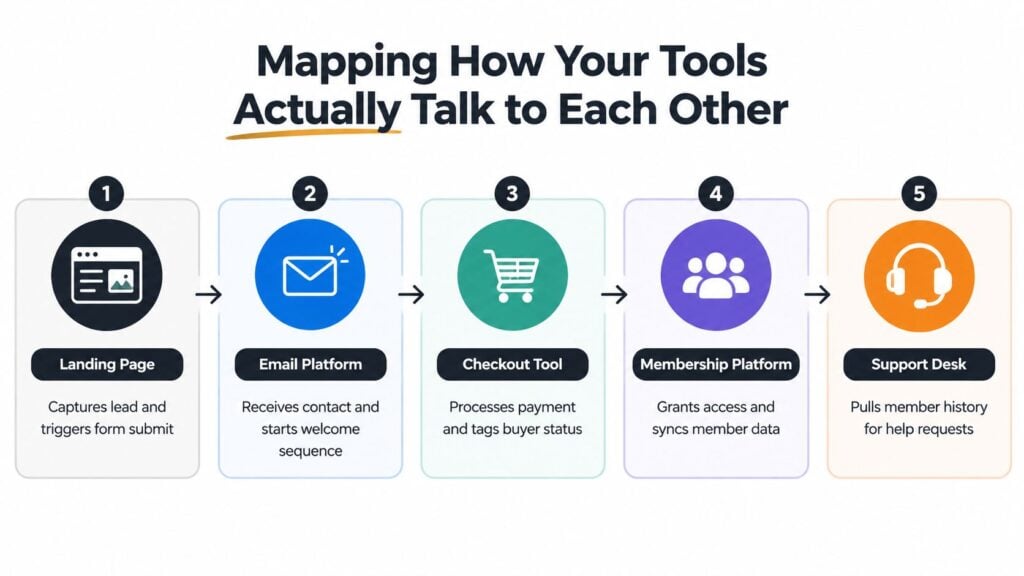
Draw each platform as a node and connect it with arrows. Label the direction of data, the trigger, the fields transferred, and the failure point you would inspect first. A line labelled “new purchase” should identify whether it creates a tag, updates a contact, grants access, sends an email, or all four.
Follow one member instead of trusting the diagram
Choose a test signup and follow it from form submission to community access. Record the timestamp at each handoff, the fields that arrive, and any action you perform manually. This exposes delays and missing fields that a clean-looking integration diagram hides.
Look for duplicate member records created by different email addresses, orphaned tags left behind after a product change, and CSV exports that people describe as integrations. A manual export may keep the workflow running, but it has a different risk profile from a monitored, two-way sync. If one person forgets the export, the member journey stops.
The map also shows where a vendor outage could affect several workflows at once. A tracking pixel may be low priority, while the payment-to-enrollment handoff directly affects paid access. The cost list won’t reveal that dependency. The arrows will.
For identity and access decisions, this explanation of single sign-on for LMS platforms can help you assess whether a shared-login workaround is creating unnecessary control risk.
Scoring Cost, Usage, and Fit for Each Tool
Once the inventory and data-flow map are complete, score every tool using the same criteria. Consistency matters more than mathematical precision. The purpose is to force a decision when a platform sits in a grey area because nobody wants to own the cancellation.
Use four axes:
- Cost: Score the recurring expense from 0 for negligible to 3 for a significant cost relative to your business.
- Usage: Score actual use, not purchased seats. Check feature adoption reports, recent outputs, last-touch timestamps, and support tickets.
- Fit: Ask whether the tool still matches your current membership model, audience, and operating requirements.
- Integration health: Check whether data syncs reliably, fields match, failures are visible, and someone can repair the connection.
A low-cost tool can still score badly if it consumes disproportionate attention. A lightly used platform can score well if it handles a critical payment or access function. Seat counts are weak evidence on their own because a purchased seat doesn’t prove meaningful adoption.
Use four decisions
Every row should land in one of four buckets:
- Keep when the tool fits, supports a necessary workflow, and operates reliably.
- Fix when the function matters but configuration, training, or data quality is weak.
- Replace when the tool is important but cannot meet the required workflow or integration standard.
- Consolidate when another platform can handle the same job without creating a new dependency.
Consider a course platform with strong member usage and reliable enrollment but a poor reporting workflow. That belongs in fix, not replace. An email tool with active campaigns and clean course synchronization belongs in keep. A community forum with weak participation but a critical member-support role might need a fit review before removal. An analytics layer that duplicates reporting already available in the course platform is a consolidation candidate.
| Tool | Cost (0-3) | Usage (0-3) | Fit (0-3) | Integration Health (0-3) | Decision |
|---|---|---|---|---|---|
| Course platform | 3 | 3 | 3 | 2 | Fix |
| Email platform | 2 | 3 | 3 | 3 | Keep |
| Community forum | 2 | 1 | 2 | 2 | Review, then fix or replace |
| Analytics layer | 1 | 1 | 1 | 2 | Consolidate |
For payment workflows and recurring access, include the billing model in your review. LearnStream’s guide to subscription billing software provides useful context for comparing recurring payment responsibilities before you change a live system.
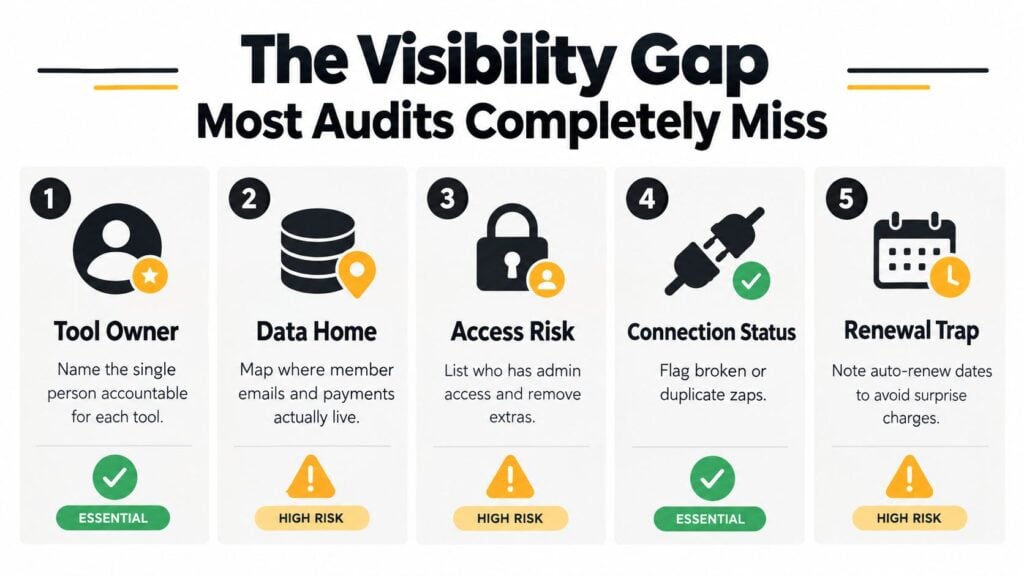
The Visibility Gap Most Audits Completely Miss
Cancelling three subscriptions can feel like a successful audit. It may reduce spend, but it doesn’t prove that the remaining stack is understandable or safe.
I once saw a creator remove several tools and still fail a basic ownership test. Nobody could answer who owned the affiliate payout flow. The subscriptions were cleaner, yet the workflow remained dependent on undocumented connections and founder memory.
Ask four visibility questions
- Where is the single source of truth? Can you identify the authoritative record for member identity, payment status, access, and progress?
- Who owns each workflow? Does one named person know how to monitor, change, and repair each important connection?
- Can you reconstruct the journey? Can you follow a member from signup to payment, enrollment, community access, and renewal?
- Would failure be visible? If a critical integration stopped on a Saturday, would someone receive an alert or discover it only after a member complained?
Flexera’s reporting on IT asset management describes continuing visibility gaps across cloud, SaaS, and BYOL environments, along with the difficulty of manual, historical-data-heavy audit work. That supports a broader conclusion: visibility is a control, not a one-time spreadsheet exercise.
A useful audit for web developers can add a technical perspective when your membership site includes custom scripts, embedded forms, tracking code, or developer-managed integrations. The same ownership principle applies to no-code workflows. Someone must know what runs, why it runs, and how to verify it.
A clean subscription list is useful. A reconstructable member journey is the real deliverable.
Turning Findings Into a Remediation Plan You Will Use
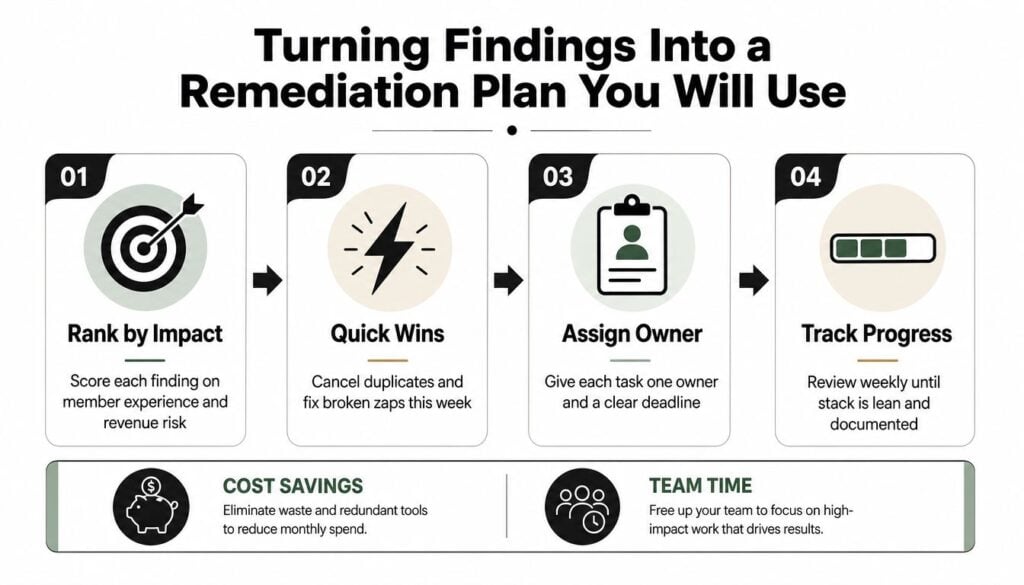
An audit document becomes valuable only when someone changes the system. I rank findings by impact and effort, then put them into a simple two-by-two grid. Impact includes member experience, revenue risk, cost savings, and team time. Effort means the hours required to complete and verify the work, not just the invoice amount.
A creator might find eleven issues and choose three for the next 30 days:
- Consolidate email and CRM records to remove duplicate contact handling.
- Replace a brittle Zap that sometimes fails to pass purchase status.
- Document course-platform ownership so access and enrollment decisions don’t depend on one person.
Each task gets a short statement with an owner, trigger, and definition of done. “Improve integrations” is too vague. “When a paid checkout succeeds, the owner verifies course access, email status, and community membership using a test account” can be assigned and checked.
Sequence the work before cutting tools
Fix visibility first. Export the current inventory, preserve the integration map, and confirm the member journey. Then remove duplicates, repair critical handoffs, and migrate data where needed. Cancelling tools before understanding dependencies can optimise the wrong system and create avoidable access problems.
The audit cadence can stay light:
- Quarterly review: Check new tools, upcoming renewals, seat right-sizing, and workflow changes.
- Annual deep dive: Rebuild the full inventory, reassess consolidation, review standards, and test critical journeys.
Renewals deserve early attention. The Tropic analysis says negotiations started 90 to 180 days ahead can save 39% more than last-minute negotiations, so place renewal dates in the remediation calendar rather than leaving them in scattered inboxes.
What to Do This Week and How to Keep It Honest
Start with three actions this week. Assign one technical owner, export the full tool inventory with its integrations, and book a 60-minute scoring session. Don’t begin by cancelling subscriptions. Establish a reliable baseline first, or your savings decisions will rest on incomplete information.
Build the next 90 days around four lanes:
- Security blockers: Exposed credentials, unnecessary admin access, weak authentication, or unclear data ownership.
- Broken member journeys: Failed enrollment handoffs, missing payment tags, delayed emails, or community access errors.
- Costly redundancies: Duplicate email, CRM, analytics, checkout, or automation functions.
- Performance improvements: Slow workflows, confusing reporting, poor adoption, or avoidable manual work.
Prioritise each finding by member impact, operational risk, effort, and cost. A broken enrollment handoff should come before replacing a lightly used analytics tool. Each task needs a named owner, due date, and verification step, such as testing a new purchase with a real or controlled member record.
Keep the audit alive without creating bureaucracy
Review progress monthly, re-score the stack quarterly, and complete a full audit annually. Trigger an out-of-cycle review when revenue changes, you add a major platform, payment or identity providers change, member complaints rise, or costs jump unexpectedly.
Preserve version history so you can see what changed and why. Document exceptions, compare invoices with actual usage, and test the member journey instead of trusting a configuration diagram. A small monthly dashboard can show total monthly cost, active tools, unresolved high-risk issues, failed workflows, and savings delivered.
IBM’s application portfolio guidance and Adobe’s application portfolio management explanation both point toward the same discipline: maintain a complete application inventory, assess business value and technical health, then decide whether to maintain, replace, or retire each application. Torii’s 2025 SaaS Benchmark Annual Report reported an average portfolio increase of 20.7% across five business segments in 2024, which illustrates why a static list ages quickly.
Your first move should be simple. Open a blank sheet, list every subscription and integration you can find, and assign one person to validate each row. Then follow one member from signup to access. That exercise will show you where the hidden cost lives and give your next tech stack audit a foundation you can trust.
Set aside one focused work session this week to create your inventory and test a complete member journey. If you uncover unclear ownership, failed handoffs, or duplicate tools, turn the first three findings into assigned tasks with deadlines before the session ends.





![How to Launch a Membership Site Using Squarespace [Step By Step Guide]](https://learnstream.io/wp-content/uploads/2024/11/image-768x433.png)