SaaS Learning Management Systems Explained and Compared

You’re halfway through a compliance rollout when the LMS stops responding. Learners are waiting, course uploads are unfinished, and your IT team is busy applying a server patch that was supposed to happen earlier. Meanwhile, someone is asking for a progress report that the system can’t generate until the database is available again.
That situation explains why many training managers are moving toward SaaS learning management systems. A cloud-hosted platform can reduce infrastructure work, handle vendor-managed updates, and give learners access through a browser. Those benefits matter, but the subscription price and feature list only show part of the decision. Data ownership, integrations, user growth, support, migration work, and vendor dependence all affect the full cost of running an LMS.
Introduction
A training manager at a growing company might start with a perfectly reasonable plan. The organization installs an LMS on its own servers, uploads its courses, connects a few user accounts, and begins assigning training.
Then the operational work accumulates. Someone has to maintain the hosting environment, schedule backups, apply security patches, troubleshoot integrations, monitor performance, and keep the system available when large groups of learners sign in at the same time. Every update becomes a small project, and every outage creates a communication problem for the learning team.
A SaaS LMS changes who carries that workload. The vendor hosts the application, maintains the underlying infrastructure, and delivers access through the internet. Your team still owns course design, learner communication, reporting decisions, and governance, but it can stop treating server administration as part of instructional design.
The shift has become mainstream. The overall LMS market reached USD 24.09 billion in 2025, while cloud platforms represented 88.24% of market share, according to Fortune Business Insights’ LMS market analysis. That cloud share suggests that hosted, subscription-based delivery is now the default buying model for many organizations.
The practical question is more useful than “Which platform has the most features?” Ask instead, which operational responsibilities do you want to keep, and which are you prepared to hand to a vendor?
Understanding the Key Concepts
A SaaS Learning Management System is a web-based application that lets an organization create, deliver, manage, and track learning without installing the core software on its own servers. The organization usually pays a recurring subscription, while the vendor operates the application environment, applies updates, and manages much of the infrastructure.
The architecture often uses multi-tenancy. One application instance serves multiple customers, while the platform separates each customer’s users, settings, content, and records. Technical approaches can include tenant IDs, separate schemas, or dedicated databases, as described in this guide to multi-tenant LMS architecture.
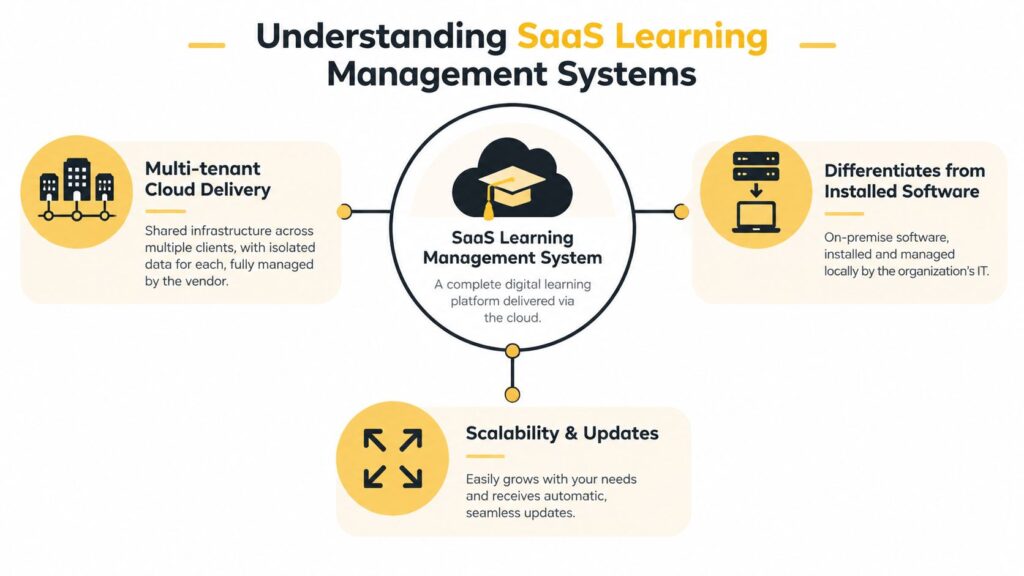
The easiest way to understand the difference from installed software is to separate responsibilities.
- With SaaS delivery, the vendor manages hosting, application maintenance, updates, and much of the technical availability work.
- With self-hosted software, your organization manages the servers, operating environment, updates, backups, security configuration, and technical troubleshooting.
- With either model, your team remains responsible for instructional quality, content accuracy, learner support, enrollment rules, and internal governance.
SaaS also changes the rhythm of buying. Instead of treating the LMS as a software package that needs a major installation, you generally configure an existing service. That can shorten the path to launch, but it also means your team works within the vendor’s product design and release process.
For a broader explanation of platform categories, see this guide to learning management system types. The distinction matters because “cloud” doesn’t automatically mean “low effort.” Content migration, identity management, integrations, permission design, and reporting still require careful planning.
Core Features and Benefits
A modern SaaS LMS combines learner-facing tools with administrative controls. The value appears when those tools remove a specific source of friction from daily training work.
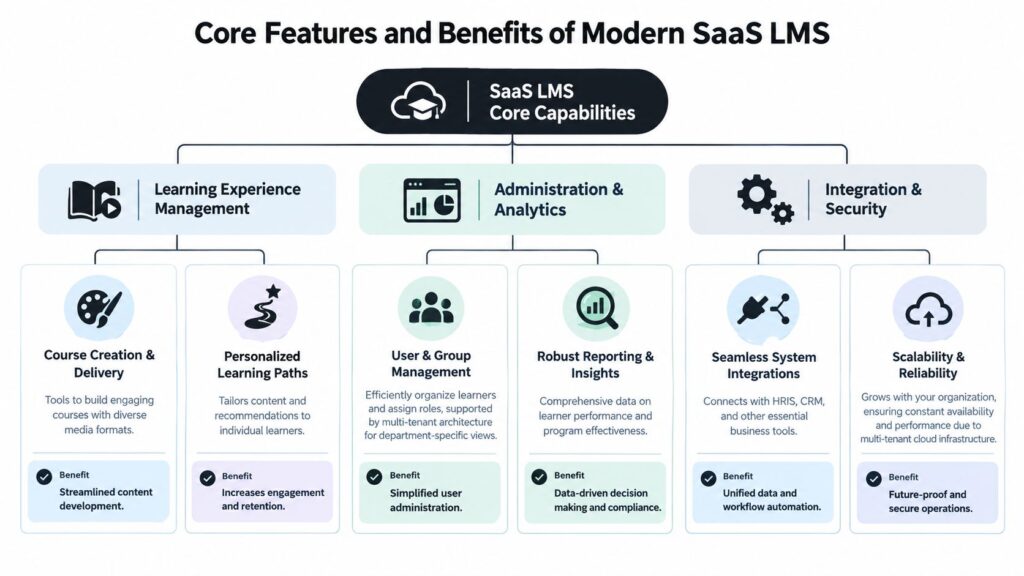
Multi-tenant administration
Multi-tenant architecture lets one platform support multiple customer environments while keeping their data and configuration separated. In a corporate setting, a similar structure can support distinct departments, regions, brands, or external audiences, depending on how the vendor implements its account model.
For example, a training team might need one administrative view for employees and another for channel partners. Separate groups, permissions, catalogs, and reports can reduce accidental access and make ownership clearer. The trade-off is that your organization must understand exactly how the vendor isolates tenants and what configuration options are available.
Course creation and delivery
Authoring tools help instructors combine text, video, assessments, documents, and other learning materials in one course experience. A course creator preparing onboarding can replace a scattered folder of videos, slide decks, and spreadsheets with a structured path that records enrollment and completion.
Standards support also deserves attention. SCORM is commonly used for packaged courses and completion tracking, while xAPI can capture richer learning activity across mobile apps, simulations, virtual reality, offline experiences, and environments outside the LMS. A platform that supports both can give your team more flexibility as learning becomes less dependent on a single browser window. The distinction is outlined in this SCORM and xAPI guide.
Personalized paths and learner access
Learning paths can organize courses in a sequence, assign different content to different groups, or guide learners toward role-specific material. That structure helps an instructional designer avoid sending every employee through the same generic curriculum.
Mobile access matters for field staff, distributed teams, and learners who switch between devices. You’ll still need to test the actual mobile experience, because a responsive interface doesn’t guarantee that every activity, assessment, or media type works well on a smaller screen.
Analytics and reporting
Built-in reports can show who enrolled, who completed a course, how learners performed, and where administrators need to follow up. The useful question is whether those reports support a decision. A completion report may help a compliance manager identify overdue training, while assessment data may help an instructor revise unclear content.
Analytics also create governance work. Decide which metrics matter before configuring dashboards, and define who can access learner records. More data doesn’t automatically produce better learning decisions.
Integrations and workflow automation
Integrations connect the LMS with tools such as an HRIS, CRM, identity provider, or collaboration platform. When the connection works well, a new employee can receive the right training assignment from an existing personnel record, and completion data can return to the system where managers already work.
Integration quality depends on details such as supported APIs, authentication methods, data mapping, error handling, and vendor support. Ask to test your real workflow rather than accepting a general statement that the platform “integrates with HR systems.”
Operational question: Which manual task will disappear after the integration is live, and who will own the workflow when something fails?
Pricing Models Explained
SaaS LMS pricing can look simple until you map it against actual usage. A subscription may include a platform tier, a learner allowance, storage, support, integrations, or separate implementation services. The commercial model affects forecasting just as much as the advertised rate.
Subscription pricing
A flat subscription gives you a predictable recurring expense for a defined package. This approach can suit a small organization with stable usage and a clear feature requirement.
The limitation is that a flat plan may include capabilities your team won’t use, or exclude functions you assumed were standard. Check whether advanced reporting, branded portals, API access, dedicated support, and additional environments sit inside the quoted plan.
Per-user and active-user pricing
Per-user billing connects the fee to the number of licensed learners. Active-user pricing typically counts learners who use the platform during a defined billing period, which can work well for seasonal programs or organizations with a large registered audience and uneven participation.
Ask the vendor to define “active.” Also model different scenarios, such as a quiet month, a major onboarding period, external learners joining a course, and archived users remaining in the system. A low entry price can become difficult to forecast if your usage rules aren’t clear.
Tiered and freemium plans
Tiered plans group features, administration controls, support levels, or usage limits into packages. Freemium access can help a small team test the learner experience before committing, but free plans often impose restrictions on users, storage, branding, reporting, or integrations.
I recommend writing down every limit before comparing plans. A missing integration may create more work than a higher subscription fee, especially if your team has to move data manually between systems.
For a structured way to estimate how a subscription business charges across users and tiers, you can calculate your app’s SaaS pricing. Use the result as a planning aid, not as a substitute for a vendor quote.
A full review of cost structures also benefits from this guide to learning management system pricing. Include migration, course conversion, integration setup, administrator training, support, and future user growth in your comparison. The cheapest license can carry the highest operational burden if your team has to compensate for missing capabilities.
Security and Scalability Considerations
A training provider can have strong encryption and still expose data through careless permissions or weak tenant boundaries. Ask the vendor how it separates each customer’s records, limits administrator access, and detects unusual activity. These controls affect both learner trust and the work required from your team.

Use this checklist during evaluation:
- Role-based access control: Confirm that administrators, instructors, managers, and learners receive only the permissions they need.
- Encryption: Ask how the vendor protects data at rest and in transit.
- Monitoring and logging: Check whether the platform records sign-ins, permission changes, content edits, exports, and other sensitive actions.
- Security reviews: Look for regular audits, vulnerability assessments, and a defined process for addressing discovered issues.
- Data ownership: Confirm who owns learner records, how data can be exported, and what happens when the contract ends.
For a closer look at controls course creators should review, read these LMS security features course creators should know. Independent guidance also recommends RBAC, monitoring, logging, regular security audits, and clear tenant data ownership terms, alongside basic tenant isolation, as discussed in this overview of multi-tenant LMS privacy controls.
Scalability has an operational cost as well as a technical one. A platform may support more learners, yet administrators still need workable groups, automated assignments, useful reports, and support processes that remain manageable as enrollment grows.
Ask how the vendor routes tenant requests, manages storage, handles backups, and communicates service interruptions. Microsoft’s Azure guidance describes patterns including separate databases, tenant identifiers, Azure AD authentication and authorization, Key Vault for secrets, tenant-specific storage containers, virtual networks, and Azure Policy for governance in multi-tenant SaaS environments. Review those patterns in Microsoft’s multi-tenant isolation guidance.
Vendor answers should give IT and compliance teams enough detail to assess the controls. If the response only says “enterprise-grade security,” request the specific control, its owner, supporting evidence, and contractual commitment. Those details reveal the ongoing work and risk hidden behind the subscription fee.
Comparing SaaS and Self Hosted LMS
The choice between SaaS and self-hosted software determines where technical work lives. In a SaaS arrangement, the vendor takes responsibility for the hosted service. With self-hosting, your organization keeps more control, but it also takes on more responsibility for uptime, patching, backups, security configuration, and capacity planning.
The LMS market’s movement from institution-managed software toward cloud-first delivery followed the expansion of internet access and corporate digital training, according to Mordor Intelligence’s LMS market analysis. That history helps explain why SaaS is now familiar to buyers, though familiarity shouldn’t replace due diligence.
| Aspect | SaaS LMS | Self Hosted LMS |
|---|---|---|
| Deployment | Configuration through a vendor-managed service | Installation and environment preparation by your organization |
| Maintenance | Vendor manages core application infrastructure and releases | Internal teams manage patches, backups, monitoring, and upgrades |
| Customization | Usually limited to supported settings, integrations, and extensions | Greater control over application and infrastructure changes |
| Data control | Data resides in the vendor’s environment under contract terms | Organization controls its own hosting environment |
| Scaling | Capacity and user arrangements are handled through the service model | Internal teams plan and fund additional capacity |
| Downtime response | Vendor operates service monitoring and incident processes | Your organization operates the technical response |
| Cost profile | Recurring subscription plus implementation and integration work | Hosting, technical labor, maintenance, upgrades, and software costs |
Self-hosting can make sense when an organization needs infrastructure-level customization, strict internal hosting requirements, or has a capable technical team prepared to maintain the system. SaaS usually fits teams that want to launch faster and shift infrastructure work away from learning specialists.
The hidden trade-off is control versus operational attention. A self-hosted LMS gives your team more authority over the environment, while SaaS gives the vendor more authority over the environment. Neither model removes responsibility. Each places it with a different owner.
How to Choose the Right SaaS LMS
Start with the learning operation, not the demo screen. Write down who will learn, what they need to complete, how administrators will manage them, and which evidence your organization must retain.
Define the first use case
Choose the initial program or programs, such as employee onboarding, compliance, product education, customer training, or partner certification. A platform designed for internal employee assignments may not provide the catalog, branding, commerce, or external access controls needed for a public academy.
List the learner journey from invitation to completion. Include assessments, certificates, reminders, manager visibility, and support questions. This exposes requirements that a feature checklist can miss.
Map the surrounding systems
Create an inventory of identity, HR, CRM, content-authoring, communications, and reporting tools. Mark each connection as essential, useful, or unnecessary.
Then ask vendors to demonstrate the exact data flow. A claim that a platform supports an HRIS integration tells you less than a live example showing how a new employee becomes a learner, receives an assignment, and returns completion data.
Test administration, not only learning
During a trial, create a course, assign it to a group, change a permission, export a report, and remove a user. Ask someone who’ll administer the system every week to complete these tasks.
Pay attention to the small sources of friction:
- Content updates: Can you replace a lesson without breaking learner records?
- Group rules: Can you target departments, regions, roles, or external audiences cleanly?
- Reporting: Can managers answer their own questions without requesting custom reports?
- Support: Can you reach a knowledgeable person when an integration or permission issue appears?
- Accessibility and mobile use: Can learners complete the actual course activities on their devices?
Calculate the operating cost
Compare subscription options using your current learner population and plausible growth scenarios. Include implementation time, content migration, integration work, administrator training, premium support, storage, and contract exit requirements.
A useful buying rule: Require the vendor to describe what happens when your usage, data volume, or administrative complexity changes.
Invite stakeholders from learning, IT, security, compliance, finance, and the learner community. Each group notices a different risk. Your instructional team may value authoring flexibility, while security may focus on access logs and finance may focus on renewal terms.
Finally, request a written proposal that defines included features, usage limits, service responsibilities, support commitments, data export, and price changes. A polished demo can show what the system does. The contract should clarify what the vendor will continue doing after implementation.
Conclusion
SaaS learning management systems can remove a substantial layer of infrastructure work from training teams. They provide hosted access, vendor-managed maintenance, centralized learning workflows, and architecture that can support multiple customer or organizational environments.
The trade-off deserves equal attention. You give up some control over servers and release timing, depend on the vendor’s security and support practices, and commit to ongoing subscription terms. Your total cost also includes migration, integrations, administration, content maintenance, reporting design, and the time needed to govern the platform well.
The market’s scale reflects the strength of the cloud model. The global LMS market is estimated at USD 35.23 billion in 2026 and projected to reach USD 88.41 billion by 2032, according to Grand View Research’s LMS market analysis. Growth alone doesn’t identify the right product, though.
Before choosing, ask who owns each operational task, how learner data is isolated, how integrations fail, what usage triggers extra cost, and how easily you can leave. Then run a real pilot with real content and real administrators. That process will tell you far more than a feature list.
Build your shortlist around one live training workflow, request written answers on security and pricing, and schedule vendor demos with your learning, IT, and compliance stakeholders. Use the checklist above to compare the results, then choose the platform that fits your operating capacity, not just the one with the longest feature page.