Notion vs Trello for Managing Course Creation Projects

You probably already know the feeling.
Your course outline lives in one doc. Scripts are somewhere else. Research clips are buried in cloud folders. Launch tasks sit on a board you only remember to check when you’re already behind. Feedback from a reviewer is trapped in email, and your calendar has no idea how any of this connects.
That’s the point where most course creators start looking for one system that can hold the whole project together.
I’ve used both Notion and Trello for course work, and they solve that problem in very different ways. Trello gives you a fast, visual workflow. Notion gives you a connected workspace that can hold the workflow, the content, the documentation, and the relationships between them.
For Notion vs Trello for managing course creation projects, the choice isn’t just feature depth. It’s how you think, how complex your course is, and how much structure you need before your process starts helping instead of getting in the way.
The Messy Middle of Course Creation
Most course projects don’t fall apart at the idea stage.
They fall apart in the middle, when the clean outline turns into a living project with scripts, slide decks, worksheets, reviews, revisions, recording dates, upload deadlines, and random notes you swear you’ll organize later.
I see this a lot with educators building their first serious program. They start with a rough module list, maybe in a doc or notebook. Then they add production steps, then resource files, then feedback from a beta student, then a launch checklist. Before long, they’re managing one course across five tools and a lot of memory.
That’s also where your planning quality starts to matter. If your curriculum and launch process aren’t tied to a broader effective content strategy, you end up producing lessons in the wrong order, or spending time polishing content that doesn’t support the actual offer.
A simple outline helps, especially early on. If you need a place to start before choosing a project tool, this free course outline PDF template is useful for getting the curriculum out of your head and into a workable structure.
Two tools, two answers
Trello says, “Put the work on cards and move it forward.”
Notion says, “Build a system where the work, the documents, the assets, and the schedule can all live together.”
Neither answer is wrong. I’ve seen Trello keep a small course launch on track with almost no setup. I’ve also seen Notion become the operating system for a bigger course business where one lesson connects to several resources, deadlines, approvals, and updates.
The right tool usually reveals itself when you look at where your current process breaks. If you’re losing track of steps, Trello often helps. If you’re losing track of relationships, Notion usually helps.
That distinction matters more than the marketing pages do.
The Digital Whiteboard vs The Digital LEGO Set
Trello feels like a wall full of sticky notes. That’s why so many people click with it immediately.
You create lists, drop in cards, and move the cards as work progresses. For course creation, that might mean columns like Ideas, Outline, Scripted, Recorded, Edited, Uploaded, and Published. You can glance at the board and know what’s moving and what’s stuck.
Notion works from a different philosophy. It treats the workspace more like a set of building blocks. Pages, databases, text blocks, tables, calendars, timelines, and linked views can all connect. You don’t just track a lesson. You can make that lesson part of a larger system that includes curriculum, production status, resource links, review notes, and release dates.

Why Trello feels easy so fast
Trello’s big strength is that almost nobody needs much explanation.
The card metaphor makes sense right away. A solo creator can open a blank board and be functional very quickly. In the verified comparison data, Trello is described as having 15-minute onboarding for visual Kanban boards and an intuitive ★★★★★ UI for rapid task visualization. That tracks with my experience. You can hand Trello to a creator, editor, or assistant and get movement without much setup drama.
That simplicity shapes behavior in a good way. It encourages action.
You’re less likely to spend hours “designing the system” and more likely to start moving cards for scripting, filming, and editing.
Why Notion can feel powerful and annoying at the same time
Notion’s strength is flexibility. It supports Kanban, lists, tables, calendars, and timelines in the same workspace, with formulas, filters, custom properties, and relations between tasks, according to the verified comparison summary from TableSprint’s Notion vs Trello review.
That’s great for course creators dealing with connected work.
If module three depends on a worksheet, a quiz, a review pass, and a scheduled drip release, Notion can represent all of that cleanly. Trello can show progress, but it doesn’t naturally model those deeper relationships in the same way.
The trade-off is obvious once you’ve spent time in both tools.
Notion asks you to make more decisions. You need to think about structure, database properties, templates, and views. If you like building systems, that feels liberating. If you just want to see what needs doing today, it can feel like extra friction.
The verified data also notes that up to 80% of Notion’s features can go unused by teams that don’t need that level of complexity. That’s a fair warning. A lot of course creators don’t need a highly engineered workspace. They need a clear list and fewer loose ends.
The core difference in one line
- Trello works best when the job is primarily moving tasks through a visible workflow
- Notion works best when the job involves managing a connected body of content, assets, notes, and deadlines in one place
Practical rule: Trello helps you see the pipeline. Notion helps you build the operating system behind the pipeline.
That’s the philosophical split, and it shapes everything else.
A Head-to-Head Comparison for Course Creators
Here’s the quick snapshot I’d want in front of me before choosing a tool.
| Capability | Trello Approach | Notion Approach | Best For |
|---|---|---|---|
| Curriculum planning | Cards and lists for modules or lessons | Databases, pages, and linked views for modules, lessons, and dependencies | Notion for layered curricula |
| Task tracking | Simple Kanban workflow with strong visibility | Multiple views including board, table, calendar, and timeline | Trello for quick progress tracking, Notion for mixed planning styles |
| Content drafting | Usually links out to docs and assets | Lets you draft inside pages and connect content to project records | Notion for script-heavy course builds |
| Asset management | Works as a tracker for files and approvals | Better for storing context, notes, and linked resources together | Notion for centralizing resources |
| Team feedback | Clear task comments and review flow on cards | Richer documentation and page-based collaboration | Depends on whether feedback is task-first or document-first |
| Automation | Strong built-in rule-based automation with Butler | More limited built-in automation, often extended with Zapier | Trello for workflow automation |
| Permissions | More granular board-level permissions | Page-level permissions, but less granular in some project scenarios | Trello for tighter board control |
| Large complex projects | Can get fragmented across many boards | Can slow in large workspaces, but handles relationships better | Notion if complexity outweighs speed concerns |
The visual summary helps too.
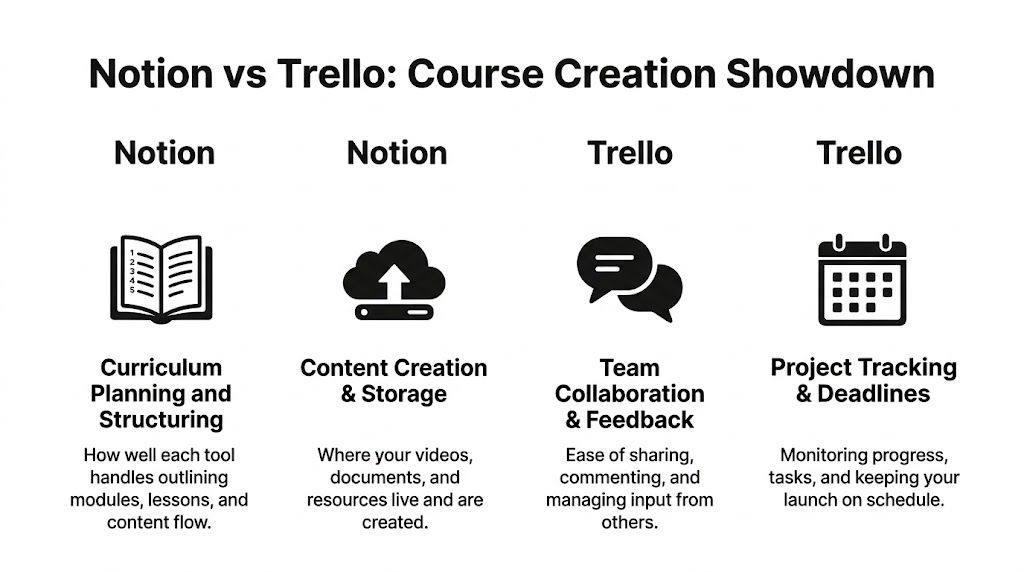
Curriculum planning and outlining
At this stage, the gap becomes obvious.
In Trello, curriculum planning usually turns into one of two setups. Either each card is a lesson, or each list is a module. That works fine for a straightforward course. You can scan the structure quickly and drag things into a new order if you change your mind.
But Trello’s structure stays pretty flat. Once your outline needs metadata, such as lesson type, owner, status, release week, linked worksheet, or review state, boards start getting crowded. You can still make it work, but you begin layering workarounds onto a tool that was designed first for flow, not deep content architecture.
In Notion, a curriculum can live as a database with one entry per module or lesson. Each lesson can open into its own page with script drafts, learning objectives, file embeds, review notes, and linked assets. You can view that same database as a table when planning, a calendar when scheduling, or a board when tracking status.
According to the verified data, Notion’s relational databases and multi-view capabilities provide superior handling of interconnected tasks compared to Trello’s Kanban-only structure, and 2026 benchmarks in that same comparison rate project management ★★★★★ for Notion versus ★★★☆☆ for Trello.
That tracks with real course design work. If I’m building a program where lesson pages, downloadable templates, and drip timing all influence one another, Notion fits the work better.
If your outline is just a sequence, Trello is enough. If your outline behaves like a system, Notion starts making more sense.
A quick demo can help if you want to see how people structure it in practice.

Task and milestone tracking
Trello is excellent at this.
That might sound too simple, but simple is often exactly what a launch needs. If your course has clear stages like script, record, edit, upload, approve, Trello shows progress with almost no friction. That’s why I still like it for first launches and for creators who need a daily visual cue more than a full operating system.
Notion can also track milestones well, and it has more ways to display them. The same project can be viewed as a board by status, a calendar by due date, or a timeline for production planning. That flexibility is useful when a course includes multiple moving parts, especially if you’re coordinating contributors.
The downside is speed. In a complex Notion build, people can spend too much time filtering and tweaking views instead of finishing the lesson.
Content and asset management
This is one of the biggest practical differences, and a lot of comparison posts skip it.
Trello manages the existence of content well. It tells you a script needs to be written, a slide deck needs review, and a worksheet is waiting for upload. But the actual content usually lives elsewhere. Cards point to docs, folders, or cloud files.
Notion is better when you want the project record and the content itself to live together.
A lesson entry can hold the draft, notes to the editor, references, and the final checklist in one place. For course creators, that reduces context switching. You open the lesson page and the work is there.
That’s why I often describe Trello as a manager of motion and Notion as a manager of both motion and context.
Team collaboration and feedback
This part depends less on features and more on the kind of collaboration your team does.
If your team mainly needs to know who owns what and where the work sits, Trello is easier. Designers, editors, and VAs usually understand the board instantly. For many teams, that lowers resistance enough to matter more than feature depth.
Notion is stronger when collaboration happens around documents, embedded assets, and linked records. Instructional designers, SMEs, and curriculum teams often need to comment inside the actual lesson environment, not just on a task card.
There are trade-offs though. The verified data notes that Notion lacks Trello’s more granular board-level permissions and can slow down in larger workspaces. That’s a real operational issue if you’re managing a broad team with varying access needs.
A note on alternatives
If you know Trello’s visual style works for your brain but want to compare similar tools, this roundup of apps like Trello for visual project management is worth a look. It’s helpful when your main requirement is board-based clarity rather than an all-in-one workspace.
Real-World Course Creation Workflows
The best way to choose between these tools is to picture an actual course project inside each one.
Not abstract features. A real working week.
A solo creator using Trello
A first-time creator building a five-module video course usually doesn’t need a complex system. They need momentum.
In Trello, I’d set up one board with lists that match the production path. Something like Ideas, Outline Approved, Script Draft, Ready to Record, Editing, Uploaded, and Done. Each lesson gets a card. Each card gets a checklist for script, slides, recording, edit notes, thumbnail, upload, and course platform update.
That setup works because the creator can answer the only question that matters each day. What needs to move next?
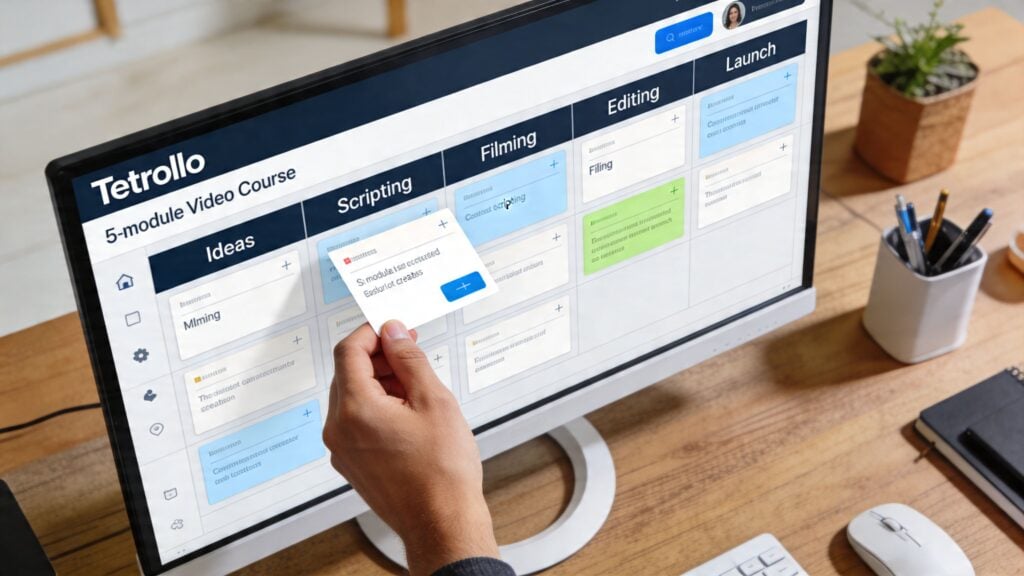
I’ve seen this work well when the course content itself is being drafted elsewhere, like in Google Docs or a teleprompter app, and Trello is there to keep the launch from drifting. Due dates help. So do labels for lesson type, priority, or blockers.
What I like about this setup is that it rarely scares people off. The creator logs in, sees the board, and gets moving.
A strong drafting process matters more than board sophistication at this stage. If you’re building lessons from rough notes and want a cleaner writing workflow before production, this guide to online course drafting pairs nicely with a Trello-first setup.
A simple Trello board is often enough for a first course because the main risk isn’t system failure. It’s stalled execution.
An instructional design team using Notion
Now take a very different project.
A team is building an evergreen drip course with assessments, templates, worksheet downloads, and a resource library that needs ongoing updates. Multiple people touch each lesson. One person owns curriculum flow, another writes scripts, another reviews learner materials, and someone else manages release timing.
Notion begins to feel like the better home.
I’d build a master curriculum database with one entry per module and lesson. Each lesson page would hold the objective, draft script, asset links, production notes, review comments, and status properties. A related database could track resources separately, so a single downloadable worksheet can connect to multiple lessons if needed.
The team can then view the same information in different ways:
- Board view for content status
- Table view for audit work and property checks
- Calendar view for drip release planning
- Timeline view for production sequencing across contributors
That multi-view setup is where Notion earns its complexity. One person can care about due dates. Another can care about dependencies. Another can care about version notes. They’re all looking at the same underlying records.
What the day-to-day feels like
Trello feels lighter.
You open it and move work. Great for shipping.
Notion feels denser. You open it and often see the project, the content, and the context in one place. Great for coordination.
The frustration point in Notion comes when the workspace gets too clever. If every lesson has too many properties, too many views, and too many nested pages, the team slows down. I’ve had to simplify Notion builds more than once because the architecture was technically impressive and practically annoying.
The frustration point in Trello shows up when a course grows beyond a clean board. Once the team starts saying things like “where’s the latest version,” “which worksheet belongs to this lesson,” or “how do we see release timing across everything,” Trello starts depending on too many external tools and habits.
What I’d actually recommend in each case
For the solo creator with one flagship course, Trello often wins on speed and clarity.
For the team building a larger learning ecosystem, Notion usually wins because it can hold the relationships that Trello only points toward.
The lived experience is simple. Trello keeps work visible. Notion keeps work connected.
That difference becomes obvious once a course has to survive revisions, feedback loops, and future updates.
Integrations Scalability and The Real Cost
A project tool never works alone in course creation.
It has to live alongside your LMS, calendar, cloud storage, meeting tools, and whatever you use for forms, automations, and communication. That’s where the long-term choice gets more practical.
Free plans and paid plans
For bootstrapped creators, price matters early.
According to Ramp’s verified comparison, Notion’s free tier offers unlimited pages, while Trello’s free tier is capped at 10 boards. For paid plans, Notion’s Plus plan is around $10/user/month, while Trello’s Standard plan is about $5/user/month in the same comparison at Ramp’s Notion vs Trello analysis.
That pricing split makes sense when you use the tools. Trello costs less at the entry paid level because it does less in one place. Notion costs more because it’s trying to replace several separate workspaces.
If your course operation is small, Trello’s lower paid tier can be enough for a while.
If your project hub is also serving as your documentation layer, curriculum base, and planning center, Notion’s higher cost can still be reasonable because you may avoid stacking additional tools too early.
Automation and workflow scale
Trello has a real edge in built-in automation.
Its Butler automation is useful for rule-based actions like assigning review tasks or moving cards when a checklist is complete. That’s ideal for repetitive launch workflows. If every lesson follows the same sequence, Trello can reduce admin work nicely.
Notion is less strong out of the box here. For more advanced automations, many teams pair it with Zapier or use its API through other tools. That’s workable, but it means your process may depend on another layer of setup.
For a growing education business, this becomes a practical choice:
- Choose Trello if your scaling challenge is repetitive task movement
- Choose Notion if your scaling challenge is keeping documents, planning, and curriculum records connected
If you’re building out the wider infrastructure around a membership or course business, this guide to a tech stack for a $10 membership site is useful because it shows how the project tool fits into the broader software picture.
Adoption, switching, and the hidden cost
The most interesting market signal in the verified data isn’t price. It’s migration.
Ramp’s comparison says Notion has a 19% competitor switch rate compared to Trello’s 4%, which suggests teams are actively moving to Notion for all-in-one capabilities. The same verified data also notes stronger adoption for Notion among relevant teams.
That doesn’t mean Trello is failing. It means many teams eventually hit the ceiling of a board-first system and want a workspace that can absorb more complexity.
Still, there’s a hidden cost on the Notion side. A steep learning curve can waste time if the team doesn’t need the full feature set. The verified data even mentions that teams can spend hours on database tweaks, and that matches what I’ve seen. Notion can save tool sprawl while inadvertently creating setup sprawl.
The expensive part of software usually isn’t the subscription. It’s the hours your team spends wrestling with the wrong level of complexity.
Scalability in plain terms
Trello scales well when your process stays simple and repeatable.
Notion scales better when your course business becomes a network of connected assets, recurring updates, documentation, and cross-functional work. But it can also slow down with larger workspaces, which matters if your team builds very large content libraries.
That’s the core trade-off. Trello scales through clarity. Notion scales through structure.
Which Tool Is Right for You A Decision Framework
There isn’t one winner for everyone.
The better question is which tool matches your project shape and your working style without creating friction you’ll resent in three weeks.

Choose Trello if this sounds like you
You’re building a straightforward course, probably your first or second one. The work mainly moves through clear stages like outline, script, record, edit, upload, launch.
You don’t need a knowledge base inside the project tool. You mostly need a visual system that tells you what’s next and keeps you from dropping tasks.
Trello is also a better fit if:
- You think visually first and like dragging work across a board
- You work with lightweight collaborators who don’t want system training
- You want fast onboarding and minimal setup decisions
- You value automation for repetitive task flow more than deep content architecture
Watch out for one thing. If your board starts turning into a map of links to docs, folders, notes, and calendars scattered elsewhere, you may be outgrowing it.
Choose Notion if this sounds like you
Your course is more than a list of tasks.
You’re managing curriculum records, content drafts, supporting resources, review feedback, and release timing that all connect. Maybe you’re updating a resource library over time. Maybe several people touch each lesson. Maybe you want one place where the script, the planning notes, and the production status all live together.
Notion is the better fit if:
- You need one workspace for docs and project management
- Your course has dependencies between lessons, assets, and schedules
- You want multiple views of the same data
- You’re comfortable investing time in setup so the system can support future complexity
The warning is just as important here. If you don’t need relational structure, Notion can become a hobby instead of a tool.
Your tool should reduce decisions during production. If it creates new decisions every day, it’s the wrong tool for the season you’re in.
My practical recommendation by creator type
For the solo creator, I’d usually start with Trello unless the business already runs heavily inside Notion.
For the instructional designer building a larger learning system, I’d usually choose Notion because the relational structure pays off.
For the team lead managing several people across content, editing, and launch operations, I’d choose based on where the friction lives. If the problem is workflow visibility, Trello can be enough. If the problem is fragmented knowledge and disconnected assets, Notion is the stronger answer.
The shortest version
Ask yourself these questions:
- Do I need to manage tasks, or do I need to manage a connected system?
- Will my team maintain a more advanced workspace?
- Do I want speed now, or structure that can hold future complexity?
If your answers lean toward speed, Trello is probably right.
If they lean toward structure, Notion probably is.
Frequently Asked Questions
Is it smart to use both Notion and Trello together
Sometimes, yes.
I’ve seen this work when Trello handles day-to-day production flow and Notion holds the deeper course documentation. For example, a team might track recording and editing in Trello while keeping curriculum maps, lesson scripts, and resource libraries in Notion.
That said, I wouldn’t recommend a dual-tool setup unless you’re disciplined. Two tools can become double maintenance fast. If nobody is clear on which system owns what, things drift.
Is it hard to migrate from Trello to Notion later
Conceptually, no. Operationally, it depends on how messy the Trello setup became.
If Trello has been used cleanly, with one card per lesson or task and clear labels, moving into Notion is mostly a matter of designing a better structure. The harder part is not importing the data. It’s deciding what the new Notion workspace should represent.
A messy migration usually happens when people try to recreate Trello exactly inside Notion. That misses the point. Notion works better when you redesign around relationships, not just columns.
Can Notion replace Google Docs for course scripts
For a lot of creators, yes.
Notion is good for drafting directly inside lesson pages, especially when you want the script next to the production notes and linked assets. But some writers still prefer Google Docs for pure writing flow and easier external commenting.
I usually recommend testing one full module in Notion before moving all script work there.
Does Trello feel too limited for serious course businesses
Not always.
A serious business can still run well on a simple board-based system if the offer is straightforward and the team is disciplined. Trello becomes limiting when the business starts managing lots of interrelated content and needs stronger documentation in the same workspace.
Are there better alternatives than either one
There are other tools worth exploring, especially if you want a middle ground or more reporting depth.
But for many course creators, the choice comes back to this. Do you want a visual board that gets people moving, or a flexible workspace that can model the whole course ecosystem?
That’s why Notion vs Trello for managing course creation projects is still such a relevant comparison. They represent two very different ways of thinking about work.
What should I do first after choosing one
Keep the first version simple.
If you choose Trello, make one board for one course and define the stages clearly.
If you choose Notion, build one core database for lessons and avoid stuffing it with properties you won’t use.
Start with the smallest system that can hold the actual work. You can always grow it later.