Learning Management System Pricing: How to Avoid Overpaying

You’ve probably had this moment already.
You finish mapping your course, your lessons look good, your checkout plan is taking shape, and then you open an LMS pricing page. Suddenly you’re staring at terms like active users, registered users, implementation fees, storage caps, annual commitments, and quote-based enterprise plans that tell you almost nothing.
That confusion is normal. I’ve seen a lot of creators assume LMS pricing is just a monthly software bill. It rarely is. For solo educators and small businesses, the primary challenge isn’t finding a platform with features. It’s figuring out what you’ll pay once your audience starts using it, or not using it, in uneven waves.
That matters even more because this category is growing fast. The global LMS market is projected to grow from USD 35.23 billion in 2026 to USD 88.41 billion by 2032, with a 16.6% CAGR, according to MarketsandMarkets’ LMS market projection. More vendors, more packaging, and more pricing variations usually mean more chances to overpay if you don’t know what you’re looking at.
Welcome to the Maze of LMS Pricing
If you’re a course creator, coach, membership owner, or training manager, LMS pricing can feel weirdly slippery.
One vendor gives you a neat monthly number. Another asks you to book a demo just to get a ballpark. A third says the platform is affordable, then later charges more for onboarding, migration, support, or features you assumed were standard.

What makes this especially frustrating is that most pricing pages are written for procurement teams at bigger companies. Solo creators and smaller operators don’t usually buy software that way. We think in terms of cash flow, launch timing, margin, and whether a tool will still make sense six months from now.
Why pricing feels harder than it should
A lot of the confusion comes from two things.
First, vendors charge in different ways. One charges for every learner account. Another charges only when someone logs in. Another wraps everything into a flat subscription but limits features by plan.
Second, the sticker price usually isn’t the whole story. You might compare two platforms that look similar at first glance, but one includes support, mobile access, and integrations while the other keeps those behind another paywall.
That’s why learning management system pricing trips people up. You’re not just comparing software. You’re comparing billing logic.
Practical rule: Never ask only, “What does this LMS cost?” Ask, “What causes my bill to go up?”
What small operators need to watch
If you run a lean business, a bad LMS decision usually hurts in one of three ways:
- You pay for inactive people because your audience signs up but only part of them log in regularly.
- You buy for features you won’t use because the sales demo makes everything look necessary.
- You get trapped by setup costs after committing to a platform that looked cheap on paper.
I’ve learned to treat LMS shopping like renting a studio space. The monthly rent matters, sure. But utilities, equipment, insurance, access rules, and upgrade costs matter too. Software is the same.
The mindset that helps
You don’t need a finance background to make a smart choice. You need a few clear questions, a realistic picture of your audience, and enough skepticism to read past the pretty pricing table.
That’s where most buyers get stronger fast. Once you understand how vendors structure charges, the maze starts looking a lot less mysterious.
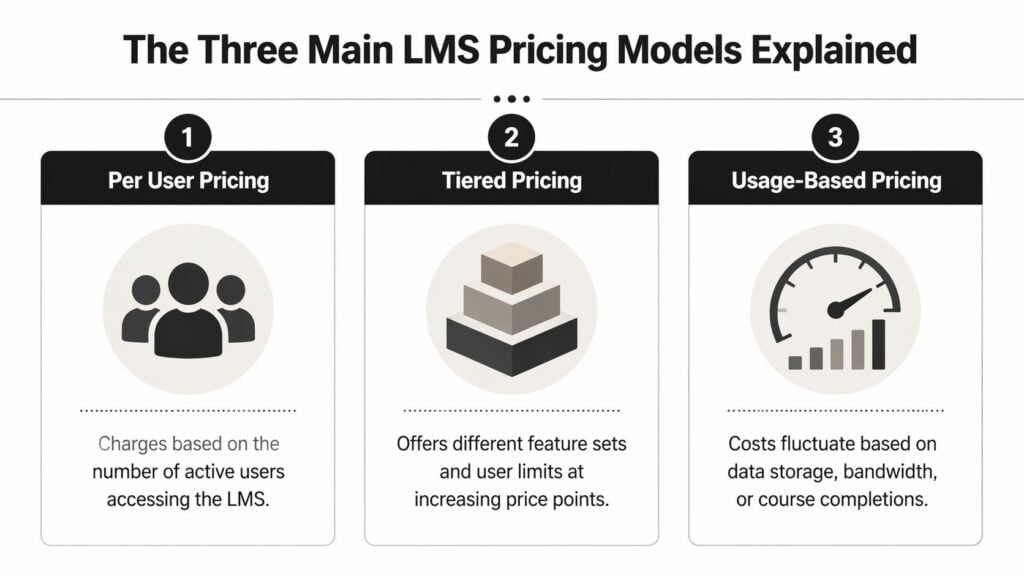
The Three Main LMS Pricing Models Explained
When I talk to other creators about learning management system pricing, I usually translate it into phone plans. That makes it easier to see what you’re really paying for.
Most LMS pricing falls into three buckets. Pay-per-user, pay-per-active-user, and flat-rate subscription. Vendors may dress these up with different names, but the logic is usually one of those three.
If you want another plain-English breakdown to compare with what I’m saying here, this LMS pricing guide and cost breakdown is a useful companion because it frames the common billing structures in a buyer-friendly way.
Pay per user
This is the family phone plan model. You pay for every seat, whether that person uses the platform a lot, a little, or not at all.
For some businesses, this works fine. If every employee or learner is expected to log in regularly, predictability is helpful. You know what the bill should look like, and budgeting is easier.
For creators and memberships, though, this model can get wasteful fast. You might have a hundred people enrolled, but only a portion are active in a given month. You’re still paying for the whole list.
Here’s the upside and downside in plain terms:
- Good fit: Stable usage, mandatory training, consistent cohorts
- Risk: Idle accounts become expensive
- Common confusion: Some vendors say “user” when they really mean “registered account,” which is even broader
Pay per active user
This is closer to paying only for family members who made calls that month.
With this model, the vendor bills based on real engagement during a billing cycle. That can be much better for memberships, drip courses, seasonal workshops, and communities where activity comes in waves.
According to Absorb’s guide to LMS pricing, pay-per-active-user models can reduce costs by 40 to 60 percent compared to pay-per-registered-user models in programs where 50 to 70 percent of registered users may be inactive, because billing follows actual engagement instead of account creation.
That’s a big reason many small operators should look at this model first.
If your learners come and go, your pricing model should bend with that reality. Your bill shouldn’t assume every registrant behaves like a daily user.
The catch is definition. “Active” doesn’t always mean the same thing across vendors. It might mean logged in once. It might mean started a course. It might mean completed an action. You need that spelled out before signing.
Flat-rate subscription
This is the unlimited plan. You pay one fixed fee for access to the platform, usually with some limits on features, support level, or scale.
I like flat-rate pricing when a business wants steadier forecasting. It removes some of the monthly volatility that active-user billing can create. It also gets simpler once you’re serving a larger base and don’t want your costs to jump every time a successful launch brings in more learners.
Still, “flat-rate” rarely means unlimited everything.
A flat fee might include:
- A feature tier with certain tools included and others locked
- A learner band that supports use up to a certain threshold
- A support level that changes how quickly you get help
- A contract structure that lowers your monthly rate only if you commit annually
A quick comparison
| Pricing model | Best when | Main risk |
|---|---|---|
| Pay per user | Your learner count stays steady | Paying for unused seats |
| Pay per active user | Engagement goes up and down | Vendor definitions of “active” can get fuzzy |
| Flat-rate subscription | You want predictable billing | Useful features may sit in higher tiers |
For small businesses, I usually suggest starting with one simple question.
Do you have a stable audience, a fluctuating audience, or a growing audience you can’t predict yet?
That answer usually points you toward the right model faster than any sales pitch will.
What Actually Drives Your LMS Price Tag
A pricing model tells you how you’ll be billed. It doesn’t explain why one plan is modest and another jumps into serious money.
I think of LMS plans like cars. The base model gets you on the road. Then the upgrades start. Better safety features, smarter navigation, premium interior, stronger support package. Software pricing works the same way.
User count is the obvious lever
This one is straightforward. More learners usually means a higher bill, whether that shows up as more seats, more active users, or a higher tier.
The mistake I see often is treating audience size as the only variable. It isn’t. Two businesses with the same number of learners can end up with very different costs because of what they need the platform to do.
That’s why a quote can swing so much from one vendor to another.
Features change the bill fast
Basic delivery is one thing. Advanced reporting, automation, AI recommendations, skills frameworks, branded experiences, and deeper analytics are another.
According to Capterra’s guide to LMS pricing models, AI-driven personalization can add 20 to 40 percent to the base cost of an LMS, but it can also deliver 2.5x faster skill acquisition in corporate training. Even if you’re not running corporate training, the lesson is still useful. Advanced features often raise price because they change outcomes, admin workload, or both.
That doesn’t mean you should rush to buy every advanced module.
It means you should ask, “Will this feature save time, improve completion, or help me sell better?” If the answer is no, it probably belongs on your maybe-later list.
Support is part of the product
A lot of creators underestimate this one.
Cheap software feels less cheap when setup is messy, help tickets move slowly, and you’re burning your own time figuring things out. Fast support, migration help, onboarding guidance, and better implementation often cost more because real people are involved.
It is also useful to think beyond LMS platforms and look at how recurring software billing works in general. A broader primer on billing for SaaS platforms helps explain why feature bundles, support levels, and usage thresholds shape software invoices the way they do.
The best-priced LMS isn’t the one with the lowest monthly fee. It’s the one that lets you run the business without adding avoidable friction.
A simple way to evaluate trade-offs
Use this quick filter when comparing plans:
- Must-have tools: Course hosting, learner progress, basic reporting, payment or access control
- Useful later: Better automations, stronger analytics, branded mobile experience
- Only if justified: Advanced AI, custom workflows, premium service layers
If a vendor demo jumps straight to fancy features, pull the conversation back to your current business. For a solo creator, the right first plan is often the one that removes admin pain without loading on complexity you won’t use for a while.
Budgeting for Your LMS With Realistic Examples
Abstract pricing advice is nice. Budgeting gets real when you map it to an actual business.
I’ll use three common situations I see all the time. Not giant enterprise departments. Real operators trying to protect margin and still deliver a polished learner experience.

The solo creator
This is the person launching a first course or building a small membership. Audience size is still uncertain. Some learners binge the material. Others disappear after week one. Cash is tight, and every tool has to earn its place.
For this setup, I’d lean toward pay-per-active-user or a modest flat-rate option with room to grow. A per-registered-user model can punish you for enthusiasm. You market well, get signups, and then pay for a lot of people who never really participate.
That risk is more than theoretical. According to iSpring’s LMS pricing guide, a 100-user site with only 30 percent monthly adoption could see costs inflated by 233 percent on a per-registered-user model versus a usage-based one.
That’s exactly the kind of trap that hits smaller creators hardest.
For this buyer, I’d prioritize:
- Core delivery: Lessons, progress tracking, and clean student access
- Simple payments or integrations: Enough to connect with your sales flow
- Low commitment: The ability to change plans without pain
I’d ignore the flashy extras unless they directly support your offer.
The small training team
This is a consultancy, agency, or education business with multiple instructors and a steady stream of learners. They need more structure, more reporting, and less manual admin.
Now a flat-rate subscription starts becoming more attractive, especially if learner volume is steady enough that active-user billing won’t save much. Predictability matters more here because the LMS is supporting delivery operations, not just one creator’s first product.
The bigger issue for this group isn’t usually the base fee. It’s whether they need:
- Instructor workflows
- Better reporting
- Client-facing branding
- Integrations with email, CRM, or internal systems
If you’re in this bucket, don’t just browse vendor pages. Read buyer comparisons too. LearnStream has a practical roundup of learning management systems reviews that can help narrow the shortlist before you start taking demos.
The growing membership
This operator has momentum. New members arrive regularly, content keeps expanding, and manual processes are starting to crack.
At this stage, choosing the wrong pricing model can chew through profit. A platform that felt fine when you had a small active core may become awkward once your community grows, your content library deepens, and support needs increase.
Here I’d look for:
| Priority | Why it matters |
|---|---|
| Automation | Reduces manual enrollment, reminders, and access management |
| Scalable billing model | Prevents sudden cost spikes during growth |
| Stronger reporting | Helps spot churn, engagement issues, and content gaps |
| Migration clarity | Makes a future switch less painful if you outgrow the tool |
A quick walkthrough can help you see how vendors position these trade-offs in practice:

One practical budgeting habit
I like to build LMS budgets in three layers:
- Base software cost
- Essential extras I know I need
- A buffer for things the sales page glosses over
That last layer matters because software costs rarely stay confined to the advertised plan. If your business has variable engagement, pricing flexibility matters just as much as feature quality.
The Hidden Costs That Can Derail Your Budget
The subscription fee is the part vendors put on the brochure. The rest is the iceberg under the water.
Learning management system pricing can shift from mildly annoying to expensive. You think you’ve found a manageable monthly cost, then setup, migration, branding, storage, or integration fees show up later.

Migration and setup are where surprises begin
If you’re moving from one platform to another, somebody has to transfer learner records, content, completion data, and structure. Sometimes that’s simple. Often it isn’t.
According to Workademy’s breakdown of LMS hidden costs, data migration can reach $2,500, and hidden fees can inflate total LMS cost by up to 3x. The same source notes that up to 70 percent of buyers underestimate total cost of ownership.
That’s the kind of miss that can wreck a small budget.
Integration and storage costs creep in quietly
If your LMS has to connect with your CRM, email platform, community tool, webinar software, or payment system, ask whether that connection is included, limited, or custom-billed.
Video-heavy libraries can create another issue. Some platforms bundle generous storage. Others charge more once you pass a threshold. If your teaching style relies on lots of hosted video, that detail matters.
I’d ask every vendor these questions before I get attached to the demo:
- What does onboarding include
- What costs extra during migration
- Which integrations are native and which require paid setup
- Are storage limits or overages part of the contract
- What happens if I leave and need my data exported
A cheap LMS with expensive exits is not cheap.
DIY can also get expensive
Some buyers avoid platform fees by stitching together a low-cost stack themselves. Sometimes that works. Sometimes the “savings” disappear into plugins, workarounds, support gaps, and manual labor.
That same pattern shows up outside the LMS world too. This piece on the hidden costs of DIY solutions is about webinars, but the lesson carries over perfectly. A low headline price can hide operational drag that costs more over time.
Protect yourself with a total-cost lens
If you’re trying to stay budget-conscious, a resource like LearnStream’s guide to an affordable learning management system is helpful because affordability only means something if it includes the less obvious costs too.
I’d never approve an LMS based on the subscription number alone. I want a written estimate for the first year in full, including everything needed to launch and operate without scrambling.
How to Choose the Right Plan and Negotiate a Better Deal
Most buyers have more bargaining power than they think.
Vendors want predictable revenue. They want annual commitments, smoother onboarding, and customers who don’t churn quickly. That gives you room to ask for better terms, even if you’re a small business and not a huge enterprise account.
Start with your actual use case
Before you talk to sales, write down what you need your LMS to do in the next year.
Not in theory. In practice.
That usually means listing:
- Your learner pattern: steady, seasonal, launch-driven, or membership-based
- Your admin reality: solo operator, small team, or multiple instructors
- Your must-haves: reporting, payments, branding, automations, support
- Your non-essentials: features that would be nice but aren’t urgent
If you need help sorting those priorities, LearnStream’s guide on how to choose an LMS is a useful planning reference before you start demos.
Use the trial like a buyer, not a browser
A lot of people treat free trials as feature tours. I treat them like stress tests.
Try the things that usually create regret later. Import content. Add a learner. Check reports. Test the admin workflow. Contact support with a real question. If there’s an integration you care about, ask to see it working.
You’re not just testing software. You’re testing what it feels like to run your business on it.
Buying lens: If a basic task feels clunky during the trial, it won’t feel better after a contract.
What to negotiate
You don’t need to play hardball. You do need to ask clearly.
Here are the asks I’d make:
Ask for annual pricing options
Vendors often prefer annual commitments. In return, ask for a lower effective rate or added services.Ask for setup fees to be reduced or waived
This is especially worth trying if your implementation is simple.Ask for price protection at renewal
A low first-year deal loses value if year two jumps sharply.Ask for a higher plan temporarily If you’re comparing tiers, request short-term access to the next tier so you can validate whether those features are necessary.
Ask for definitions in writing
This matters most with active-user billing, support promises, and feature access.
The smartest deal is often the boring one
I’ve seen buyers get distracted by a sleek demo and overlook the contract details that shape daily life. The stronger deal is usually the one with clearer terms, manageable growth costs, and fewer nasty surprises.
That might not be the flashiest platform. It’s often the platform you can confidently afford while your business grows.
Frequently Asked Questions About LMS Pricing
Are open-source LMS options really free
Not really, at least not in the way most creators mean “free.”
The software license may be free, but somebody still has to handle hosting, setup, updates, security, maintenance, and troubleshooting. If you have technical support in house, that can be workable. If you don’t, the time and service costs can pile up.
For many small businesses, open-source can make sense only if customization is a bigger priority than convenience.
Is a quote-based LMS always more expensive
No. It’s often just less transparent.
Some quote-based vendors serve larger organizations and customize plans based on user volume, support, and implementation needs. That doesn’t automatically make them overpriced. It does mean you need a more disciplined buying process, because it’s harder to compare offers without a detailed breakdown.
If you get a quote, ask for every line item separately. Don’t accept a bundled number you can’t unpack.
How easy is it to switch LMS platforms later
It varies a lot.
Some platforms make export and migration relatively straightforward. Others make the process awkward, expensive, or incomplete. Before signing, ask what you can export, in what format, and whether there are fees attached to leaving.
That question feels pessimistic during the sales cycle. It’s practical.
Should solo creators avoid enterprise-style LMS platforms
Usually, yes, unless your business already needs that level of complexity.
A platform built for large internal training teams may include workflows and admin layers that don’t help a solo educator. You can end up paying for structure you’ll never use. Smaller operators usually benefit more from clear pricing, lighter setup, and faster day-to-day management.
Is monthly billing safer than annual billing
It’s safer for flexibility. It isn’t always cheaper overall.
If you’re still validating your offer, monthly billing can reduce risk. Once your learner flow is more stable, an annual plan may make sense if the vendor gives you stronger terms and predictable costs. I only like annual commitments when I’m already confident in usability, support quality, and the actual all-in cost.
What’s the biggest pricing mistake small businesses make
Paying for theoretical growth.
I see this all the time. A founder buys the bigger plan because they expect rapid expansion, advanced automations, or a flood of learners that hasn’t happened yet. Then they spend months carrying software costs that don’t match current reality.
Buy for the next stage you can reasonably see, not the fantasy version of your business.
Do nonprofits or educators get discounts
Some vendors offer them, some don’t, and many don’t advertise them clearly.
It’s worth asking directly. Even when there isn’t a formal discount, vendors may adjust setup, contract terms, or support for education-focused buyers. Just make sure any special terms are written into the agreement and not left as a verbal promise.
What should I ask on a sales call
Keep it simple and direct.
Ask:
- How do you define a billable user
- What is included in onboarding
- Which features cost extra
- What happens if my usage changes
- What are the full first-year costs
- What does renewal look like
- How do I export my data if I leave
Those questions will tell you more than a polished demo ever will.
Learning management system pricing doesn’t have to stay confusing. Once you strip away the jargon, you’re really deciding how you want software costs to behave inside your business. Predictable, flexible, or feature-heavy.
If you keep your eye on actual usage, total cost, and contract terms, you’ll make a much better decision than someone who shops by headline price alone.