LMS for Insurance Agent Continuing Education

If you’re managing insurance training right now, there’s a good chance part of your CE process still lives in spreadsheets, inbox reminders, shared drives, and one person’s memory. That works right up until it doesn’t. A renewal gets missed, an agent takes the wrong course for the wrong license, or a state audit request turns into a scavenger hunt.
That’s why an LMS for insurance agent continuing education matters. It’s not just a content library. In a brokerage or agency environment, it becomes the operating system for compliance, documentation, renewals, and ongoing development.
The hard part is that insurance CE isn’t simple. You’re rarely dealing with one license type, one state, one reporting rule, or one learner profile. The challenge lies in the messy middle, where a single agent may hold multiple licenses, work across jurisdictions, and need different course approvals depending on where they sell and what they’re authorized to handle.
Your Guide to Choosing an Insurance CE Learning System
Most insurance teams don’t start shopping for an LMS because they love learning technology. They start because manual CE management has become risky, slow, and expensive to maintain.
In the U.S., most states require licensed insurance agents to complete 24 hours of continuing education every two years to renew their licenses, according to American Agents Alliance’s overview of insurance continuing education requirements. That requirement sounds manageable on paper. In practice, it creates a rolling compliance calendar that never really stops.
A training manager usually isn’t dealing with one clean deadline. They’re dealing with staggered renewals, state-specific approvals, line-of-authority differences, and agents who need training in the flow of work, not after hours when they’re already behind.
Practical rule: Don’t buy software to solve a spreadsheet problem. Buy a system that can enforce your compliance process.
That distinction matters.
A weak selection process leads to a polished LMS that hosts courses but can’t answer the questions your operations team poses every week. Who is close to expiration? Which completions count in which state? Which certificates are audit-ready? Which agents are carrying multiple license obligations that need separate tracking?
Before demos, before pricing calls, and before procurement gets involved, define what your CE operation has to control.
Start with these three realities:
- Compliance is operational: CE affects active licensure, not just employee development.
- Insurance rules vary: A generic LMS can look fine in a demo and still fail in production.
- Tracking is the product: If records, reminders, completions, and proofs aren’t reliable, the learning experience doesn’t matter much.
The best buyers treat LMS selection as a compliance systems project first and a course platform decision second. That mindset changes the questions you ask, the vendors you short-list, and the mistakes you avoid.
First Things First Define Your CE Strategy
The first useful document in this process isn’t an RFP. It’s a plain-language map of your compliance reality.
If you skip that step, every vendor demo will sound convincing. They’ll all say they support certifications, reporting, reminders, and custom learning paths. What matters is whether those features fit the way your agency operates.

Audit your license landscape first
The biggest blind spot I see is assuming your learner list is the same as your compliance list. It isn’t.
A useful CE strategy starts by auditing your roster across four dimensions:
- Who holds which license types
- Which states each person is licensed in
- What CE rules apply to each combination
- What proof your team needs to retain
That sounds basic, but insurance organizations often discover edge cases fast. Some agents are resident in one state and non-resident in others. Some have line-of-authority combinations that create overlapping but not identical obligations. Some are producers. Some are adjusters. Some are managers who still need regulatory training but not full producer CE.
A major challenge is that each state has unique requirements, and combined licensees such as agents holding both LH and PC licenses may need full CE for both license types, which creates a tracking problem that an LMS has to manage well. PIA Southern Alliance highlights that issue in its guidance on insurance continuing education requirements across states and license types.
That’s where many generic LMS rollouts start to wobble. They can assign a course. They can record a completion. They struggle when one completion needs to be interpreted differently based on the learner’s state, line, and renewal cycle.
Define what success looks like beyond “stay compliant”
Compliance is the floor. It shouldn’t be the only outcome you design for.
Here’s the practical test. If your LMS were live tomorrow, what decisions should it make automatically, and what decisions should stay with your compliance or training team?
The stronger your requirements document is, the less likely you are to buy on interface alone.
Write a requirements document your vendors can’t dodge
I like a requirements document that’s ugly but specific. It doesn’t need branding. It needs operational detail.
Include items like these:
- License complexity: Note every active line of authority and every state where your agents operate.
- Renewal logic: Capture how your current team tracks deadlines, exceptions, and proof of completion.
- Course sourcing: Identify whether you create content internally, rely on third-party CE libraries, or need both.
- Reporting needs: List the exact reports leaders, compliance staff, and managers need to pull without custom work.
- Approval workflow: Clarify who approves assignments, certificates, exceptions, and archived records.
If your team is still sorting out what “good” CE administration looks like, this resource on mastering insurance producer continuing education is useful because it helps frame the producer side of the problem in operational terms.
A smart strategy document makes vendor conversations much easier. You stop asking, “Can your platform do CE?” and start asking, “Show me how your rules handle a multi-state producer with overlapping requirements and different renewal dates.”
That’s a much better buying position.
Must-Have Features for Insurance CE Compliance
Insurance buyers get in trouble when they shop from a generic LMS checklist. A platform can have course catalogs, quizzes, certificates, and decent reporting and still be a bad fit for regulated CE.
The right feature set is narrower and more demanding. You need tools that can survive compliance work in daily use, not just look good in a sales environment.
Tracking has to understand compliance, not just completion
This is the first line item I’d push hardest on in a demo.
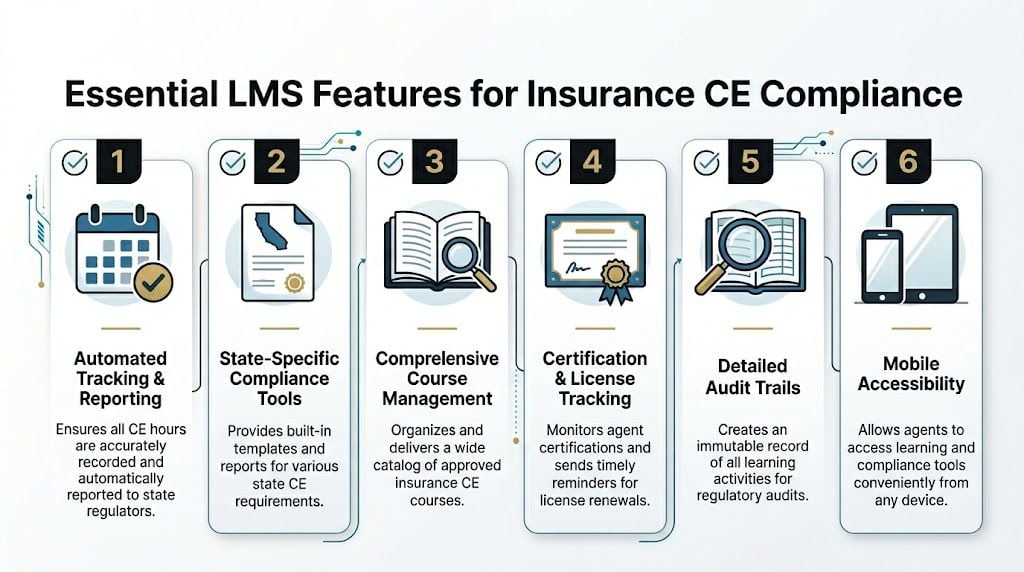
A strong insurance CE platform needs automated CE credit tracking, custom certificate templates, expiration reminders, and audit-ready records. It also needs SCORM and xAPI support if you expect to bring in third-party content cleanly, as outlined in DigitalChalk’s LMS buyer guidance for regulated training needs.
That sounds technical, but the business meaning is simple. Your LMS should know more than whether somebody clicked through a course. It should help you answer whether the completion counts, how it was earned, what certificate was issued, and what you’ll show an auditor later.
Look for evidence of these capabilities:
- Credit-aware completions: The system should tie learning activity to CE credit logic, not just issue a generic “completed” status.
- Expiration workflows: Renewal reminders should be configurable and tied to actual compliance deadlines.
- Certificate controls: Templates should reflect the fields your organization and regulators need.
- Immutable records: You want a reliable historical trail, especially if a completion is challenged later.
State-level complexity needs its own workflow layer
Insurance CE breaks simple LMS workflows because each state can interpret eligibility, approvals, and timing differently. That’s why I’d treat state-specific rules as their own category during evaluation.
Ask vendors how they handle:
| Compliance area | What to ask the vendor | Why it matters |
|---|---|---|
| State rule variation | Can admins assign requirements by state and line of authority? | One course may not satisfy every learner equally |
| Multi-license agents | Can one learner have separate CE obligations tracked at the same time? | Combined licensees create messy reporting if the LMS assumes one requirement set |
| Deadline management | Can reminders and dashboards reflect different renewal cycles? | Uniform reminder logic usually fails in multi-state teams |
| Record retention | Can you export learner history and certificates cleanly for audits? | Compliance teams need proof fast |
This is also where integrations matter. If you use external CE providers, AMS tools, or reporting systems, your LMS has to exchange data without manual re-entry. Otherwise your compliance team becomes the integration layer.
For organizations dealing with regulated training beyond insurance, this guide to LMS features required for HIPAA compliance training is worth reading because it shows how auditability, record controls, and policy-sensitive workflows change what “must-have” really means.
Course delivery still matters, but in a different way
A lot of teams over-focus on the learner interface and under-focus on course administration. Both matter, but not equally.
Your agents do need a clean experience. They should be able to log in, see exactly what’s required, complete assigned learning on mobile when needed, and access certificates without opening support tickets. But in insurance CE, usability has to work hand in hand with governance.
If a vendor spends most of the demo on social learning, badges, and homepage branding, pull them back to compliance records, audit exports, and multi-jurisdiction logic.
That’s where insurance CE success lives.
Connecting Your Tech Integrations Really Matter
A standalone LMS creates extra work. An integrated LMS removes it.
That’s the practical dividing line.
Insurance CE data rarely starts and ends inside the LMS. Agent identity, status, role, manager assignment, and sometimes license details often live somewhere else. That might be your AMS, CRM, HRIS, association database, or a patchwork of systems that grew over time. If those systems don’t connect, your team ends up entering the same information multiple times and correcting mismatches after the fact.
Compare integrated workflows against manual ones
The easiest way to evaluate integrations is to compare what daily operations look like with and without them.
Without solid integrations:
- New hires get loaded manually
- Role changes take too long to reflect in training assignments
- Agents end up enrolled in the wrong path
- Managers ask for status updates your team has to compile by hand
- CE completion records sit apart from the systems leadership uses
With strong integrations:
- User data flows in automatically
- Enrollment rules can key off role, location, or team
- Reporting gets cleaner because data comes from one source of truth
- Compliance and operations stop arguing about which spreadsheet is current
That’s why I treat integrations as architecture, not convenience.
Pick the integration model that fits your environment
Not every insurance organization needs the same stack. A national brokerage with multiple lines and distributed teams has different integration demands than a smaller regional agency or an association delivering CE to members.
Here’s the trade-off I usually explain to buyers:
| Approach | Strength | Weak spot |
|---|---|---|
| All-in-one platform | Fewer vendors and simpler administration | May not go deep enough on insurance-specific workflows |
| Best-of-breed LMS plus integrations | Better fit for specialized CE needs | Requires more implementation discipline |
| CE provider portal with limited integrations | Fastest path to content access | Harder to unify reporting and internal development |
A lot of teams benefit from thinking about LMS integration the same way they’d think about building a modern marketing technology stack. The point isn’t to collect tools. The point is to decide where core data should live, which system owns which process, and where automation effectively removes risk.
If your organization already works with student or learner data systems in other contexts, this article on LMS integration with SIS systems gives a useful framework for thinking through data ownership, sync logic, and handoff points. The same principles apply in insurance environments, even if the underlying systems differ.
Ask vendors to show data movement, not just API slides
Procurement teams often get fooled. A vendor says they have an API, and everyone relaxes.
An API is not an integration strategy.
Ask vendors to demonstrate actual flows:
- User provisioning: What happens when a new agent joins?
- Attribute changes: What happens when a learner changes state, role, or manager?
- Completion return: Where does CE data go after the course is done?
- Error handling: How does the system flag failed syncs or mismatched records?
Good integrations reduce admin effort quietly. Bad integrations create silent data drift that shows up when someone’s license is on the line.
That’s why I’d rather buy a slightly less flashy LMS with dependable sync behavior than a more polished platform that leaves your team doing reconciliation work every week.
The Smart Way to Choose and Buy Your LMS
The insurance LMS market is crowded, and the options can look similar until you force them into your actual use case. Some vendors come from association management. Some come from corporate learning. Some are CE library providers that expanded into platform functionality.
Scale matters, but fit matters more. At the same time, it’s useful to know that online regulatory training platforms can operate at substantial scale. For example, 360training serves over 11 million users, which shows how large this market has become, as noted in Insurance Business Magazine’s review of continuing education providers.
Comparing LMS vendor types for insurance CE
Here’s the buying lens I’d use first.
| Vendor Type | Best For | Typical Pricing Model | Key Consideration |
|---|---|---|---|
| Association platform with CE tools | Associations and membership-driven groups | Platform fee plus membership or module-based pricing | May bundle events, membership, and learning well, but depth for brokerage workflows can vary |
| Specialized corporate LMS | Agencies and brokerages needing custom workflows | Per-user, tiered, or enterprise contract | Usually better for internal training control and integrations |
| CE content provider with portal access | Teams prioritizing quick access to approved courses | Library subscription, seat-based, or course access pricing | Fast content access, but weaker control over broader learning operations |
| Customizable enterprise learning suite | Large organizations with complex governance | Enterprise licensing and implementation fees | Powerful, but can become expensive and slow to configure |
The mistake I see most often is buying for the current pain only. If the pain today is “we need CE courses fast,” a content portal may seem perfect. But if you also need manager dashboards, onboarding, internal product training, and multi-state compliance logic, that shortcut gets expensive later.
Run demos around your messiest scenario
A polished demo proves almost nothing unless you give the vendor a difficult use case.
I’d give every finalist the same scenario and make them show it live. For example:
- An agent holds multiple license types
- That agent is active across more than one state
- Their renewal timeline differs from peers on the same team
- They need third-party CE plus internal compliance training
- A manager wants status visibility without admin rights
Then ask the vendor to walk through:
- User setup
- Assignment logic
- Completion tracking
- Certificate output
- Reminder workflow
- Admin reporting
- Audit export
If they dodge, narrate, or answer with “that can be configured” without showing how, take that seriously.
“Configured later” often means “your team will discover the limits after signing.”
If you want a broader evaluation framework before demos begin, this guide on how to choose an LMS is a solid planning aid for narrowing requirements and comparing vendors consistently.
Read pricing proposals like an operator, not a shopper
Insurance LMS pricing can look neat at the top line and messy in the contract.
I’d review proposals for these hidden friction points:
- Implementation scope: What data migration, setup, and training are included?
- Integration charges: Are connectors, API access, or data sync work extra?
- Support tiers: Does meaningful admin support require a higher package?
- Content separation: Is the CE catalog included, or priced separately from the platform?
- Reporting limits: Are custom reports, exports, or compliance dashboards standard?
Shortlist vendors based on operational fit first, then negotiate. Once you know which one can manage your compliance complexity, you can have a real pricing conversation. If you do it the other way around, the cheapest option often turns into the most labor-intensive one.
Your Launch Plan From Migration to Agent Onboarding
Signing the contract feels like progress. It also starts the part where projects usually go off track.
Most insurance LMS launches don’t fail because the software is broken. They fail because data comes over half-clean, ownership is fuzzy, and agents get a login email without enough context to use the system correctly.

Clean your data before you migrate anything
Do not use migration as a cleanup strategy. It rarely works.
Before any import, validate:
- User records: Names, emails, roles, manager relationships, and locations
- License details: State associations, license types, and any internal tags you use for assignment rules
- Historical completions: What needs to move for compliance history and what can stay archived elsewhere
- Course inventory: Which courses are active, retired, duplicated, or outdated
- Certificate records: What has to remain accessible for audit or proof requests
I’d also decide early where your “system of record” will sit for each data type. If that’s unclear, the LMS can quickly become a second source of truth instead of a reliable one.
Onboarding needs a communication plan, not just a training session
Agents are busy, and CE is often something they fit around selling, servicing, and client support. If the new LMS feels confusing or optional, adoption drops fast.
What works better is staged onboarding with role-specific messaging.
Before launch
Tell agents what’s changing, why the new system matters, and what problem it solves for them. Keep it practical. Fewer missed deadlines. Easier access to required courses. Faster proof of completion.
At launch
Give them one clean path. Login instructions, where to find assigned learning, where to view due dates, and how to get help. Don’t flood them with every feature on day one.
After launch
Use manager follow-up, simple reminders, and short support content to reinforce habits.
A lot of the same principles used in product adoption apply here. This article on user onboarding best practices is helpful because it focuses on reducing friction early, which is exactly what insurance learners need in a newly launched platform.
Here’s a useful explainer to share internally if your team needs a quick orientation point during rollout.

Assign ownership before problems appear
A launch goes smoother when everyone knows who owns what.
I usually recommend splitting ownership like this:
| Area | Primary owner |
|---|---|
| Data imports and user syncs | Systems or LMS admin |
| CE rules and assignment governance | Compliance lead |
| Course catalog and learner experience | Training manager |
| Manager reporting and escalations | Operations leaders |
| Learner support and communications | Training or enablement team |
That structure prevents the usual confusion where support tickets bounce between compliance, HR, and IT.
One more point that gets overlooked. Don’t try to launch every use case at once. If CE compliance is the business-critical function, stabilize that first. Add broader professional development, product training, or elective learning after your core workflows are working cleanly.
After the Launch How to Measure What Matters
Tracking completions is a common practice because completions are easy to find. That’s fine as a starting point, but it’s not enough to manage CE well over time.
The better question is whether your LMS is reducing compliance risk and making administration easier while still helping agents complete what they need without friction.
According to AcademyOcean’s insurance LMS benchmarks, strong programs often target an 85 to 95 percent course completion rate and a 92 percent average assessment pass rate. The same source notes that automated expiration reminders can cut renewal lapses by as much as 50 percent.
Build one dashboard for leadership and another for operators
One dashboard usually can’t serve both audiences well.
Leadership needs a compact view:
- Overall compliance health
- Upcoming renewal risk areas
- Team or region comparisons
- Participation trends in required training
Your operators need something much more detailed:
- Learners nearing deadlines
- Failed or incomplete assignments
- Certificates missing from records
- State or license groups with unusual exceptions
- Manager follow-up lists
If you mix those views together, neither audience gets what it needs.
Measure the signals that lead to fewer problems
I’d watch a handful of indicators consistently rather than drowning in reports.
Completion rate
Use it as a workflow signal, not a vanity metric. If required CE completion drops, check whether the issue is content, communication, access, or assignment logic.
Assessment performance
The 92 percent average assessment pass rate benchmark gives you a useful reference point from the source above. If scores are lower, it may point to weak preparation, confusing content, or agents being assigned material that doesn’t fit their role.
Renewal lapse prevention
This is one of the clearest operational wins. If reminder workflows are set up well, renewal misses should become less common. That’s where automation starts proving its value.
Support load
A practical metric many teams overlook. Track what agents ask for help with. If tickets cluster around login issues, unclear assignments, or certificate access, your learner experience needs attention.
Numbers matter, but patterns matter more. If the same team repeatedly finishes late, there’s usually a process issue behind it.
Use data to improve the program, not just report on it
A mature insurance CE program uses analytics to make decisions.
If one state cohort consistently struggles with a required topic, adjust the content or add support material. If managers aren’t following up, give them simpler status views. If agents finish required work only at the last minute, review reminder timing and assignment windows.
The strongest teams also gather qualitative feedback. Ask agents whether they can quickly tell what’s required, whether the course catalog makes sense, and whether certificates are easy to access when needed. Those answers often reveal more than a dashboard does.
Over time, this is how an LMS for insurance agent continuing education starts paying off. You stop treating CE as a recurring scramble and start running it like a controlled process.
If you’re evaluating platforms and want more practical guidance on LMS selection, implementation, and digital learning operations, explore more resources on LearnStream.