ActivePresenter vs Articulate Storyline for E-learning
You’ve probably had this moment already.
The course outline is solid. You know the audience. You know whether this thing needs to teach a process, test decisions, or walk people through software. Then the build starts, and the main question shows up: Do I make this in ActivePresenter or Articulate Storyline?
That choice matters more than most feature lists admit. These tools can both publish standard e-learning packages, and both can produce polished work. The bigger difference is what the build process feels like when you’re under deadline, revising feedback, and trying not to fight your software.
I’ve seen people pick Storyline because it’s the industry name, then realize most of their work is screen tutorials that could’ve moved much faster in ActivePresenter. I’ve also seen teams choose the cheaper option first, only to hit a wall when they needed layered branching, custom logic, and tighter control over learner decisions.
If you’re still exploring the broader selection of authoring platforms, LearnStream’s guide to authoring tools for e-learning in 2026 is a useful broader read. But if your shortlist is already down to these two, the core question is simpler.
Which tool helps you build the kind of course you make, without slowing you down?
Choosing Your E-Learning Authoring Tool
A lot of buying decisions start with the wrong question. People ask which tool is “better” as if there’s one universal answer.
There isn’t.
ActivePresenter vs Articulate Storyline for e-learning is really a workflow decision. Both tools can build courses. Both can handle LMS-friendly output. What separates them is where each one feels natural, and where each one starts to feel like extra work.
Here’s the fast comparison most course creators need at the start:
| Area | ActivePresenter | Articulate Storyline |
|---|---|---|
| Best fit | Software tutorials, demos, procedural training | Branching scenarios, custom interactions, high-control course design |
| Typical starting point | Record the screen, then edit | Start with slides, layers, triggers, and logic |
| Platform support | Windows and macOS | Windows only |
| Licensing style | Free version plus one-time purchase options | Annual subscription through Articulate 360 |
| Team style | Strong for solo creators and local production | Strong for review-heavy teams using the Articulate ecosystem |
This is why the choice can feel oddly emotional. One tool tends to say, “Let’s capture the process and shape it.” The other says, “Let’s design the experience from the ground up.”
That difference affects everything. It affects how quickly you can get a first draft out. It affects how annoying revisions feel. It affects whether adding one more interaction is a quick edit or a rabbit hole.
Practical rule: Pick the tool that matches your most common project, not the fanciest project you might make twice a year.
If your weekly work is tutorial-heavy, simulation-heavy, or video-led, ActivePresenter often feels lighter. If your work lives in branching decisions, custom navigation, and scenario design, Storyline usually earns its complexity.
Understanding the Core Philosophy of Each Tool
The cleanest way to understand these tools is to look at where they came from.
ActivePresenter grew up around capture and simulation
ActivePresenter feels like a tool built by people who expected you to record something first. Its center of gravity is the software walkthrough, the product demo, the step-by-step process.
That history still shows in the way it behaves now. One comparison notes that ActivePresenter evolved from a screen-capture and simulation-centered workflow, while Articulate Storyline became the benchmark for advanced branching course design. The same comparison also lists Windows and macOS support for ActivePresenter, while Storyline is shown as Windows only in that comparison, which matters for mixed-device teams and solo creators on Mac (Atomi Systems comparison of Storyline alternatives).
That DNA matters in day-to-day production. When a tool starts from the idea of “record, then refine,” it naturally gets good at demonstrations, system training, onboarding walkthroughs, and procedural learning.
Storyline grew up around interaction design
Storyline feels different because it was shaped around building interactions more than capturing them.
Its core mental model is slide-based, but that undersells it. Its true power lies behind the slides. Layers, states, variables, and triggers are what give Storyline its reputation. You don’t just place content. You define how it behaves.
That’s why Storyline often feels like the stronger choice when the learning experience depends on consequences, branching paths, changing visual states, and more personalized feedback. It asks more from the designer, but it also hands back more control.
If ActivePresenter often feels like “show the learner what to do,” Storyline more often feels like “make the learner choose what happens next.”
Why the philosophy matters
This isn’t just product positioning. It affects the way projects move.
A software simulation course usually benefits from a tool that gets from recording to editable training steps quickly. A customer service scenario with multiple responses, consequences, retries, and alternate outcomes usually benefits from a tool designed around interaction architecture.
Neither philosophy is better in the abstract. The mismatch is the problem.
If you choose Storyline for mostly procedural screen tutorials, you may end up spending too much time building what another tool captures more naturally. If you choose ActivePresenter for a logic-heavy branching experience, you may find yourself pushing harder against the edges of the interface.
The Authoring Workflow and Creator Experience
The difference becomes undeniably clear.

What building in ActivePresenter feels like
In ActivePresenter, a lot of projects begin with one obvious action. You hit record.
That changes the mood of the whole build. Instead of starting from an empty course shell, you start from captured activity. The project already has momentum because the raw material exists. You’ve got steps, visuals, and a clear sequence right away.
That makes ActivePresenter feel efficient for work like:
- Software onboarding: Record the workflow, clean up the steps, add guidance, publish.
- Product tutorials: Capture once, then turn the same material into training content.
- Procedure-heavy microlearning: Show the task, annotate the task, check understanding.
Its all-in-one feel helps here. Video editing, audio cleanup, and interactive additions live close together, so you’re not mentally switching between “editing mode” and “authoring mode” as much.
For creators doing a lot of tutorial work, that reduced friction matters. If you also produce demos or screencasts, LearnStream’s roundup of the best screen recording software for course creators is worth pairing with this decision because it highlights how much your capture workflow shapes the final course.
What building in Storyline feels like
Storyline usually starts quieter. Blank file. Slide canvas. Familiar structure.
Then you open the panels and remember why people love it.
Storyline shifts from presentation software to interaction software. Triggers, layers, and variables give you a lot of freedom, but they also ask you to think like a designer and a builder at the same time. You’re planning content flow, screen behavior, learner input, and feedback logic together.
That’s why Storyline can feel slower at first and more rewarding later.
One comparison describes Storyline’s advanced interactivity through triggers, layers, and variables, and reports an average development time of 10 hours per course hour with a 92% quality score. The same source contrasts that with ActivePresenter’s more efficient workflow for lower-complexity projects (Stratbeans comparison of Presenter and Storyline).
The biggest day-to-day difference
Here’s the plain version.
ActivePresenter feels like a tool that wants to help you produce.
Storyline feels like a tool that wants to let you construct.
That sounds subtle, but it isn’t. In practice:
| Workflow moment | ActivePresenter feel | Storyline feel |
|---|---|---|
| First draft | Fast if source material is on-screen activity | Slower, because you build more from scratch |
| Editing | Direct for demos, callouts, and media cleanup | Precise for logic, states, and feedback behavior |
| Revisions | Smooth when feedback is visual or procedural | Better when feedback changes learner paths or interaction rules |
| Complexity ceiling | Good for moderate branching and straightforward interactions | Higher for layered scenarios and custom behaviors |
“If the course is mostly teaching a process, I want the tool to disappear. If the course is mostly shaping decisions, I want the tool to give me control.”
That’s the feel difference in one sentence.
What works and what gets annoying
ActivePresenter works well when speed matters and the content already exists as something you can show. It gets less comfortable when you try to force a highly custom scenario into a workflow that shines most in guided demonstration.
Storyline works well when the interaction is the lesson. It gets annoying when simple tutorial work turns into unnecessary setup, especially if all you needed was a clean screen capture, a few knowledge checks, and a quick publish.
Neither tool is hard for the sake of being hard. They’re just optimized for different kinds of effort.
A Side-by-Side Feature Showdown
Feature checklists can get shallow fast, but there are still a few areas where the practical differences are worth spelling out.
Interactivity and branching
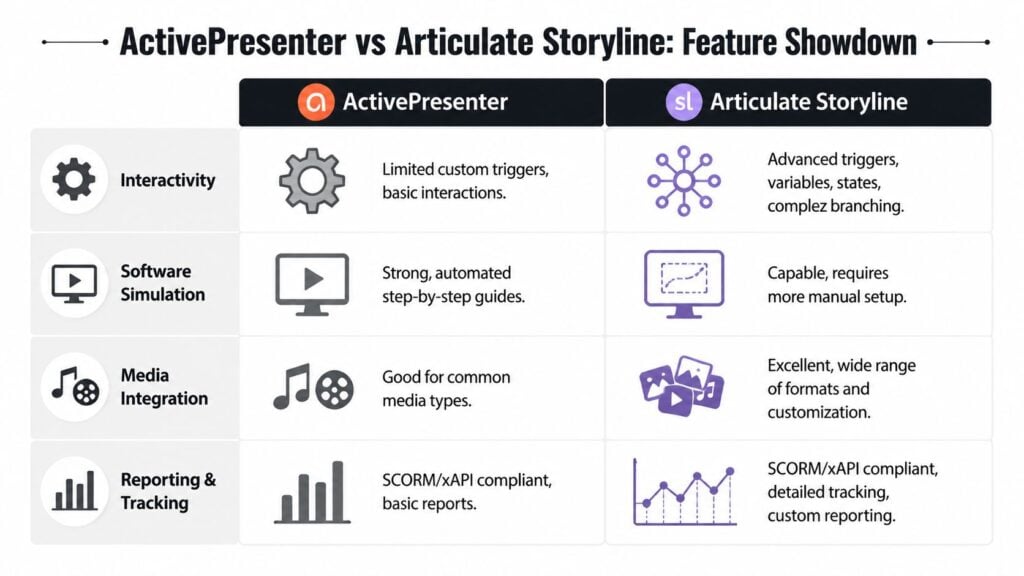
If your course depends on decision-making logic, Storyline is the stronger tool.
Its triggers, layers, and variables give designers a lot of room to build custom behaviors. That could mean scenario branches, screen states that react to learner actions, or more elaborate feedback patterns. You can create experiences that feel less templated and more engineered.
ActivePresenter can handle interactive learning, but this is not the category where it has the same reputation. It’s more comfortable when interactivity supports the lesson rather than defines the whole lesson.
So if you’re building soft-skills scenarios, role-play style interactions, or custom branching assessments, Storyline usually gives you more breathing room.
Software simulation and demo creation
ActivePresenter often feels ahead in this regard.
Its roots in screen recording and simulation make it a better fit for software training, walkthroughs, and “show me how” learning. The workflow is more natural when the lesson starts with a product, interface, or process happening on-screen.
Storyline can create simulation-style learning too, but it often asks for more manual assembly. If your team is constantly turning software workflows into training assets, ActivePresenter is usually the cleaner day-to-day tool.
Assessments and learner feedback
Both tools cover the basics well. If your needs are standard quizzes, scored checks, and conventional e-learning assessment patterns, either can get the job done.
Storyline tends to offer more flexibility when you want custom feedback layers and more nuanced response handling. That matters when the assessment itself is part of the experience, not just the checkpoint at the end.
ActivePresenter stays appealing when assessments sit inside a broader tutorial or simulation workflow and don’t need a lot of custom behavior.
Working rule: If assessment design is mostly functional, both are fine. If assessment design is part of the craft, Storyline gives you more room.
Assets, ecosystem, and team production
This is one of the biggest practical differences, especially for business teams.
According to a comparison on GetApp, both platforms share equivalent features across core capabilities such as SCORM compliance and drag-and-drop interfaces, but the larger distinction is scope. Articulate 360 bundles Storyline 360, Rise 360, and Review 360, while ActivePresenter is a standalone on-premise solution. The same comparison notes that Articulate 360 includes a 9+ million asset library (GetApp comparison of Articulate 360 and ActivePresenter).
That changes production in a very real way.
A large built-in asset ecosystem helps when teams need templates, characters, stock images, and review workflows without assembling a patchwork stack. Storyline on its own is one thing. Storyline inside Articulate 360 is another. It’s a more connected production environment.
ActivePresenter feels more self-contained. That can be good. Fewer moving parts, fewer subscriptions, more local control. But it also means you’re more likely to bring your own assets and manage more of the surrounding workflow yourself.
For people comparing operational software stacks in other fields, this kind of ecosystem question comes up all the time. I was reminded of that while reading Bruce and Eddy’s ChMS guide, which does a good job showing how feature parity on paper often hides the bigger issue, which is how well the surrounding system fits the actual work.
If SCORM delivery is part of your buying criteria, LearnStream also has a practical breakdown of the best tools to create SCORM-compliant courses.
Quick verdict by use case
| Category | Better fit |
|---|---|
| Complex branching scenarios | Articulate Storyline |
| Software demos and simulations | ActivePresenter |
| Built-in asset ecosystem | Articulate Storyline via Articulate 360 |
| Standalone desktop production | ActivePresenter |
| Review-driven team workflows | Articulate Storyline via Articulate 360 |
| Fast procedural training output | ActivePresenter |
Decoding the Pricing and Long-Term Value
Pricing is where these two stop looking like close siblings and start looking like very different business decisions.
The licensing models are fundamentally different
In comparison data available for 2026, ActivePresenter starts at $399 and includes free, freemium, and one-time purchased licenses, while Articulate 360 starts at $1,199 per year and uses a subscription model with a free 30-day trial. The same comparison notes that both support publishing standards such as SCORM and xAPI, which means the buying decision often shifts toward licensing economics, platform fit, and workflow preferences rather than basic export compatibility (eLearning Industry comparison of ActivePresenter and Articulate 360).
That distinction affects how the purchase feels from day one.
With ActivePresenter, the one-time model is attractive for freelancers, educators, and smaller businesses because the cost is easier to absorb and easier to predict. You buy the tool and own that version.
With Articulate 360, the cost is recurring, but the value proposition isn’t just Storyline. You’re paying for an ecosystem that stays updated and includes related tools.
What long-term value actually means
People sometimes compare the sticker prices too superficially.
For a solo creator, perpetual ownership can be a huge relief. You don’t have to justify a recurring software bill if your course output is seasonal, project-based, or tied to client work that ebbs and flows.
For a larger training team, subscription cost can make more sense if the surrounding system saves time in review cycles, template reuse, and multi-tool production. If the team is regularly using the broader Articulate environment, the subscription is easier to defend.
Lower purchase price doesn’t automatically mean better value. Higher subscription cost doesn’t automatically mean waste. The useful question is whether you’ll actually use the ecosystem you’re paying for.
Who usually feels the pricing gap most
A few groups feel this difference immediately:
- Freelancers: One-time ownership is easier to build into project margins.
- Educators: Free access and lower entry cost reduce experimentation risk.
- SMBs: Recurring annual software spend can be harder to justify.
- Enterprise teams: Suite-based workflows may offset subscription cost through process efficiency.
If you’re buying for one person, ActivePresenter’s model is hard to ignore.
If you’re buying for a workflow that depends on shared review, broader suite access, and more enterprise-style production, Articulate 360 may still be the better fit despite the higher annual commitment.
Which Tool Is Right for Your Project
I’d choose based on the kind of work sitting in your queue right now, not based on brand reputation.
Choose ActivePresenter if your work starts with showing
ActivePresenter makes the most sense when your course begins with a process, a task, or a system on screen.
That usually includes software tutorials, onboarding walkthroughs, support documentation turned into training, and procedural courses where the learner mainly needs to see what to do and then try it. It also makes sense for creators who produce a lot of video-led learning and want recording, editing, and authoring close together.
It’s also the obvious candidate if you work on a Mac, since that earlier comparison listed ActivePresenter as supporting Windows and macOS, while Storyline was shown as Windows only in that comparison.
The creators who often fit ActivePresenter best are:
- Solo course creators who need to move quickly
- Technical trainers building software demonstrations
- Educators who want lower financial friction
- Membership site owners publishing steady how-to content
- Small teams that don’t need a larger suite around the authoring tool
Choose Storyline if your work starts with learner decisions
Storyline is the better fit when the interaction structure is the product.
That usually means compliance scenarios with decision paths, soft-skills simulations, sales conversations, customer service branching, and custom e-learning experiences where feedback, logic, and consequences matter as much as the content itself.
If the course needs to respond to the learner in richer ways, Storyline tends to feel more deliberate and more capable. It’s also stronger when a team values the wider Articulate environment for review and content support.
Storyline is often the right call for:
- Instructional designers building custom interactions
- Corporate L&D teams with review-heavy workflows
- Organizations that want an integrated suite
- Brands that rely on large asset libraries for speed and consistency
- Projects where branching logic is central, not optional
Buy ActivePresenter for demonstration-heavy production. Buy Storyline for interaction-heavy design.
A simple gut check
If you can describe your project as “I need to show people how to do this,” ActivePresenter is probably the more natural fit.
If you describe it as “I need learners to make choices and experience consequences,” Storyline is probably the stronger choice.
That one sentence test is often more useful than another ten-item feature grid.
Making Your Final Decision
If you’re stuck, ask yourself three questions.
First, what are you building most often?
Video tutorials, software demos, and process training point toward ActivePresenter. Scenario-based learning, branching, and custom behavior point toward Storyline.
Second, how do you want to pay for your tool?
If recurring cost is a problem, ActivePresenter’s ownership model will feel safer. If your team benefits from a broader suite and ongoing updates, the Articulate subscription may be easier to justify.
Third, are you building alone or inside a broader production workflow?
Solo creators often value simplicity, speed, and local control. Teams with formal review cycles often get more value from the larger Articulate environment.
Neither tool is the “winner” in every situation. They’re built for different kinds of course creation, and that’s the answer most buyers need.
Pick the tool that fits your natural way of building. You’ll work faster, fight the interface less, and end up with better learning experiences because of it.