How to Create a Course Completion Survey That Works

You launch a course, watch the first enrollments come in, and then hit that awkward silence at the end.
A few people finish. A few disappear halfway through. A couple send a nice message. Most say nothing.
That’s the point where a lot of course creators guess. They assume the quiet students were satisfied. They assume the drop-offs got busy. They assume the course “basically worked.”
I’ve learned that assumptions are expensive.
If you want to know how to create a course completion survey that helps you improve retention and revenue, start with this idea: the survey is not a courtesy email. It’s your post-launch diagnostic tool. It tells you where learners got stuck, what felt valuable, what they’ll apply, and what needs to change before the next round of students hits the same friction.
A good completion survey also gives context to raw completion numbers. If you’re already tracking average online course completion rates and why they matter, you know that “finished” doesn’t always mean “learned,” and “didn’t finish” doesn’t always mean “failed.” The survey helps you see the story behind the behavior.
The creators who keep improving their courses usually have a simple habit. They collect feedback consistently, review it fast, and turn it into edits while the learner experience is still fresh in their mind. That habit compounds.
Your Course is Done Now What
The day a course goes live feels like a finish line. It isn’t. It’s the first real test.
I’ve seen creators spend weeks polishing slides, recording lessons, tweaking worksheets, and setting up automations, only to end the launch with one vague question sent by email: “What did you think?” That question usually produces two kinds of replies. One is “Loved it.” The other is silence.
Neither helps much.
A course completion survey gives you something better than praise or politeness. It gives you signals you can act on. You find out whether the lessons flowed in the right order, whether the workload felt realistic, whether the examples made sense, and whether learners can use what they learned.
A completion survey is the bridge between shipping a course and improving a product.
That matters if you sell cohort courses, memberships, internal training, or self-paced programs. If learners finish but don’t apply the material, renewals suffer. If they liked the instructor but found the exercises confusing, referrals slow down. If one module consistently frustrates people, that friction keeps showing up until you remove it.
The survey also helps you separate surface feedback from business feedback.
A learner saying “great course” feels good. A learner saying “module three was useful, but the template came too late and I couldn’t use it during the exercise” is gold. That one comment can lead to a change that improves completion, implementation, and word of mouth.
Most weak surveys fail because they’re too broad, too late, or too annoying to finish. The strongest ones feel like a natural final step in the learning experience. They’re short, specific, and connected to decisions you’re willing to make.
If you treat the survey like a checkbox, you’ll get checkbox answers.
If you treat it like a product improvement system, it starts paying you back.
Laying the Groundwork Before You Write
The worst time to start thinking about survey strategy is when you’re already inside Google Forms, Typeform, or your LMS question builder.
By then, it is common to do what feels natural and start typing questions. That’s backwards.

Pick one job for the survey
Before writing anything, decide what this survey is for.
If your survey is trying to measure satisfaction, content clarity, instructor effectiveness, technical issues, confidence to apply, and feature requests all at once, it will turn into a junk drawer. You’ll collect a lot of words and still struggle to decide what to change.
I like to write one sentence before I build the survey:
Practical rule: “When responses come in, I want to decide __________.”
That blank forces focus.
Examples:
- For a first-run course: decide which lessons caused confusion
- For a mature course: decide what to cut, expand, or reorder
- For a team training program: decide whether learners can apply the material on the job
- For a paid program: decide what improvements will make completion and re-enrollment more likely
Know whether you need formative or summative feedback
This is the fork in the road most creators skip.
Best-practice guidance distinguishes mid-course surveys from end-of-course surveys. Mid-course surveys are usually run around the halfway point and kept short at 3 to 5 questions, while end-of-course surveys are usually sent after completion and are often 10 to 15 questions. The reason is simple. Mid-course feedback helps the current learner group right away, and end-of-course feedback is mainly used to redesign the next version of the course, as explained in Formbricks’ guide to course survey questions.
Here’s the trade-off in plain English:
| Survey type | Best use | Good for | Bad for |
|---|---|---|---|
| Mid-course | Fixing the live experience | pacing, confusion, support gaps | deep reflection on full-course impact |
| End-of-course | Improving the next version | outcomes, structure, overall value | rescuing struggling learners in the current run |
If you only run one survey, most course creators should choose the end-of-course version. But if you run cohort programs or instructor-led training, a short midpoint check can prevent problems from snowballing.
Decide what “completion” really means in your course
This part matters more than people think.
For one course, completion means “watched every video.” For another, it means “finished the workbook and submitted a final assignment.” Those are not the same learner experience, so they shouldn’t produce the same survey.
I build survey questions around the actual promise of the course:
- Knowledge course: Did learners understand the material?
- Skill course: Could they practice and apply it?
- Transformation course: Did the sequence help them make progress?
- Compliance or team training: Did the course prepare them to perform correctly?
If your course promise is fuzzy, your survey results will be fuzzy too.
Crafting Questions People Will Actually Answer
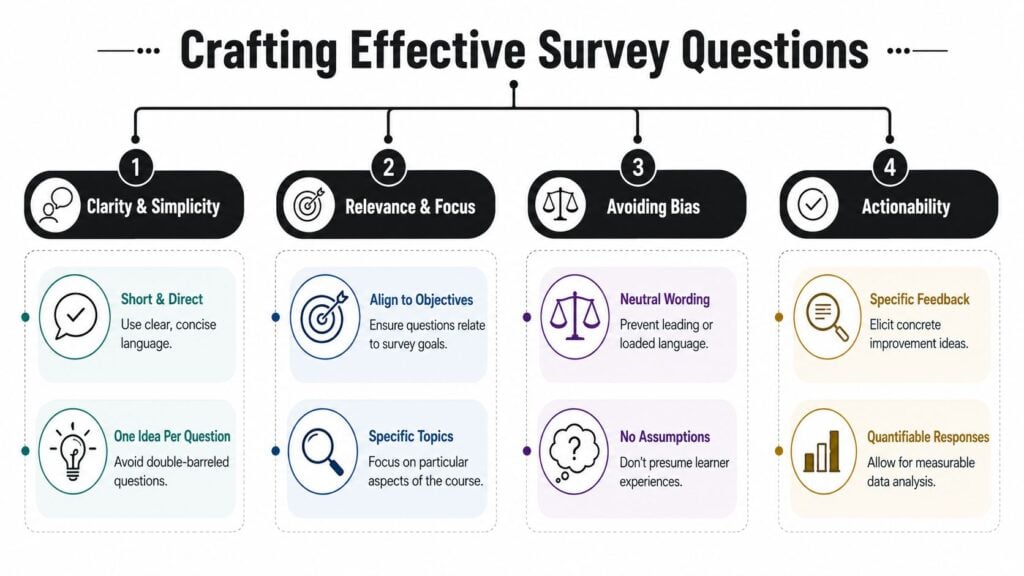
Bad surveys sound like they were written by committee. They’re vague, bloated, and full of double-barreled questions like “How would you rate the clarity and organization of the course?” If a learner thought the course was clear but badly organized, what are they supposed to say?
Benchmark guidance points in a better direction. Short, focused surveys of about 10 to 15 questions that take roughly 5 to 7 minutes tend to outperform longer ones, and asking about multiple dimensions in one item makes feedback harder to act on, as noted in Spaceforms’ course evaluation survey guide.
Use a mix of question types
I keep most completion surveys simple. A few rating questions give me patterns. A couple of open-ended questions give me context.
Here’s a practical mix that works well:
- Rating questions for clarity, relevance, pacing, and usefulness
- Multiple choice for identifying specific problem areas
- Open text for surprises, examples, and suggestions
What I avoid is stuffing open-ended questions everywhere. Learners won’t write an essay after finishing a course unless they’re either thrilled or annoyed.
A better pattern is this:
- Start easy with quick-response questions
- Move into the most important evaluation items
- End with one or two open prompts that invite specifics
If your course objectives weren’t clearly defined, revisit Bloom’s Taxonomy learning objectives before you write survey items. Strong objectives make it much easier to ask useful post-course questions.
Here’s a useful explainer if you want to see question design principles in action:

A question bank you can adapt
You don’t need a giant template library. You need a lean set of questions tied to decisions.
Course content
- Clarity check: How clear were the lessons in this course?
- Relevance check: How relevant was the course content to your goals?
- Gap finder: Which lesson or module felt least useful?
Learning experience
- Pacing: How would you rate the pace of the course?
- Workload: How manageable was the workload required to complete the course?
- Navigation: Was it easy to move through the course and find what you needed?
Outcomes
- Confidence: How confident do you feel applying what you learned?
- Implementation: What is one thing you’re likely to use right away?
- Friction: What, if anything, might stop you from applying this material?
Improvement
- Cut or expand: Which part of the course should be expanded, shortened, or removed?
- Missed expectation: What did you expect to get that wasn’t fully covered?
- Final recommendation prompt: What’s one change that would most improve this course?
Common question mistakes
A few traps show up constantly.
| Mistake | Weak question | Better question |
|---|---|---|
| Two ideas in one | How clear and engaging were the lessons? | How clear were the lessons? |
| Leading wording | How helpful was the excellent workbook? | How helpful was the workbook? |
| Too broad | What did you think of the course? | Which lesson created the most confusion? |
| No action path | Were you satisfied? | What should be improved before the next cohort? |
When a question doesn’t point to a decision, it usually creates clutter instead of insight.
Boosting Response Rates with Smart Distribution
A strong survey can still fail if learners have to hunt for it, remember it later, or click through too many steps.
Distribution is where most of the practical wins happen.

Reduce friction first
If I had to choose between writing better copy and making the survey easier to complete, I’d fix the friction first.
One large institutional study found that giving students class time to complete course evaluations raised response rates from 46.2% to 67.0%, while simple reminders increased response by 8.5 percentage points, and reiterating the value of evaluations added 7.1 percentage points, according to Lehigh’s detailed participation results.
That’s a useful lesson for online course creators too. Protected time works. Reminders work. Clear messaging about why the survey matters works.
Choose the right delivery method
Email is fine, but it’s easy to ignore. Embedded surveys usually perform better because they appear when the learner is already in the flow.
I think about distribution in three buckets:
Inside the course platform
Best when you want feedback while the experience is still fresh. This is my default for self-paced courses.Email after completion
Useful when you want a little distance and reflection. The downside is obvious. Inbox competition is brutal.Live session or cohort wrap-up
Strong for workshops, academies, and instructor-led programs because you can protect time for completion.
If you use tools with native survey features, setup is simpler. LMS platforms often reduce handoff friction compared with sending people to an external form. Depending on your stack, that might mean using your LMS survey module, a Typeform embed, Google Forms, or a built-in evaluation tool. If you’re already using a platform that supports training evaluations, LearnStream is one option for collecting course completion feedback inside a training workflow.
The message matters too
Learners respond more often when they know what happens next.
Don’t send this:
- “Please fill out our survey.”
Send something closer to this:
- Direct ask: “You’ve finished the course. Please take a few minutes to tell us what worked and what didn’t.”
- Reason: “We use this feedback to improve the next version.”
- Benefit to them: “Your input helps us fix unclear lessons and improve the resources.”
People are more willing to answer when they believe a real person will read the feedback and make changes.
A short reminder sequence helps too. One message right after completion, one follow-up if they haven’t responded, and a clear note that the survey is brief usually beats a single request sent into the void.
From Data to Decisions How to Analyze Feedback
The true value becomes clear here.
Collecting responses feels productive. Analysis is what improves the course.
Start with patterns, not individual comments
When I review survey data, I don’t begin with the longest complaint. I start by scanning for repeat signals.
For rating questions, look for:
- Low-scoring modules
- Big variation between lessons
- Any item tied to confusion, workload, or usability
A single harsh response might just be a mismatch. A cluster of lower ratings around the same lesson usually points to a design issue.
For a broader framework on turning learning data into action, this guide on how to measure training effectiveness is a useful companion.
Theme the open-ended responses
Open text gets messy fast unless you categorize it.
I usually drop comments into a small set of buckets:
| Theme | What it usually means | Typical fix |
|---|---|---|
| Confusing content | explanation, examples, or sequencing failed | rewrite, reorder, add example |
| Technical friction | platform or access got in the way | simplify navigation or support |
| Too much or too little depth | scope didn’t match learner needs | trim or expand selected lessons |
| Application gap | learners liked the content but can’t use it yet | add practice, templates, or scenarios |
That simple exercise keeps you from reacting emotionally to one comment and helps you prioritize changes that affect more people.
The most useful survey insight is usually not “people liked it.” It’s “people got stuck at the same point for the same reason.”
Turn findings into an edit list
Good analysis ends with decisions, not a folder full of spreadsheets.
I like to split follow-up actions into three groups:
Fix now
Broken links, confusing instructions, missing resources, obvious navigation problemsFix in the next course update
Lesson rewrites, reordered modules, better examples, improved exercisesMonitor next round
Feedback that’s interesting but not strong enough yet to justify a change
The final step is the one many creators skip. Tell learners what changed. When people see that feedback led to updates, future response quality usually gets better because the survey feels real, not ceremonial.
Your Course Survey Questions Answered
Should the survey be mandatory
Sometimes, yes.
One effective option is to make the survey part of the course itself. Some platforms, including Docebo, let you create the survey as training material and set it as the final locked item so learners must complete it before the course is marked finished, as described in Docebo’s guide to creating and managing course surveys. That setup works well when consistent data capture matters more than keeping the final step optional.
For premium courses, I usually prefer “strongly encouraged” unless completion records are important to the program. Mandatory surveys can raise volume, but if they feel forced, the quality of responses can dip.
What do I do with negative feedback
Read it twice before changing anything.
First, ask whether the comment is specific. “Didn’t like it” isn’t very useful. “Module two assumed prior knowledge I didn’t have” is useful. Then check whether the same issue appears elsewhere in the data.
Outlier feedback can still matter. If one learner points out a broken assumption in your course flow, they may be the first person to articulate a problem others felt but didn’t explain well.
Should I offer an incentive
Sometimes that works, but it can also attract rushed responses.
If you use an incentive, keep the survey short and the ask clean. In many cases, convenience beats rewards. A survey placed naturally at the end of the course often performs better than an external form with a prize attached.
How often should I update the survey itself
More often than not.
Your survey should evolve with the course. If you’ve already fixed the navigation issue that kept showing up, stop asking three different questions about navigation. Replace them with questions tied to the next problem you’re trying to solve.