Compare Micro Credentials Platforms for Course Creators

You’ve probably been here already.
A learner finishes your course, downloads a tidy PDF certificate, and then… nothing much happens. They don’t share it. Employers can’t verify it. It doesn’t lead naturally into your next offer. The certificate exists, but it doesn’t do much work for your business or for the learner.
That’s why more course creators are looking at micro credentials platforms for course creators instead of basic certificate plugins. The shift isn’t just about making badges look better. It’s about turning course completion into something portable, verifiable, and valuable enough that learners see it as part of their professional identity.
The platform you choose affects more than admin. It shapes how easily you can automate issuance, connect learning milestones into a pathway, and give students something they can use outside your course environment.
Why Your Course Needs More Than a PDF Certificate
A plain certificate works fine when your only goal is marking completion. It struggles when you want the credential itself to help sell the course.
That distinction matters more now than it did a few years ago. According to coverage of Coursera’s 2024 Micro-Credentials Impact Report, learners are 2 times more likely to enroll in a program that includes a microcredential. For a course creator, that changes the conversation. The credential stops being a decorative extra and starts acting like part of the offer.
I’ve seen this play out in a familiar pattern. A creator builds a solid course, gets decent completions, and then hits a ceiling. Sales pages get refined. Testimonials get added. Pricing gets tested. Yet the core promise still sounds like “take my course and get a certificate.” That’s rarely strong enough if your audience wants proof they can carry into a job search, promotion discussion, or client pitch.
What learners actually want
Learners want recognition they can use in public, not just a file buried in downloads.
A micro-credential can give them something more durable. Depending on the platform, that can mean a verified record, structured evidence of skill, or a credential that sits inside a broader pathway instead of standing alone.
If you’re still weighing the strategic difference, LearnStream’s breakdown of micro-credentials vs traditional certifications is a useful companion read.
A completion certificate says, “I finished.” A strong micro-credential says, “I can show what I learned, where it fits, and why it matters.”
Why this changes your pricing and funnel
Once you treat credentials as part of the product, your course stack gets easier to design.
You can justify tiered offers more clearly. An entry course can award one credential. An applied workshop can provide access to the next one. A capstone or assessed program can become the premium offer. That ladder is much easier to explain to buyers than a pile of unrelated PDFs.
And from the learner side, the value feels concrete. They’re not just buying content. They’re buying progress they can show.
Key Questions to Ask Before Choosing a Platform
Before you compare badge templates, ask a harder question. What job is this platform doing inside your business?
If the answer is “issuing a nice-looking badge,” you’ll probably overspend on the wrong tool or underspec the one you need. The stronger approach is to look at automation, portability, and the amount of operational friction the platform adds to your workflow.

Can it connect to your existing learning stack
This is the first filter.
BCdiploma notes that modern micro-credential platforms should support secure API integrations and LTI standards so they can connect directly to LMS platforms like Canvas and Moodle and automate credentialing without adding workload, as explained in its guide on choosing the right micro-credential platform.
That matters because manual issuing breaks quickly. It might be manageable when you have one flagship cohort. It becomes a mess when you run evergreen courses, memberships, team licenses, or multi-course catalogs.
Ask these questions early:
- Does it issue automatically: Can the platform trigger a credential from a completion event, passing score, or assessment milestone?
- Does it support your LMS: If you use Canvas, Moodle, Blackboard, or another LMS, check for direct compatibility before you fall in love with the front end.
- Can it scale with your catalog: A workflow that works for three courses may fail when you have twenty.
Who owns the credential data
Data ownership sounds boring until you want to migrate.
If your credentials live entirely inside a vendor’s closed system, leaving that platform can become painful for you and confusing for learners. You want to know whether credential records remain verifiable over time and whether you can export what you’ve built in a usable format.
Practical rule: If a platform makes it easy to issue but hard to leave, treat that as a product risk, not a minor inconvenience.
This also affects the learner experience. People may want to keep using their credential long after you’ve changed tools, rebranded, or reorganized your offers.
Does it fit your sales model
A lot of creators evaluate credential tools like they’re buying design software. That misses the commercial side.
Your choice should match how you sell. A solo educator with a simple evergreen funnel needs something different from a training company selling bundled pathways to teams. If you’re working on that bigger picture, this guide on scaling digital course sales is worth reading because it frames your tools as part of a repeatable revenue system, not isolated purchases.
A few sales-model checks help:
Single-course business
Keep setup light. You need easy issuance, clear verification, and simple sharing.Multi-course academy
Look for pathway logic, progression rules, and a clean learner record across courses.B2B or institutional training
Prioritize integrations, reporting, and admin control across multiple programs.
What happens after the credential is issued
Many tools separate at this point.
Ask what the learner can do next. Can they share the credential cleanly? Can another institution or employer verify it? Can you tie it to future offers inside your own catalog?
A badge that looks polished but goes nowhere is still a dead end.
Comparing the Top Micro-Credential Platforms
The market has a few recognizable names, but they don’t all solve the same problem. Some platforms were built with universities and enterprise programs in mind. Others suit independent creators better. A few sit somewhere in between.
Use this table as a first-pass filter, not a final verdict.
| Platform | Best fit | What it’s strongest at | Watch-outs |
|---|---|---|---|
| Credly | Universities, large training teams, enterprise programs | Broad recognition, established digital credential presence, large-scale credential management | Can feel heavier than necessary for a solo creator |
| Accredible | Course businesses, professional training brands, creator-led academies | Certificate and credential workflows, branding control, practical business use cases | You still need to verify pathway depth for more complex stacks |
| Virtualbadge | Creators building multi-step learning paths | Stackable credential design and progression logic | May require more upfront curriculum planning |
| Digital Promise | Competency-focused education and assessed skill validation | Emphasis on demonstrated performance and assessment-based credentials | Better fit when evidence of performance is central |
| LearnStream | Course creators comparing systems and building digital learning operations | Educational guidance around course systems, learning tools, and monetization workflows | Not a standalone credential issuance platform in the same sense as the others |
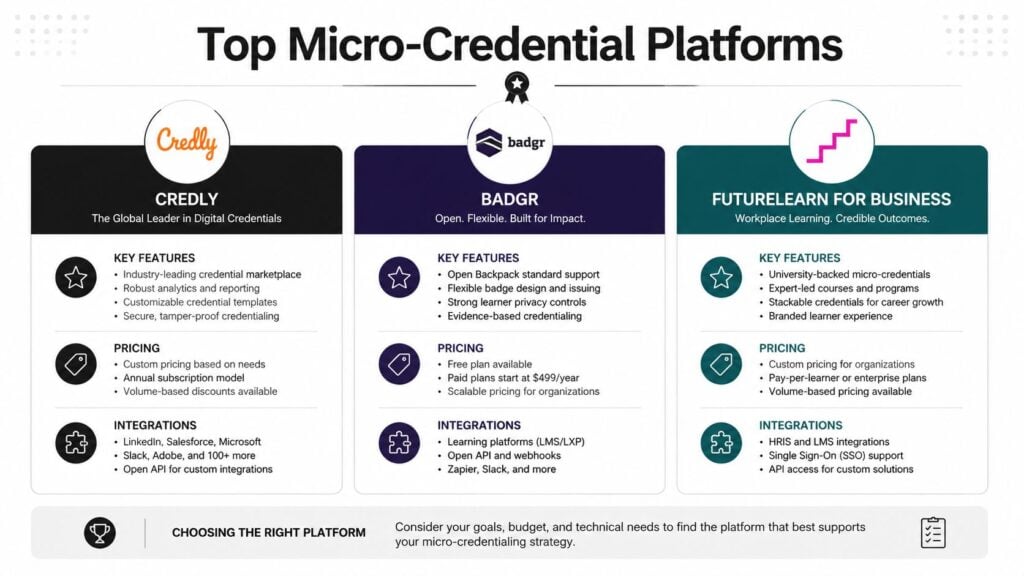
Credly for reach and institutional gravity
Credly is the name many people recognize first, and there’s a reason. A 2024 study found that 127 U.S. universities on Credly were offering a total of 2,308 micro-credentials, according to the ERIC-hosted study PDF. That tells you two things. Serious institutions are using it, and they aren’t using it lightly.
If you serve universities, workforce programs, or employer-facing training, Credly’s scale gives it credibility. It’s the kind of platform you choose when you care about administrative structure, portfolio breadth, and operating in an ecosystem people already know.
For a solo creator, though, that same gravity can feel oversized. You may not need an institutional machine if you’re selling one cohort-based program and a short workshop.
Accredible for practical business use
Accredible tends to make sense for creators who want a business-friendly middle ground.
It’s often appealing when you need branded credentials and smoother issuance workflows without stepping fully into university-style complexity. If your main concern is delivering polished credentials that fit a commercial course business, it’s easy to see why people shortlist it.
The main caution is strategic, not technical. Don’t assume a good issuance workflow means strong pathway support. If your roadmap includes layered programs, check how it handles progression across multiple credentials.
Virtualbadge for stackable pathway builders
Virtualbadge stands out when your product strategy revolves around steps, not one-off completions.
That makes it attractive for creators building academies, certification ladders, or memberships with milestone-based advancement. The platform conversation gets more interesting when your learner journey has dependencies. Intro workshop first, applied module second, final assessment third.
If your curriculum already works like a staircase, your credential system should follow the same shape.
The trade-off is that stackable systems force clarity. You need defined milestones, prerequisites, and naming discipline. That’s good for the business, but it takes planning.
Digital Promise for evidence-based credentialing
Digital Promise is useful to study because it pushes a stronger standard for what a credential should mean.
Its emphasis is on expert assessment of actual performance, not simple attendance or completion. That’s a better fit when your learners need to demonstrate competence in a way that carries weight beyond your own platform. It’s especially relevant for educators, practitioner training, and contexts where assessed evidence matters.
That approach does create more work. Assessments have to be designed well. Evidence has to be collected consistently. But if you want a credential to mean something in the labor market, that rigor can be worth it.
Which kind of buyer each platform serves
Some creators try to find the universal winner. There isn’t one.
- Choose Credly if institutional credibility and broader ecosystem familiarity matter most.
- Choose Accredible if you want practical credential workflows for a growing commercial course business.
- Choose Virtualbadge if your revenue model depends on learners progressing through a structured pathway.
- Choose Digital Promise-style models if demonstrated performance is the core value proposition.
If you’re still sorting out how your credential layer fits alongside your core tech stack, LearnStream’s guide to online course platforms comparison helps place credentialing inside the wider platform decision.
Build Learning Pathways with Stackable Credentials
A standalone credential can add value. A stackable pathway can reshape your whole offer.
That’s where many creators leave money on the table. They issue one badge per course and stop there. The learner gets a sequence of isolated wins, but no obvious next step. There’s no narrative. No ladder. No built-in reason to keep buying.

Think in levels, not lessons
Virtualbadge points out that stackable credentials work best when they include clear competency milestones and logical prerequisites between levels, which is what turns separate courses into a connected pathway in its article on stackable micro-credentials and learning pathways.
That idea is simple, but most creators don’t apply it rigorously enough.
Instead of asking, “What badge does this course issue?”, ask:
- What level is this course: Beginner, applied, advanced, specialist?
- What must the learner already know: If there’s no prerequisite logic, the stack won’t feel coherent.
- What bigger credential does this lead to: Every micro-credential should point somewhere.
A pathway structure that works
Here’s a model that tends to work well in practice.
An entry-level course gives the learner a small, accessible credential. That credential can be affordable and low-friction. The next offer adds applied work, proof, or specialization. The final offer bundles the prior pieces into a more meaningful capstone credential.
That creates a natural progression:
- Start credential for foundational understanding
- Applied credential tied to project work or implementation
- Capstone credential that represents the full stack
A stack should feel like a curriculum map the learner can see, not a maze they have to decode.
This is also where pricing gets easier. The first credential can bring people in. The second and third create an upgrade path that feels earned instead of forced.
A quick example makes it clearer.
One practical example
If you teach instructional design, the first credential might cover core learning principles. The second could focus on building assessments. The third might require a full learning experience with expert review. Each step has its own value, but together they create a stronger market-facing credential story.
Later in the journey, supporting media can help you explain the progression visually. This short video is useful if you want another angle on how micro-credentials fit into a broader learning model.

What usually goes wrong
Creators often overcomplicate the stack or underdefine it.
Common problems include inconsistent naming, unclear progression rules, and credentials that overlap so much learners can’t tell why the next one matters. If you want repeat purchases, each rung has to feel distinct and connected at the same time.
The strongest pathway designs are boring in the best way. They’re obvious, clean, and easy to explain on a sales page.
Will Learners Actually Use Your Credential
A badge that stays inside your platform has limited value. Learners need to use it where reputation is built.
That’s why I push creators to ask a blunt question before they buy any tool. Will this credential travel well, or does it only look impressive inside the course dashboard?

Completion isn’t the same as proof
Digital Promise makes an important distinction here. It emphasizes that the most valuable micro-credentials are based on expert assessment of real performance, not just participation, as described on its micro-credentials initiative page.
That difference changes how employers, clients, and even learners themselves interpret the credential.
A completion badge says the learner showed up and finished the experience. A stronger micro-credential signals that someone reviewed evidence, assessed competence, or validated performance in a meaningful way.
What to check before you issue anything
You don’t need every credential to be high-stakes and assessment-heavy. But you do need clarity about what the credential claims.
Look at these points:
- Verification: Can someone outside your platform confirm that the credential is real and current?
- Portability: Can the learner share it on professional profiles, resumes, or portfolios without friction?
- Meaning: Does the credential describe a demonstrated skill or just attendance?
- Recognition context: Will people outside your audience understand what the credential represents?
If a learner has to explain the credential from scratch every time they share it, the platform and the program still have work to do.
A simple test for real-world usefulness
Open one of your course offers and imagine a buyer asking, “What can I do with this credential the day after I earn it?”
If the answer is vague, the credential probably isn’t strong enough yet.
Good credentials help learners signal competence outside your ecosystem. That could mean adding it to a LinkedIn profile, showing it in a portfolio, or attaching it to an internal promotion case. The exact use case varies, but the principle stays the same. The credential should keep working after the course is over.
A Simple Framework for Making Your Choice
If you’re stuck between several options, don’t choose by feature count. Choose by business shape.
A lot of platform regret comes from buying for the business you imagine you’ll have later instead of the one you’re running right now. You can avoid that by matching your platform to your delivery model, team size, and credential strategy.
If you’re a solo creator
Keep your setup lean.
You probably need a platform that’s quick to configure, easy to brand, and simple for learners to share. Heavy admin controls and enterprise layers can slow you down more than they help. If your catalog is small, usability matters more than complexity.
If you run a course business with multiple offers
Look for a platform that can support progression across your products.
Stackability, automation, and consistent learner records matter more at this stage. If your learners move from workshop to cohort to premium program, your credential system should reflect that journey clearly.
If you sell training to teams or institutions
Favor infrastructure over polish.
Reporting, integration depth, and credential governance become more important when multiple stakeholders are involved. In these setups, the back-end reliability often matters more than the front-end badge design.
A short decision filter
Use this when you’re narrowing the shortlist:
- Choose for simplicity if you need fast rollout and low admin overhead.
- Choose for pathways if repeat purchases depend on structured learner progression.
- Choose for recognition if labor-market value and externally credible proof are central to your offer.
- Choose for integration if credentials need to plug into an LMS and run automatically.
The right choice usually becomes obvious once you decide what success looks like. More conversions. Better upsells. Stronger learner proof. Cleaner operations. Pick the outcome first, then the platform.
Getting Started and Avoiding Common Pitfalls
The rollout matters almost as much as the platform.
I’ve seen creators buy a solid tool and still get weak results because the learner criteria were fuzzy, the credential wasn’t explained well, or the issuing workflow lived outside the normal course experience.
Launch with a small, visible use case
Start with one course or one pathway, not your whole catalog.
Define exactly how the learner earns the credential, what evidence is required, and where they’ll access it. If you’re upgrading from basic certificates, LearnStream’s article on tools to automate course completion certificates can help you think through the handoff from simple issuance to a more durable workflow.
Avoid these common mistakes
- Vague criteria: If learners don’t know what they must do, the credential loses credibility.
- Manual admin: Hand-issuing credentials creates delays and mistakes as volume grows.
- Weak messaging: If you don’t explain why the credential matters, learners will treat it like a decorative extra.
- No next step: A credential should lead somewhere, whether that’s sharing, progression, or both.
Launch the credential the same way you’d launch a paid offer. Name it clearly, explain its value, and make the earning path obvious.
When micro credentials platforms for course creators work well, they do two jobs at once. They give learners proof they want to keep, and they give your course business a cleaner way to grow.