Learning Management Systems Open Source Guide

You’re probably here because you got a quote for a proprietary LMS, stared at the annual price, and thought there has to be another way.
There is. But open source is only cheaper when you count the work.
I’ve set up enough LMS platforms to know the trap. The software looks free. The implementation isn’t. A team downloads Moodle or Open edX on a Friday, gets a test site running by Monday, and then spends the next year dealing with upgrades, plugin conflicts, backups, authentication, reporting gaps, and a growing list of “small” custom requests.
That doesn’t mean open source is a bad choice. Far from it. It can be the right choice if you want control, flexibility, and an LMS that won’t punish you every time your learner count grows.
This guide looks at learning management systems open source from the angle that matters most in real life. Not feature bloat. Not marketing screenshots. The labor cost of keeping the thing running over 12 months.
Why Open Source LMS Platforms Are Worth a Serious Look
A mid-sized training team gets quoted a proprietary LMS renewal at $50,000 a year. That number gets their attention fast. Then someone on the team says, “What about Moodle? Isn’t it free?”
That question starts a very common evaluation path.
They download Moodle, or maybe they shortlist Open edX and Canvas too. The initial reaction is relief. No per-seat licensing. Source code access. Freedom to customize. No vendor telling you that basic integration support lives on a higher pricing tier.
What you actually gain
Open-source LMS platforms are worth serious attention for a few reasons:
- You control the codebase: If your team needs a custom workflow, branded portal, or unusual enrollment logic, open source gives you room to build it.
- You avoid license-based growth penalties: If your learner base expands, you’re not automatically pushed into a more expensive subscription bracket.
- You keep stronger ownership over deployment choices: You can self-host, use a managed host, or split responsibilities between internal IT and an outside partner.
- You reduce vendor lock-in: Moodle’s own open-source overview is very clear that users can install it on their own server or choose hosted setup options, which is a practical expression of open-source freedom (Moodle open-source overview).
Practical rule: Open source saves money when your team already knows how to run web applications, or when the customization benefit is big enough to justify the operational load.
Where teams get burned
The catch is simple. No license fee does not mean no ownership cost.
Peer-reviewed research on open-source LMS packages points out the core trade-off clearly. These systems are popular because they don’t require a license fee and allow users to modify source code, but they often demand more technical skill for installation and support (peer-reviewed LMS analysis).
That matches what I see in real deployments. Open source works best when one of these is true:
- You already have IT staff who can own the platform.
- You need custom behavior badly enough to justify the extra effort.
- You’re willing to pay for managed hosting instead of pretending self-hosting is free.
If none of those apply, the “cheap” option usually turns expensive in staff time, delays, and cleanup work.
How the Open Source LMS Market Actually Got Here
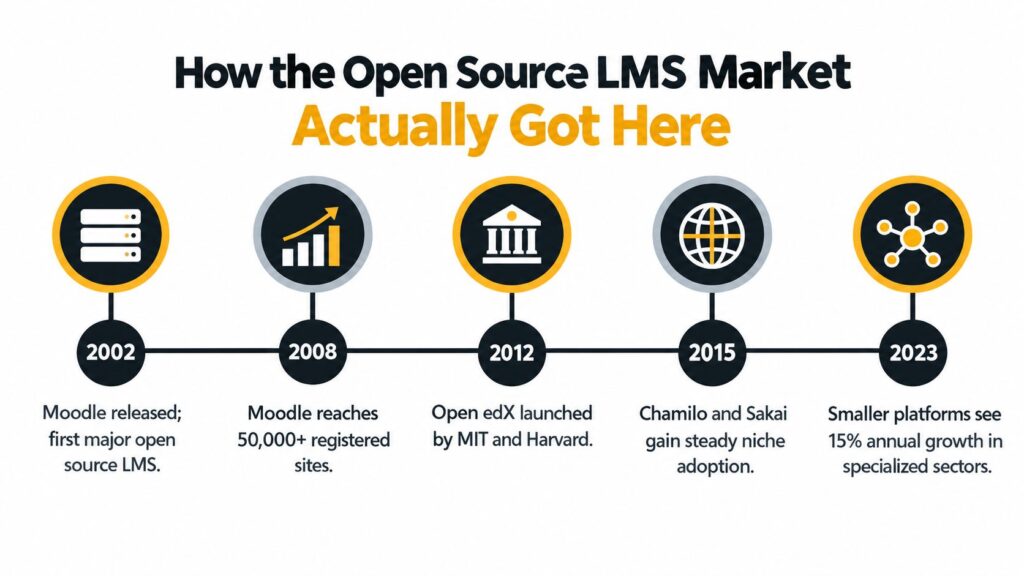
A university IT team in the early 2000s had a familiar problem. The commercial LMS worked, but every change request was expensive, every integration took too long, and the institution had little control over where the platform went next. Open-source LMS projects grew because schools and training organizations were tired of that trade-off.
Moodle launched in August 2002, and its live stats page now shows 146,588 sites, 59,637,529 courses, and 530,149,879 users worldwide (Moodle statistics). That matters for one reason. Open source proved it could support large, messy, real-world learning operations, not just small experimental deployments.
Early roots and the shift to mainstream use
Sakai followed soon after. It was announced in January 2004 with a $2.7 million Mellon Foundation grant to build a community-driven alternative to commercial LMS products (history of open LMS).
That funding mattered because it signaled a shift in buyer expectations. Institutions no longer saw the LMS as software they rented. They wanted influence over the roadmap, control over integrations, and the option to run the system on their own terms.
That mindset spread beyond universities. Corporate training teams, member organizations, and regulated industries started looking at open-source LMS platforms for very practical reasons:
- They needed stricter control over data location
- They expected custom workflows that off-the-shelf systems handled poorly
- They wanted a longer runway before a vendor pricing change forced a migration
- They needed flexibility on hosting, support, and internal ownership
If you want context on where open, hosted, and hybrid systems fit, LearnStream has a useful breakdown of types of learning management systems.
Why buyers should care about category maturity
Category history matters because it predicts labor cost. Older open-source LMS platforms usually have larger communities, more implementation partners, and fewer dead ends when you need help. Newer or narrower projects can still work well, but they often put more pressure on your internal team.
That is the part feature comparison tables usually miss.
A mature platform with average features can be cheaper to run over 12 months than a more flexible platform that demands heavier DevOps support, more testing, and harder upgrades. That is why Moodle became the default shortlist option for so many institutions, why Open edX earned a place in large-scale course delivery, and why Sakai stayed strongest in specific academic environments where its collaboration model still fits.
The category also changed as vendors looked for easier ways to package open-source software. Canvas pushed an open-core direction. Moodle kept a stronger community-first identity. Open edX built credibility around structured digital learning at scale. Chamilo and Sakai remained more specialized, which can be a strength or a maintenance burden depending on your team.
My advice is simple. Do not treat the market’s history as trivia. It tells you how much support you can expect, how painful upgrades are likely to be, and whether self-hosting will save money or hand your team a second job.
Later in your evaluation, this video gives a decent high-level orientation before you start shortlisting platforms.
The Five Platforms Most Teams Compare
Teams that want a serious open-source LMS end up comparing the same five names: Moodle, Open edX, Canvas LMS, Chamilo, and Sakai.
That’s a good shortlist. These are not equal, though. They differ a lot in extension ecosystems, deployment flexibility, and how much technical patience they demand.
Open Source LMS Platform Comparison
| Platform | Best For | Plugin/Extension Count | Hosting Requirements | Typical User Scale |
|---|---|---|---|---|
| Moodle | Schools, universities, mixed training use cases | 2,390+ plugins | Cloud, on-premise, or hybrid | Small to very large |
| Open edX | MOOCs, structured self-paced programs, large academic delivery | XBlocks framework | Cloud, on-premise, or hybrid | Mid-size to very large |
| Canvas LMS | Teams that want a polished UX and API-driven integrations | LTI-based integrations | Cloud, on-premise, or hybrid | Mid-size to large |
| Chamilo | Smaller organizations that want a lighter setup | Smaller extension ecosystem | Cloud or on-premise | Small to mid-size |
| Sakai | Universities with collaborative and academic workflows | Relatively limited official plugins | More limited ecosystem flexibility | Mid-size to large |
The plugin and deployment details above come from an independent comparison of major open-source LMS platforms (open-source LMS comparison).
Moodle is the default for a reason
If you force me to pick the safest default open-source LMS for most organizations, I pick Moodle.
It’s under the GNU General Public License, its source code is publicly accessible, and Moodle notes that anyone can download, modify, and share the core platform without licensing fees. Moodle also clarifies that plugins and themes are licensed separately by their developers, which matters if you’re planning a custom stack (Moodle open-source licensing).
Moodle usually wins on breadth. Independent structured comparisons have also put Moodle first in rubric-based evaluations, including one comparison that scored Moodle at 136 points versus 120 for Chamilo (2026 LMS comparison study).
That fits what I see on the ground. Moodle can do almost anything. The downside is that teams often over-customize it and create a maintenance mess.
If your team loves adding plugins, make someone responsible for saying no. Moodle’s flexibility becomes technical debt very quickly.
Open edX, Canvas, Chamilo, and Sakai
Open edX is stronger than many buyers expect for structured, self-paced learning at scale. It’s a serious platform. It’s also more demanding. Recent summaries describe it as suitable for teams with dedicated DevOps support, and that’s exactly right in practice (operational burden summary).
Canvas LMS feels cleaner out of the box. If user experience matters a lot and your institution already works with LTI-heavy integrations, Canvas deserves a look. But I’d be careful here. Open-core products can pull advanced capabilities behind commercial layers, which changes your total cost later.
Chamilo is the lightweight option. I recommend it when simplicity matters more than ecosystem depth. Smaller training providers and NGOs often do better with a simpler platform they can maintain.
Sakai still makes sense in higher education, especially where academic collaboration and standards-based integration matter. It’s just not the platform I’d choose if you want lots of off-the-shelf extension flexibility.
Hosting and the Hidden Cost of Running These Platforms
Most feature comparison posts fail. They talk about quizzes, certificates, mobile apps, and reporting screens. They skip the weekly work needed to keep the LMS stable.
That weekly work is the bill.
Hidden Operational Burden by Platform
| Platform | Stack | Min. Hosting Profile | DevOps Hours/Month | Patch Cadence |
|---|---|---|---|---|
| Moodle | PHP | Basic VPS can work for smaller installs | Low to moderate | Regular plugin and core review needed |
| Open edX | Python/Django | More demanding cloud setup | High | Frequent operational oversight |
| Canvas LMS | Ruby-based ecosystem with integration-heavy usage | Better with experienced hosting setup | Moderate to high | Ongoing app and integration maintenance |
| Chamilo | PHP | Basic VPS is often enough for modest use | Low | Lighter than Moodle, but still needs routine upkeep |
| Sakai | Java | Heavier app hosting profile | Moderate to high | More formal upgrade planning helps |
I’m using qualitative ranges here because the burden depends on learner activity, integrations, custom code, and how disciplined your admin team is.
What teams forget to budget for
The hidden workload usually lands in six buckets:
- Security patching: Core updates are only part of the story. Plugins, themes, and authentication connectors all need review.
- Backups and recovery testing: Having backups isn’t enough. Someone has to confirm they restore cleanly.
- Database and storage cleanup: Video, SCORM packages, logs, and old course copies pile up.
- Uptime monitoring: Someone needs alerts before learners do.
- Integration maintenance: SSO, HRIS sync, webinar tools, and analytics connectors break more often than buyers expect.
- Upgrade testing: Every major update risks breaking themes, plugins, and custom workflows.
For server planning, Moodle and Chamilo are usually more forgiving. A competent generalist sysadmin can keep a smaller installation healthy. Open edX is less forgiving. It tends to reward teams that already know containerized deployment, release workflows, and application monitoring.
If you’re comparing regions for hosting, latency, compliance, or colocation options, it helps to explore data center facilities before choosing where the LMS should live.
When self-hosting makes sense
Self-hosting works when your organization already runs internal web applications and has someone who can own the LMS without treating it like a side project.
If that’s not you, managed hosting is usually cheaper in real terms.
For teams already weighing simpler course stacks, LearnStream also has a practical look at the trade-offs in a learning management system for WordPress setup. WordPress-based systems can be easier for some creator businesses, but they come with a different kind of maintenance burden.
A platform doesn’t become low cost because the software download is free. It becomes low cost when your team can support it without constant firefighting.
Which LMS Fits Which Type of Organization
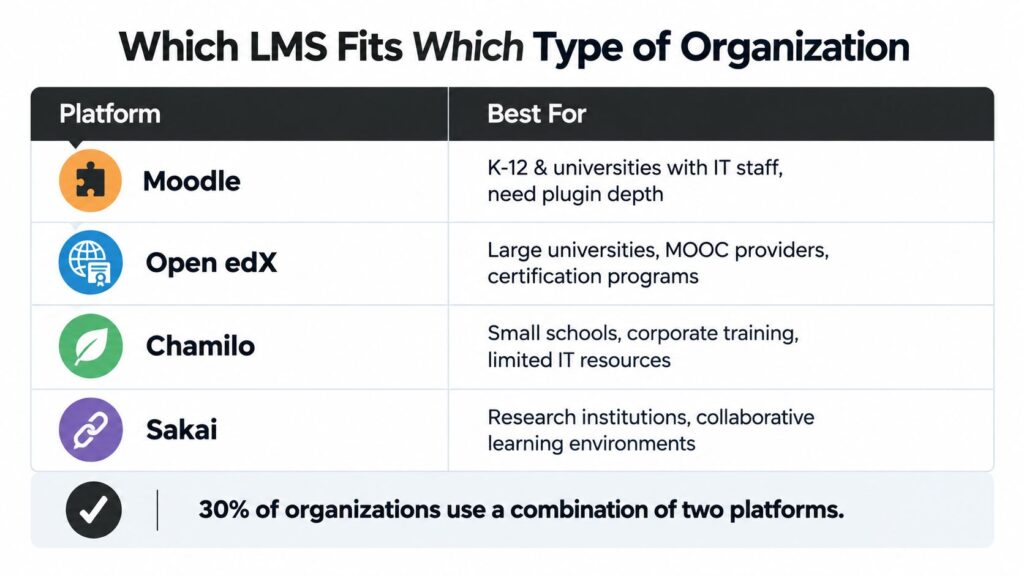
A good LMS choice depends less on feature lists and more on what kind of organization you are. That’s the part buyers often get backwards.
Moodle for institutions that want control
Moodle fits K-12 schools, colleges, universities, and mixed training organizations that already have IT support and want room to customize.
It also has real adoption depth in education. Research from Kenya found that open-source LMS platforms were gaining acceptance and being increasingly adopted in public universities (Kenyan LMS selection research). That matters because universities usually have stricter requirements around cost, customization, and long-term control than small training businesses.
Choose Moodle when you want a broad ecosystem and can govern plugin sprawl.
Open edX for flagship digital programs
Open edX is a better fit for MOOCs, certification programs, and high-visibility academic course delivery than for a small company trying to get compliance training online quickly.
It handles structured course pathways well. It also asks more from your technical team. If your platform is central to your institution’s digital offering, that trade-off can be worth it.
Chamilo and Sakai for narrower cases
Chamilo works well for small schools, NGOs, and lean training teams that want a lighter system and don’t need a massive extension marketplace.
It’s one of the few platforms I’d suggest for teams that know they’ll never build a complicated custom LMS environment.
Sakai fits research-led universities and collaborative academic settings better than commercial training teams. If your institution values standards, academic tooling, and a university-centered development culture, Sakai can still be a smart choice.
Canvas for teams that care about usability first
Canvas appeals to schools and institutions that want a cleaner interface and more polished day-to-day experience.
I’d shortlist it when the learner and instructor experience matters enough that the technical and commercial compromises are acceptable. That’s especially true for K-12 environments where admin simplicity matters.
A Realistic 12 Month Cost Comparison
This is the part where buyers want a clean number, and I can’t give one without inventing data. Answer depends on your hosting model, learner activity, customization level, and whether you already have Linux, database, and LMS admin skills in-house.
Still, you can make a solid decision by comparing cost lines instead of chasing a fake “average.”
12-Month Cost Estimate by Hosting Model
| Cost Line | Self-Hosted | Managed Hosting | SaaS Adjacent |
|---|---|---|---|
| Infrastructure | Cloud compute, storage, backups, CDN, monitoring | Bundled or partly bundled | Included in subscription |
| LMS Administration | Internal staff time | Lower internal load, vendor handles more | Lower internal load |
| DevOps and Security | Internal or contractor-owned | Shared with provider | Mostly vendor-owned |
| Upgrades and Patches | Your responsibility | Usually provider-assisted or provider-led | Vendor-owned |
| Plugins, Themes, Customization | Separate line item | Separate line item | Often limited or add-on based |
| Integrations | Internal build and maintenance | Shared depending on vendor scope | Varies by plan and API access |
| Migration and Rebuild Work | High if architecture changes | Moderate | High when leaving vendor stack |
The decision rule I use
For a team with limited technical staff, managed hosting usually wins over 12 months because it removes the most expensive failure mode. Staff distraction.
For a team with existing infrastructure and a real sysadmin function, self-hosting can win because the marginal cost of one more PHP or application stack is often manageable.
The budget lines people forget most often are:
- Upgrade testing
- Backup verification
- Reporting setup
- Theme fixes after version changes
- Contractor cleanup when the original installer disappears
If you’re trying to frame this against commercial software budgets, LearnStream has a useful primer on learning management system pricing.
My short version
Use this shortcut:
- Self-host if your team already runs business-critical apps and can treat the LMS as production software.
- Use managed hosting if open source matters but infrastructure work doesn’t.
- Use SaaS instead if your real goal is speed, not ownership.
I’ve seen too many teams choose self-hosting because it looked cheaper on paper, then spend the year paying for avoidable admin labor.
My Honest Recommendation by Use Case
I’ll keep this simple.
My picks
- Higher education with strong IT staff: Pick Moodle. It gives you the broadest capability set and the healthiest mix of control, documentation, and ecosystem depth.
- Large-scale digital learning or certification delivery: Pick Open edX, preferably through a managed partner unless you already have platform engineers.
- K-12 or institutions that need easier day-to-day usability: Start with Canvas if the open-core trade-off is acceptable.
- Small training businesses, NGOs, and lean internal teams: Pick Chamilo if you insist on open source. Otherwise, skip self-hosting entirely.
- Research-led academic institutions: Pick Sakai when collaboration and higher-ed alignment matter more than plugin abundance.
The blunt advice most teams need
If you’re a small course creator or a training business without technical staff, don’t self-host an open-source LMS.
That’s the main mistake I’d stop people from making.
You probably don’t need root access, custom deployment pipelines, and plugin governance. You need reliable delivery, decent reporting, and fewer support headaches. A hosted Moodle partner, a managed Open edX setup, or even a non-open-source SaaS tool is usually the smarter call.
Buy the amount of control your team can actually maintain.
One-minute decision matrix
| Situation | Recommendation |
|---|---|
| University with IT and need for deep customization | Moodle |
| Large public course initiative or certification academy | Open edX |
| School prioritizing usability and familiar LMS workflows | Canvas |
| Small nonprofit or simple training operation | Chamilo |
| Academic collaboration-heavy environment | Sakai |
If your job is advising others rather than running the platform yourself, LearnStream is one of the places that publishes side-by-side LMS guidance for course and membership businesses without focusing only on enterprise software.
Practical Questions Buyers Ask Before Committing
What about AI, mobile, and analytics
Buyers need to stay skeptical.
Recent market coverage keeps pointing to AI-powered personalization, mobile-first learning, gamification, and cloud deployment as growing priorities in open-source LMS evaluation (open-source LMS market trends). The problem is that many comparison pages still focus on older strengths like multilingual support and course administration.
So ask a harder question. Which of these capabilities are native, and which require plugins, custom development, or extra services?
What else should you check
- Mobile support: Most major platforms support responsive access or apps, but implementation quality still varies.
- Migration risk: Switching LMS platforms is disruptive. Content mapping, user migration, and reporting continuity always take more work than expected.
- Accessibility: Don’t assume parity. Test your actual learner flows.
- Maintenance budget: The strongest predictor of success isn’t the logo on the login page. It’s whether someone owns the platform after launch.
If a team can’t answer who patches the LMS, who tests upgrades, and who fixes integrations, they aren’t ready to self-host.