Learning Management System on WordPress: Is It Worth It?
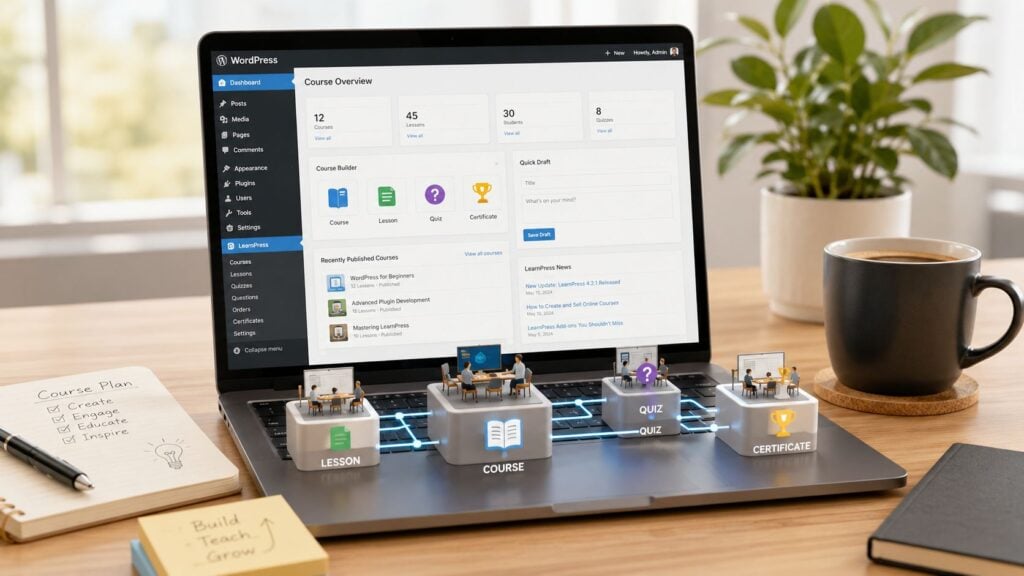
You’ve probably hit the point where your course business feels boxed in.
The sales page works, students are joining, and the content is solid. But the platform underneath it starts calling the shots. You want a different checkout flow. You want a cleaner student dashboard. You want your blog, email capture, community, and course area to feel like one brand instead of a stack of borrowed tools. That’s usually when people start looking at a learning management system for WordPress.
I’ve seen this happen over and over. A creator starts on a hosted platform because it’s fast, which is a reasonable choice. Then the business matures, and suddenly the limits matter more than the convenience. The question stops being “How do I launch?” and becomes “How do I build something I control?”
Starting Your Journey Beyond Hosted Platforms
A lot of course creators don’t move to WordPress because they love plugins. They move because they’re tired of renting their school.
That shift usually starts with one frustrating moment. Maybe you want your course pages to match the rest of your site and can’t quite get there. Maybe your checkout feels detached from the student experience. Maybe your blog is doing the heavy lifting for discovery, but your learning platform lives somewhere else with its own design rules and user records.
That’s where a WordPress LMS starts making sense. Instead of keeping your marketing site in one place and your teaching business in another, you bring everything onto one system you own.
Why ownership changes the business
When your course lives inside WordPress, you control the site structure, the design, the content strategy, and the student journey. You’re not working around somebody else’s roadmap every time you want to add a new offer, protect a resource, or rebuild a landing page.
That control matters more than people think.
A hosted platform can feel smooth in the beginning, but once your catalog grows, you start dealing with edge cases. Corporate buyers ask for private enrollment flows. Members want bundled access. Students need different paths based on what they’ve already completed. Those requests are awkward when the platform only wants to support the default setup.
Practical rule: If your course business is becoming a real business, not just a side project, platform flexibility becomes a strategic decision.
Where to get your footing
If WordPress still feels a bit bigger than you want to tackle alone, it helps to learn from people who teach the platform in plain language. One practical place to start is PurpleCow Digital Marketing, especially if you want a better grasp of the WordPress side before layering in LMS tools.
You don’t need to become a developer to do this well.
You do need to understand the trade-off. WordPress gives you more control, but it also asks you to make better decisions. Hosting matters. Plugin choices matter. Workflow matters. If you’re willing to own those decisions, the payoff is a course platform that feels like your business, not a storefront inside someone else’s building.
What a WordPress LMS Really Is
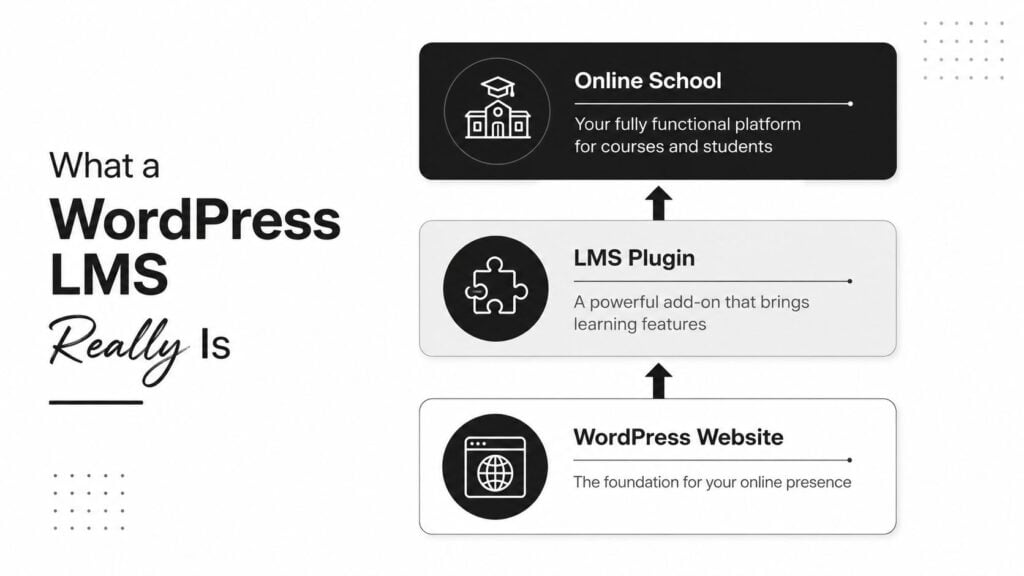
A lot of course creators hear “learning management system WordPress” and assume they need a separate platform running beside their site. In practice, you are usually building on top of WordPress, not beside it.
A WordPress LMS is typically a plugin that adds course delivery, enrollment rules, progress tracking, quizzes, and completion records to a standard WordPress site. WordPress still runs your main website. It handles your pages, blog, navigation, design, and content marketing. The LMS plugin adds the application layer that makes teaching and tracking possible.
How the architecture actually works
The simplest way to understand the setup is to separate the website layer from the learning layer.
Your WordPress website handles brand presentation, sales pages, blog content, landing pages, and general site structure. The LMS plugin handles course access, lesson sequencing, quiz logic, learner progress, certificates, and reporting. Put those together and you have an online school built on WordPress rather than a generic marketing site with videos pasted into pages.
That split matters because it affects every later decision. If you only evaluate the lesson builder, you miss the parts that create real operational pressure later, such as membership rules, checkout behavior, reporting, and logged-in user performance.
A WordPress Learning Management System works by separating the CMS layer, which controls pages and design, from the application layer that manages enrollment, progression, and learner records, as explained in this WordPress LMS architecture guide.
What the plugin is actually doing
Under the hood, the LMS plugin is storing relationships that WordPress does not manage on its own. It keeps track of which users are enrolled in which courses, which lessons they have completed, how they scored on assessments, and whether they met the rules for certificates or compliance records.
That is the key difference between a course website and a learning system.
A page builder can produce an attractive lesson layout. It cannot reliably answer operational questions like who completed Module 2, which team members missed a required assessment, or whether a client account needs a report for HR or compliance review. Those are LMS jobs.
This is also where strategy starts to matter more than plugin marketing. If you plan to sell a few standalone courses, a simple setup may be enough. If you expect subscriptions, cohort programs, private corporate portals, or training records that someone else has to audit, your LMS is no longer just a content tool. It becomes part of your business infrastructure.
The website sells the training. The LMS controls access, tracks progress, and keeps the learning records.
Why this matters before you choose a plugin
Plugin comparison posts often flatten this into a feature checklist. That misses the real decision.
Your LMS does not replace WordPress. It extends it, and that means the quality of your hosting, theme, checkout stack, membership rules, and plugin compatibility all affect the student experience. I have seen course sites look great in demos and then break down once real students start logging in, buying, progressing through lessons, and asking for account-specific access.
That is why a WordPress LMS should be treated as an architecture choice, not just a plugin purchase. If your business may grow into bundles, memberships, client-specific training portals, or compliance tracking, you need a setup that can support those models without forcing a rebuild six months later.
Core Features Every Course Creator Needs
Before you compare brands, get clear on the jobs your LMS has to do.
I’ve watched people choose a plugin because the dashboard looked nice, then spend months patching over missing basics. That usually happens when they shop by feature count instead of business function.
Start with course delivery
The first requirement is a builder that makes course structure easy to manage.
You need a clean way to organize modules, lessons, and assessments. You also need to be able to change that structure later without feeling like you’re rebuilding the whole school. Most course businesses don’t stay with one flagship offer forever. They add workshops, mini-courses, onboarding tracks, and bonus libraries.
If the content structure feels clumsy at the start, it gets worse as your catalog grows.
Drip, tracking, and reporting matter more than people think
A lot of first-time creators obsess over lesson styling and ignore progression rules. That’s backwards.
Drip feed content delivery is one of the core requirements for a serious WordPress LMS, along with granular dashboard analytics and payment integrations like PayPal and Stripe, according to WebDevStudios’ WordPress LMS build guidance. In practical terms, that means your system should let you release lessons on a schedule, track student activity in detail, and tie purchases directly to course access.
Here’s why each one matters:
- Drip content: Releasing everything at once sounds generous, but it often hurts completion. Scheduled lessons create pacing and reduce overwhelm.
- Progress tracking: Students want clarity. Admins need visibility. If you can’t see who is stuck, who is active, or where people drop off, you can’t improve the course.
- Quiz and assignment records: For serious training, especially internal or credential-style programs, recorded attempts and submissions are part of the product.
The checkout is part of the learning experience
People often treat payments as a separate system decision. It isn’t.
If buying is confusing, students arrive frustrated. If enrollment doesn’t trigger correctly, support tickets pile up. If access rules are messy, refunds and complaints follow. A smooth purchase-to-enrollment flow is part of the product, not just the storefront.
What works: one clear offer, one clean checkout path, one reliable enrollment trigger.
What doesn’t: stacking too many access plugins before you’ve even validated the offer.
A simple checklist for non-negotiables
When I evaluate any WordPress LMS stack, I look for these first:
- Course structure: Can it handle lessons, modules, and content hierarchy without friction?
- Assessment tools: Can I run quizzes, assignments, or completion checks that fit how I teach?
- Access control: Can I sell a single course, bundles, or recurring access without hacks?
- Learner reporting: Can I track progress in a useful way, not just see that someone enrolled?
- Payments and enrollment: Can Stripe, PayPal, or WooCommerce connect cleanly to access rules?
If a setup fails one of those, I stop there. Fancy extras won’t save a weak foundation.
WordPress LMS vs Hosted Platforms
A creator usually feels this choice when the first version of the business stops fitting the platform.
The hosted setup that got a course online fast starts to feel tight. Checkout works, but not the way you want. Reporting is fine for basic sales, but weak for renewals, team access, or completion records. Branding looks close enough, until you try to build a site that sells more than one type of offer.
Where WordPress wins
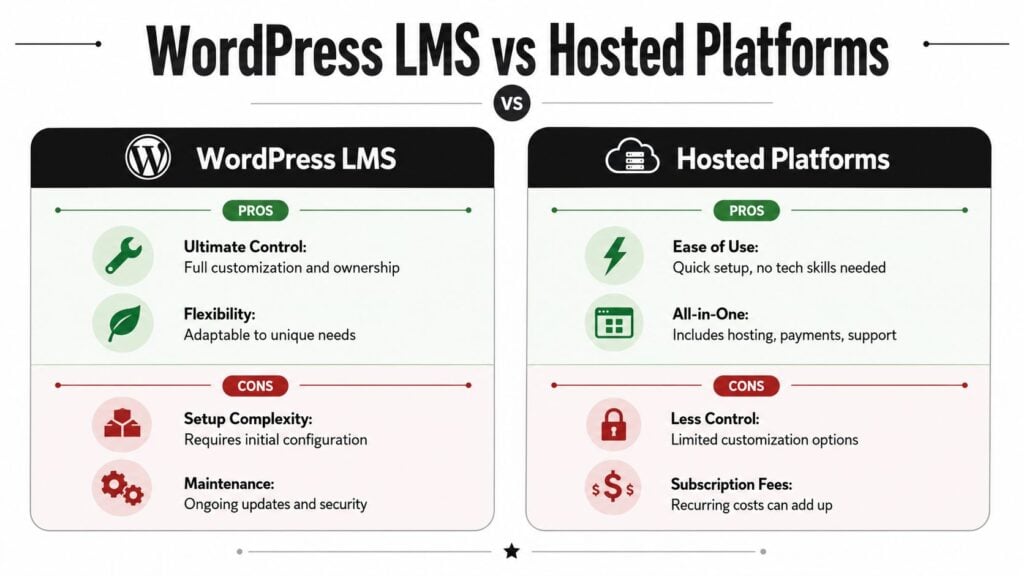
WordPress makes more sense when the course is only one part of the business.
If you need content marketing, SEO pages, lead magnets, memberships, private resources, coaching upsells, or different purchase paths for different audiences, WordPress gives you far more control. That control matters because course businesses rarely stay simple. A setup that works for one flagship course can become awkward once you add bundles, subscriptions, community access, or B2B sales.
I have found that WordPress pays off most when the business has clear operational requirements. You can shape the checkout, student account area, CRM connections, and reporting around how you sell and deliver training, instead of accepting the platform default.
The trade-off is maintenance. You are responsible for plugin compatibility, hosting quality, update discipline, and basic system hygiene. That extra freedom is valuable only if you are prepared to run the stack properly.
Where hosted platforms win
Hosted platforms are often the better choice for speed.
You can launch quickly, test an offer, and avoid a lot of early technical decisions. For a solo creator selling a small catalog with standard lessons and simple checkout, that convenience is real. It reduces setup time and usually gives you one support team instead of several plugin vendors.
The limit shows up later, and usually in places that affect margin or operations.
You may want a different checkout flow, more control over SEO, custom fields for registrations, team-based purchasing, or deeper reporting on learner activity. Many hosted platforms can handle some of that. Few handle all of it well without higher-tier plans, workarounds, or giving up control over the student experience.
A side-by-side view
| Feature | WordPress LMS | Hosted Platforms |
|---|---|---|
| Control | Full control over branding, site structure, and plugin stack | Limited to platform settings and templates |
| Ownership | You manage your site and student environment directly | The platform manages the system and controls the environment |
| Setup | Requires more initial configuration | Faster to get live |
| Maintenance | You handle updates, compatibility, and site care | The platform handles maintenance |
| Flexibility | Better for custom workflows, memberships, and mixed business models | Better for simple, standard course delivery |
| Scaling path | Strong if you plan your stack well | Convenient until you hit feature or workflow limits |
The decision changes for corporate training and compliance
In these situations, a basic feature comparison usually falls short.
Selling courses to individuals is one model. Running staff training, partner enablement, certification tracking, or compliance programs is a different one. The buying process is different, the reporting needs are different, and the risk of getting the system wrong is higher.
A corporate buyer may need manager dashboards, group enrollment, proof of completion, retraining schedules, audit-friendly records, and content segmented by role or region. A consumer-focused hosted platform can struggle here. A standard WordPress LMS plugin can also fall short if you choose it only by looking at lesson design and quiz screens.
That does not rule WordPress out. It changes the standard you should use to evaluate it.
For compliance-oriented training, the strategic question is not “Which platform has the nicest course builder?” It is “Can this system produce the records, access rules, and reporting our client will ask for six months from now?” If the answer is unclear, the cheaper setup often becomes the expensive one after custom work, support overhead, and client friction.
If your requirements include regulated training, team-based learning, or internal L&D workflows, start with the reporting and administrative model first. Then choose the platform. This guide on how to choose an LMS is a useful framework for that decision.
The practical rule
Choose hosted if speed, simplicity, and low operational load matter more than flexibility.
Choose WordPress if the business needs custom sales flows, deeper ownership, or specialized learning operations such as memberships, multi-offer funnels, and compliance-driven training. That path takes more care up front, but it gives you more room to build a system that still fits once the business grows.
Your WordPress LMS Implementation Checklist
Most failed LMS builds don’t fail because the plugin was bad.
They fail because the stack was assembled in the wrong order.
Someone buys a plugin first, then tries to force hosting, theme, checkout, and email automation around it afterward. That’s where the weird bugs and frustrating student experiences start. Build the foundation in sequence and you avoid most of that pain.
The five decisions that matter first
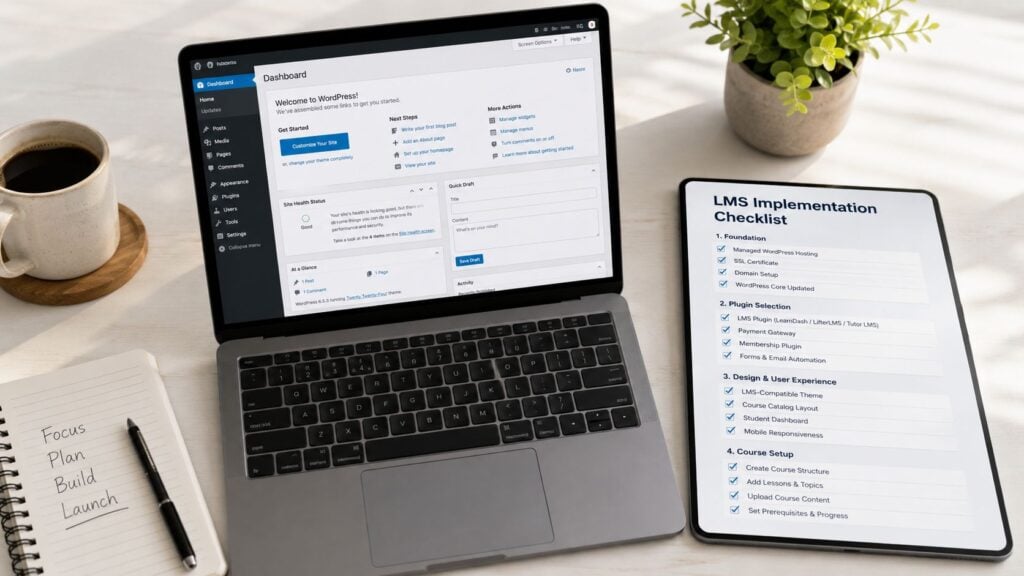
I like to frame implementation as five layers.
Hosting comes first
Don’t put an LMS on bargain hosting and expect a smooth student experience. Logged-in users, quizzes, progress tracking, and checkout actions create more load than a simple blog. Managed WordPress hosting usually makes life easier because updates, backups, and performance basics are handled more cleanly.Theme compatibility matters more than style at first
A slick theme demo doesn’t tell you how well lesson templates, account pages, or course grids will behave. Pick a theme known to work well with LMS plugins and WooCommerce if you plan to sell courses that way.Choose the LMS after you define the teaching model
Are you delivering cohort-style courses, evergreen lessons, private client portals, or internal staff training? The answer should shape the plugin choice. A plugin that feels great for solo creators may feel thin once you need manager visibility or layered access rules.
Don’t forget the systems around the course
The LMS plugin is only one part of your business.
You’ll usually need supporting tools that handle communication, commerce, and access logic. A stable setup often includes:
- Email marketing: For onboarding, reminders, launch campaigns, and student follow-up.
- Payments: Stripe, PayPal, or WooCommerce depending on how complex your offers are.
- Membership control: Useful when access depends on a plan, bundle, or subscription instead of a single course purchase.
- Community tools: Optional, but valuable if discussion and peer learning are part of the offer.
A course can survive with simple tools. A growing course business needs systems that agree with each other.
What to test before launch
Before a single student sees the site, run through the whole journey yourself.
- Buy the course as a student: Make sure payment, enrollment, and welcome messaging happen in the right order.
- Complete a lesson and quiz: Confirm progress tracking works and doesn’t break on mobile.
- Check restricted pages: Verify that non-members, members, and admins each see the right thing.
- Review email timing: Welcome emails, access emails, and reminders should feel intentional, not duplicated or delayed.
A staged setup is worth the effort. Even a small course site benefits from testing on a private build before launch. If you want a more detailed planning sequence, this LMS implementation checklist for small teams is a good framework.
Choosing Your Core Plugins
A lot of course creators lose weeks here.
They compare feature tables, install three demos, and still end up asking the wrong question. The fundamental decision is not which plugin has the longest list of options. It is which stack fits the business model you plan to run 12 months from now. A solo creator selling one flagship course needs a different setup than a training company managing renewals, team access, and compliance records.
The big three LMS plugins
For most WordPress LMS projects, the shortlist gets practical fast: LearnDash, LearnPress, and Tutor LMS.
As noted earlier, these are the plugins that show up again and again on serious course builds. That matters for a simple reason. Popular tools usually have more add-ons, more developers who know how to work with them, and fewer dead ends when you need to change your sales model later. If you expect to add subscriptions, bundles, certificates, group enrollments, or corporate reporting, ecosystem depth matters more than a polished settings screen on day one.
How I evaluate the stack
I split the decision into three jobs: teaching, access, and commerce.
That keeps plugin choices clear and prevents the overlap that causes enrollment problems later.
LMS plugin
The LMS plugin runs the learning experience itself. It handles lesson structure, progression rules, quizzes, certificates, assignments, and reporting.
- LearnDash: A strong fit for structured programs, graded learning, prerequisite paths, and clients who care about records. I usually put it first for certification programs or corporate training because the control is there, even if the setup takes more time.
- Tutor LMS: Easier to get live with if speed and interface matter most. It suits creators who want a cleaner builder and do not need unusually strict learning logic on day one.
- LearnPress: Often the budget choice. That can work, but lower upfront cost usually means more plugin testing and more decisions about add-ons, support, and long-term maintenance.
After you’ve seen the interfaces in action, this walkthrough can help ground the decision:

Membership plugin
A membership plugin controls access across the site, not just inside a single course.
That distinction matters once your offer gets more complicated. If you sell a course library, recurring member access, private resources, or team-based access, course enrollment alone usually is not enough. In those cases, I add a membership layer so the LMS can focus on learning logic while the membership tool handles plans, renewals, and protected content. If you’re sorting through those options, this guide to membership plugins for WordPress does a good job explaining the trade-offs.
This is also where long-term architecture starts to matter. A creator business can get away with simple per-course access. A company selling staff training often needs expiry dates, manager visibility, and proof that people completed the right material on schedule.
Commerce layer
For many builds, WooCommerce is still the practical commerce choice.
It gives you flexible product setup, order handling, coupons, taxes, and room to add other revenue lines later. I recommend it when courses are only part of the business, or when the offer will likely expand into workshops, coaching, downloads, or physical materials. If sales are simple and the funnel is narrow, a lighter checkout path can be easier to maintain.
I also pay attention to search and content strategy here. If organic growth matters, the stack should support clean product pages, indexable course content where appropriate, and a site structure that can rank over time. That is one reason WordPress remains attractive for education businesses that care about discoverability. SEO for WordPress sites is a useful reference if search is part of the growth plan.
Field note: The best plugin stack is the one where each tool has a clear job.
What works and what usually causes trouble
The cleanest builds use one LMS, one access layer only if the business model requires it, and one commerce system.
Problems start when two plugins both try to control who gets into a course. I have seen this happen with WooCommerce add-ons, LMS enrollment rules, and membership restrictions all active at once. Payments go through, but access does not trigger correctly. Renewal rules conflict. Support tickets pile up because the student experience looks random from their side.
Choose the stack based on the business you are building. If you plan to serve corporate clients, compliance tracking and group management should influence the LMS choice early. If you plan to grow through content and search, site structure and commerce flexibility matter more than flashy course builder features. That is the decision that holds up.
Scaling and Next Steps for Your Course Business
Launching the site is only the beginning.
Once students are active, your priorities change. You stop thinking only about setup and start thinking about reliability. Pages need to load well for logged-in users. Video delivery needs to feel smooth. Reporting needs to stay usable. If you migrate from another platform, students need a transition that doesn’t feel like a downgrade.
The scaling mindset that helps most
Don’t try to future-proof every possible scenario on day one.
Do plan for the obvious pressure points. Logged-in traffic behaves differently from casual blog traffic. Course libraries grow. Support requests get more specific. The stack that feels perfectly fine with one offer can become awkward when you add memberships, cohorts, or team access.
This is also where marketing and platform finally meet. A strong LMS without discoverability won’t grow much. If organic acquisition matters to your business, this guide to SEO for WordPress sites is worth a look because WordPress gives you far more room to build a durable search presence than most hosted course tools.
The next three moves I’d make
If you’re staring at too many options, shrink the problem.
- Map the first course: Write the module and lesson structure before you buy anything.
- Pick the simplest workable stack: One LMS, one payment path, and only the extra access tools you need.
- Publish one real lesson: Not a mockup. A live lesson with the exact media, layout, and student flow you plan to use.
Small builds teach faster than endless comparison shopping.
A solid learning management system on WordPress grows well when it’s built around a clear teaching model and a restrained stack. That’s the path I trust most.