The Instructional Design Process: A Complete Guide
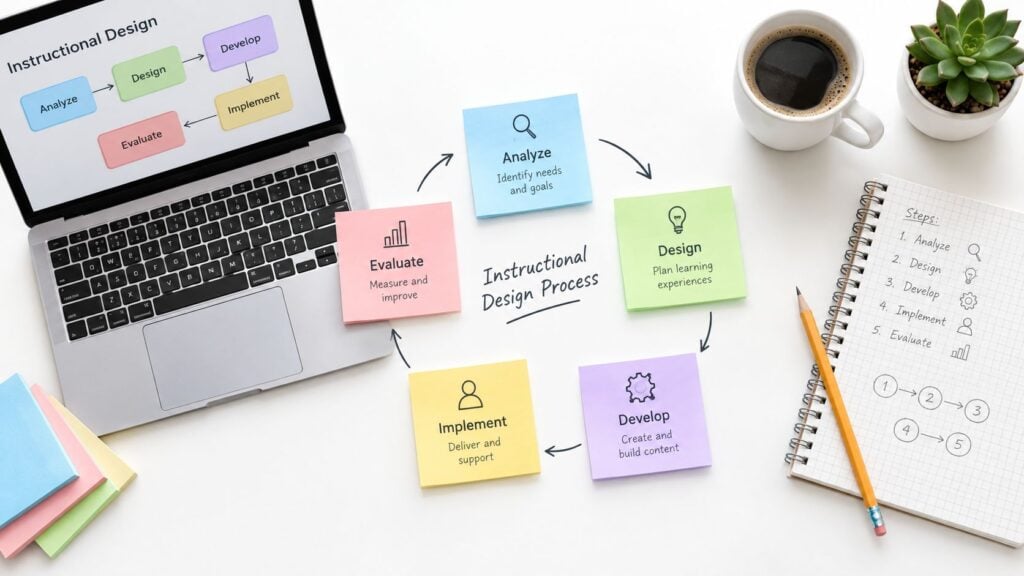
You’ve probably seen this happen. A course creator records a stack of polished videos, drops them into modules, adds a quiz at the end, and opens enrollment. Learners begin with good intentions, then run into unclear instructions, long lessons, awkward navigation, or assessments that don’t resemble the work they’re expected to do. Within a short time, participation fades.
The problem usually isn’t a lack of expertise. It’s the absence of a dependable instructional design process that connects learner needs to practice, feedback, and evidence of performance. A strong process gives you checkpoints before production becomes expensive and diagnostic information after launch.
Structured microlearning can support that discipline. Organizations using structured microlearning approaches report information retention improvements of 25–60% compared with traditional training methods, while companies implementing structured microlearning programs report 50% higher engagement rates and a 42% increase in revenue per employee. These figures are provided in the available verified data, but they shouldn’t be treated as a reason to chop every course into tiny pieces. The format still has to match the task, learner, and context.

Why Your Course Process Makes or Breaks Learner Outcomes
A creator skips analysis because they already know the subject. They write lessons around the material they have, not the decisions learners need to make. The result can look substantial while teaching very little that transfers to real work.
I’ve seen this pattern in memberships as well. The library grows, but members still ask the same basic questions because the content was organized around files rather than outcomes. A module might contain a video, a worksheet, and a discussion prompt, yet the learner can’t tell what to do first, how to judge a good result, or where to apply the skill.
The instructional design process prevents that drift by forcing a chain of decisions:
- Learner need: What situation creates the demand for training?
- Performance gap: What can’t learners do yet?
- Target behavior: What should they do differently after instruction?
- Practice and evidence: What activity will let them rehearse that behavior?
- Feedback and improvement: How will they know what to change?
When those links are missing, completion data becomes hard to interpret. A learner may stop because the course is irrelevant, because the workload is unreasonable, or because the interface makes progress difficult. Treating every exit as a motivation problem leads to the wrong fix.
Practical rule: Design around the task learners must perform, then choose content that supports that task.
Start with the learner’s actual situation
A course for new support agents shouldn’t begin with a complete product history. It should begin with the customer problem the agent must recognize, the questions they should ask, and the response they must produce. A course for freelance designers might need a realistic client brief, a decision exercise, and feedback on the proposed solution. Reading about good work rarely substitutes for attempting it.
Structured microlearning can help here. Short units are useful when each one supports a meaningful decision or action. They become frustrating when the creator breaks a coherent process into disconnected fragments and makes learners reconstruct the logic themselves.
The reported retention, engagement, and revenue figures associated with structured microlearning are useful signals, not automatic guarantees. Format alone doesn’t create learning. Clear objectives, useful practice, sensible sequencing, and support after the lesson determine whether a compact unit earns its place.
Treat process as quality assurance
A mature workflow catches weak alignment before launch. You can review whether an objective asks for analysis while the quiz only checks recall. You can test whether a learner can complete the lesson with a keyboard. You can ask whether an AI-generated explanation contains claims that require verification.
That work takes time, but skipping it transfers the cost to learners. They pay through confusion, repeated attempts, abandoned lessons, or unsuccessful workplace application.
The historical development of instructional design reflects this need for systematic work. Large-scale training demands during World War II helped establish the need to prepare many recruits efficiently, including people with little or no prior military training. Later researchers formalized instructional design as a structured process. Ralph Tyler influenced task-analysis work around 1953, Robert Glaser coined the term “instructional system” in 1962, and Robert Gagné developed an early systematic instructional design model in the same year. Gagné and Leslie Briggs later collaborated on a more detailed model in 1974. These milestones are summarized in Springer’s reference work on instructional design.
The lasting lesson is practical. Good instruction begins with what learners need to do, not with the content inventory sitting on your hard drive.
Understanding the Five Phases of the ADDIE Model
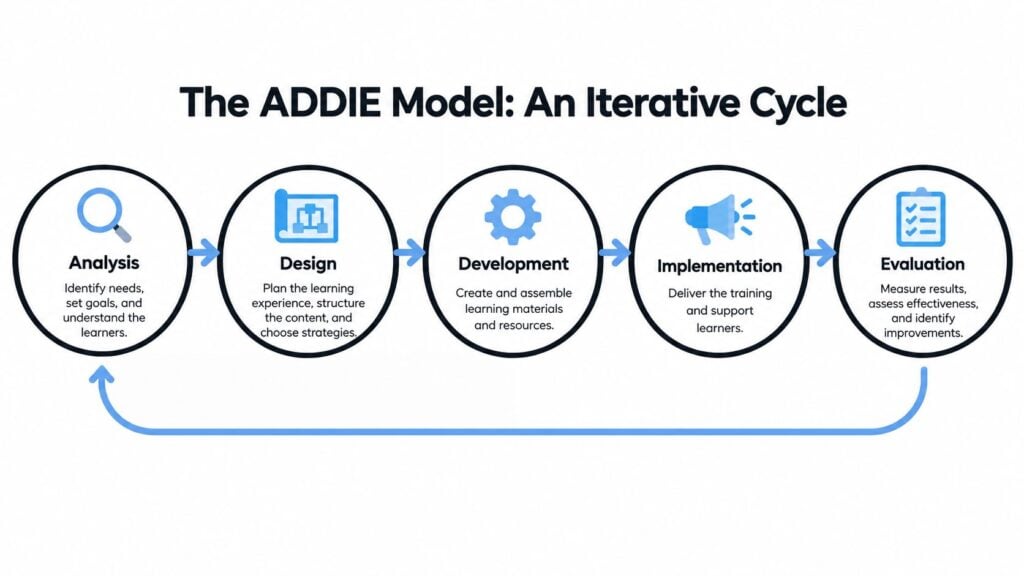
ADDIE works best as an iterative quality-assurance cycle. The five phases are Analysis, Design, Development, Implementation, and Evaluation, but production rarely moves through them only once. Evaluation can send you back to Design. A prototype can reveal an Analysis mistake. Implementation can expose constraints that require Development changes.
Analysis identifies the real problem
Analysis clarifies the learner population, current capability, performance gap, environment, constraints, and desired result. It also tests whether training is the right intervention. If staff know the correct procedure but the system makes it difficult to find, a course won’t solve the underlying problem.
Document the target behavior in observable terms. “Understand account security” is too vague to guide design. “Identify a suspicious login and follow the escalation procedure” gives you something you can teach, practice, and assess.
Design defines evidence before content
Design turns the analysis into objectives, assessment methods, practice activities, sequence, and delivery decisions. Start by asking what acceptable performance looks like. Then build activities that let learners produce that performance under conditions resembling the actual context.
A content map can help you see whether each lesson has a job. For broader guidance on organizing lessons, modules, and supporting material, this content structure guide offers a useful planning reference.
Development makes the plan usable
Development is where scripts, visuals, activities, feedback, assessments, job aids, and accessibility features become working assets. Build a small prototype before producing the full course. A prototype can reveal confusing navigation or an unrealistic exercise while changes are still inexpensive.
Development also includes quality checks. Review factual accuracy, objective alignment, instructions, feedback logic, media performance, captions, alternative text, and device behavior. A beautiful course with a broken interaction is still a broken course.
Implementation exposes delivery friction
Implementation includes the launch environment, facilitator preparation, learner communication, support, technology checks, and operational handoffs. This phase often reveals problems that a design document hides. Learners may not know where to begin, managers may not provide practice time, or the platform may handle a required activity poorly.
Evaluation tests the intended change
Evaluation examines whether learners reacted positively, gained knowledge, changed workplace behavior, and produced the intended organizational or service result. In a documented e-learning implementation, designers used formative evaluation throughout development and summative evaluation after deployment. Learners reported mean perceived knowledge-acquisition ratings of 4.4 to 4.6 on a five-point scale, as documented in this peer-reviewed e-learning implementation.
That result doesn’t mean satisfaction proves effectiveness. It shows why evaluation should collect several kinds of evidence. Low completion may indicate navigation friction or excessive workload. Knowledge gain without behavior change may point to weak practice or missing workplace support.
Designing for Cognitive Load with Multimedia Principles
A course can contain too much information even when every sentence is accurate. Decorative animations, distant labels, background music, repeated text, and rapid transitions all compete for attention. Learners then spend mental effort processing the presentation instead of understanding the procedure.
An overview of 29 systematic reviews covering 1,189 studies and 78,177 participants found significant positive effects for 11 multimedia principles and improvements in cognitive-load management for five. The strongest benefits included captioning for second-language video, temporal and spatial contiguity, and signaling, as reported in this review of multimedia principles.
Make every element earn its place
For a software demonstration, place the label beside the button or field it explains. Synchronize narration with the relevant screen action. Remove repeated on-screen paragraphs when the narration already communicates the same content. Use a highlight or brief visual cue to direct attention to the decision that matters.
These choices are especially important for technical demonstrations, software workflows, and multi-step compliance procedures. System-paced instruction also demands careful control because learners may not be able to pause or revisit material easily. Self-paced environments give learners more control, but that doesn’t excuse cluttered design.
A useful production review asks:
- Relevance: Does this visual support the objective or merely decorate the screen?
- Proximity: Can learners connect each label with the feature it describes?
- Timing: Does the narration arrive when the visual evidence appears?
- Control: Can learners pause, replay, or move through a complex procedure at a manageable pace?
- Attention: Does signaling identify the information needed for the next decision?
Use progression instead of novelty
Interactivity only helps when it requires meaningful thinking. A click-to-reveal element may create activity without improving performance. A scenario that asks learners to choose a response, explain the choice, and compare feedback can support deeper processing.
Practicing instructional designers frequently use worked examples, completion tasks, dual modality, and simple-to-complex sequencing to manage cognitive load. A practical progression is straightforward. Demonstrate a complete solution, provide a partially completed version, then require independent performance as complexity increases.
For a detailed application of these principles, see this guide to cognitive load theory in e-learning design. The production decision should always connect to a learning problem. Shorter videos can help when pacing or workload is excessive, but shortening a video won’t fix poor signaling or an assessment that asks learners to perform an unrelated task.
Integrating AI Into Your Design Workflow Without Losing Quality
AI has moved into routine instructional design work. A 2025 study of 144 instructional designers found that 83% were already using ChatGPT, while 67% reported moderate-to-significant time savings that enabled more strategic work, according to this AACE review of generative AI in instructional design.
The useful question is what those savings produce. If AI lets a designer draft faster but leaves inaccurate content, weak assessments, or inaccessible activities, production speed has hidden the quality problem.

Assign AI the right class of work
AI can accelerate drafting, summarization, brainstorming, alternative explanations, question variations, and formative-feedback ideas. It can also help transform a source outline into different delivery formats, provided a designer checks the output against the approved source material.
Human ownership must remain explicit for needs analysis, context interpretation, assessment validity, accessibility review, bias detection, privacy decisions, and final approval. Those tasks depend on judgment about people, consequences, and real performance conditions.
A practical governance map separates work into risk tiers:
- Lower risk: Brainstorming titles, generating rough examples, summarizing approved notes.
- Review required: Drafting explanations, creating practice scenarios, producing feedback, adapting tone.
- Human approval required: Learning objectives, assessment decisions, accessibility, sensitive organizational content, final learner-facing claims.
The AI for instructional design guide provides additional context for placing AI inside a broader workflow rather than treating it as a standalone authoring shortcut.
Add evidence and version control
Keep a record of prompts, source documents, generated drafts, reviewer comments, and approved versions. Verify AI-produced claims against primary material before publication. Don’t paste identifiable learner records, confidential business information, or sensitive performance data into a tool without an approved privacy process.
A review gate should answer three questions:
- What did AI produce or change?
- What did a qualified reviewer verify?
- What evidence shows the change improved learning or reduced production risk?
The final question matters most. Time saved is useful, but it’s only one process measure. Compare error rates, revision patterns, alignment reviews, accessibility findings, and learner performance over successive versions.
Building Accessibility Into Design From the Start
Accessibility works better when it shapes goals, methods, materials, and assessments from the beginning. Retrofitting captions, keyboard access, alternative text, and usable interactions after production often forces compromises because the original design assumed one way to perceive information or complete a task.
A 2025 systematic review covering 32 studies found that accessibility and Universal Design for Learning produced the strongest inclusive outcomes when incorporated at the design stage instead of retrofitted later. Separate testing work found that combining automated checks, manual inspection, and testing with visually impaired students exposed labeling, navigation, and interaction failures in activities such as drag-and-drop and sorting tasks, as described in this accessibility and UDL review.
Build an accessibility review into each phase
Start with the learner and task. Ask what information must be perceived, what action must be completed, and what evidence the learner must submit. Then identify possible barriers before choosing media or interaction types.
Use this sequence during production:
- Plan alternatives: Provide equivalent ways to access key information and demonstrate learning.
- Design for perception: Write meaningful alternative text, use clear language, provide captions, and avoid relying on color alone.
- Check interaction: Test keyboard navigation, focus order, labels, controls, timing, and instructions.
- Inspect manually: Automated tools can identify some technical issues, but they won’t judge whether instructions make sense or whether a screen-reader user can complete the task.
- Test with representative learners: Invite people who use assistive technology to attempt realistic activities, not just inspect a sample page.
- Record remediation: Log the barrier, affected task, change made, and retest result.
Use UDL as a design checklist
CAST organizes Universal Design for Learning around engagement, representation, and action and expression. Engagement concerns the reason for learning, representation concerns the information learners need to access, and action and expression concern how learners interact, communicate, and demonstrate what they know. The framework includes nine guideline categories, including recruiting interest, sustaining effort and persistence, supporting perception, clarifying language and symbols, and supporting executive function. These principles are outlined in the CAST UDL Guidelines.
The framework gives designers useful questions. Can learners understand the objective? Can they access the explanation in a suitable form? Can they show competence without an unnecessary barrier? Flexibility should preserve the performance standard while reducing obstacles unrelated to the skill being assessed.
A course passes an automated checker when it meets certain technical conditions. That doesn’t prove a learner can complete a sorting activity, locate feedback, or recover from an error. Functional usability requires testing the whole path.
Evaluating Before and After Launch for Continuous Improvement
Formative and summative evaluation answer different questions. Formative evaluation asks what needs fixing before official release. Summative evaluation asks whether the released program achieved its goals after learners have used it.
Confusing the two produces weak decisions. A post-course survey might tell you that learners liked the presenter, but it won’t necessarily reveal that the assessment instructions were ambiguous. A pre-launch usability session can catch that problem before it affects an entire cohort.
Formative evaluation reveals design faults
A practical formative sequence includes one-to-one evaluation, small-group evaluation, and a field trial, with findings returned to the design team for revision. CAST describes formative evaluation as refinement before release and summative evaluation as judgment after instructional sessions, in its guidance on Universal Design for Learning.
Each stage exposes a different kind of issue:
| Evaluation stage | What it can reveal |
|---|---|
| One-to-one | Confusing instructions, missing context, navigation problems |
| Small group | Common misunderstandings, pacing concerns, interaction patterns |
| Field trial | Delivery constraints, support needs, real-world workflow friction |
Watch what learners do, not only what they say. If several people replay the same explanation, inspect the explanation and its surrounding activity. If they skip a resource, check whether the resource is relevant, findable, and connected to the objective.
Summative evaluation tests transfer
After launch, examine reaction, knowledge gain, workplace behavior, and downstream organizational or service results. A membership creator might track assessment improvement, task completion, activation, or retention. A workplace training team might examine whether employees follow the target procedure under normal conditions.
The metric alone won’t explain the result. A low completion rate can reflect excessive workload, unclear sequencing, or platform friction. Strong assessment results with weak workplace transfer can indicate that learners memorized the course pattern without practicing the actual task.
Evaluation should explain where performance changed, not merely report whether learners finished.
Define success measures during Analysis, instrument the relevant steps, and route findings back into the next design cycle. That turns evaluation into operational intelligence instead of a final survey attached to the end of production.
Creating Your Custom Instructional Design Workflow
A workable process fits on one page. Start with backward design: define the target behavior, evidence of mastery, learner variability, sequence, and review point. The CEEDAR Center guidance on designed instruction offers a useful foundation.
Treat the workflow as a living system. Put these fields in one working document: decision, evidence, owner, risk, and next review date. That record prevents approvals from becoming vague handoffs.
- Clarify the job: Name the learner, context, performance gap, and target behavior.
- Define proof: State what acceptable performance looks like and how you will observe it.
- Plan access: Check goals, methods, materials, and assessments for flexible participation.
- Prototype early: Test one representative activity before producing the full course.
- Govern AI use: Record generated content, source checks, reviewer ownership, and approval status.
- Test in stages: Use individual review, small-group review, and a field trial.
- Measure transfer: Track the outcome that matters beyond completion.
- Reflect and revise: Log failures, decisions, and changes for the next version.
Use the VideoLearningAI training guide when making production decisions. LearnStream users can also review instructional design templates for structured modules, lessons, videos, attachments, and quizzes.
For a practical decision rule, stop production when a prototype fails accessibility, usability, or performance checks. Fix the design, retest the same evidence, then scale. Record why the change was approved, especially for high-risk AI output.
Before recording another lesson, write the target behavior, define mastery evidence, test one activity, and assign human review. Use those findings before launch, while revision is still cheaper.