Managing an Email List for Course Creators

You’ve just reached 5,000 email subscribers, but course completions haven’t moved. Members are cancelling, launch emails seem less effective, and your social posts still attract plenty of attention without producing many additional sales. The list looks healthy in your dashboard, yet the business feels less stable.
That situation is common among course creators. A large database can hide weak engagement, poor segmentation, inactive learners, and subscribers who never intended to receive the emails you’re sending. Managing an email list properly gives you a way to improve revenue and retention at the same time, because the right message can help someone buy, start a lesson, finish a module, or stay subscribed.
What Managing an Email List Actually Means for Course Creators
For a course creator, an email list isn’t just a collection of addresses waiting for the next launch. It’s a record of where people came from, what they care about, what they’ve bought, and whether they’re making progress.
A new subscriber might have downloaded a checklist for beginner photography. Another might have completed your flagship course and be ready for an advanced cohort. A third may have joined your membership, stopped logging in, and ignored every message for months. Sending the same broadcast to all three creates unnecessary noise and misses useful opportunities.
Managing the list means making sure each person receives relevant communication at the right stage. That includes:
- Acquisition: attracting subscribers with a clear promise that matches your teaching offer.
- Segmentation: recording course interests, purchases, membership status, and engagement.
- Hygiene: correcting invalid addresses, suppressing bounces, and handling complaints.
- Deliverability: authenticating your sending domain and protecting sender reputation.
- Automation: responding to signups, purchases, lesson activity, and inactivity.
- Consent: keeping permission clear and making preferences easy to change.
- Measurement: connecting email activity to sales, course progress, renewals, and cancellations.
A list can grow while the learning business weakens. If new subscribers arrive for a free download but never understand the paid course, acquisition is doing its job while the customer journey is failing. If members receive promotional emails but no useful prompts to return to their lessons, the list may generate clicks without improving completion.
Practical rule: Track email performance beside learner behavior. A message that produces clicks but doesn’t lead to a lesson start, purchase, renewal, or course restart may be entertaining your audience without moving the business forward.
The broader deliverability picture makes this even more important. Validity’s benchmark data, reported in this email marketing statistics overview, put global average inbox placement at 87.2% in 2025, up from 83.5% in 2024. Even at that higher level, roughly one in eight legitimate marketing emails still didn’t reach the inbox. The same source reported 89.1% inbox placement for fully authenticated domains using SPF, DKIM, and DMARC, compared with 44.2% for domains without full DMARC authentication.
That makes the list a product asset you own, rather than a temporary audience rented from a social platform. Resources such as BAMF’s guide to building an email list can help with the acquisition side, but growth only becomes valuable when the contacts receive useful, relevant communication after they subscribe.
The rest of the system is practical. You need lead magnets that attract likely buyers, segments that reflect real learner behavior, cleanup routines that protect reach, and automations that support progress instead of filling inboxes with generic reminders.
Growing Your List With the Right Lead Magnets
A lead magnet should attract the kind of person who can benefit from your paid learning experience. A broad giveaway may collect addresses quickly, but it can also bring in people who want a free resource and have no interest in completing a course.
Start with the transformation your course provides. Then offer a smaller, useful step toward that transformation.
Choose a format that previews the learning experience
The strongest lead magnets usually let prospects experience how you teach. Suitable formats include:
- A short email course: Teach one narrow skill over a few messages, then point subscribers toward the complete pathway.
- A workshop replay: Use a focused session to demonstrate your explanation style and show the gap your paid program fills.
- A first-module preview: Give prospective students access to the opening module of a multi-week course, with a clear explanation of what comes next.
- A resource library: Offer templates, swipe files, checklists, or tools to people considering a membership waitlist.
- A diagnostic quiz: Help visitors identify their current level, then recommend a relevant course or learning path.
- A challenge sequence: Guide subscribers through a practical exercise and use their participation to identify genuine interest.
A lead magnet works better when the promise is specific. “Improve your business” is difficult to evaluate. “Plan your first paid workshop with a one-page outline” gives the subscriber a clear reason to exchange an address.
Value should arrive quickly. If someone signs up for a checklist, deliver it promptly and make the first follow-up email useful on its own. That first message establishes whether your future emails will feel like lessons, invitations, or unwanted promotion.
Put the signup where intent already exists
Cold visitors often need more context before they opt in, so a landing page or a relevant article can explain the result in detail. Warm visitors need less persuasion. They may respond well to a lesson-end invitation, a checkout-page checkbox for future updates, or a post-purchase offer for the next stage of learning.
Useful placements include:
- A lesson-end CTA inviting students to receive the next exercise.
- A thank-you screen offering a related resource after purchase.
- A community profile or membership bio with a clear learning promise.
- Podcast show notes connected to the episode topic.
- A course waitlist page offering a practical tool library.
- A blog post that naturally expands on the problem the lead magnet solves.
Keep the form focused. Ask for the information you need to deliver the resource and begin relevant communication. You can collect additional context later through a welcome survey or a preference link, rather than turning the initial signup into an application form.
For a broader walkthrough of signup pages, lead magnets, and welcome automation, use this guide to building an email list for an online learning business.
Before creating a new asset, score the idea against four questions:
- Does it solve a problem that appears before the paid course?
- Does the person who wants it resemble your ideal buyer?
- Can you deliver a useful result without teaching the entire paid program?
- Is there a natural next step into a course, cohort, or membership?
If the answer to the first three is yes but the fourth is no, the asset may build attention without building a useful audience. Improve the bridge before spending time designing it.
Segmenting Subscribers for Better Course and Member Engagement
A single broadcast can be convenient for the creator and irrelevant to almost everyone else. A prospective student needs confidence and context. An active learner needs momentum. An alumnus may want an advanced offer. A cancelled member may need a reason to return, not another introductory sales email.
I use three layers to keep segmentation manageable. Each layer answers a different question:
- Engagement: Is this person active, cooling, or dormant?
- Interest: Which course, topic, skill, or membership tier matters to them?
- Lifecycle: What relationship do they currently have with the business?
Build the segment from useful fields
Tags work well for events and actions. Examples include downloaded-portrait-guide, started-module-1, or completed-course-x. Custom fields work better for information that should remain part of the subscriber profile, such as preferred topic, experience level, membership tier, or acquisition source.
Don’t create a segment unless it changes what you send. A tag that never affects a campaign only adds clutter and makes reporting harder.
| Segment Layer | Example Segments | Practical Use Case |
|---|---|---|
| Engagement | Active readers, cooling subscribers, dormant contacts | Send regular education to active readers, a preference prompt to cooling subscribers, and a re-engagement sequence to dormant contacts |
| Interest | Course topic, quiz result, downloaded resource, membership tier | Recommend the course or lesson path that matches the subscriber’s stated problem |
| Lifecycle | Lead, trial member, active member, alumnus, cancelled member | Route each person to the appropriate onboarding, conversion, advanced-offer, or win-back communication |
A trial member who has started lessons but hasn’t selected a paid plan deserves a different sequence from a lead who has only downloaded a checklist. An alumnus who completed your beginner course may be ready for an advanced cohort, while a cancelled member might need a concise summary of what has changed since they left.
The data doesn’t need to be elaborate. Start with the signup source, primary interest, purchase history, membership status, and recent activity. Add a field only when you can name the decision it will support.
One 2026 marketing guide reported that segmented campaigns achieved 14% higher open rates and 100% higher click rates than non-segmented campaigns. Those figures appear in this segmentation and email strategy guide, but the useful lesson is broader than the benchmark. Relevance gives subscribers a reason to pay attention.
Send one carefully matched campaign before building ten complex segments. If the message wouldn’t change, the segment probably isn’t ready.
Over-segmentation creates another problem. A small audience divided into many tiny groups produces thin reporting and complicated automation. Begin with one useful segment today, such as active members who started a course but haven’t reached the next milestone. Give that group a message that helps them continue, then measure course activity rather than opens alone.
Keeping the List Clean and the Inboxes Reachable
List hygiene is a recurring operating task. It starts at signup and continues after every campaign, because invalid addresses, complaints, and inactive contacts can weaken future delivery.
Remove duplicates and obvious typos when people join. Suppress hard bounces rather than repeatedly sending to them. Keep a permanent record of unsubscribed and complaining contacts so they don’t re-enter through a different form or integration. Role-based addresses such as info@ or support@ deserve review because they may not represent a single learner, though they shouldn’t be removed automatically without checking how the address entered the list.
Use thresholds that trigger action
A practical baseline treats a bounce rate under 2% as the normal working threshold. A rate above 2% signals that list quality needs attention, while a rate above 5% is a stop-and-clean warning, according to this email deliverability guidance.
Complaints need an even tighter response. Google and Yahoo expect bulk senders to stay below 0.10%, and 0.30% is treated as an enforcement threshold in this explanation of spam complaint metrics. At 0.10%, one complaint per 1,000 delivered emails can matter to your reputation.
| Metric | Healthy Threshold | Action Cadence |
|---|---|---|
| Hard bounce rate | Under 2% | Review after every send and suppress invalid addresses promptly |
| Overall bounce rate | Above 5% requires a stop-and-clean response | Investigate acquisition sources and verification before the next major campaign |
| Spam complaint rate | Under 0.10% | Review after every campaign and inspect the message, segment, and consent source |
| List decay | Around 28% annually without maintenance | Run ongoing re-engagement and suppression work rather than relying on an annual scrub |
The annual decay benchmark matters for course businesses. Prospeo’s email list management guidance puts list decay at about 28% per year and recommends verifying new signups, removing duplicates and typos, suppressing hard bounces, and permanently unsubscribing complainers. The same source identifies sender reputation as the main benefit cited by 47.5% of senders who prioritize hygiene.
Authenticate before you scale
Set up SPF, DKIM, and DMARC for the custom domain used by your course business. Confirm that the authentication passes in your sending platform before increasing volume for a launch. Authentication doesn’t make an irrelevant campaign useful, but it helps mailbox providers identify the sender and supports the deliverability advantage described earlier.
Check inbox placement with seed-list testing or a tool such as GlockApps. Watch for sudden delivery changes after a campaign, an increase in complaints, or a bounce pattern tied to one signup source. A list that looks large in the dashboard can still underperform if a meaningful share of messages never reaches the inbox.
The trade-off is uncomfortable but straightforward. Removing inactive contacts can reduce the visible list size, yet continuing to send to people who never engage can make the remaining audience less responsive. A smaller active audience gives a course launch a clearer path to people who are more likely to open, click, buy, or return to a lesson.
For platform decisions around sending and course delivery, this MailerLite versus Mailchimp comparison offers a useful starting point. Whichever tools you choose, the workflow should remain yours, with clear ownership of suppression rules and reporting.
Automations That Sell Courses and Keep Members Active
Automation should respond to learner behavior, not just fill a calendar. The most useful flows help a subscriber understand what to do next, recover a stalled decision, or return to a course before the habit disappears.
Start with the learner’s next action
A welcome series introduces your teaching point of view, delivers the promised resource, and makes the next step obvious. It might invite a reader to complete a diagnostic, attend a workshop, or review the course that solves the problem they initially showed interest in. Measure first purchase, lesson starts, or qualified sales activity rather than open rate alone.
A behavior-triggered workflow reacts to actions such as started Module 1, watched the orientation, or completed course X. If a learner stalls, send help that addresses the likely obstacle. If they finish, recommend the next relevant lesson, cohort, or membership benefit. Course platforms and email service providers need to share event data cleanly.
Browse-abandonment and pricing-page sequences can remind a prospect what they were considering. Keep the message useful. Clarify who the course is for, answer a common objection, or show the structure of the learning experience. A generic “you forgot something” reminder usually feels like a store notification rather than a thoughtful sales message.
Re-engagement flows should focus on inactive members before they disappear completely. Offer a simple return point, such as the next unfinished lesson, a new resource, or a short progress reset. If the person doesn’t respond, reduce or stop regular sending instead of escalating pressure.
Assign each trigger to the right system
LearnStream can be considered alongside an external ESP such as ConvertKit or ActiveCampaign when planning the technology stack for a learning business. Store learner events where they naturally occur, then pass the minimum useful event data into the email system. For example, the course platform may own enrollment and lesson completion, while the ESP manages consent, campaigns, and subscriber preferences.
The important metrics are operational:
- Revenue per automation: Which flow contributes to paid enrollment or renewal?
- Completion lift: Do triggered reminders lead more learners to resume or finish?
- Churn reduction: Do active-member interventions precede more renewals?
- Suppression quality: Are inactive or invalid contacts being removed without sending further messages?
- Path completion: Where do subscribers stop moving from signup to purchase or course progress?
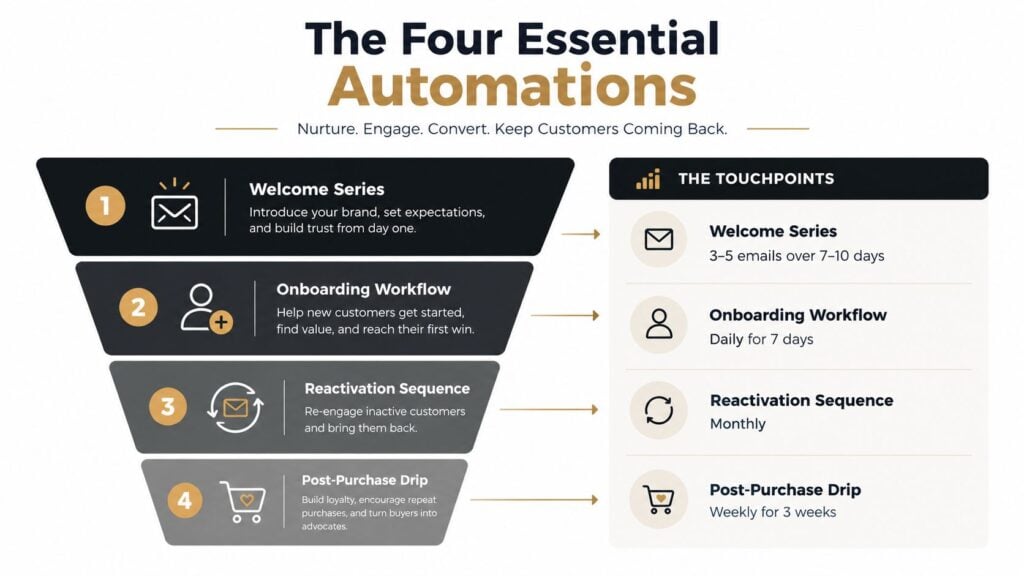
The visual above uses four distinct touchpoints, including a welcome series, onboarding workflow, reactivation sequence, and post-purchase drip. Their cadence should fit the learning experience, not a universal schedule. A short workshop may need concentrated guidance, while a substantial course may benefit from more breathing room between lessons.
A related email marketing guide for course creators can help connect launch messaging, nurturing, segmentation, and automation. The final test is simple. If an automation sends an email, you should know what behavior caused it and what meaningful learner or business outcome should follow.
Here’s the companion video for planning the automation system:
Staying Compliant Without Killing Conversions
Compliance becomes easier when you treat it as part of the subscriber experience. People should know what they’re signing up for, which messages they’ll receive, and how to change their preferences without hunting through an email footer.
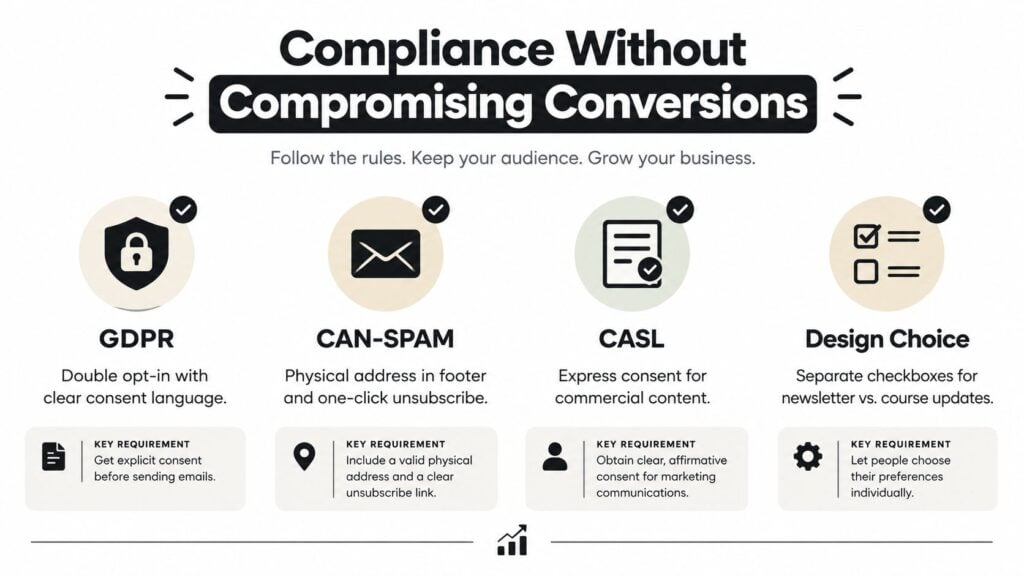
Use separate consent choices when the purposes differ. Someone may want the promised newsletter but not promotional course updates. A learner may want progress reminders but not invitations to every live event. Clear choices give your team better data and make later segmentation more honest.
Design consent into the journey
GDPR, CAN-SPAM, and CASL address different legal environments and obligations, so your specific requirements depend on where subscribers live, what you send, and how you collect permission. Your forms, checkout pages, and automations should support the relevant rules rather than relying on a generic checkbox copied across every workflow.
A practical consent record should show:
- What the person agreed to receive.
- When and where they submitted permission.
- Which form or checkout experience collected it.
- What wording appeared at the time.
- How they can unsubscribe or change preferences.
A preference center can let subscribers choose topic, frequency, course interest, or communication type. That gives someone who dislikes launch emails a way to keep receiving useful lessons. It also gives you a clearer signal than an ignored message or a spam complaint.
Give your team a simple handoff
A virtual assistant or fulfillment partner should be able to check the same items every time a form, campaign, or automation changes. Keep the checklist short enough to use during ordinary production work.
Permission check: Confirm the form language, consent record, sending purpose, unsubscribe path, and preference options before activating a new audience.
Keep deletion requests separate from ordinary unsubscribes. An unsubscribe stops a category of messages, while a deletion request may require a broader review of the systems holding the person’s information. Document the request, identify connected platforms, and follow the applicable legal process instead of leaving the task to an informal email note.
Clear compliance can support conversion because subscribers understand the exchange. A person who knows why you’re emailing, what they’ll receive, and how to leave is more likely to trust the next message. That trust supports engagement, and engagement helps protect the sender reputation your course launches depend on.
Your Monthly Email List Management Routine
A monthly routine keeps list maintenance from becoming an emergency before launch. It doesn’t need to consume your entire week. A solo creator can divide the work into four focused phases and keep a short record of what changed.
Audit the previous period
Compare the current report with the previous month. Look at active subscribers, hard bounces, spam complaints, unsubscribes, inbox placement, and engagement by segment. Don’t rely on the all-list average. A healthy active-reader segment can hide a dormant group that drags down the next campaign.
Check the core automations too. Did new leads receive the promised resource? Did buyers enter the correct onboarding flow? Did members who completed a course receive the appropriate next offer? Broken triggers often cost more than weak subject lines because they interrupt the customer journey entirely.
Clean the records
Suppress hard bounces and review addresses flagged by your verification tool. Check for duplicate contacts created by a checkout integration, webinar form, or community platform. Review inactive subscribers through a re-engagement process, then remove or suppress people who don’t respond according to your stated policy.
A useful list record includes the reason for suppression, the date of the action, and the source that originally added the contact. That prevents old decisions from becoming mysterious and helps you spot acquisition channels that produce poor-quality signups.
Review performance by purpose
Open rate can provide context, but it isn’t enough to judge a learning business. Review clicks to lessons, course starts, purchases, renewals, restarts, and cancellations. Compare active members with cooling members so you can see whether your messages are helping people continue.
A monthly dashboard might include:
- Inbox placement: Are messages reaching the intended audience?
- Bounce and complaint rates: Are technical or consent problems increasing?
- Segment engagement: Which groups respond to which topics?
- Automation outcomes: Which flows influence sales, progress, or renewal?
- Unsubscribe patterns: Which campaigns cause people to leave?
Plan the next cycle
Choose the next lead magnet, decide whether an existing segment needs a new field, and identify one automation trigger worth improving. Don’t rebuild the entire system every month. Pick the bottleneck that most directly affects revenue or retention.
A practical solo stack might include an ESP such as MailerLite, ConvertKit, or ActiveCampaign, an email verification service such as MailerCheck or another reputable validator, and an inbox placement tester such as GlockApps. Your course platform should provide enrollment and progress events, while the ESP should manage consent, sending, and suppression.
Keep the routine documented in one page. Assign each task to a named person, record the decision, and set the next review date. Consistency beats a dramatic annual cleanup, especially when the list supports both course sales and member relationships.
If your list is growing but completions and renewals are flat, start with one audit this week. Review your active, cooling, and dormant subscribers, verify that your domain authentication is working, and identify the single learner behavior your next automation should support. Then update one signup promise, one segment, or one retention flow before your next campaign.