10 eLearning Localization Best Practices

Going global with a course usually starts with a simple thought. The content already works, learners are happy, and new markets look wide open. Then the hard part shows up.
A course that feels smooth in English can get awkward fast in another language. Buttons break. Quiz wording shifts meaning. A friendly sales example lands flat. A polished onboarding flow starts feeling like a product assembled from spare parts.
That’s why translation alone rarely gets the job done. If you’ve ever opened a localized course and seen cropped text, strange phrasing, or screenshots that still show the wrong interface language, you know exactly where this goes wrong. Learners notice those details immediately, and they read them as a signal about quality.
Good localization changes more than words. It adapts structure, visuals, assessments, interface choices, launch sequencing, and even the way you price and market the offer in each region. It also forces a business decision. Which courses are worth localizing first, how much process you need, and where human review must stay in the loop.
These elearning localization best practices come from that broader view. They’re not just about getting content translated. They’re about building a course business that can expand without turning every update into chaos.
Let’s get into the list.
1. Conduct Thorough Cultural and Linguistic Audits Before Localization
Most localization problems don’t start in translation. They start in the source course.
I’ve seen solid courses become messy because nobody checked the original material for idioms, region-specific jokes, screenshots with baked-in English, or examples tied to one market. By the time translation starts, the team is already solving avoidable problems.
That’s why I like to begin with an audit. Not a massive corporate ritual. Just a clear review of what in the course is universal and what is local.

What to flag before anyone translates
Look at the course like a learner from somewhere else would.
- Language habits: Catch idioms, slang, acronyms, and humor that won’t travel well.
- Formatting details: Review dates, phone numbers, currency references, and measurement systems.
- Cultural references: Check examples, work scenarios, and visuals for assumptions about hierarchy, communication style, or local norms.
- Learning context: Review whether the tone feels too casual, too direct, or too dependent on one educational style.
A sales training module is a good example. A scenario written for a U.S. audience might assume a casual back-and-forth with a manager. In another market, that same exchange can feel oddly informal or even disrespectful.
Practical rule: Audit the learning objectives and assessments first. If those aren’t culturally clear, polishing the rest of the course won’t save it.
I’d also document the findings in one shared place. A simple spreadsheet works. What matters is that designers, translators, reviewers, and marketers all see the same decisions. If one person adapts “ZIP code” to a local format and another leaves it untouched in the checkout or LMS profile flow, learners feel the inconsistency immediately.
This is also the stage where native reviewers earn their keep. They’ll catch what internal teams miss because they live inside the language, not just next to it.
2. Implement Modular Course Architecture for Easier Localization
If your course is built like one giant fused file, localization gets expensive fast.
Every update becomes a scavenger hunt. A changed lesson title means revisiting slides, transcripts, quiz files, subtitles, email reminders, and LMS labels. That’s manageable in one language. It becomes painful across several.
A modular course architecture fixes a lot of that.
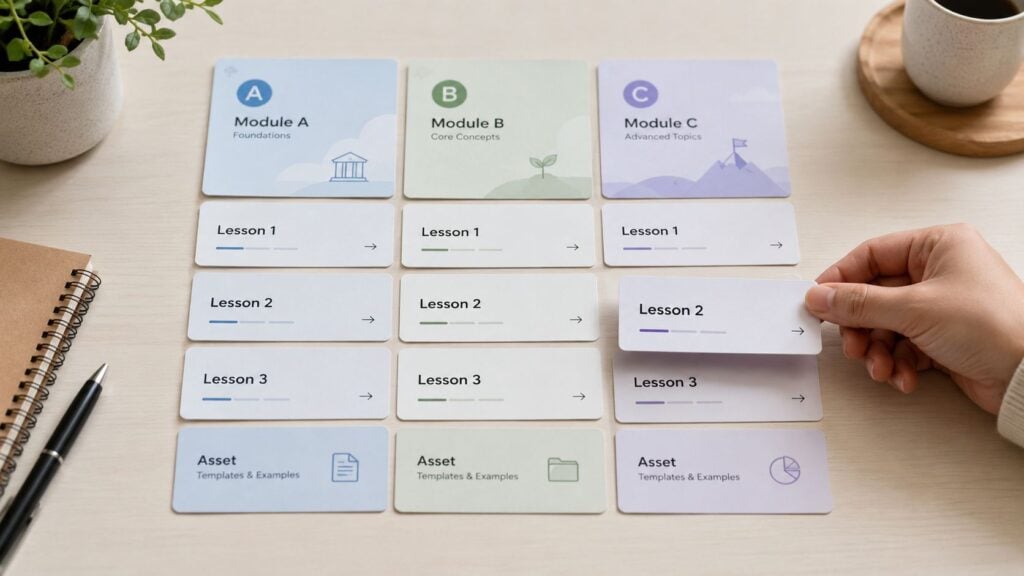
Build courses in pieces, not as a single object
Think in reusable units. Separate lessons, transcripts, handouts, quizzes, captions, UI strings, and support assets. When each part stands on its own, you can localize the highest-value components first and update them without breaking everything else.
That lines up with common industry guidance to prioritize business-critical content first and use phased rollout instead of a global launch all at once, as described in Andovar’s eLearning localization guide.
Here’s what tends to work well:
- Reusable lesson templates: Keep repeated structures consistent across modules.
- Clean file naming: Make version tracking possible without detective work.
- Isolated media assets: Store voice-over, subtitles, and on-screen text separately.
- Dependency notes: Mark which lessons rely on shared examples, product shots, or glossary terms.
This matters beyond production. It affects monetization too. If you sell bundles, memberships, or certifications, modular design lets you localize the flagship path first, validate demand, and hold off on lower-priority content until the market proves itself.
I’ve found this especially useful for memberships with drip content. You don’t need to localize the entire library on day one. You can localize the onboarding sequence, core training, and top-performing lessons first, then expand once the process is stable.
That approach feels slower at first. In practice, it’s usually faster because you avoid redoing the whole library every time one thing changes.
3. Partner with Native Speakers and In-Country Subject Matter Experts
Machine output, bilingual staff, and generalist freelancers can all help. None of them replaces a native reviewer who understands the subject matter.
That gap shows up in small but important ways. A compliance term gets translated word-for-word instead of functionally. A leadership scenario uses the right words but the wrong tone. A product training module sounds grammatically fine and professionally strange.
Native review changes the quality ceiling
When the content is technical, regulated, or tied to professional behavior, you need people who know both the language and the field. A native marketer can localize promotional copy for a course launch. A native compliance reviewer can tell you whether an assessment prompt sounds credible in a regulated environment. Those are different jobs.
The safest workflow still includes translation memory, QA, and native review, and ongoing guidance keeps stressing that localization is a workflow rather than a one-time task, which is part of the gap discussed in eLeaP’s overview of eLearning localization.
A course can be technically translated and still feel like nobody local actually touched it.
That’s usually what learners react to. Not one dramatic mistake. A stack of subtle misses.
I like to brief native experts on more than terminology. Give them the learning objective, audience level, and business context. If they know whether a module is meant for first-time learners, managers, or paying certification candidates, their feedback gets sharper.
A good in-country reviewer will often suggest changes that go beyond wording. They might flag examples that feel imported, quiz feedback that reads too bluntly, or visuals that don’t fit the setting. That feedback improves completion and learner trust even if you never mention localization in your marketing.
And if you’re using AI for first drafts, a safety rail is warranted. Let automation accelerate rough translation and terminology handling. Keep native humans responsible for meaning, tone, assessments, and anything learner-facing that could damage credibility.
4. Adapt Assessment and Testing Methods to Local Educational Standards
Assessment is where weak localization gets exposed.
You can get away with a slightly awkward paragraph in a lesson. You can’t get away with a quiz question that reads ambiguously, a grading scale that feels unfamiliar, or feedback phrased in a way that confuses learners instead of helping them.
A quiz format that works in one region may feel wrong in another
Different audiences have different expectations around testing. Some are comfortable with direct corrective feedback. Others expect a more guided tone. Some markets are used to fast knowledge checks throughout a module. Others respond better to fewer, higher-stakes assessments.
That doesn’t mean you need to rebuild your pedagogy from scratch every time. It does mean you should test whether your assessment style fits the learner context.
A few places to focus:
- Question style: Multiple choice, scenario-based prompts, or short written responses can feel very different depending on the learner audience.
- Feedback tone: The same “Incorrect” message can feel routine in one market and harsh in another.
- Formatting conventions: Dates, numerical notation, and answer input patterns need local logic.
- Certification expectations: Passing rules, assessment pacing, and retake flow should make sense in the local learning context.
I’ve seen this come up a lot in workplace training. A management course built around outspoken role-play and self-assertive feedback may work nicely in one market and feel awkward in another where communication norms are more formal. The learning goal is still valid. The assessment wrapper needs adaptation.
This also affects business outcomes. If learners struggle with the testing format rather than the content itself, your completion and satisfaction numbers get muddy. Then teams blame the course topic when localization design is the underlying issue.
When in doubt, pilot the assessment with a small local group and ask one simple question afterward: did the test feel clear, fair, and familiar?
If the answer is hesitant, revise before scale.
5. Localize Visual Design, Graphics, and Multimedia Elements Thoughtfully
A lot of teams localize text and forget the screen.
That’s how you end up with polished translated narration sitting on top of screenshots in the wrong language, icons that don’t make sense locally, or subtitles cramped into layouts that were never designed to flex.
Visual localization starts during course design
One foundational best practice is designing for translation from the start because some languages can take 30% to 50% more space than English. If your slide layout, lesson player, or mobile card design is already packed tight, localization will expose every weak spot.
The same guidance also recommends planning extra time for audio expansion because translated voice-over can run longer in some languages. That matters a lot in timed explainers, animated walkthroughs, and screen-recorded demos.
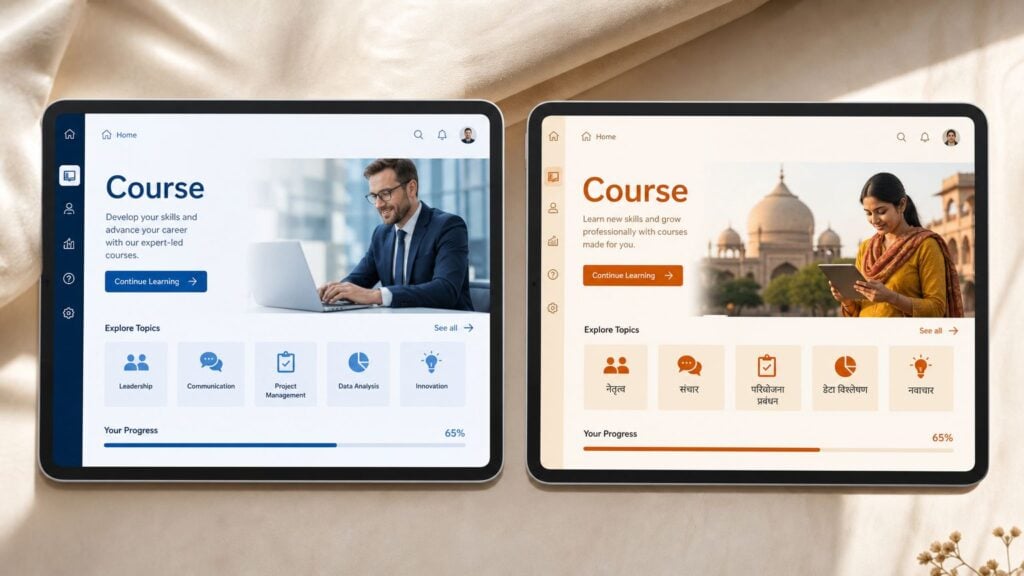
Here’s what usually saves headaches:
- Use editable text layers: Don’t bake labels into images if you can avoid it.
- Leave layout headroom: Tight UI containers almost always come back to bite you.
- Design responsive components: Mobile and LMS screens need room for longer labels and different scripts.
- Swap visuals intentionally: Screenshots, presenters, and examples should reflect the learner’s context when they need to.
If a learner sees your interface fighting the language, they stop trusting the lesson before they finish the first module.
I’d be especially careful with software training and product education. If the localized course teaches a tool, the screenshots and interface labels need to match what learners see. Otherwise you’ve created friction right inside the instruction.
Visual design also affects marketing and conversion. A sales page for the course, the course trailer, and the in-course experience should feel like they belong to the same local product. When the promo feels local but the course feels imported, refund risk goes up and word of mouth gets weaker.
6. Use Translation Management Systems and Localization Platforms for Consistency
A course team launches in two new languages, then updates the English source after a product release. Three weeks later, support is fielding complaints because the quiz uses one term, the subtitles use another, and the LMS buttons still show the old label. That is usually the moment a manual workflow stops being “good enough.”
Once a course has multiple modules, revision cycles, and customer-facing assets, consistency becomes an operational problem, not just a translation problem. You need one system that tracks approved terminology, stores past translations, shows review status, and connects source content to the right output. A translation management system does that work. It keeps lessons, onboarding emails, support articles, and interface strings aligned so the learner experiences one product, not a patchwork.
A TMS also affects the business side of the course lifecycle. It reduces rework during launches, makes updates faster, and lowers the risk of selling a localized course that already contains mismatched terms or outdated messaging. That matters for renewals, referrals, and team trust, especially if the course supports a paid catalog or subscription offer. Teams working through packaging decisions often run into the same operational question. Can your localization process keep pace with recurring releases and regional variations? That same logic shows up in subscription pricing model decisions for digital products.
The tool alone will not save a messy source workflow. It will make a disciplined process repeatable.
A setup that works in practice usually includes:
- A glossary first: Lock down product names, feature labels, and teaching terms before translation starts.
- Translation memory with judgment: Reuse approved phrasing, but review anything tied to assessment, compliance, or brand promise.
- Clear status stages: Draft, reviewed, approved, implemented, tested.
- Asset mapping: Track which text lives in the authoring tool, subtitles, LMS fields, downloadable worksheets, and support content.
Format choices matter too. Content is easier to localize and test when translators get editable, structured files instead of copied text from slides or screenshots. Teams also avoid preventable cleanup when they plan early for truncation, hard-coded strings, and encoding problems, as covered in Dynamic Language’s localization best practices.
If you’re still choosing the production stack, this guide to elearning content creation tools is a helpful reference because authoring decisions affect export formats, string handling, and update workflows later.
The biggest payoff is not raw speed. It is control during change. Courses evolve. Product interfaces change. Offers get repackaged for new markets. A solid localization platform helps the course keep up without creating avoidable QA work every time the business updates something.
7. Optimize Course Monetization Models and Pricing Strategies for Local Markets
Localization affects revenue long before a learner starts lesson one.
Teams often spend heavily to localize a course, then keep the same pricing page, the same payment assumptions, and the same offer structure in every market. That’s where a solid localization effort can still underperform commercially.
The course offer needs local logic
The right monetization model depends on how people in a market buy training. In some regions, a one-time purchase is easier to understand and easier to approve internally. In others, subscription access fits better, especially for ongoing libraries or memberships. Corporate buyers may want team licensing. Solo creators may do better with a low-friction starter offer and a later upsell.
This isn’t just a marketing issue. It’s part of course design. If your flagship course is localized but the checkout, invoice flow, and offer framing still feel foreign, the funnel leaks before learning begins.
A few pressure points matter most:
- Payment methods: Don’t assume everyone wants to pay the same way.
- Offer packaging: A certificate path, cohort option, or membership bundle may land differently by region.
- Price presentation: Currency display and local expectations around discounts matter.
- Value framing: One audience may care most about career mobility, another about internal promotion or compliance.
For teams comparing recurring access models, LearnStream’s breakdown of subscription pricing models is worth a read because the structure of the offer often matters as much as the translated sales copy.
I also like localizing the surrounding commercial experience, not just the course. Confirmation emails, refund policies, support language, and FAQ tone all shape trust. A learner doesn’t separate those from the educational product. They read the whole thing as one brand experience.
That’s why I’d localize the highest-value path first. Core course, payment flow, onboarding emails, and certificate or completion messaging. That combination gives you a cleaner read on market demand than translating a huge library and hoping monetization catches up later.
8. Develop Region-Specific Marketing and Positioning Messaging
A direct translation of your original sales page usually sounds fine. It also usually underperforms.
That’s because the promise of the course often changes by market. The content may stay mostly the same, but the reason someone buys it can shift. Career advancement, certification value, team performance, compliance readiness, or side-income potential won’t carry the same weight everywhere.
Local positioning beats literal translation
I’ve seen course creators localize every lesson carefully and then run generic translated ads into a generic translated landing page. Traffic arrives. Conversion lags. The course isn’t the issue. The message is.
Marketing localization needs local pain points, local language patterns, and local examples of success. Even if you don’t have region-specific testimonials yet, you can still adapt the framing around real use cases and search intent in that market.
A few smart adjustments go a long way:
- Rewrite the headline promise: Lead with the problem buyers in that region care about.
- Adapt examples: A freelancer audience, enterprise team, or exam-focused learner will respond to different proof points.
- Localize search intent: The best keyword phrase in English may not map neatly to buyer language elsewhere.
- Adjust channel choice: Email, local communities, partner institutions, and regional creators may outperform your default channels.
Marketing copy should sound like it was written for the market, not imported into it.
Close collaboration between localization and growth teams matters. If the translators localize the course but the demand gen team keeps pushing the original messaging logic, the brand feels split in two.
I’d also watch the handoff from ad to landing page to course preview. Learners decide very quickly whether the product feels native to their world. If the campaign says “built for professionals like you” and the course examples immediately feel foreign, trust drops fast.
That’s why good elearning localization best practices always include positioning, not just production.
9. Implement Rigorous Quality Assurance and Testing in Target Languages
A localized course can look finished in the build file and still fail the moment a real learner touches it.
That usually shows up late. A learner in Brazil opens the course on mobile and the text spills outside the button. A quiz in German accepts the right answer in one module but marks the same phrasing wrong in another. A caption covers a diagram in Arabic. Support gets the complaint, marketing keeps spending, and revenue takes the hit before the team realizes the problem sits in QA, not demand.
Test the live learning experience, not just the translated files
Language review matters, but it only catches part of the risk. The actual check happens inside the LMS, on actual devices, through the full learner path. That includes layout, tracking, interactivity, notifications, certificates, and any place translated text touches code or design.
I’d test these areas in every target language:
- Enrollment and sign-in flow
- Course navigation and resume behavior
- Knowledge checks, quiz scoring, and feedback states
- Certificates, badges, or completion records
- Automated emails and LMS alerts
- Mobile display, touch targets, and text expansion
If you want a broader release checklist, LearnStream’s guide to online course quality assurance is a useful companion to localization testing.
QA protects more than learner satisfaction
Poor in-language testing creates business problems across the course lifecycle. Completion rates drop because learners get stuck. Refund requests rise because the product feels broken, even when the source course works fine. Support costs climb because teams are troubleshooting preventable issues market by market.
That trade-off matters. Teams often rush to launch because they want revenue from a new region quickly. Fair enough. But every shortcut in QA tends to come back as rework, reputation damage, or wasted acquisition spend.
In-language QA is part of launch readiness, not a cleanup task after launch.
Native-speaker review should happen in the final environment whenever possible. Text that reads well in a spreadsheet can break inside a slide layer, a collapsed menu, or a mobile app shell. Learners judge the course they use, not the translation file your team approved.
10. Create Localization Style Guides and Establish Ongoing Maintenance Processes
A course launches in Spanish, German, and Japanese. Three months later, product marketing renames a feature, the compliance team updates one policy slide, and customer support asks for clearer onboarding language. If there is no style guide and no maintenance process, each market starts drifting on its own. The learner sees the result fast. A button label no longer matches the quiz instructions. A sales page promises one thing, while the course interface uses older terms. Support tickets rise for reasons that look small but add up.
That drift is not a translation problem. It is an operations problem.
A good localization style guide gives every contributor the same playbook. Translators use it. Reviewers use it. Course builders use it. Marketing and support teams should use it too, because learners move across the full business lifecycle of the course, from ad click to enrollment to completion to renewal or upsell. If the language changes at each step, trust drops.
Keep the guide practical:
- Approved terminology: Product names, feature labels, certification titles, and repeated instructional phrases
- Tone and formality: Whether the course should sound conversational, academic, technical, or corporate in each market
- Formatting rules: Dates, times, currencies, decimal separators, honorifics, and punctuation conventions
- UI conventions: Character limits, button labels, menu naming, and rules for recurring system text
- Examples in context: Short examples that show the preferred phrasing inside a lesson, quiz, email, or checkout screen
The best style guides are short enough that people will open them during production.
Maintenance needs the same level of discipline. Source courses change constantly. Pricing changes. Screenshots age. Legal language gets revised. New bonus modules get added to improve conversion. If localized versions are treated as one-time projects, each update creates hidden debt that shows up later as rework, inconsistent messaging, and missed revenue.
Set rules before the first update lands. Decide what triggers a localization review, who approves terminology changes, which course elements need same-cycle updates, and which ones can wait for a scheduled release window. There is no single right model. A certification course may need immediate updates in every language. A lower-margin catalog course may justify quarterly localization batches instead.
That is the trade-off. Faster updates protect consistency and reduce learner confusion, but they cost more in coordination and vendor time. Batched updates lower operating cost, but they increase the risk that sales, support, and learning content fall out of sync in a local market.
I treat localized courses as active product lines, not archived deliverables. That mindset changes planning in a useful way. Version control gets tighter. Terminology decisions get documented. Launch calendars start accounting for translation and review work instead of treating it as cleanup after the “real” release.
Less scrambling follows. Fewer duplicate files. Fewer debates about which term is current. More confidence that the course you market, sell, and maintain in each region still feels like the same product.
Top 10 eLearning Localization Practices
A localization plan gets easier to manage when the team can see the full set of decisions in one place. This table does that job well. It connects each practice to the work involved, the business upside, and the situations where it pays off fastest.
Your Next Steps to a Truly Global E-Learning Experience
Whew, that's a lot to hold at once. But the bigger pattern is pretty simple.
Successful localization doesn't sit in one department. It touches course design, media production, LMS setup, launch sequencing, pricing, marketing, QA, and long-term maintenance. That's why so many localization projects feel harder than expected. People treat them like a translation task when they're really an operational system.
The good news is you don't need to build that whole system overnight.
Start with one flagship course. Run a proper cultural and linguistic audit on it. Clean up the source files. Pull text out of graphics. Review the assessments. Decide what absolutely needs native human review. If your course business includes a sales page, checkout flow, onboarding email sequence, or certificate path, include those in scope too. Learners experience all of it as one product.
I'd also be selective about what you localize first. Not every asset deserves the same attention. Core lessons, assessments, compliance content, and high-conversion marketing pages usually matter most. Supporting extras can follow once the workflow is stable. That phased approach keeps costs under control and gives you better feedback from the market.
If you're using AI in the process, keep the governance simple and strict. Use automation for draft speed, terminology support, and repetitive updates. Keep humans firmly in charge of brand voice, cultural judgment, assessment language, and final QA in the live environment. That's the difference between moving faster and creating expensive cleanup work.
One mindset shift helps more than anything else. Treat localization like product management, not file handling.
That means maintaining a glossary, setting update rules, assigning owners, tracking learner response by language, and deciding what quality bar each course must meet before launch. It also means accepting that localized versions need care over time. They're not side projects. They're active parts of your catalog.
If you want to make this manageable, don't chase perfection across your whole library first. Pick the course with the clearest demand signal. Build the process there. Learn from the first rollout. Then expand.
That's how global course businesses get built without losing their sanity. Not with one giant translation push, but with thoughtful systems, local judgment, and a willingness to design for scale from the beginning.