Learning Management System Development

You’re probably here because your current LMS is getting in the way.
Maybe you’ve outgrown a course platform that was fine at the start but now fights you on branding, pricing logic, user roles, reporting, or how learners move through content. Maybe your training team is stitching together Zoom, Google Drive, spreadsheets, and a generic LMS, then calling it a system because there isn’t time to build something better.
I’ve seen that point come up more than once in software projects. The frustration usually starts as a feature complaint. Then it turns into a business problem. You can’t launch the workflow you want, your team spends too much time on manual admin, and every workaround adds another piece of fragility.
That’s when learning management system development becomes a real strategic question, not a technical curiosity.
When Off-the-Shelf Software Just Is not Enough
A lot of custom LMS projects start the same way. Someone buys a platform to move fast. That part works. The first courses go live, payments come in, learners enroll, and everyone feels relieved.
Then the edge cases show up.
Your instructor needs cohort-based onboarding, but the platform is built for self-paced courses. Your compliance team needs sign-offs and audit trails, but reporting is too shallow. Your customer education team wants the LMS to match your product and support model, but the user journey still feels like rented software with your logo pasted on top.
That’s the moment when “good enough” starts costing more than it saves.
The category itself has moved well beyond basic course hosting. The global LMS market was valued at USD 32 billion in 2023 and is projected to reach USD 163.7 billion by 2032, with a CAGR over 19%, according to Global Market Insights on the LMS market. Buyers now expect mobile access, analytics, integrations, cloud delivery, and a smoother product experience than older systems were built to offer.
The real trigger is usually control
What teams want isn’t always more features. They want control over the product shape.
That can mean:
- Brand control: The platform needs to feel native to your business, not like a third-party portal.
- Workflow control: Enrollment, approvals, certifications, reminders, or renewals need to follow your rules.
- Data control: You need access to learner events, course behavior, and account data without waiting on a vendor roadmap.
- Commercial control: You may need subscriptions, bundles, internal seats, partner access, or client-specific portals.
Those are product decisions, not simple settings.
Practical rule: If your team keeps building process workarounds outside the LMS, the software has probably become the bottleneck.
What goes wrong when teams ignore the mismatch
The common mistake is trying to force a standard platform into a use case it wasn’t designed for. At first, that looks cheaper. Six months later, the hidden costs show up.
You get duplicated records. Reporting breaks when people use multiple tools. Support tickets rise because the learner flow is confusing. Admins invent manual steps to compensate. Nobody trusts the data enough to make roadmap decisions.
I’ve also seen teams jump too early into custom software for the wrong reason. They’re annoyed by design limitations, but the underlying issue is poor onboarding, weak course design, or unclear audience segmentation. A custom build won’t rescue a fuzzy product strategy.
Custom development makes sense when the LMS itself is part of your competitive advantage. If it’s central to how you teach, sell, certify, support, or comply, then building can be justified. If it’s just a container for videos and quizzes, buying is usually smarter.
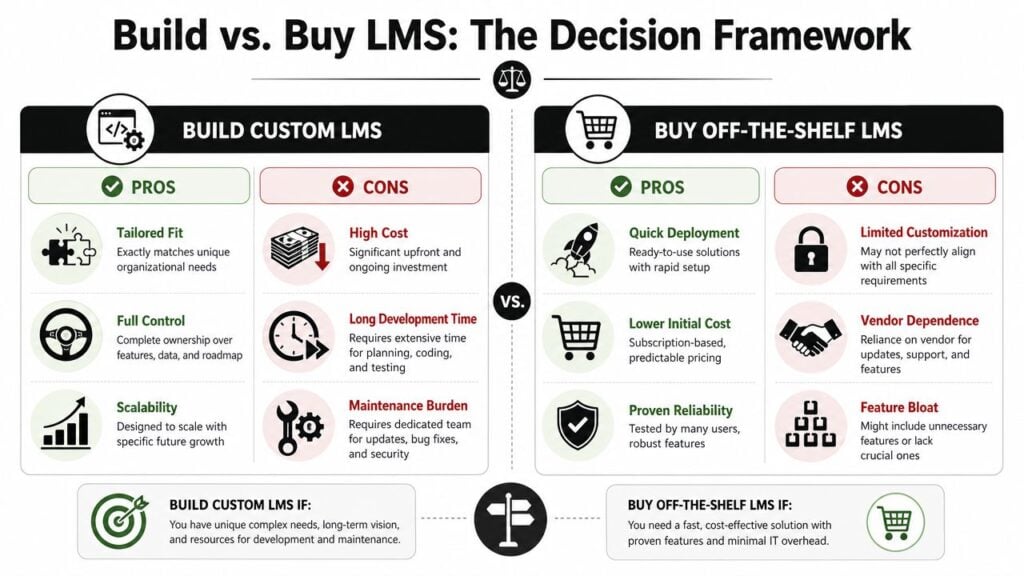
The Critical Build vs Buy Decision Framework
Before anyone opens Figma or starts picking frameworks, answer one hard question.
What problem can only a custom LMS solve for your business?
If you can’t answer that clearly, stop there.
Many teams fall in love with the idea of building because packaged tools feel limiting. That’s understandable. But custom software creates a second job. You’re no longer just running learning operations. You’re also running a product, a backlog, release cycles, security updates, and support.
The questions that matter
A custom LMS is easier to justify when your use case depends on regulatory compliance, deep data ownership, offline functionality, or specialized workflows that mainstream products can’t handle well. That decision is getting more relevant as the market expands, with Grand View Research projecting USD 123.78 billion by 2033 for the LMS market, as referenced in the OECD discussion of LMS scope and system use.
Run through these questions without sugarcoating the answers:
Is the differentiator real?
If your learner journey is standard, buying usually wins. If your model depends on unique certifications, field workflows, blended delivery, partner access rules, or unusual data structures, custom starts to make more sense.Who owns the roadmap?
Vendor software means compromise. That can be perfectly fine. But if your business depends on shipping LMS improvements on your own timeline, relying on a vendor can become a strategic constraint.Do you need system-level control over data?
This matters more than people admit. If your reporting, customer success, compliance, or product analytics depend on raw learning data, ask whether an off-the-shelf platform gives you enough access and consistency.Can your team support a product long term?
Launching is the easy part. Maintenance is where weak decisions get exposed.
A blunt build vs buy filter
Use this as a fast reality check:
- Buy first if you need speed, standard course delivery, stable admin tools, and predictable operations.
- Build first if the LMS itself is central to your product offering and off-the-shelf constraints block revenue, compliance, or user experience.
- Hybridize if you can keep a standard LMS underneath while adding custom portals, reporting layers, or integrations around it.
That third option gets overlooked all the time.
Sometimes the right move isn’t replacing the LMS. It’s wrapping it with better software around the edges. A custom learner dashboard, a branded storefront, a reporting layer, or an integration hub can solve the actual problem without committing to a full rebuild.
If you need a practical checklist for evaluating vendors before making the jump, this guide on how to choose an LMS is a useful starting point.
Build when the workflow is the business. Buy when the platform is just infrastructure.
Where teams miscalculate cost
Teams often underestimate three things:
- Maintenance drag: Every feature becomes yours forever.
- Opportunity cost: Time spent rebuilding standard LMS features is time not spent improving instruction, content, or sales workflows.
- Internal complexity: Decisions get slower when product, learning, operations, compliance, and engineering all need to align.
That’s why I rarely recommend greenfield LMS builds unless the business case is strong. You need a reason stronger than “the current tool annoys us.”
Architecting Your Core Features and User Experience
If you’ve decided to build, resist the urge to start with a giant feature wish list.
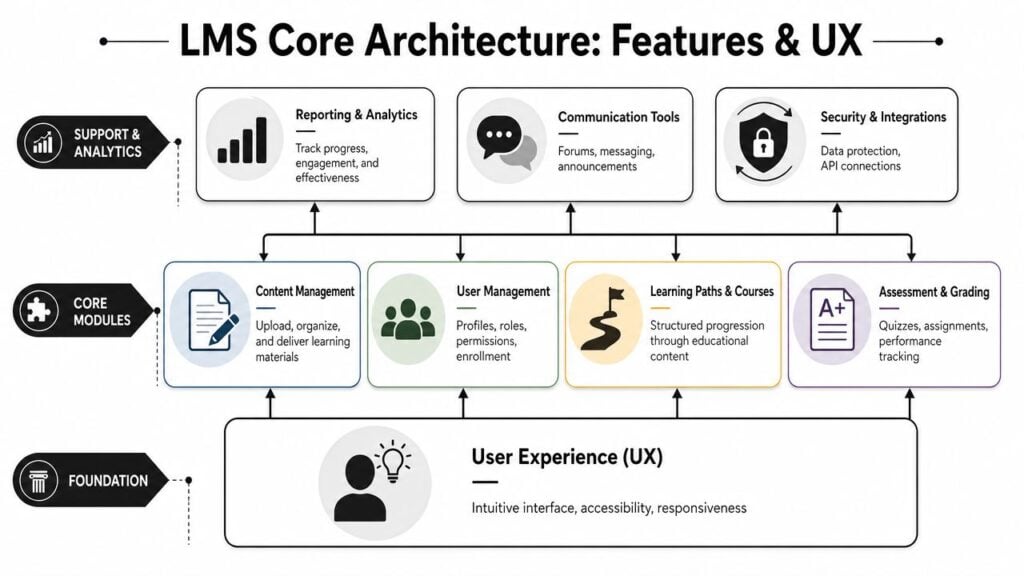
Start with the people who’ll use the system every day. In most LMS projects, that means at least three groups: learners, instructors, and admins. Sometimes there’s a fourth group that matters just as much, such as client managers, compliance officers, or partner leads.
Your architecture should follow their actions, not your menu structure.
Design the core loops first
I think of LMS architecture the same way I think about product architecture in any SaaS build. You need to identify the core loops before you decide on extras.
For a learner, the loop might be:
- discover assigned learning
- start quickly
- complete content without friction
- pass an assessment
- see progress and next steps
For an instructor or admin, the loop looks different:
- create or upload content
- assign it to the right audience
- monitor progress
- intervene when someone stalls
- export or review meaningful reports
Those flows should drive your MVP.
A lot of teams get distracted by gamification, badges, social features, or AI ideas too early. Sometimes those matter. Often they don’t. A stable course player, clear progress tracking, sensible permissions, and reporting people can use will beat flashy features every time in an early release.
Bridge found that 70% of learning leader organizations evaluate learning technologies based on user experience, compared with 43% of laggards, according to Bridge’s LMS statistics and tech trends. That lines up with what product teams learn the hard way. If the system feels clumsy, adoption drops even when the feature set looks strong on paper.
Build your MVP like a house blueprint
Don’t design your LMS as one big product. Break it into layers.
| Layer | What belongs here | Why it matters |
|---|---|---|
| Foundation | Roles, permissions, navigation, accessibility, responsive layout | Bad foundations make every later feature harder to use |
| Core learning engine | Courses, lessons, progress tracking, assessments, completion rules | This is the product’s operational heart |
| Admin controls | Enrollment, cohort management, notifications, reporting | Admin friction kills rollout speed |
| Extension layer | Integrations, APIs, certificates, commerce, advanced analytics | These features expand value once the basics hold up |
That order matters.
I’ve watched teams spend weeks debating advanced dashboards while basic role logic was still muddy. Then they hit rework because admins, instructors, and client managers all needed slightly different permissions. Get the data model right early. User, organization, course, enrollment, attempt, completion, and event data should be defined carefully before UI polish begins.
Here’s a useful walkthrough if you want a visual primer before mapping your own user journeys:

UX debt gets expensive fast
Poor UX in an LMS doesn’t just annoy people. It creates admin load.
When learners can’t find modules, they open support tickets. When instructors can’t understand assignment states, they export data into spreadsheets. When admins can’t trust the workflow, they create side processes. That’s how product debt turns into operational debt.
A few practical priorities usually pay off early:
- Fast first session: Help users get into their first course without confusion.
- Clear progress states: In progress, complete, overdue, failed, approved. Don’t make people guess.
- Accessible interaction patterns: Keyboard navigation, readable contrast, captions, and sensible form behavior should be built in, not patched in later.
- Mobile reality: Even if your audience mostly uses desktop, somebody important will need the LMS on a phone or tablet.
Choosing Your Tech Stack and Building a Team
Founders and training teams often ask for a “best stack.” There isn’t one.
There’s the stack your team can ship and maintain, and there’s the stack that looks impressive in a proposal deck. Those are not always the same.
For learning management system development, I’d usually optimize for four things: hiring reality, maintainability, integration flexibility, and speed to iterate. If your product changes every month, a stack that slows releases will hurt more than one that looks less fashionable.
Common LMS tech stack options
| Stack (Example) | Pros | Cons | Best For |
|---|---|---|---|
| React + Node.js | Flexible UI, strong ecosystem, good fit for custom dashboards and interactive front ends | More architectural decisions, easier to overengineer | Teams building a highly custom product experience |
| React + Django | Strong backend structure, good admin tooling, clear data modeling | Frontend and backend coordination can get heavier | Products with complex permissions, reporting, and business rules |
| Laravel + Vue | Fast development, approachable for many agencies, solid for CRUD-heavy systems | Can require extra planning for very large-scale complexity | Mid-sized LMS builds with practical business workflows |
| Ruby on Rails | Fast for MVPs, opinionated conventions, productive small teams | Hiring can be narrower depending on region | Founders who want to move fast with a senior small team |
| .NET + React or Angular | Strong enterprise fit, mature tooling, often preferred in larger organizations | Can feel heavier for lean startups | Corporate training platforms with internal IT alignment |
I care less about the exact framework and more about whether the team can support it two years later.
Pick the architecture that matches your product shape
A content-heavy LMS with standard workflows doesn’t need the same architecture as a customer education platform with subscriptions, tenant separation, SSO, analytics pipelines, and partner portals.
Questions worth asking early:
Will you need multi-tenant architecture?
If clients need isolated portals, branding, and reporting, design for that now.How custom is your assessment logic?
Quizzes are easy to underestimate. Attempts, grading states, question banks, feedback rules, timers, and certificates all add complexity.Where will analytics live?
Product analytics, learning analytics, and compliance reporting often overlap but aren’t identical.Do you need content standard support?
If SCORM or xAPI matters, that has technical implications well beyond a file upload screen.
A stack is a long-term staffing decision as much as a technical one.
The team shape matters as much as the code
You can build an LMS with freelancers, an agency, an internal team, or some mix of all three. Each route has trade-offs.
- Freelancers work well when you already have a strong product lead and a tightly defined scope.
- Agencies help when you need delivery capacity and a broader skill mix fast.
- In-house teams make sense when the LMS is core to your business and you’ll keep evolving it.
Minimum roles I’d want covered one way or another:
- Product lead: Owns scope, trade-offs, and roadmap
- UX or product designer: Maps workflows before engineers hard-code assumptions
- Frontend engineer: Handles learner and admin experience
- Backend engineer: Owns data models, APIs, permissions, and integrations
- QA support: Catches regressions before users do
If you’re building a course business or branded training product and want to compare software approaches before committing to custom code, LearnStream has a practical piece on how to create an online course platform.
Planning for Security and Key Integrations
Many LMS builds often exceed their cost estimates at this stage.
Founders often budget for course creation, dashboards, assessments, and branding. Then reality arrives. The LMS has to connect to identity providers, payment systems, HR tools, webinar platforms, analytics tools, email systems, and content standards. That’s before you deal with permissions, audit trails, and data retention.

Interoperability is where hidden complexity lives
A primary cost of LMS development is often interoperability. Teams need to plan for integrations, identity management, and data governance across multiple systems like Google Classroom and Microsoft 365, not just the LMS core, as described in the earlier OECD-backed guidance cited above in the build-versus-buy discussion.
That shows up in practical ways:
- SSO and identity mapping: One person can exist across several systems with different identifiers.
- Reporting consistency: Completion data gets messy when learning happens in multiple tools.
- Content compatibility: SCORM and xAPI decisions affect how granularly you can track activity.
- Data governance: Teams need to know which system owns what, and who can change it.
If you ignore this early, you end up rebuilding the plumbing later while users are already active.
Security should shape the product, not trail behind it
Security work in LMS projects usually starts too late. Someone says “we’ll tighten that up before launch,” then the team realizes the architecture itself makes that hard.
Think through:
- Permission boundaries: Learners, managers, instructors, org admins, and super admins should not share vague access rules.
- Sensitive data handling: Profiles, assessment results, certification records, and payment data all need careful treatment.
- Auditability: In regulated environments, you may need to know who changed what and when.
- Secure integration patterns: External systems should connect through deliberate APIs and token handling, not ad hoc shortcuts.
If you’re selling courses directly, payment flow design becomes part of both security and user experience. For teams evaluating checkout options and transaction handling, this guide to payment integration for no-code apps is useful even if your LMS isn’t fully no-code, because the underlying payment considerations are similar.
A lot of course creators also underestimate basic platform hardening. This overview of LMS security features course creators should know is a solid checklist for thinking through access, data protection, and operational risk.
What good planning looks like
A healthy LMS integration plan usually includes:
- An API-first mindset: Even if the first version only uses a few endpoints
- A source-of-truth map: Define which system owns users, enrollments, completions, and payments
- Event tracking standards: Decide what learner events you’ll record before development fans out
- Failure handling: Know what happens when Zoom, Stripe, your CRM, or your identity provider fails temporarily
The expensive part usually isn’t building the screens. It’s making the system trustworthy when it has to talk to everything else.
Your Guide to Testing Deployment and Launch
Launch day shouldn’t feel like a cliff jump. It should feel boring.
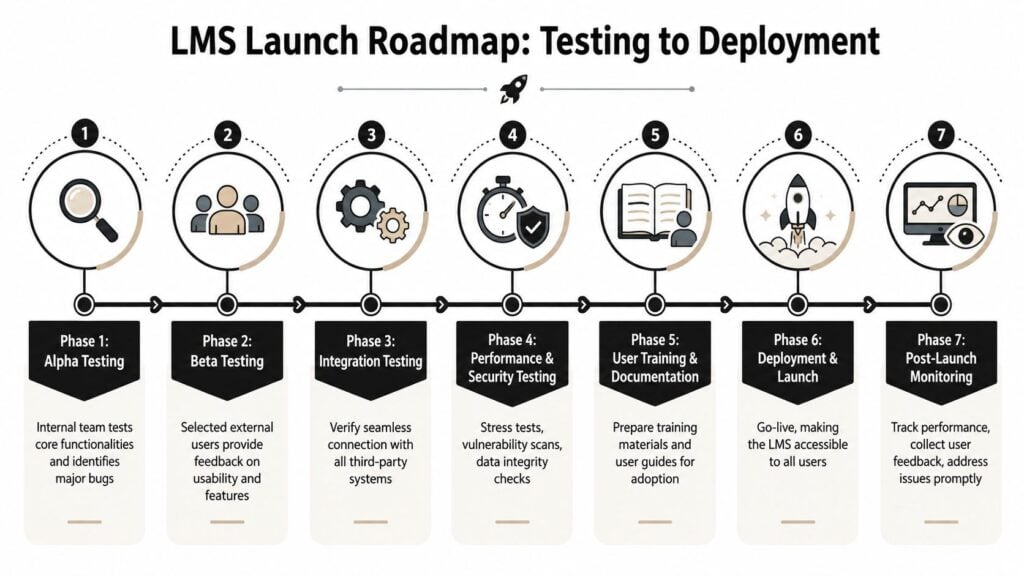
If a launch feels dramatic, the team usually left too much uncertainty for the final week. A strong LMS release is controlled, staged, and instrumented so you can see what users are doing once they arrive.
Test in layers, not in one giant pass
I like to break LMS testing into separate tracks because different failures hurt in different ways.
- Core workflow testing: Enrollment, login, course access, video playback, quizzes, completion, certificates
- Role and permission testing: Admins, instructors, managers, learners, client accounts
- Integration testing: SSO, payments, email, webinar tools, analytics, content imports
- Performance and security testing: Load behavior, file handling, data exposure, session behavior
If your team needs a clean explanation of the difference between checking that software was built correctly versus checking that it meets intended use, this piece on understanding software validation and verification is a helpful refresher.
Don’t launch to everyone at once
A soft launch is almost always the better option.
Start with internal users. Then bring in a small beta group with a mix of friendly and demanding users. Don’t only invite champions. Invite the people who will click the wrong thing, upload weird files, skip steps, and complain when labels are vague. They’re the ones who reveal the truth.
A simple rollout sequence often works well:
- Internal alpha with staff using realistic content
- Private beta with selected learners or pilot clients
- Bug-fix sprint based on observed friction
- Limited public release with support close at hand
- Full rollout after the operational kinks settle
Measure more than logins from day one
This part matters more than many teams realize.
Totara recommends measuring LMS success beyond logins by adapting the Kirkpatrick approach around Reaction, Learning, and Impact, and building in event tracking, feedback capture, and reporting from the first launch. Their guidance on how to measure the success of your LMS is useful because it pushes teams to instrument behavior and outcomes, not just access.
That means your first release should already capture things like:
- Return visits: Did people come back after the first session?
- Drop-off points: Where do learners abandon the flow?
- Course friction signals: Which lessons trigger exits, confusion, or support requests?
- Basic reaction feedback: Was the experience clear, useful, and worth continuing?
Launch analytics should answer product questions, not just populate a dashboard.
If you only track signups and completions, you’ll miss the reasons people stall. Early launch data should help you decide what to fix next, not just prove the platform exists.
Life After Launch Maintaining and Scaling Your LMS
The day after launch is when the product becomes real.
Before launch, most problems are hypothetical. After launch, they have names, tickets, angry messages, edge cases, and business consequences. That’s normal. A custom LMS is not a finished asset. It’s a software product with a learning use case.
Maintenance is the ongoing cost center
Every LMS needs routine work that users rarely notice when it’s done well.
That includes bug fixes, library updates, security patches, browser compatibility issues, admin support, and small UX repairs that remove daily friction. If your budget only covered the build, you haven’t funded the product.
A practical post-launch rhythm usually includes:
- Weekly triage: Review bugs, support patterns, and broken workflows
- Monthly product review: Decide what moves into the roadmap
- Quarterly platform audit: Revisit security, performance, permissions, and integration health
Scaling changes the nature of the work
At a small user count, people forgive rough edges. At larger scale, those same issues create operational drag.
A confusing enrollment rule becomes a support queue. A slow report becomes an admin bottleneck. A shaky integration becomes a data reconciliation problem across teams. Growth doesn’t just stress infrastructure. It stresses process.
This is also where technical debt becomes visible. Early shortcuts around permissions, notifications, analytics events, or tenancy tend to surface once new user groups arrive. If you know your LMS may need enterprise clients, partner portals, or multilingual rollout later, keep those future constraints visible while prioritizing backlog work.
The best roadmap comes from real usage
Don’t let the loudest stakeholder drive every release.
Use support data, observed behavior, admin friction, learner feedback, and business priorities together. Some requests will be valid but have low impact. Others will look small and enable major adoption gains because they remove repeated confusion.
The strongest LMS teams treat maintenance as product development, not cleanup. They listen closely, protect the core experience, and keep the platform stable while it grows.
Building a custom LMS can be the right move. It can also become a costly detour if you build for ego, aesthetics, or vague dissatisfaction.
The best decisions usually come from a simple truth. If the LMS is central to how your business delivers value, custom development may be worth the weight. If not, buy faster, integrate smarter, and spend your energy on the learning experience itself.