What Is Adaptive Learning?

You’ve probably seen this already. One learner flies through a course, finishes early, and asks for more. Another opens the same module, gets stuck on the second lesson, and disappears.
That split is where adaptive learning starts to matter. In plain English, it’s a data-driven way to change content, pacing, and assessment based on what a learner has already shown they know. Coursera’s summary of a scoping review says adaptive learning improved academic performance in 59% of studies, which helps explain why creators, universities, and training teams keep paying attention to it. Grand View Research also estimated the global adaptive learning market at USD 3.46 billion in 2022, with a forecast 21.4% CAGR from 2023 to 2030 (Grand View Research).
For course designers, its value is simple. Adaptive learning gives you a way to stop forcing every learner through the same path when their starting points are obviously different.
Two Students, One Course, Totally Different Results
A standard online lesson assumes both learners need the same explanation, the same examples, and the same quiz. That works for some people. It frustrates the rest.
I think of adaptive learning as the course equivalent of a good tutor. One student proves they already understand the basics, so the system moves them ahead. Another student misses a key concept, so the course slows down and gives them practice before they hit a wall. Ohio State describes that kind of setup as a diagnostic first, then a personalized pathway based on assessment performance, with stronger performers moving to more challenging content and weaker performers getting remedial material (Ohio State).
Why creators keep reaching for it
The appeal is not hard to see. In a fixed course, the learner who’s ready for harder work gets bored, and the learner who needs more support gets buried. Adaptive learning changes the experience so each person gets a different next step, even if they started in the same room, course, or cohort.
Practical rule: If two learners can finish your course with wildly different needs, they probably shouldn’t be forced through the same sequence for every lesson.
By the end of this guide, you’ll be able to explain what is adaptive learning in plain language, tell the difference between fixed-path and adaptive design, and sketch a lightweight version for your own course without rebuilding everything from scratch.
How Adaptive Learning Works Behind the Scenes
A learner opens a course and gets a short check first. One person answers quickly and moves on. Another hesitates on the same concept and gets a simpler path, more practice, or a review before the course asks for more. That is the basic promise of adaptive learning, and it works more like a route recalculation tool than a fixed lesson plan.
The process usually starts with a diagnostic. That can be a placement quiz, a skill check, a short challenge, or the learner’s early responses inside the course. Coursera describes adaptive learning as using AI and learner performance data to personalize content, pacing, and assessments in real time (Coursera).
First, the system checks what the learner knows
The first job is to find out where the learner stands. A strong adaptive course does not assume the opening lesson fits everyone. It asks a few targeted questions, watches for hesitation, and uses that early evidence to avoid sending someone into material they are not ready for.
That opening check can be simple. A short quiz works. A scenario-based task works too. In a speaking course, for example, a learner may answer a prompt aloud, then receive a follow-up based on how confidently they handled the first attempt. ChatPal’s AI-powered speaking practice shows this kind of moment in a language-learning setting, where learner input shapes the next practice step.
Then it builds a learner model
The system does not stop at a score. It builds a working picture of the learner’s current knowledge, skill by skill. That model changes as the learner answers questions, asks for hints, stalls on a task, or makes repeated errors.
IEEE’s topic overview notes that this is often powered by knowledge-tracing methods such as Bayesian knowledge tracing or deep knowledge tracing, which estimate the chance that a skill has been mastered from response history (IEEE TechNav). The label sounds technical, but the purpose is simple. The system is trying to infer what the learner is ready for next, not just whether they got one answer right.
Then it chooses the next step
Once the model updates, the platform uses that information to select the next lesson, practice item, or feedback message. Docebo describes adaptive systems as dynamic rather than fixed-path, with content presentation controlled by rules or machine-learning policies that react to performance data at runtime (Docebo).
The pattern is easiest to see in a course that branches. A learner who shows confidence may get harder practice or the next topic. A learner who struggles may get a review example, a hint, or a different activity that teaches the same idea in another way. The logic is not magical, it is just responsive. The course keeps checking, updating, and choosing the next move.
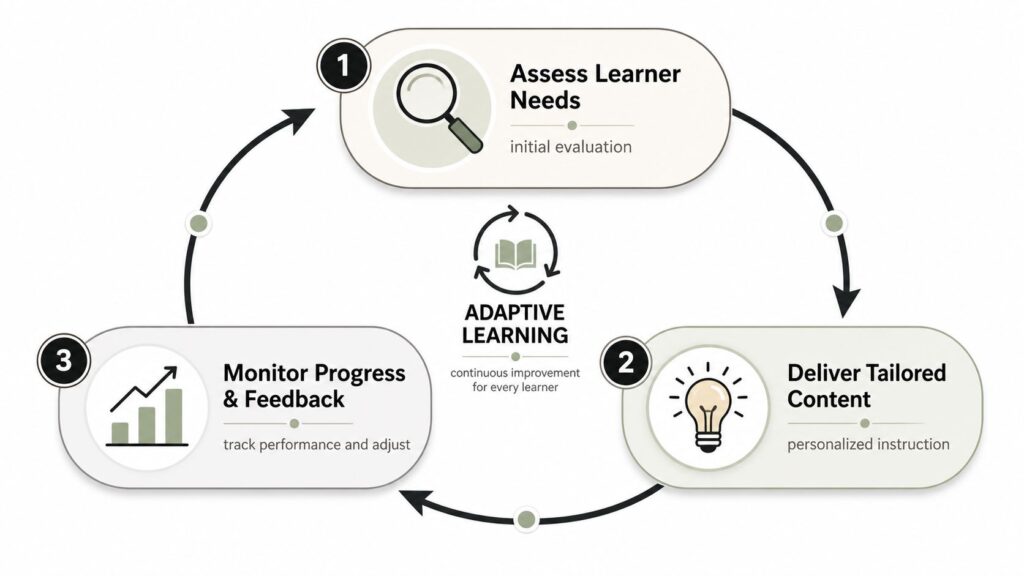
A useful shorthand is assess, estimate, adjust. First the course checks the learner. Then it estimates the current skill level. Then it adjusts what comes next.
If you are building this kind of logic into a course platform, the structured version of the idea is laid out in LearnStream’s adaptive learning software overview.
Adaptive Learning vs Traditional Online Courses
A learner opens a course, answers the first question quickly, then gets sent to the same next slide as everyone else. Another learner hesitates, re-reads the prompt, and still gets the same follow-up path. That is the basic limit of a fixed course. Adaptive learning changes the next step based on what the learner just did, so the experience can fit their pace, confidence, and gaps more closely.
The contrast shows up fast in a short lesson. In a traditional course, every learner moves through the same five questions in the same order. In an adaptive course, the first questions can act like a checkpoint. If the learner shows clear understanding, the course can raise the difficulty or move on to a new skill. If the learner struggles, it can offer a review example, a hint, or a different practice item that teaches the same idea another way.
| Element | Fixed-Path Course | Adaptive Course |
|---|---|---|
| Sequence | Pre-authored and identical for everyone | Adjusted at runtime based on learner data |
| Pace | Same pace for the whole cohort | Faster for ready learners, slower for learners who need support |
| Practice | Same questions and activities for all | Targeted remediation or extension |
| Feedback | Often delayed or generic | Immediate and tied to the learner’s current need |
| Design requirement | Good content order | Good content order plus tagged skills, signals, and rules |
That final row is where many creators underestimate the work. Adaptive learning is not just a nicer word for personalization. It uses a different delivery structure. Each activity has to be tagged with what it teaches, the platform has to know which signals count as evidence, and the system has to decide how to respond when a learner gets something right, wrong, or uncertain.
The comparison also matters because the outcomes are not the same in every context. One industry synthesis reported that traditional non-adaptive e-learning typically delivers 5–10 percentage-point learning gains, while AI-driven model-based adaptive systems often reach 18–30 percentage-point gains. It also cited a 2024 study showing an average 23 percentage-point improvement in assessment scores for students using an AI-based adaptive system (Adaptemy).
Those numbers do not mean every adaptive course will outperform a good fixed course. A well-sequenced traditional course can still teach effectively, especially when the topic is simple or the audience is already fairly uniform. A key difference is architectural. A fixed-path course assumes one route can serve everyone. An adaptive course is built to decide, step by step, who needs more support, who is ready to move faster, and who needs a different path entirely.
The Main Approaches Creators Should Know
Not every adaptive experience needs a complex AI engine. Most creators start with rules, and that’s often enough for a first version. The more advanced methods live inside mature platforms and are worth understanding before you buy anything expensive.
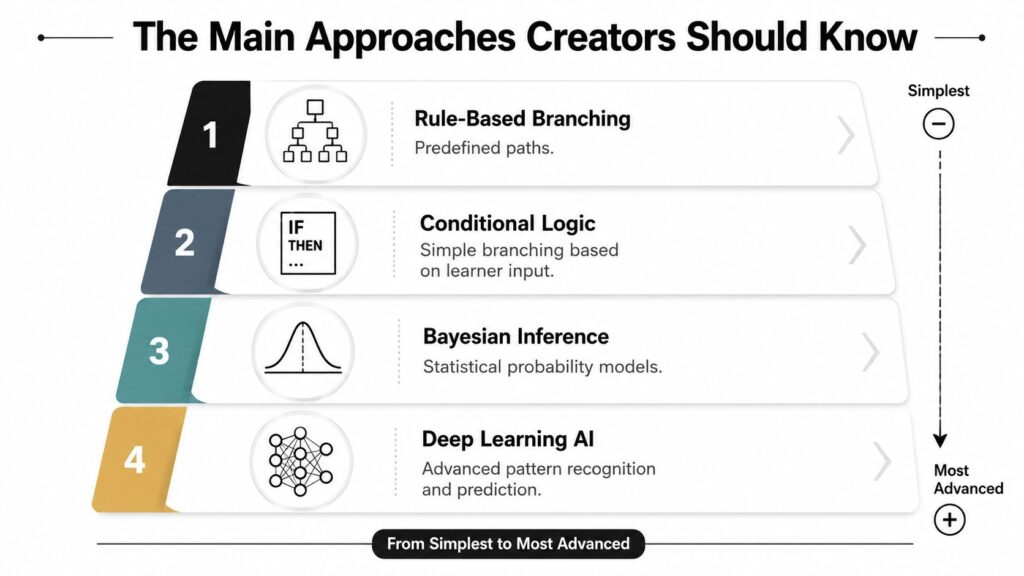
Rule based branching
This is the simplest entry point. If a learner misses a question, send them to remediation. If they pass, move them ahead. It works well for onboarding, compliance, and short skill checks where the decision tree is manageable. The limitation is obvious, because every path has to be designed by hand. For a solo creator, the cost is usually time rather than software complexity.
Conditional logic
This is the next level up. You still set rules, but they can respond to more signals, such as quiz results, self-reported confidence, or completion of a prerequisite lesson. It suits a course on software setup, sales training, or exam prep where one answer can reveal a lot about readiness. The downside is maintenance, because branching gets messy when too many conditions pile up.
Bayesian inference
This approach uses probability to estimate mastery over time. It’s a better fit for serious platforms that need to infer skill state from repeated behavior, not just one quiz. In practice, it’s useful for subjects with a clear skill map, such as math, coding, or language learning. The tradeoff is complexity, since you need a structured domain model and enough data to make the probabilities meaningful.
Deep learning AI
This is the most advanced layer. It looks for patterns in large sets of learner behavior and can support more subtle predictions about next-best content. It’s most useful in larger academies or platforms with many learners and enough interaction data to justify the investment. For a small team, the complexity can outrun the benefit unless the platform already includes it.
If you’re a one-person course business, start with rule-based branching. If you run a corporate academy with a defined skill map, the more advanced models may be worth the heavier setup.
For a broader look at how platforms talk about learner tailoring, LearnStream’s personalized learning software overview is a useful companion piece.
When Adaptive Learning Works and When It Does Not
A course can be well built and still miss the mark if every learner is forced through the same path. Adaptive learning helps most when the course design gives it something real to work with, and when the learning environment can support that extra layer of decision-making.
A 2025 longitudinal analysis found adaptive systems improved retention and skill mastery, especially for lower-income and underrepresented students, but it also noted that disparities persist where digital infrastructure is limited. A separate 2025 synthesis of school-based adaptive learning says effectiveness depends on context, and the Ada-LIT framework breaks the topic into source, assessment, delivery, operationalization, outcomes, and context instead of treating adaptive learning like one simple product feature (ELQN).
That matters because a tool added on top of a fixed course usually has little to work with. If lessons are not tagged to competencies, if assessments do not reflect the skill map, and if the course still follows the same old sequence underneath, the system can only pretend to personalize. The learner sees a customized label, but the experience stays mostly unchanged.
Where it tends to work best
Adaptive learning works best in courses with clear skills, repeatable practice, and checkpoints that show whether a learner is ready to move on. It also fits better when learners have steady access to devices and connectivity, and when the course was planned for adaptive delivery from the start instead of adjusted after launch.
A software onboarding course, a language program, or a certification path often gives the system enough structure to make useful choices. Each quiz attempt, practice task, or lesson check can inform the next step, which makes the experience feel responsive instead of random.
Where it tends to fall flat
It struggles when the audience is varied but the content is not modular, when assessment data is too thin, or when the platform cannot handle the local context well. A generic adaptive tool can miss language differences, device limits, and learners who need offline access.
It also falls short when the course depends on judgment, discussion, or creative work that is hard to score with simple rules. In those cases, the system can still support practice, but it should not be treated as the main teaching method.
Bottom line: adaptive learning can widen opportunity, but only when the surrounding design respects the learner’s reality.
Course creators should treat it as a design decision, not a software checkbox.
Designing Your First Adaptive Learning Experience
Start with the part of the course that already creates friction. A lesson where learners stall, repeat the same mistake, or keep asking the same question is a better first candidate than rebuilding the whole course. That keeps the project small enough to test without turning your entire course into a construction site.
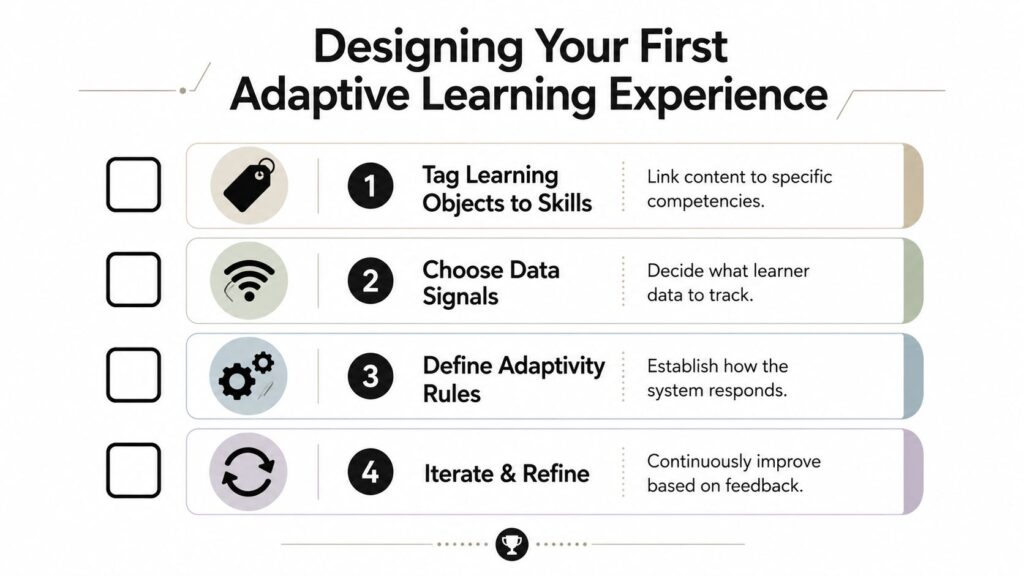
Tag your learning objects to skills
Each video, quiz, worksheet, and practice task should connect to one clear competency. The point is to give the course a map, so the system knows what each piece is meant to teach and can decide what comes next without guessing. As noted earlier, adaptive systems work better when content is organized around skill nodes or competencies, because the platform needs that structure to choose the next activity with less ambiguity.
Choose the signals you’ll track
Keep the first version simple. Correctness, time on task, hint usage, and retries are usually enough to show whether a learner needs more support or is ready to move on. Coursera’s overview points to progress, engagement, and performance as the basic data layer for adaptive adjustment, which is a useful place to start before you add more complexity (Coursera).
Define the rules before you chase the engine
A small team does not need a heavy system to begin. Rule-based branching often covers the first pass, a learner misses a key concept, and they get remediation. They pass the checkpoint, and they advance. Many course platforms can handle that kind of logic without a specialized engine, which makes it easier to test whether the idea helps before you invest more time.
Decide how you’ll deliver it
You can build it inside your current platform, use a feature it already offers, or add an AI tutor layer later if the course needs it. For most creators, the decision comes down to budget, technical comfort, and how much flexibility the course needs. If you are building around spaced review, a spaced repetition strategy guide fits naturally beside adaptive practice.
Here’s the checklist I’d use:
- Start small: Pick one high-friction lesson instead of adapting the whole course.
- Keep the path visible: Learners should understand why they were routed to a different activity.
- Limit the signals: Too much data makes the logic harder to trust.
- Measure before scaling: Compare outcomes over time, not just completion.
Some platforms, including LearnStream, offer engines that track progress and adjust learning paths based on performance data, but the content still needs a clear map before any tool can help.
Real Examples From Higher Ed, Corporate Training, and Small Creators
A good adaptive system changes the learner’s experience first, then the numbers follow.
In higher ed, one adaptive-learning deployment raised pass rates after refinement over the following months. The same deployment also saw average math improvement rise per concept in the following year. For the student, the value was not just a score bump. It meant the system kept steering them toward the concepts they had not mastered yet.
A corporate training example usually looks different. A compliance course can route experienced employees past basics and reserve more practice for the people who need it most. Docebo describes a sales manager who already knows data privacy moving ahead to advanced customer interaction scenarios while a new hire receives foundational content with extra support. The learner experience gets cleaner because the course stops wasting their time.
For a small creator or membership site, the most realistic version is usually a branching quiz inside the platform you already use. A learner answers a short diagnostic, then gets sent to a different lesson, example, or practice activity. The result is less about fancy AI and more about reducing friction, which is exactly what keeps people moving in a small community course.

The common thread is easy to miss if you only look at the metrics. In every case, the learner gets a path that reacts to where they are, not where the syllabus assumes they should be. For a creator, that usually means the first version can stay simple, a short check, a fork in the lesson, and a clearer next step for the learner.
Your Next Steps With Adaptive Learning
If you want a practical start, pick one module and inspect the weak spots. Look for the lesson where learners stall, fail, or repeat the same mistake. Then tag that content to the skill it teaches.
After that, build a simple rule-based branch. If the learner misses the checkpoint, send them to a short review and another try. If they pass, move them forward. That one change can tell you a lot before you spend time on heavier tooling.
I’d keep the first pilot tight. Use a few signals, not every possible data point. Track whether learners are moving through the module more cleanly, whether they need fewer retries, and whether the whole experience feels clearer to them.
The bigger mindset shift is this. Adaptive learning is a design discipline, not a magic switch. It works when the content is tagged well, the course structure makes sense, and the learner’s context is respected.
Start while your audience is still small enough for you to notice patterns quickly. Choose one lesson, add one branch, measure what changes, and build from there.