What Is a Membership Site? Types, Pricing and Tech Basics

A membership site is a website where people pay a recurring fee to get access to content, a community or tools that are closed to everyone else.
Maybe you've got lessons sitting in Drive, a small audience asking for more help, and a nagging thought that one off sales aren't cutting it. I get that spot. You're not necessarily trying to build something huge. You just want a steadier way to teach people who stick around.
A Membership Site in Plain Terms
Think of a gym. Anyone can walk up to the front desk, ask prices, and look around a little. The weight room, classes, and lockers sit behind a door that only members can get through.
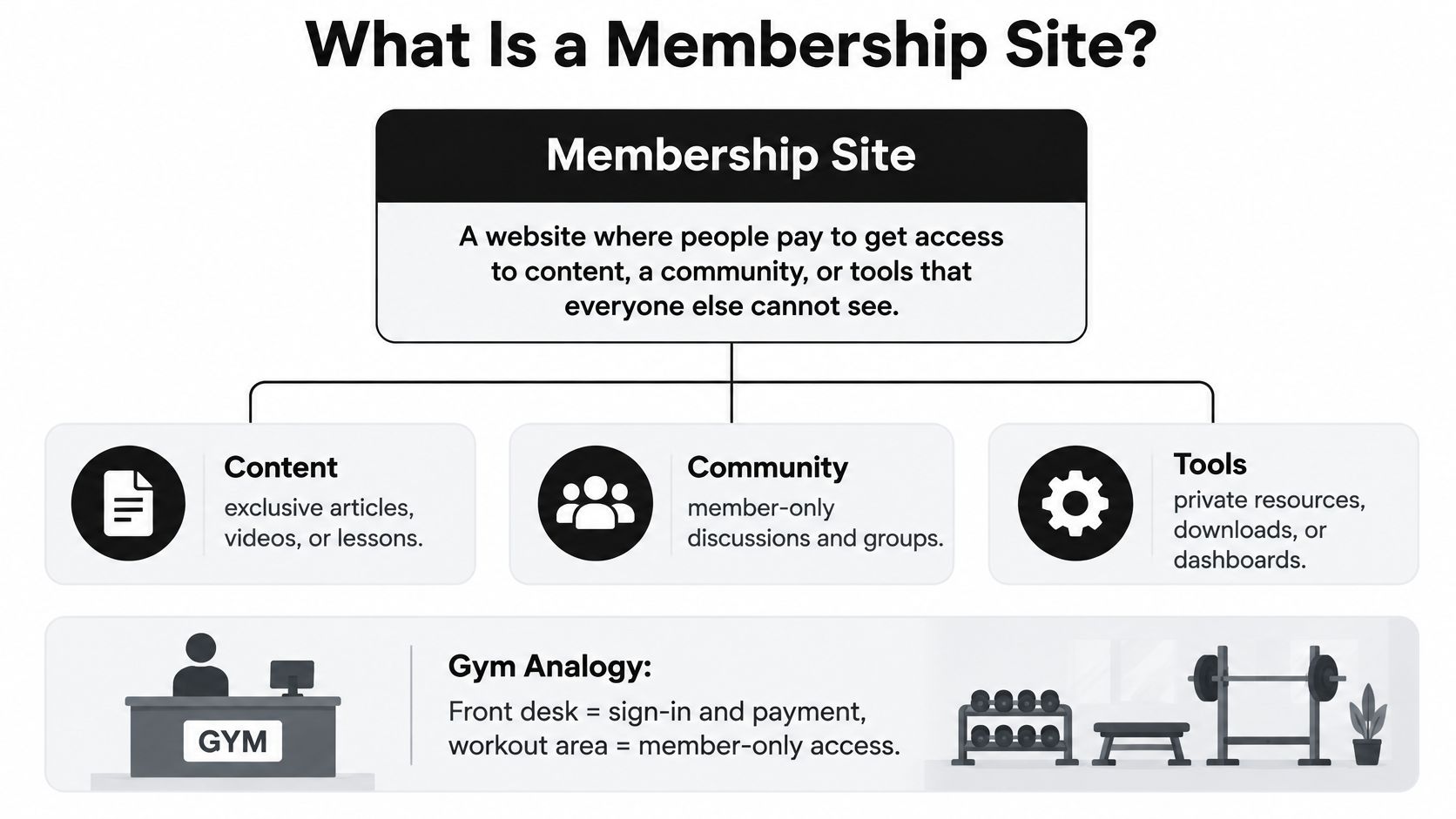
A membership site works the same way online. Public pages explain the offer. The good stuff lives behind a login.
The Four Parts That Make It Work
- A login or paywall: This separates visitors from paying members.
- A recurring payment: It keeps access active month after month or year after year.
- A member area: That's where lessons, posts, files, or tools live.
- A reason to return: New lessons, live chats, fresh resources, and conversations give people a reason to keep paying.
That's different from a blog, which anyone can read free. It's also different from a store, where someone buys once and leaves. Here you're asking for repeat payments, so you need repeat value.
A solo teacher can run one. So can a hobby club or a company training team. The size doesn't define it.
Quick self check. Can you name who pays, what they pay for, and why they'd still be paying in six months?
If you can answer those three, you're starting from solid ground. If the last one is fuzzy, that's worth sorting out before you build anything.
Three Common Types and What Members Get
Most creators land on one of these three formats, or they mix two of them together.
| Type | What Members Get | How Often They Return | Typical Examples |
|---|---|---|---|
| Online course | Lessons, videos, quizzes and progress tracking | Over a few weeks or months until finished | Language schools, coaches, trainers |
| Community | Discussion boards, chat, live calls and member directory | Daily or weekly | Fitness groups, professional networks, hobby clubs |
| Resource library | Templates, downloads, toolkits and updated guides | When they need something specific | Designers, writers and accountants sharing toolkits |
What Each One Feels Like Day to Day
A course membership gives members a path. They work through lessons in order, check off progress, and often leave once they've reached the finish line. That's normal. You keep these members by adding new material or helping them use what they've learned.
A community membership sells access to people, including you and each other. Members post questions, join calls, and find others doing similar work. If you're drawn to that model, it's worth looking at how to build a supportive business community where people help each other instead of just lurking. The value can grow as more good members join, but it also needs hosting and moderation.
A resource library is more like a shelf people visit when they need a thing. Templates, checklists, swipe files, and updated guides save them time. They may not log in daily, and that's fine if the shelf keeps getting better.
Lots of sites combine a course with a community. The lessons give people direction. The conversations give them a reason to stay after the lessons end.
My simple advice is this. Pick the format you can keep producing for the next year without resenting it. A membership lives on new value each month, even if that value is small and steady.
How Membership Sites Make Money
Money comes from members paying again, not from one big launch day. That makes how long people stay the whole game.
| Model | How It Works | Best For | Watch Out For |
|---|---|---|---|
| Monthly subscription | Members pay every month until they cancel | Ongoing content and community | Churn can be high month to month |
| Annual plan | One payment covers twelve months, often at a discount | Creators with steady, loyal members | The upfront cost can put off new buyers |
| Tiered plans | Several price levels unlock more access | Sites with clear basic and premium members | Too many tiers confuse people |
| Lifetime access | One payment for permanent access | Small libraries with fixed content | Updates and support costs fall on you |
| Free trial then paid | Members try for a set number of days before billing | Products that prove value fast | Many trial sign-ups never convert |
Churn Is the Number to Watch
Churn means the share of members who leave in a given period. The subscription benchmarks reported by MarketingCharts cover more than 2,000 subscription businesses and show a 4.4% median churn rate across all categories. Education subscriptions were higher at 6.6%, business to consumer subscriptions reached 5.7%, and business to business subscriptions were 3.6%.
At 6.6%, roughly one in fifteen members leaves each month. A 100 member site needs new members just to stay flat. That's why keeping someone is usually cheaper than finding a replacement.
People often ask me about a low cost entry tier versus a free trial. A cheap first tier can keep someone who likes you but can't pay full price yet. A trial can bring in curious people, but some forget, some never log in, and some leave annoyed when billing starts. I lean toward a low entry tier when the value takes time to show, and a short trial when people get a clear win fast.
If you want to think like a buyer later on, the subscription buying insights from Dealmaker Wealth Society are a helpful reminder that retention shapes value. We also map these choices in our guide to membership business models and recurring revenue.
Billing, Free Trials and Renewal Terms
Automatic billing only feels fair when people know what's coming before they type in a card. Surprises here break trust fast.
The Federal Trade Commission guidance on the amended Negative Option Rule treats terms as material when they cover the amount and frequency of charges, when a free trial or promotional offer ends, deadlines for withdrawing, and the cancellation process. It also calls for express informed consent before charging for the recurring plan.
A Plain Example You Can Copy the Logic Of
Say you offer a 14 day free trial, then $19 a month starting on day 15. Put that exact sentence on the signup page near the payment form. Add the date math if you can, like your first charge falls on a named date.
Don't hide it in a long terms page and hope for the best. Many readers won't read that page, and they'll blame you later anyway.
- Trial ending reminder: Email members before the trial converts to paid.
- Next billing date: Show it inside the member account where they manage billing.
- Renewal receipt: Send one after each charge so there's a clear record.
If a member would be surprised by a charge, your signup page didn't explain it clearly enough.
Rules vary by country and state, so check your local requirements before launch. If you're weighing the trial route, our comparison of free trials versus a low entry fee for memberships walks through the trade offs in more detail.
Cancellation, Pausing and Winning Members Back
Leaving should be as easy to find as joining. I know that sounds backwards when you want people to stay. But a clear exit makes joining feel safer in the first place.
This is what account settings can look like when a member manages their own subscription.
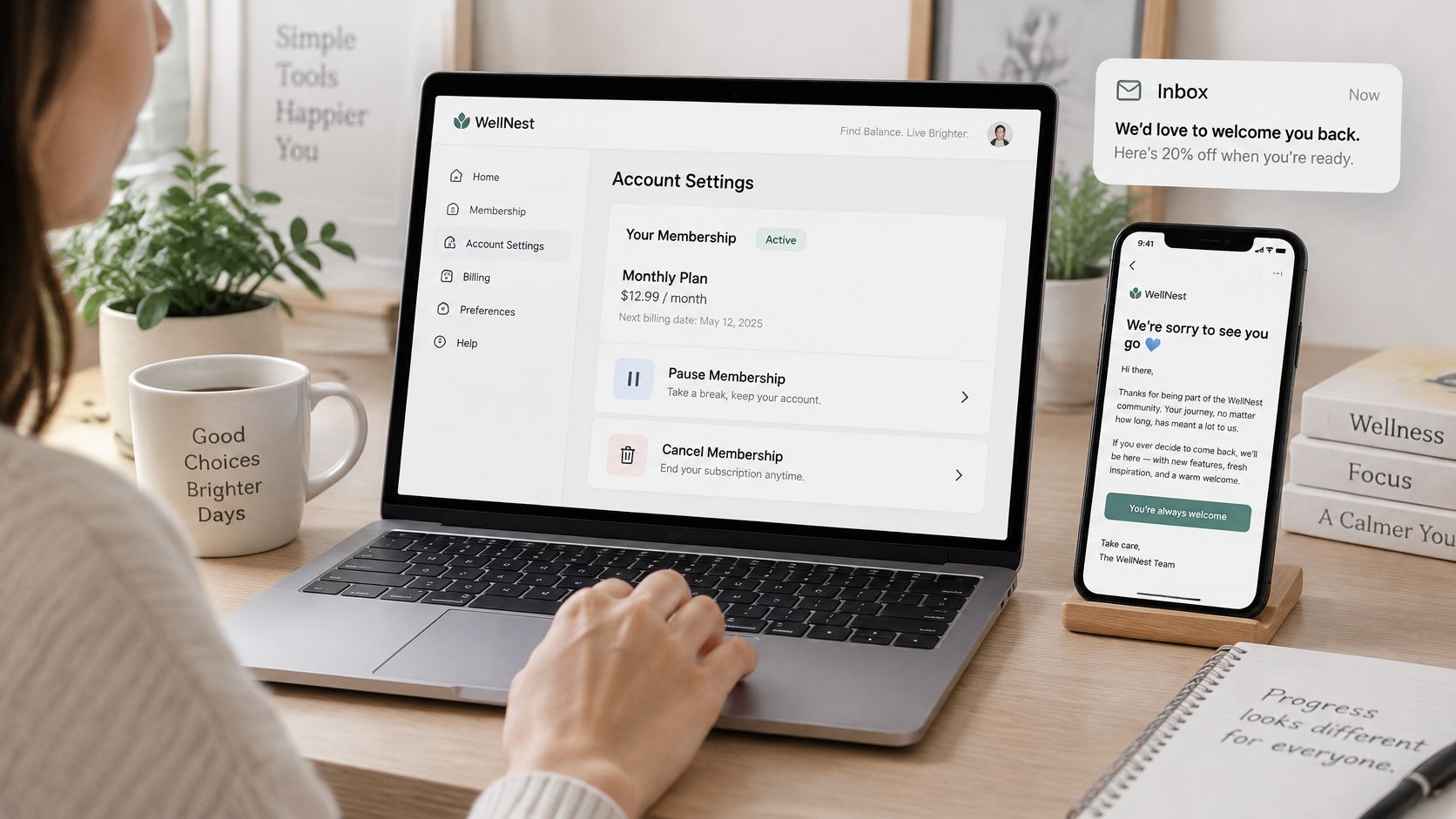
The U.S. Government Accountability Office record on the FTC rule describes the click to cancel standard this way. A seller must provide a simple way to stop recurring charges, and cancellation should be as easy to find and use as signup. Online signup needs an online cancellation method. Phone signup needs phone cancellation during normal business hours, at no more than the cost of the enrollment call.
Federal rules have been through legal challenges, and state auto renewal laws can apply too. Check the current status where you sell before you rely on one rule alone.
Give Members a Softer Option Than Leaving
- Pause for one to three months: Good for illness, holidays, busy seasons, or tight budgets.
- Downgrade to a cheaper tier: Keeps access while lowering the monthly pressure.
- State what they'll lose: Keep it plain and honest, and skip guilt trips.
Failed payments need kindness too. Send a friendly retry notice, give a short grace period, and show members exactly where to update their card. A lot of failed payments are just expired cards.
This short video helps you see the member side of managing a subscription.

For win backs, lead with new value. Mention fresh lessons, a new resource, or a returning member discount after some time away. Never hide cancel behind a support form. That frustrates people and can break the rules.
The Tech Stack Options for Creators
You don't need a fancy setup to start. You do need a few basics working well together.
Every site needs a payment processor for recurring billing, a way to restrict pages to logged in members, a place to host content, and an email tool for welcome messages and renewals. Add a community space only if members will talk to each other there.
| Setup | What It Handles | Who It Suits | Main Trade-Off |
|---|---|---|---|
| All-in-one membership platform | Hosting, payments, member areas, courses and community | Creators who want to launch fast | Monthly fees and less control over design |
| Website builder with membership add-on | Pages, payments and gated content | Creators with a simple site already | Feature gaps as the site grows |
| Self-hosted WordPress with plugins | Full control over pages, payments and integrations | Creators comfortable with setup or hiring help | You handle updates, security and backups |
| Custom build | Anything the site needs | Teams with budget and developers | Highest cost and ongoing maintenance |
A Quick Way I Compare Them
All in one tools cost more each month, but you spend less time fixing connections between tools. WordPress gives you control and plenty of plugin choices, but updates, security, and backups land on your plate. A custom build only makes sense when your needs are unusual and you have developers to maintain it.
Before you commit, run these checks.
- Billing and cancellation: Confirm the tool can show clear terms, handle renewals, and let members cancel or pause the way you've promised.
- Failed card test: Run a failed payment, a card update, and a refund before real members arrive.
- Phone login test: Join, pay, log in, and open a lesson on your phone without help.
Practical rule: Start with the simplest setup that handles payments and access cleanly.
If budget is your main worry, our breakdown of a tech stack for a $10 membership site shows a lean starting point. You can upgrade later once paying members tell you what's missing.
Common Myths and Real Limits
Let me clear up a few things I hear a lot.
Myth one is that you need a huge audience before you can charge. You don't. A small group with a clear problem can be enough, especially if you can talk to them directly.
Myth two is that you build it once and money just arrives. It won't. Members need support, updates, and proof that staying is worth it.
Myth three is that a membership is just files behind a paywall. Files alone are easy to ignore. Guidance, feedback, community, and fresh material are what make access feel alive.
Myth four is that every member can use the site the same way. This one matters more than people think.
Access Can Decide Whether Your Promise Works
The UNESCO UNEVOC World Youth Skills Day survey results found 76% of respondents had both internet access and a device, yet access still involved reliability and sufficiency, not simple ownership. A member might have a phone but a weak signal, a shared laptop, limited data, low confidence with software, or a disability that makes your layout hard to use.
Practical fixes help a lot. Offer downloadable or low bandwidth lessons, captions and transcripts, keyboard and screen reader friendly pages, and mobile first design. Let people join discussions on their own schedule instead of requiring every live session. Add data saving options where you can.
The limits are steady ones. Churn never disappears entirely. Support questions continue to arise. Content requires time.
Ask yourself what your least connected member would need to use your site well. Build for that person and everyone else benefits too.
Checking If a Membership Site Fits Your Idea
Before you pick software, run this little decision test on paper.
- Monthly value: Can you produce something useful every month without burning out?
- Clear result: Does a member learn a skill, get a question answered, or save a template they will use?
- One sentence price: Can you explain what they pay and why in one sentence?
- Working style: Does a course, community, or library match how you like to show up?
- Least connected member: Can that person still log in and get value?
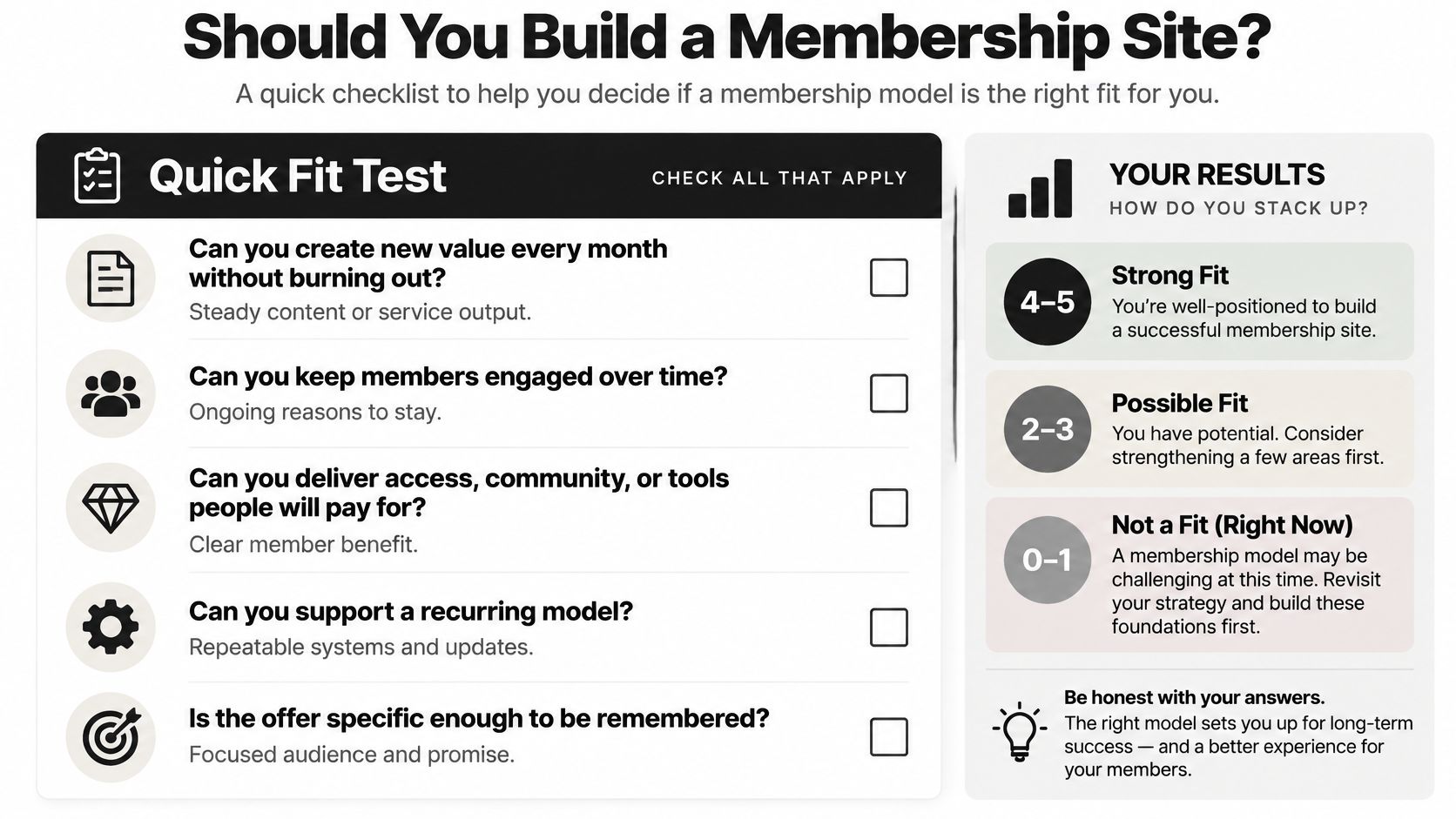
If most answers are yes, pick one pricing model and the simplest tech setup that fits. LearnStream has a guide on how to make money with membership sites using pricing models, recurring revenue tactics, retention strategies, and tech stack picks, which can help once you're ready to map the money side.
Your action for this week is simple. Write a one page plan with your member, price, format, and first three months of content. Then show it to ten people and listen more than you pitch.
If your one page plan gets real nods from those ten people, choose your format and pricing model this week and build the smallest version a paying member can use. Keep the exit clear, keep the value steady, and let your first members teach you what to improve next.