What Is Just in Time Training and How to Use It

You’ve probably seen this happen. A course goes live, people praise the content, and then a few weeks later they’re still asking the same questions in Slack, in email, or at the point of work. The training was solid, but the timing was off, and that gap is exactly where just in time training earns its place.
For course creators, the challenge isn’t only building good lessons. It’s making sure help shows up when someone needs it, while they’re doing the task, not long before or long after. That’s why what is just in time training matters so much. It gives learners the right support at the moment of need, which makes training feel useful instead of distant.
The Training Timing Problem We All Face
I see this pattern all the time with online courses and workplace learning. A team gets a polished onboarding sequence, a manager runs a live workshop, or a creator publishes a detailed module library, then the learner goes back to work and hits the core problem days or weeks later. By then, the memory is hazy, the context has changed, and the training doesn’t feel close enough to act on.
That gap between learning time and use time is the core problem. People don’t usually need every lesson at once. They need one answer, one reminder, one next step, right when a task gets stuck. Traditional training often asks them to store too much for later, which is a weak bet in busy workplaces.
Practical rule: if a learner can’t use the information soon after learning it, the content probably needs a just-in-time version.
A large manufacturing study puts that timing problem into plain numbers. The control group recorded defects at 5.95% across 86,893 observations, while the just-in-time training group recorded 2.99% across 146,012 observations, for a 2.96 percentage-point reduction in defect errors (study). That matters because it links timing to actual task accuracy, not just learner satisfaction.
The same frustration shows up in everyday workplace learning too. Employees want support in the flow of work, and industry summaries note that 57% of employees expected learning to be delivered on a just-in-time basis (LinkedIn Learning figure summarized here). Other summaries in the same source note that 49% of employees cannot access the information they need to do their jobs effectively, and 43% say training was ineffective because it came at the wrong time (same source).
That’s the setup for the rest of this topic. People don’t just need more training. They need the right training at the right moment.
Understanding Just in Time Training Fundamentals
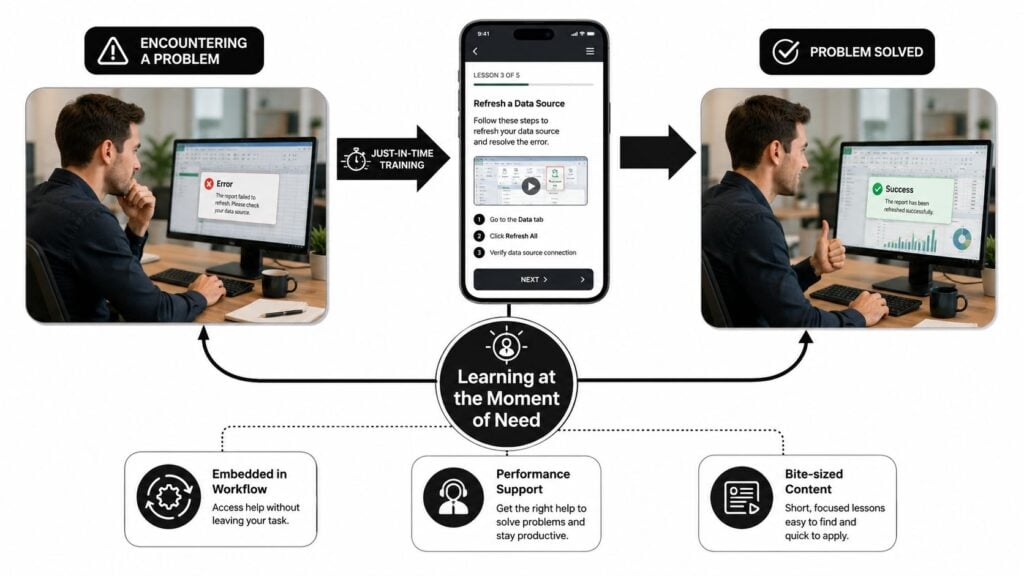
Just in time training is learning delivered at the exact moment someone needs it. That can mean a quick video, a checklist, a search result inside a tool, or a short guide that sits beside the task itself. The point is simple. The learner doesn’t have to stop, hunt, and hope.
I like to compare it to GPS navigation. A paper map can be useful, but many people don’t want to study the whole route before they leave the driveway. They want live directions while they’re driving, turning, and correcting in real time. JIT training works the same way inside a workflow.
A good way to think about it is through performance support. Instead of acting like a standalone class, JIT sits inside the job. It helps people act now, which is why sources describe it as bite-sized, task-specific guidance that people access through mobile devices, embedded help, or searchable job aids (Articulate). That same source also notes that practical JIT assets are often short, task-oriented pieces in the 5 to 15 minute range (Articulate).
The key difference from just-in-case training is timing and intent. Just-in-case training tries to prepare learners for many possible future scenarios. JIT waits for a real trigger. It delivers only what matters in the moment, which is why task-based organization usually works better than topic-based organization (iSpring). The same logic separates JIT from general microlearning. Microlearning is short, but it isn’t automatically timely. A five-minute lesson can still be badly timed if it shows up too early or too late.
If you need a practical example, think of a 90-second tutorial for someone who’s stuck inside a software platform, a quick reference guide for a new process, or contextual help that pops up when a learner clicks the wrong button. Those assets work because they answer a specific problem without asking the learner to leave the workflow.
For a useful design example, I’d also look at Bruce and Eddy’s approach to real-time reporting, since it shows how immediate access to information changes decision-making in practice.
Measurable Benefits That Matter to Your Business
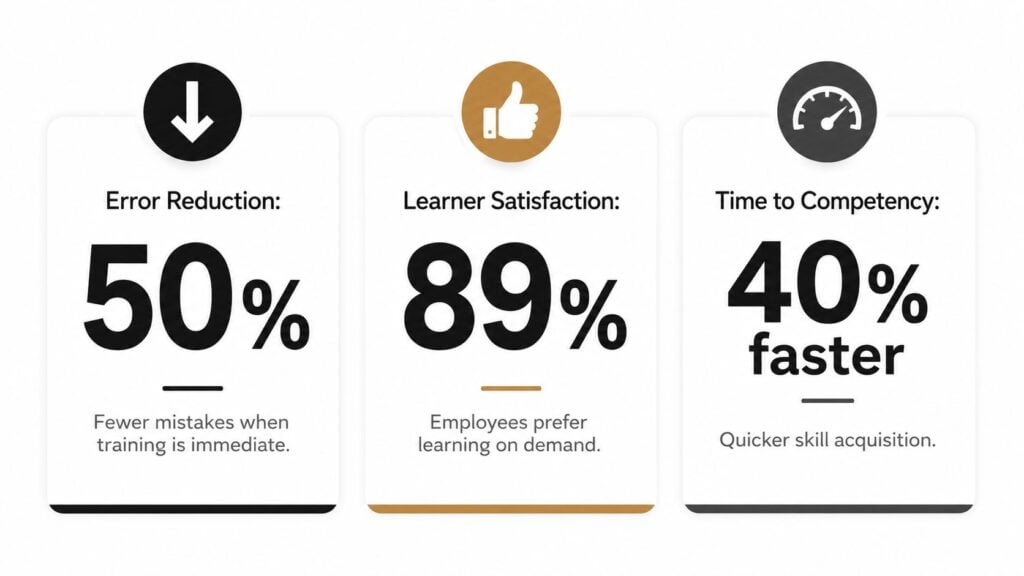
A course creator can do everything right on paper, and still miss the point if the training arrives at the wrong moment. JIT matters because it changes what people do while they are working. In the manufacturing study above, lower defect rates show that timing can affect operational quality, not just learner preference. That is the kind of evidence that helps you decide whether a learning asset belongs in a course catalog or right inside the workflow.
Why shorter distance between need and action matters
JIT reduces cognitive load in a practical way. Learners do not have to hold a long explanation in memory and hope it still matches the task later. They can pull up the exact step they need, act on it, and keep going. For deskless, remote, and frontline workers, that matters even more because they often cannot step away for a full lesson.
The design principle is straightforward. Keep the support close to the task, keep the content short, and make retrieval easy. Sources consistently describe JIT as mobile-first, searchable, and embedded at the point of work (Articulate, iSpring, Docebo). It works like a wrench stored next to the machine, not in a locked room across the building. When the problem is simple and the task is stable, that closeness pays off quickly.
What to track instead of guessing
Clicks can tell you that people opened the resource. They cannot tell you whether the resource changed performance. If you want to judge whether JIT is working, track outcomes that touch actual work, like error reduction, faster task completion, fewer support requests, and better first-pass success. LearnStream’s guide to measuring training effectiveness is useful if you want to move beyond vanity metrics.
Useful mindset: if the training is truly helping, the proof should show up in task performance, not just in content views.
A short video can matter more than a long course if it helps someone finish the job correctly. That is the tradeoff JIT makes. It gives up breadth in exchange for timing, and in many workplaces that is the smarter bet. In high-stakes learning, though, speed alone is not enough. If the task has safety, compliance, or customer risk attached to it, the decision rule changes. Use JIT for reminders, checklists, and guided support. Keep fuller instruction nearby when a mistake would be costly or hard to recover from.

Real World Use Cases Across Different Contexts
A learner does not use just in time training the same way in every job. A software user needs help inside the interface, a customer service rep needs an answer fast, and a healthcare worker may need a reminder before making a decision under pressure. The format changes, but the logic stays the same, the support appears at the moment the work demands it.
Where it fits naturally
In software onboarding, JIT often appears as in-app guidance, tooltips, or a short walkthrough that shows up when a user reaches a confusing step. That works because the problem is already sitting inside the workflow. The learner does not need a broad lesson first, they need the next click and a clear path through the step they are on.
Customer service teams use a searchable knowledge base in much the same way. A rep can pull up a policy, a script, or a troubleshooting step while the customer is still on the line, which keeps the response consistent without forcing the rep to leave the conversation to hunt for help. For a wider set of just in time learning examples for workplace training, the pattern is the same, short support tied to a real task.
Manufacturing teams often rely on QR-code access to procedures so workers can open a checklist at the machine instead of walking back to a desk. That setup is useful when the task changes often or when the procedure needs a quick refresh right before action. It works like a wrench kept next to the equipment, close enough to use without losing time.
Where it starts to struggle
JIT handles reminders, troubleshooting, and process support well. It starts to break down when you ask it to carry the full weight of foundational learning. If a learner has no baseline, a quick tip will not do much. The same is true for complex skills that need practice, reflection, and feedback over time.
Healthcare makes that tension easy to see. JIT can support quick refreshers and decision prompts, but it cannot replace deeper preparation. In regulated or high-stakes settings, the learner still needs structured training before the point-of-need layer makes sense. Course creators who work in compliance, safety, or professional certification need that line to stay clear.
A simple filter helps here.
- Use JIT when: the task is specific, the need is immediate, and the learner already has baseline knowledge.
- Use traditional training when: the topic is broad, the skill is complex, or the risk of error is high.
- Use both when: people need a foundation first, then a quick support layer during real work.
That blend is usually the most realistic option. JIT is a sharp tool, and sharp tools work best when they are used for the right job.
Implementation Patterns You Can Build Today
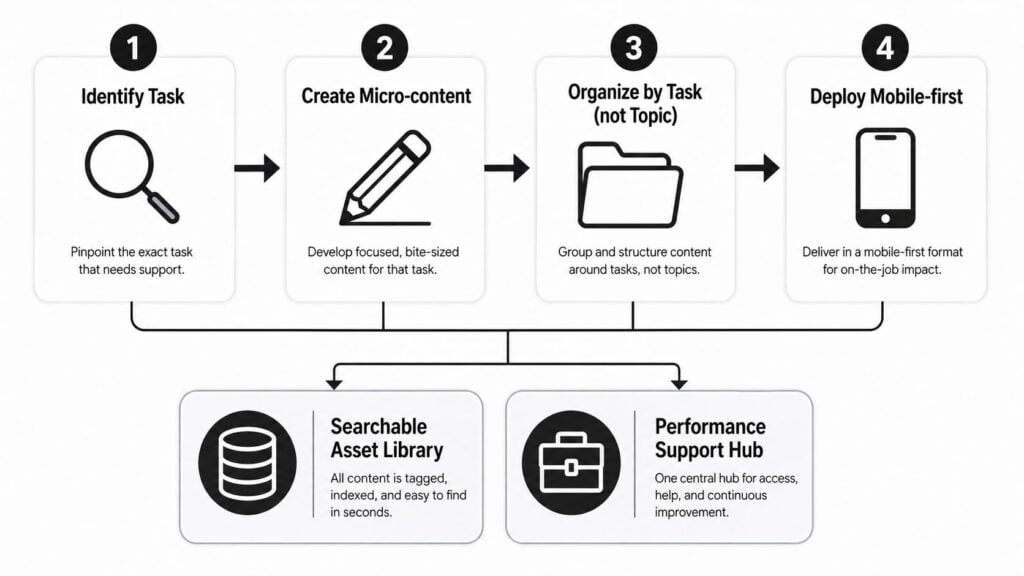
A good JIT program starts with a real task that someone needs to complete under pressure. That changes the whole build. Instead of creating a broad module called “Customer Handling Basics,” you create a help asset called “How to calm an upset customer after a delayed order.” The second version is easier to find, easier to use, and far more likely to help in the moment.
That is why a searchable task-based library works better than a course catalog for JIT. People under time pressure are not looking for theory, they are looking for the exact fix. Short, mobile-friendly assets, embedded help, and quick access are the common delivery pattern across the learning tools that support this approach. A practical companion to that setup is microlearning modules for staff training, which can break support content into small pieces that are easier to scan and reuse.
Formats that actually work under time pressure
The strongest JIT assets are small enough to open fast and specific enough to solve one problem. A 90-second video tutorial, a checklist, a short screen recording, a job aid, or contextual tooltips inside a platform can all work well when the learner needs help now. A compact tutorial is useful when someone is stuck and needs the next move without sorting through extra context.
I’d keep the structure tight.
- State the task: Use a title that mirrors the learner’s actual search.
- Show the action: Lead with the exact step or decision, not the theory.
- Reduce friction: Keep the file short, mobile-friendly, and easy to scan.
- Tag it well: Use labels that match the learner’s language, role, and workflow.
Delivery matters as much as content
A strong clip buried in the wrong place still fails. JIT works best when it sits inside the tools people already use, shows up in search on a phone, and opens without extra clicks. Content tagging, clear search, and clean integration with your LMS or knowledge base do a lot of the heavy lifting here.
If you are building in LearnStream or another platform, treat it as a performance support hub, not just a course library. The hub should help someone search, retrieve, and act quickly. It also makes updates easier, because short assets are much simpler to revise than long modules.
A simple editorial test for every asset
Before publishing, ask one question. Could a tired employee use this in under a minute and still complete the task correctly? If the answer is no, the asset probably needs trimming. JIT does not leave much room for extra words, decorative intros, or buried steps. It works best when the content is clear enough to trust and short enough to use.
When Just in Time Training Breaks Down
The biggest mistake I see is treating JIT like a universal replacement for upfront training. It isn’t. In safety-critical, regulated, or high-complexity environments, the learner needs a stronger baseline before the moment-of-need layer can help.
Where the limits show up fastest
In emergency response and other high-pressure settings, speed alone doesn’t solve the learning problem. Inclusive-design materials for emergency responders point out that effective JIT has to address intellectual, behavioral, and emotional needs, which tells me the content has to be built for stress as well as speed (NWC PHP). If the design ignores accessibility or panic conditions, the asset may be technically available but practically unusable.
Regulated work creates another boundary. If someone needs to follow a compliance procedure, a short reminder can help, but it can’t replace the required instruction, practice, and verification. Complex skill building also needs repetition and feedback. A quick guide can support execution, but it won’t build mastery by itself.
The measurement problem makes this even trickier. Many teams track usage, adoption, or completion, but those numbers don’t prove that JIT improved business outcomes. A better standard is whether the training changed errors, task success, ticket deflection, or time-to-proficiency. Without that, it’s easy to mistake convenience for impact.
A decision rule you can actually use
Rule of thumb: if a mistake could hurt safety, compliance, or critical service delivery, JIT should sit beside formal training, not replace it.
I use a simple three-part filter when deciding whether a topic belongs in JIT. First, the learner needs some baseline knowledge. Second, the task must be specific enough to search for quickly. Third, the consequence of a wrong step can’t require deep conceptual reasoning in the moment. If any of those fail, I keep the content in a more structured format and add JIT only as a support layer.
That balance is what makes the model sustainable. JIT is strongest when it helps people act with more confidence. It falls short when it’s asked to do the whole job alone.
Your Action Plan for Getting Started
Start with your existing content. I’d audit your courses, FAQs, onboarding docs, and support tickets to find the moments when learners get stuck and need one exact answer. Those are your first JIT candidates.
From there, build a small task-based library. Pick five to ten high-friction tasks, create short assets for each one, and tag them by the words learners would use. Keep the delivery path simple, mobile-friendly, and easy to search. If you already use an LMS or knowledge base, slot the assets into that environment before buying anything new.
A quick decision framework helps:
- Foundational: broad concepts, new skills, or anything that needs explanation and practice.
- Just in time: troubleshooting, reminders, process steps, and moments of need.
- Both: topics that need a full lesson first, then a support asset for live work.
For measurement, go past clicks. Track whether people make fewer mistakes, finish tasks faster, or ask fewer repeat questions after the asset launches. That’s the kind of evidence that tells you JIT is helping real work, not just filling a content gap.
If you want to add just in time training to your courses or membership site this month, pick one learner pain point, turn it into a short searchable asset, and test it with a small group. Then watch what changes in the workflow, not just in the dashboard.