Learning Management System Requirements Checklist
Buying an LMS gets messy fast when every demo looks polished and every feature list sounds the same. I've learned to slow that moment down and ask a simpler question. What can this platform prove with my course, my roster, and my learners?
That's how I treat learning management system requirements. A requirement isn't a nice word on a sales page. It's a behavior you can test, score, and fail before you sign.
Why LMS Requirements Decide the Purchase
In 2024, LMS adoption reached 90% among organizations surveyed in Training Magazine's Training Industry Report, with adoption at 100% among large companies, 94% among midsize companies, and 82% among small companies. At that point, the question isn't whether you need a system. The question is which requirements you refuse to drop when price, design, and sales pressure start pulling at you.
I write requirements for course creators, membership owners, instructional designers, and training managers who have to live with the choice after the demo ends. Say you run a paid cohort and a small internal training library. You don't need every bell a vendor can ring, but you do need progress to save, certificates to fire at the right moment, and exports that don't trap your catalog.

What counts as a real requirement
For me, a real requirement sounds like this. A learner can finish a module on a phone, reopen it on a laptop, and see the same progress. An admin can export every learner record and open it in a spreadsheet. An external quiz tool can launch, return a grade, and show a clear error when it's down.
Words like engaging and enterprise ready don't pass that test. They're fine for a brochure, but they won't help you when a launch breaks or a manager asks for proof of completion. If you're weighing broader platform choices first, these CBE learning platform features to consider give useful context before you lock your own must-haves.
The eight rows I keep coming back to
I sort every claim into eight areas. Learner experience, instructor tools, content packages, integrations, accessibility, privacy and AI, reporting, and scale cover most of the pain you'll feel in month two. Each area gets one clear question and one owner who can say pass or fail.
Do one useful thing today. Copy the scorecard below, bring one real course and one real roster, and ignore any feature that can't survive those two artifacts.
The LMS Requirements Checklist to Score Vendors
I put the scorecard before the deep dives on purpose. If you read about standards for an hour and only then try to compare vendors, you'll remember the slickest demo instead of the strongest evidence. Score as you go.
Mark each area Pass, Partial, or Fail, then add a score from 1 to 5. Double the weight of must-have rows. That one rule stops a pretty dashboard from hiding a failed export or a broken tool launch.
| Area | Must be true | Acceptance test | Owner |
|---|---|---|---|
| Learner experience | Finish on phone and desktop with saved progress and a certificate | Five learners complete one real module | Instructional lead |
| Instructor tools | Author, release, grade, and message in one place | Build a sample module in the pilot | Course owner |
| Content packages | Import existing SCORM or xAPI and record completion | Import one real package and check the gradebook | Content admin |
| Integrations | LTI 1.3 tool launch and roster sync where needed | Live launch plus a failed-launch test | Technical owner |
| Accessibility | WCAG 2.2 AA on player, quizzes, templates, and admin | Keyboard, screen reader, captions, and zoom | Accessibility owner |
| Privacy and AI | Export, delete, restrict, and disclose model use | DPA review and an AI off switch demo | Privacy owner |
| Reporting | Completion, time, assessment, cohort, and export | Sample CSV plus a dashboard walkthrough | Training manager |
| Scale and recovery | Stated peak concurrent learners and recovery target | Load note and recent status history | IT owner |
How I read each row
Learner experience means a person can finish a course on a phone and desktop, keep their progress, and get a certificate without signing in again for every tool. If they need help finding the resume button, that's data. Don't coach them through it and then call it intuitive.
Instructor tools means your course owner can build, release, grade, and message from one place. Include a drip or scheduled release if your course uses one, because that's where timing bugs like to hide. A tool that forces roster exports just to email a cohort will waste hours every month.
Content packages means you import a course you already own and the LMS records completion correctly. Integrations means a standards based launch works with a real tool, and roster sync works where a student system exists. A logo wall proves neither one.
Practical rule: If a vendor won't run your course, your roster, and a keyboard only test, mark that feature unproven. Don't give credit for a promise.
Accessibility means WCAG 2.2 Level AA on the player, quizzes, templates, and admin screens, checked with a keyboard and a screen reader. Privacy and AI means you can export data, delete data, restrict who sees it, and learn whether learner data trains a model. If the answers get vague, score it Partial at best.
Reporting means you can see completion and assessment results, filter by cohort, and export a clean file someone can use. Scale means the vendor states a peak for concurrent learners and a recovery target in writing. Average daily use won't save you on cohort launch day.
Who signs off
- Name an owner for each test: One person decides pass or fail and writes down the evidence.
- Bring three artifacts: One real course, one real roster, and one keyboard only learner journey.
- Score must-haves double: A Fail on a must-have can't be averaged away by nice extras.
- Date every Partial: A Partial without a fix date is really a Fail you're choosing to live with.
I like this checklist because it travels well. You can use it in a demo, a pilot, and a contract review without rewriting your thinking each time.
Functional Requirements Written as User Stories
Feature lists let vendors answer yes to everything. User stories make them show you the clicks. I write each one the same way: As a role, I can do a task, so that an outcome is true.
Then I add three things under every story. I note the demo proof, the data I expect to see afterward, and the fail line where I stop giving credit. That turns learning management system requirements into something a pilot team can judge.
Three learner stories to test live
As a learner, I can resume a lesson on my phone and see the same progress on my laptop, so that I don't repeat work. The proof is simple. Start on one device, stop mid lesson, open the other device, and check the progress bar and gradebook. It fails if progress resets or the learner has to hunt for where they left off.
As a learner, I can take a quiz, see which items I missed, and get one retake if the course allows it, so that I know how to improve. Watch the click path and check that both attempts land in the gradebook the way your policy says they should. It fails if feedback is hidden, retake rules don't stick, or dropping mid quiz corrupts the attempt.
As a learner, I can view or download my certificate only after I meet the completion rule, so that the credential means something. Test it before and after completion. It fails if the certificate appears early or never appears after the rule is met.
Instructor stories that expose daily friction
As an instructor, I can build a module with video, a file, and a quiz without a developer, so that I can publish on my own timeline. Time the build and let the instructor upload a large video file, not just a tiny sample. It fails if publishing needs support tickets or mystery settings buried three menus deep.
As an instructor, I can release the next module on a date or after a pass mark, so that learners move in the right order. Set both rules and test with a passing learner and a failing learner. It fails if one group sees content they shouldn't.
As an instructor, I can message one cohort without exporting the roster to another tool, so that communication stays in one place. Send a real message during the pilot. It fails if you need a spreadsheet workaround for a basic task.
Admin stories demos often skip
- Restricted manager view: As an admin, I can assign a manager who sees only one department, so that teams don't view each other's people. It fails the second that manager can open another team's records.
- Catalog level control: As an admin, I can turn off a feature, including an AI assistant, for one catalog and leave it on for another, so that different audiences get different rules. It fails if the switch is global when you need nuance.
Map each story back to the learner experience or instructor tools row on your scorecard. When a story fails, the row fails. That's clearer than arguing about whether the feature mostly works.
Content Standards Buyers Should Specify
I'd never accept a promise of SCORM support without importing a course I already paid for. Your library is the test, not the vendor's sample lesson. A clean demo package can hide problems that your older files will expose in minutes.
The SCORM 1.2 developer overview explains that a conformant LMS must implement an API with eight communication functions, including LMSInitialize(), LMSFinish(), LMSGetValue(), LMSSetValue(), LMSCommit(), LMSGetLastError(), and LMSGetErrorString(). Packages also arrive as a folder or ZIP based package interchange file with imsmanifest.xml at the root. Those details sound nerdy until an import fails and nobody can tell you why.
The one ZIP test
Bring one of your own ZIP files to the pilot. Import it, launch it, complete it, and force an error if you can. Then check three things in the gradebook.
- Completion: Did the LMS mark the course complete at the right moment?
- Score: Did the quiz score land without manual fixing?
- Time: Did time in the course record in a way your reports can use?
If your library uses sequencing, ask which SCORM 2004 edition the vendor supports in production. Don't let the answer stay at the family name level. Sequencing behavior is exactly where vague answers cause expensive surprises.
A vendor who can import your ugliest real package has earned more trust than a vendor with a perfect sample course.
Newer tracking needs
For newer courses, I ask for xAPI with a learning record store you can query. I also ask about cmi5 when a course launches from the LMS but tracks learning as xAPI statements. Those two questions separate basic completion tracking from richer activity records.
Ask where statements are stored and how long they're kept. Ask whether you can export them if you leave. If the vendor can't show a statement sample and an export path, you don't really own that data in a practical sense.
Authoring matters too. Decide whether instructors will build in the LMS, in an external authoring tool, or both. Then name who fixes a package that imports with a broken manifest, because someone will own that job whether you plan for it or not.
Package import is only one kind of connection. If your course needs a live external tool instead, you'll want the launch and grade checks covered in the next section.
Interoperability Requirements That Prevent Lock In
A marketplace badge makes me nervous. It tells me a partnership exists, but it doesn't tell me whether a learner can launch the tool, whether a grade comes back, or what happens when the tool goes down. Standards based connections give you better answers and more freedom to change tools later.
The diagram below sums up the pieces I ask vendors to prove before I believe an integration claim.
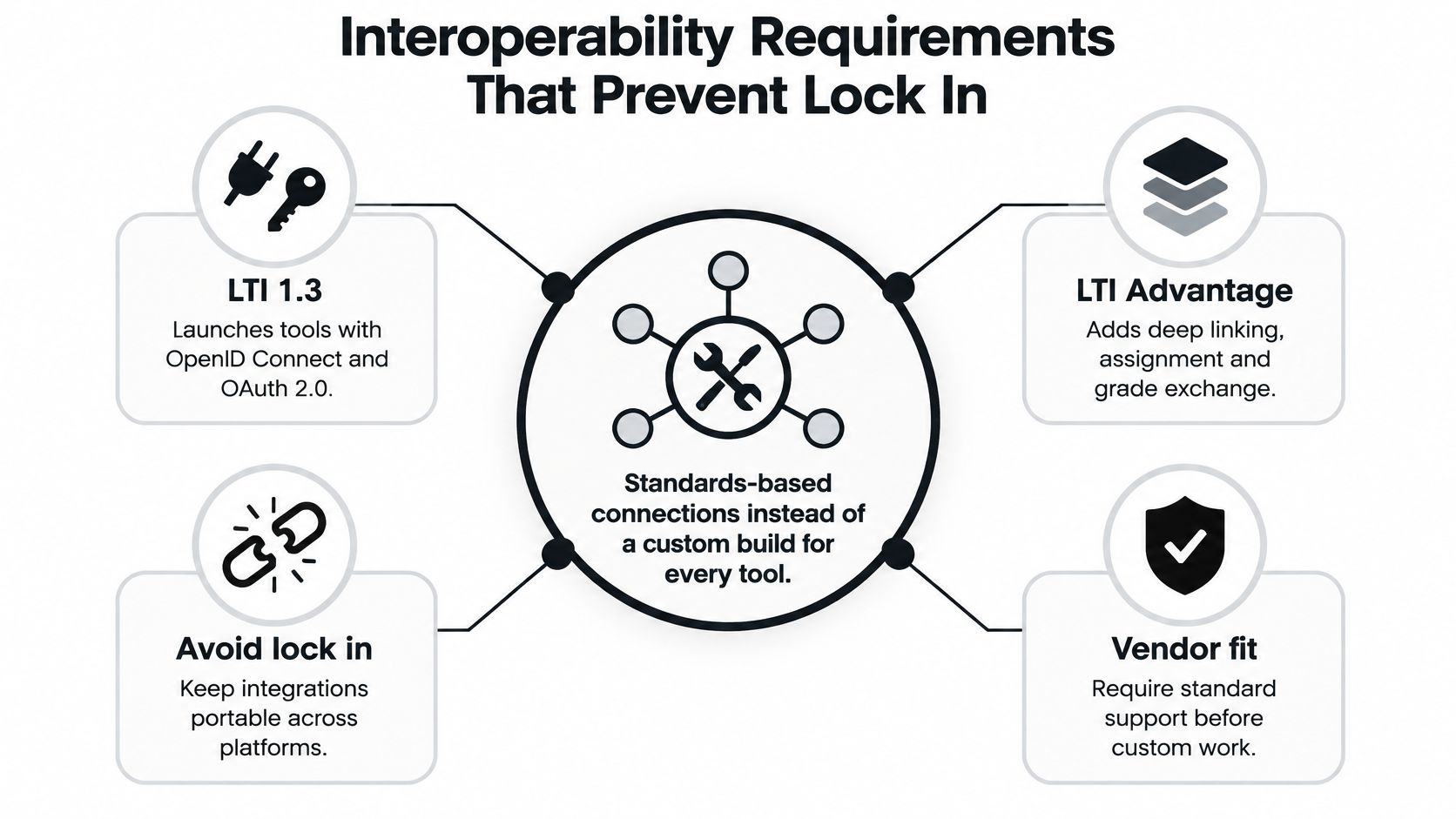
According to 1EdTech's specifications overview, LTI 1.3 provides secure tool launches using OpenID Connect and OAuth 2.0, while LTI Advantage adds standardized services for deep linking, assignment and grade exchange, and names and roles provisioning. That same overview points to OneRoster 1.2 for standardized exchange of people, memberships, courses, and outcomes, and Caliper Analytics 1.2 for a common event vocabulary across tools. I want those version numbers in writing, not a general claim about integration capability.
What to name in your spec
Write down LTI 1.3 platform support, configurable trust relationships, issuer and client ID management, redirect URI validation, encrypted transport, and auditable logs for launches and service requests. Those items tell you whether the connection can be set up safely and troubleshot later. Without logs, every failure becomes a blame game between vendors.
Ask for certification evidence, the versions running in production, conformance test results, and a migration policy for deprecated specifications. If a vendor supports an older launch method, ask when it goes away and what you'll need to change. That answer belongs in your budget and timeline.
If you're also comparing how course packages track learning, our comparison of SCORM and xAPI for course creators helps you separate package tracking from live tool launches. For teams tying learning records to sales or member records, this guide to integrating CRM with your learning platform is a helpful companion when you map which data should move where.
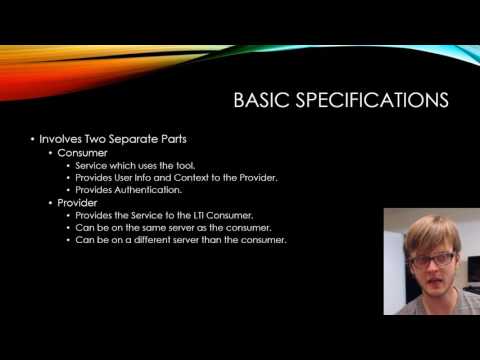
The short video below is worth watching before your next vendor call, especially if your team is still treating integrations as a logo checklist.
Test the tools you own
Run launches for the tools you use, such as video, assessment, plagiarism detection, conferencing, analytics, and content authoring. A strong answer shows a launch, role exchange, grade passback, and the message a learner sees when the tool fails. A weak answer sends you back to a marketplace page.
More connected apps can raise risk, so I score this row beside the privacy row every time. Skip these checks and you'll pay later in custom work. Pass them and you can swap one tool without rebuilding your whole course stack.
Accessibility Tests Beyond a WCAG Checkbox
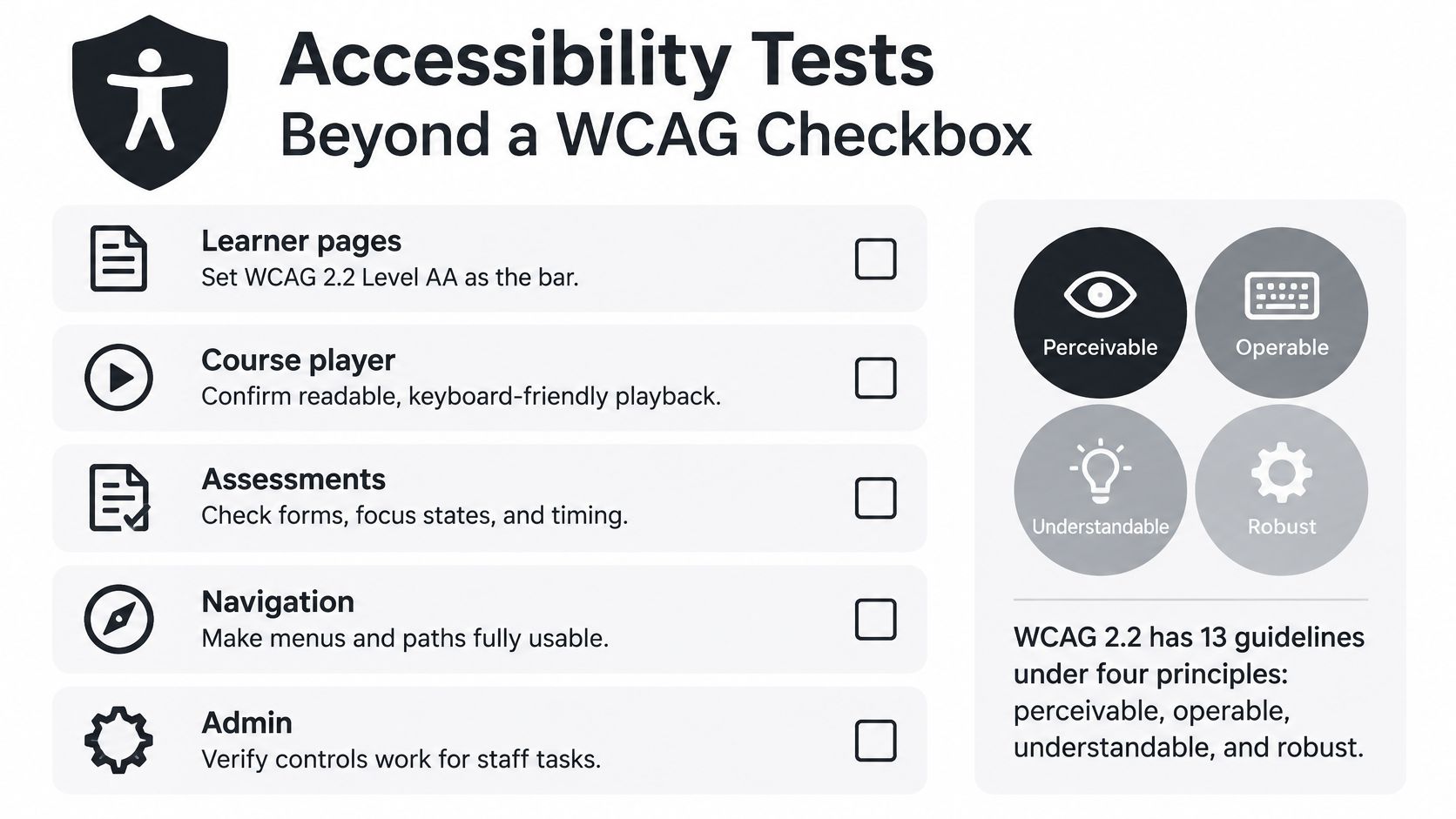
I set WCAG 2.2 Level AA as the bar for learner pages, the course player, assessments, navigation, and admin workflows. Anything lower leaves too much room for a vendor to call a broken experience compliant. Anything vaguer makes testing almost impossible.
The W3C page on WCAG standards states that WCAG 2.2 contains 13 guidelines organized under four principles, perceivable, operable, understandable, and reliable, with conformance levels A, AA, and AAA. It also notes WCAG 2.2 was published as a W3C Recommendation on October 5, 2023, and is recognized as ISO/IEC 40500:2025. Level AA includes every Level A and AA criterion, or a conforming alternate version.
Turn the standard into tests
Start with text alternatives for images and other non-text content. Then try to operate every learner workflow with a keyboard alone, watching for a visible and persistent focus indicator. If you lose your place, a keyboard user will too.
Check contrast, captions and transcripts for prerecorded media, predictable navigation, and accessible authentication. Zoom the layout and test reflow on a small screen. Run screen reader checks on the player and the quiz, because those are the screens learners can't avoid.
I combine automated scans with manual checks. Automated tools catch missing labels and contrast problems quickly, but they won't tell you whether a quiz makes sense when read aloud. Include at least one disabled learner on a real lesson if you can, and use our practical guide to accessibility for online courses to shape the test script.
Two checks that trip up course builders
Pointer targets need to be at least 24 by 24 CSS pixels, except in specified cases. That matters for small icons, calendar controls, and crowded mobile menus. Test the player controls with a finger, not just a precise mouse click.
Drag and drop activities need another way to complete the task with a single click or tap unless dragging is essential. Course builders love sorting activities, but learners using assistive tech may not be able to drag at all. If there's no alternative, I'd fail that activity pattern.
Split the responsibility honestly
Ask for a current accessibility conformance report mapped to WCAG 2.2 success criteria, plus remediation timelines in the contract. For US public institutions, name Section 508 as well, since it points back to these WCAG levels. A report without dates for known gaps doesn't give your team much protection.
Buying a compliant platform doesn't guarantee an accessible course. Templates, PDFs, videos, and third party tools can break access on day one.
The vendor owns the platform, but you own templates, uploaded documents, integrations, and author habits. Require alt text fields, caption prompts, and author guidance in the workflow. If your policy requires transcripts, ask whether the system can block publishing a video without one.
Language access belongs here too. Test learner pages with multilingual learners in mind and confirm that translated text doesn't break keyboard use, screen reader labels, or layout. A course that works in one language and falls apart in another isn't ready for a global audience.
Privacy Security and AI Governance Checks
Feature lists make privacy sound like a settings page. I treat it as ecosystem control. You need proof that a small team can add tools, limit data, cut off access, and still get its records out cleanly.
Recent reporting covered by eSchool News on edtech leadership found 61% of school districts rely on general funds for cybersecurity, while the leading interoperability barrier was leaders' lack of understanding rather than the absence of standards. The same reporting found the share using an approved-apps list rose from 42% in 2023 to 59% in 2025. I read that as a warning for any buyer. Connections multiply faster than governance if you don't slow down.
The evidence I ask for
- Data processing agreement: Who processes learner data, for what purpose, and under what terms?
- Subprocessor list: Which other companies touch the data, and how are changes announced?
- Data residency note: Which region stores the data, stated plainly in writing?
- Breach steps: Who notifies whom, and what does the vendor do first?
Then I test controls instead of reading about them. Require role based access, audit logs, retention periods, and a tested delete and export for learners and courses. Require single sign-on with your identity provider and a way to cut off one connected tool without deleting the course that links to it.
Our overview of LMS security features course creators should know can help your team prepare questions before legal review starts. Bring those questions to the demo, not after the contract draft arrives. Late surprises tend to become expensive concessions.
Five AI questions that need written answers
For every AI feature, I ask what data is sent, where it's processed, and whether it trains an outside model. I also ask how an admin turns the feature off, and how an instructor reviews generated output before a learner sees it. If a vendor can't demo the off switch, I score the AI claim as unproven.
Ask the same five questions for third party apps, not just the core LMS. A portable launch that shares extra roster fields is still a privacy miss. Governance has to follow the data across the whole stack.
By the end of the pilot, I want a one page evidence pack. It holds the DPA, the residency note, a sample audit log, a sample export file, and proof of the AI off switch. That's small enough for a lean team to collect and strong enough to support a buying decision.
Scalability Reporting and Usability Targets
I don't score phrases like easy to use or built to scale. I ask for numbers, sample files, and timed tasks. Those three things tell you what launch week will feel like.
Ask the vendor for the largest concurrent learner count supported on your plan and what happens at that peak. Ask for the recovery point and recovery time they commit to, plus status history for the last 12 months and who gets paged during an outage. If those answers only exist in a sales call, ask for them in writing.
Size for the peak you know
For a course business, size the peak from a launch webinar or a cohort start, not average daily logins. A Tuesday afternoon trickle won't predict hundreds of people joining after one email. Ask what slows down first when logins, video starts, and quiz submissions hit at the same time.
- State your peak: Use your biggest realistic launch moment as the test case.
- Read the status history: Look for repeat incidents at busy times.
- Name the fallback: Know what learners see and who your team contacts.
Reporting you can open and use
Require completion status, score, time, last activity, and cohort or tag in reports. Require filters by course, date, and group, plus a scheduled CSV or API export a manager can open in a spreadsheet. Ask for a sample file from a tenant like yours and inspect the column names yourself.
Keep admin reports separate from learner analytics in your scoring. A research style dashboard won't help if your manager only needs a reliable completion export every Monday. When a column is missing, mark the reporting row down instead of hoping a custom report will save you later.
Usability as task success
Define usability as whether people finish tasks without help. Time a new instructor publishing one lesson, then time a learner finishing it on desktop and on a supported mobile browser. Count misclicks, backtracks, and support tickets during the pilot.
The 2024 imc report summary says 31% of learners said it was very easy to complete training through their organization's learning management system, based on a survey of 510 UK senior decision-makers. I use that as a floor to beat, not a goal to copy. For example, you could set a pilot target of 80 percent of learners finishing a module without help and then judge vendors against your own result.
If the platform slows down at peak, score the scale row. If the export misses fields, score the reporting row. Keeping those failures separate makes your final comparison much easier to defend.
Quick Lookup for Standards and Related Requirements
When a stakeholder asks a standards question, I start with the job they need done. Then I jump to the test that proves it. This table keeps that conversation short.
| Standard | Job it does | Version to require | Proof to ask for |
|---|---|---|---|
| LTI Advantage | Secure tool launch, deep link, grades, roles | LTI 1.3 | Certification and a launch log |
| OneRoster | People, classes, and outcomes sync | OneRoster 1.2 | A sample roster exchange |
| SCORM | Import a packaged course and track it | SCORM 1.2 and 2004 as needed | Your ZIP with imsmanifest.xml |
| xAPI and cmi5 | Statements beyond a SCORM session | Current version confirmed in writing | A statement sample and export |
| Caliper | Shared learning-event vocabulary | Caliper Analytics 1.2 | An event sample from a real tool |
| WCAG | Accessible player, quiz, and admin | WCAG 2.2 Level AA | Conformance report mapped to criteria |
Start from your question
- You own a packaged ZIP: Ask for the imsmanifest.xml import and a completion record from your file.
- Your tool lives outside the LMS: Ask for a live launch, grade passback, and a failed launch test.
- A learner can't use a mouse or needs captions: Ask for a WCAG 2.2 Level AA conformance report and a real lesson test.
- You need to know where data goes: Ask for the DPA and an AI off switch demo.
- A leader wants a Monday spreadsheet: Ask for a sample CSV from a tenant like yours.
Don't request every standard by default. Ask for the ones that match systems you already run and mark the rest out of scope in the RFP. Confirm any unknown version with the vendor in writing before the pilot starts, so vendors don't price features you'll never switch on.
How to Write the RFP and Run a Pilot
Your scorecard can become the buying sequence without much extra work. Copy the must-have rows into the RFP and mark everything else as nice to have. If you need help structuring that document, this guide on how to write an effective RFP is a solid place to start.
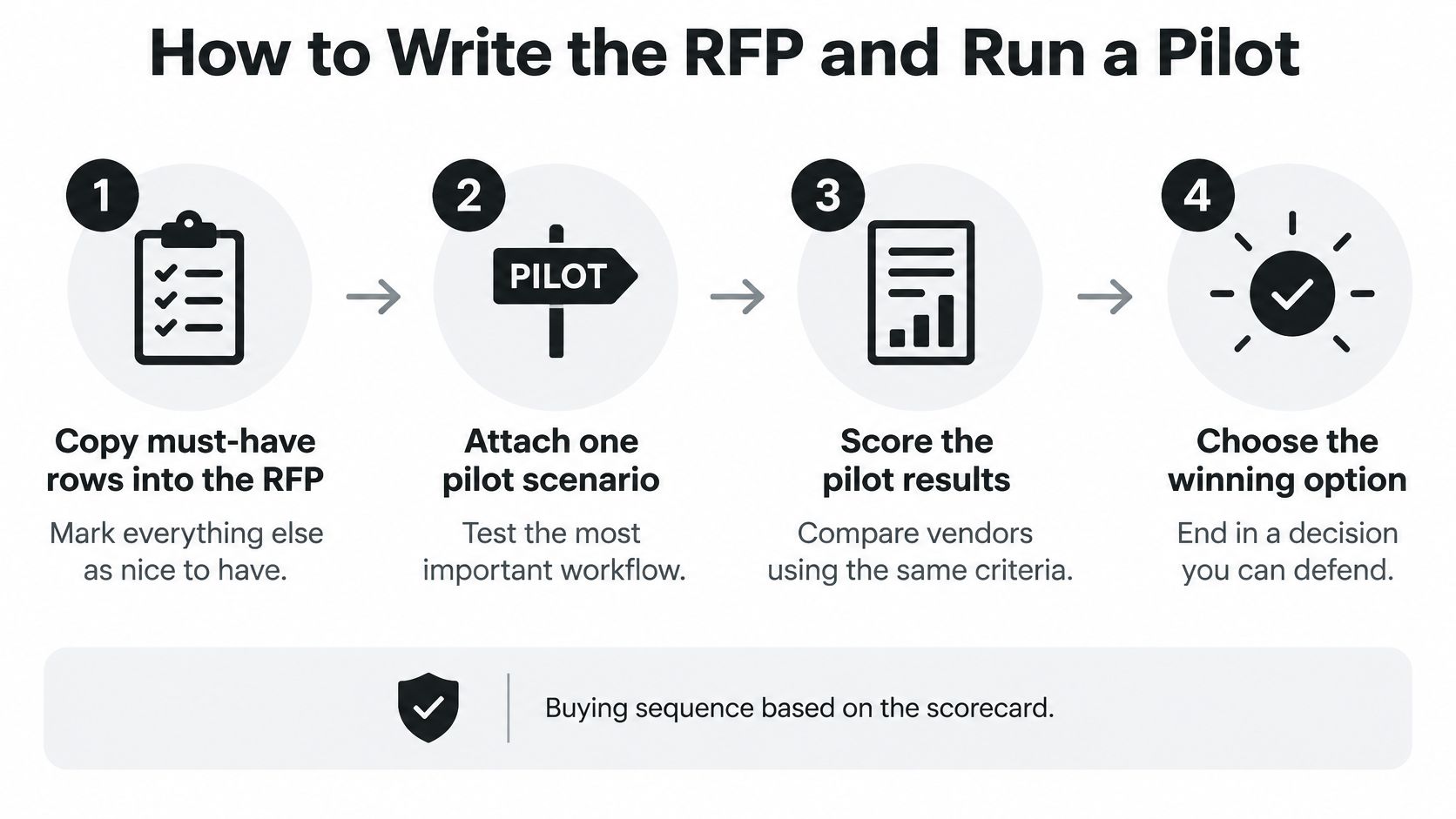
Attach one real course package, a small roster, and your accessibility test script so every vendor runs the same checks. Tell vendors the pass rule before the demo. Must-haves count double, and a Partial on a must-have is a fail unless the vendor dates the fix.
Run a two week pilot with one instructor, one admin, and a handful of learners who'll use the tool. Score from evidence collected in the pilot, not from the slide deck. Test a full course and learner export in a documented format before you sign.
We have a guide comparing learning management systems for employee training by team size, pricing, SCORM and xAPI support, and use case, plus a pilot plan you can adapt. Use it to put your top two vendors side by side on the same scorecard and rerun every failed test. I'd rather keep a plain LMS that passes the exit test than buy a flashy one that traps the catalog.
Write failed items into the contract as dated obligations, or drop the vendor. That's the point where learning management system requirements stop being a wish list and start protecting your budget.
Copy the scorecard today, pick your must-have rows, and invite two vendors to prove themselves with your real course, roster, and accessibility script within the next two weeks. Score only what you see in the pilot, write every dated fix into the contract, and choose the platform that passes the export test as cleanly as the demo.