The Course Creator’s Guide to Subscription Billing Software
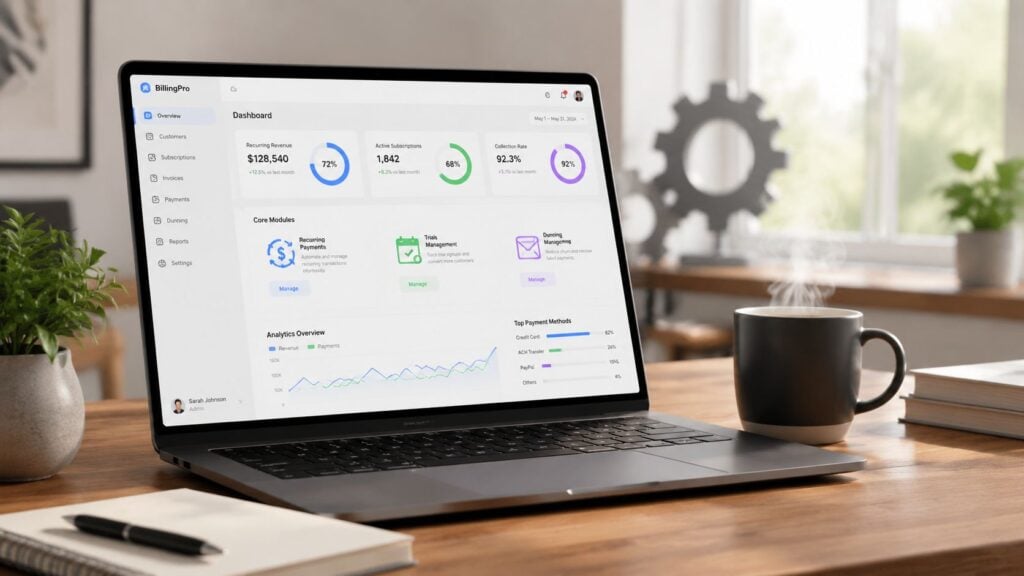
The first of the month used to wreck my focus.
I’d sit down to map a new module, tighten up onboarding emails, or plan the next live workshop. Instead, I’d end up inside Stripe, PayPal, a spreadsheet, and my LMS, trying to answer basic questions. Who paid? Who failed? Who upgraded? Who should still have access to the community?
That kind of admin work doesn’t just waste time. It leaks trust. A student gets charged the wrong amount, loses access after a card expires, or sees a clunky checkout and backs out. For creators selling courses, cohorts, memberships, and drip content, billing chaos shows up as support tickets, refunds, and quiet churn.
That’s why subscription billing software matters. It’s not some back-office tool for giant SaaS companies. It’s the system that keeps your revenue, access rules, and customer experience aligned when your business stops being simple.
Introduction The End of Billing Chaos
A lot of course businesses start with duct tape.
You launch with a checkout page, connect Stripe, maybe add a PayPal option, and manually tag buyers in ConvertKit or your LMS. That works for a while. Then you add a monthly community, an annual plan, a workshop upsell, maybe a coaching add-on, and suddenly every payment change creates a mess somewhere else.
I’ve seen creators spend more energy fixing billing than improving lessons. They’re exporting CSV files, checking failed charges one by one, and answering awkward emails from members who paid but can’t get in. That’s usually the moment they realize they don’t have a pricing problem. They have an operations problem.
Subscription billing software is the thing that brings order to that mess. It automates recurring charges, handles upgrades and downgrades, keeps records clean, and makes sure payment status matches access status.
That shift is bigger than one niche, too. The global subscription billing software market was estimated at USD 10.77 billion in 2026 and is projected to reach USD 19.66 billion by 2030, growing at a CAGR of 16.2%, according to Research and Markets’ subscription billing software market report. That projection tells you something important. Recurring revenue isn’t a side model anymore. It’s becoming the default way digital businesses get paid.
Billing is easy when you have one product and one price. It gets real when students pause, upgrade, fail a payment, or ask for a different plan halfway through the month.
If you run a membership, a drip course, or a library of paid learning content, billing software isn’t just there to collect money. It’s what lets you run the business without babysitting every transaction.
What Is Subscription Billing And Why You Need It
Think of subscription billing software as the financial control room for your education business.
It doesn’t just charge a card every month. It manages the whole payment lifecycle. A student signs up, gets put on the right plan, receives the right invoice, keeps access while the account is active, and moves through upgrades, downgrades, retries, or cancellations without you rebuilding the process by hand.
If you’re using a mix of Stripe links, PayPal buttons, Google Sheets, and manual LMS rules, you already know where this breaks. One tool knows who paid. Another tool knows what they bought. A third tool controls access. When those systems drift apart, students feel it first.
What it actually replaces
In practical terms, subscription billing software replaces a patchwork setup like this:
- Manual recurring invoices sent from PayPal or accounting software
- Spreadsheet tracking for renewals, expired cards, and access dates
- Hand-built coupon logic that lives in checkout but nowhere else
- Support-driven plan changes where every upgrade needs your intervention
- Disconnected access control between your payment processor and your LMS or community
A stronger system gives you one place to manage plans, billing rules, subscriber status, invoices, retries, and payment history.
Why creators feel the pain faster
Course creators often underestimate how much billing affects brand perception.
A lesson can be fantastic, but if checkout feels confusing or a renewal hits wrong, students remember the payment friction more vividly than the curriculum. That’s one reason billing deserves more attention than it usually gets in creator circles.
According to Grand View Research’s subscription billing management market report, 59% of subscription businesses cite customer friction due to billing complexities as a major challenge. For a creator business, that friction shows up in familiar ways: a student can’t switch plans, doesn’t understand what they were charged for, or drops off after a failed renewal because nobody caught it in time.
What good billing changes
Here’s what improves when billing is handled well:
- Checkout feels professional because pricing, trials, and renewals are clear
- Support volume drops because students can manage common changes themselves
- Retention gets more predictable because failed payments don’t instantly become lost customers
- Your offers get easier to test because the system can support different models without a rebuild
Practical rule: If a student needs to email you to change plans, fix an invoice, or regain access after a failed payment, your billing setup is still too fragile.
The best billing systems don’t feel flashy. They feel calm. That’s the point.
Core Features That Run Your E-Learning Business
Some billing features sound boring until you’ve lived without them.
If you run a membership, a cohort-based course, or a content library with add-ons, the difference between a workable setup and a stressful one comes down to a handful of functions that keep the machine running.
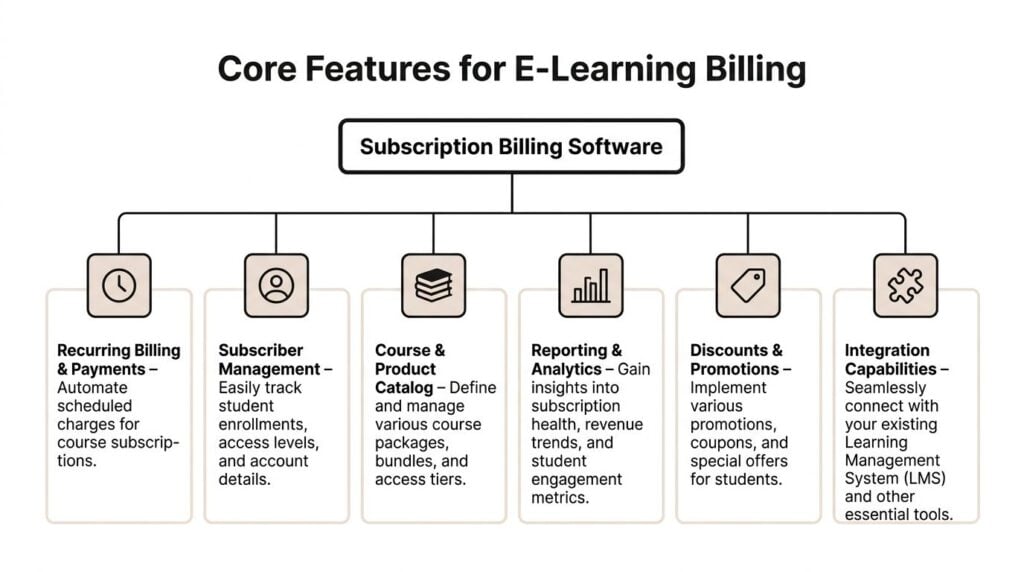
Recurring payments and subscriber management
The obvious starting point is automated recurring billing.
If a student joins your monthly membership on the 12th, the system should know when to bill again, what they’re entitled to, and what happens if they cancel or pause. You shouldn’t be checking payment dates manually or trying to remember whether “VIP Community Annual” includes workshop replays.
Subscriber management matters just as much. You need to know who is active, who is in trial, who is delinquent, and who changed plans. In a creator business, that status often controls course access, private community access, bonus downloads, office hours, or certification pathways.
Proration and plan changes
At this stage, many setups fall apart.
A member joins your basic plan, then wants to upgrade halfway through the month because they want access to the coaching calls. If your software can’t handle proration cleanly, someone has to do the math. Usually that someone is you, late at night, trying not to overcharge a loyal customer.
According to Zone & Co’s guide to subscription billing platforms, billing errors can increase by up to 35% during subscription upgrades or downgrades when automated proration logic is missing. For memberships and course businesses, that’s not a technical edge case. It’s a weekly reality.
Dunning and failed payment recovery
Cards expire. Banks decline legitimate charges. Students switch payment methods and forget to update them.
A decent billing platform doesn’t just mark the payment as failed and shut the door. It retries the charge, sends a clear email, gives the member a way to update billing details, and keeps the experience from turning into a support argument.
I’ve seen many creators underestimate this. They assume failed payments mean the customer wanted to cancel. Often, the student just had an expired card and didn’t realize access had stopped.
A good dunning flow saves customers from accidental churn. A bad one turns a simple card update into a cancellation.
Catalog, promotions, and flexible offers
Course businesses rarely stay with one simple product.
You start with one flagship course. Then you add a starter course, a premium tier, a community, maybe a certification path, maybe office-hour credits. Your billing software needs to handle a course and product catalog that reflects how creators sell.
That includes:
- Bundles for related courses
- Coupons for launches or partner promotions
- Trials for memberships or software-supported learning communities
- Installments for premium programs
- Add-ons like templates, coaching, or private feedback
If your billing system can’t support those without custom workarounds, your pricing strategy will become narrower than your product strategy.
Reporting, tax, and integration basics
You also need reporting that tells you which packages perform well and which ones create confusion.
That’s not a nice extra. It’s part of what separates a real subscription billing product from a checkout plugin. The software should help you monitor package performance, manage late or incomplete payments, and keep records clean enough for support, accounting, and compliance work.
Then there’s tax and invoicing. If you sell across regions, even a modest course business can create real bookkeeping headaches fast. Your billing tool should generate invoices reliably and keep the audit trail intact when plan changes happen.
Choosing The Right Billing Model For Your Courses
Most creators ask the wrong first question.
They ask, “Which billing tool should I use?” The sharper question is, “Which billing model fits the economics of what I sell?” If you get that wrong, the software won’t save you. It’ll just automate a weak structure.
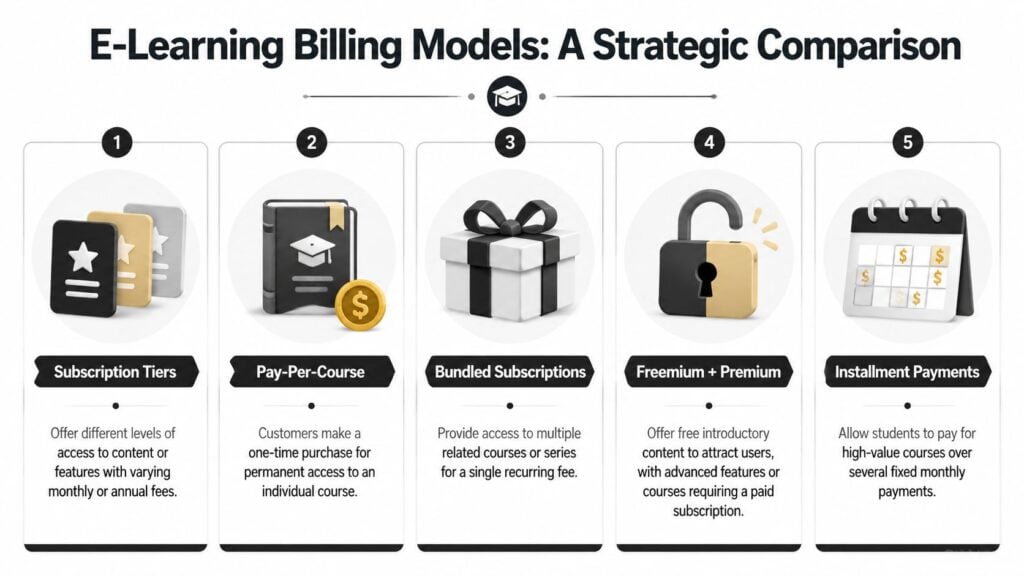
Low-ticket digital products expose this problem fast. A creator selling a compact micro-course, mini workshop, or drip lesson series has very different margins from someone running a premium mastermind.
According to this 2025 report on subscription billing software trends, 68% of new course creators fail due to billing friction, and fixed monthly platform fees can consume 15-20% of gross revenue from low-ticket items. That’s the part too many billing guides skip. A tool that works fine for a mature SaaS business can be financially clumsy for a creator selling smaller offers.
A quick comparison of common models
| Billing model | Where it fits | Where it breaks |
|---|---|---|
| Subscription tiers | Memberships, resource libraries, community access | Can feel bloated if members only want one narrow outcome |
| Pay-per-course | Standalone flagship or niche courses | Harder to build recurring revenue and predictable retention |
| Bundled subscriptions | Topic libraries, continuing education, creator academies | Needs strong content cadence to justify ongoing payment |
| Freemium plus premium | Audience building and top-of-funnel education | Free users can consume support time without converting |
| Installments | Higher-ticket programs and certifications | More moving parts if access and payment schedules drift apart |
A lot of creators should be comparing recurring subscriptions against transaction-based models more carefully, especially for low-priced education products.
Where unit economics matter most
If you sell a micro-course, a fixed software fee can erode margin before ad spend, affiliate commissions, or taxes even enter the conversation.
That’s why I tell smaller creators to map the economics at the offer level, not just the business level. Your premium membership may support a flat monthly software bill just fine. Your smaller workshop funnel might not.
This is also where pricing logic starts to overlap with adjacent models. If you’ve never looked at understanding dynamic ticket pricing, it’s worth a read because it sharpens how you think about demand, timing, and perceived value. Course creators don’t need to copy event pricing, but the framing helps when you’re deciding whether to charge one recurring fee, bundle access, or time-limit certain offers.
A useful companion to that thinking is this breakdown of subscription pricing models for digital offers. It’s especially relevant if you’re balancing memberships against drip products and one-time purchases.
A simple way to decide
Use this rough lens:
- Choose recurring membership billing when students need ongoing access, community, fresh content, or repeated support.
- Choose pay-per-course when the transformation is finite and the buyer expects permanent access.
- Choose tiers when your audience naturally splits by need, such as DIY learners versus hands-on support buyers.
- Choose installments when the total price is high enough that payment flexibility removes friction.
- Be cautious with low-ticket subscriptions unless the content updates often enough to justify the repeat charge.
Here’s a short explainer that complements this decision nicely:

The mistake I see most often is forcing every offer into a monthly subscription because recurring revenue sounds attractive. Sometimes the cleanest model is a one-time purchase with optional upsells. Sometimes it’s a bundle. Sometimes it’s a membership.
Billing software should support your model. It shouldn’t bully you into one.
Picking A Tool That Connects To Your Tech Stack
A billing platform can be strong on paper and still be wrong for your business.
That usually happens when it doesn’t connect effectively to the tools you already rely on. If it charges the card but can’t reliably control access in your LMS, sync customer records to your CRM, or pass clean data into accounting, you’re still stuck doing manual cleanup.
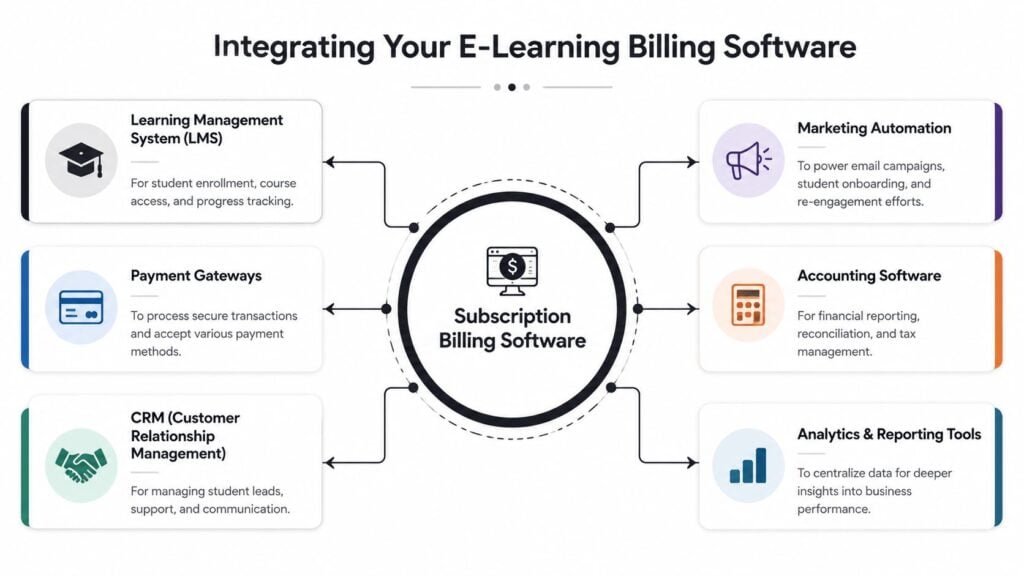
Native connection beats patchwork
There’s a real difference between a native integration and a workaround.
A native connection means the billing tool and the LMS understand each other’s events. A successful payment enrolls the student. A failed renewal triggers a grace period. A downgrade removes one layer of access but keeps the rest intact. That’s clean.
A workaround usually means Zapier, custom scripts, or manual exports. Those can be useful, but they create failure points. A tag doesn’t fire. A webhook fails. A student pays, but the course access doesn’t update. Support gets dragged in.
What to check before you commit
Ask blunt questions during demos or trials:
- LMS fit: Does it connect with LearnDash, Kajabi, Teachable, Thinkific, or whatever system delivers your content?
- Community sync: Can it add and remove members from Circle, Slack, Discord, or your private portal automatically?
- Email workflows: Will ConvertKit, ActiveCampaign, or your CRM know when someone starts a trial, upgrades, or churns?
- Accounting handoff: Can invoices, taxes, and payment records flow cleanly into your bookkeeping setup?
A subscription billing product is expected to monitor package performance, adjust billing when plans change, and maintain a detailed audit trail, as outlined in G2’s subscription billing category requirements. For creators, that translates into fewer “why was I charged this?” emails and far less guesswork when you need to trace what happened inside an account.
The accounting side gets real fast
Many creators ignore the accounting side until tax season punches them in the face.
When your offers expand, you need a reliable handoff from billing into bookkeeping. If you’re sorting through options, this overview of an online tax and accounting platform is useful for thinking through what should happen after payment is collected. The billing tool doesn’t need to replace accounting software, but the two should cooperate without drama.
For a broader creator setup, this guide to a tech stack for a 10 dollar membership site is also worth reviewing. Low-priced memberships have almost no room for operational waste, so tool compatibility matters even more.
The best billing system is often the one that removes the most invisible admin, not the one with the longest feature list.
If the tool can’t fit your stack, it’s not really automating the business. It’s just adding another dashboard.
Your Implementation Checklist For A Smooth Launch
Switching billing systems feels risky because it touches money, access, and customer trust all at once.
That fear is justified. A sloppy migration can lock paying students out or trigger duplicate charges. But a careful launch is very manageable when you treat it like an operations project instead of a weekend side task.

Start with a clean map
Before you move anything, document what exists now.
Write down every active plan, legacy offer, coupon, trial, installment setup, and manual exception. If you skip this, old edge cases will surprise you mid-migration. Creator businesses often carry weird artifacts from past launches, like grandfathered pricing, bonus access promises, and one-off partner deals.
Your first checklist should look like this:
- Define current billing models and decide which ones will stay, merge, or retire.
- Map subscriber data so you know which records need to move, update, or be archived.
- List access rules tied to each offer, including community and bonus materials.
- Document payment gateways and how customers were originally charged.
Test the full journey, not just checkout
A lot of people test one happy-path purchase and call it done.
That’s not enough. You need to test the messy stuff. Trial start, trial conversion, upgrade mid-cycle, failed payment, card update, cancellation, reactivation, and installment completion. Billing gets stressful at the edges, not the center.
Launch rule: If you haven’t tested failure states, you haven’t really tested the billing system.
If you’re looking for a practical model, guides built for commerce migrations can be surprisingly useful. This walkthrough on Shopify subscription store setup has a helpful mindset for thinking through recurring purchase flows, even if you’re selling courses instead of physical products.
Protect existing members
Current subscribers should feel as little disruption as possible.
If your migration forces everyone to re-enter payment details at once, expect confusion and churn. The cleaner move is to preserve billing continuity where your tools allow it and communicate clearly when action is required.
Use plain language in your member emails:
- Tell them what’s changing
- Explain what won’t change
- Say whether they need to do anything
- Give a deadline if action is required
- Provide one support contact path
That one email alone can prevent a flood of anxiety-driven replies.
Build your go-live sequence
Once your setup is configured and tested, run the launch in an ordered sequence.
A simple rollout plan works well:
- Freeze plan edits for a short window so data doesn’t change during migration
- Move records deliberately rather than trying to clean data on the fly
- Verify integrations with your LMS, CRM, and email platform before opening sales
- Monitor support inboxes closely for early signs of broken access or confusing invoices
- Review transactions daily during the first stretch after launch
For smaller education teams, this LMS implementation checklist for small teams complements the billing side nicely because access delivery and billing migration usually fail together, not separately.
The calmest launches I’ve seen all have one thing in common. Someone owns the checklist. Not the idea of the checklist. The actual list.
Conclusion Your Billing System Is A Growth Engine
Subscription billing software looks like an operational expense until you’ve lived with the alternative.
Then you see it for what it is. A good billing system protects margin, reduces support drag, keeps access aligned with payment status, and gives you room to test new offers without rebuilding your business every time. For course creators and membership owners, that’s a serious advantage.
The biggest lesson is simple. Billing choices are product choices. The model you pick affects your unit economics. The tool you pick affects your student experience. The setup you build affects how much time you get back to teach, market, and improve the offer.
If your current setup depends on spreadsheets, manual fixes, and crossed fingers, it’s probably already costing more than you think.
Treat billing like infrastructure. When it works, your business feels lighter, your offers become easier to manage, and growth stops creating chaos.